AUX Peugeot 208 2015 Owner's Manual - RHD (UK, Australia)
[x] Cancel search | Manufacturer: PEUGEOT, Model Year: 2015, Model line: 208, Model: Peugeot 208 2015Pages: 341, PDF Size: 38.75 MB
Page 7 of 341
5
208_en_Chap01_vue-ensemble_ed01-2015
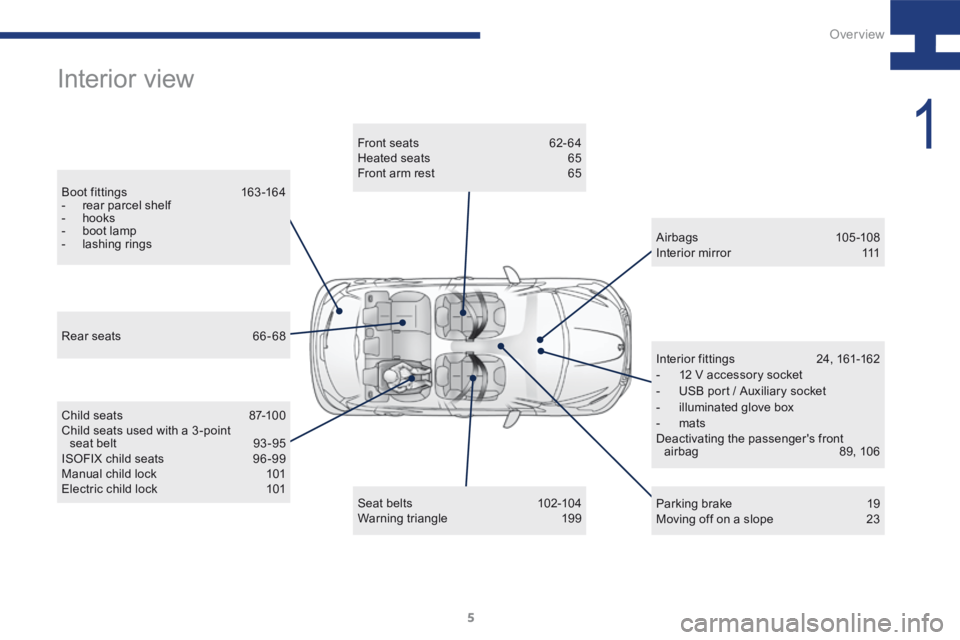
Interior view
Boot f ittings 163 -16 4
- rear parcel shelf
- hooks
- boot lamp
- lashing rings Front seats
62-64
Heated seats 65
Front arm rest 65
Child seats 87-100
Child seats used with a 3 -point seat belt 93 -95
ISOFIX child seats 96 -99
Manual child lock 101
Electric child lock 101 Airbags
105 -108
Interior mirror 111
Parking brake 19
Moving off on a slope 23
Interior fittings
24, 161-162
- 12 V accessory socket
- USB port / Auxiliary socket
- illuminated glove box
- mats
Deactivating the passenger's front airbag 89, 106
Seat belts 102-104
Warning triangle 199
Rear seats
66-68
1
Over view
Page 11 of 341
9
208_en_Chap01_vue-ensemble_ed01-2015
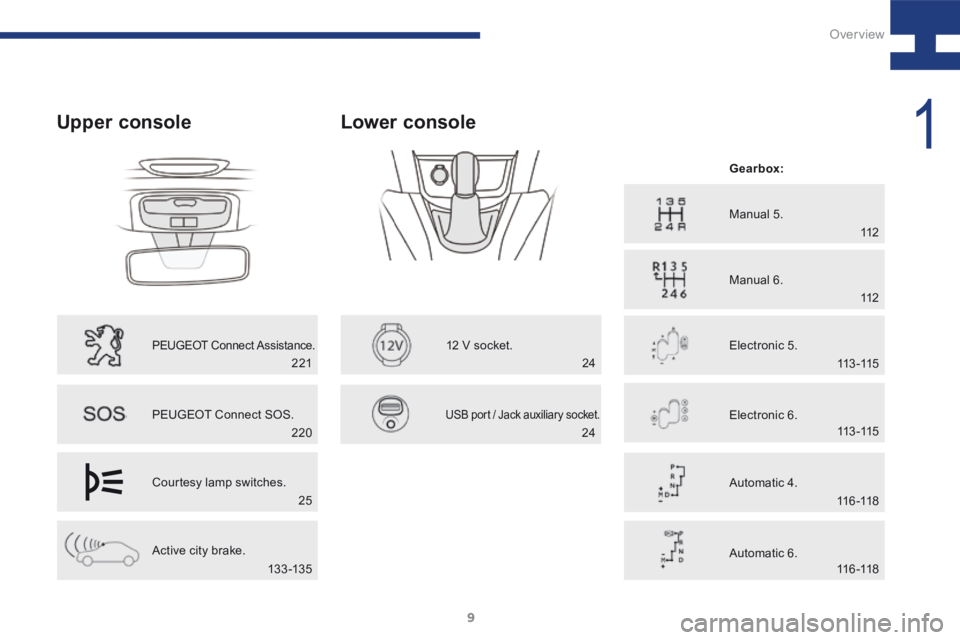
Upper console
PEUGEOT Connect Assistance.
PEUGEOT Connect SOS.
Courtesy lamp switches.
Active city brake.
Lower console
12 V socket.
USB port / Jack auxiliary socket.
Manual 5.
Manual 6.
Electronic 5. Gearbox:
Electronic 6.
Automatic 4.
Automatic 6.
220 112
112
113 -115
113 -115
11 6 -118
11 6 -118
24
25
13 3 -13 5 221
24
1
Over view
Page 26 of 341
24
208_en_Chap02_ Acces-Demarrage_ed01-2015
Ports and sockets - Connectivity
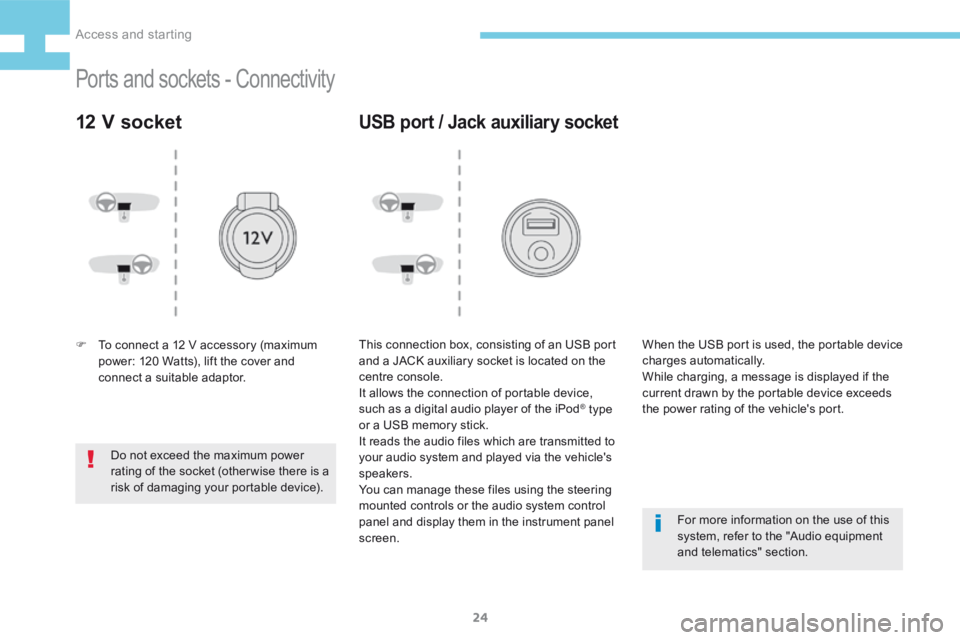
12 V socket
F To connect a 12 V accessory (maximum
power: 120 Watts), lift the cover and
connect a suitable adaptor.
Do not exceed the maximum power
rating of the socket (otherwise there is a
risk of damaging your portable device).
USB port / Jack auxiliary socket
This connection box, consisting of an USB port
and a JACK auxiliary socket is located on the
centre console.
It allows the connection of portable device,
such as a digital audio player of the iPod
® type
or a USB memory stick.
It reads the audio files which are transmitted to
your audio system and played via the vehicle's
speakers.
You can manage these files using the steering
mounted controls or the audio system control
panel and display them in the instrument panel
screen. For more information on the use of this
system, refer to the "Audio equipment
and telematics" section.
When the USB port is used, the portable device
charges automatically.
While charging, a message is displayed if the
current drawn by the portable device exceeds
the power rating of the vehicle's port.
Access and starting
Page 227 of 341
225
208_en_Chap9b_SMEGplus_ed01-2015
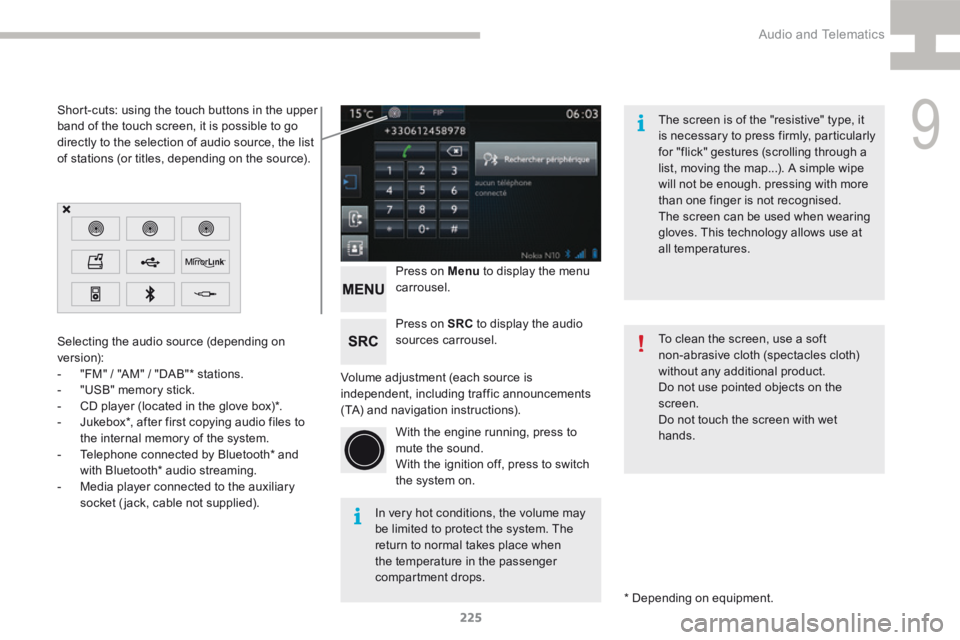
Volume adjustment (each source is
independent, including traffic announcements
(TA) and navigation instructions).Press on Menu
to display the menu
carrousel.
Press on SRC to display the audio
sources carrousel.
With the engine running, press to
mute the sound.
With the ignition off, press to switch
the system on.
Selecting the audio source (depending on
version):
-
"FM" / "AM" / "DAB"* stations.
- "USB" memory stick.
- CD player (located in the glove box)*.
- Jukebox*, after first copying audio files to
the internal memory of the system.
- Telephone connected by Bluetooth* and
with Bluetooth* audio streaming.
- Media player connected to the auxiliary
socket (jack, cable not supplied).
* Depending on equipment.
Short-cuts: using the touch buttons in the upper
band of the touch screen, it is possible to go
directly to the selection of audio source, the list
of stations (or titles, depending on the source).
The screen is of the "resistive" type, it
is necessary to press firmly, particularly
for "flick" gestures (scrolling through a
list, moving the map...). A simple wipe
will not be enough. pressing with more
than one finger is not recognised.
The screen can be used when wearing
gloves. This technology allows use at
all temperatures.
In very hot conditions, the volume may
be limited to protect the system. The
return to normal takes place when
the temperature in the passenger
compartment drops. To clean the screen, use a soft
non-abrasive cloth (spectacles cloth)
without any additional product.
Do not use pointed objects on the
screen.
Do not touch the screen with wet
hands.
9
Audio and Telematics
Page 245 of 341
243
208_en_Chap9b_SMEGplus_ed01-2015
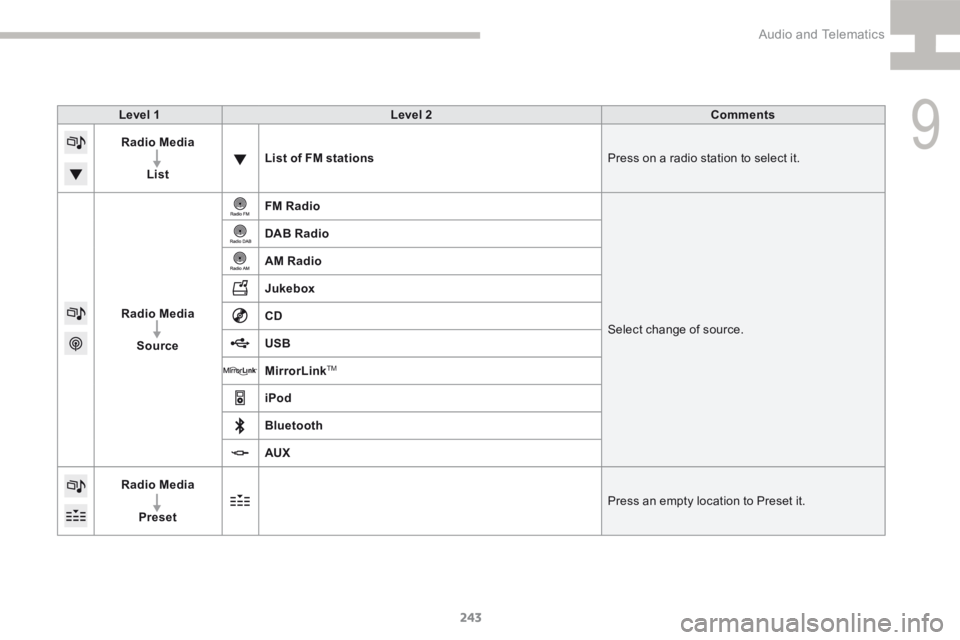
Level 1Level 2 Comments
Radio Media
List List of FM stations
Press on a radio station to select it.
Radio Media Source FM Radio
Select change of source.
DAB Radio
AM Radio
Jukebox
CD
USB
MirrorLink
TM
iPod
Bluetooth
AUX
Radio Media
Preset Press an empty location to Preset it.
9
Audio and Telematics
Page 249 of 341
247
208_en_Chap9b_SMEGplus_ed01-2015
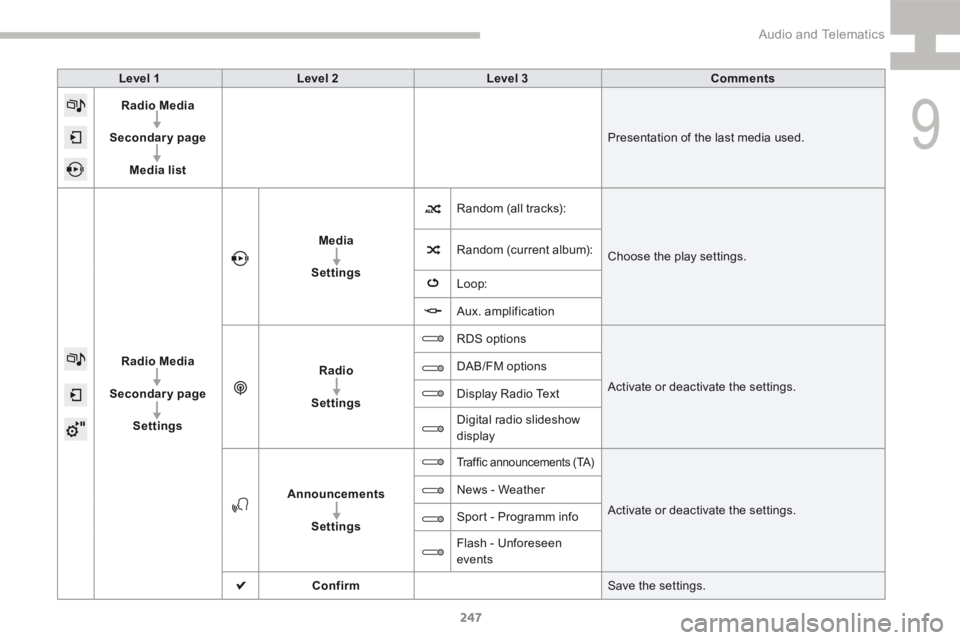
Level 1Level 2 Level 3 Comments
Radio Media
Secondary page Media list Presentation of the last media used.
Radio Media
Secondary page Settings Media
Settings Random (all tracks):
Choose the play settings.
Random (current album):
Loop:
Aux. amplification
Radio
Settings RDS options
Activate or deactivate the settings.
DAB/FM options
Display Radio Text
Digital radio slideshow
display
Announcements Settings
Traffic announcements (TA)
Activate or deactivate the settings.
News - Weather
Sport - Programm info
Flash - Unforeseen
events
Confirm Save the settings.
9
Audio and Telematics
Page 254 of 341
252
208_en_Chap9b_SMEGplus_ed01-2015
Media
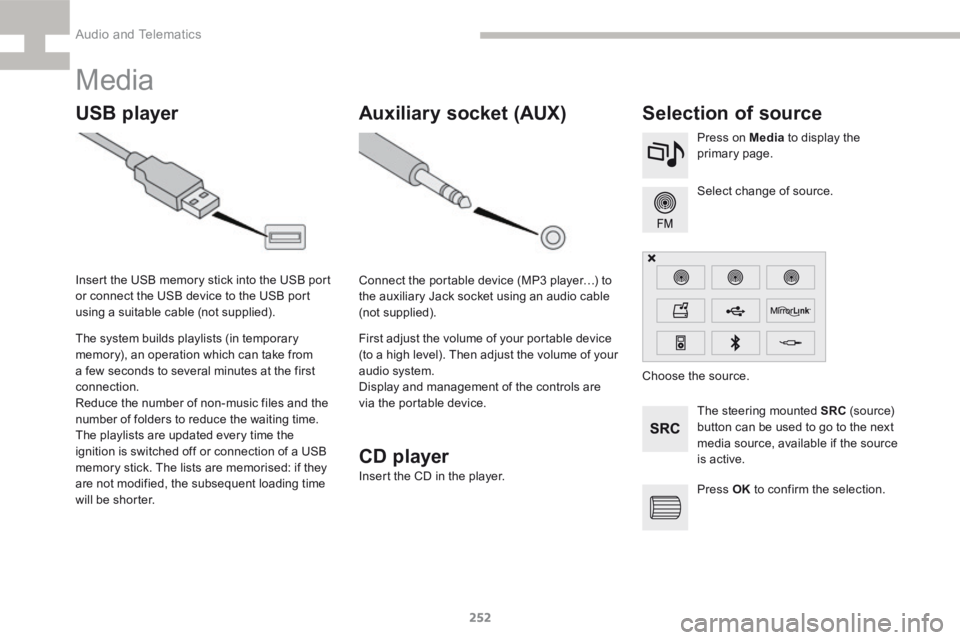
USB playerSelection of source
The steering mounted SRC (s o u r c e)
button can be used to go to the next
media source, available if the source
is active. Select change of source. Press on Media to display the
primary page.
The system builds playlists (in temporary
memory), an operation which can take from
a few seconds to several minutes at the first
connection.
Reduce the number of non-music files and the
number of folders to reduce the waiting time.
The playlists are updated every time the
ignition is switched off or connection of a USB
memory stick. The lists are memorised: if they
are not modified, the subsequent loading time
will be shorter.
Insert the USB memory stick into the USB port
or connect the USB device to the USB port
using a suitable cable (not supplied).
Auxiliary socket (AUX)
Connect the portable device (MP3 player…) to
the auxiliary Jack socket using an audio cable
(not supplied).
First adjust the volume of your portable device
(to a high level). Then adjust the volume of your
audio system.
Display and management of the controls are
via the portable device.
Choose the source.
CD player
Insert the CD in the player.
Press OK to confirm the selection.
Audio and Telematics
Page 255 of 341
253
208_en_Chap9b_SMEGplus_ed01-2015
The audio equipment will only play audio files
with ".wma, .aac, .flac, .ogg and .mp3" file
extensions and with a bit rate of between
32 Kbps and 320 Kbps.
It also supports VBR (Variable Bit Rate) mode.
No other type of file (.mp4, ...) can be played.
"wma" files must be of the standard
wma 9 type.
The sampling rates supported are 11, 22, 44
and 48 KHz.
It is advisable to restrict file names to
20 characters, without using of special
characters (e.g.: " " ? ; ù) to avoid any playing
and displaying problems.
Information and advice
Use only USB memory sticks formatted FAT32
(file allocation table).
The system supports USB mass
storage devices, BlackBerry
® devices
or Apple® players via USB ports. The
adaptor cable not supplied.
Control of the peripheral device is with
the audio system controls.
Other peripherals, not recognised on
connection, must be connected to the
auxiliary socket using a Jack cable (not
supplied). It is recommended that the USB cable
for the portable device is used. The system does not support the
simultaneous connection of two
identical devices (two memory sticks,
two Apple
® players) but it is possible
to connect one memory stick and one
Apple
® player at the same time.
In order to be able to play a recorded CDR or
CDRW, when recording it is preferable to select
the ISO 9660 level 1, 2 or Joliet standard.
If the disc is recorded in another format it may
not be played correctly.
It is recommended that the same recording
standard is always used for an individual disc,
with as low a speed as possible (4x maximum)
for optimum sound quality.
In the particular case of a multi-session CD, the
Joliet standard is recommended.
9
Audio and Telematics
Page 257 of 341
255
208_en_Chap9b_SMEGplus_ed01-2015
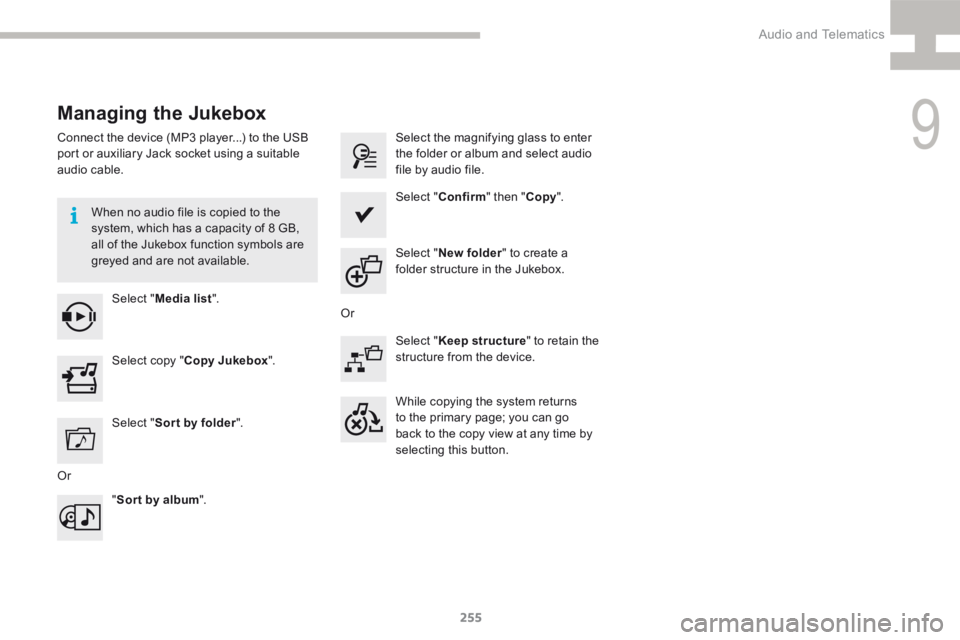
Managing the Jukebox
Connect the device (MP3 player...) to the USB
port or auxiliary Jack socket using a suitable
audio cable.When no audio file is copied to the
system, which has a capacity of 8 GB,
all of the Jukebox function symbols are
greyed and are not available.Select " Media list ". Select the magnifying glass to enter
the folder or album and select audio
file by audio file.
Select copy " Copy Jukebox ". Select "
Confirm " then "Copy".
Select " Sor t by folder ". Select "
New folder " to create a
folder structure in the Jukebox.
" Sor t by album ". Select "
Keep structure " to retain the
structure from the device.
While copying the system returns
to the primary page; you can go
back to the copy view at any time by
selecting this button.
Or Or
9
Audio and Telematics
Page 290 of 341
288
208_en_Chap9c_RDE2_ed01-2015
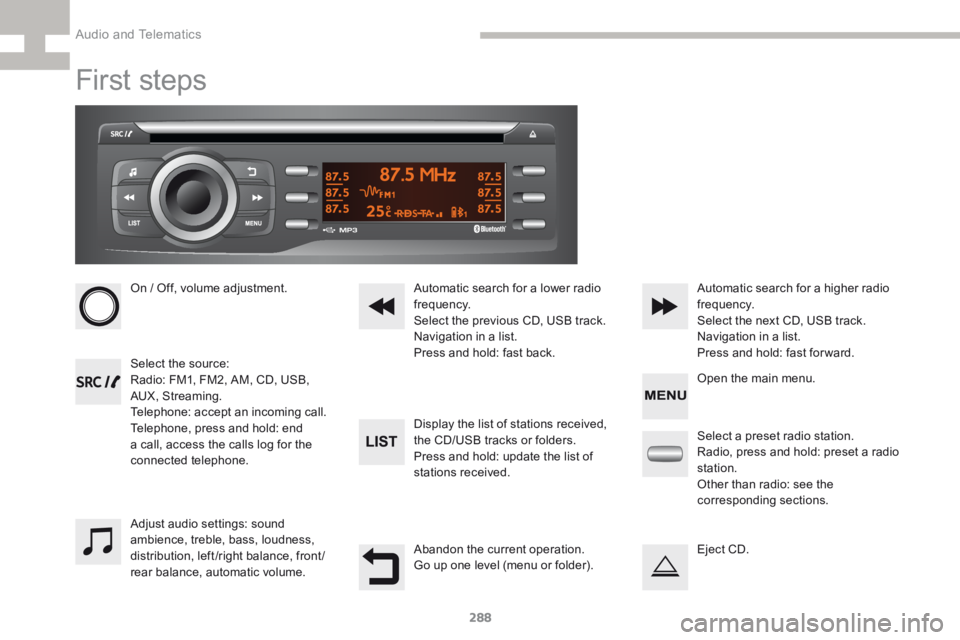
First steps
On / Off, volume adjustment.
Select the source:
Radio: FM1, FM2, AM, CD, USB,
AUX, Streaming.
Telephone: accept an incoming call.
Telephone, press and hold: end
a call, access the calls log for the
connected telephone.Display the list of stations received,
the CD/USB tracks or folders.
Press and hold: update the list of
stations received. Automatic search for a lower radio
frequency.
Select the previous CD, USB track.
Navigation in a list.
Press and hold: fast back.Automatic search for a higher radio
frequency.
Select the next CD, USB track.
Navigation in a list.
Press and hold: fast for ward.
Adjust audio settings: sound
ambience, treble, bass, loudness,
distribution, left/right balance, front/
rear balance, automatic volume. Abandon the current operation.
Go up one level (menu or folder).Select a preset radio station.
Radio, press and hold: preset a radio
station.
Other than radio: see the
corresponding sections.
Eject CD. Open the main menu.
Audio and Telematics