clutch Peugeot 208 2015 Owner's Manual - RHD (UK, Australia)
[x] Cancel search | Manufacturer: PEUGEOT, Model Year: 2015, Model line: 208, Model: Peugeot 208 2015Pages: 341, PDF Size: 38.75 MB
Page 16 of 341
14
208_en_Chap02_ Acces-Demarrage_ed01-2015
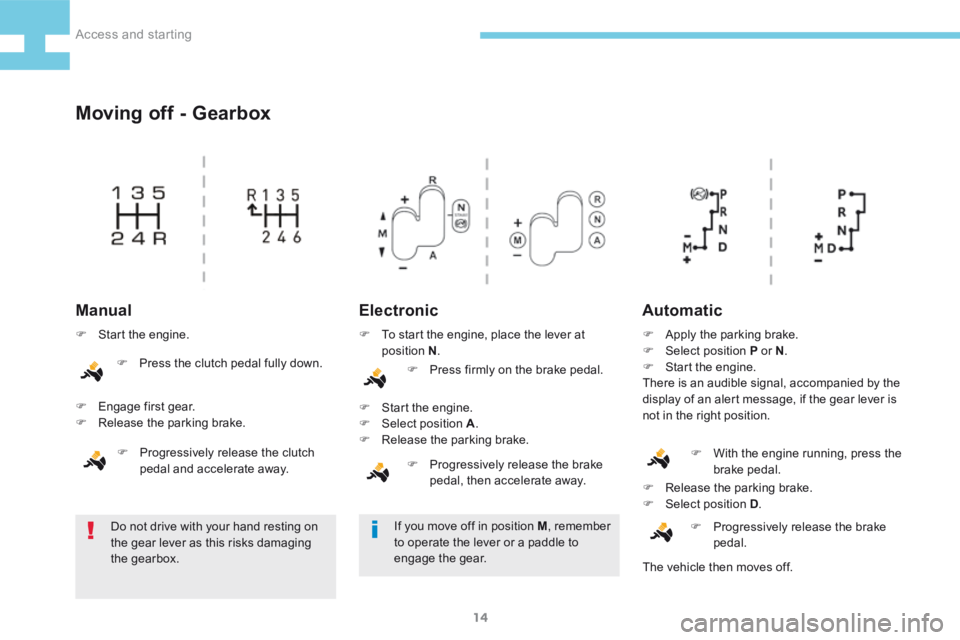
Moving off - Gearbox
ElectronicAutomatic
Do not drive with your hand resting on
the gear lever as this risks damaging
the gearbox. F
Release the parking brake.
F Select position D .
F Progressively release the brake
pedal.
Manual
F Start the engine.
F Engage first gear.
F Release the parking brake.
F Progressively release the clutch
pedal and accelerate away. F
To start the engine, place the lever at
position N .
F Press firmly on the brake pedal.
F Start the engine.
F Select position A .
F Release the parking brake.
F Progressively release the brake
pedal, then accelerate away. F
Apply the parking brake.
F Select position P or N .
F Start the engine.
There is an audible signal, accompanied by the
display of an alert message, if the gear lever is
not in the right position.
If you move off in position M , remember
to operate the lever or a paddle to
engage the gear. F
With the engine running, press the
brake pedal.
The vehicle then moves off.
F
Press the clutch pedal fully down.
Access and starting
Page 17 of 341
15
208_en_Chap02_ Acces-Demarrage_ed01-2015
Switching off
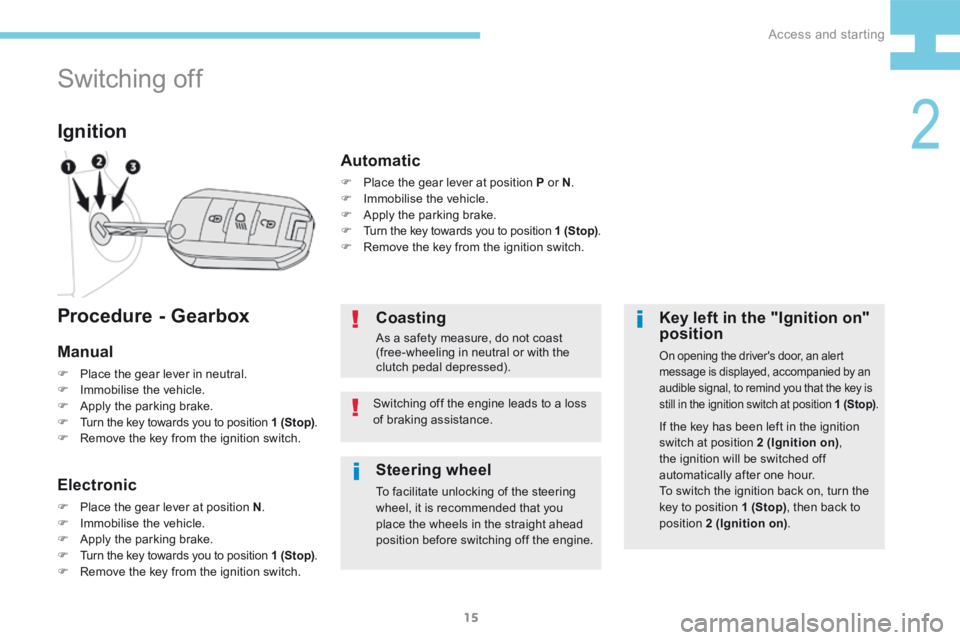
Ignition
Key left in the "Ignition on"
position
On opening the driver's door, an alert
message is displayed, accompanied by an
audible signal, to remind you that the key is
still in the ignition switch at position 1 (Stop).
If the key has been left in the ignition
switch at position 2 (Ignition on),
the ignition will be switched off
automatically after one hour.
To switch the ignition back on, turn the
key to position 1 (Stop) , then back to
position 2 (Ignition on) .
Coasting
As a safety measure, do not coast
(free-wheeling in neutral or with the
clutch pedal depressed).
Switching off the engine leads to a loss
of braking assistance.
Procedure - Gearbox
Manual
F Place the gear lever in neutral.
F Immobilise the vehicle.
F Apply the parking brake.
F Turn the key towards you to position 1 (Stop) .
F Remove the key from the ignition switch.
Electronic
F Place the gear lever at position N .
F Immobilise the vehicle.
F Apply the parking brake.
F Turn the key towards you to position 1 (Stop) .
F Remove the key from the ignition switch.
Automatic
F Place the gear lever at position P or N .
F Immobilise the vehicle.
F Apply the parking brake.
F Turn the key towards you to position 1 (Stop) .
F Remove the key from the ignition switch.
Steering wheel
To facilitate unlocking of the steering
wheel, it is recommended that you
place the wheels in the straight ahead
position before switching off the engine.
2
Access and starting
Page 22 of 341
20
208_en_Chap02_ Acces-Demarrage_ed01-2015
Stop & Start
Principle
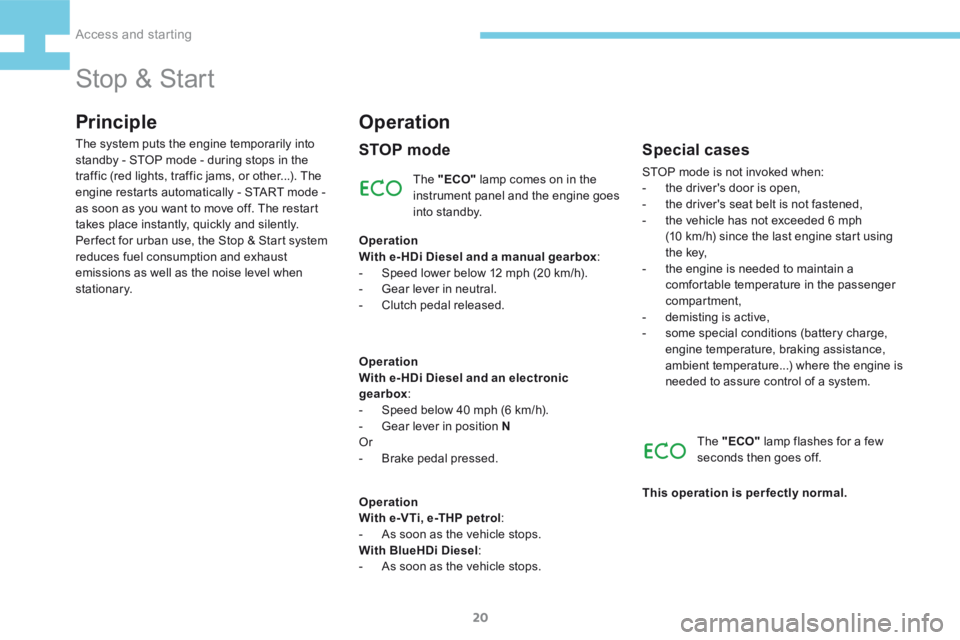
The "ECO" lamp comes on in the
instrument panel and the engine goes
into standby.
The system puts the engine temporarily into
standby - STOP mode - during stops in the
traffic (red lights, traffic jams, or other...). The
engine restarts automatically - START mode -
as soon as you want to move off. The restart
takes place instantly, quickly and silently.
Per fect for urban use, the Stop & Start system
reduces fuel consumption and exhaust
emissions as well as the noise level when
stationary.
Operation
STOP mode
Operation
With e- HDi Diesel and a manual gearbox
:
- Speed lower below 12 mph (20 km/h).
- Gear lever in neutral.
- Clutch pedal released.
Operation
With e- HDi Diesel and an electronic
gearbox :
- Speed below 40 mph (6 km/h).
- Gear lever in position N
Or
- Brake pedal pressed.
Operation
With e-VTi, e-THP petrol :
- As soon as the vehicle stops.
With BlueHDi Diesel :
- As soon as the vehicle stops.
Special cases
STOP mode is not invoked when:
- the driver's door is open,
- the driver's seat belt is not fastened,
- the vehicle has not exceeded 6 mph
(10 km/h) since the last engine start using
t h e key,
- the engine is needed to maintain a
comfortable temperature in the passenger
compartment,
- demisting is active,
- some special conditions (battery charge,
engine temperature, braking assistance,
ambient temperature...) where the engine is
needed to assure control of a system.
The "ECO" lamp flashes for a few
seconds then goes off.
This operation is perfectly normal.
Access and starting
Page 23 of 341

21
208_en_Chap02_ Acces-Demarrage_ed01-2015
For your comfort, during parking
manoeuvres, STOP mode is not
available for a few seconds after
coming out of reverse gear.
STOP mode does not affect the
functionality of the vehicle, such as for
example, braking, power steering...
Never refuel with the engine in STOP
mode; you must switch off the ignition
with the key.A time counter calculates the
sum of the periods in STOP
mode during a journey. It rests
itself to zero every time the
ignition is switched on with the
key.
Advice
Special casesAs a safety measure and for your comfort,
START mode is invoked automatically when:
-
you open the driver's door,
- you unfasten the driver's seat belt,
- some special conditions (battery charge,
engine temperature, braking assistance,
ambient temperature...) where the engine is
needed for control of a system.
The "ECO" warning lamp flashes for
a few seconds, then goes off.
This operation is perfectly normal.
S TA R T m o d e
Operation
With a manual gearbox :
- Clutch pedal depressed.
Operation
With an electronic gearbox :
- Gear lever in position A .
- Brake pedal released.
or
- Gear lever in position N .
- Brake pedal released.
- Then gear lever in position A .
or
- Reverse gear engaged. The "ECO"
lamp goes off and the
engine restarts.
2
Access and starting
Page 40 of 341
38
208_en_Chap03_Indicateurs_ed01-2015
Warning / indicator lampStateCause Action / Observations
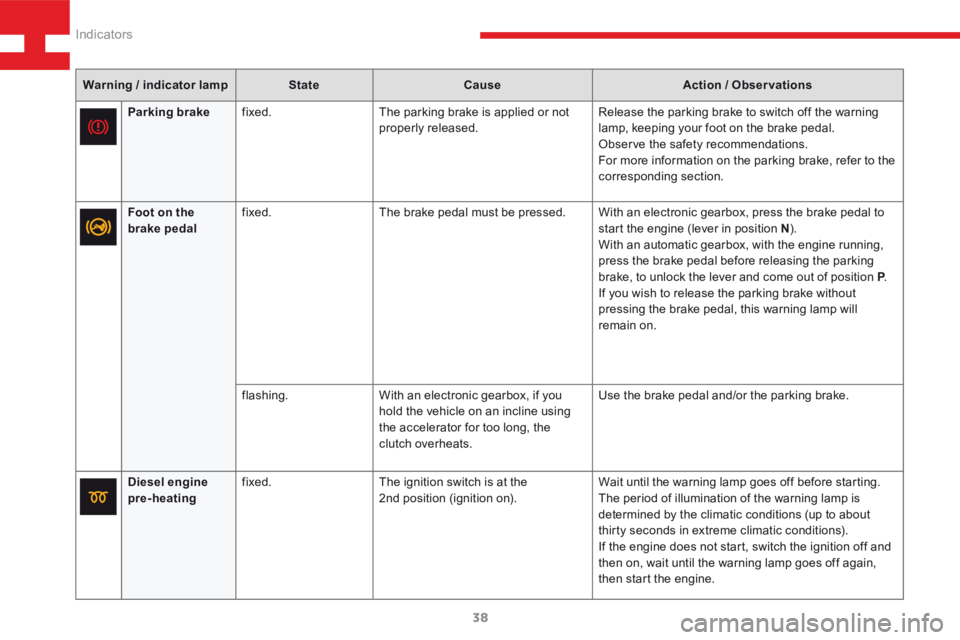
Diesel engine
pre-heating fixed.
The ignition switch is at the
2nd position (ignition on). Wait until the warning lamp goes off before starting.
The period of illumination of the warning lamp is
determined by the climatic conditions (up to about
thirty seconds in extreme climatic conditions).
If the engine does not start, switch the ignition off and
then on, wait until the warning lamp goes off again,
then start the engine.
Parking brake
fixed. The parking brake is applied or not
properly released. Release the parking brake to switch off the warning
lamp, keeping your foot on the brake pedal.
Observe the safety recommendations.
For more information on the parking brake, refer to the
corresponding section.
Foot on the
brake pedal fixed.
The brake pedal must be pressed. With an electronic gearbox, press the brake pedal to
start the engine (lever in position N).
With an automatic gearbox, with the engine running,
press the brake pedal before releasing the parking
brake, to unlock the lever and come out of position P .
If you wish to release the parking brake without
pressing the brake pedal, this warning lamp will
remain on.
flashing. With an electronic gearbox, if you
hold the vehicle on an incline using
the accelerator for too long, the
clutch overheats. Use the brake pedal and/or the parking brake.
Indicators
Page 41 of 341
39
208_en_Chap03_Indicateurs_ed01-2015
Warning / indicator lampStateCause Action / Observations
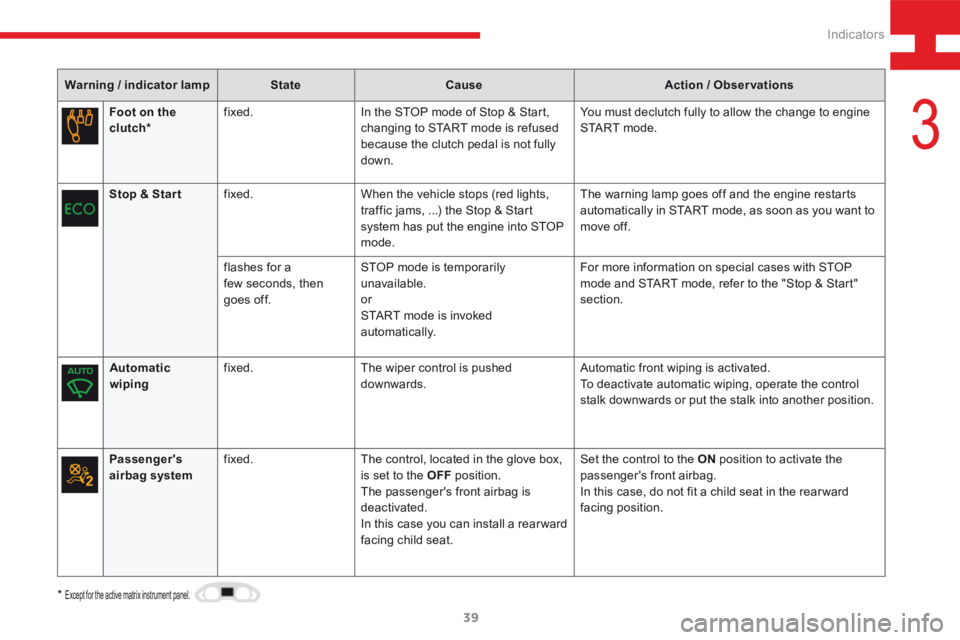
Foot on the
clutch* fixed.
In the STOP mode of Stop & Start,
changing to START mode is refused
because the clutch pedal is not fully
down. You must declutch fully to allow the change to engine
S TA R T m o d e .
Stop & Star t fixed. When the vehicle stops (red lights,
traffic jams, ...) the Stop & Start
system has put the engine into STOP
mode. The warning lamp goes off and the engine restarts
automatically in START mode, as soon as you want to
move off.
flashes for a
few seconds, then
goes off. STOP mode is temporarily
unavailable.
or
START mode is invoked
automatically. For more information on special cases with STOP
mode and START mode, refer to the "Stop & Start"
section.
Automatic
wiping fixed.
The wiper control is pushed
downwards. Automatic front wiping is activated.
To deactivate automatic wiping, operate the control
stalk downwards or put the stalk into another position.
*
Except for the active matrix instrument panel.
Passenger's
airbag system fixed.
The control, located in the glove box,
is set to the OFF position.
The passenger's front airbag is
deactivated.
In this case you can install a rear ward
facing child seat. Set the control to the ON
position to activate the
passenger's front airbag.
In this case, do not fit a child seat in the rear ward
facing position.
3
Indicators
Page 114 of 341
112
208_en_Chap05_conduite_ed01-2015
Only engage reverse gear when the vehicle
is stationary and the engine is at idle.
As a safety precaution and to facilitate
starting of the engine:
- always select neutral,
- press the clutch pedal.
Manual 6
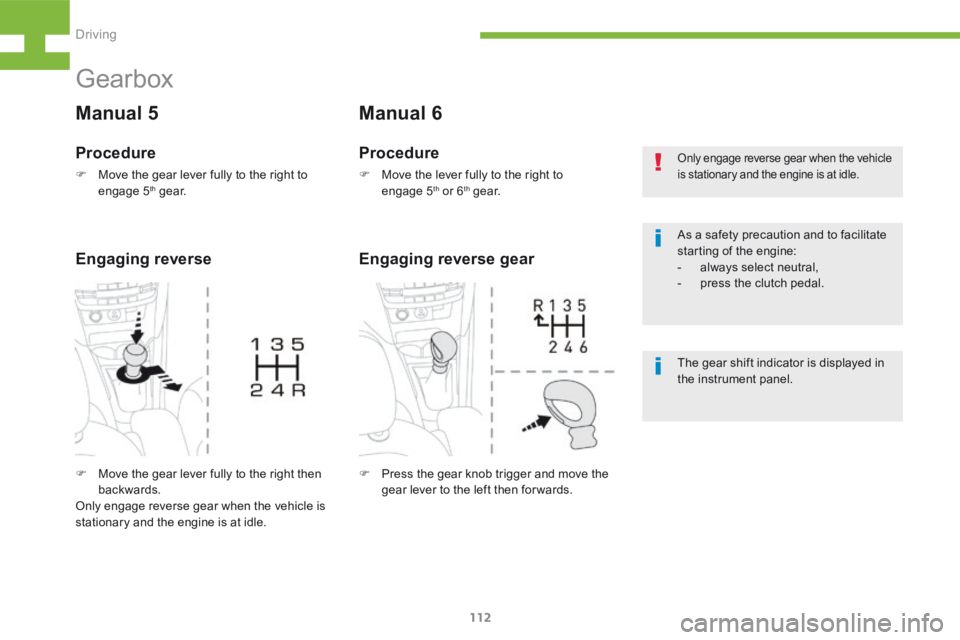
F Press the gear knob trigger and move the
gear lever to the left then for wards.
Engaging reverse gear
Gearbox
Manual 5
Procedure
F Move the lever fully to the right to
engage 5th or 6th g e a r.
Procedure
F Move the gear lever fully to the right to
engage 5th g e a r.
The gear shift indicator is displayed in
the instrument panel.
Engaging reverse
F Move the gear lever fully to the right then
backwards.
Only engage reverse gear when the vehicle is
stationary and the engine is at idle.
Driving
Page 124 of 341
122
208_en_Chap05_conduite_ed01-2015
Park Assist
For entry into a parking space (parallel
parking) the system does not detect
spaces which are clearly much smaller
or larger than the size of the vehicle.
This "parking assistance" system
is activated automatically during
manoeuvres; it is therefore possible
that a symbol comes on in the screen,
accompanied by an audible signal,
without affecting the manoeuvre.The selection of the type of manoeuvre
(entering or exiting a parallel parking
space) prevents a change to STOP
mode of Stop & Start.
In STOP mode, this selection restarts
the engine.
The Park Assist system cannot in any
circumstances replace the need for
vigilance on the part of the driver.
The driver must remain in control of
their vehicle ensuring that the space
remains clear during the manoeuvre.
In some circumstances, the sensors
may not detect small obstacles located
in their blind spots. During a manoeuvre the steering wheel
turns quickly: do not hold the steering
wheel, do not place your hand between
the spokes of the steering wheel and
take care with loose and bulky clothing,
scarves, handbags... There is a risk of
injury.
The driver can take back control of the steering
at any time.
Changing tyre sizes (out-size tyres,
winter tyres, ...) can inter fere with
the correct operation of the parking
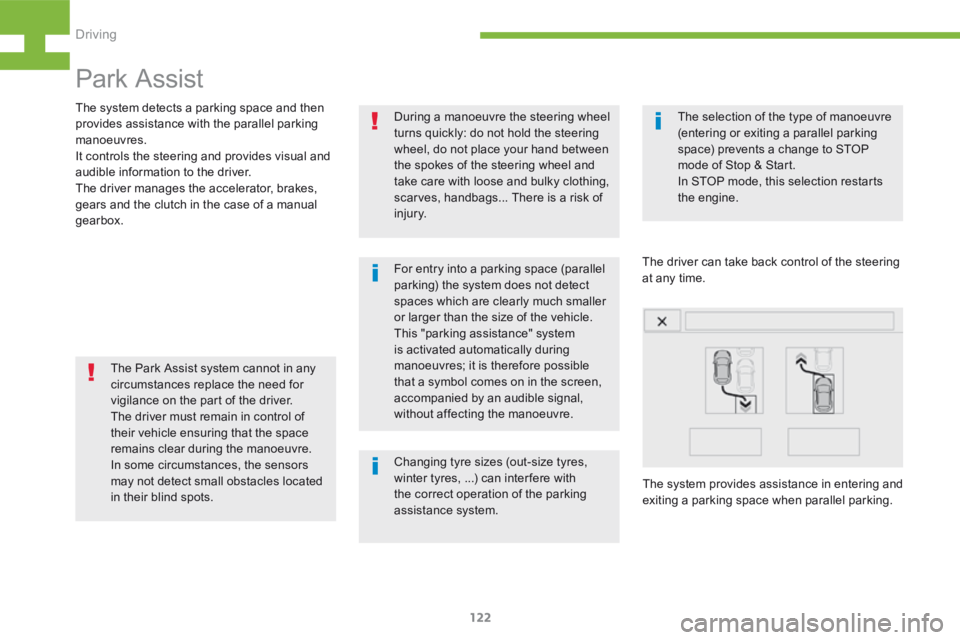
assistance system. The system provides assistance in entering and
exiting a parking space when parallel parking.
The system detects a parking space and then
provides assistance with the parallel parking
manoeuvres.
It controls the steering and provides visual and
audible information to the driver.
The driver manages the accelerator, brakes,
gears and the clutch in the case of a manual
gearbox.
Driving
Page 131 of 341
129
208_en_Chap05_conduite_ed01-2015
Temporarily exceeding the
speed
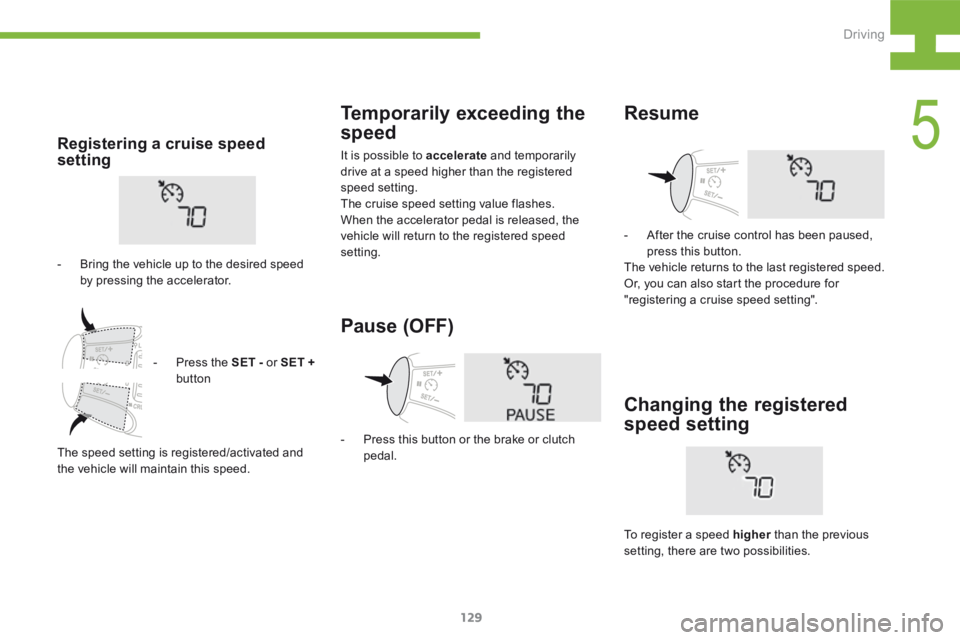
It is possible to accelerate and temporarily
drive at a speed higher than the registered
speed setting.
The cruise speed setting value flashes.
When the accelerator pedal is released, the
vehicle will return to the registered speed
setting.Registering a cruise speed
setting
- Bring the vehicle up to the desired speed
by pressing the accelerator.
Pause (OFF)
- Press this button or the brake or clutch
pedal.
Resume
- After the cruise control has been paused,
press this button.
The vehicle returns to the last registered speed.
Or, you can also start the procedure for
"registering a cruise speed setting".
Changing the registered
speed setting
To register a speed higher than the previous
setting, there are two possibilities.
-
Press the SET - or SET +
button
The speed setting is registered/activated and
the vehicle will maintain this speed.
5
Driving