tow PEUGEOT 3008 2013 Owners Manual
[x] Cancel search | Manufacturer: PEUGEOT, Model Year: 2013, Model line: 3008, Model: PEUGEOT 3008 2013Pages: 352, PDF Size: 15.64 MB
Page 5 of 352
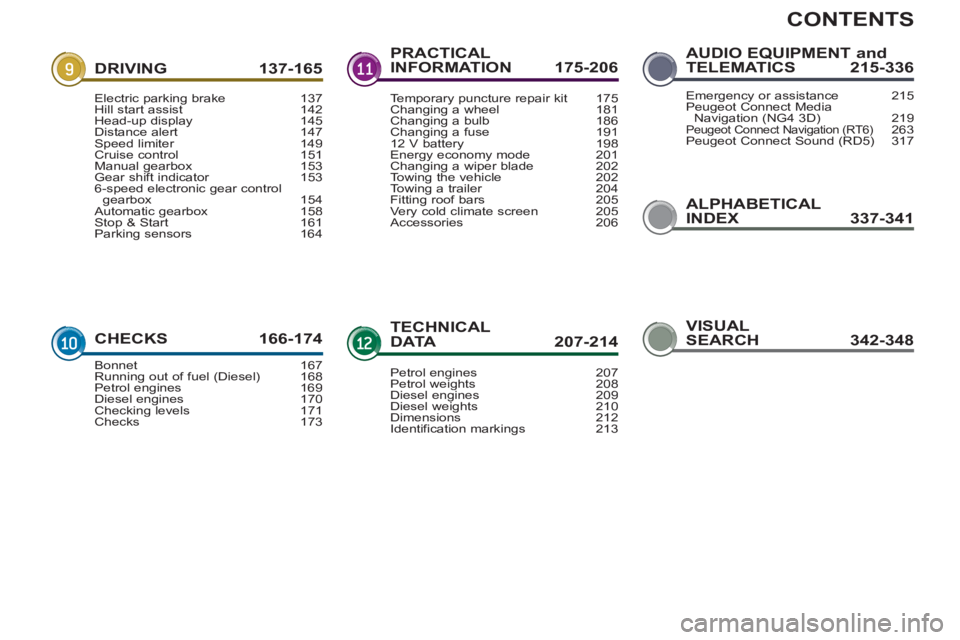
CONTENTS
ALPHABETICAL
INDEX 337-341
DRIVING 137-165
CHECKS 166-17
4
PRACTICAL
INFORMATION 175-206
TECHNICALDATA 207-214
AUDIO EQUIPMENT andTELEMATICS 215-336
Electric parking brake 137Hill start assist 142Head-up display 145Distance alert 147Speed limiter 149Cruise control 151Manual gearbox 153Gear shift indicator 1536-speed electronic gear control gearbox 154Automatic gearbox 158Stop & Start 161Parking sensors 164
Bonnet 167Running out of fuel (Diesel) 168Petrol engines 169Diesel engines 170Checking levels 171Checks 173
Temporary puncture repair kit 175Changing a wheel 181Changing a bulb 186Changing a fuse 19112 V battery 198Energy economy mode 201Changing a wiper blade 202
Towing the vehicle 202Towing a trailer 204Fitting roof bars 205Very cold climate screen 205Accessories 206
Petrol engines 207Petrol weights 208Diesel engines 209Diesel weights 210Dimensions 212
Identification markings 213
Emergency or assistance 215Peugeot Connect Media
Navigation (NG4 3D) 219Peugeot Connect Navigation (RT6)263Peugeot Connect Sound (RD5) 317
VISUAL
SEARCH 342-348
Page 27 of 352
Optimise the use of your gearbox
With a manual gearbox, move off gen-
tly, change up without waiting and
drive by changing up quite soon. If
your vehicle has the system, the gear
shift indicator invites you to change up;
it is displayed in the instrument panel,
follow its instructions.
With an automatic or electronic gear-
box, stay in Drive "D"
or Auto "A"
, ac-
cording to the type of gearbox, without
pressing the accelerator pedal heavily
or suddenly.
Drive smoothly
Maintain a safe distance between ve-
hicles, use engine braking rather than
the brake pedal, and press the accel-
erator progressively. These practices
contribute towards a reduction in fuel
consumption and CO
2 emissions and
also helps reduce the background traf-
fi c noise.
If your vehicle has cruise control, make
use of the system at speeds above
25 mph (40 km/h) when the traffi c is
fl owing well.
Control the use of your electrical equipment
Before moving off, if the passenger
compartment is too warm, ventilate it by
opening the windows and air vents be-
fore using the air conditioning.
Above 30 mph (50 km/h), close the win-
dows and leave the air vents open.
Remember to make use of equipment
that can help keep the temperature in
the passenger compartment down (sun-
roof and window blinds...).
Switch off the air conditioning, unless
it has automatic digital regulation, as
soon as the desired temperature is at-
tained.
Switch off the demisting and defrosting
controls, if not automatic.
Switch off the heated seat as soon as
possible.
Switch off the headlamps and front
foglamps when the level of light does
not require their use.
Avoid running the engine before mov-
ing off, particularly in winter; your ve-
hicle will warm up much faster while
driving.
As a passenger, if you avoid connect-
ing your multimedia devices (fi lm, mu-
sic, video game...), you will contribute
towards limiting the consumption of
electrical energy, and so of fuel.
Disconnect your portable devices be-
fore leaving the vehicle.
ECO-DRIVING
25
Eco-driving is a range of everyday practices that allow the motorist to optimise their fuel consumption and CO2 emis-
sions.
Page 32 of 352
30
IN
S
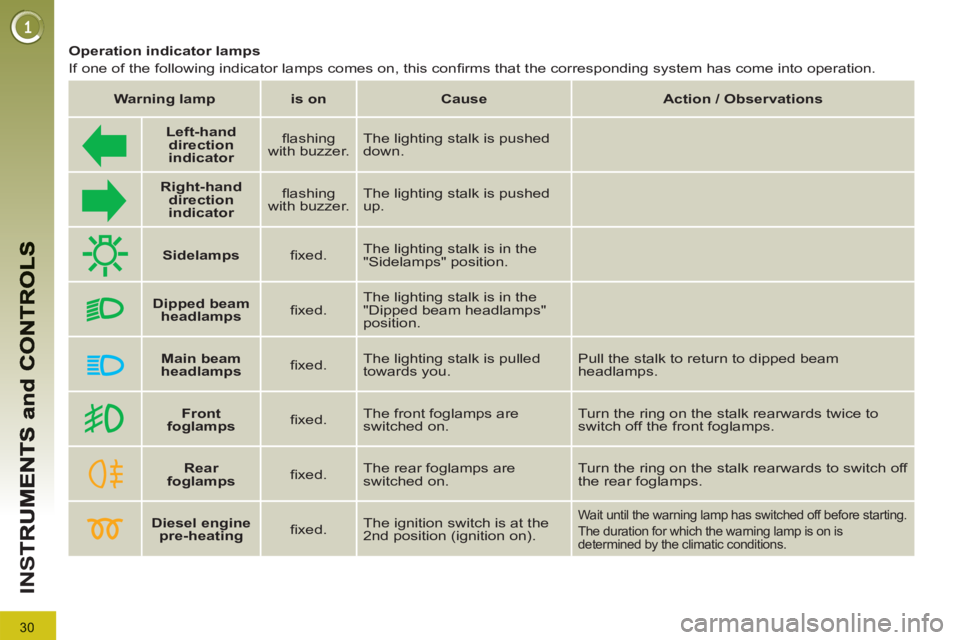
Diesel engine
pre-heating
fi xed. The ignition switch is at the
2nd position (ignition on). Wait until the warning lamp has switched off before starting.
The duration for which the warning lamp is on is
determined by the climatic conditions.
Operation indicator lamps
If one of the following indicator lamps comes on, this confi rms that the corresponding system has come into operation.
Warning lamp
is on
Cause
Action / Observations
Left-hand
direction
indicato
r
fl ashing
with buzzer. The lighting stalk is pushed
down.
Right-hand
direction
indicator
fl ashing
with buzzer. The lighting stalk is pushed
up.
Sidelamps
fi xed. The lighting stalk is in the
"Sidelamps" position.
Dipped beam
headlamps
fi xed. The lighting stalk is in the
"Dipped beam headlamps"
position.
Main beam
headlamps
fi xed. The lighting stalk is pulled
towards you. Pull the stalk to return to dipped beam
headlamps.
Front
foglamps
fi xed. The front foglamps are
switched on. Turn the ring on the stalk rearwards twice to
switch off the front foglamps.
Rear
foglamps
fi xed.
The rear foglamps are
switched on. Turn the ring on the stalk rearwards to switch off
the rear foglamps.
Page 53 of 352
51
M
U
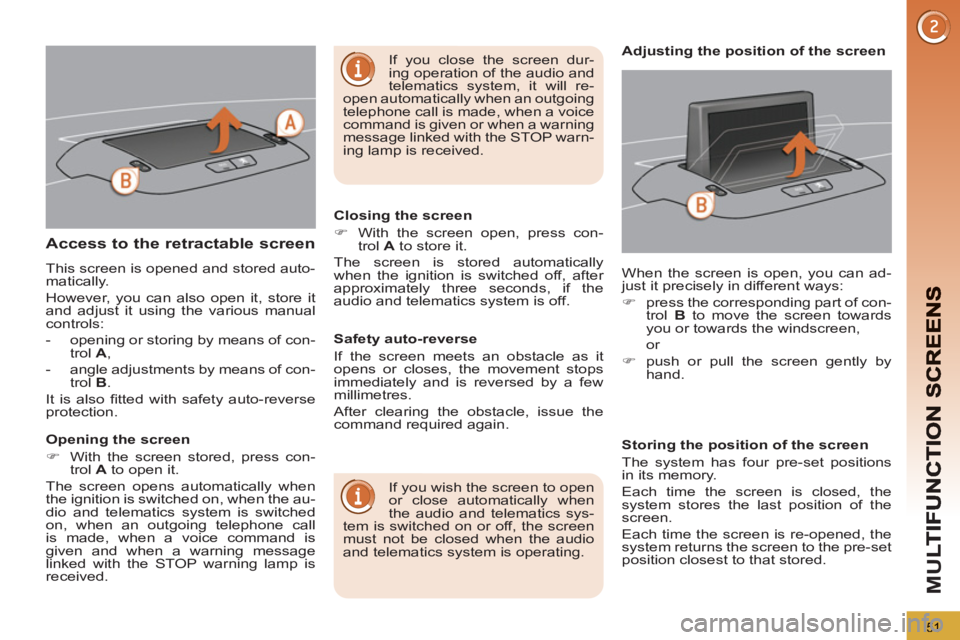
Access to the retractable screen
This screen is opened and stored auto-
matically.
However, you can also open it, store it
and adjust it using the various manual
controls:
- opening or storing by means of con-
trol A
,
- angle adjustments by means of con-
trol B
.
It is also fi tted with safety auto-reverse
protection.
Opening the screen
)
With the screen stored, press con-
trol A
to open it.
The screen opens automatically when
the ignition is switched on, when the au-
dio and telematics system is switched
on, when an outgoing telephone call
is made, when a voice command is
given and when a warning message
linked with the STOP warning lamp is
received.
Closing the screen
)
With the screen open, press con-
trol A
to store it.
The screen is stored automatically
when the ignition is switched off, after
approximately three seconds, if the
audio and telematics system is off.
If you wish the screen to open
or close automatically when
the audio and telematics sys-
tem is switched on or off, the screen
must not be closed when the audio
and telematics system is operating. When the screen is open, you can ad-
just it precisely in different ways:
)
press the corresponding part of con-
trol B
to move the screen towards
you or towards the windscreen,
or
)
push or pull the screen gently by
hand.
Adjusting the position of the screen
Safety auto-reverse
If the screen meets an obstacle as it
opens or closes, the movement stops
immediately and is reversed by a few
millimetres.
After clearing the obstacle, issue the
command required again.
Storing the position of the screen
The system has four pre-set positions
in its memory.
Each time the screen is closed, the
system stores the last position of the
screen.
Each time the screen is re-opened, the
system returns the screen to the pre-set
position closest to that stored.
If you close the screen dur-
ing operation of the audio and
telematics system, it will re-
open automatically when an outgoing
telephone call is made, when a voice
command is given or when a warning
message linked with the STOP warn-
ing lamp is received.
Page 59 of 352
57
CO
Recommendations for ventilation and air conditioning
In order for these systems to be fully effective, follow the operation and mainte-
nance guidelines below:
)
If the interior temperature remains very high after the vehicle has been
parked in the sun for a considerable time, fi rst ventilate the passenger com-
partment for a few minutes.
Place the air fl ow control at a suffi cient level to provide an adequate renewal
of air in the passenger compartment.
)
To obtain an even air distribution, take care not to obstruct the exterior air
intake grilles located at the base of the windscreen, the nozzles, the vents
and the air outlets, as well as the air extractor located in the boot.
)
Use in preference the intake of exterior air as prolonged use of the air recir-
culation may cause misting of the windows and side windows.
)
Do not cover the sunshine sensor, located on the dashboard; this is used for
regulation of the automatic air conditioning system.
)
Operate the air conditioning system for 5 to 10 minutes, once or twice a
month to keep it in good working order.
)
Ensure that the passenger compartment fi lter is in good condition and have
the fi lter elements replaced regularly (refer to the "Checks" section).
We recommend the use of a combined passenger compartment fi lter. Thanks
to its second special active fi lter, it contributes to the purifi cation of the air
breathed by the occupants and the cleanliness of the passenger compart-
ment (reduction of allergic symptoms, bad odours and greasy deposits).
)
The air conditioning uses power from the engine while operating. This re-
sults in an increase in the vehicle's fuel consumption.
When towing at or near maximum capacity or on steep slopes in high ambient
temperatures, switching off the air conditioning saves engine power and so
improves towing capacity.
Condensation created by the air conditioning results in a discharge of water
under the vehicle when stationary, which is perfectly normal.
)
To ensure correct operation of the air conditioning system, you are also ad-
vised to have it checked regularly.
)
If the system does not produce cold air, do not use it and contact a PEUGEOT
dealer or a qualifi ed workshop.
The air conditioning system
does not contain chlorine and
does not present any danger
to the ozone layer.
Page 63 of 352
61
CO
Manual operation
)
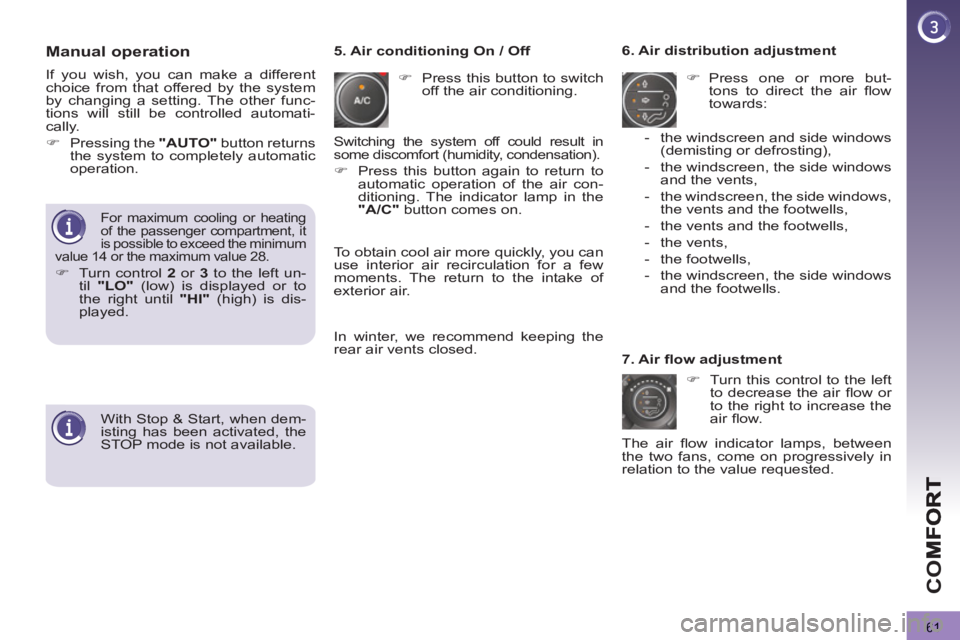
Press this button to switch
off the air conditioning.
6. Air distribution adjustment
)
Press one or more but-
tons to direct the air fl ow
towards:
7. Air fl ow adjustment
)
Turn this control to the left
to decrease the air fl ow or
to the right to increase the
air fl ow.
5. Air conditioning On / Off
- the windscreen and side windows
(demisting or defrosting),
- the windscreen, the side windows
and the vents,
- the windscreen, the side windows,
the vents and the footwells,
- the vents and the footwells,
- the vents,
- the footwells,
- the windscreen, the side windows
and the footwells.
The air fl ow indicator lamps, between
the two fans, come on progressively in
relation to the value requested.
For maximum cooling or heating
of the passenger compartment, it
is possible to exceed the minimum
value 14 or the maximum value 28.
)
Turn control 2
or 3
to the left un-
til "LO"
(low) is displayed or to
the right until "HI"
(high) is dis-
played.
Switching the system off could result in
some discomfort (humidity, condensation).
)
Press this button again to return to
automatic operation of the air con-
ditioning. The indicator lamp in the
"A/C"
button comes on.
With Stop & Start, when dem-
isting has been activated, the
STOP mode is not available.
If you wish, you can make a different
choice from that offered by the system
by changing a setting. The other func-
tions will still be controlled automati-
cally.
)
Pressing the "AUTO"
button returns
the system to completely automatic
operation.
To obtain cool air more quickly, you can
use interior air recirculation for a few
moments. The return to the intake of
exterior air.
In winter, we recommend keeping the
rear air vents closed.
Page 76 of 352
74
AC
C
Electronic engine immobiliser
The key contains an electronic chip
which has a special code. When the
ignition is switched on, this code must
be recognised in order for starting to be
possible.
This electronic engine immobiliser locks
the engine management system a few
minutes after the ignition is switched off
and prevents starting of the engine by
anyone who does not have the key.
Anti-theft protection
In the event of a fault, you are
informed by illumination of this
warning lamp, an audible signal
and a message in the screen.
In this case, your vehicle will not start;
contact a PEUGEOT dealer as soon as
possible.
Keep safely the label attached to the
keys given to you on acquisition of the
vehicle.
For more information, re-
fer to the "Practical informa-
tion - Energy economy mode"
secnstion.
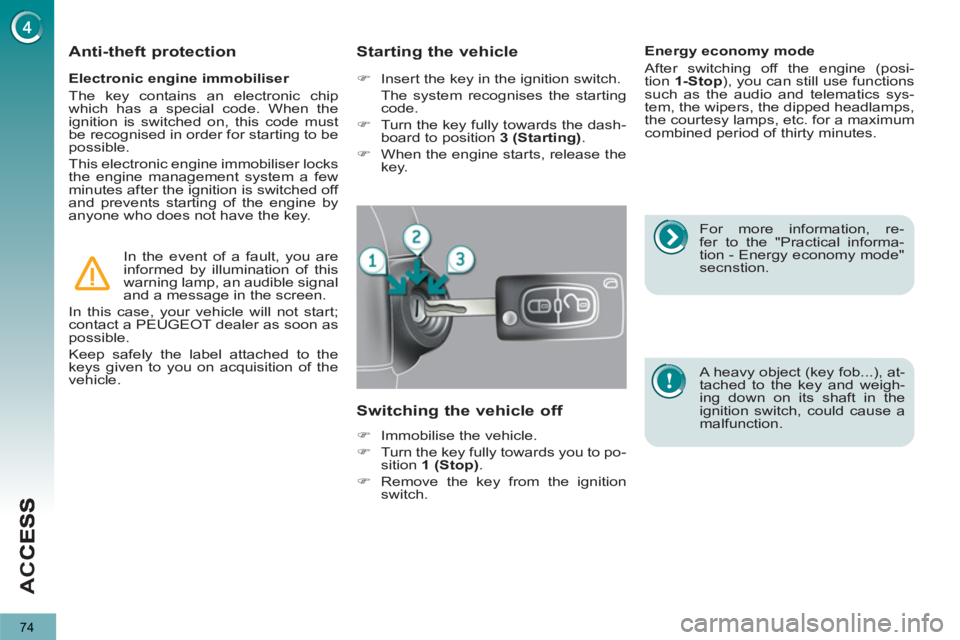
Starting the vehicle
)
Insert the key in the ignition switch.
The system recognises the starting
code.
)
Turn the key fully towards the dash-
board to position 3 (Starting)
.
)
When the engine starts, release the
key.
Switching the vehicle off
)
Immobilise the vehicle.
)
Turn the key fully towards you to po-
sition 1 (Stop)
.
)
Remove the key from the ignition
switch.
Energy economy mode
After switching off the engine (posi-
tion 1-Stop
), you can still use functions
such as the audio and telematics sys-
tem, the wipers, the dipped headlamps,
the courtesy lamps, etc. for a maximum
combined period of thirty minutes.
A heavy object (key fob...), at-
tached to the key and weigh-
ing down on its shaft in the
ignition switch, could cause a
malfunction.
Page 86 of 352
84
AC
C
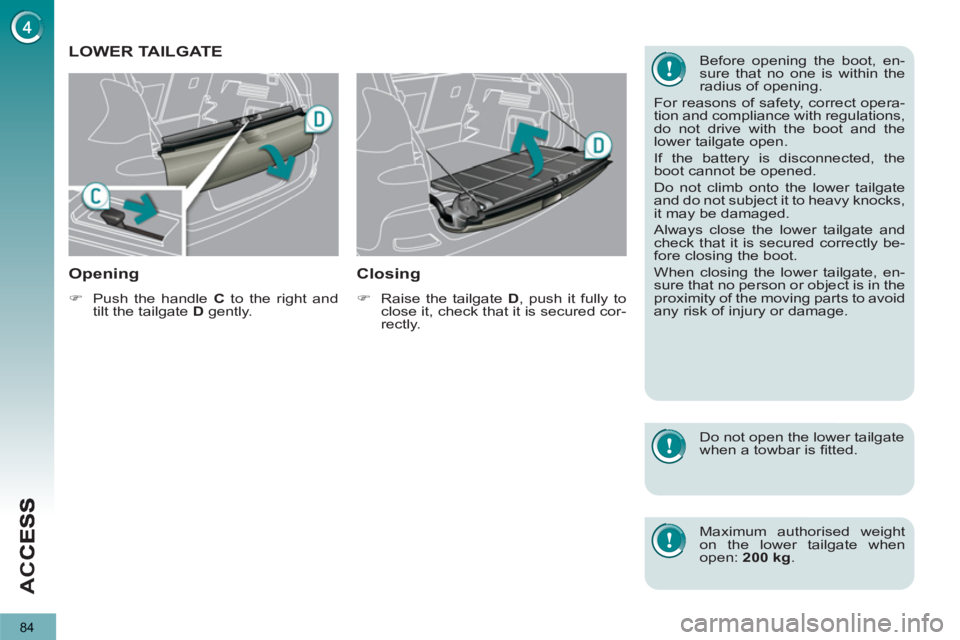
LOWER TAILGATE
Openin
g
)
Push the handle C
to the right and
tilt the tailgate D
gently.
Closing
)
Raise the tailgate D
, push it fully to
close it, check that it is secured cor-
rectly.
Before opening the boot, en-
sure that no one is within the
radius of opening.
For reasons of safety, correct opera-
tion and compliance with regulations,
do not drive with the boot and the
lower tailgate open.
If the battery is disconnected, the
boot cannot be opened.
Do not climb onto the lower tailgate
and do not subject it to heavy knocks,
it may be damaged.
Always close the lower tailgate and
check that it is secured correctly be-
fore closing the boot.
When closing the lower tailgate, en-
sure that no person or object is in the
proximity of the moving parts to avoid
any risk of injury or damage.
Do not open the lower tailgate
when a towbar is fi tted.
Maximum authorised weight
on the lower tailgate when
open: 200 kg
.
Page 87 of 352
85
AC
C
The key cannot be removed
from the lock until the cap is
put back on the tank.
Opening the cap may trigger an in-
rush of air. This vacuum, which is
completely normal, is caused by the
sealing of the fuel system.
FUEL TANK
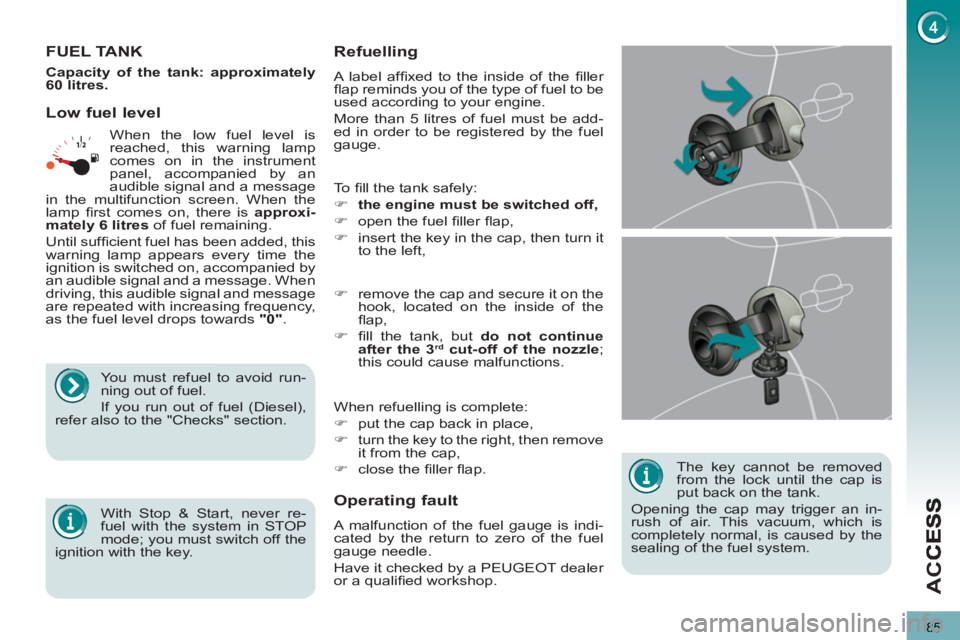
To fi ll the tank safely:
)
the engine must be switched off,
)
open the fuel fi ller fl ap,
)
insert the key in the cap, then turn it
to the left,
When refuelling is complete:
)
put the cap back in place,
)
turn the key to the right, then remove
it from the cap,
)
close the fi ller fl ap.
)
remove the cap and secure it on the
hook, located on the inside of the
fl ap,
)
fi ll the tank, but do not continue
after the 3
rd cut-off of the nozzle
;
this could cause malfunctions.
Low fuel level
Operatin
g fault
A malfunction of the fuel gauge is indi-
cated by the return to zero of the fuel
gauge needle.
Have it checked by a PEUGEOT dealer
or a qualifi ed workshop.
Refuelling
A label affi xed to the inside of the fi ller
fl ap reminds you of the type of fuel to be
used according to your engine.
More than 5 litres of fuel must be add-
ed in order to be registered by the fuel
gauge. When the low fuel level is
reached, this warning lamp
comes on in the instrument
panel, accompanied by an
audible signal and a message
in the multifunction screen. When the
lamp fi rst comes on, there is approxi-
mately
6 litres
of fuel remaining.
Until suffi cient fuel has been added, this
warning lamp appears every time the
ignition is switched on, accompanied by
an audible signal and a message. When
driving, this audible signal and message
are repeated with increasing frequency,
as the fuel level drops towards "0"
.
You must refuel to avoid run-
ning out of fuel.
If you run out of fuel (Diesel),
refer also to the "Checks" section.
With Stop & Start, never re-
fuel with the system in STOP
mode; you must switch off the
ignition with the key.
Capacity of the tank: approximately
60 litres.
Page 89 of 352
87
VIS
LIGHTING CONTROLS
System for selection and control of the
various front and rear lamps providing
the vehicle's lighting.
Main lighting
The various front and rear lamps of
the vehicle are designed to adapt the
lighting progressively in relation to the
climatic conditions and so improve the
driver's visibility:
- sidelamps, to be seen,
- dipped beam headlamps to see
without dazzling other drivers,
- main beam headlamps to see clearly
when the road is clear,
- directional headlamps for improved
visibility when cornering.
Additional lighting
Other lamps are installed to fulfi l the
requirements of particular driving con-
ditions:
- a rear foglamp to be seen from a
distance,
-
front foglamps for even better visibility,
- daytime running lamps to be seen
during the day.
Programming
Various automatic lighting control
modes are also available according to
the following options:
- guide-me-home lighting,
- automatic lighting,
- directional headlamps.
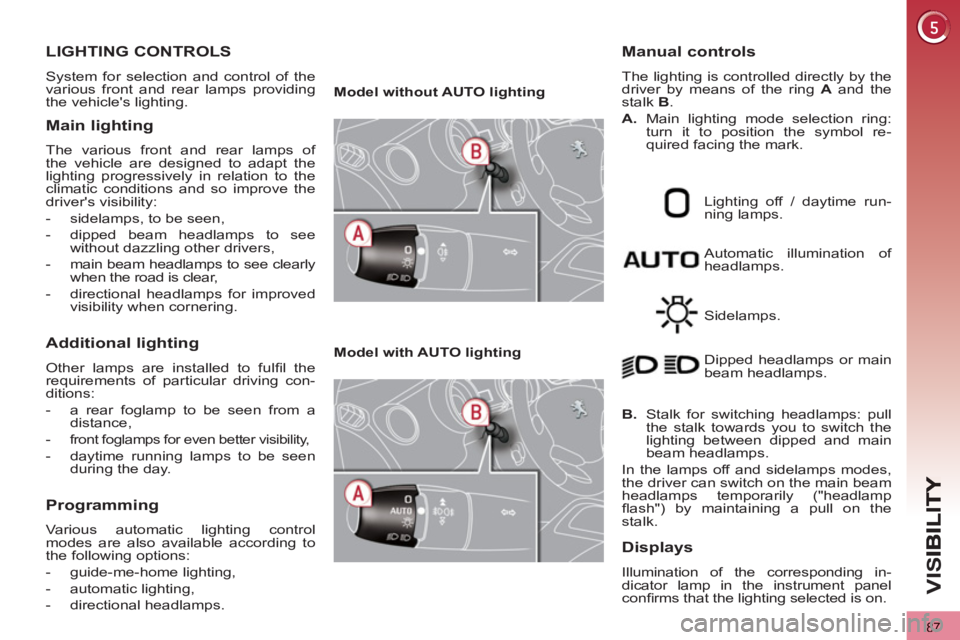
Model without AUTO lighting
Model with AUTO lighting
Automatic illumination of
headlamps.
Manual controls
The lighting is controlled directly by the
driver by means of the ring A
and the
stalk B
.
A.
Main lighting mode selection ring:
turn it to position the symbol re-
quired facing the mark.
Lighting off / daytime run-
ning lamps.
Sidelamps.
B.
Stalk for switching headlamps: pull
the stalk towards you to switch the
lighting between dipped and main
beam headlamps.
In the lamps off and sidelamps modes,
the driver can switch on the main beam
headlamps temporarily ("headlamp
fl ash") by maintaining a pull on the
stalk. Dipped headlamps or main
beam headlamps.
Displays
Illumination of the corresponding in-
dicator lamp in the instrument panel
confi rms that the lighting selected is on.