pairing PEUGEOT 3008 2014 Owners Manual
[x] Cancel search | Manufacturer: PEUGEOT, Model Year: 2014, Model line: 3008, Model: PEUGEOT 3008 2014Pages: 389, PDF Size: 22.92 MB
Page 51 of 389
2
Multifunction screens49
Display confi guration
Once this menu has been selected, you have access to the following settings: - brightness-video setting, - date and time setting,
- selection of the units.
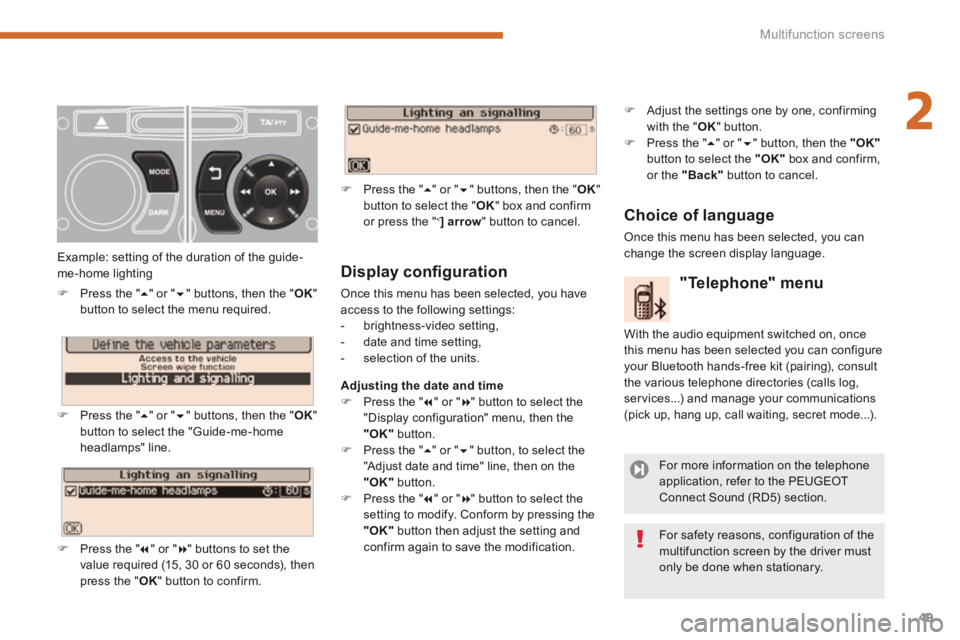
Adjusting the date and time Press the " " or " " button to select the "Display configuration" menu, then the "OK" button. Press the " " or " " button, to select the "Adjust date and time" line, then on the "OK" button. Press the " " or " " button to select the setting to modify. Conform by pressing the "OK" button then adjust the setting and confirm again to save the modification.
Example: setting of the duration of the guide-me-home lighting
Press the " " or " " buttons, then the " OK " button to select the menu required.
Press the " " or " " buttons, then the " OK " button to select the "Guide-me-home headlamps" line.
Press the " " or " " buttons to set the value required (15, 30 or 60 seconds), then press the " OK " button to confirm.
Press the " " or " " buttons, then the " OK " button to select the " OK " box and confirm or press the " < ] arrow " button to cancel.
"Telephone" menu
With the audio equipment switched on, once this menu has been selected you can configure your Bluetooth hands-free kit (pairing), consult the various telephone directories (calls log, services...) and manage your communications (pick up, hang up, call waiting, secret mode...).
For more information on the telephone application, refer to the PEUGEOT Connect Sound (RD5) section.
For safety reasons, configuration of the multifunction screen by the driver must only be done when stationary.
Choice of language
Once this menu has been selected, you can change the screen display language.
Adjust the settings one by one, confirming with the " OK " button. Press the " " or " " button, then the "OK"button to select the "OK" box and confirm, or the "Back" button to cancel.
Page 82 of 389
Access
80
Lost keys
Go to a PEUGEOT dealer with the vehicle's registration document, your personal identification documents and if possible the key code label. The PEUGEOT dealer will be able to look up the key code and the transponder code required to order a new key.
Do not throw the remote control batteries away, they contain metals which are harmful to the environment. Take them to an approved collection point.
Remote control
The high frequency remote control is a sensitive system; do not operate it while it is in your pocket as there is a possibility that it may unlock the vehicle, without you being aware of it. Do not repeatedly press the buttons of your remote control out of range and out of sight of your vehicle. You run the risk of stopping it from working and the remote control would have to be reinitialised. No remote control can operate when the key is in the ignition switch, even when the ignition is switched off, except for reinitialisation.
Locking the vehicle
Driving with the doors locked may make access to the passenger compartment by the emergency services more difficult in an emergency. As a safety precaution, never leave children alone in the vehicle, except for a very short period. In all cases, it is essential to remove the key from the ignition switch when leaving the vehicle.
Anti-theft protection
Do not make any modifications to the electronic engine immobiliser system; this could cause malfunctions.
When purchasing a second-hand vehicle
Have the pairing of all of the keys in your possession checked by a PEUGEOT dealer, to ensure that only your keys can be used to open and start the vehicle.
Page 118 of 389
Fittings
116
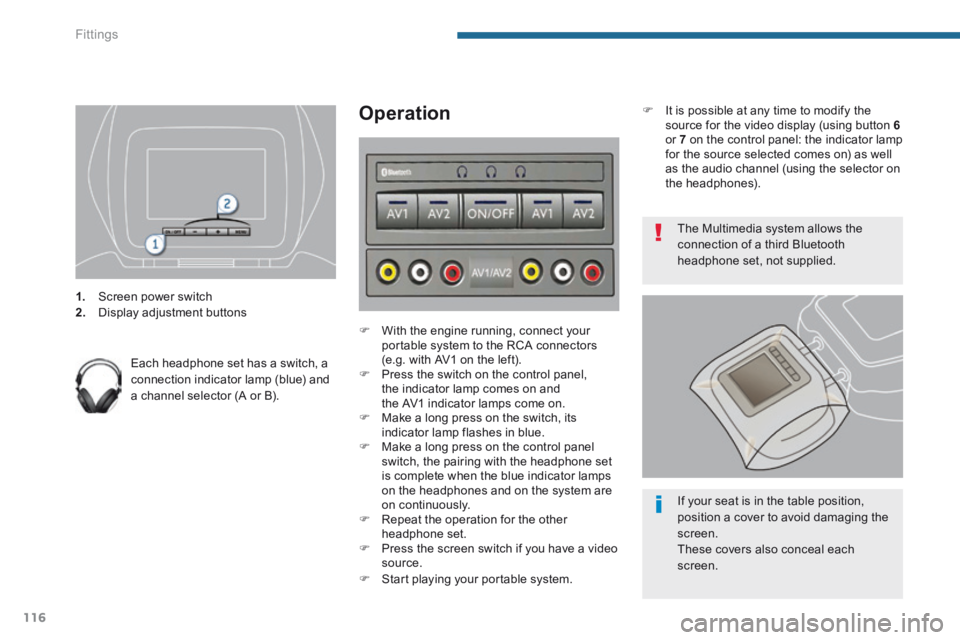
1. Screen power switch 2. Display adjustment buttons
Each headphone set has a switch, a connection indicator lamp (blue) and a channel selector (A or B).
Operation
With the engine running, connect your portable system to the RCA connectors (e.g. with AV1 on the left). Press the switch on the control panel, the indicator lamp comes on and the AV1 indicator lamps come on. Make a long press on the switch, its indicator lamp flashes in blue. Make a long press on the control panel switch, the pairing with the headphone set is complete when the blue indicator lamps on the headphones and on the system are on continuously. Repeat the operation for the other headphone set. Press the screen switch if you have a video source. Start playing your portable system.
The Multimedia system allows the connection of a third Bluetooth headphone set, not supplied.
If your seat is in the table position, position a cover to avoid damaging the
screen. These covers also conceal each screen.
It is possible at any time to modify the source for the video display (using button 6or 7 on the control panel: the indicator lamp for the source selected comes on) as well as the audio channel (using the selector on the headphones).
Page 224 of 389
Practical information
222
Changing a fuse
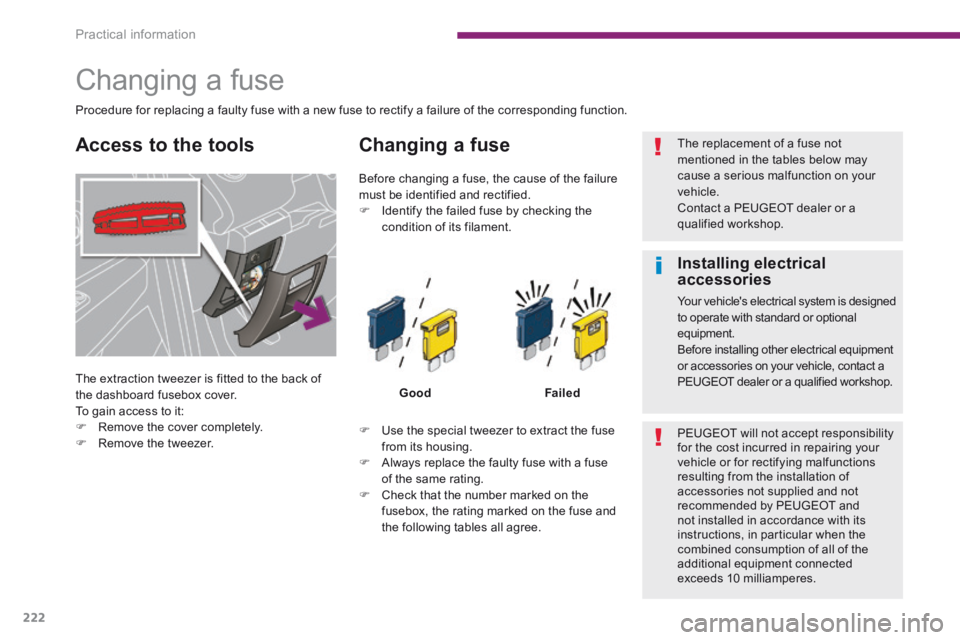
The extraction tweezer is fitted to the back of
the dashboard fusebox cover. To gain access to it: Remove the cover completely.
Remove the tweezer.
Changing a fuse
GoodFailed
Use the special tweezer to extract the fuse from its housing. Always replace the faulty fuse with a fuse of the same rating. Check that the number marked on the fusebox, the rating marked on the fuse and the following tables all agree.
Before changing a fuse, the cause of the failure must be identified and rectified. Identify the failed fuse by checking the
condition of its filament.
Procedure for replacing a faulty fuse with a new fuse to rectify a failure of the corresponding function.
The replacement of a fuse not mentioned in the tables below may cause a serious malfunction on your vehicle. Contact a PEUGEOT dealer or a qualified workshop.
PEUGEOT will not accept responsibility for the cost incurred in repairing your vehicle or for rectifying malfunctions resulting from the installation of accessories not supplied and not recommended by PEUGEOT and not installed in accordance with its instructions, in particular when the combined consumption of all of the additional equipment connected exceeds 10 milliamperes.
Access to the tools
Installing electrical accessories
Your vehicle's electrical system is designed to operate with standard or optional equipment. Before installing other electrical equipment or accessories on your vehicle, contact a PEUGEOT dealer or a qualified workshop.
Page 284 of 389
282
08
2ABC3DEF5JKL4GHI6MNO8TUV7PQR S9WXYZ0*#
1RADIO MEDIA NA
V TRAFFIC
SETUPADDR
BOOK
2ABC3DEF5JKL4GHI6MNO8TUV7PQR S9WXYZ0*#
1RADIO MEDIA NA
V TRAFFIC
SETUPADDR
BOOK
2ABC3DEF5JKL4GHI6MNO8TUV7PQR S9WXYZ0*#
1RADIO MEDIA NA
V TRAFFIC
SETUPADDR
BOOK
2ABC3DEF5JKL4GHI6MNO8TUV7PQR S9WXYZ0*#
1RADIO MEDIA NA
V TRAFFIC
SETUPADDR
BOOK
2ABC3DEF5JKL4GHI6MNO8TUV7PQR S9WXYZ0*#
1RADIO MEDIA NA
V TRAFFIC
SETUPADDR
BOOK2ABC3DEF5JKL4GHI6MNO8TUV7PQR S9WXYZ0*#
1RADIO MEDIA NA
V TRAFFIC
SETUPADDR
BOOK
* The services available via the telephone depend on the network, the SIM \
card and the compatibility of the Bluetooth equipment used. Refer to you\
r telephone's manual and your operator to check which services you have access to.
USING THE TELEPHONE
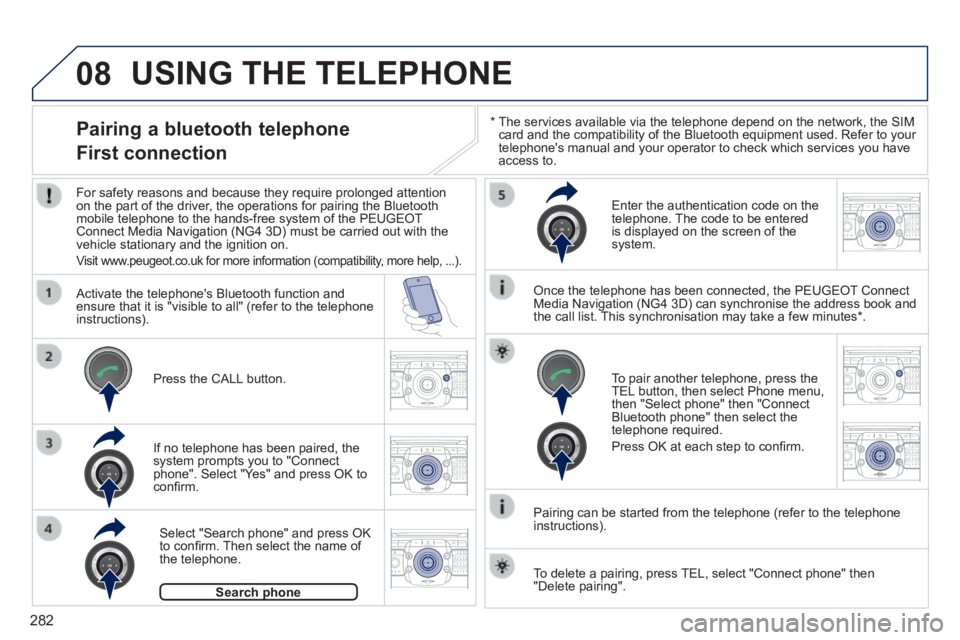
Pairing a bluetooth telephone
First connection
For safety reasons and because they require prolonged attention on the part of the driver, the operations for pairing the Bluetooth mobile telephone to the hands-free system of the PEUGEOT Connect Media Navigation (NG4 3D) must be carried out with the vehicle stationary and the ignition on.
Visit www.peugeot.co.uk for more information (compatibility, more help, ...).
Activate the telephone's Bluetooth function and ensure that it is "visible to all" (refer to the telephone instructions).
If no telephone has been paired, the system prompts you to "Connect phone". Select "Yes" and press OK to confi rm.
Enter the authentication code on the telephone. The code to be entered is displayed on the screen of the system.
To pair another telephone, press the TEL button, then select Phone menu, then "Select phone" then "Connect Bluetooth phone" then select the telephone required.
Press OK at each step to confi rm.
Once the telephone has been connected, the PEUGEOT Connect Media Navigation (NG4 3D) can synchronise the address book and the call list. This synchronisation may take a few minutes * .
Pairing can be started from the telephone (refer to the telephone instructions).
Press the CALL button.
Select "Search phone" and press OK to confi rm. Then select the name of the telephone.
Search phoneSearch phone
To delete a pairing, press TEL, select "Connect phone" then "Delete pairing".
Page 285 of 389

283
08
2ABC3DEF5JKL4GHI6MNO8TUV7PQR S9WXYZ0*#
1RADIO MEDIA NA
V TRAFFIC
SETUPADDR
BOOK
* The services available via the telephone depend on the network, the SIM \
card and the compatibility of the Bluetooth equipment used. Refer to your tel\
ephone's manual and your operator to check which services you have access to. A list of mobile telephones which offer the best range of services is available from dealers.
USING THE TELEPHONE
Connecting a bluetooth telephone
For safety reasons and because they require prolonged attention on the part of the driver, the operations for pairing the Bluetooth mobile telephone to the hands-free system of the PEUGEOT Connect Media Navigation (NG4 3D) must be carried out with the vehicle stationary and the ignition on.
Activate the telephone's Bluetooth function and ensure that it is visible to all.
Once the telephone has been connected, the PEUGEOT Connect Media Navigation (NG4 3D) can synchronise the address book and the call list. This synchronisation may take a few minutes * .
Press the PICK UP button.
The list of telephones connected previously (4 maximum) appears in the multifunction screen. Select the telephone required then select "Connect phone" for a new connection. Select "Delete pairing" to cancel the connection to the telephone.
Page 290 of 389
288
ADDR
BOOK
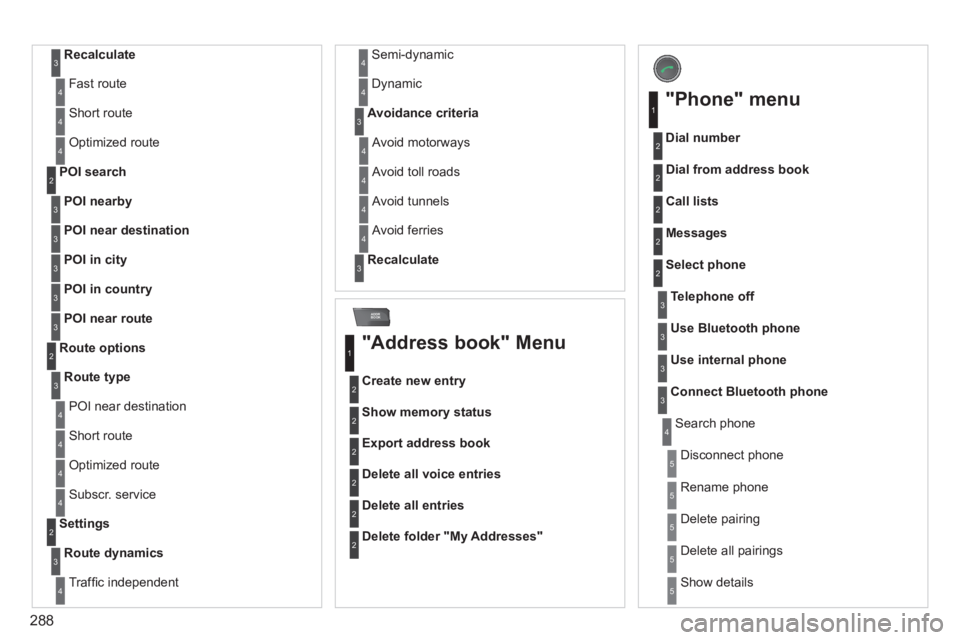
Recalculate3
Fast route 4
Short route 4
Optimized route 4
POI nearby
POI search 2
3
POI near destination3
POI in city3
POI in country3
POI near route3
Route type
Route options 2
3
POI near destination 4
Short route 4
Optimized route 4
Subscr. service 4
Route dynamics
Settings 2
3
Traffi c independent 4
Semi-dynamic 4
Dynamic 4
Avoidance criteria3
Avoid motorways 4
Avoid toll roads 4
Avoid tunnels 4
Avoid ferries 4
Recalculate3
"Address book" Menu
Create new entry
1
2
Show memory status 2
Export address book 2
Delete all voice entries 2
Delete all entries 2
Delete folder "My Addresses" 2
"Phone" menu
Dial number
1
2
Dial from address book 2
Call lists 2
Messages 2
Select phone 2
Search phone 4
Telephone off3
Use Bluetooth phone3
Use internal phone3
Connect Bluetooth phone3
Disconnect phone 5
Rename phone 5
Delete pairing 5
Delete all pairings 5
Show details 5
Page 322 of 389
06
320
USING THE TELEPHONE
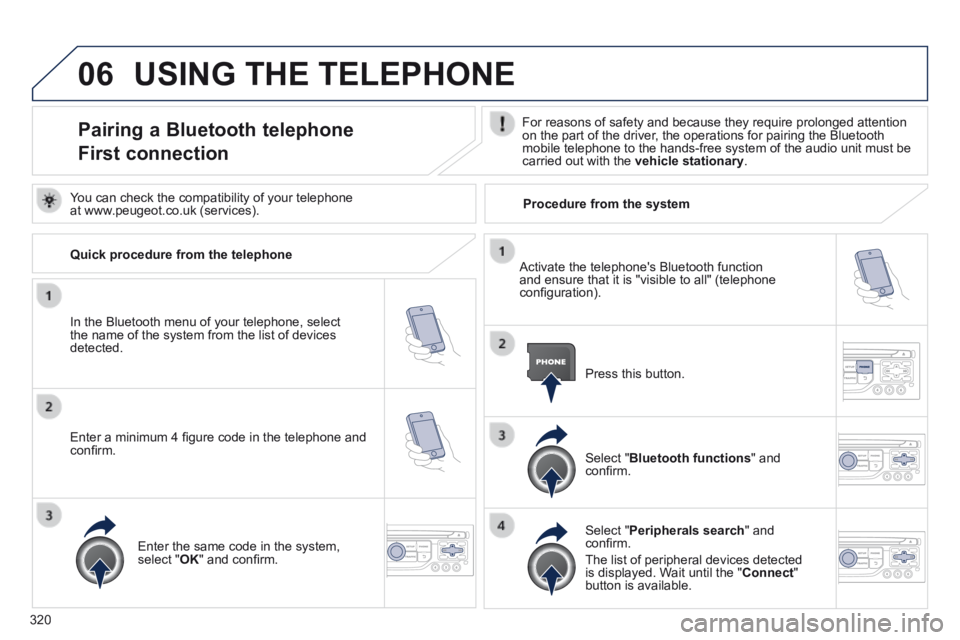
Pairing a Bluetooth telephone
First connection
For reasons of safety and because they require prolonged attention on the part of the driver, the operations for pairing the Bluetooth mobile telephone to the hands-free system of the audio unit must be carried out with the vehicle stationary .
In the Bluetooth menu of your telephone, select the name of the system from the list of devices detected.
Press this button.
Select " Bluetooth functions " and confi rm.
Select " Peripherals search " and confi rm.
The list of peripheral devices detected is displayed. Wait until the " Connect " button is available.
You can check the compatibility of your telephone at www.peugeot.co.uk (services).
Activate the telephone's Bluetooth function and ensure that it is "visible to all" (telephone confi guration).
Quick procedure from the telephone
Enter a minimum 4 fi gure code in the telephone and confi rm.
Enter the same code in the system, select " OK " and confi rm.
Procedure from the system
Page 323 of 389
06
321
USING THE TELEPHONE
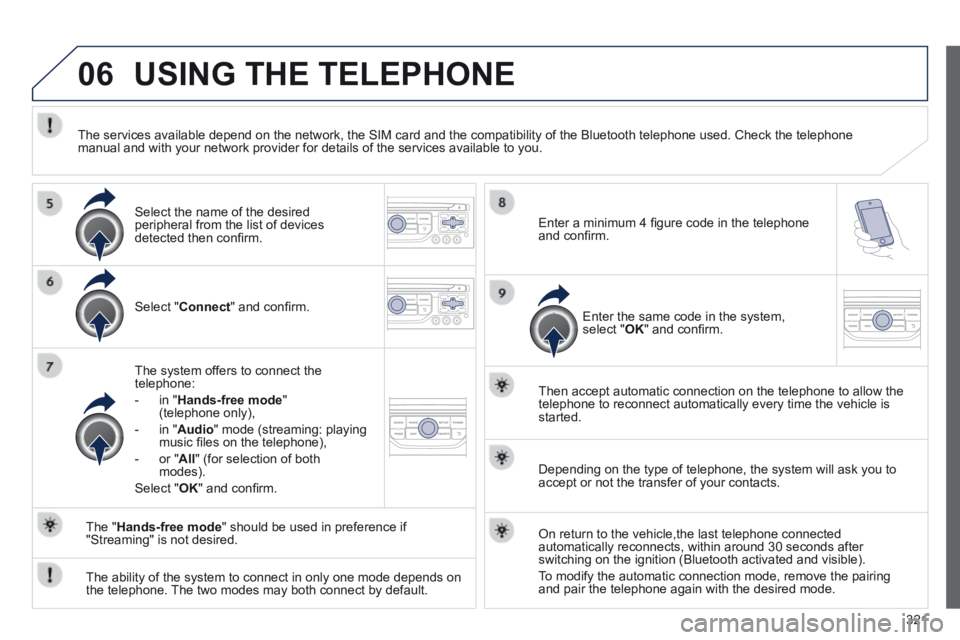
Select " Connect " and confi rm.
The system offers to connect the telephone:
- in " Hands-free mode " (telephone only),
- in " Audio " mode (streaming: playing music fi les on the telephone),
- or " All " (for selection of both modes).
Select " OK " and confi rm.
Then accept automatic connection on the telephone to allow the telephone to reconnect automatically every time the vehicle is started.
The ability of the system to connect in only one mode depends on the telephone. The two modes may both connect by default.
The " Hands-free mode " should be used in preference if "Streaming" is not desired.
The services available depend on the network, the SIM card and the compa\
tibility of the Bluetooth telephone used. Check the telephone manual and with your network provider for details of the services availa\
ble to you.
Depending on the type of telephone, the system will ask you to accept or not the transfer of your contacts.
On return to the vehicle,the last telephone connected automatically reconnects, within around 30 seconds after switching on the ignition (Bluetooth activated and visible).
To modify the automatic connection mode, remove the pairing and pair the telephone again with the desired mode.
Enter a minimum 4 fi gure code in the telephone and confi rm.
Enter the same code in the system, select " OK " and confi rm.
Select the name of the desired peripheral from the list of devices detected then confi rm .
Page 330 of 389
06
328
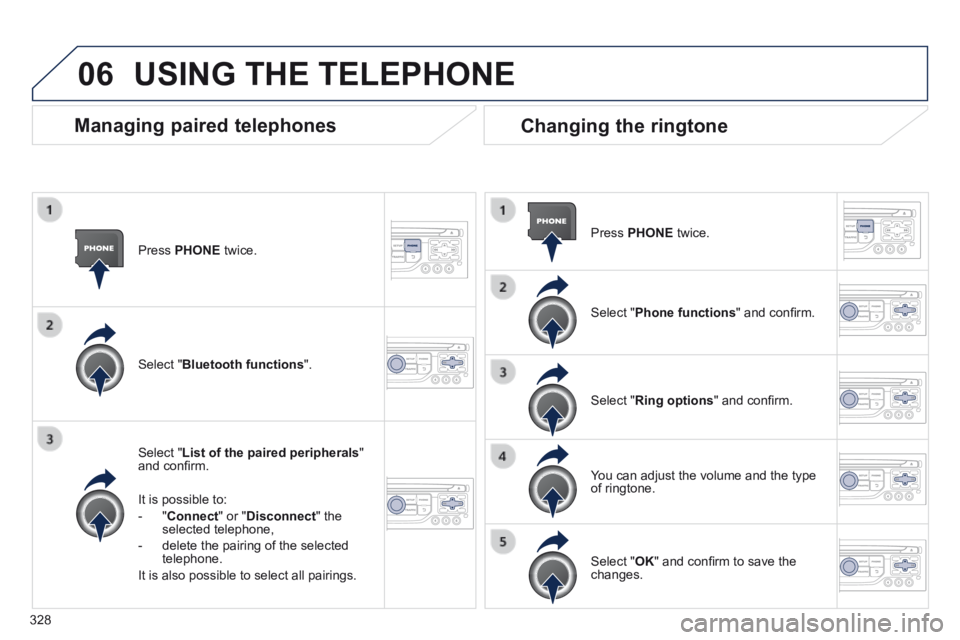
Press PHONE twice.
Select " List of the paired peripherals " and confi rm.
It is possible to:
- " Connect " or " Disconnect " the selected telephone,
- delete the pairing of the selected telephone.
It is also possible to select all pairings.
Managing paired telephones Changing the ringtone
Press PHONE twice.
Select " Phone functions " and confi rm.
Select " Ring options " and confi rm.
You can adjust the volume and the type of ringtone.
Select " Bluetooth functions ".
Select " OK " and confi rm to save the changes.
USING THE TELEPHONE