instrument panel PEUGEOT 3008 2017 Owners Manual
[x] Cancel search | Manufacturer: PEUGEOT, Model Year: 2017, Model line: 3008, Model: PEUGEOT 3008 2017Pages: 566, PDF Size: 16.05 MB
Page 363 of 566
3
.
12:13
18,5 21,5
23 °C
Audio and Telematics
Transversal-Peugeot_en_Chap01_NAC-2-2-0_ed01-2016
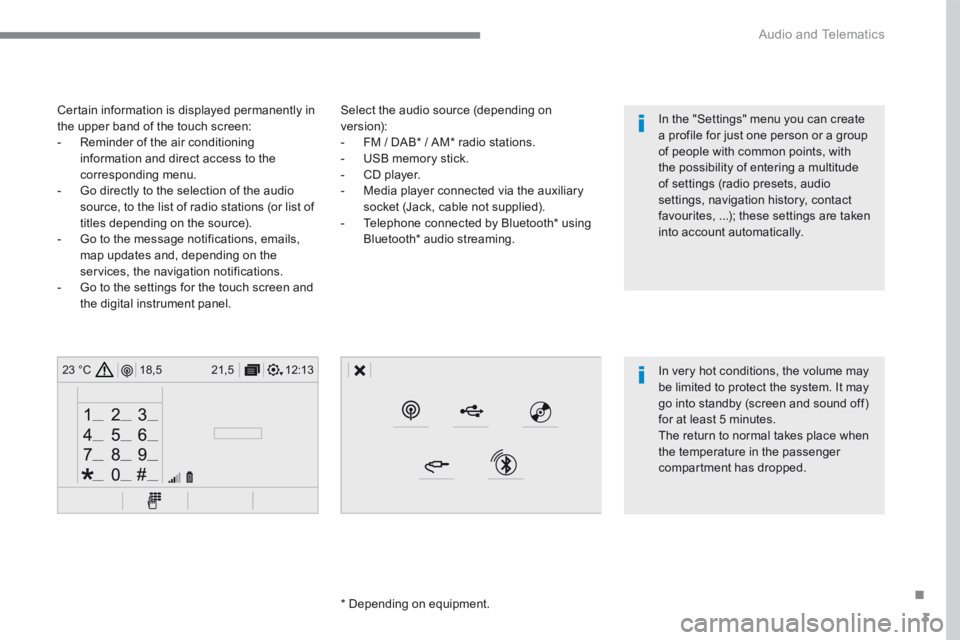
Select the audio source (depending on version): - FM / DAB * / AM * radio stations. - USB memory stick. - CD player. - Media player connected via the auxiliary socket (Jack, cable not supplied). - Telephone connected by Bluetooth * using
Bluetooth * audio streaming.
* Depending on equipment.
Certain information is displayed permanently in the upper band of the touch screen: - Reminder of the air conditioning information and direct access to the corresponding menu. - Go directly to the selection of the audio source, to the list of radio stations (or list of titles depending on the source).
- Go to the message notifications, emails, map updates and, depending on the services, the navigation notifications. - Go to the settings for the touch screen and the digital instrument panel.
In very hot conditions, the volume may be limited to protect the system. It may go into standby (screen and sound off) for at least 5 minutes.
The return to normal takes place when the temperature in the passenger compartment has dropped.
In the "Settings" menu you can create a profile for just one person or a group of people with common points, with the possibility of entering a multitude of settings (radio presets, audio settings, navigation history, contact favourites, ...); these settings are taken into account automatically.
Page 443 of 566
83
.
1
15
16
1
1
11
12
13
14
9
8
10
Audio and Telematics
Transversal-Peugeot_en_Chap01_NAC-2-2-0_ed01-2016
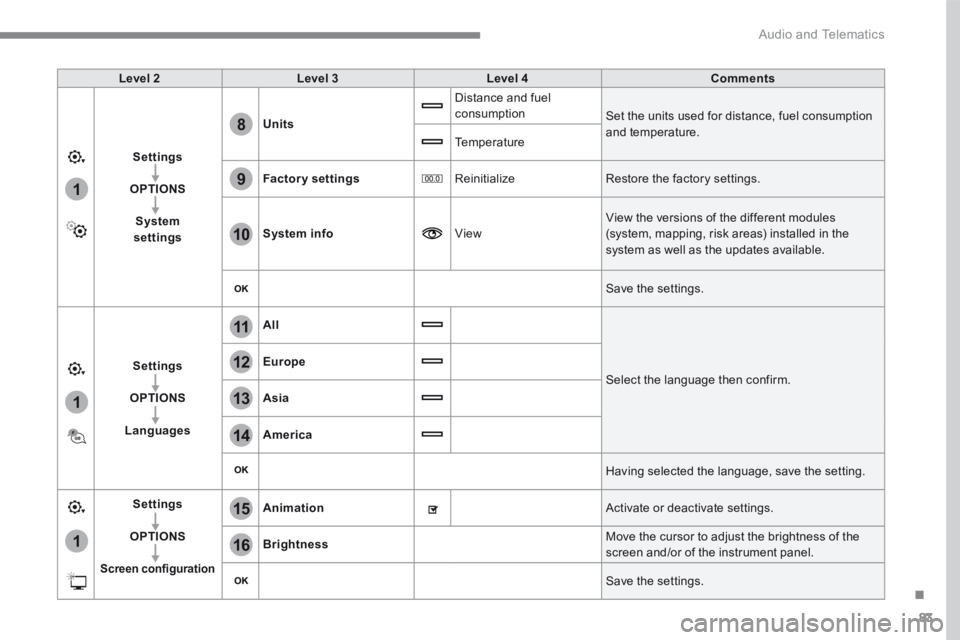
Level 2Level 3Level 4Comments
Settings
OPTIONS
System settings
Units
Distance and fuel consumption Set the units used for distance, fuel consumption and temperature. Temperature
Factory settings Reinitialize Restore the factory settings.
System info View
View the versions of the different modules
(system, mapping, risk areas) installed in the system as well as the updates available.
Save the settings.
Settings
OPTIONS
Languages
All
Select the language then confirm.
Europe
Asia
America
Having selected the language, save the setting.
Settings
OPTIONS
Screen configuration
Animation Activate or deactivate settings.
Brightness Move the cursor to adjust the brightness of the screen and/or of the instrument panel.
Save the settings.
Page 448 of 566
88
111
8
9
10
15
161
Audio and Telematics
Transversal-Peugeot_en_Chap01_NAC-2-2-0_ed01-2016
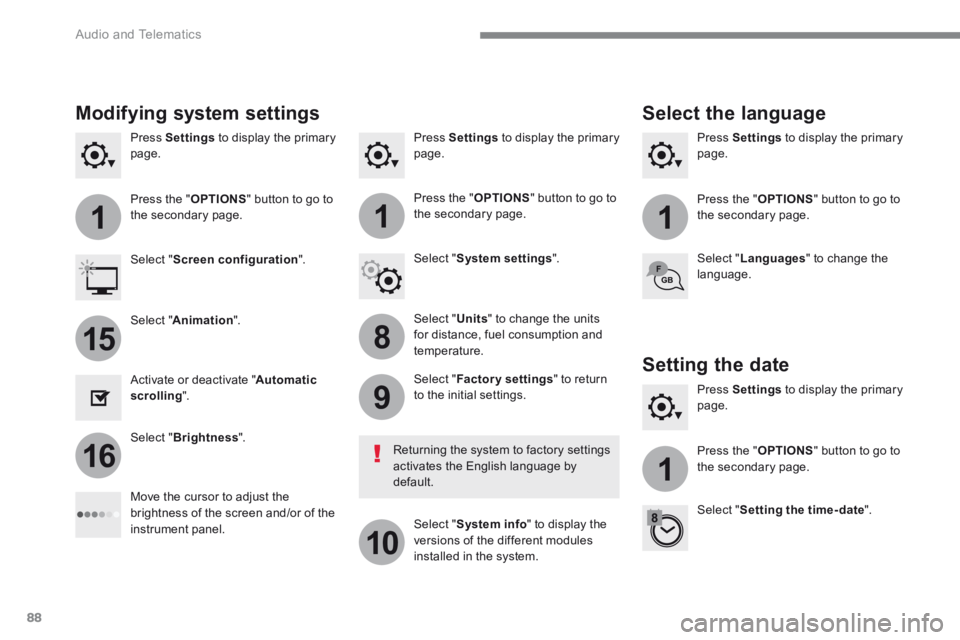
Press Settings to display the primary page. Press Settings to display the primary page. Press Settings to display the primary page.
Press the " OPTIONS " button to go to the secondary page. Press the " OPTIONS " button to go to the secondary page. Press the " OPTIONS " button to go to the secondary page.
Select " System settings ". Select " Screen configuration ".
Select " Units " to change the units for distance, fuel consumption and temperature.
Select " Languages " to change the language.
Activate or deactivate " Automatic scrolling ".
Move the cursor to adjust the brightness of the screen and/or of the instrument panel.
Select " Factory settings " to return to the initial settings.
Select " System info " to display the versions of the different modules installed in the system.
Modifying system settings
Returning the system to factory settings activates the English language by default.
Select " Animation ".
Select " Brightness ".
Select the language
Press Settings to display the primary page.
Press the " OPTIONS " button to go to the secondary page.
Select " Setting the time- date ".
Setting the date
Page 459 of 566
99
.
Audio and Telematics
Transversal-Peugeot_en_Chap02_RCC-2-2-0_ed01-2016
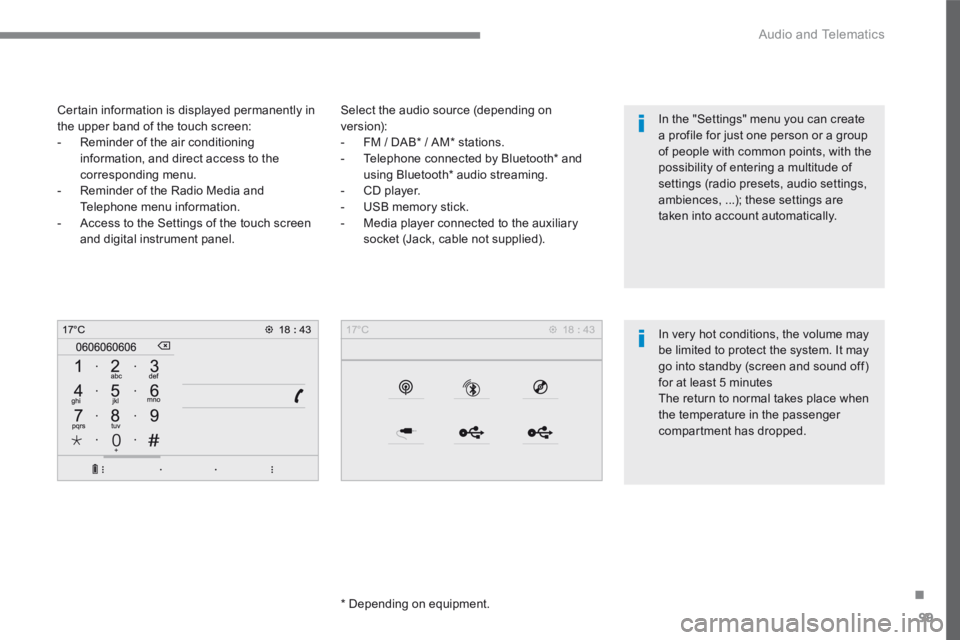
Select the audio source (depending on version): - FM / DAB * / AM * stations. - Telephone connected by Bluetooth * and using Bluetooth * audio streaming. - CD player. - USB memory stick. - Media player connected to the auxiliary
socket (Jack, cable not supplied).
* Depending on equipment.
Certain information is displayed permanently in the upper band of the touch screen: - Reminder of the air conditioning information, and direct access to the corresponding menu. - Reminder of the Radio Media and Telephone menu information. - Access to the Settings of the touch screen
and digital instrument panel.
In very hot conditions, the volume may be limited to protect the system. It may go into standby (screen and sound off) for at least 5 minutes The return to normal takes place when the temperature in the passenger
compartment has dropped.
In the "Settings" menu you can create a profile for just one person or a group of people with common points, with the possibility of entering a multitude of settings (radio presets, audio settings, ambiences, ...); these settings are taken into account automatically.
Page 499 of 566
139
.
1
2
3
4
Audio and Telematics
Transversal-Peugeot_en_Chap02_RCC-2-2-0_ed01-2016
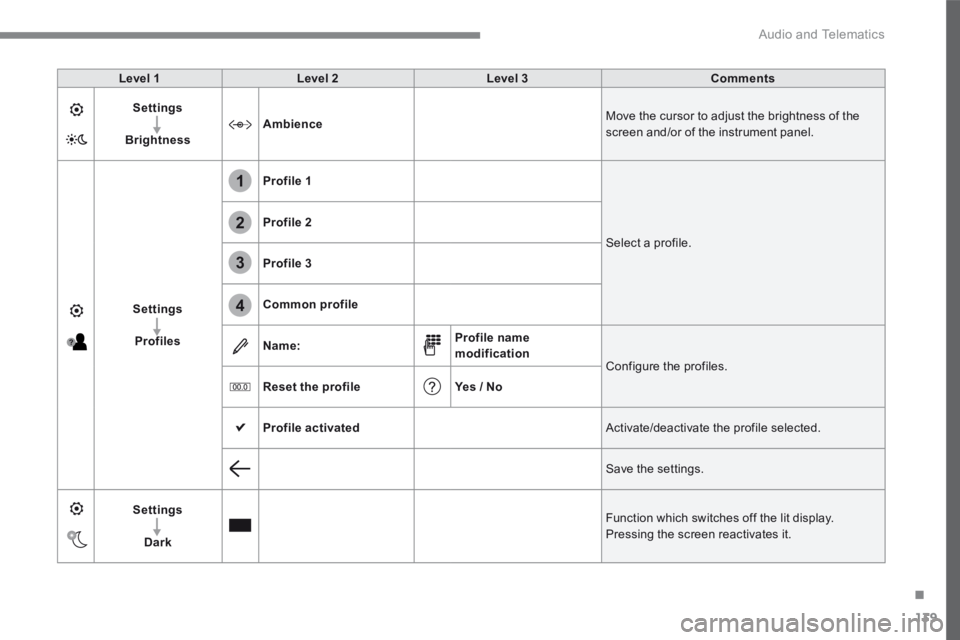
Level 1Level 2Level 3Comments
Settings
BrightnessAmbience Move the cursor to adjust the brightness of the screen and/or of the instrument panel.
Settings
Profiles
Profile 1
Select a profile.
Profile 2
Profile 3
Common profile
Name:Profile name modification Configure the profiles.
Reset the profileYes / No
Profile activated Activate/deactivate the profile selected.
Save the settings.
Settings
Dark
Function which switches off the lit display. Pressing the screen reactivates it.
Page 501 of 566
141
.
Audio and Telematics
Transversal-Peugeot_en_Chap02_RCC-2-2-0_ed01-2016
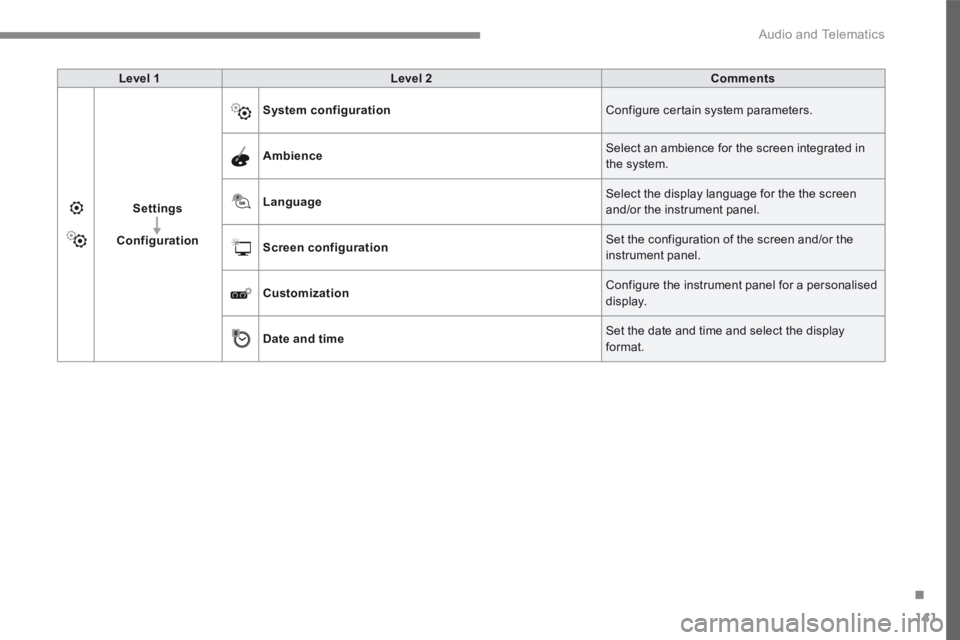
Level 1Level 2Comments
Settings
Configuration
System configuration Configure certain system parameters.
Ambience Select an ambience for the screen integrated in the system.
Language Select the display language for the the screen and/or the instrument panel.
Screen configuration Set the configuration of the screen and/or the instrument panel.
Customization Configure the instrument panel for a personalised display.
Date and time Set the date and time and select the display format.
Page 503 of 566
143
.
6
5
7
8
9
10
11
Audio and Telematics
Transversal-Peugeot_en_Chap02_RCC-2-2-0_ed01-2016
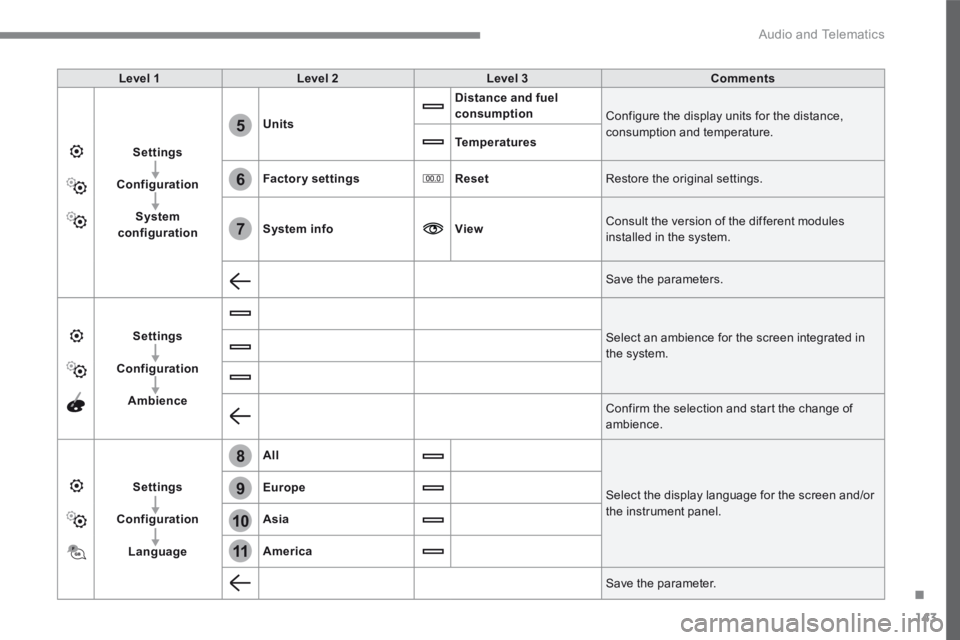
Level 1Level 2Level 3Comments
Settings
Configuration
System configuration
Units
Distance and fuel consumption Configure the display units for the distance, consumption and temperature. Temperatures
Factory settingsReset Restore the original settings.
System infoView Consult the version of the different modules installed in the system.
Save the parameters.
Settings
Configuration
Ambience
Select an ambience for the screen integrated in the system.
Confirm the selection and start the change of ambience.
Settings
Configuration
Language
All
Select the display language for the screen and/or the instrument panel.
Europe
Asia
America
Save the parameter.
Page 506 of 566
146
1
Audio and Telematics
Transversal-Peugeot_en_Chap02_RCC-2-2-0_ed01-2016
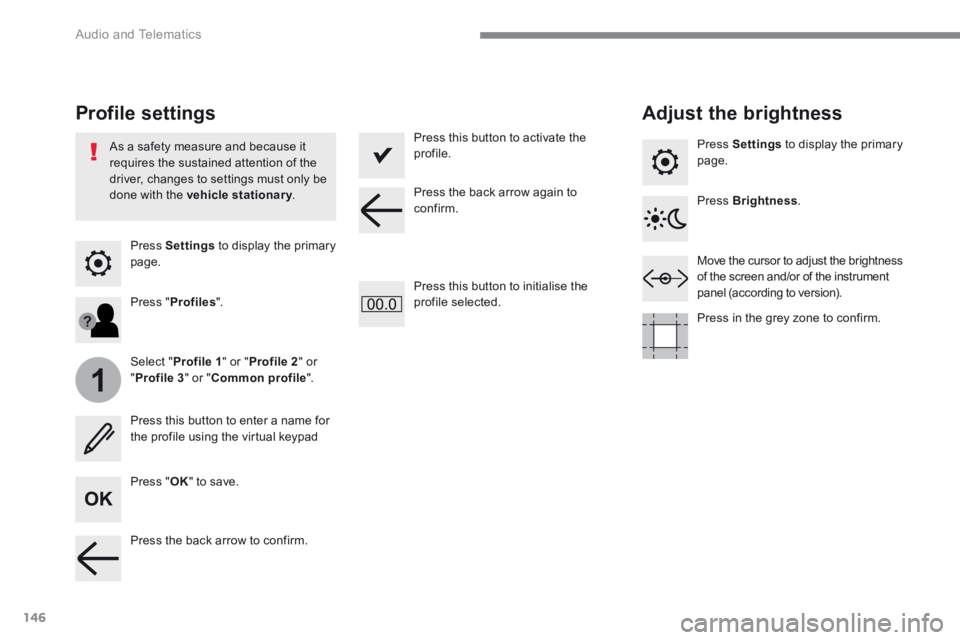
Press Settings to display the primary page.
Profile settings Adjust the brightness
Press " OK " to save.
Select " Profile 1 " or " Profile 2 " or " Profile 3 " or " Common profile ".
Press " Profiles ".
Press this button to enter a name for the profile using the virtual keypad
As a safety measure and because it requires the sustained attention of the driver, changes to settings must only be done with the vehicle stationary . vehicle stationary . vehicle stationary
Press this button to activate the profile.
Press this button to initialise the profile selected.
Press Settings to display the primary page.
Move the cursor to adjust the brightness of the screen and/or of the instrument panel (according to version).
Press Brightness .
Press in the grey zone to confirm.
Press the back arrow to confirm.
Press the back arrow again to confirm.
Page 507 of 566
147
.
5
6
7
12
13
Audio and Telematics
Transversal-Peugeot_en_Chap02_RCC-2-2-0_ed01-2016
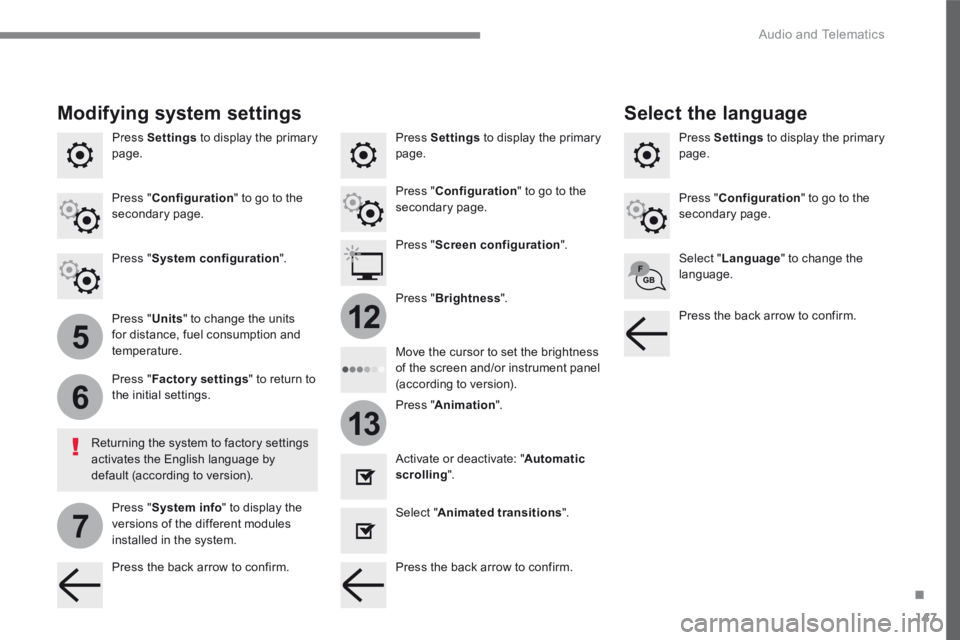
Press Settings to display the primary page. Press Settings to display the primary page. Press Settings to display the primary page.
Press " Configuration " to go to the secondary page. Press " Configuration " to go to the secondary page.
Press " Configuration " to go to the secondary page.
Press " System configuration ". Press " Screen configuration ".
Press " Units " to change the units for distance, fuel consumption and temperature.
Select " Language " to change the language.
Activate or deactivate: " Automatic scrolling ".
Select " Animated transitions ".
Move the cursor to set the brightness of the screen and/or instrument panel (according to version). Press " Factory settings " to return to the initial settings.
Press " System info " to display the versions of the different modules installed in the system.
Modifying system settings
Returning the system to factory settings activates the English language by default (according to version).
Pres s " Animation ".
Press " Brightness ".
Select the language
Press the back arrow to confirm. Press the back arrow to confirm.
Press the back arrow to confirm.
Page 553 of 566
13
Trailer stability assist
When towing, this system reduces the risk of the vehicle or trailer swaying.
Operation
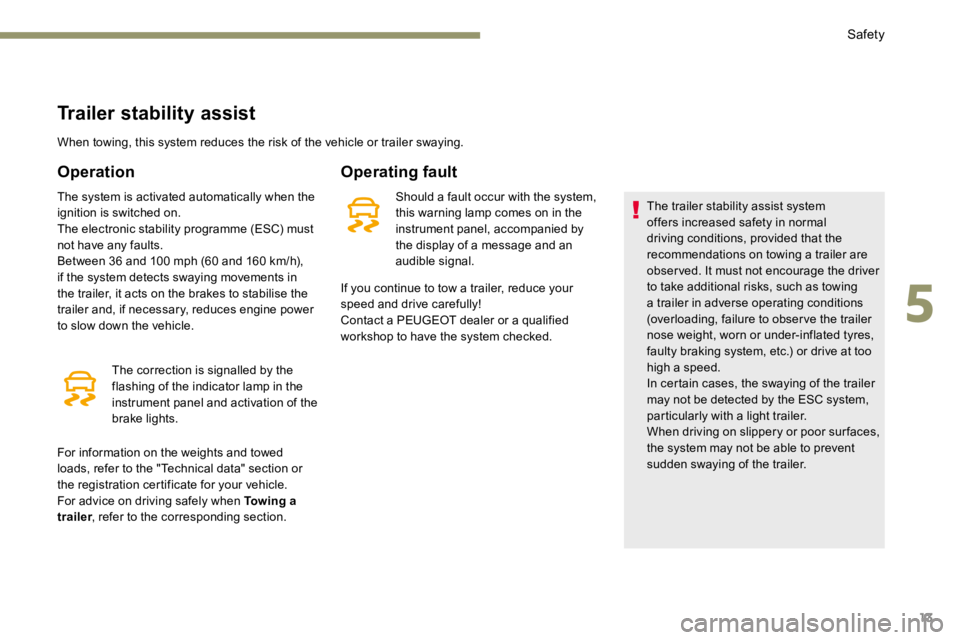
The system is activated automatically when the
ignition is switched on.
The electronic stability programme (ESC) must
not have any faults.
Between 36 and 100 mph (60 and 160 km/h),
if the system detects swaying movements in
the trailer, it acts on the brakes to stabilise the
trailer and, if necessary, reduces engine power
to slow down the vehicle.The correction is signalled by the
flashing of the indicator lamp in the
instrument panel and activation of the
brake lights.
Operating fault
Should a fault occur with the system,
this warning lamp comes on in the
instrument panel, accompanied by
the display of a message and an
audible signal. The trailer stability assist system
offers increased safety in normal
driving conditions, provided that the
recommendations on towing a trailer are
obser ved. It must not encourage the driver
to take additional risks, such as towing
a trailer in adverse operating conditions
(overloading, failure to obser ve the trailer
nose weight, worn or under-inflated tyres,
faulty braking system, etc.) or drive at too
high a speed.
In certain cases, the swaying of the trailer
may not be detected by the ESC system,
particularly with a light trailer.
When driving on slippery or poor sur faces,
the system may not be able to prevent
sudden swaying of the trailer.
If you continue to tow a trailer, reduce your
speed and drive carefully!
Contact a PEUGEOT dealer or a qualified
workshop to have the system checked.
For information on the weights and towed
loads, refer to the "Technical data" section or
the registration certificate for your vehicle.
For advice on driving safely when Towing a
trailer , refer to the corresponding section.
5
Safety