instrument panel PEUGEOT 3008 2017 Workshop Manual
[x] Cancel search | Manufacturer: PEUGEOT, Model Year: 2017, Model line: 3008, Model: PEUGEOT 3008 2017Pages: 566, PDF Size: 16.05 MB
Page 214 of 566
SPORT
SPORT
212
3008-2_en_Chap06_conduite_ed01-2016
Steering mounted control paddles
In M or D mode, the steering mounted control
paddles allow the driver to change gear
manually.
F
P
ull the right-hand "+" paddle toward you
and release to change up a gear.
F
P
ull the left-hand "-"
paddle toward you
and release to change down a gear.
The steering mounted control paddles
cannot be used to select neutral or to
select or come out of reverse.
"Sport" button
Activating the Sport programme or the
Dynamic pack is not recommended in the
following situations:
-
o
ne of the special modes (other than
standard mode) of Grip control is on,
-
l
ow fuel level reached,
-
l
ow AdBlue level reached.
Sport programme
With the engine running, when the programme
associated with the button is active, the
gearbox delays changing up for a more
dynamic driving style.
The programme is automatically deactivated
when the ignition is switched off.
Pressing this button has no effect when
a trailer is connected.In D mode, pressing this button
activates the Sport programme.
"S" appears in the instrument panel.Dynamic pack
You can activate or deactivate the function:
-
b y pressing this button,
or
-
v
ia the i-Cockpit Amplify function, by
modifying the setting for an ambience in
the touch screen.
For more information on the Dynamic Pack
and the i-Cockpit Amplify function, refer to
the corresponding section. The indicator lamp in the button is on
when the Dynamic pack
is activated.
Driving
Page 215 of 566
213
3008-2_en_Chap06_conduite_ed01-2016
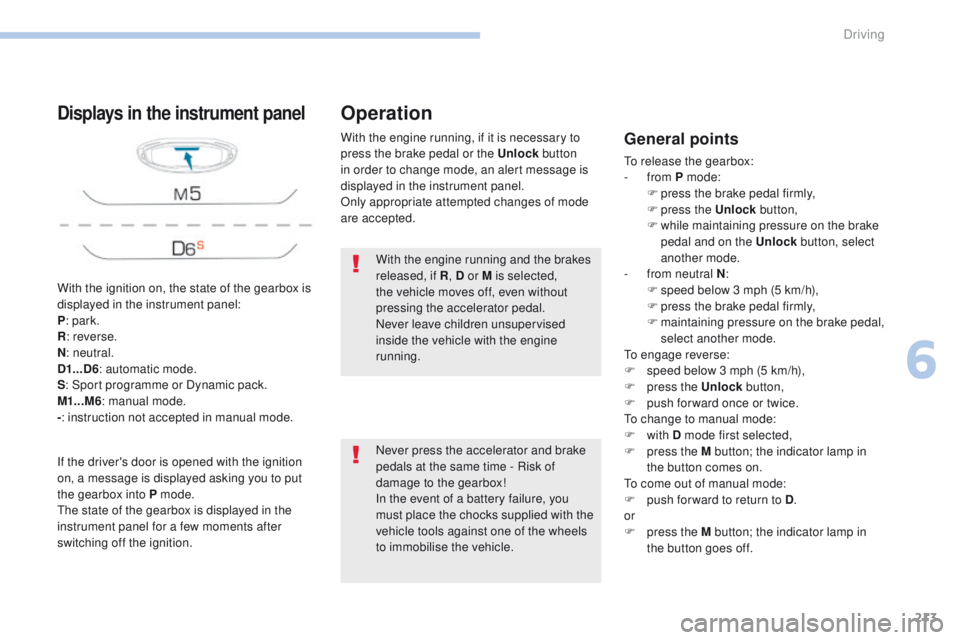
With the ignition on, the state of the gearbox is
displayed in the instrument panel:
P: park.
R : reverse.
N : neutral.
D1...D6 : automatic mode.
S : Sport programme or Dynamic pack.
M1...M6 : manual mode.
- : instruction not accepted in manual mode.
Displays in the instrument panel
If the driver's door is opened with the ignition
on, a message is displayed asking you to put
the gearbox into P mode.
The state of the gearbox is displayed in the
instrument panel for a few moments after
switching off the ignition. With the engine running, if it is necessary to
press the brake pedal or the Unlock
button
in order to change mode, an alert message is
displayed in the instrument panel.
Only appropriate attempted changes of mode
are accepted.
Operation
General points
To release the gearbox:
- from P mode:
F
p
ress the brake pedal firmly,
F
press the Unlock button,
F
w
hile maintaining pressure on the brake
pedal and on the Unlock button, select
another mode.
-
f
rom neutral N :
F
s
peed below 3 mph (5 km/h),
F
p
ress the brake pedal firmly,
F
m
aintaining pressure on the brake pedal,
select another mode.
To engage reverse:
F
s
peed below 3 mph (5 km/h),
F
p
ress the Unlock button,
F
p
ush forward once or twice.
To change to manual mode:
F
with D mode first selected,
F
p
ress the M button; the indicator lamp in
the button comes on.
To come out of manual mode:
F
p
ush for ward to return to D .
or
F
p
ress the M button; the indicator lamp in
the button goes off.
With the engine running and the brakes
released, if R
, D or M is selected,
the vehicle moves off, even without
pressing the accelerator pedal.
Never leave children unsupervised
inside the vehicle with the engine
running.
Never press the accelerator and brake
pedals at the same time - Risk of
damage to the gearbox!
In the event of a battery failure, you
must place the chocks supplied with the
vehicle tools against one of the wheels
to immobilise the vehicle.
6
Driving
Page 217 of 566
215
3008-2_en_Chap06_conduite_ed01-2016
In severe wintry conditions (temperature
below -23°C), it is recommended that
the engine be allowed to run for a few
minutes before moving off, to ensure
the correct operation and durability of
the engine and gearbox.
Stopping the vehicle
Whatever the state of the gearbox when the
ignition is switched off, P mode is engaged
automatically, with the exception of N, in which
case P
mode will be engaged after a delay of
5 seconds (allowing the change to free-wheel).
Check that P mode has been engaged and
that the electric parking brake was applied
automatically; if not, apply it manually.
Operating faults
Malfunction of the gearbox Malfunction of the selector
In the event of a minor fault
In the event of a serious fault
Stop as soon as it is safe to do so, away
from the traffic, and call a PEUGEOT
dealer or a qualified workshop.
When the ignition is switched off,
the gearbox goes into P mode
automatically.You are alerted by the illumination of
this warning lamp.
The corresponding indicator lamps
for the selector panel and the electric
parking brake control lever must
be on, as well as the ones in the
instrument panel.
This is signalled by the illumination of
this warning lamp, accompanied by the
display of a message and an audible
signal, when the ignition is switched on.
The gearbox goes into back-up mode: D mode
stays in third gear, the steering mounted control
paddles are inoperative, M mode is no longer
available. You may feel a pronounced jolt when
engaging reverse. This does not present any
risk for the gearbox.
Do not drive faster than 62 mph (100 km/h),
keeping to the speed limit.
Go to a PEUGEOT dealer or a qualified
workshop.
You are alerted by the illumination of this
warning lamp, accompanied by the display
of a message and an audible signal.
In certain cases, the selector lamps may not
come on, but the state of the gearbox is still
displayed in the instrument panel.
Drive cautiously and go to a PEUGEOT or a
qualified workshop.
6
Driving
Page 219 of 566
SPORT
217
3008-2_en_Chap06_conduite_ed01-2016
Dynamic Pack
This pack adapts:
- t he display colour for the instrument panel,
-
t
he acoustic ambience of the engine,
-
t
he level of power assistance for the steering,
-
acceleration,
-
t
he management of gear changes with an
automatic gearbox,
-
t
he display in the instrument panel of
information on the vehicle's dynamic
parameters.
Activation
F Press and hold this button until
the instrument panel colour
changes (red); the indicator lamp
in the button comes on.
Displays
F Press the end of the wiper control stalk to display the various dynamic parameters in
the instrument panel.
F
P
ress repeatedly to go from one screen to
another. You can also display this information with the
"PERSONAL" mode of the instrument panel.
If the indicator lamp flashes, activation
is not possible (for example, if Park
Assist is selected) and the instrument
panel display colour returns to its
normal mode.
If the indicator lamp continues flashing
for a long time, contact a PEUGEOT
dealer or a qualified workshop. This telemetry information (power
output, turbocharger pressure, torque,
longitudinal and lateral acceleration, ...)
is given as an indication only.
The Dynamic pack is also managed
by the i-Cockpit Amplify
function.
For more information on the i-Cockpit Amplify
function, refer to the corresponding section.
6
Driving
Page 220 of 566
218
3008-2_en_Chap06_conduite_ed01-2016
Gear shift indicator*
Depending on the driving situation and your
vehicle's equipment, the system may advise
you to skip one (or more) gear(s). You can
follow this instruction without engaging the
intermediate gears.
The gear engagement recommendations must
not be considered compulsory. In fact, the
configuration of the road, the amount of traffic
and safety remain determining factors when
choosing the best gear. Therefore, the driver
remains responsible for deciding whether or not
to follow the advice given by the system.
This function cannot be deactivated.-
Y
ou press the accelerator pedal.
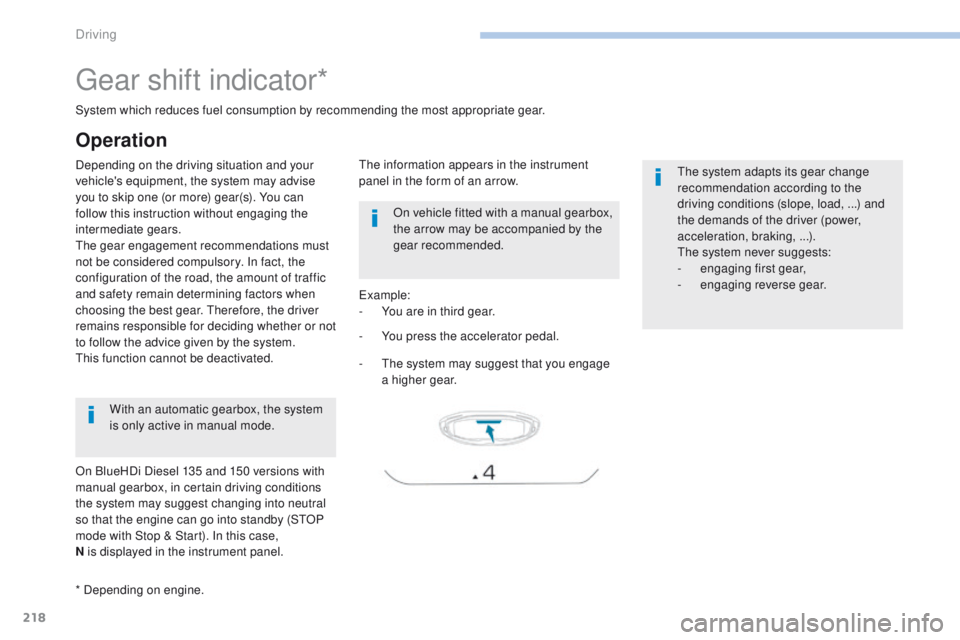
Example:
-
Y
ou are in third gear.
-
T
he system may suggest that you engage
a higher gear.
The information appears in the instrument
panel in the form of an arrow.
System which reduces fuel consumption by recommending the most appropriate gear.
With an automatic gearbox, the system
is only active in manual mode.
* Depending on engine. On vehicle fitted with a manual gearbox,
the arrow may be accompanied by the
gear recommended.
The system adapts its gear change
recommendation according to the
driving conditions (slope, load,
...) and
the demands of the driver (power,
acceleration, braking,
...).
The system never suggests:
-
e
ngaging first gear,
-
enga
ging reverse gear.
Operation
On BlueHDi Diesel 135 and 150 versions with
manual gearbox, in certain driving conditions
the system may suggest changing into neutral
so that the engine can go into standby (STOP
mode with Stop & Start). In this case,
N is displayed in the instrument panel.
Driving
Page 221 of 566
219
3008-2_en_Chap06_conduite_ed01-2016
Stop & Start
Operation
Going into engine STOP mode
This indicator lamp comes on in the
instrument panel and the engine
goes into standby automatically:
-
w
ith a manual gearbox , at speeds below
12 mph (20 km/h) or vehicle stationary with
the PureTech 130 petrol and BlueHDi 115
and 120 Diesel versions, when you place
the gear lever in neutral and you release
the clutch pedal,
A time counter calculates the sum of the
periods in STOP mode during a journey. It
resets itself to zero every time the ignition is
switched on with the key or the START/STOP
button. -
w
ith an automatic gearbox , vehicle
stationary, when you press the brake pedal
or put the gear selector in N mode.
The Stop & Start
system puts the engine
temporarily into standby - STOP mode
-
during stops in the traffic (red lights,
traffic jams,
...). The engine restarts
automatically
-
START
mode - as soon as
you want to move off. The restart takes place
instantly, quickly and silently.
Per fect for urban use, the Stop & Start system
reduces fuel consumption and exhaust
emissions as well as the noise level when
stationary.
Never refuel with the engine in
STOP
mode; you must switch off the
ignition with the key or the S TA R T/
STOP button.
For your comfort, during parking
manoeuvres, STOP mode is not
available for a few seconds after
coming out of reverse gear.
Stop & Start does not affect the
operation of vehicle systems such as
braking, power steering...
6
Driving
Page 223 of 566
221
3008-2_en_Chap06_conduite_ed01-2016
Deactivation / Reactivation
In certain circumstances, such as the need
to maintain the temperature in the passenger
compartment, it may be useful to deactivate the
Stop & Start system.
The system can be deactivated at any time,
once the ignition is switched on.
If the engine is in STOP mode, it then restarts.
The Stop & Start system is reactivated
automatically every time the ignition is
switched
on.
Opening the bonnet
Before doing anything under the
bonnet, deactivate the Stop & Start
system to avoid the risk of injury
related to an automatic change to
S TA R T
m o d e .
Driving on flooded roads
Before driving through a flooded road,
it is strongly recommended that you
deactivate the Stop & Start system.
For more information on Driving
advice , particularly on flooded roads,
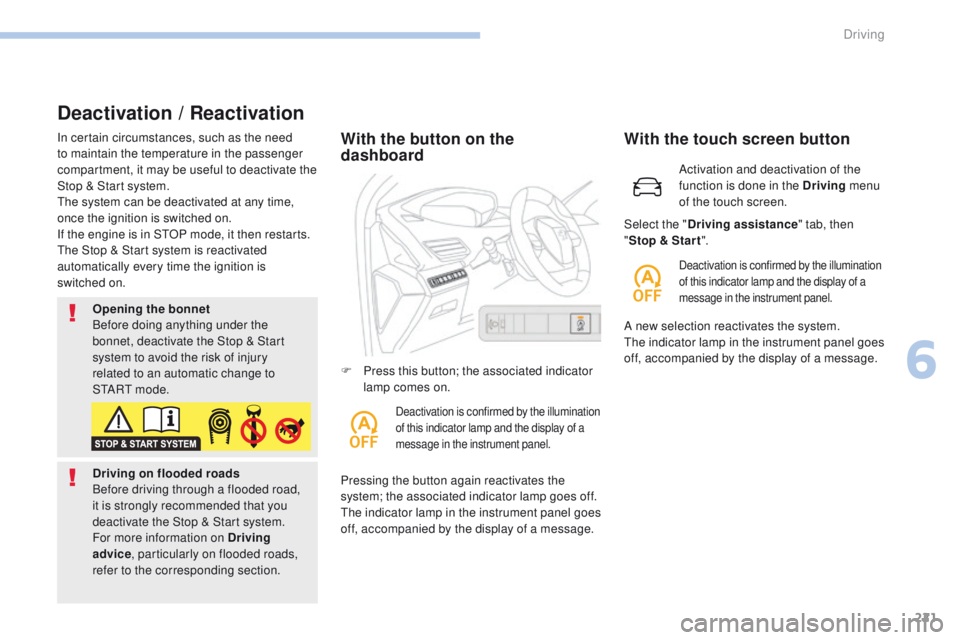
refer to the corresponding section.With the button on the
dashboard
Pressing the button again reactivates the
system; the associated indicator lamp goes off.
The indicator lamp in the instrument panel goes
off, accompanied by the display of a message. F
P
ress this button; the associated indicator
lamp comes on.
Deactivation is confirmed by the illumination
of this indicator lamp and the display of a
message in the instrument panel.
Activation and deactivation of the
function is done in the Driving menu
of the touch screen.
With the touch screen button
Deactivation is confirmed by the illumination
of this indicator lamp and the display of a
message in the instrument panel.
Select the " Driving assistance " tab, then
" Stop & Star t ".
A new selection reactivates the system.
The indicator lamp in the instrument panel goes
off, accompanied by the display of a message.
6
Driving
Page 224 of 566
222
3008-2_en_Chap06_conduite_ed01-2016
Operating fault
The Stop & Start system requires a
12 V battery of specific technology and
specification.
All work on this type of battery must be
carried out only by a PEUGEOT dealer
or a qualified workshop.
For more information on the
12 V batter y , refer to the corresponding
section. In the event of a fault with the system,
this warning lamp flashes for a few
moments in the instrument panel,
then remains on, accompanied by the
display of a message.
In the event of a fault in STOP mode,
the
vehicle may stall.
All of the instrument panel warning lamps
come
on.
It is then necessary to switch off the ignition
and start the engine again with the key or the
" START/STOP " button.
Have it checked by a PEUGEOT dealer or a
qualified workshop.
Driving
Page 229 of 566
227
3008-2_en_Chap06_conduite_ed01-2016
Speed limit recognition
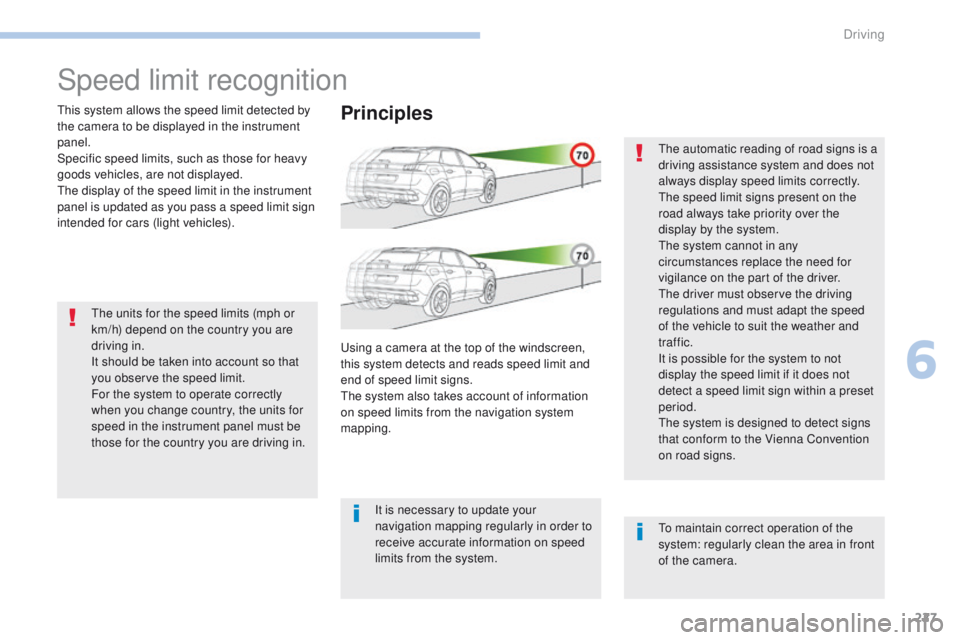
This system allows the speed limit detected by
the camera to be displayed in the instrument
panel.
Specific speed limits, such as those for heavy
goods vehicles, are not displayed.
The display of the speed limit in the instrument
panel is updated as you pass a speed limit sign
intended for cars (light vehicles).The units for the speed limits (mph or
km/h) depend on the country you are
driving in.
It should be taken into account so that
you observe the speed limit.
For the system to operate correctly
when you change country, the units for
speed in the instrument panel must be
those for the country you are driving in. The automatic reading of road signs is a
driving assistance system and does not
always display speed limits correctly.
The speed limit signs present on the
road always take priority over the
display by the system.
The system cannot in any
circumstances replace the need for
vigilance on the part of the driver.
The driver must observe the driving
regulations and must adapt the speed
of the vehicle to suit the weather and
traffic.
It is possible for the system to not
display the speed limit if it does not
detect a speed limit sign within a preset
period.
The system is designed to detect signs
that conform to the Vienna Convention
on road signs.
To maintain correct operation of the
system: regularly clean the area in front
of the camera.Principles
Using a camera at the top of the windscreen,
this system detects and reads speed limit and
end of speed limit signs.
The system also takes account of information
on speed limits from the navigation system
mapping.
It is necessary to update your
navigation mapping regularly in order to
receive accurate information on speed
limits from the system.
6
Driving
Page 230 of 566
228
3008-2_en_Chap06_conduite_ed01-2016
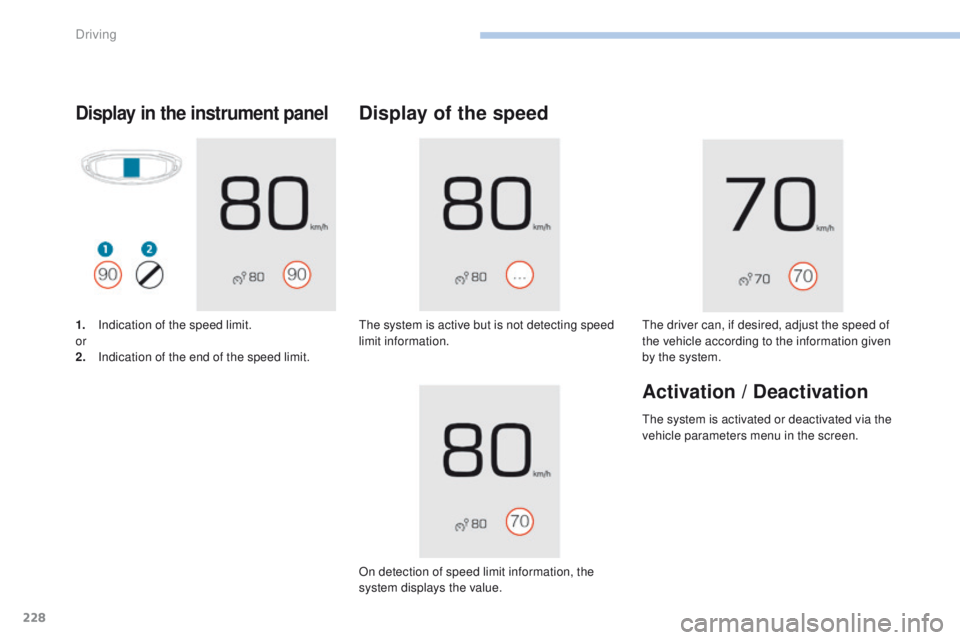
Display in the instrument panel
1. Indication of the speed limit.
or
2.
I
ndication of the end of the speed limit.
Display of the speed
The system is active but is not detecting speed
limit information.
On detection of speed limit information, the
system displays the value. The driver can, if desired, adjust the speed of
the vehicle according to the information given
by the system.
Activation / Deactivation
The system is activated or deactivated via the
vehicle parameters menu in the screen.
Driving