instrument panel PEUGEOT 3008 2017 Repair Manual
[x] Cancel search | Manufacturer: PEUGEOT, Model Year: 2017, Model line: 3008, Model: PEUGEOT 3008 2017Pages: 566, PDF Size: 16.05 MB
Page 231 of 566
229
3008-2_en_Chap06_conduite_ed01-2016
Memorising the speed
setting
This memorisation is in addition to the display
of Speed limit recognition.
The driver can choose to adapt the speed
setting to the speed limit suggested, by
pressing the memorisation button for the speed
limiter, the standard cruise control and the
dynamic cruise control with Stop function.
This speed setting then replaces the previous
speed setting for the speed limiter and/or cruise
control. For more information on the Speed
limiter, Cruise control , or Dynamic
cruise control with Stop function ,
refer to the corresponding sections.
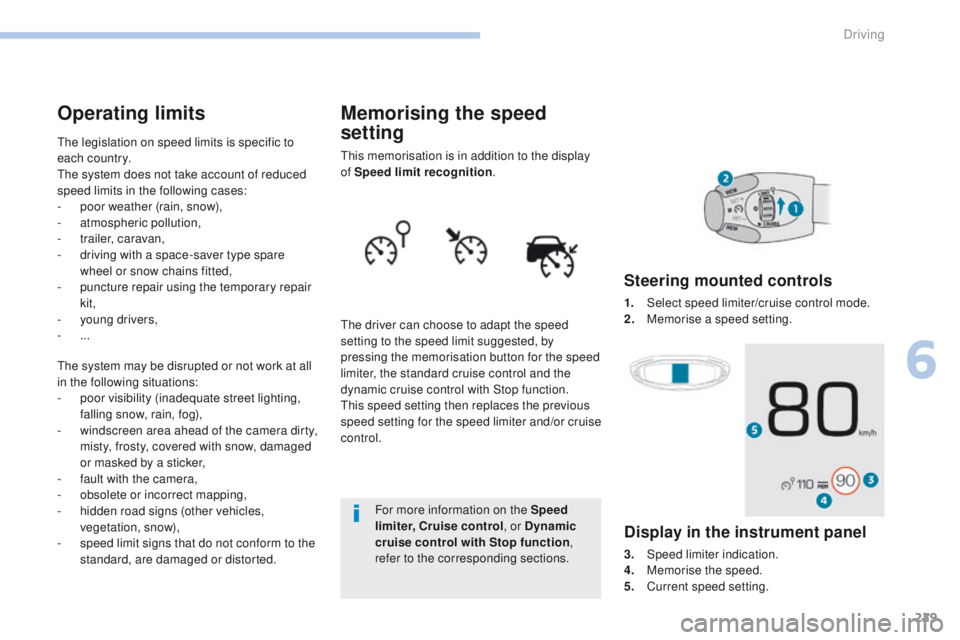
Steering mounted controls
1. Select speed limiter/cruise control mode.
2. M emorise a speed setting.
Operating limits
The legislation on speed limits is specific to
each country.
The system does not take account of reduced
speed limits in the following cases:
-
p
oor weather (rain, snow),
-
a
tmospheric pollution,
-
t
railer, caravan,
-
d
riving with a space-saver type spare
wheel or snow chains fitted,
-
p
uncture repair using the temporary repair
kit,
-
y
oung drivers,
-
...
The system may be disrupted or not work at all
in the following situations:
-
p
oor visibility (inadequate street lighting,
falling snow, rain, fog),
-
w
indscreen area ahead of the camera dirty,
misty, frosty, covered with snow, damaged
or masked by a sticker,
-
f
ault with the camera,
-
o
bsolete or incorrect mapping,
-
h
idden road signs (other vehicles,
vegetation, snow),
-
s
peed limit signs that do not conform to the
standard, are damaged or distorted.
Display in the instrument panel
3. Speed limiter indication.
4. M emorise the speed.
5.
C
urrent speed setting.
6
Driving
Page 233 of 566
231
3008-2_en_Chap06_conduite_ed01-2016
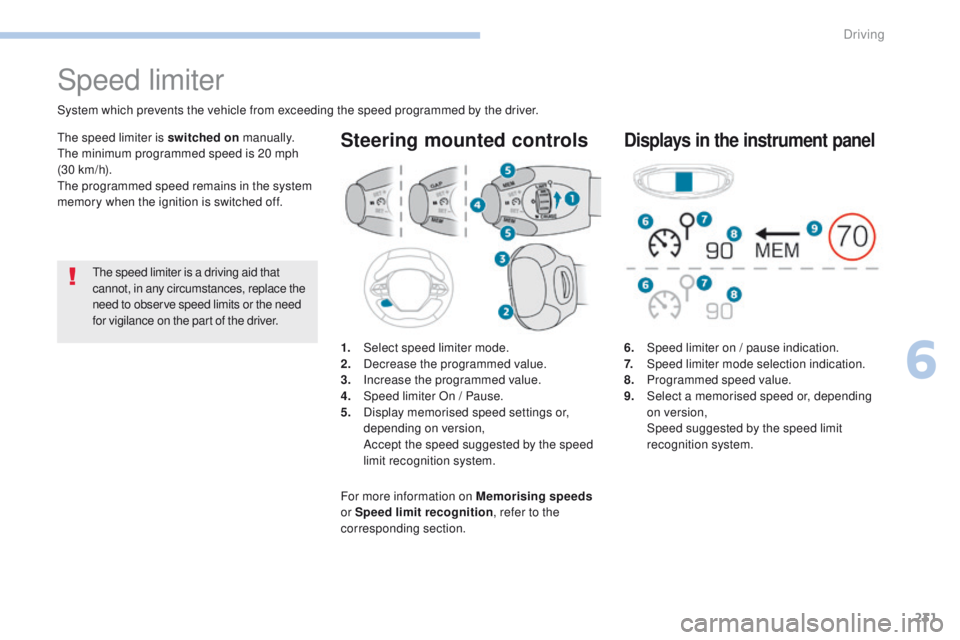
6. Speed limiter on / pause indication.
7. Speed limiter mode selection indication.
8.
P
rogrammed speed value.
9.
S
elect a memorised speed or, depending
on version,
Spe
ed suggested by the speed limit
recognition system.
Displays in the instrument panel
Speed limiter
1. Select speed limiter mode.
2. D ecrease the programmed value.
3.
In
crease the programmed value.
4.
S
peed limiter On / Pause.
5.
D
isplay memorised speed settings or,
depending on version,
A
ccept the speed suggested by the speed
limit recognition system.
Steering mounted controls
System which prevents the vehicle from exceeding the speed programmed by the driver.
The speed limiter is a driving aid that
cannot, in any circumstances, replace the
need to observe speed limits or the need
for vigilance on the part of the driver.
The speed limiter is switched on
manually.
The minimum programmed speed is 20 mph
(30 km/h).
The programmed speed remains in the system
memory when the ignition is switched off.
For more information on Memorising speeds
or Speed limit recognition , refer to the
corresponding section.
6
Driving
Page 234 of 566
232
3008-2_en_Chap06_conduite_ed01-2016
Switching on
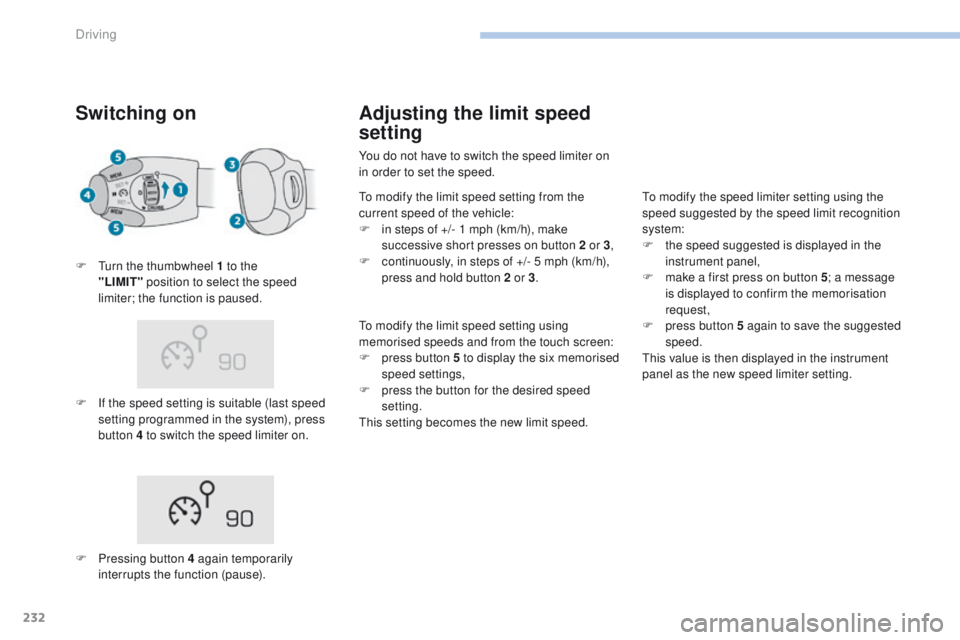
F If the speed setting is suitable (last speed setting programmed in the system), press
button 4 to switch the speed limiter on.
F
T
urn the thumbwheel 1 to the
"LIMIT"
position to select the speed
limiter; the function is paused.
F
P
ressing button 4 again temporarily
interrupts the function (pause).
Adjusting the limit speed
setting
You do not have to switch the speed limiter on
in order to set the speed.
To modify the limit speed setting from the
current speed of the vehicle:
F
i
n steps of +/- 1 mph (km/h), make
successive short presses on button 2 or 3 ,
F
c
ontinuously, in steps of +/- 5 mph (km/h),
press and hold button 2 or 3 .
To modify the limit speed setting using
memorised speeds and from the touch screen:
F
p
ress button 5 to display the six memorised
speed settings,
F
p
ress the button for the desired speed
setting.
This setting becomes the new limit speed. To modify the speed limiter setting using the
speed suggested by the speed limit recognition
system:
F
t
he speed suggested is displayed in the
instrument panel,
F
m
ake a first press on button 5; a message
is displayed to confirm the memorisation
request,
F
p
ress button 5 again to save the suggested
speed.
This value is then displayed in the instrument
panel as the new speed limiter setting.
Driving
Page 236 of 566
234
3008-2_en_Chap06_conduite_ed01-2016
Cruise control
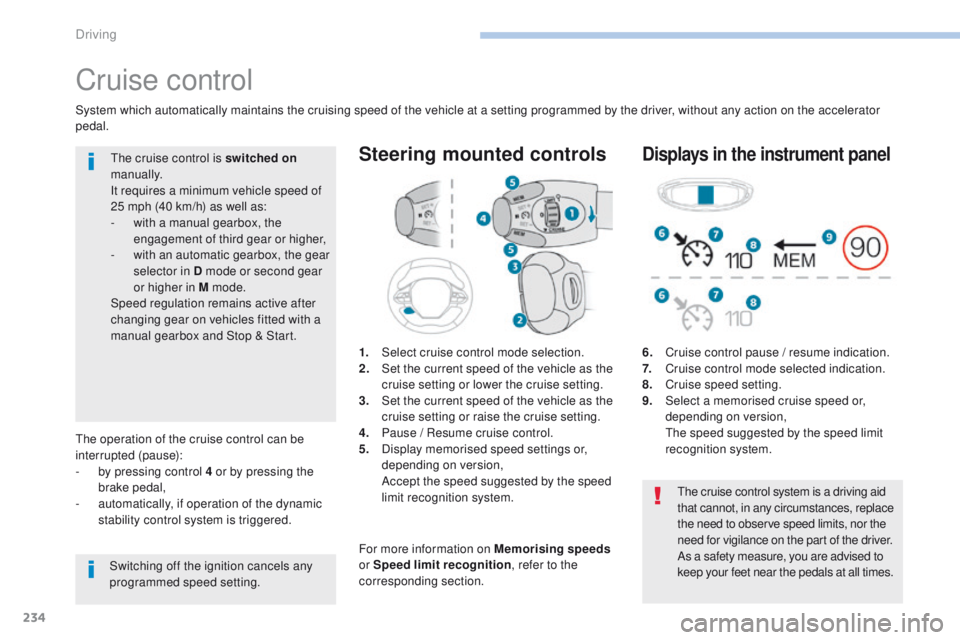
1. Select cruise control mode selection.
2. Set the current speed of the vehicle as the
cruise setting or lower the cruise setting.
3.
S
et the current speed of the vehicle as the
cruise setting or raise the cruise setting.
4.
P
ause / Resume cruise control.
5.
D
isplay memorised speed settings or,
depending on version,
A
ccept the speed suggested by the speed
limit recognition system.
Steering mounted controls
6. Cruise control pause / resume indication.
7. C ruise control mode selected indication.
8.
C
ruise speed setting.
9.
S
elect a memorised cruise speed or,
depending on version,
T
he speed suggested by the speed limit
recognition system.
Displays in the instrument panel
The operation of the cruise control can be
interrupted (pause):
-
b
y pressing control 4 or by pressing the
brake pedal,
-
a
utomatically, if operation of the dynamic
stability control system is triggered.
Switching off the ignition cancels any
programmed speed setting.The cruise control is switched on
manually.
It requires a minimum vehicle speed of
25 mph (40 km/h) as well as:
-
w
ith a manual gearbox, the
engagement of third gear or higher,
-
w
ith an automatic gearbox, the gear
selector in D mode or second gear
or higher in M mode.
Speed regulation remains active after
changing gear on vehicles fitted with a
manual gearbox and Stop & Start.
System which automatically maintains the cruising speed of the vehicle at a setting programmed by the driver, without any action on the accelerator
pedal.
The cruise control system is a driving aid
that cannot, in any circumstances, replace
the need to observe speed limits, nor the
need for vigilance on the part of the driver.
As a safety measure, you are advised to
keep your feet near the pedals at all times.
For more information on Memorising speeds
or Speed limit recognition , refer to the
corresponding section.
Driving
Page 238 of 566
236
3008-2_en_Chap06_conduite_ed01-2016
As a precaution, it is recommended
that the cruise speed chosen be close
to the current speed of your vehicle, so
as to avoid any sudden acceleration or
deceleration of the vehicle.
Temporarily exceeding the
programmed speed
When descending a steep hill, the
cruise control system cannot prevent
the vehicle from exceeding the
programmed speed.
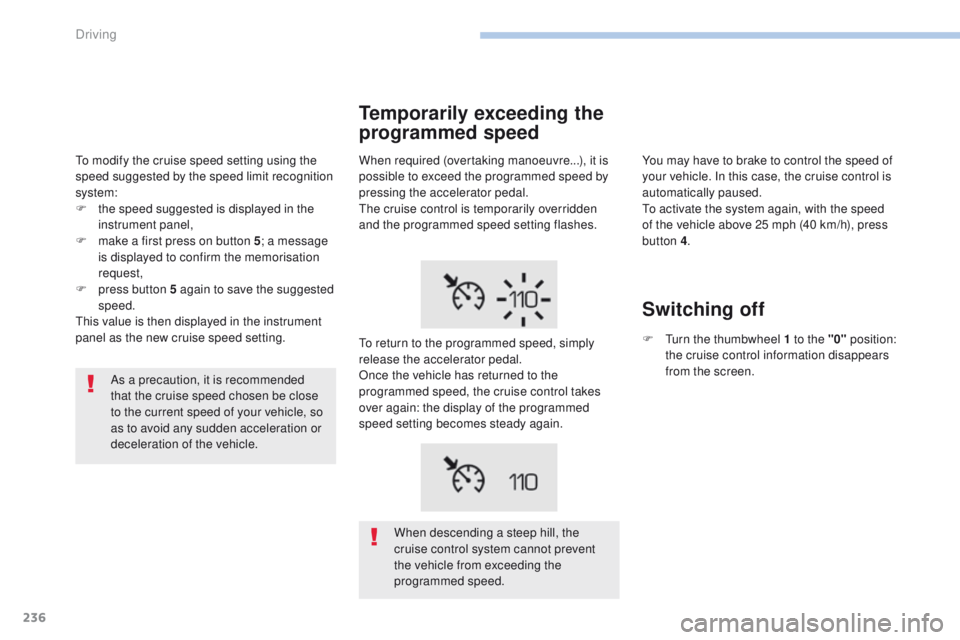
When required (overtaking manoeuvre...), it is
possible to exceed the programmed speed by
pressing the accelerator pedal.
The cruise control is temporarily overridden
and the programmed speed setting flashes.
To return to the programmed speed, simply
release the accelerator pedal.
Once the vehicle has returned to the
programmed speed, the cruise control takes
over again: the display of the programmed
speed setting becomes steady again.
You may have to brake to control the speed of
your vehicle. In this case, the cruise control is
automatically paused.
To activate the system again, with the speed
of the vehicle above 25 mph (40 km/h), press
button 4
.
Switching off
F Turn the thumbwheel 1 to the "0" position:
the cruise control information disappears
from the screen.
To modify the cruise speed setting using the
speed suggested by the speed limit recognition
system:
F
t
he speed suggested is displayed in the
instrument panel,
F
m
ake a first press on button 5
; a message
is displayed to confirm the memorisation
request,
F
p
ress button 5 again to save the suggested
speed.
This value is then displayed in the instrument
panel as the new cruise speed setting.
Driving
Page 241 of 566
239
3008-2_en_Chap06_conduite_ed01-2016
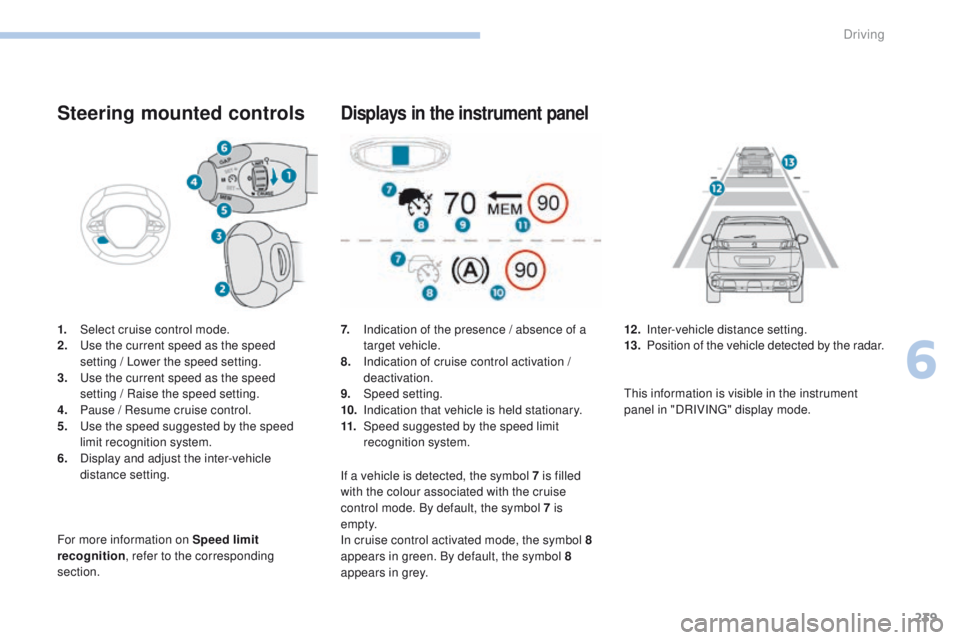
Steering mounted controls
1. Select cruise control mode.
2. Use the current speed as the speed
setting
/ Lower the speed setting.
3.
U
se the current speed as the speed
setting
/ Raise the speed setting.
4.
P
ause / Resume cruise control.
5.
U
se the speed suggested by the speed
limit recognition system.
6.
D
isplay and adjust the inter-vehicle
distance setting.
For more information on Speed limit
recognition , refer to the corresponding
section.
Displays in the instrument panel
7. Indication of the presence / absence of a target vehicle.
8.
I
ndication of cruise control activation /
deactivation.
9.
Spe
ed setting.
10.
I
ndication that vehicle is held stationary.
11.
Spe
ed suggested by the speed limit
recognition system. 12 . I
nter-vehicle distance setting.
13. P osition of the vehicle detected by the radar.
If a vehicle is detected, the symbol 7
is filled
with the colour associated with the cruise
control mode. By default, the symbol 7 is
e m pt y.
In cruise control activated mode, the symbol
8
appears in green. By default, the symbol 8
appears in grey. This information is visible in the instrument
panel in "DRIVING" display mode.
6
Driving
Page 243 of 566
241
3008-2_en_Chap06_conduite_ed01-2016
When the cruise control is paused,
it can only be reactivated when all of
the safety conditions are met. The
message "Activation not possible,
conditions unsuitable" is displayed while
reactivation is not possible.
Wait until the speed of the vehicle
is close to the speed setting before
reactivating the system - by pressing
button 2 or 3 - in order to set your
current speed as the new speed setting.
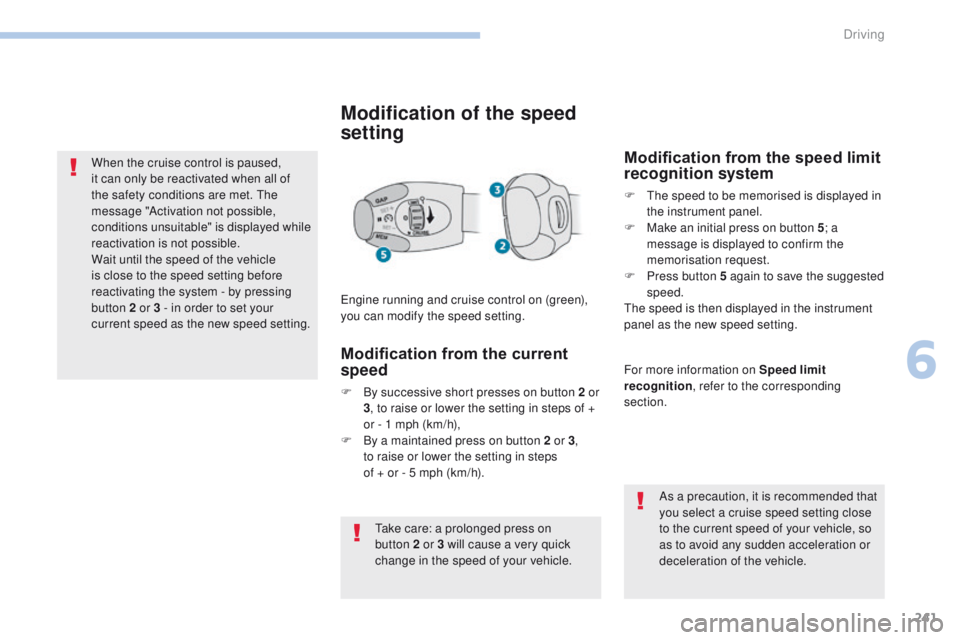
Modification of the speed
setting
Engine running and cruise control on (green),
you can modify the speed setting.As a precaution, it is recommended that
you select a cruise speed setting close
to the current speed of your vehicle, so
as to avoid any sudden acceleration or
deceleration of the vehicle.
Modification from the speed limit
recognition system
F The speed to be memorised is displayed in the instrument panel.
F
M
ake an initial press on button 5 ; a
message is displayed to confirm the
memorisation request.
F
P
ress button 5 again to save the suggested
speed.
The speed is then displayed in the instrument
panel as the new speed setting.
Modification from the current
speed
F By successive short presses on button 2 or 3, to raise or lower the setting in steps of +
or - 1 mph (km/h),
F
B
y a maintained press on button 2 or 3 ,
to
raise or lower the setting in steps
of + or - 5 mph (km/h). For more information on Speed limit
recognition
, refer to the corresponding
section.
Take care: a prolonged press on
button
2 or 3 will cause a very quick
change in the speed of your vehicle.
6
Driving
Page 245 of 566
70
70
243
3008-2_en_Chap06_conduite_ed01-2016
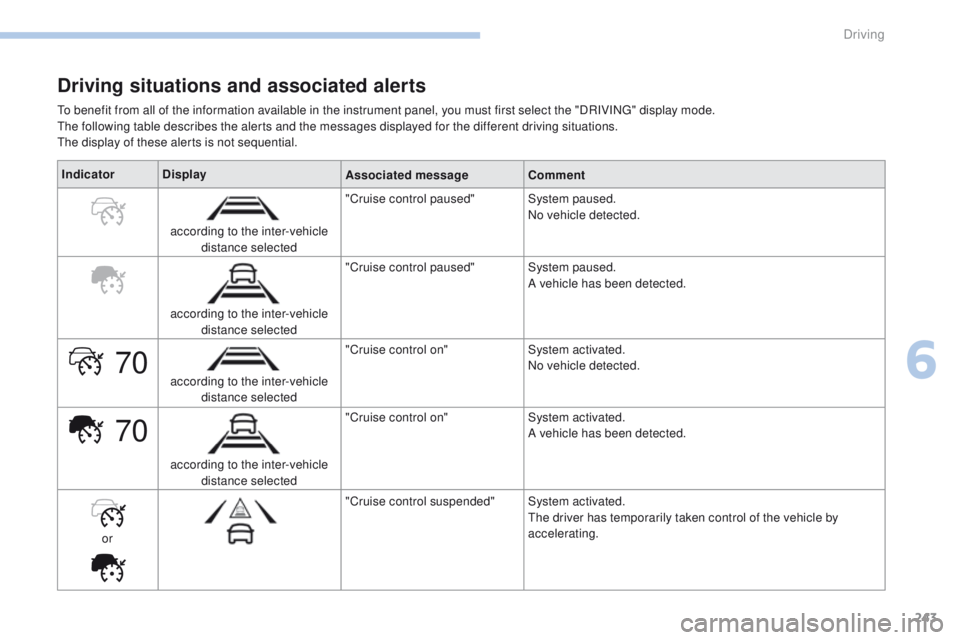
Driving situations and associated alerts
To benefit from all of the information available in the instrument panel, you must first select the "DRIVING" display mode.
The following table describes the alerts and the messages displayed for the different driving situations.
The display of these alerts is not sequential.Indicator Display
Associated messageComment
according to the inter-vehicle distance selected "Cruise control paused"
System paused.
No vehicle detected.
according to the inter-vehicle distance selected "Cruise control paused"
System paused.
A vehicle has been detected.
according to the inter-vehicle distance selected "Cruise control on"
System activated.
No vehicle detected.
according to the inter-vehicle distance selected "Cruise control on"
System activated.
A vehicle has been detected.
or "Cruise control suspended"
System activated.
The driver has temporarily taken control of the vehicle by
accelerating.
6
Driving
Page 248 of 566
246
3008-2_en_Chap06_conduite_ed01-2016
Operating fault
Have the system checked by a PEUGEOT
dealer or a qualified workshop.In the event of a fault with the cruise
control, you are alerted by the
illumination of this warning lamp
and the display of a message in the
instrument panel, accompanied by an
audible signal.
The cruise control operates by day and at
night, in fog or moderate rainfall.
However, it is strongly recommended that
you always keep a safe distance from
vehicles ahead, according to the driving
conditions, the weather and the road
sur face.
Use the cruise control only where the
driving conditions allow running at a
constant speed and at an adequate safe
distance.
Do not use the cruise control in urban
areas, heavy traffic, on winding or steep
roads or on slippery or flooded sur faces.
In certain circumstances, it may not
be possible for the speed setting to be
maintained or even attained: loaded
vehicle, ascending a steep hill, ... The system is not intended for driving in the
following situations:
-
t
he front end of the vehicle has been
modified (addition of driving lamps),
-
d
riving on a racing circuit,
-
r
unning on a rolling road,
-
u
se of snow chains or non-slip covers.
As a safety measure, do not use the
system if the brake lamps are faulty.
Do not use the system if the front
bumper is damaged.
The operation of the radar, located in the
front bumper, may be disturbed in certain
weather conditions, for example: with
accumulations of snow, ice, mud, ...
Clean the front bumper, removing the snow,
mud, ... The use of mats not approved by
PEUGEOT may inter fere with the operation
of the cruise control.
To avoid any risk of jamming the pedals:
-
e
nsure that mats are secured correctly,
-
n
ever fit one mat on top of another.
Driving
Page 250 of 566
248
3008-2_en_Chap06_conduite_ed01-2016
Depending on the degree of risk of collision
detected by the system and the alert threshold
chosen by the driver, different levels of alert can be
triggered and displayed in the instrument panel.
Because of limits in the operation of the
system, it is possible that warnings are
not given, are given too late or seem
unjustified.
Consequently, the driver must always
remain attentive and able to react at any
time to avoid an accident.
Distance alert
Level 1: visual alert only, signalling
to you that the vehicle in front is very
close.
The message " Vehicle close" is
displayed.
Limits of operation
In the following cases, it is recommended
that the system be deactivated in the vehicle
configuration menu:
-
w
hen towing a trailer or caravan,
-
w
hen carrying long objects on roof bars or
a roof rack,
-
b
efore using an automatic car wash, with
the engine running,
-
b
efore placing the vehicle on a rolling road
in a workshop,
-
w
hen the vehicle is being towed, with the
engine running,
-
w
hen a "space-saver" type spare wheel is
fitted (depending on version),
-
f
ollowing impact damage to the windscreen
close to the detection camera,
-
i
f the front bumper has been damaged,
-
i
f the brake lamps are not working. This level of alert is based on the inter-vehicle
time between your vehicle and the vehicle in
front.
Level 2: visual and audible alert,
warning you that a collision is
imminent.
The message " Brake!" is displayed.
This level of alert is based on the time before
collision. It takes account of the vehicle
dynamics, the speed of your vehicle and the
one in front, the environmental conditions, the
operation of the vehicle (cornering, pedals
pressed, etc.) to trigger the alert at the best
moment. Where the speed of your vehicle is too
high approaching another vehicle, the
first level of alert may not be displayed:
the level 2 alert may be displayed
di r e c t l y.
Important
: the level 1 alert is never
displayed if the " Close" threshold has
been selected.
Driving