Wing Peugeot 301 2015 Owner's Manual
[x] Cancel search | Manufacturer: PEUGEOT, Model Year: 2015, Model line: 301, Model: Peugeot 301 2015Pages: 285, PDF Size: 13.55 MB
Page 2 of 285
On-line handbook
Select one of the following means of access to view your
handbook on-line...
Referring to the handbook on-line also gives you access to the latest information available, easily identified by the bookmark, associated with
this symbol:If the "MyPEUGEOT" function is not available on the PEUGEOT
public website for your country, you can find your handbook at the
following address:
http://public.servicebox.peugeot.com/ddb/
the language,
the vehicle, its body style,
the print edition of your handbook appropriate for the date of registration of
your vehicle.
Select:
Find your handbook on the PEUGEOT website, under
"MyPEUGEOT".
Scan this code for direct access to your handbook.
This personal space offers advice and other useful information for
the care and maintenance of your vehicle.
Page 3 of 285
KeyWarning:
this symbol marks warnings which it is essential to observe for your
own safety, for the safety of others or to avoid any risk of damaging
your vehicle.
Information:
this symbol draws your attention to additional information for better
use of your vehicle.
Protection of the environment:
this symbol accompanies advice relating to protection of
the environment.
Page reference:
this symbol invites you to refer to the pages which provide details of
the function.
Your vehicle is fitted with only some of the equipment described
in this document, depending on its trim level, version and the
specification for the country in which it was sold.
We draw your attention to the following point:
The fitting of electrical equipment or accessories which are
not recommended by PEUGEOT may result in a failure of your
vehicle's electronic system. Contact a PEUGEOT dealer to be
shown the recommended equipment and accessories.
Thank you for choosing a 301.
This Handbook has been designed to help you make the most
of your 301 in all circumstances.
WELCOME
Page 5 of 285
.
.
Direction indicators 90
Hazard warning lamps
9
0
Horn
90
Under-inflation detection
9
1
Braking assistance systems
9
4
Trajectory control systems
9
5
Front seat belts
9
6
Airbags
9
9
Safety
Child seats 103
Deactivating the passenger's front airbag
1
06
ISOFIX mountings
1
12
Child lock
1
17
Child safety
Fuel tank 118
Misfuel prevention (Diesel)
1
19
Running out of fuel (Diesel)
1
21
Temporary puncture repair kit
1
22
Changing a wheel
1
28
Snow chains
1
35
Changing a bulb
1
36
Changing a fuse
1
42
Battery
1
47
Electrical energy economy mode
1
50
Changing a wiper blade
1
51
Towing the vehicle
1
52
Towing a trailer
1
54
Very cold climate screen(s)
1
56
Advice on care and maintenance
1
57
Accessories
157
Mats
159
Roof bars
1
60
Practical information
Petrol engines 1 71
Petrol weights
1
72
Diesel engine
1
73
Diesel weights
1
74
Dimensions
175
Identification markings
1
76
Technical data
Audio system / Bluetooth 177
Audio system
2
09
Audio equipment and telematics
Visual search
Alphabetical index
Checks
Bonnet
162
Petrol engines
1
63
Diesel engine
1
64
Checking levels
1
65
Checks
16
9
Contents
Page 10 of 285
8
As a passenger, if you avoid connecting your multimedia devices
(film, music, video game...), you will contribute towards limiting the
consumption of electrical energy, and so of fuel.
Disconnect your portable devices before leaving the vehicle.
Eco-driving
Eco-driving is a range of everyday practices that allow the motorist to optimise their fuel consumption and CO2 emissions.
Optimise the use of your gearbox
With a manual gearbox, move off gently, change up without waiting and
drive by changing up quite soon.
With an automatic or electronic gearbox, stay in Drive "D" or Auto "A",
according to the type of gearbox, without pressing the accelerator pedal
heavily or suddenly.
The gear shift indicator invites you to select the most suitable gear:
once the indication is displayed in the instrument panel, follow the
advice straight away.
For vehicles fitted with an electronic or automatic gearbox, this indicator
only appears in manual mode.
Drive smoothly
Maintain a safe distance between vehicles, use engine braking rather
than the brake pedal, and press the accelerator progressively. These
practices contribute towards a reduction in fuel consumption and CO
2
emissions and also helps reduce the background traffic noise.
If your vehicle has cruise control, make use of the system at speeds
above 25 mph (40 km/h) when the traffic is flowing well.
Control the use of your electrical
equipment
Before moving off, if the passenger compartment is too warm,
ventilate it by opening the windows and air vents before using the air
conditioning.
Above 30 mph (50 km/h), close the windows and leave the air vents
open.
Remember to make use of equipment that can help keep the
temperature in the passenger compartment down (window blinds...).
Switch off the air conditioning as soon as the desired temperature is
attained.
Switch off the demisting and defrosting controls, if not automatic.
Switch off the heated seat as soon as possible.
Switch off the headlamps and foglamp when the level of light does not
require their use.
Avoid running the engine before moving off, particularly in winter; your
vehicle will warm up much faster while driving.
Eco-driving
Page 14 of 285
12
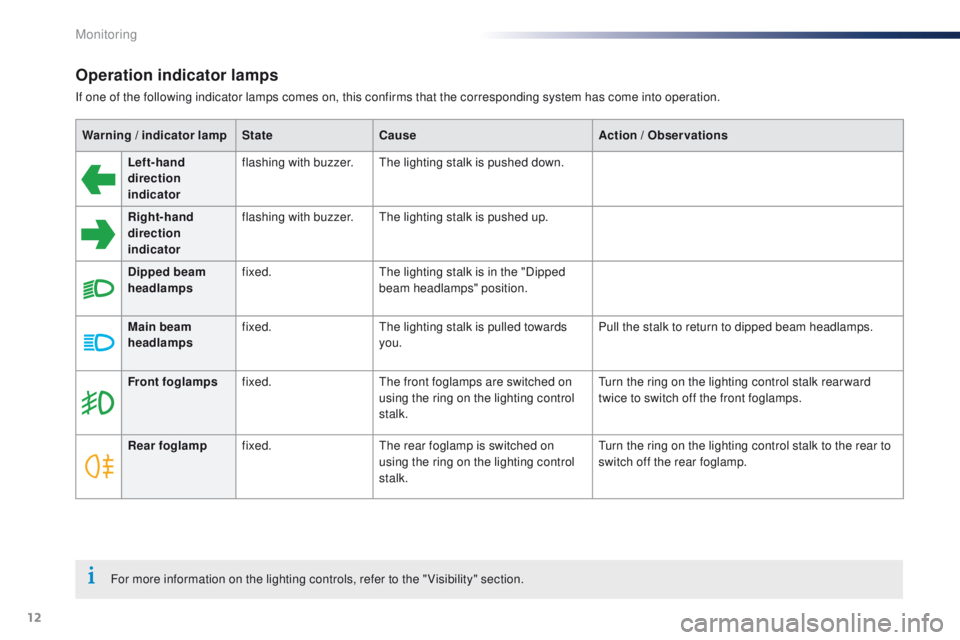
Operation indicator lamps
If one of the following indicator lamps comes on, this confirms that the corresponding system has come into operation.Warning
/ indicator lamp State Cause Action
/ Observations
Left-hand
direction
indicato r flashing with buzzer.
The lighting stalk is pushed down.
Right-hand
direction
indicator flashing with buzzer.
The lighting stalk is pushed up.
Dipped beam
headlamps fixed.
The lighting stalk is in the "Dipped
beam headlamps" position.
Main beam
headlamps fixed.
The lighting stalk is pulled towards
you. Pull the stalk to return to dipped beam headlamps.
Front foglamps fixed. The front foglamps are switched on
using the ring on the lighting control
stalk. Turn the ring on the lighting control stalk rear ward
twice to switch off the front foglamps.
Rear foglamp fixed. The rear foglamp is switched on
using the ring on the lighting control
stalk. Turn the ring on the lighting control stalk to the rear to
switch off the rear foglamp.
For more information on the lighting controls, refer to the " Visibility" section.
Monitoring
Page 16 of 285
14
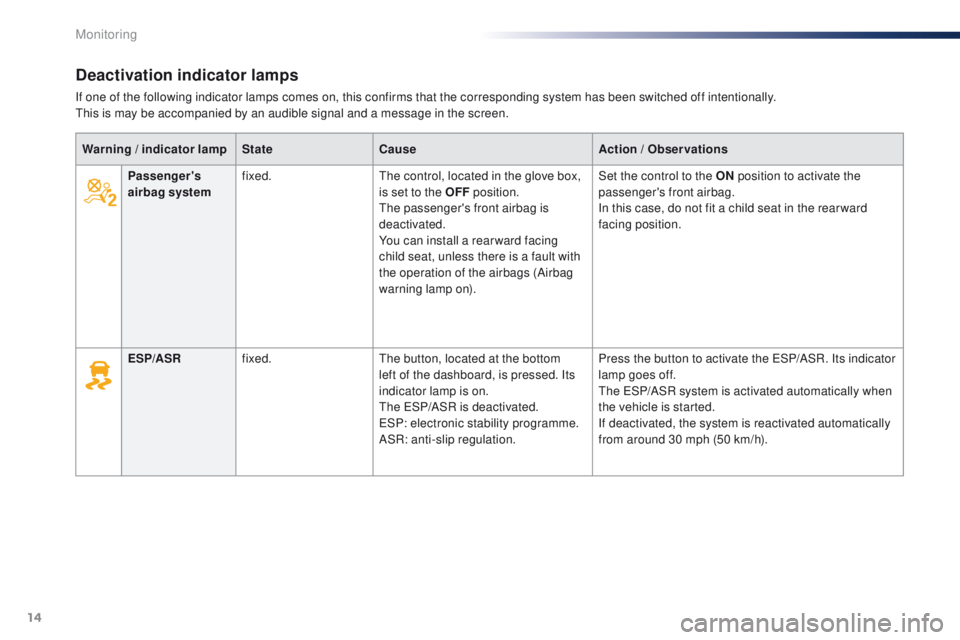
Deactivation indicator lamps
If one of the following indicator lamps comes on, this confirms that the corresponding system has been switched off intentionally.
This is may be accompanied by an audible signal and a message in the screen.Warning
/ indicator lamp State Cause Action
/ Observations
Passenger's
airbag system fixed.
The control, located in the glove box,
is set to the OFF position.
The passenger's front airbag is
deactivated.
You can install a rear ward facing
child seat, unless there is a fault with
the operation of the airbags (Airbag
warning lamp on). Set the control to the ON
position to activate the
passenger's front airbag.
In this case, do not fit a child seat in the rear ward
facing position.
ESP/ASR fixed. The button, located at the bottom
left of the dashboard, is pressed. Its
indicator lamp is on.
The ESP/ASR is deactivated.
ESP: electronic stability programme.
ASR: anti-slip regulation. Press the button to activate the ESP/ASR. Its indicator
lamp goes off.
The ESP/ASR system is activated automatically when
the vehicle is started.
If deactivated, the system is reactivated automatically
from around 30 mph (50 km/h).
Monitoring
Page 17 of 285
15
301_en_Chap01_controle-de-marche_ed01-2014
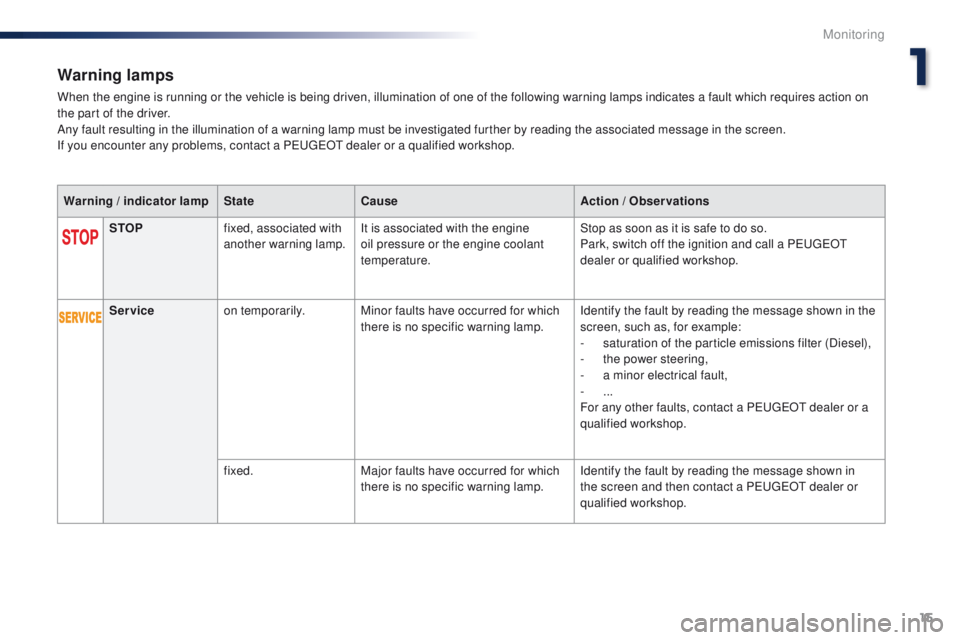
Warning lamps
When the engine is running or the vehicle is being driven, illumination of one of the following warning lamps indicates a fault which requires action on
the part of the driver.
Any fault resulting in the illumination of a warning lamp must be investigated further by reading the associated message in the screen.
If you encounter any problems, contact a PEUGEOT dealer or a qualified workshop.Warning
/ indicator lamp State Cause Action
/ Observations
STOP fixed, associated with
another warning lamp. It is associated with the engine
oil pressure or the engine coolant
temperature. Stop as soon as it is safe to do so.
Park, switch off the ignition and call a PEUGEOT
dealer or qualified workshop.
Service on temporarily. Minor faults have occurred for which
there is no specific warning lamp. Identify the fault by reading the message shown in the
screen, such as, for example:
-
s
aturation of the particle emissions filter (Diesel),
-
t
he power steering,
-
a m
inor electrical fault,
-
...
For any other faults, contact a PEUGEOT dealer or a
qualified workshop.
fixed. Major faults have occurred for which
there is no specific warning lamp. Identify the fault by reading the message shown in
the screen and then contact a PEUGEOT dealer or
qualified workshop.
1
Monitoring
Page 23 of 285
21
301_en_Chap01_controle-de-marche_ed01-2014
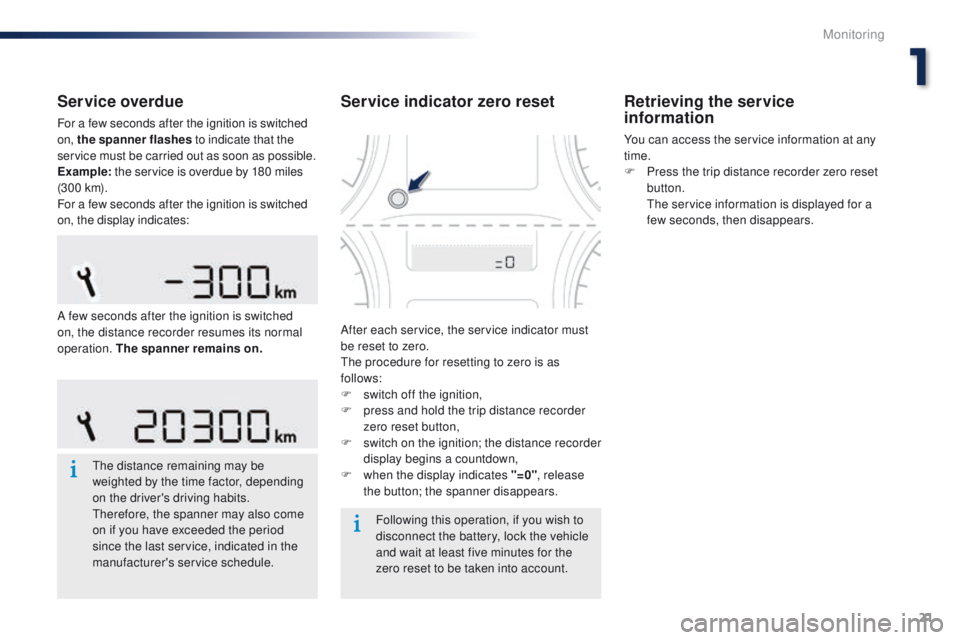
Service overdue
For a few seconds after the ignition is switched
on, the spanner flashes to indicate that the
service must be carried out as soon as possible.
Example: the service is overdue by 180 miles
(3 0 0 k m).
For a few seconds after the ignition is switched
on, the display indicates:
The distance remaining may be
weighted by the time factor, depending
on the driver's driving habits.
Therefore, the spanner may also come
on if you have exceeded the period
since the last service, indicated in the
manufacturer's service schedule. Following this operation, if you wish to
disconnect the battery, lock the vehicle
and wait at least five minutes for the
zero reset to be taken into account.
Service indicator zero reset
After each service, the service indicator must
be reset to zero.
The procedure for resetting to zero is as
follows:
F
s
witch off the ignition,
F
p
ress and hold the trip distance recorder
zero reset button,
F
s
witch on the ignition; the distance recorder
display begins a countdown,
F
w
hen the display indicates "=0" , release
the button; the spanner disappears.
Retrieving the service
information
You can access the service information at any
time.
F
P
ress the trip distance recorder zero reset
button.
T
he service information is displayed for a
few seconds, then disappears.
A few seconds after the ignition is switched
on, the distance recorder resumes its normal
operation. The spanner remains on .
1
Monitoring
Page 25 of 285
23
301_en_Chap01_controle-de-marche_ed01-2014
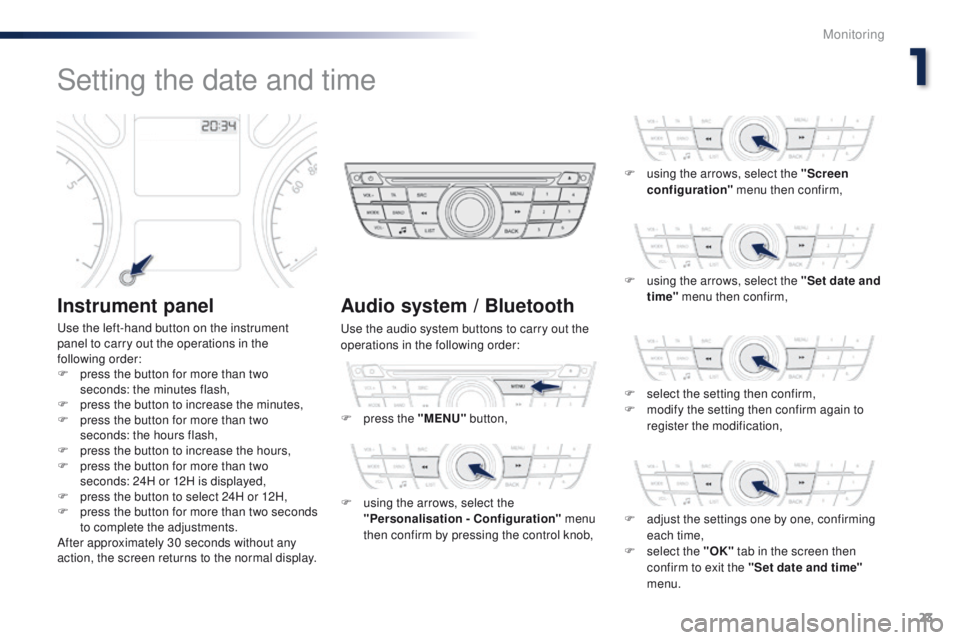
Setting the date and time
Instrument panel
Use the left-hand button on the instrument
panel to carry out the operations in the
following order:
F
p
ress the button for more than two
seconds: the minutes flash,
F
p
ress the button to increase the minutes,
F
p
ress the button for more than two
seconds: the hours flash,
F
p
ress the button to increase the hours,
F
p
ress the button for more than two
seconds: 24H or 12H is displayed,
F
p
ress the button to select 24H or 12H,
F
p
ress the button for more than two seconds
to complete the adjustments.
After approximately 30 seconds without any
action, the screen returns to the normal display.
Audio system / Bluetooth
Use the audio system buttons to carry out the
operations in the following order:
F
p
ress the "MENU" button,
F
u
sing the arrows, select the
"Personalisation - Configuration" menu
then confirm by pressing the control knob, F
u
sing the arrows, select the "Screen
configuration" menu then confirm,
F
u
sing the arrows, select the "Set date and
time" menu then confirm,
F
se
lect the setting then confirm,
F
m
odify the setting then confirm again to
register the modification,
F
a
djust the settings one by one, confirming
each time,
F
s
elect the "OK" tab in the screen then
confirm to exit the "Set date and time"
menu.
1
Monitoring
Page 26 of 285
24
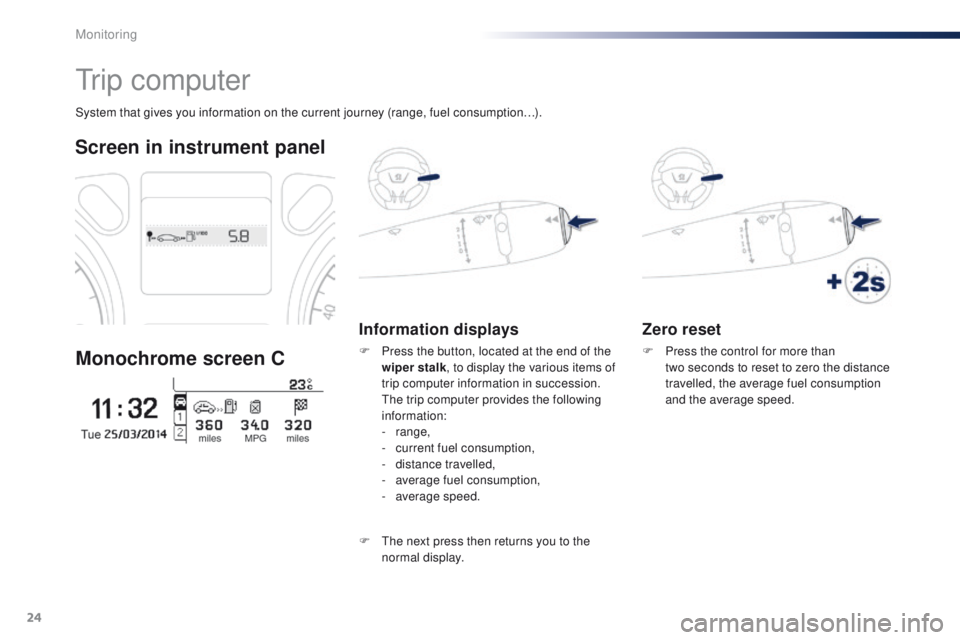
Zero reset
F Press the control for more than two seconds to reset to zero the distance
travelled, the average fuel consumption
and the average speed.
System that gives you information on the current journey (range, fuel consumption…).
Tr i p c o m p u t e r
Screen in instrument panel
Monochrome screen C
Information displays
F Press the button, located at the end of the wiper stalk , to display the various items of
trip computer information in succession.
T
he trip computer provides the following
information:
-
range,
-
c
urrent fuel consumption,
-
d
istance travelled,
-
a
verage fuel consumption,
-
a
verage speed.
F
T
he next press then returns you to the
normal display.
Monitoring