change time PEUGEOT 308 2014 User Guide
[x] Cancel search | Manufacturer: PEUGEOT, Model Year: 2014, Model line: 308, Model: Peugeot 308 2014Pages: 389, PDF Size: 22.92 MB
Page 198 of 389
Checks
196
Checking levels
Engine oil level
The check is carried out either when the ignition is switched on using the oil level indicator in the instrument panel for vehicles with and electric oil level gauge, or using the dipstick.
Check all of these levels regularly, in line with the warranty and maintenance record. Top them up if necessary, unless other wise indicated. If a level drops significantly, have the corresponding system checked by a PEUGEOT dealer or a qualified workshop.
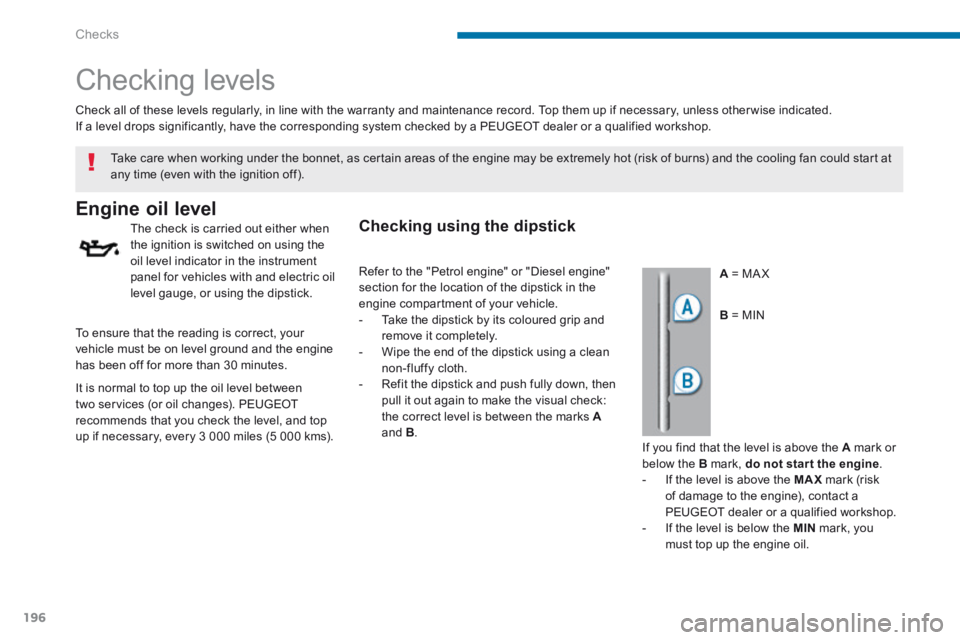
A = MA X
Take care when working under the bonnet, as certain areas of the engine may be extremely hot (risk of burns) and the cooling fan could start at any time (even with the ignition off).
To ensure that the reading is correct, your vehicle must be on level ground and the engine has been off for more than 30 minutes.
B = MIN
It is normal to top up the oil level between two services (or oil changes). PEUGEOT recommends that you check the level, and top
up if necessary, every 3 000 miles (5 000 kms).
Checking using the dipstick
If you find that the level is above the A mark or below the B mark, do not star t the engine . - If the level is above the MAX mark (risk of damage to the engine), contact a PEUGEOT dealer or a qualified workshop. - If the level is below the MIN mark, you must top up the engine oil.
Refer to the "Petrol engine" or "Diesel engine" section for the location of the dipstick in the engine compartment of your vehicle. - Take the dipstick by its coloured grip and remove it completely. - Wipe the end of the dipstick using a clean non-fluffy cloth. - Refit the dipstick and push fully down, then pull it out again to make the visual check: the correct level is between the marks A
and B .
Page 201 of 389
10
Checks199
Checks
Unless otherwise indicated, check these components in accordance with the warranty and maintenance record and according to your engine. Other wise, have them checked by a PEUGEOT dealer or a qualified workshop.
Replace the oil filter each time the engine oil is changed. Refer to the warranty and maintenance record for details of the replacement interval for this component.
Oil filter
Refer to the warranty and maintenance record for details of the replacement intervals for these components. Depending on the environment (e.g. dusty atmosphere) and the use of the vehicle (e.g. city driving), replace them twice as often if necessary . if necessary . if necessary A clogged passenger compartment filter may have an adverse effect on the per formance of the air conditioning system and generate undesirable odours.
Air filter and passenger compartment filter
12 V battery The battery does not require any
maintenance. However, check that the terminals are clean and correctly tightened, particularly in summer and winter. When carrying out work on the battery, refer to the "12 V battery" section for details of the precautions to be taken before disconnecting the battery and following its reconnection.
Particle emission filter (Diesel)
On a new vehicle, the first particle filter regeneration operations may be accompanied by a "burning" smell, which is per fectly normal.
Following prolonged operation of the vehicle at very low speed or at idle, you may, in exceptional circumstances, notice the emission of water vapour at the exhaust on acceleration. This does not affect the behaviour of the vehicle or the environment.
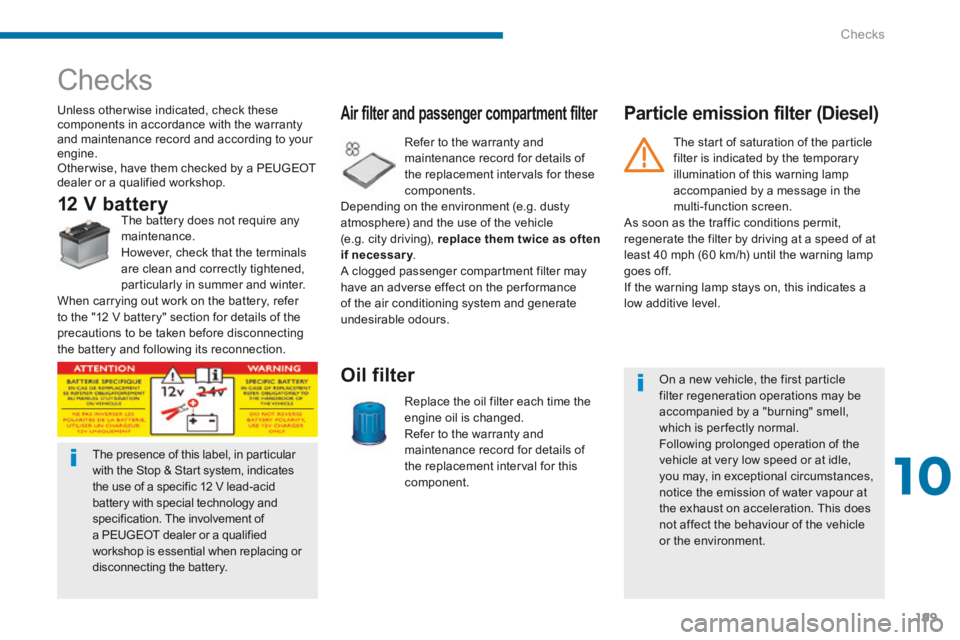
The presence of this label, in particular with the Stop & Start system, indicates the use of a specific 12 V lead-acid battery with special technology and specification. The involvement of a PEUGEOT dealer or a qualified workshop is essential when replacing or disconnecting the battery.
The start of saturation of the particle filter is indicated by the temporary illumination of this warning lamp accompanied by a message in the multi-function screen. As soon as the traffic conditions permit, regenerate the filter by driving at a speed of at least 40 mph (60 km/h) until the warning lamp goes off. If the warning lamp stays on, this indicates a low additive level.
Page 219 of 389
11
Practical information217
Changing main beam headlamp bulbs (halogen model) Changing dipped beam headlamp bulbs (models with halogen headlamps)
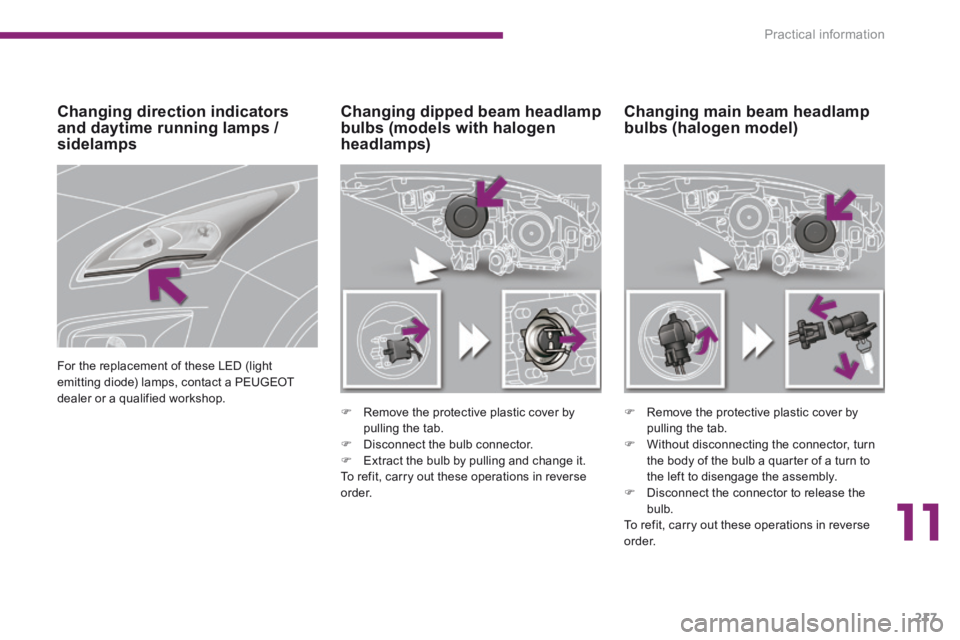
Remove the protective plastic cover by pulling the tab.
Disconnect the bulb connector. Extract the bulb by pulling and change it. To refit, carry out these operations in reverse o r d e r.
Remove the protective plastic cover by pulling the tab.
Without disconnecting the connector, turn the body of the bulb a quarter of a turn to the left to disengage the assembly. Disconnect the connector to release the bulb. To refit, carry out these operations in reverse o r d e r.
Changing direction indicators and daytime running lamps / sidelamps
For the replacement of these LED (light emitting diode) lamps, contact a PEUGEOT dealer or a qualified workshop.
Page 220 of 389
Practical information
218
Changing foglamp bulbs
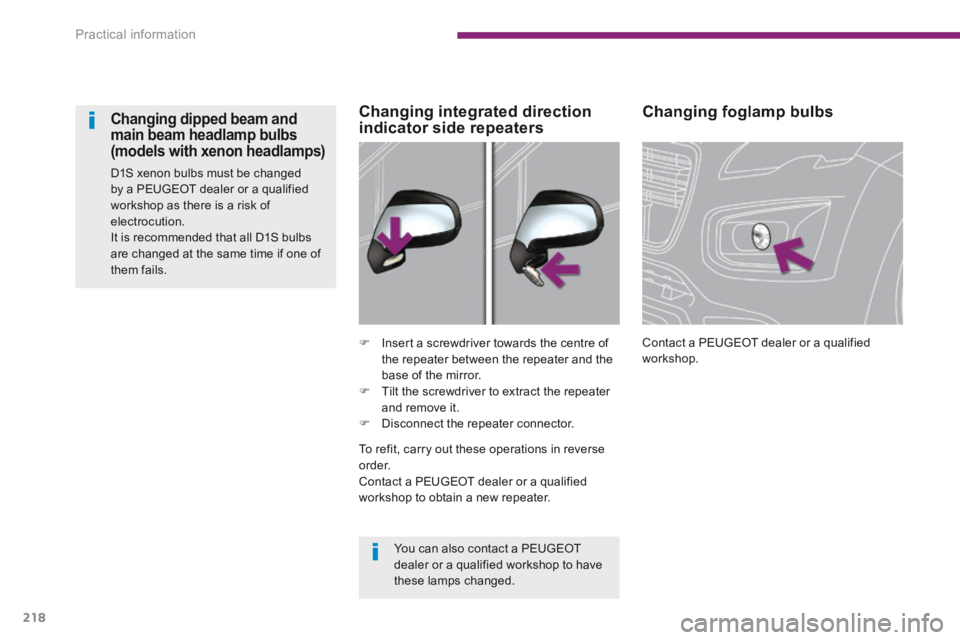
Contact a PEUGEOT dealer or a qualified workshop. Insert a screwdriver towards the centre of the repeater between the repeater and the base of the mirror. Tilt the screwdriver to extract the repeater and remove it. Disconnect the repeater connector.
Changing integrated direction indicator side repeaters Changing dipped beam and main beam headlamp bulbs (models with xenon headlamps)
D1S xenon bulbs must be changed by a PEUGEOT dealer or a qualified workshop as there is a risk of electrocution. It is recommended that all D1S bulbs are changed at the same time if one of them fails.
You can also contact a PEUGEOT dealer or a qualified workshop to have these lamps changed.
To refit, carry out these operations in reverse o r d e r. Contact a PEUGEOT dealer or a qualified workshop to obtain a new repeater.
Page 228 of 389
Practical information
226
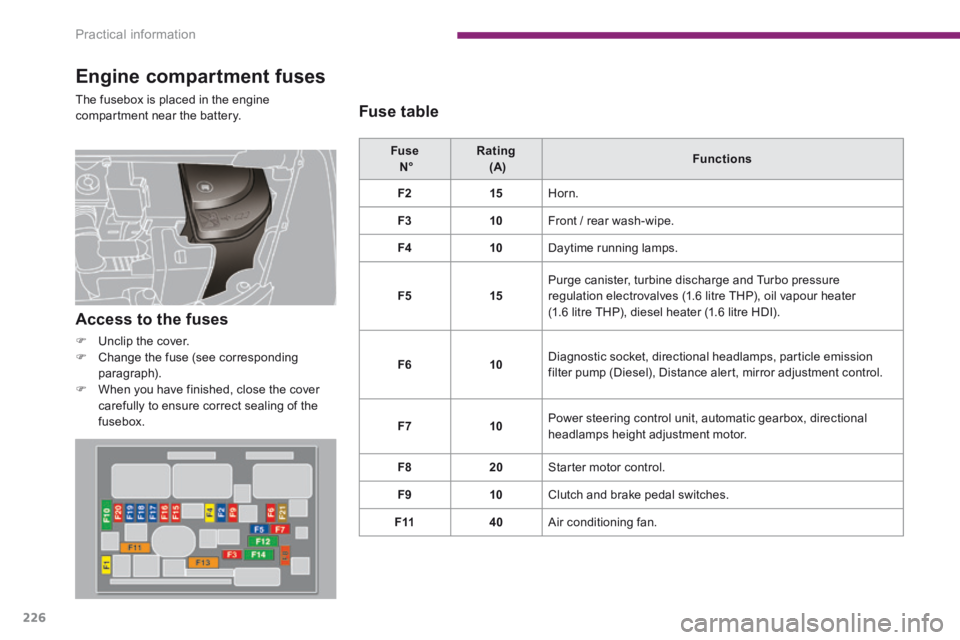
Engine compartment fuses
The fusebox is placed in the engine compartment near the battery.
Fuse N° Rating (A) Functions
F215 Horn.
F310 Front / rear wash-wipe.
F410 Daytime running lamps.
F515 Purge canister, turbine discharge and Turbo pressure regulation electrovalves (1.6 litre THP), oil vapour heater (1.6 litre THP), diesel heater (1.6 litre HDI).
F610 Diagnostic socket, directional headlamps, particle emission filter pump (Diesel), Distance alert, mirror adjustment control.
F710 Power steering control unit, automatic gearbox, directional headlamps height adjustment motor.
F820 Starter motor control.
F910 Clutch and brake pedal switches.
F1140 Air conditioning fan.
Access to the fuses
Unclip the cover. Change the fuse (see corresponding paragraph). When you have finished, close the cover carefully to ensure correct sealing of the fusebox.
Fuse table
Page 258 of 389
256
02
SETUP2ABC3DEF5JKL4GHI6MNO8TUV7PQR S9WXYZ0*#
1NAV TRAFFICADDR
BOOKSETUP
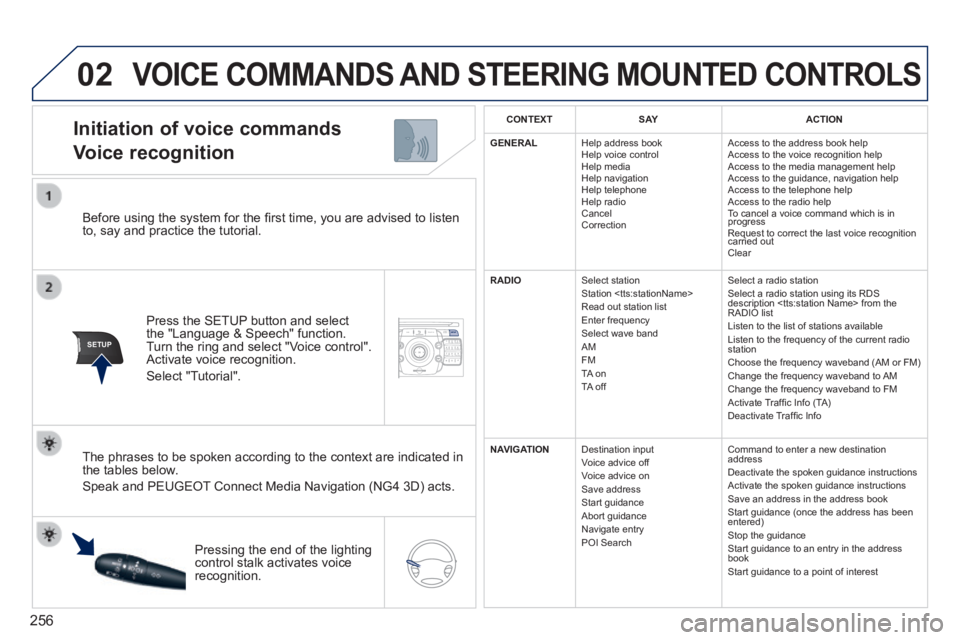
Before using the system for the fi rst time, you are advised to listen to, say and practice the tutorial.
Press the SETUP button and select the "Language & Speech" function. Turn the ring and select "Voice control". Activate voice recognition.
Select "Tutorial".
Initiation of voice commands
Voice recognition
The phrases to be spoken according to the context are indicated in the tables below.
Speak and PEUGEOT Connect Media Navigation (NG4 3D) acts.
Pressing the end of the lighting control stalk activates voice recognition.
CONTEXTS AYACTION
GENERAL Help address book Help voice control Help media Help navigation Help telephone Help radio Cancel Correction
Access to the address book help Access to the voice recognition help Access to the media management help Access to the guidance, navigation help Access to the telephone help Access to the radio help To cancel a voice command which is in progress Request to correct the last voice recognition carried out Request to correct the last voice recognition carried out Request to correct the last voice recognition
Clear
RADIO Select station Station
Select a radio station Select a radio station using its RDS description
NAVIGATION Destination input Voice advice off Voice advice on Save address Start guidance Abort guidance Navigate entry POI Search
Command to enter a new destination address Deactivate the spoken guidance instructions Activate the spoken guidance instructions Save an address in the address book Start guidance (once the address has been entered) Stop the guidance Start guidance to an entry in the address book Start guidance to a point of interest
VOICE COMMANDS AND STEERING MOUNTED CONTROLS
Page 270 of 389
268
04
NAV2AB C3DEF5JKL4GHI6MNO8TUV7PQR S9WXYZ0*#
1RADIO MEDIA NA
V TRAFFIC
SETUPADDR
BOOK
2ABC3DEF5JKL4GHI6MNO8TUV7PQR S9WXYZ0*#
1RADIO MEDIA NA
V TRAFFIC
SETUPADDR
BOOK
2ABC3DEF5JKL4GHI6MNO8TUV7PQR S9WXYZ0*#
1RADIO MEDIA NA
V TRAFFIC
SETUPADDR
BOOK
2ABC3DEF5JKL4GHI6MNO8TUV7PQR S9WXYZ0*#
1RADIO MEDIA NA
V TRAFFIC
SETUPADDR
BOOK
2ABC3DEF5JKL4GHI6MNO8TUV7PQR S9WXYZ0*#
1RADIO MEDIA NA
V TRAFFIC
SETUPADDR
BOOK
2ABC3DEF5JKL4GHI6MNO8TUV7PQR S9WXYZ0*#
1RADIO MEDIA NA
V TRAFFIC
SETUPADDR
BOOK
2ABC3DEF5JKL4GHI6MNO8TUV7PQR S9WXYZ0*#
1RADIO MEDIA NA
V TRAFFIC
SETUPADDR
BOOK
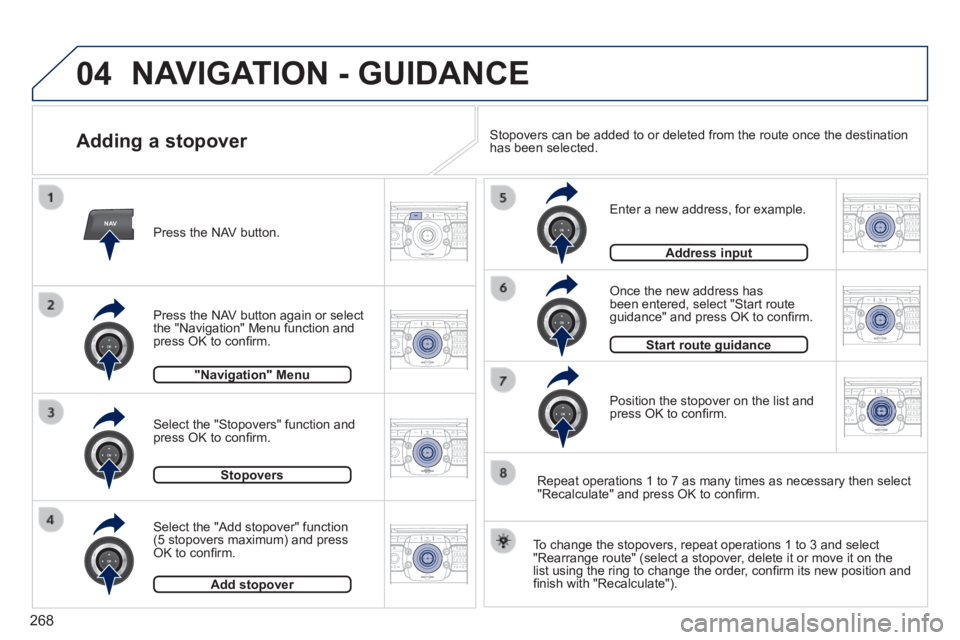
Adding a stopover
Enter a new address, for example.
Once the new address has been entered, select "Start route guidance" and press OK to confi rm.
Position the stopover on the list and press OK to confi rm.
Press the NAV button.
Press the NAV button again or select the "Navigation" Menu function and press OK to confi rm.
Select the "Add stopover" function (5 stopovers maximum) and press OK to confi rm.
Select the "Stopovers" function and press OK to confi rm.
"Navigation" Menu"Navigation" Menu
StopoversStopovers
Add stopoverAdd stopover
Address inputAddress input
To change the stopovers, repeat operations 1 to 3 and select "Rearrange route" (select a stopover, delete it or move it on the list using the ring to change the order, confi rm its new position and fi nish with "Recalculate").
Stopovers can be added to or deleted from the route once the destination\
has been selected.
Repeat operations 1 to 7 as many times as necessary then select "Recalculate" and press OK to confi rm.
Start route guidanceStart route guidance
NAVIGATION - GUIDANCE
Page 280 of 389
278
07
MEDIA
2ABC3DEF5JKL4GHI6MNO8TU V7PQRS9WXYZ0*#
1RADIOM EDIA NA
V ESC TRAFFIC
SETUPADDR
BOOK
2AB C3DEF5JKL4GHI6MNO8TUV7PQR S9WXYZ0*#
1RADIO MEDIA NA
V TRAFFIC
SETUPADDR
BOOK
2ABC3DEF5JKL4GHI6MNO8TUV7PQR S9WXYZ0*#
1RADIO MEDIA NA
V TRAFFIC
SETUPADDR
BOOK
2ABC3DEF5JKL4GHI6MNO8TUV7PQR S9WXYZ0*#
1RADIO MEDIA NA
V TRAFFIC
SETUPADDR
BOOK
2ABC3DEF5JKL4GHI6MNO8TUV7PQR S9WXYZ0*#
1RADIO MEDIA NA
V TRAFFIC
SETUPADDR
BOOK
2ABC3DEF5JKL4GHI6MNO8TUV7PQR S9WXYZ0*#
1RADIO MEDIA NA
V TRAFFIC
SETUPADDR
BOOK
2ABC3DEF5JKL4GHI6MNO8TUV7PQR S9WXYZ0*#
1RADIO MEDIA NA
V TRAFFIC
SETUPADDR
BOOK
2ABC3DEF5JKL4GHI6MNO8TUV7PQR S9WXYZ0*#
1RADIO MEDIA NA
V TRAFFIC
SETUPADDR
BOOK
RADIO NA
V TRAFFICMEDIA
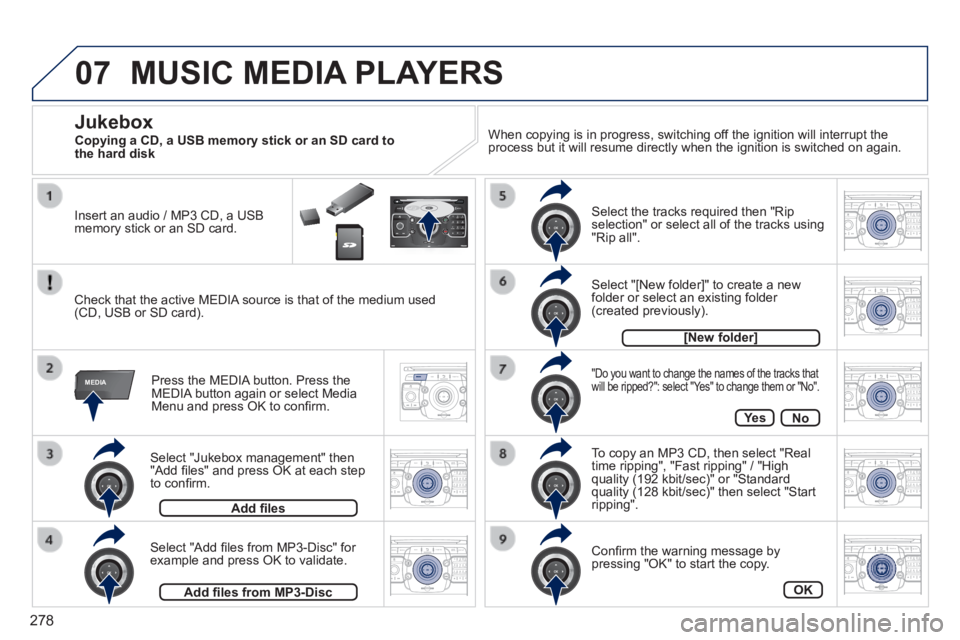
Select "Jukebox management" then "Add fi les" and press OK at each step to confi rm.
Press the MEDIA button. Press the MEDIA button again or select Media Menu and press OK to confi rm.
Insert an audio / MP3 CD, a USB memory stick or an SD card.
Jukebox
Add fi les
Check that the active MEDIA source is that of the medium used (CD, USB or SD card).
Select "Add fi les from MP3-Disc" for example and press OK to validate.
Select the tracks required then "Rip selection" or select all of the tracks using "Rip all".
Select "[New folder]" to create a new folder or select an existing folder (created previously).
Add fi les from MP3-Disc
[New folder]
"Do you want to change the names of the tracks that will be ripped?": select "Yes" to change them or "No".
To copy an MP3 CD, then select "Real time ripping", "Fast ripping" / "High quality (192 kbit/sec)" or "Standard quality (128 kbit/sec)" then select "Start ripping".
Confi rm the warning message by pressing "OK" to start the copy.
OK
Ye sNo
When copying is in progress, switching off the ignition will interrupt the process but it will resume directly when the ignition is switched on aga\
in.
MUSIC MEDIA PLAYERS
Copying a CD, a USB memory stick or an SD card to the hard disk
Page 282 of 389
280
07
MEDIA
2ABC3DEF5JKL4GHI6MNO8TU V7PQRS9WXYZ0*#
1RADIOM EDIA NA
V ESC TRAFFIC
SETUPADDR
BOOK
MEDIA
2AB C3DEF5JKL4GHI6MNO8TUV7PQR S9WXYZ0*#
1RADIO MEDIA NA
V TRAFFIC
SETUPADDR
BOOK
2ABC3DEF5JKL4GHI6MNO8TUV7PQR S9WXYZ0*#
1RADIO MEDIA NA
V TRAFFIC
SETUPADDR
BOOK
2ABC3DEF5JKL4GHI6MNO8TUV7PQR S9WXYZ0*#
1RADIO MEDIA NA
V TRAFFIC
SETUPADDR
BOOK
RADIO NA
V TRAFFICMEDIA
RADIO NA
V TRAFFICMEDIA
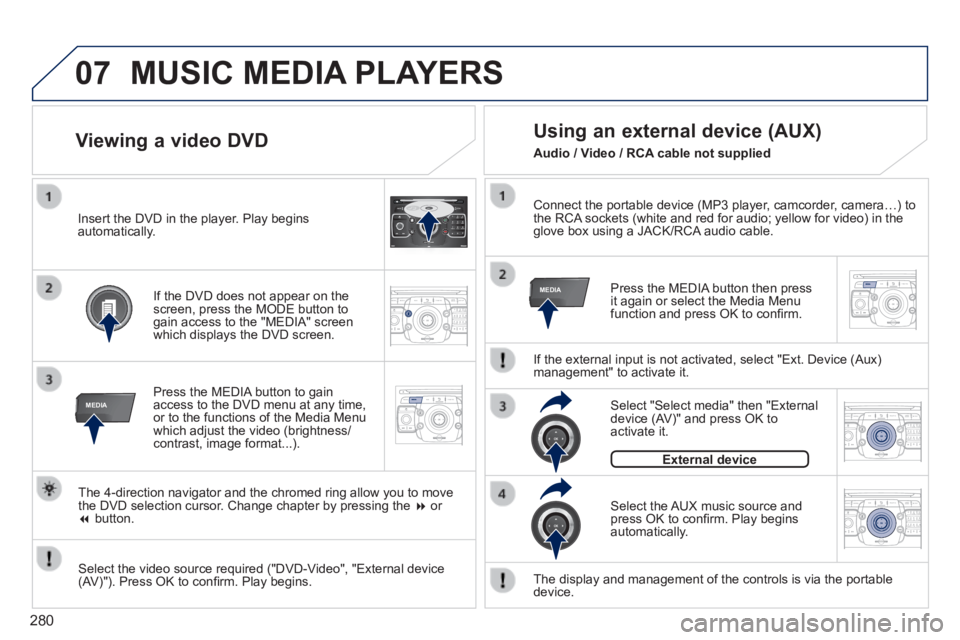
Connect the portable device (MP3 player, camcorder, camera…) to the RCA sockets (white and red for audio; yellow for video) in the glove box using a JACK/RCA audio cable.
Press the MEDIA button then press it again or select the Media Menu function and press OK to confi rm.
Select the AUX music source and press OK to confi rm. Play begins automatically.
Select "Select media" then "External device (AV)" and press OK to activate it.
External device
The display and management of the controls is via the portable device.
Using an external device (AUX)
If the external input is not activated, select "Ext. Device (Aux) management" to activate it.
Viewing a video DVD
Select the video source required ("DVD-Video", "External device (AV)"). Press OK to confi rm. Play begins.
Press the MEDIA button to gain access to the DVD menu at any time, or to the functions of the Media Menu which adjust the video (brightness/contrast, image format...).
If the DVD does not appear on the screen, press the MODE button to gain access to the "MEDIA" screen which displays the DVD screen.
Insert the DVD in the player. Play begins automatically.
The 4-direction navigator and the chromed ring allow you to move the DVD selection cursor. Change chapter by pressing the or button.
MUSIC MEDIA PLAYERS
Audio / Video / RCA cable not supplied
Page 291 of 389
289
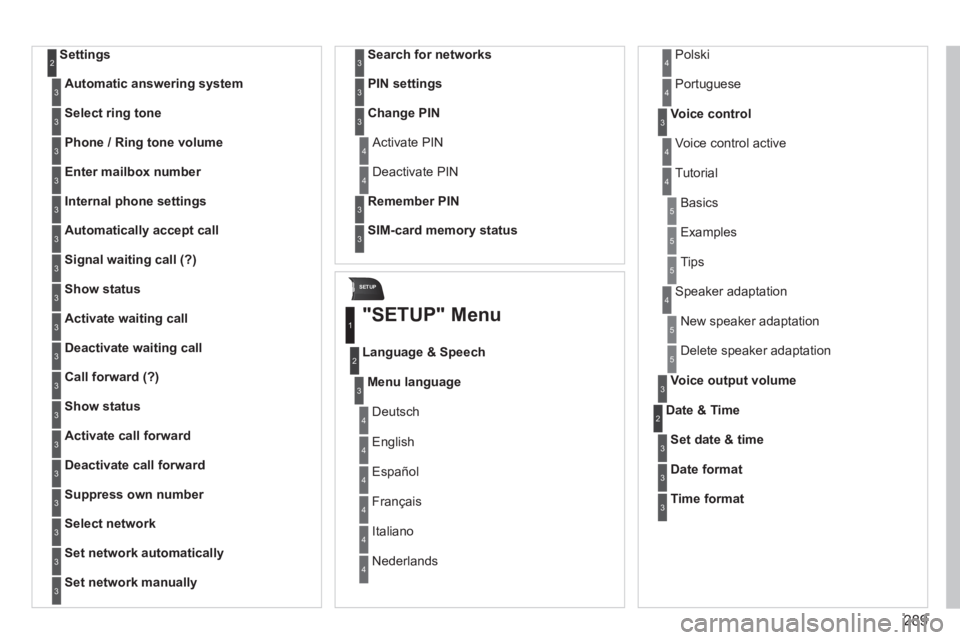
SETUP
Settings 2
Automatic answering system3
Select ring tone3
Phone / Ring tone volume3
Enter mailbox number3
Internal phone settings3
Automatically accept call3
Signal waiting call (?)3
Show status3
Activate waiting call3
Deactivate waiting call3
Call forward (?)3
Show status3
Activate call forward3
Deactivate call forward3
Suppress own number3
Select network3
Set network automatically3
Set network manually3
Search for networks3
PIN settings3
Change PIN3
Activate PIN 4
Deactivate PIN 4
Remember PIN3
SIM-card memory status3
"SETUP" Menu
Menu language
Language & Speech
1
2
3
Deutsch 4
English 4
Español 4
Français 4
Italiano 4
Nederlands 4
Polski 4
Voice control3
Voice control active 4
Tutorial 4
Portuguese 4
Basics 5
Examples 5
Tips 5
Speaker adaptation 4
New speaker adaptation 5
Delete speaker adaptation 5
Voice output volume3
Date & Time 2
Set date & time3
Date format3
Time format3