fuel PEUGEOT 308 2014 User Guide
[x] Cancel search | Manufacturer: PEUGEOT, Model Year: 2014, Model line: 308, Model: Peugeot 308 2014Pages: 389, PDF Size: 22.92 MB
Page 38 of 389
Monitoring
36
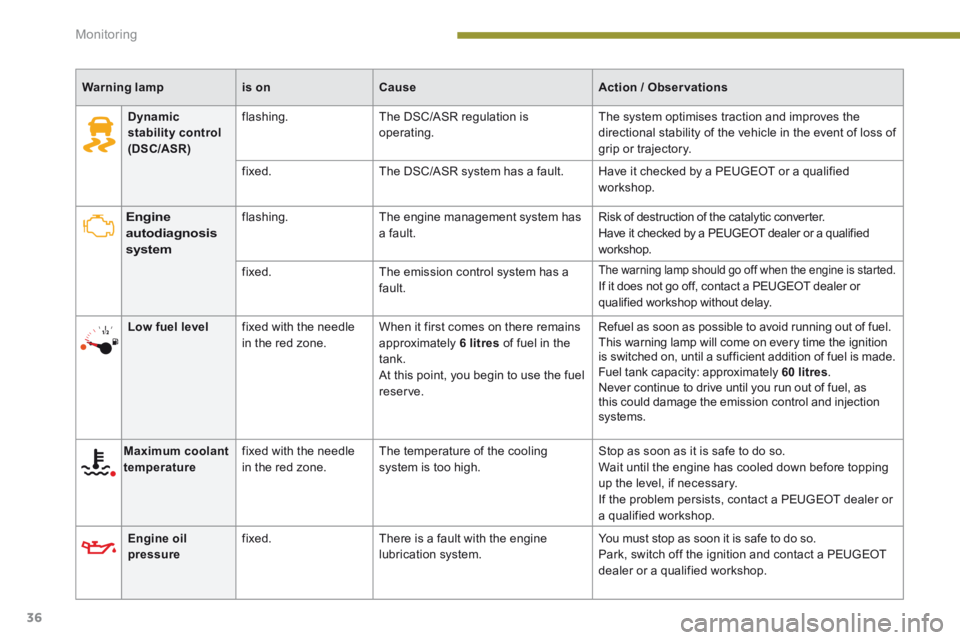
Warning lampis onCauseAction / Observations
Engine autodiagnosis system
flashing. The engine management system has a fault. Risk of destruction of the catalytic converter. Have it checked by a PEUGEOT dealer or a qualified workshop.
fixed. The emission control system has a fault.
The warning lamp should go off when the engine is started. If it does not go off, contact a PEUGEOT dealer or qualified workshop without delay.
Low fuel level fixed with the needle in the red zone. When it first comes on there remains approximately 6 litres of fuel in the tank. At this point, you begin to use the fuel reserve.
Refuel as soon as possible to avoid running out of fuel. This warning lamp will come on every time the ignition is switched on, until a sufficient addition of fuel is made. Fuel tank capacity: approximately 60 litres . Never continue to drive until you run out of fuel, as this could damage the emission control and injection systems.
Maximum coolant temperature fixed with the needle in the red zone. The temperature of the cooling system is too high. Stop as soon as it is safe to do so. Wait until the engine has cooled down before topping up the level, if necessary. If the problem persists, contact a PEUGEOT dealer or a qualified workshop.
Engine oil pressure fixed. There is a fault with the engine lubrication system. You must stop as soon it is safe to do so. Park, switch off the ignition and contact a PEUGEOT dealer or a qualified workshop.
Dynamic stability control (DSC/ASR)
flashing. The DSC/ASR regulation is operating. The system optimises traction and improves the directional stability of the vehicle in the event of loss of grip or trajectory.
fixed. The DSC/ASR system has a fault. Have it checked by a PEUGEOT or a qualified workshop.
Page 39 of 389
1
Monitoring37
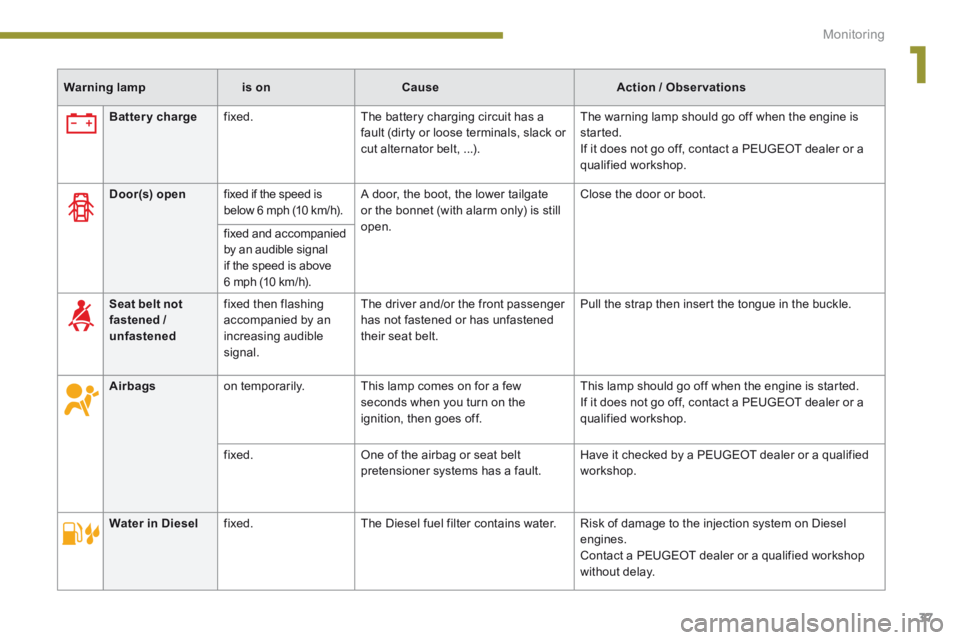
Warning lampis onCauseAction / Observations
Battery charge fixed. The battery charging circuit has a fault (dirty or loose terminals, slack or cut alternator belt, ...).
The warning lamp should go off when the engine is started. If it does not go off, contact a PEUGEOT dealer or a qualified workshop.
Door(s) open fixed if the speed is below 6 mph (10 km/h). A door, the boot, the lower tailgate or the bonnet (with alarm only) is still open.
Close the door or boot.
fixed and accompanied by an audible signal if the speed is above 6 mph (10 km/h).
Seat belt not fastened / unfastened
fixed then flashing accompanied by an increasing audible signal.
The driver and/or the front passenger has not fastened or has unfastened their seat belt.
Pull the strap then insert the tongue in the buckle.
Airbags on temporarily. This lamp comes on for a few seconds when you turn on the ignition, then goes off.
This lamp should go off when the engine is started. If it does not go off, contact a PEUGEOT dealer or a qualified workshop.
fixed. One of the airbag or seat belt pretensioner systems has a fault. Have it checked by a PEUGEOT dealer or a qualified workshop.
Water in Diesel fixed. The Diesel fuel filter contains water. Risk of damage to the injection system on Diesel engines. Contact a PEUGEOT dealer or a qualified workshop without delay.
Page 46 of 389
Multifunction screens
44
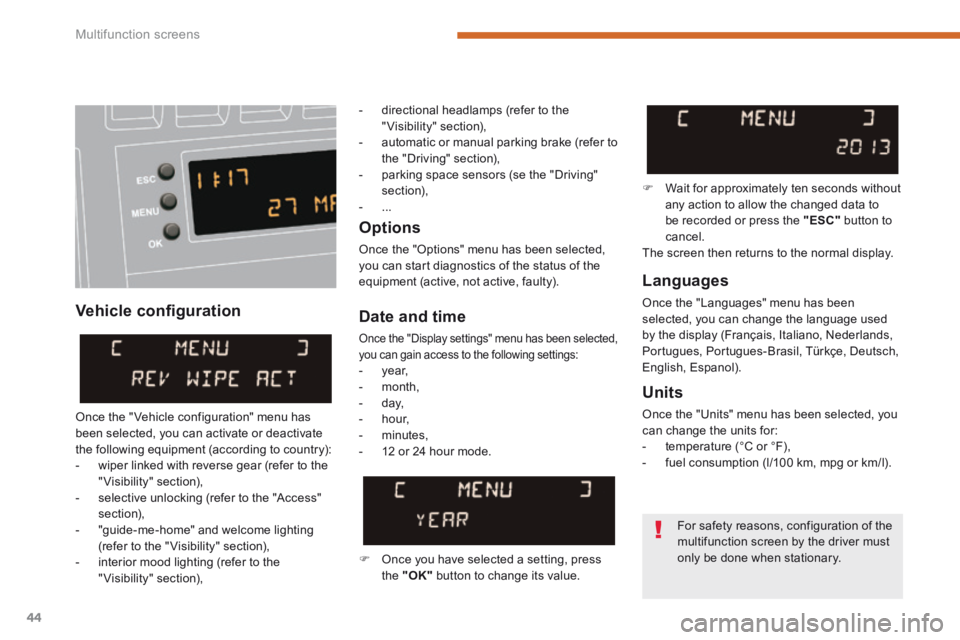
Vehicle confi guration
Options
Once the "Options" menu has been selected, you can start diagnostics of the status of the equipment (active, not active, faulty). Languages
Once the "Languages" menu has been selected, you can change the language used by the display (Français, Italiano, Nederlands, Portugues, Portugues-Brasil, Türkçe, Deutsch, English, Espanol).
Date and time
Once the "Display settings" menu has been selected, you can gain access to the following settings: - year, - month, - day, - hour,
- minutes, - 12 or 24 hour mode.
Units
Once the "Units" menu has been selected, you can change the units for: - temperature (°C or °F), - fuel consumption (l/100 km, mpg or km/l).
Once you have selected a setting, press the "OK" button to change its value.
Wait for approximately ten seconds without any action to allow the changed data to be recorded or press the "ESC" button to cancel. The screen then returns to the normal display.
Once the " Vehicle configuration" menu has been selected, you can activate or deactivate the following equipment (according to country): - wiper linked with reverse gear (refer to the "Visibility" section), - selective unlocking (refer to the "Access" section), - "guide-me-home" and welcome lighting (refer to the " Visibility" section), - interior mood lighting (refer to the "Visibility" section),
For safety reasons, configuration of the
multifunction screen by the driver must only be done when stationary.
- directional headlamps (refer to the "Visibility" section), - automatic or manual parking brake (refer to the "Driving" section), - parking space sensors (se the "Driving" section), - ...
Page 48 of 389
Multifunction screens
46
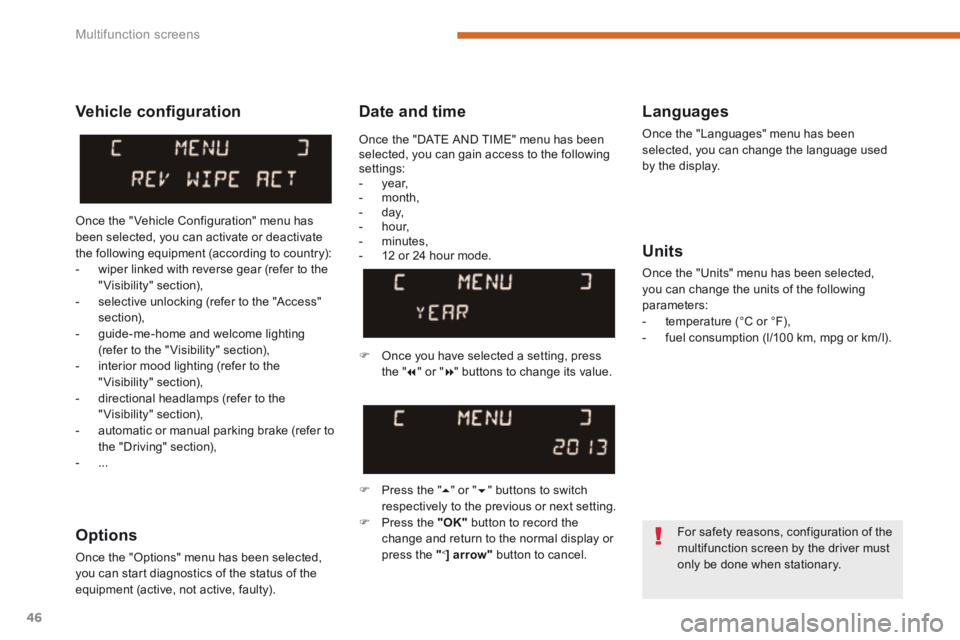
Date and time Languages
Once the "Languages" menu has been selected, you can change the language used by the display.
Units
Once the "Units" menu has been selected, you can change the units of the following parameters: - temperature (°C or °F), - fuel consumption (l/100 km, mpg or km/l).
Once you have selected a setting, press t h e " " or " " buttons to change its value.
Press the " " or " " buttons to switch respectively to the previous or next setting. Press the "OK" button to record the
change and return to the normal display or press the " < ] arrow" button to cancel.
Vehicle confi guration
Once the " Vehicle Configuration" menu has been selected, you can activate or deactivate the following equipment (according to country): - wiper linked with reverse gear (refer to the "Visibility" section), - selective unlocking (refer to the "Access" section), - guide-me-home and welcome lighting (refer to the " Visibility" section), - interior mood lighting (refer to the "Visibility" section), - directional headlamps (refer to the "Visibility" section),
- automatic or manual parking brake (refer to the "Driving" section), - ...
Options
Once the "Options" menu has been selected, you can start diagnostics of the status of the equipment (active, not active, faulty).
For safety reasons, configuration of the multifunction screen by the driver must only be done when stationary.
Once the "DATE AND TIME" menu has been selected, you can gain access to the following settings: - year, - month, - day, - hour, - minutes, - 12 or 24 hour mode.
Page 53 of 389
2
Multifunction screens51
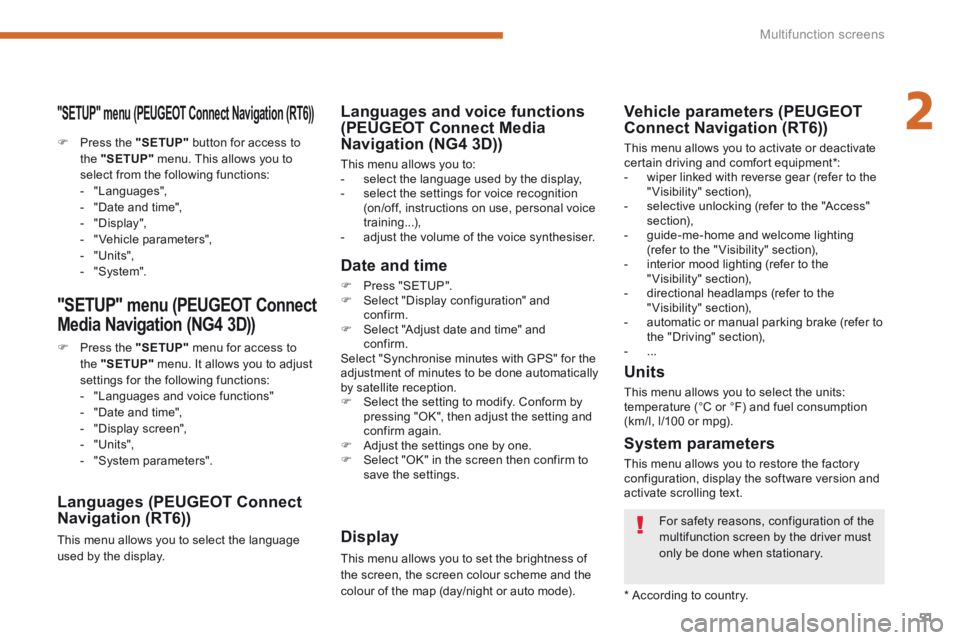
"SETUP" menu (PEUGEOT Connect Navigation (RT6))
Press the "SETUP" button for access to the "SETUP" menu. This allows you to select from the following functions: - "Languages", - "Date and time", - "Display", - " Vehicle parameters", - "Units", - "System".
"SETUP" menu (PEUGEOT Connect
Media Navigation (NG4 3D))
Press the "SETUP" menu for access to the "SETUP" menu . It allows you to adjust settings for the following functions: - "Languages and voice functions" - "Date and time", - "Display screen",
- "Units", - "System parameters".
Languages (PEUGEOT Connect Navigation (RT6))
This menu allows you to select the language used by the display.
Languages and voice functions (PEUGEOT Connect Media Navigation (NG4 3D))
This menu allows you to: - select the language used by the display, - select the settings for voice recognition (on/off, instructions on use, personal voice training...), - adjust the volume of the voice synthesiser.
Date and time
Press "SETUP". Select "Display configuration" and confirm. Select "Adjust date and time" and confirm. Select "Synchronise minutes with GPS" for the adjustment of minutes to be done automatically by satellite reception. Select the setting to modify. Conform by pressing "OK", then adjust the setting and confirm again. Adjust the settings one by one. Select "OK" in the screen then confirm to save the settings.
Display
This menu allows you to set the brightness of the screen, the screen colour scheme and the colour of the map (day/night or auto mode).
System parameters
This menu allows you to restore the factory configuration, display the software version and activate scrolling text.
For safety reasons, configuration of the multifunction screen by the driver must only be done when stationary.
* According to country.
Units
This menu allows you to select the units: temperature (°C or °F) and fuel consumption (km/l, l/100 or mpg).
Vehicle parameters (PEUGEOT Connect Navigation (RT6))
This menu allows you to activate or deactivate certain driving and comfort equipment * : - wiper linked with reverse gear (refer to the "Visibility" section), - selective unlocking (refer to the "Access" section), - guide-me-home and welcome lighting (refer to the " Visibility" section), - interior mood lighting (refer to the "Visibility" section), - directional headlamps (refer to the "Visibility" section), - automatic or manual parking brake (refer to the "Driving" section), - ...
Page 55 of 389
2
Multifunction screens53
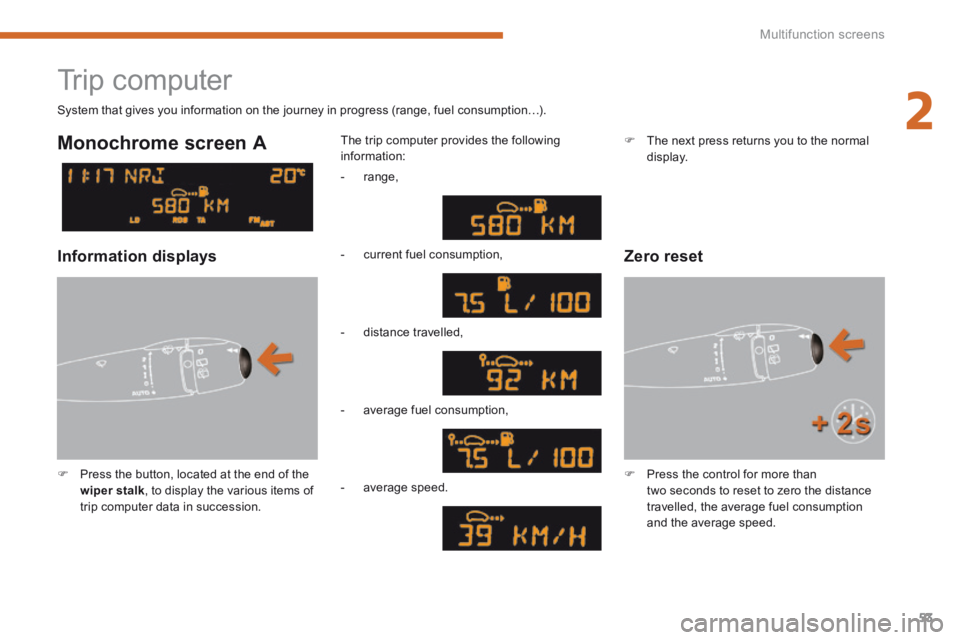
Trip computer
Press the button, located at the end of the wiper stalk , to display the various items of trip computer data in succession.
The trip computer provides the following information:
System that gives you information on the journey in progress (range, fuel consumption…).
Press the control for more than two seconds to reset to zero the distance travelled, the average fuel consumption and the average speed.
Monochrome screen A
Zero reset Information displays
- range,
- current fuel consumption,
- distance travelled,
- average fuel consumption,
- average speed.
The next press returns you to the normal display.
Page 57 of 389
2
Multifunction screens55
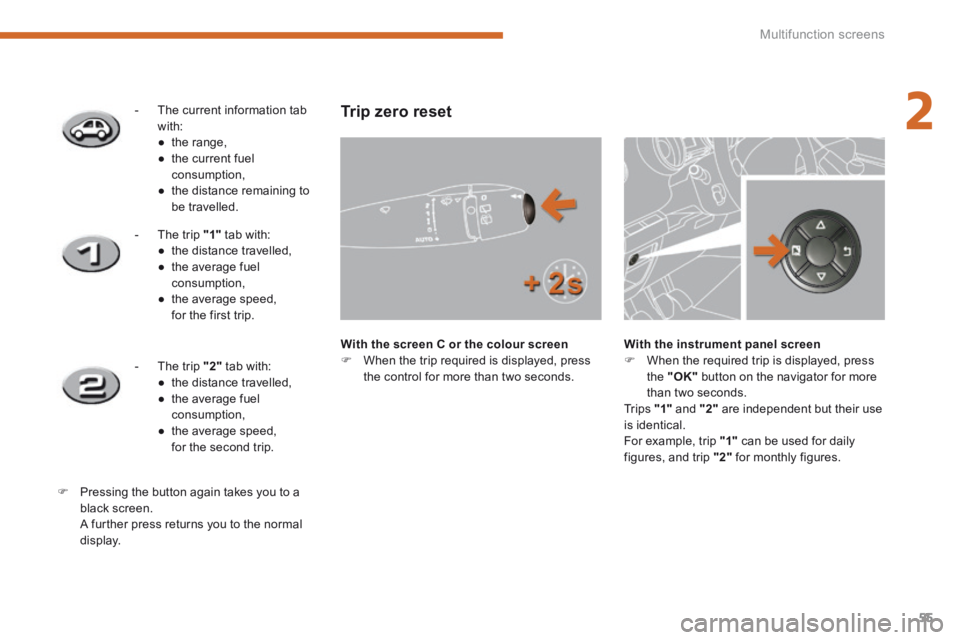
- The current information tab with: ● t h e r a n g e , ● the current fuel consumption, ● the distance remaining to be travelled.
- The trip "1" tab with: ● the distance travelled, ● the average fuel consumption, ● the average speed, for the first trip.
- The trip "2" tab with: ● the distance travelled, ● the average fuel consumption,
● the average speed, for the second trip.
Pressing the button again takes you to a black screen. A further press returns you to the normal
display.
Trip zero reset
With the screen C or the colour screen When the trip required is displayed, press the control for more than two seconds.
With the instrument panel screen When the required trip is displayed, press the "OK" button on the navigator for more than two seconds. Tr i p s "1" and "2" are independent but their use is identical. For example, trip "1" can be used for daily figures, and trip "2" for monthly figures.
Page 58 of 389
Multifunction screens
56
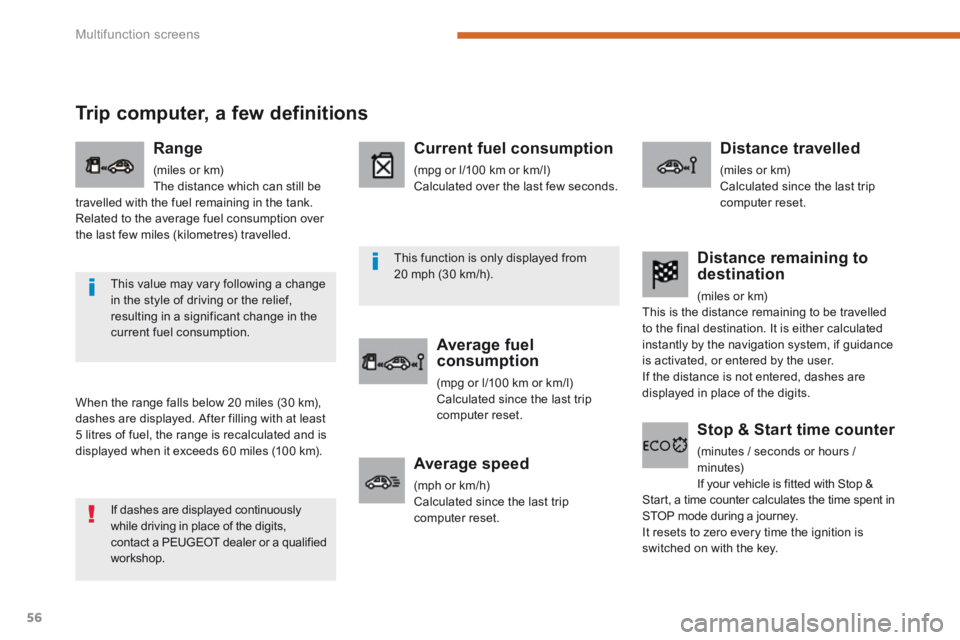
Trip computer, a few definitions
When the range falls below 20 miles (30 km), dashes are displayed. After filling with at least
5 litres of fuel, the range is recalculated and is displayed when it exceeds 60 miles (100 km).
Range
(miles or km) The distance which can still be travelled with the fuel remaining in the tank. Related to the average fuel consumption over the last few miles (kilometres) travelled.
Current fuel consumption
(mpg or l/100 km or km/l) Calculated over the last few seconds.
Average fuel consumption
(mpg or l/100 km or km/l) Calculated since the last trip computer reset.
Distance travelled
(miles or km) Calculated since the last trip computer reset.
Average speed
(mph or km/h) Calculated since the last trip computer reset.
Distance remaining to destination
(miles or km) This is the distance remaining to be travelled to the final destination. It is either calculated instantly by the navigation system, if guidance is activated, or entered by the user. If the distance is not entered, dashes are displayed in place of the digits.
Stop & Start time counter
(minutes / seconds or hours / minutes) If your vehicle is fitted with Stop & Start, a time counter calculates the time spent in STOP mode during a journey. It resets to zero every time the ignition is switched on with the key.
If dashes are displayed continuously while driving in place of the digits, contact a PEUGEOT dealer or a qualified workshop.
This value may vary following a change in the style of driving or the relief, resulting in a significant change in the current fuel consumption.
This function is only displayed from 20 mph (30 km/h).
Page 60 of 389
Comfort
58
Recommendations for ventilation and air conditioning
In order for these systems to be fully effective, follow the operation and maintenance guidelines below: If the interior temperature remains very high after the vehicle has been parked in the sun for a considerable time, first ventilate the passenger compartment for a few minutes. Place the air flow control at a sufficient level to provide an adequate renewal of air in the passenger compartment. To obtain an even air distribution, take care not to obstruct the exterior air intake grilles located at the base of the windscreen, the nozzles, the vents and the air outlets, as well as the air extractor located in the boot. Use in preference the intake of exterior air as prolonged use of the air recirculation may cause misting of the windows and side windows. Do not cover the sunshine sensor, located on the dashboard; this is used for regulation of the automatic air conditioning system. Operate the air conditioning system for 5 to 10 minutes, once or twice a month to keep it in good working order. Ensure that the passenger compartment filter is in good condition and have the filter elements replaced regularly (refer to the "Checks" section). We recommend the use of a combined passenger compartment filter. Thanks to its second special active filter, it contributes to the purification of the air breathed by the occupants and the cleanliness of the passenger compartment (reduction of allergic symptoms, bad odours and greasy deposits).
The air conditioning uses power from the engine while operating. This results in an increase in the vehicle's fuel consumption. When towing at or near maximum capacity or on steep slopes in high ambient temperatures, switching off the air conditioning saves engine power and so improves towing capacity. Condensation created by the air conditioning results in a discharge of water under the vehicle when stationary, which is per fectly normal. To ensure correct operation of the air conditioning system, you are also advised to have it checked regularly. If the system does not produce cold air, do not use it and contact a PEUGEOT dealer or
a qualified workshop.
The air conditioning system does not contain chlorine and does not present any danger to the ozone layer.
Page 63 of 389
3
Comfort61
The control button is located on the air conditioning system control panel.
Rear screen demist - defrost
Switching on
Press this button to demist /defrost the rear screen and, depending on version, the door mirrors. The indicator lamp associated with the button comes on.
Switching off
The demist /defrost switches off automatically to prevent an excessive consumption of current. It is possible to stop the demist /defrost operation before it is switched off automatically by pressing the button again. The indicator lamp associated with the button goes off.
Switch off the demist /defrost of the rear screen and door mirrors as
soon as it is no longer needed as lower current consumption results in reduced fuel consumption.