ESP PEUGEOT 308 2014 Service Manual
[x] Cancel search | Manufacturer: PEUGEOT, Model Year: 2014, Model line: 308, Model: Peugeot 308 2014Pages: 389, PDF Size: 22.92 MB
Page 228 of 389
Practical information
226
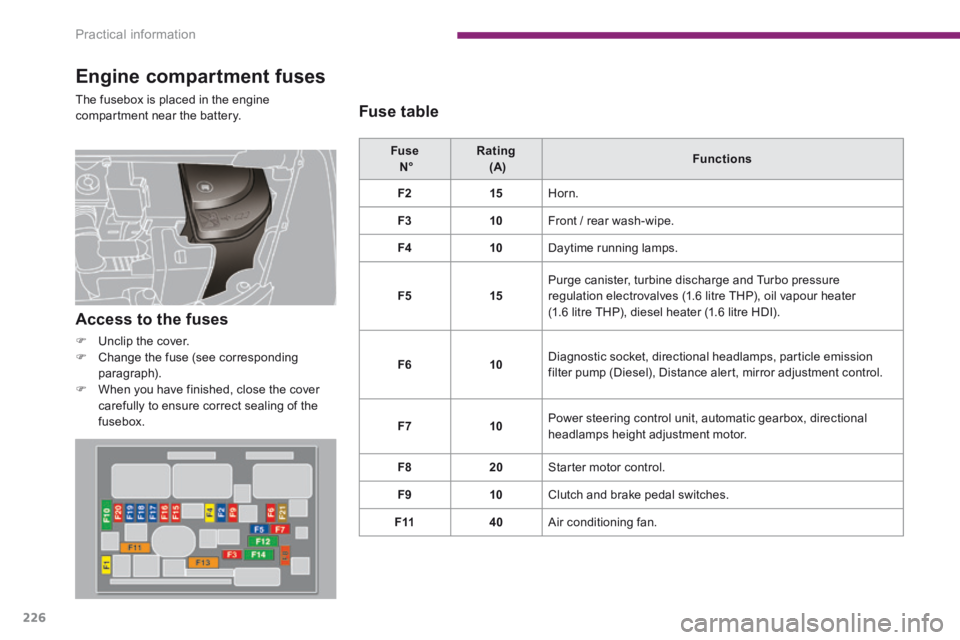
Engine compartment fuses
The fusebox is placed in the engine compartment near the battery.
Fuse N° Rating (A) Functions
F215 Horn.
F310 Front / rear wash-wipe.
F410 Daytime running lamps.
F515 Purge canister, turbine discharge and Turbo pressure regulation electrovalves (1.6 litre THP), oil vapour heater (1.6 litre THP), diesel heater (1.6 litre HDI).
F610 Diagnostic socket, directional headlamps, particle emission filter pump (Diesel), Distance alert, mirror adjustment control.
F710 Power steering control unit, automatic gearbox, directional headlamps height adjustment motor.
F820 Starter motor control.
F910 Clutch and brake pedal switches.
F1140 Air conditioning fan.
Access to the fuses
Unclip the cover. Change the fuse (see corresponding paragraph). When you have finished, close the cover carefully to ensure correct sealing of the fusebox.
Fuse table
Page 233 of 389
11
Practical information231
Following reconnection of the battery
Following reconnection of the battery, switch on the ignition and wait 1 minute before starting to permit initialisation of the electronic systems. However, if problems remain following this operation, contact a PEUGEOT dealer or a qualified workshop. Referring to the corresponding section, you must yourself reinitialise (depending on version): - the remote control key, - the electric blind(s), - ...
Before disconnecting the battery
Wait 2 minutes after switching off the ignition before disconnecting the battery. Close the windows and the doors before disconnecting the battery.
Charging the battery using
a battery charger
Disconnect the battery from the vehicle. Follow the instructions for use provided by the manufacturer of the charger. Connect the battery starting with the negative terminal (-).
Check that the terminals and connectors are clean. If they are covered with sulphate (whitish or greenish deposit), remove them and clean them.
The batteries contain harmful substances such as sulphuric acid and lead. They must be disposed of in accordance with regulations and must not, in any circumstances, be discarded with household waste.
Take used remote control batteries and vehicle batteries to a special collection point.
It is advisable to disconnect the battery
if the vehicle is to be left unused for more than one month.
Protect your eyes and face before handling the battery. All operations on the battery must be carried out in a well ventilated area and away from naked flames and sources of sparks, so as to avoid the risk of explosion or fire. Do not try to charge a frozen battery; the battery must first be thawed out to avoid the risk of explosion. If the battery has been frozen, before charging have it checked by a PEUGEOT dealer or a qualified workshop who will check that the internal components have not been damaged and the casing is not cracked, which could cause a leak of toxic and corrosive acid. Do not reverse the polarity and use only a 12 V charger. Do not disconnect the terminals while the engine is running. Do not charge the batteries without disconnecting the terminals first. Wash your hands after wards.
Do not push the vehicle to start the engine if you have an electronic or automatic gearbox.
Some functions are not available if the battery is not sufficiently charged.
Page 235 of 389
11
Practical information233
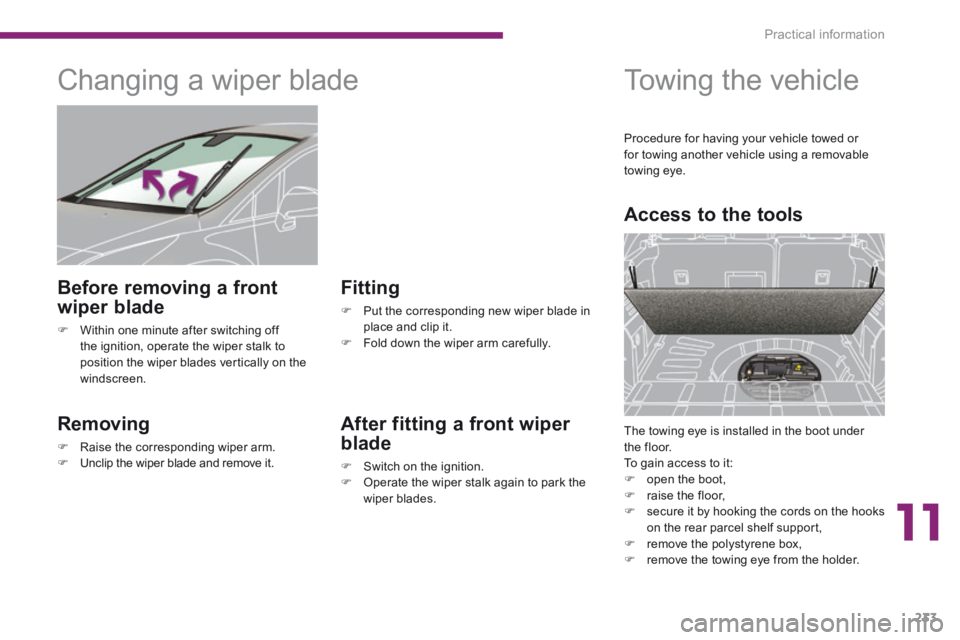
Changing a wiper blade
Removing
Raise the corresponding wiper arm. Unclip the wiper blade and remove it.
Fitting
Put the corresponding new wiper blade in place and clip it. Fold down the wiper arm carefully.
Before removing a front
wiper blade
Within one minute after switching off the ignition, operate the wiper stalk to position the wiper blades vertically on the windscreen.
After fitting a front wiper
blade
Switch on the ignition. Operate the wiper stalk again to park the wiper blades.
Towing the vehicle
Access to the tools
The towing eye is installed in the boot under the floor. To gain access to it: open the boot, raise the floor, secure it by hooking the cords on the hooks on the rear parcel shelf support, remove the polystyrene box, remove the towing eye from the holder.
Procedure for having your vehicle towed or for towing another vehicle using a removable towing eye.
Page 243 of 389
12
Technical data241
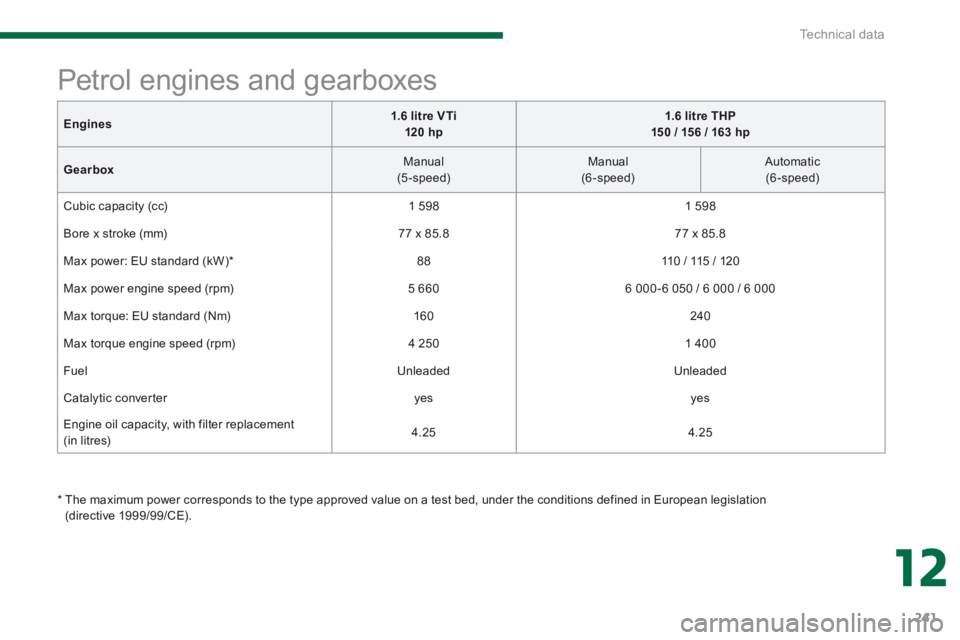
Engine s 1.6 litre VTi 120 hp1.6 litre THP 150 / 156 / 163 hp
Gearbox Manual (5-speed) Manual (6-speed) Automatic (6-speed)
Cubic capacity (cc) 1 5 9 8 1 5 9 8
Bore x stroke (mm) 77 x 85.8 77 x 85.8
Max power: EU standard (kW) * 88 110 / 115 / 120
Max power engine speed (rpm) 5 660 6 000 - 6 050 / 6 000 / 6 000
Max torque: EU standard (Nm) 160 240
Max torque engine speed (rpm) 4 250 1 400
Fuel Unleaded Unleaded
Catalytic converter yes yes
Engine oil capacity, with filter replacement (in litres) 4.25 4.25
Petrol engines and gearboxes
* The maximum power corresponds to the type approved value on a test bed, under the conditions defined in European legislation (directive 1999/99/CE).
Page 245 of 389
12
Technical data243
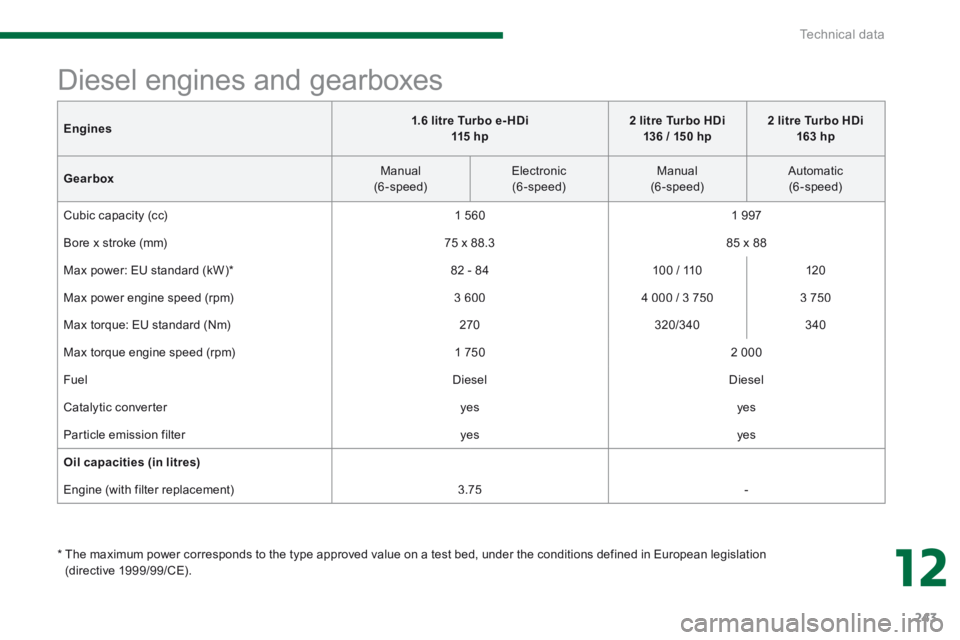
Engines1.6 litre Turbo e- HDi 115 h p2 litre Turbo HDi 136 / 150 hp2 litre Turbo HDi 163 hp
Gearbox Manual (6-speed) Electronic (6-speed) Manual (6-speed) Automatic (6-speed)
Cubic capacity (cc) 1 560 1 9 9 7
Bore x stroke (mm) 75 x 88.3 85 x 88
Max power: EU standard (kW) * 82 - 84 100 / 110 120
Max power engine speed (rpm) 3 600 4 000 / 3 750 3 750
Max torque: EU standard (Nm) 270 320/340 340
Max torque engine speed (rpm) 1 750 2 000
Fuel Diesel Diesel
Catalytic converter yes yes
Particle emission filter yes yes
Oil capacities (in litres)
Engine (with filter replacement) 3.75 -
Diesel engines and gearboxes
* The maximum power corresponds to the type approved value on a test bed, under the conditions defined in European legislation (directive 1999/99/CE).
Page 267 of 389
265
04
2ABC3DEF5JKL4GHI6MNO8TUV7PQR S9WXYZ0*#
1RADIO MEDIA NA
V TRAFFIC
SETUPADDR
BOOK
2ABC3DEF5JKL4GHI6MNO8TUV7PQR S9WXYZ0*#
1RADIO MEDIA NA
V TRAFFIC
SETUPADDR
BOOK
2ABC3DEF5JKL4GHI6MNO8TUV7PQR S9WXYZ0*#
1RADIO MEDIA NA
V TRAFFIC
SETUPADDR
BOOK
2ABC3DEF5JKL4GHI6MNO8TUV7PQR S9WXYZ0*#
1RADIO MEDIA NA
V TRAFFIC
SETUPADDR
BOOK
2ABC3DEF5JKL4GHI6MNO8TUV7PQR S9WXYZ0*#
1RADIO MEDIA NA
V TRAFFIC
SETUPADDR
BOOK
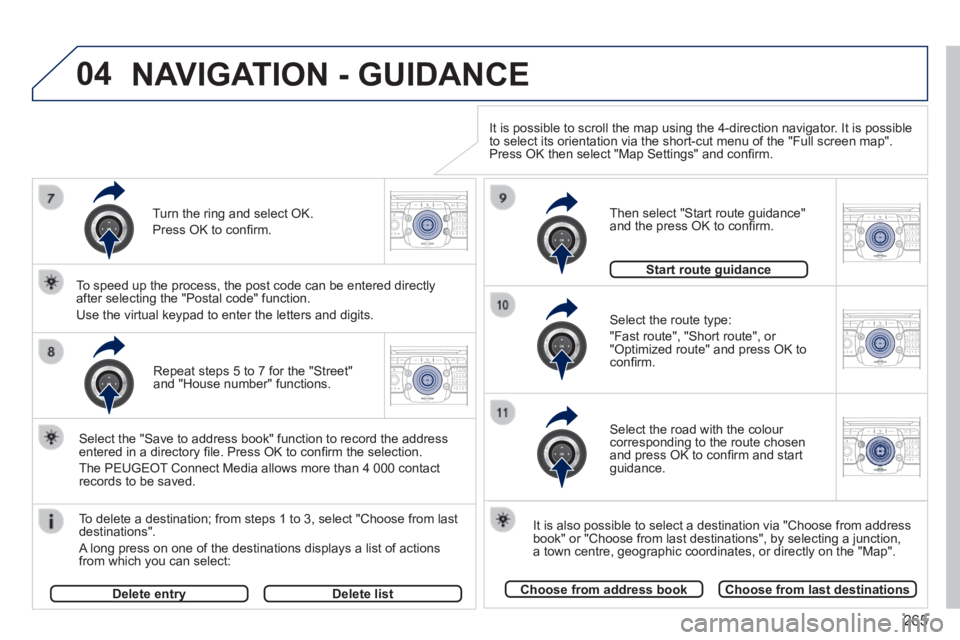
Repeat steps 5 to 7 for the "Street" and "House number" functions.
To delete a destination; from steps 1 to 3, select "Choose from last destinations".
A long press on one of the destinations displays a list of actions from which you can select:
Select the "Save to address book" function to record the address entered in a directory fi le. Press OK to confi rm the selection.
The PEUGEOT Connect Media allows more than 4 000 contact records to be saved.
To speed up the process, the post code can be entered directly after selecting the "Postal code" function.
Use the virtual keypad to enter the letters and digits. Select the route type:
"Fast route", "Short route", or "Optimized route" and press OK to confi rm.
Then select "Start route guidance" and the press OK to confi rm.
It is also possible to select a destination via "Choose from address book" or "Choose from last destinations", by selecting a junction, a town centre, geographic coordinates, or directly on the "Map".
Choose from address bookChoose from last destinations
Start route guidanceStart route guidance
It is possible to scroll the map using the 4-direction navigator. It is possible to select its orientation via the short-cut menu of the "Full screen map\
". Press OK then select "Map Settings" and confi rm.
Select the road with the colour corresponding to the route chosen and press OK to confi rm and start guidance.
Turn the ring and select OK.
Press OK to confi rm.
Delete entryDelete entryDelete list
NAVIGATION - GUIDANCE
Page 277 of 389
275
06
RADIO
2ABC3DEF5JKL4GHI6MNO8TUV7PQR S9WXYZ0*#
1RADIO MEDIA NA
V TRAFFIC
SETUPADDR
BOOK
2ABC3DEF5JKL4GHI6MNO8TUV7PQR S9WXYZ0*#
1RADIO MEDIA NA
V TRAFFIC
SETUPADDR
BOOK
2ABC3DEF5JKL4GHI6MNO8TUV7PQR S9WXYZ0*#
1RADIO MEDIA NA
V TRAFFIC
SETUPADDR
BOOK2ABC3DEF5JKL4GHI6MNO8TUV7PQR S9WXYZ0*#
1RADIO MEDIA NA
V TRAFFIC
SETUPADDR
BOOK
RADIO NA
V TRAFFICMEDIA
RADIO NA
V TRAFFICMEDIA
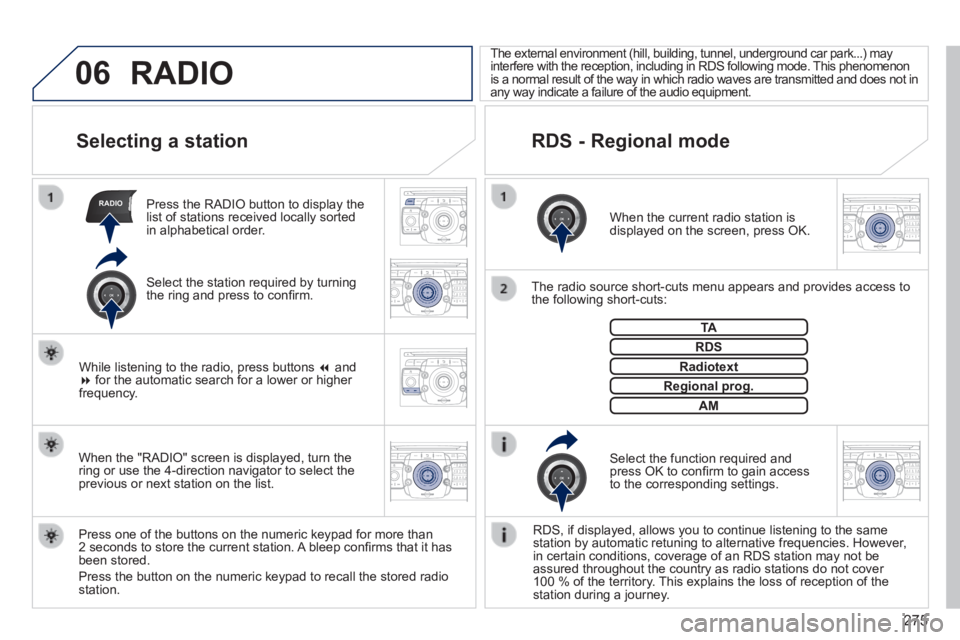
Selecting a station
When the current radio station is displayed on the screen, press OK.
The radio source short-cuts menu appears and provides access to the following short-cuts:
Select the function required and press OK to confi rm to gain access to the corresponding settings.
TA
RDS, if displayed, allows you to continue listening to the same station by automatic retuning to alternative frequencies. However, in certain conditions, coverage of an RDS station may not be assured throughout the country as radio stations do not cover 100 % of the territory. This explains the loss of reception of the station during a journey.
The external environment (hill, building, tunnel, underground car park.\
..) may interfere with the reception, including in RDS following mode. This phenomenon is a normal result of the way in which radio waves are transmitted and d\
oes not in any way indicate a failure of the audio equipment.
RDS - Regional mode
Press the RADIO button to display the list of stations received locally sorted in alphabetical order.
Press one of the buttons on the numeric keypad for more than 2 seconds to store the current station. A bleep confi rms that it has been stored.
Press the button on the numeric keypad to recall the stored radio station.
RDS
Radiotext
Regional prog.Regional prog.
RADIO
When the "RADIO" screen is displayed, turn the ring or use the 4-direction navigator to select the previous or next station on the list.
While listening to the radio, press buttons and for the automatic search for a lower or higher frequency.
Select the station required by turning the ring and press to confi rm.
AM
Page 291 of 389
289
SETUP
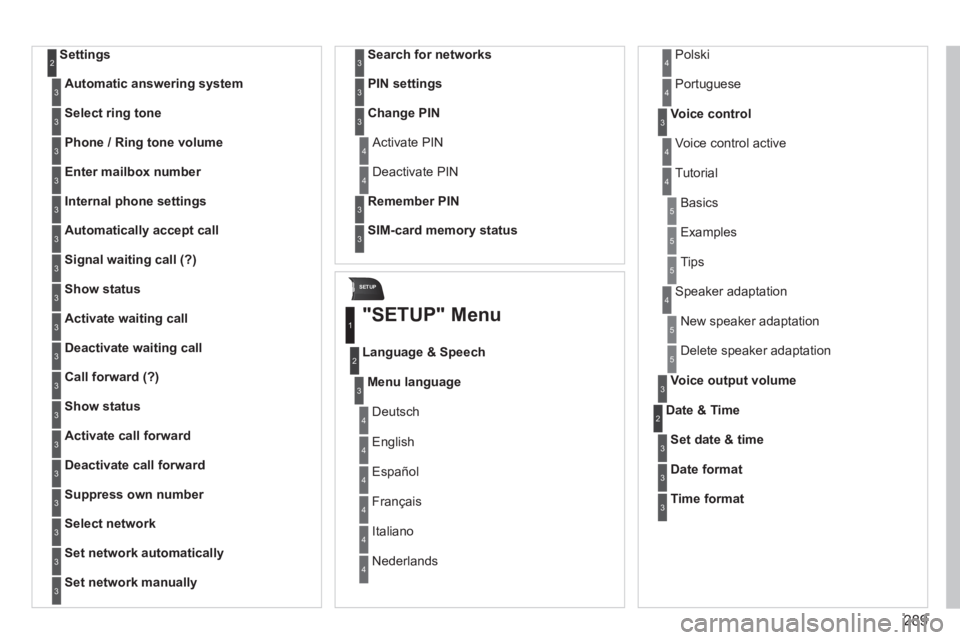
Settings 2
Automatic answering system3
Select ring tone3
Phone / Ring tone volume3
Enter mailbox number3
Internal phone settings3
Automatically accept call3
Signal waiting call (?)3
Show status3
Activate waiting call3
Deactivate waiting call3
Call forward (?)3
Show status3
Activate call forward3
Deactivate call forward3
Suppress own number3
Select network3
Set network automatically3
Set network manually3
Search for networks3
PIN settings3
Change PIN3
Activate PIN 4
Deactivate PIN 4
Remember PIN3
SIM-card memory status3
"SETUP" Menu
Menu language
Language & Speech
1
2
3
Deutsch 4
English 4
Español 4
Français 4
Italiano 4
Nederlands 4
Polski 4
Voice control3
Voice control active 4
Tutorial 4
Portuguese 4
Basics 5
Examples 5
Tips 5
Speaker adaptation 4
New speaker adaptation 5
Delete speaker adaptation 5
Voice output volume3
Date & Time 2
Set date & time3
Date format3
Time format3
Page 338 of 389
08
336
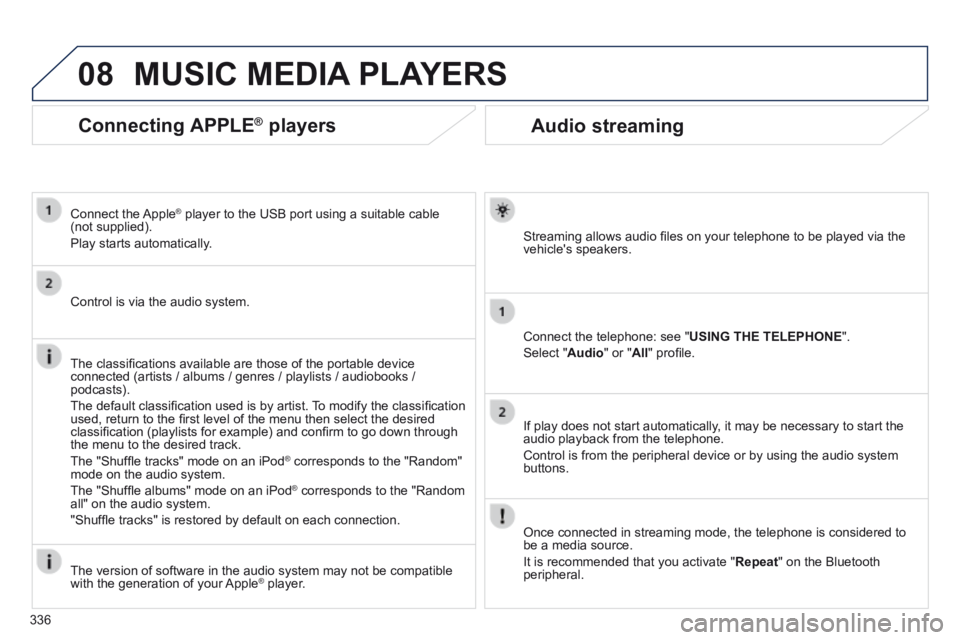
Audio streaming
Streaming allows audio fi les on your telephone to be played via the vehicle's speakers.
Connect the telephone: see " USING THE TELEPHONE ".
Select " Audio " or " All " profi le.
If play does not start automatically, it may be necessary to start the audio playback from the telephone.
Control is from the peripheral device or by using the audio system buttons.
Once connected in streaming mode, the telephone is considered to be a media source.
It is recommended that you activate " Repeat " on the Bluetooth peripheral.
MUSIC MEDIA PLAYERS
Connecting APPLE ® Connecting APPLE ® Connecting APPLE players ® players ®
Connect the Apple ® player to the USB port using a suitable cable ® player to the USB port using a suitable cable ®
(not supplied).
Play starts automatically.
Control is via the audio system.
The classifi cations available are those of the portable device connected (artists / albums / genres / playlists / audiobooks / podcasts).
The default classifi cation used is by artist. To modify the classifi cation used, return to the fi rst level of the menu then select the desired classifi cation (playlists for example) and confi rm to go down through the menu to the desired track.
The "Shuffl e tracks" mode on an iPod ® corresponds to the "Random" ® corresponds to the "Random" ®
mode on the audio system.
The "Shuffl e albums" mode on an iPod ® corresponds to the "Random ® corresponds to the "Random ®
all" on the audio system.
"Shuffl e tracks" is restored by default on each connection.
The version of software in the audio system may not be compatible with the generation of your Apple ® player. ® player. ®
Page 345 of 389
11
343
2
3
3
1
4
2
2
1
4
4
2
2
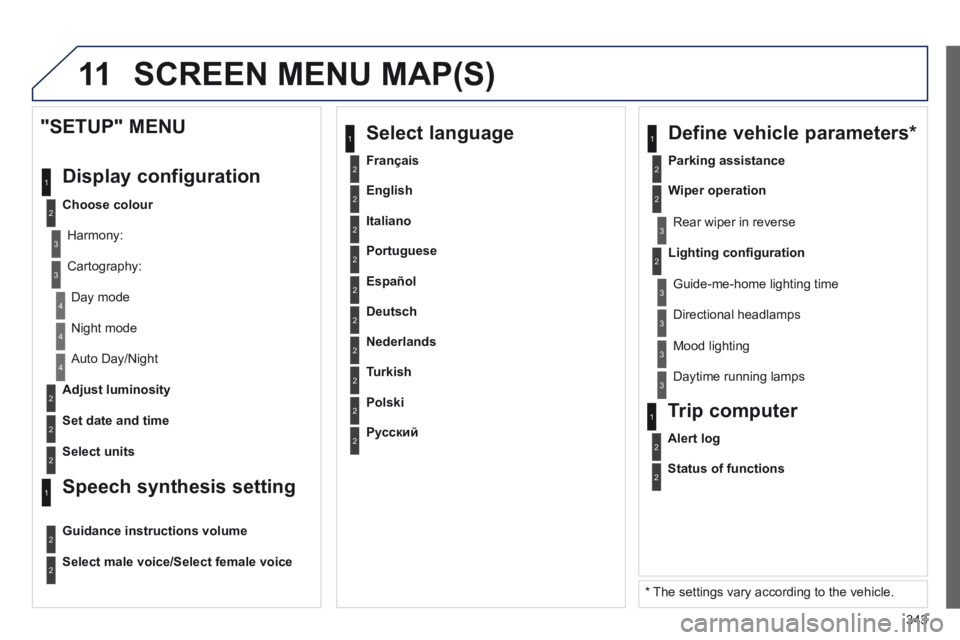
Night mode
Auto Day/Night
Adjust luminosity
Set date and time
"SETUP" MENU
Display configuration
Choose colour
Harmony:
Cartography:
Day mode
Speech synthesis setting
Guidance instructions volume
Select male voice/Select female voice
2Select units
2
3
3
2Lighting confi guration
Parking assistance
Rear wiper in reverse
Guide-me-home lighting time
1 Define vehicle parameters *
2Wiper operation
3 Directional headlamps
3 Mood lighting
3 Daytime running lamps
* The settings vary according to the vehicle.
2Alert log
1 Trip computer
2Status of functions
2Français
1 Select language
2English
2Italiano
2Portuguese
2Español
2Deutsch
2Nederlands
2Turkish
2Polski
2Русский
SCREEN MENU MAP(S)