service PEUGEOT 308 2014 Owners Manual
[x] Cancel search | Manufacturer: PEUGEOT, Model Year: 2014, Model line: 308, Model: Peugeot 308 2014Pages: 389, PDF Size: 22.92 MB
Page 2 of 389
3008_EN_CHAP0A_COUV_DEBUT_ED01-2013
This personal space offers advice and other useful information for the care and maintenance of your vehicle.
On-line handbook
You can find your handbook on the PEUGEOT website, under "Personal space". Referring to the handbook on-line also gives you access to the latest information available, easily identified by the bookmark, associated with this symbol:
If the "Personal space" function is not available on the PEUGEOT public website for your country, you can find your handbook at the following address: http://public.servicebox.peugeot.com
The Vehicle documentation link in the home page (no registration is needed), the language, the vehicle, its body style, the print edition of your handbook appropriate for the date of registration of your vehicle.
Please note the following point: The fitting of electrical equipment or accessories which are not recommended by PEUGEOT may result in a failure of your vehicle's electronic system. Please note this specific warning. It is advisable to contact a PEUGEOT dealer to be shown the recommended equipment and accessories.
Select:
You have access to your handbook on line, together with the latest information, identified by the symbol:
Page 28 of 389
Familiarisation
26
Limit the causes of excess
consumption
Spread loads throughout the vehicle; place the heaviest items in the bottom of the boot, as close as possible to the rear seats. Limit the loads carried in the vehicle and reduce wind resistance (roof bars, roof rack, bicycle carrier, trailer...). Use a roof box in preference. Remove roof bars and roof racks after use.
At the end of winter, remove snow tyres and refit your summer tyres.
Observe the recommendations
on maintenance
Check the tyre pressures regularly, when cold, referring to the label in the door aperture, driver's side.
Have your vehicle serviced regularly (engine oil, oil filter, air filter...) and observe the schedule of operations recommended by the manufacturer.
When refuelling, do not continue after the third cut-off of the nozzle to avoid any over flow.
At the wheel of your new vehicle, it is only after the first 1 800 miles (3 000 kilometres) that you will see the fuel consumption settle down to a consistent average.
Carry out this check in particular: - before a long journey, - at each change of season, - after a long period out of use. Don't forget the spare wheel and the tyres on any trailer or caravan.
Page 29 of 389
1
Monitoring27
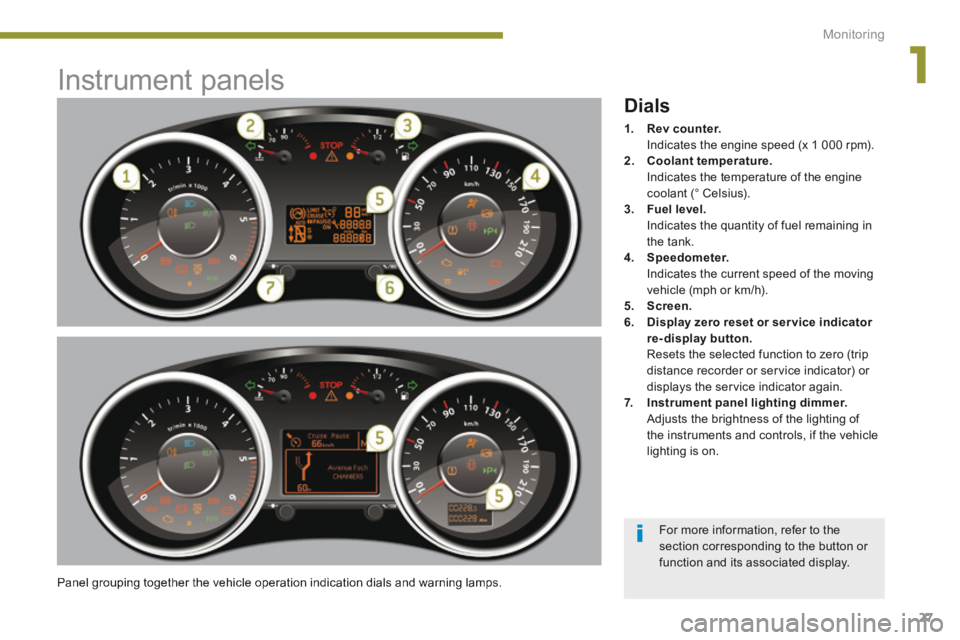
Instrument panels
Panel grouping together the vehicle operation indication dials and warning lamps.
Dials
1. Rev counter. Indicates the engine speed (x 1 000 rpm). 2. Coolant temperature. Indicates the temperature of the engine coolant (° Celsius). 3. Fuel level. Indicates the quantity of fuel remaining in the tank. 4. Speedometer. Indicates the current speed of the moving vehicle (mph or km/h). 5. Screen.6. Display zero reset or ser vice indicator re-display button. Resets the selected function to zero (trip distance recorder or service indicator) or displays the service indicator again. 7. Instrument panel lighting dimmer. Adjusts the brightness of the lighting of the instruments and controls, if the vehicle lighting is on.
For more information, refer to the section corresponding to the button or function and its associated display.
Page 30 of 389
Monitoring
28
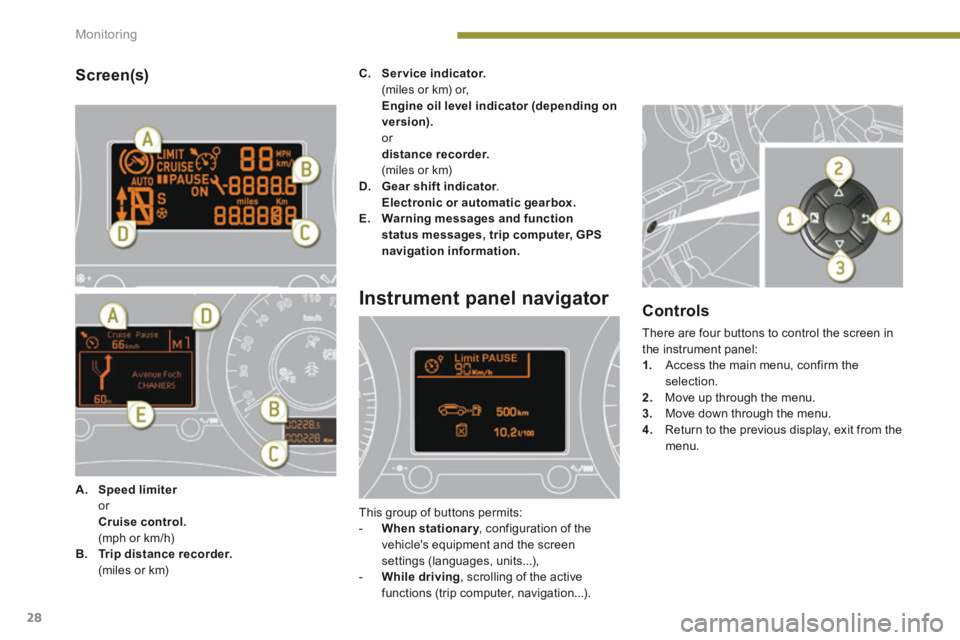
Screen(s)
A. Speed limiter Speed limiter Speed limiter or Cruise control. (mph or km/h) B. Trip distance recorder. (miles or km)
C. Service indicator. (miles or km) or, Engine oil level indicator (depending on version). or distance recorder. (miles or km) D. Gear shift indicator . Gear shift indicator . Gear shift indicator Electronic or automatic gearbox.E. Warning messages and function status messages, trip computer, GPS navigation information.
Instrument panel navigator
This group of buttons permits: - When stationary , configuration of the When stationary , configuration of the When stationary
vehicle's equipment and the screen settings (languages, units...), - While driving , scrolling of the active functions (trip computer, navigation...).
Controls
There are four buttons to control the screen in the instrument panel: 1. Access the main menu, confirm the selection. 2. Move up through the menu. 3. Move down through the menu.
4. Return to the previous display, exit from the menu.
Page 36 of 389
Monitoring
34
Warning lamps
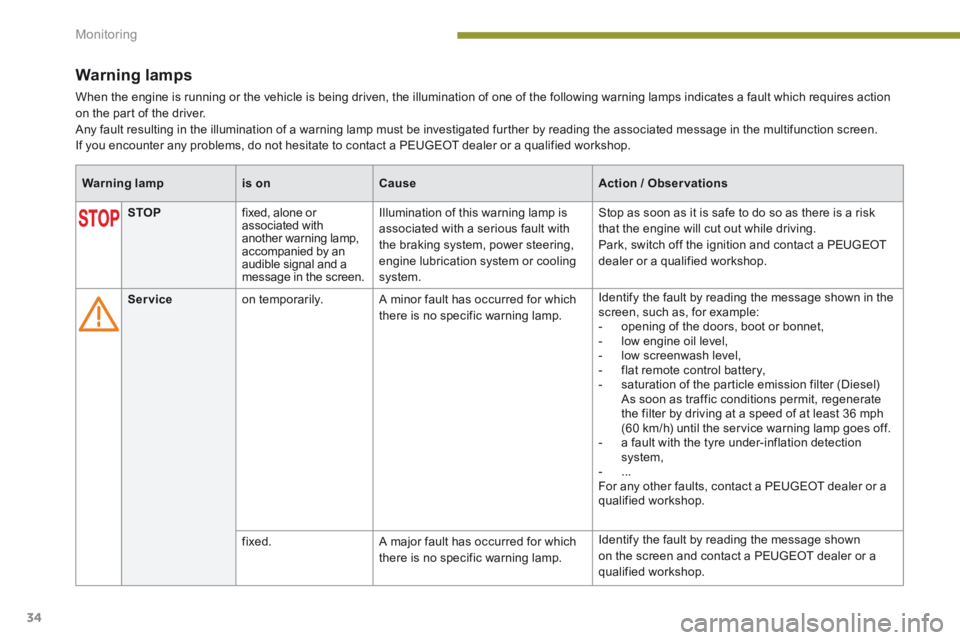
When the engine is running or the vehicle is being driven, the illumination of one of the following warning lamps indicates a fault which requires action on the part of the driver. Any fault resulting in the illumination of a warning lamp must be investigated further by reading the associated message in the multifunction screen. If you encounter any problems, do not hesitate to contact a PEUGEOT dealer or a qualified workshop.
Warning lampis onCauseAction / Observations
STOP fixed, alone or associated with another warning lamp, accompanied by an audible signal and a message in the screen.
Illumination of this warning lamp is associated with a serious fault with the braking system, power steering, engine lubrication system or cooling system.
Stop as soon as it is safe to do so as there is a risk that the engine will cut out while driving. Park, switch off the ignition and contact a PEUGEOT dealer or a qualified workshop.
Service on temporarily. A minor fault has occurred for which there is no specific warning lamp.
Identify the fault by reading the message shown in the screen, such as, for example: - opening of the doors, boot or bonnet, - low engine oil level, - low screenwash level, - flat remote control battery, - saturation of the particle emission filter (Diesel) As soon as traffic conditions permit, regenerate the filter by driving at a speed of at least 36 mph (60 km/h) until the service warning lamp goes off. - a fault with the tyre under-inflation detection system, - ... For any other faults, contact a PEUGEOT dealer or a qualified workshop.
fixed. A major fault has occurred for which there is no specific warning lamp.
Identify the fault by reading the message shown on the screen and contact a PEUGEOT dealer or a qualified workshop.
Page 40 of 389
Monitoring
38
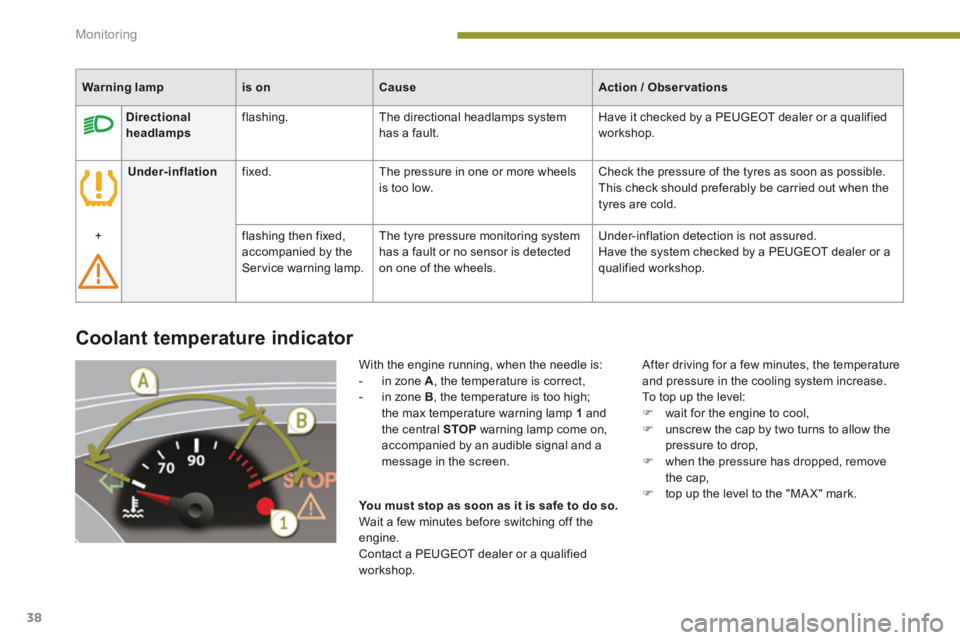
Coolant temperature indicator
With the engine running, when the needle is: - in zone A , the temperature is correct, - in zone B , the temperature is too high; the max temperature warning lamp 1 and the central STOP warning lamp come on, accompanied by an audible signal and a message in the screen.
After driving for a few minutes, the temperature and pressure in the cooling system increase. To top up the level: wait for the engine to cool, unscrew the cap by two turns to allow the pressure to drop, when the pressure has dropped, remove the cap, top up the level to the "MA X" mark. You must stop as soon as it is safe to do so. Wait a few minutes before switching off the
engine. Contact a PEUGEOT dealer or a qualified workshop.
Warning lampis onCauseAction / Observations
Directional headlamps flashing. The directional headlamps system has a fault. Have it checked by a PEUGEOT dealer or a qualified workshop.
Under-inflation fixed. The pressure in one or more wheels is too low. Check the pressure of the tyres as soon as possible. This check should preferably be carried out when the tyres are cold.
+ flashing then fixed, accompanied by the Service warning lamp.
The tyre pressure monitoring system has a fault or no sensor is detected on one of the wheels.
Under-inflation detection is not assured. Have the system checked by a PEUGEOT dealer or a qualified workshop.
Page 41 of 389
1
Monitoring39
Service indicator
System which informs the driver when the next service is due, in accordance with the manufacturer's servicing schedule. The point at which the service is due is calculated using the distance covered since the last time the service indicator was reset.
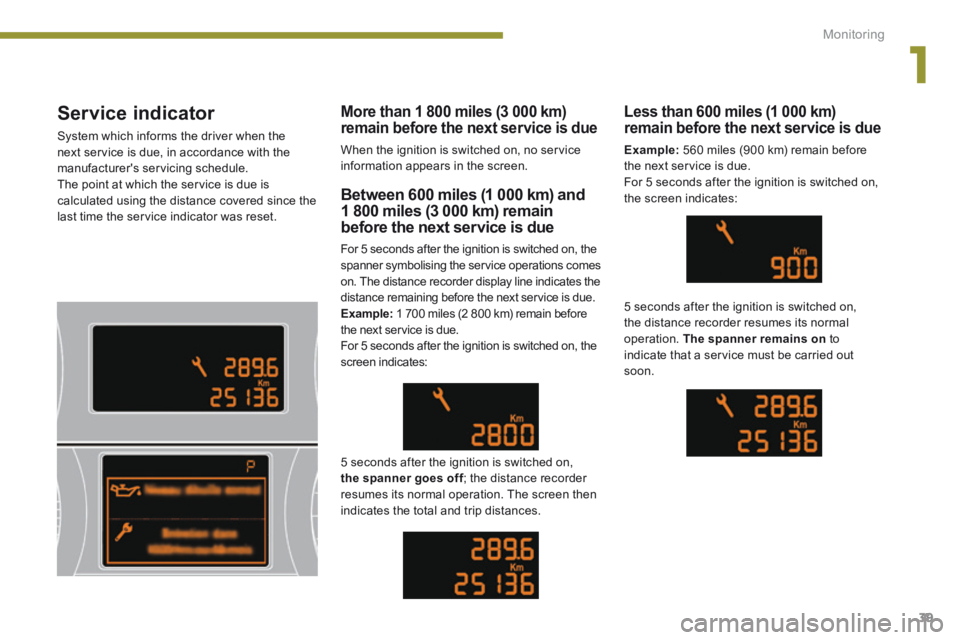
Between 600 miles (1 000 km) and 1 800 miles (3 000 km) remain
before the next service is due
For 5 seconds after the ignition is switched on, the spanner symbolising the service operations comes on. The distance recorder display line indicates the distance remaining before the next service is due. Example: 1 700 miles (2 800 km) remain before the next service is due. For 5 seconds after the ignition is switched on, the screen indicates:
5 seconds after the ignition is switched on, the spanner goes off ; the distance recorder the spanner goes off ; the distance recorder the spanner goes offresumes its normal operation. The screen then indicates the total and trip distances.
Less than 600 miles (1 000 km) remain before the next service is due
Example: 560 miles (900 km) remain before the next service is due. For 5 seconds after the ignition is switched on, the screen indicates:
5 seconds after the ignition is switched on, the distance recorder resumes its normal operation. The spanner remains on to indicate that a service must be carried out soon.
More than 1 800 miles (3 000 km) remain before the next service is due
When the ignition is switched on, no service information appears in the screen.
Page 42 of 389
Monitoring
40
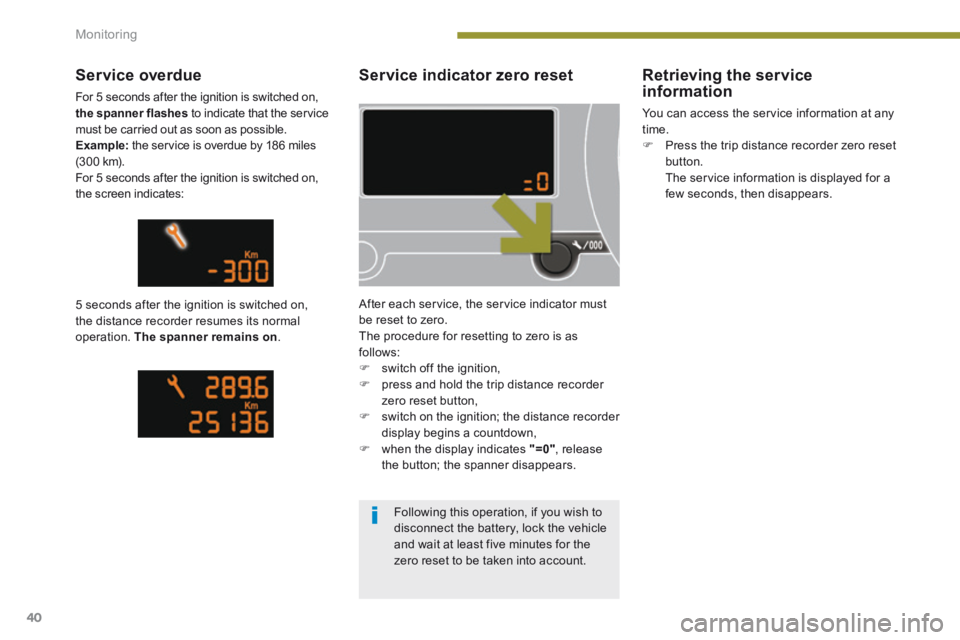
Service indicator zero reset
After each service, the service indicator must be reset to zero. The procedure for resetting to zero is as follows: switch off the ignition, press and hold the trip distance recorder zero reset button, switch on the ignition; the distance recorder display begins a countdown, when the display indicates "=0" , release the button; the spanner disappears.
Service overdue
For 5 seconds after the ignition is switched on, the spanner flashes to indicate that the service must be carried out as soon as possible. Example: the service is overdue by 186 miles (3 0 0 k m). For 5 seconds after the ignition is switched on, the screen indicates:
5 seconds after the ignition is switched on, the distance recorder resumes its normal operation. The spanner remains on .
Retrieving the service information
You can access the service information at any time. Press the trip distance recorder zero reset button. The service information is displayed for a few seconds, then disappears.
Following this operation, if you wish to disconnect the battery, lock the vehicle
and wait at least five minutes for the zero reset to be taken into account.
Page 43 of 389
1
Monitoring41
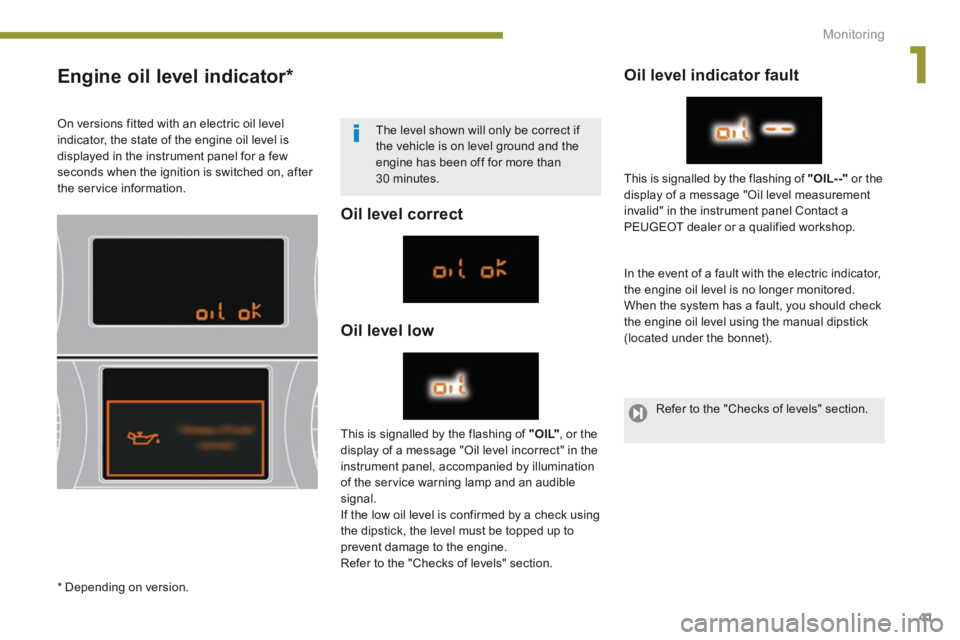
Engine oil level indicator *
Oil level correct
Oil level low
Oil level indicator fault
In the event of a fault with the electric indicator, the engine oil level is no longer monitored. When the system has a fault, you should check the engine oil level using the manual dipstick (located under the bonnet).
This is signalled by the flashing of " O I L" , or the display of a message "Oil level incorrect" in the instrument panel, accompanied by illumination of the service warning lamp and an audible signal. If the low oil level is confirmed by a check using the dipstick, the level must be topped up to
prevent damage to the engine. Refer to the "Checks of levels" section.
This is signalled by the flashing of "OIL- -" or the display of a message "Oil level measurement invalid" in the instrument panel Contact a
PEUGEOT dealer or a qualified workshop.
On versions fitted with an electric oil level indicator, the state of the engine oil level is displayed in the instrument panel for a few seconds when the ignition is switched on, after the service information.
The level shown will only be correct if the vehicle is on level ground and the engine has been off for more than 30 minutes.
* Depending on version.
Refer to the "Checks of levels" section.
Page 51 of 389
2
Multifunction screens49
Display confi guration
Once this menu has been selected, you have access to the following settings: - brightness-video setting, - date and time setting,
- selection of the units.
Adjusting the date and time Press the " " or " " button to select the "Display configuration" menu, then the "OK" button. Press the " " or " " button, to select the "Adjust date and time" line, then on the "OK" button. Press the " " or " " button to select the setting to modify. Conform by pressing the "OK" button then adjust the setting and confirm again to save the modification.
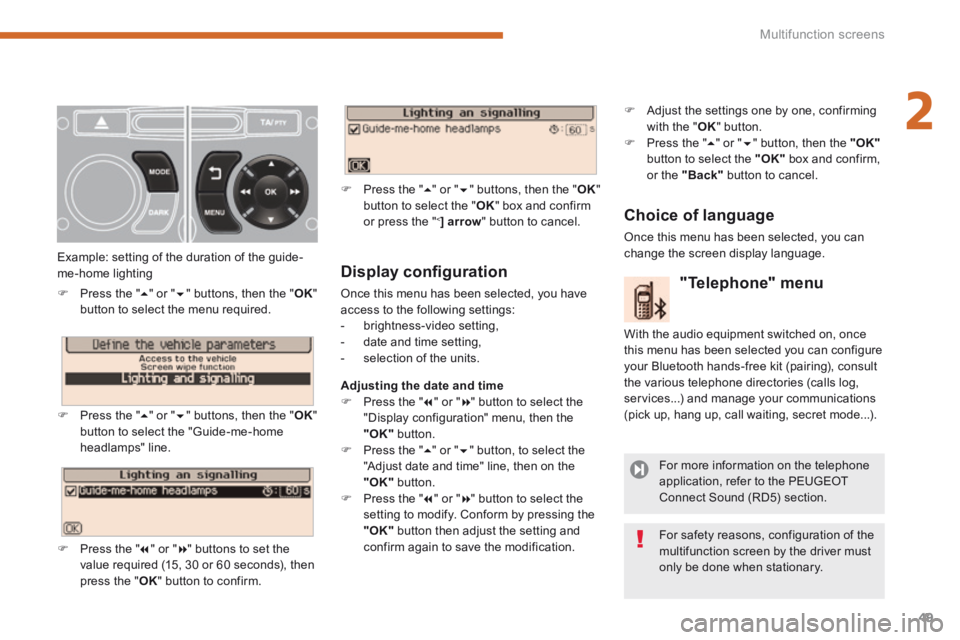
Example: setting of the duration of the guide-me-home lighting
Press the " " or " " buttons, then the " OK " button to select the menu required.
Press the " " or " " buttons, then the " OK " button to select the "Guide-me-home headlamps" line.
Press the " " or " " buttons to set the value required (15, 30 or 60 seconds), then press the " OK " button to confirm.
Press the " " or " " buttons, then the " OK " button to select the " OK " box and confirm or press the " < ] arrow " button to cancel.
"Telephone" menu
With the audio equipment switched on, once this menu has been selected you can configure your Bluetooth hands-free kit (pairing), consult the various telephone directories (calls log, services...) and manage your communications (pick up, hang up, call waiting, secret mode...).
For more information on the telephone application, refer to the PEUGEOT Connect Sound (RD5) section.
For safety reasons, configuration of the multifunction screen by the driver must only be done when stationary.
Choice of language
Once this menu has been selected, you can change the screen display language.
Adjust the settings one by one, confirming with the " OK " button. Press the " " or " " button, then the "OK"button to select the "OK" box and confirm, or the "Back" button to cancel.