key Peugeot 308 2016 Service Manual
[x] Cancel search | Manufacturer: PEUGEOT, Model Year: 2016, Model line: 308, Model: Peugeot 308 2016Pages: 398, PDF Size: 9.38 MB
Page 175 of 398
173
308_en_Chap06_conduite_ed02-2015
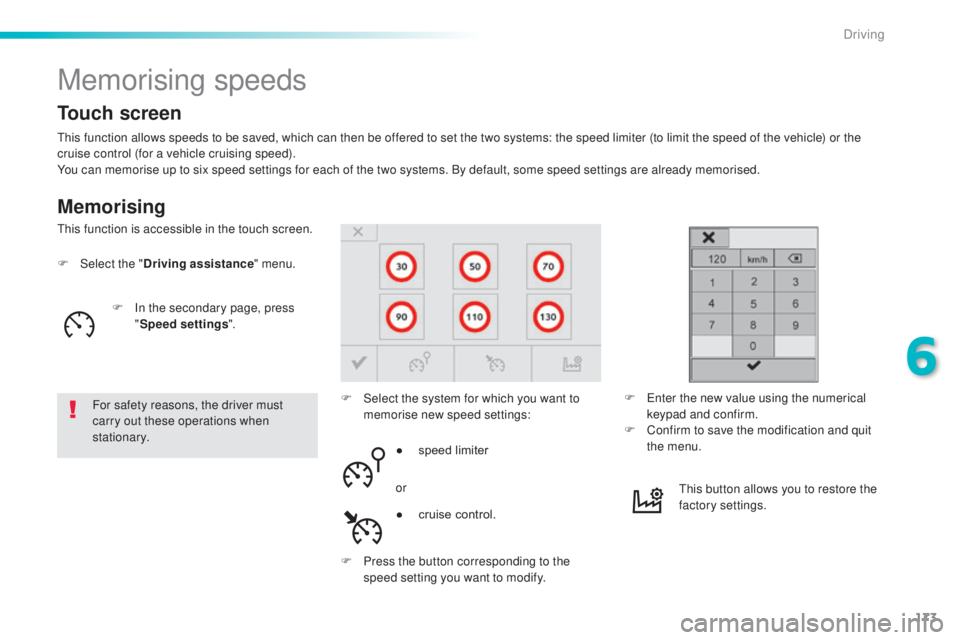
Memorising speeds
Memorising
this function allows speeds to be saved, which can then be offered to set the two systems: the speed limiter (to limit the speed of the vehicle) or the
c ruise control (for a vehicle cruising speed).
You can memorise up to six speed settings for each of the two systems. By default, some speed settings are already memorised.
F
Selec
t the "Driving assistance " menu.
For safety reasons, the driver must
carry out these operations when
stationary. F
Se
lect the system for which you want to
memorise new speed settings:
thi
s function is accessible in the touch screen.
F
e
nt
er the new value using the numerical
keypad and confirm.
F
Co
nfirm to save the modification and quit
the menu.
●
sp
eed limiter
or
F
Pr
ess the button corresponding to the
speed setting you want to modify.
thi
s button allows you to restore the
factory settings.
Touch screen
F In the secondary page, press
" S
peed settings ".
●
cr
uise control.
6
Driving
Page 215 of 398
213
308_en_Chap07_info-pratiques_ed02-2015
Fuel tank
Additions of fuel must be of at least 10 litres to
be registered by the fuel gauge.
Opening the filler cap may result in an inrush of
air.
thi
s vacuum is entirely normal and results
from the sealing of the fuel system.
Opening
With Stop & Start, never refuel with the
system in StOP m ode; you must switch
off the ignition with the key, or the
S
tARt/StOP b
utton if your vehicle has
Keyless
ent
ry and Starting.
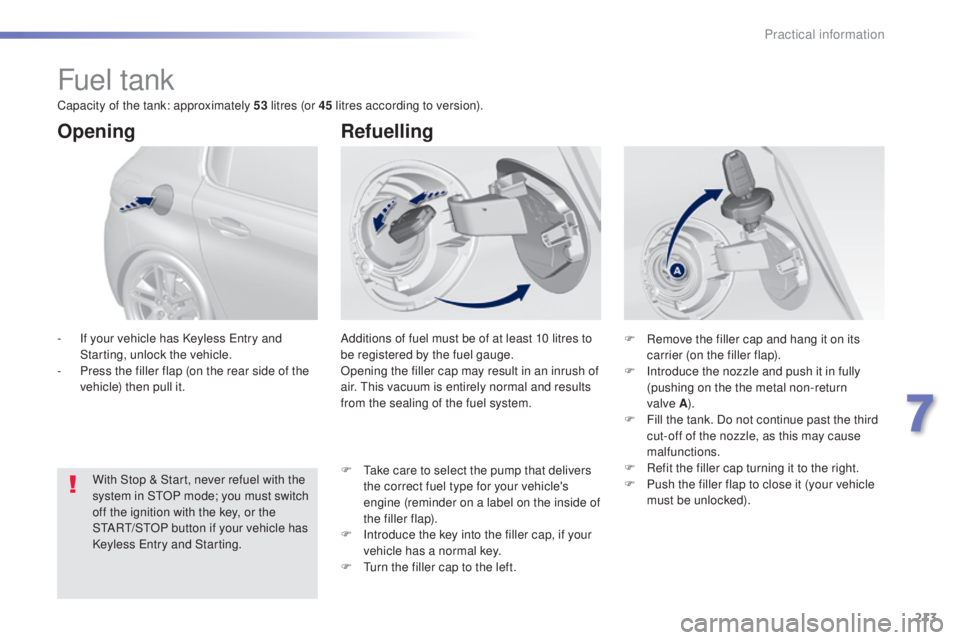
-
If y
our vehicle has Keyless
ent
ry and
Starting, unlock the vehicle.
-
Pr
ess the filler flap (on the rear side of the
vehicle) then pull it.
Refuelling
F Remove the filler cap and hang it on its
c arrier (on the filler flap).
F
In
troduce the nozzle and push it in fully
(pushing on the the metal non-return
valve
A ).
F Fi
ll the tank. Do not continue past the third
cut-off of the nozzle, as this may cause
malfunctions.
F
Re
fit the filler cap turning it to the right.
F
Pu
sh the filler flap to close it (your vehicle
must be unlocked).
F
t
ak
e care to select the pump that delivers
the correct fuel type for your vehicle's
engine (reminder on a label on the inside of
the filler flap).
F
In
troduce the key into the filler cap, if your
vehicle has a normal key.
F
t
ur
n the filler cap to the left.
Capacity of the tank: approximately 53
litres (or 45 litres according to version).
7
Practical information
Page 227 of 398
225
308_en_Chap07_info-pratiques_ed02-2015
PeugeOt & tOtAL,
A PARtNeRSHIP tO DeLI VeR
Bet
te
R PeR
FORMANC
e!
Innovation, the key to success
the tOtAL Research and Development and
Peu geOt teams work together to develop high
quality lubricants that meet the requirements
of P
eu
ge
Ot v
ehicles. For you, this is the
assurance that the performance of your engine
is optimised while also ensuring its durability.
the 2
08 HYbrid F
e d
emonstrates the ability of
P
eu
ge
Ot
and
tOtAL
to develop innovative
technologies and provide other ways of moving
towards the future.
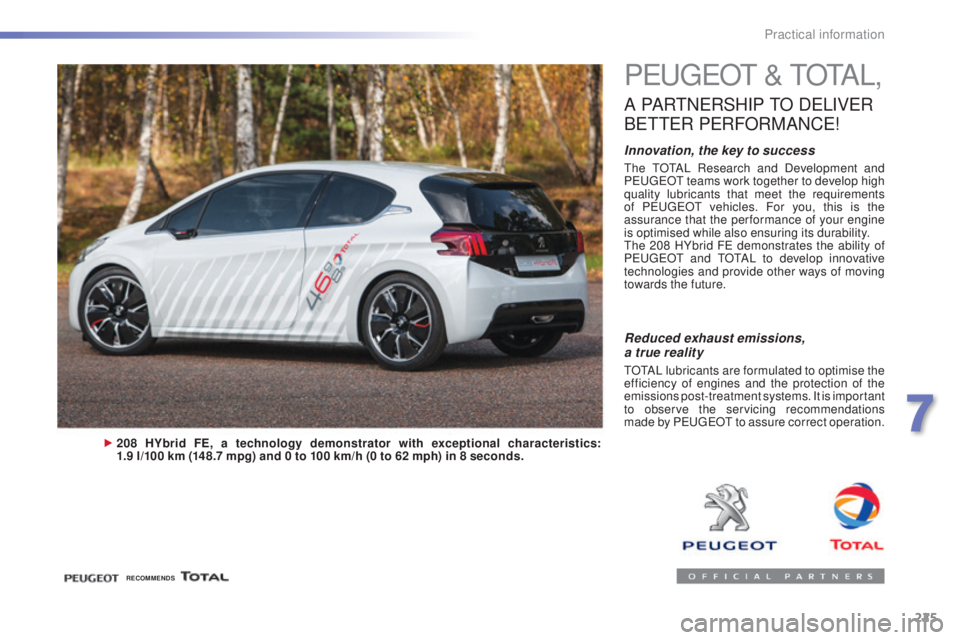
208 HYbrid FE, a technology demonstrator with exceptional characteristics:
1.9 l/100 km (148.7 mpg) and 0 to 100 km/h (0 to 62 mph) in 8 seconds.
Reduced exhaust emissions,
a true reality
tOtAL lubricants are formulated to optimise the
e fficiency of engines and the protection of the
emissions post-treatment systems. It is important
to observe the servicing recommendations
made by P
eu
ge
Ot
to assure correct operation.
RECOMMENDS
7
Practical information
Page 242 of 398
240
308_en_Chap07_info-pratiques_ed02-2015
Recommendations on storage
Never store bottles of AdBlue® in your
vehicle.
AdBlue
® freezes at about -11°C and
deteriorates above 25°C. It is recommended
that bottles be stored in a cool area and
protected from direct sunlight.
under
these conditions, the additive can be
kept for at least a year.
If the additive has frozen, it can be used once it
has completely thawed out.
Procedure
Before topping-up, ensure that the vehicle is
parked on a flat and level sur face.
In wintry conditions, ensure that the
temperature of the vehicle is above -11°C.
Otherwise the AdBlue
® may be frozen and
so cannot be poured into its tank. Park your
vehicle in a warmer area for a few hours to
allow the top-up to be carried out.
F
Sw
itch off the ignition and remove the
key, or if your vehicle has one, press
the S
tARt/StOP b
utton to switch off
the
eng
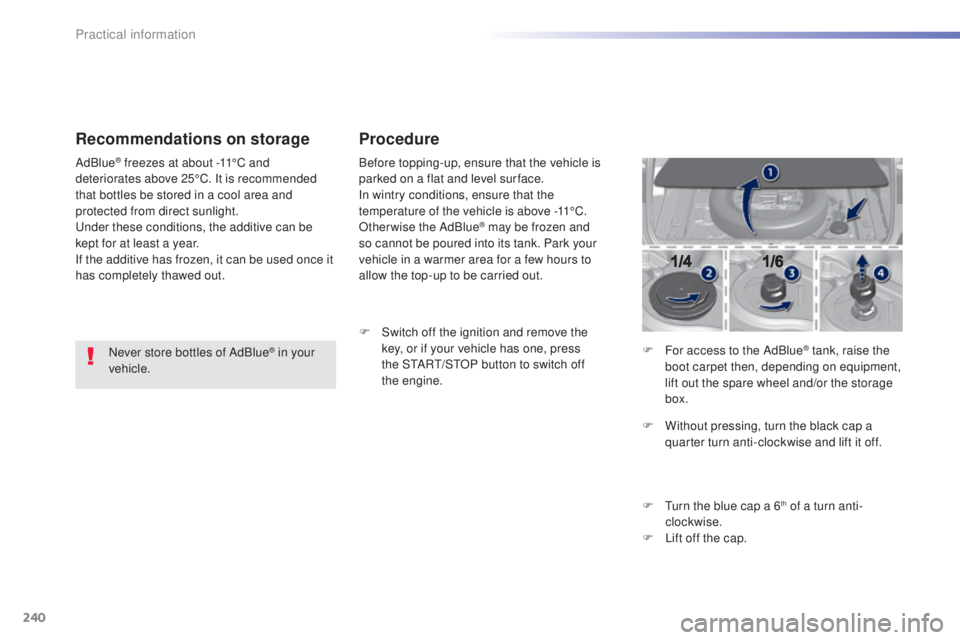
ine. F
Fo
r access to the AdBlue
® tank, raise the
boot carpet then, depending on equipment,
lift out the spare wheel and/or the storage
box.
F
Wi
thout pressing, turn the black cap a
quarter turn anti-clockwise and lift it off.
F
t
ur
n the blue cap a 6
th of a turn anti-
clockwise.
F
Li
ft off the cap.
Practical information
Page 243 of 398
241
308_en_Chap07_info-pratiques_ed02-2015
Never dispose of AdBlue® additive
bottles in the household waste. Place
them in a special container provided
this purpose or take them to your dealer.
F
Af
ter emptying the bottle, wipe away any
spillage around the tank filler using a damp
cloth. If any additive is split or splashed, wash
immediately with cold water or wipe with
a damp cloth.
If the additive has crystallised, clean it
off using a sponge and hot water.
F
Re
fit the blue cap to the tank and turn it a
6
th of a turn clockwise, to its stop.
F Re fit the black cap and turn it a quarter of
a turn clockwise without pressing.
ens
ure
that the indicator on the cap lines up with
the indicator on the support.
F
De
pending on equipment, return the spare
wheel and/or the storage box to the bottom
of the boot.
F
Re
fit the boot carpet and close the tailgate. Important: when topping
-up after
running out of additive , signalled
by the message "
top u
p emissions
additive: Starting prevented", you
must wait for about 5 minutes before
switching on the ignition, without
opening the driver's door, unlocking
the vehicle, introducing the key
into the ignition switch, or placing
the key of the "Keyless Entr y and
Star ting" system inside the vehicle .
Switch on the ignition, then wait for
10
se
conds before starting the engine.
F
Ob
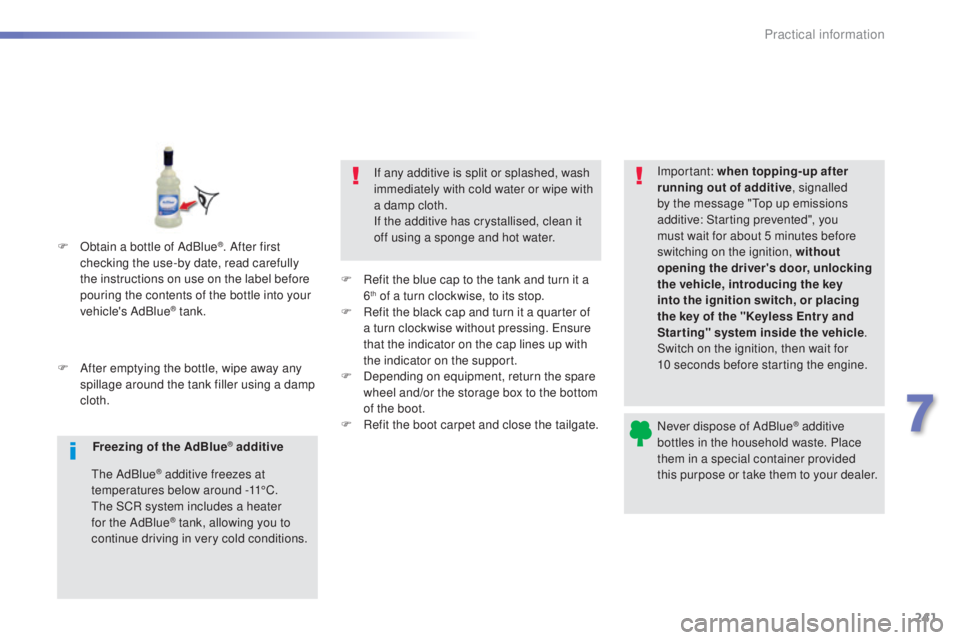
tain a bottle of AdBlue
®. After first
checking the use-by date, read carefully
the instructions on use on the label before
pouring the contents of the bottle into your
vehicle's AdBlue
® tank.
Freezing of the AdBlue
® additive
the
AdBlue
® additive freezes at
temperatures below around -11°C.
the S
CR system includes a heater
for the AdBlue
® tank, allowing you to
continue driving in very cold conditions.
7
Practical information
Page 270 of 398
268
308_en_Chap08_en-cas-de-panne_ed02-2015
Dashboard fuses
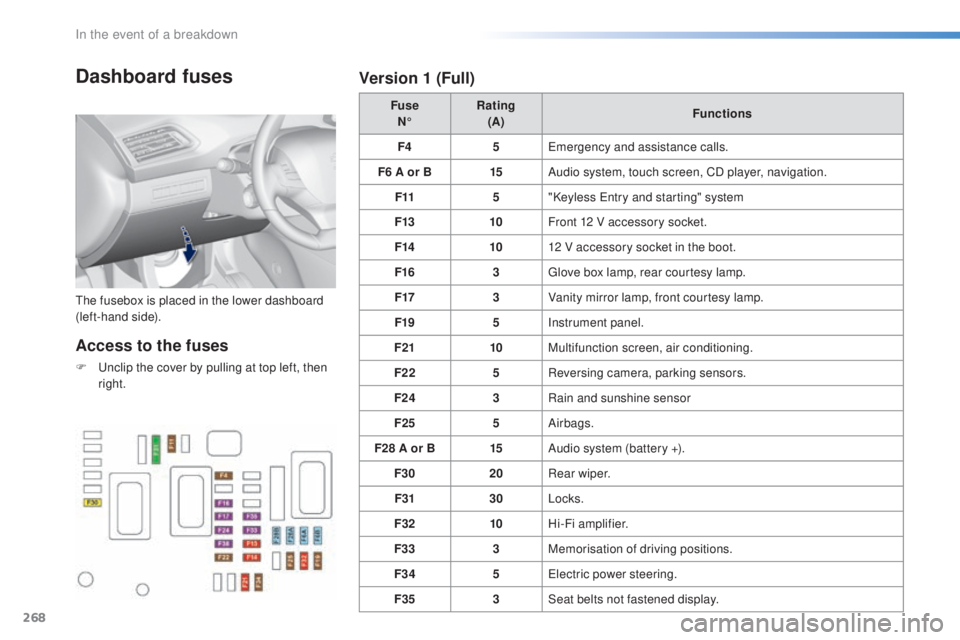
the fusebox is placed in the lower dashboard
( left-hand side). Fuse
N° Rating
(A) Functions
F4 5
eme
rgency and assistance calls.
F6 A or B 15Audio system, touch screen, CD player, navigation.
F11 5"Keyless
ent
ry and starting" system
F13 10Front 12 V accessory socket.
F14 1012 V accessory socket in the boot.
F16 3
glov
e box lamp, rear courtesy lamp.
F17 3Vanity mirror lamp, front courtesy lamp.
F19 5Instrument panel.
F21 10Multifunction screen, air conditioning.
F22 5Reversing camera, parking sensors.
F24 3Rain and sunshine sensor
F25 5Airbags.
F28 A or B 15Audio system (battery +).
F30 20Rear wiper.
F31 30Locks.
F32 10Hi-Fi amplifier.
F33 3Memorisation of driving positions.
F34 5
ele
ctric power steering.
F35 3Seat belts not fastened display.
Access to the fuses
F unclip the cover by pulling at top left, then
r ight.
Version 1 (Full)
In the event of a breakdown
Page 275 of 398
273
308_en_Chap08_en-cas-de-panne_ed02-2015
Starting using another battery
First check that the slave battery has a
nominal voltage of 12 V and a capacity
at least equal to that of the discharged
battery.
Do not try to start the engine by
connecting a battery charger.
Do not disconnect the (+) terminal when
the engine is running.
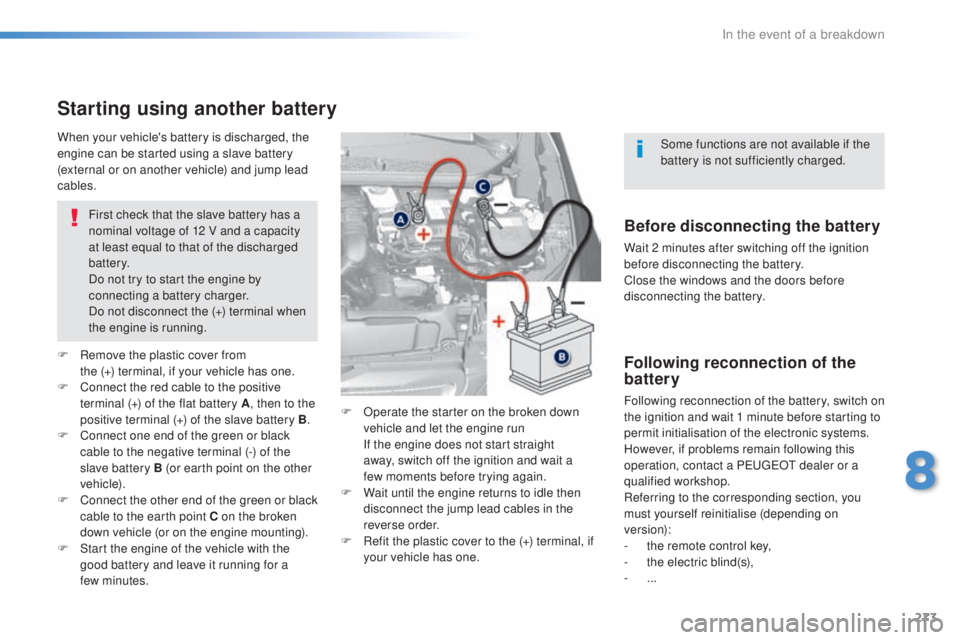
F
Re
move the plastic cover from
the
(
+)
t
erminal, if your vehicle has one.
F
Co
nnect the red cable to the positive
terminal (+) of the flat battery A , then to the
positive terminal (+) of the slave battery B.
F
Co
nnect one end of the green or black
cable to the negative terminal (-) of the
slave battery B (or earth point on the other
vehicle).
F
Co
nnect the other end of the green or black
cable to the earth point C on the broken
down vehicle (or on the engine mounting).
F
St
art the engine of the vehicle with the
good battery and leave it running for a
few
m
inutes. F
Op
erate the starter on the broken down
vehicle and let the engine run
If t
he engine does not start straight
away, switch off the ignition and wait a
few
m
oments before trying again.
F
Wa
it until the engine returns to idle then
disconnect the jump lead cables in the
reverse order.
F
Re
fit the plastic cover to the (+) terminal, if
your vehicle has one.
When your vehicle's battery is discharged, the
engine can be started using a slave battery
(external or on another vehicle) and jump lead
cables.Before disconnecting the battery
Wait 2 minutes after switching off the ignition
before disconnecting the battery.
Close the windows and the doors before
disconnecting the battery.
Following reconnection of the
battery
Following reconnection of the battery, switch on
the ignition and wait 1 minute before starting to
permit initialisation of the electronic systems.
However, if problems remain following this
operation, contact a P
eu
ge
Ot d
ealer or a
qualified workshop.
Referring to the corresponding section, you
must yourself reinitialise (depending on
version):
-
th
e remote control key,
-
th
e electric blind(s),
-
... S
ome functions are not available if the
battery is not sufficiently charged.
8
In the event of a breakdown
Page 307 of 398
305
308_en_Chap10c_SMegplus_ed02-2015
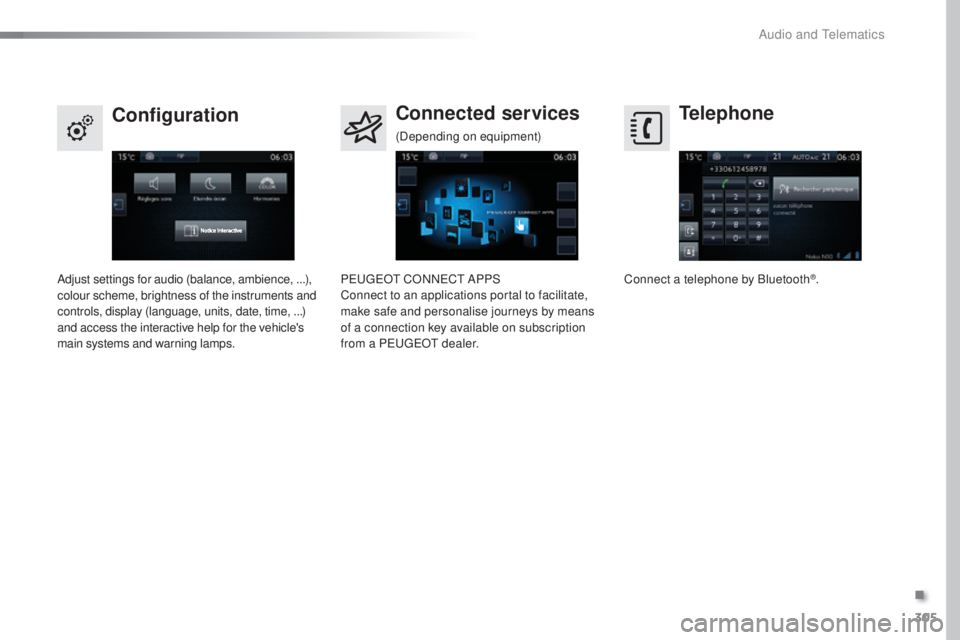
Telephone
Configuration Connected services
Connect a telephone by Bluetooth®.
Adjust settings for audio (balance, ambience, ...),
colour scheme, brightness of the instruments and
controls, display (language, units, date, time, ...)
and access the interactive help for the vehicle's
main systems and warning lamps. Peu
geOt CO
NNeCt AP
PS
Connect to an applications portal to facilitate,
make safe and personalise journeys by means
of a connection key available on subscription
from a P
eu
ge
Ot d
ealer.
(Depending on equipment)
.
Audio and telematics
Page 315 of 398
313
308_en_Chap10c_SMegplus_ed02-2015
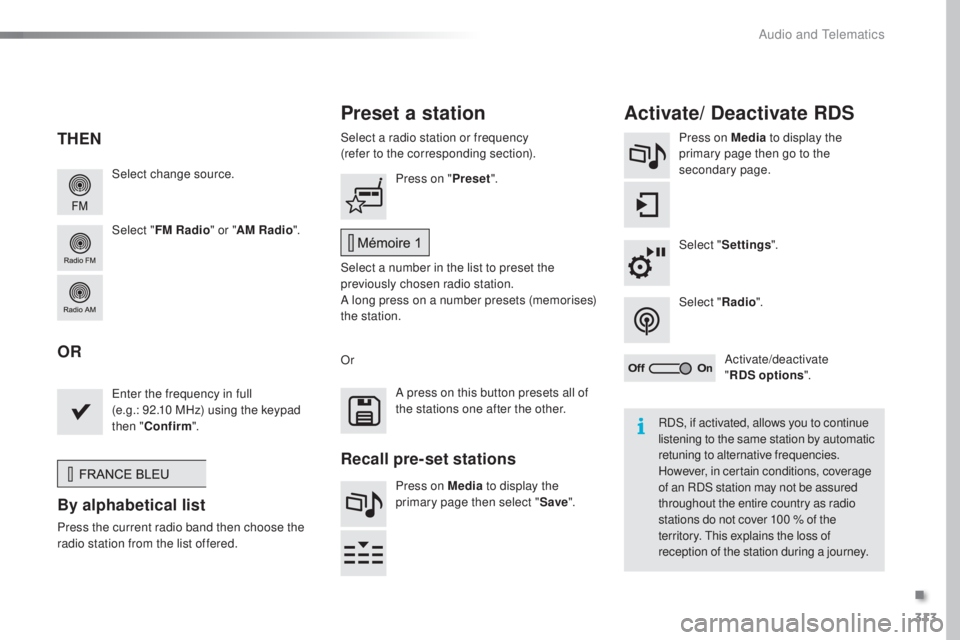
Select change source.
Select "FM Radio " or "AM Radio ".Select a radio station or frequency
(refer to the corresponding section).
Press on Media
to display the
primary page then go to the
secondary page.
Select " Settings ".
Select " Radio".
Activate/deactivate
" RDS options ".
Press on "
Preset".
Select a number in the list to preset the
previously chosen radio station.
A long press on a number presets (memorises)
the station.
ent
er the frequency in full
(e.g.: 92.10 MHz) using the keypad
then " Confirm ".
By alphabetical list
Press the current radio band then choose the
ra dio station from the l ist offered. Or
Press on Media to display the
primary page then select " Save".
Preset a station Activate/ Deactivate RDS
THEN
OR
A press on this button presets all of
the stations one after the other.
Recall pre-set stations
RDS, if activated, allows you to continue
listening to the same station by automatic
retuning to alternative frequencies.
However, in certain conditions, coverage
of an RDS station may not be assured
throughout the entire country as radio
stations do not cover 100
% o
f the
territory.
thi
s explains the loss of
reception of the station during a journey.
.
Audio and telematics
Page 347 of 398
345
308_en_Chap10c_SMegplus_ed02-2015
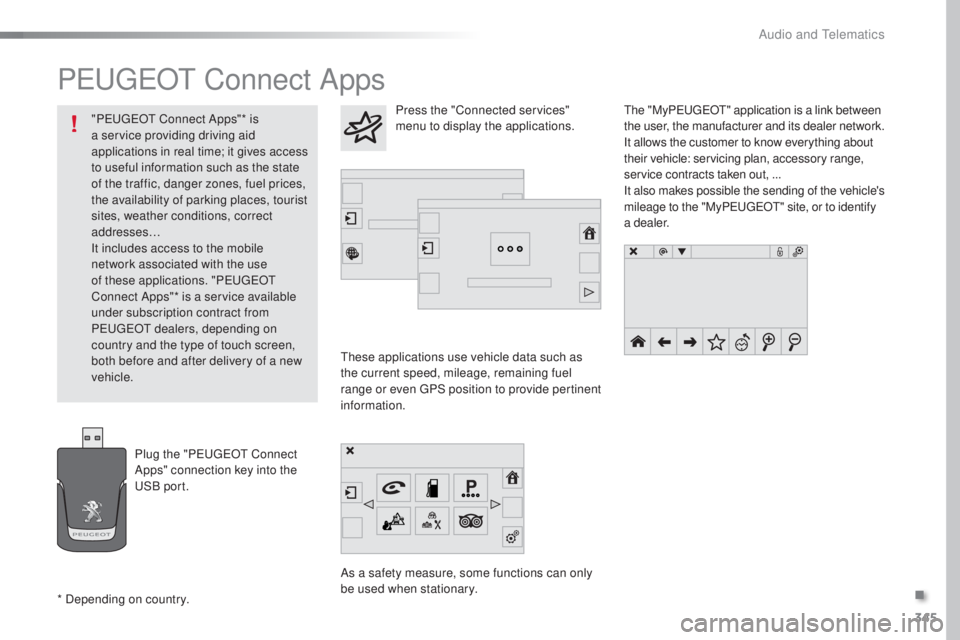
PeugeOt Connect Apps
these applications use vehicle data such as
t he current speed, mileage, remaining fuel
range or even
gPS p
osition to provide pertinent
information.
As a safety measure, some functions can only
be used when stationary.
the "
My
Peuge
Ot" a
pplication is a link between
the user, the manufacturer and its dealer network.
It allows the customer to know everything about
their vehicle: servicing plan, accessory range,
service contracts taken out, ...
It also makes possible the sending of the vehicle's
mileage to the "My Peuge
Ot" s
ite, or to identify
a dealer.
Press the "Connected services"
menu to display the applications.
Plug the "P
eu
ge
Ot C
onnect
Apps" connection key into the
uSB
port.
* Depending on country. "P
eu
ge
Ot C
onnect Apps"* is
a service providing driving aid
applications in real time; it gives access
to useful information such as the state
of the traffic, danger zones, fuel prices,
the availability of parking places, tourist
sites, weather conditions, correct
addresses…
It includes access to the mobile
network associated with the use
of these applications. "P
eu
ge
Ot
C
onnect Apps"* is a service available
under subscription contract from
P
eu
ge
Ot dea
lers, depending on
country and the type of touch screen,
both before and after delivery of a new
vehicle.
.
Audio and telematics