key Peugeot 308 2016 Workshop Manual
[x] Cancel search | Manufacturer: PEUGEOT, Model Year: 2016, Model line: 308, Model: Peugeot 308 2016Pages: 398, PDF Size: 9.38 MB
Page 354 of 398
352
308_en_Chap10c_SMegplus_ed02-2015
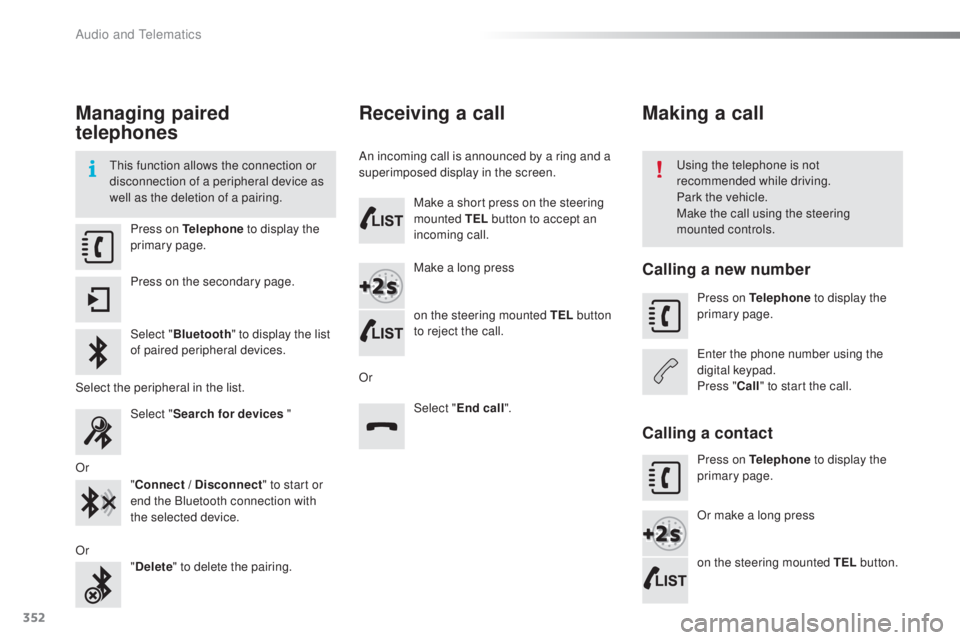
Managing paired
telephones
this function allows the connection or
d isconnection of a peripheral device as
well as the deletion of a pairing.usi ng the telephone is not
recommended while driving.
Park the vehicle.
Make the call using the steering
mounted controls.
Press on Telephone
to display the
primary page.
Press on the secondary page.
Select " Bluetooth " to display the list
of paired peripheral devices.
Select the peripheral in the list. Select "Search for devices "
Or "Connect / Disconnect " to start or
end the Bluetooth connection with
the selected device.
Or "Delete " to delete the pairing.
Receiving a call
An incoming call is announced by a ring and a
superimposed display in the screen.
Make a short press on the steering
mounted TEL button to accept an
incoming call.
Make a long press
on the steering mounted TEL button
to reject the call.
Or Select "End call".
Making a call
Calling a new number
Press on Telephone to display the
primary page.
ent
er the phone number using the
digital keypad.
Press " Call" to start the call.
Calling a contact
Press on Telephone to display the
primary page.
Or make a long press
on the steering mounted TEL button.
Audio and telematics
Page 375 of 398
373
308_en_Chap10d_RD45_ed02-2015
use only uSB memory sticks formatted FAt32
( File Allocation table ).
It is recommended that you use
genuine Apple
® uSB cables for correct
ope
ration.
*
In c
ertain cases, play of the audio files must
be initiated from the keypad.
** If the telephone supports the function.
Bluetooth® audio streaming
Streaming allows music files on the telephone
to be played via the audio system.
Connect the telephone: see the " Telephone"
section.
Select in the " Bluetooth: Telephone - Audio "
menu the telephone to be connected.
the a
udio system connects to a newly paired
telephone automatically.
Control of tracks to be played is via the buttons
on the audio system control panel and the
steering mounted controls**.
the c
ontextual
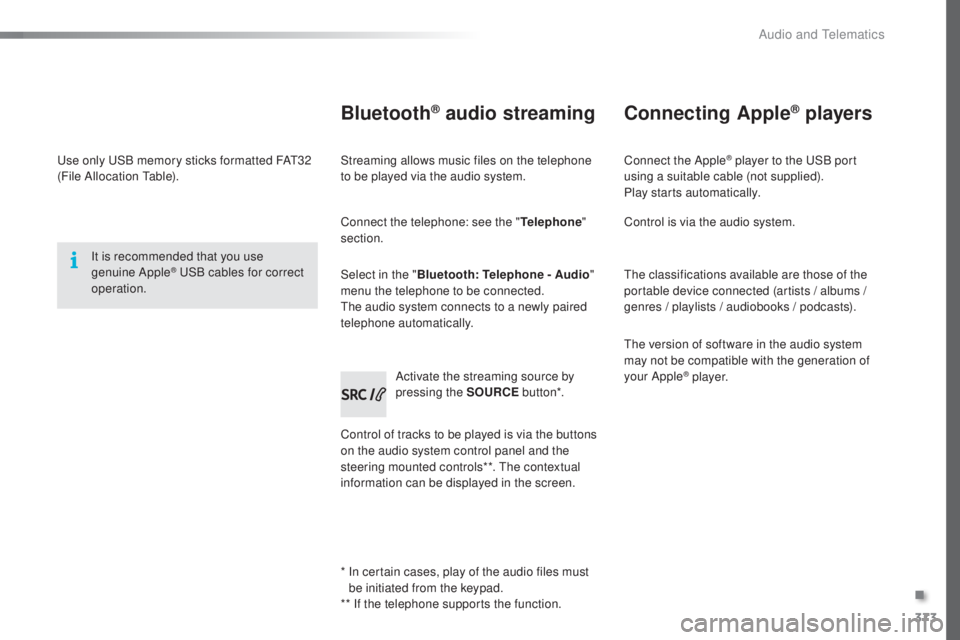
information can be displayed in the screen. Activate the streaming source by
pressing the SOURCE
but to n*.
Connecting Apple® players
Connect the Apple® player to the uSB port
using a suitable cable (not supplied).
Play starts automatically.
Control is via the audio system.
the c
lassifications available are those of the
portable device connected (artists / albums /
genres / playlists / audiobooks / podcasts).
the v
ersion of software in the audio system
may not be compatible with the generation of
your Apple
® p l aye r.
.
Audio and telematics
Page 376 of 398
374
308_en_Chap10d_RD45_ed02-2015
telephone
Pairing a Bluetooth® telephone
Screen C
(Available according to model and version)
As a safety measure and because they
require prolonged attention on the part
of the driver, the operations for pairing
of the Bluetooth mobile telephone with
the Bluetooth hands-free system of
your audio equipment must be carried
out with the vehicle stationary and the
ignition on.
go t
o www.peugeot.co.uk for more information
(compatibility, more help, ...).
Activate the telephone's Bluetooth function
and ensure that it is "visible to all" (telephone
configuration).
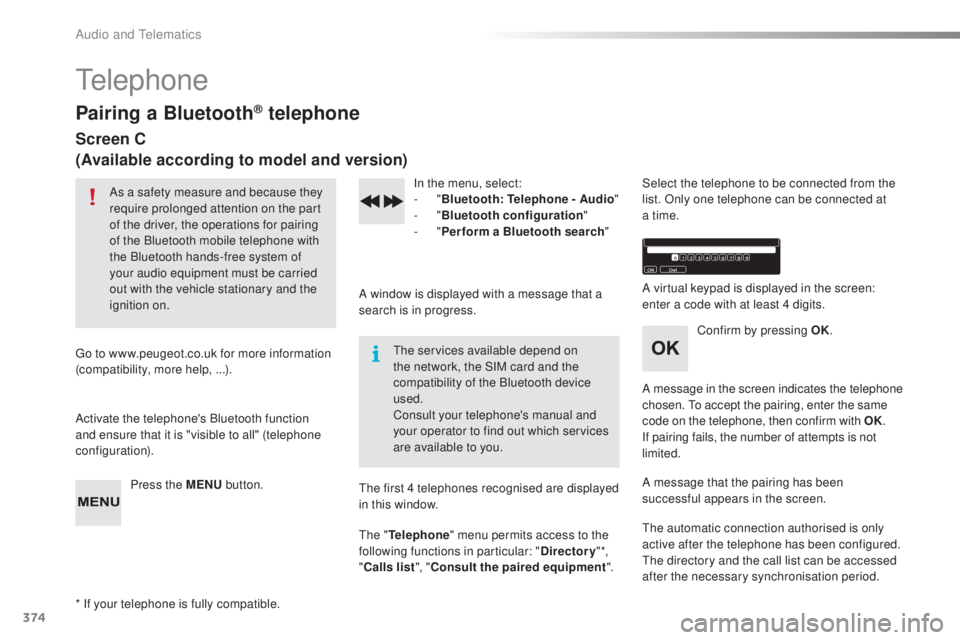
Press the MENU button. In the menu, select:
- "
Bl
uetooth: Telephone - Audio "
-
" B
luetooth configuration"
-
" P
erform a Bluetooth search"
A window is displayed with a message that a
search is in progress.
the ser
vices available depend on
the network, the SIM card and the
compatibility of the Bluetooth device
used.
Consult your telephone's manual and
your operator to find out which services
are available to you.
* If your telephone is fully compatible.
the f
irst 4 telephones recognised are displayed
in this window.
the " T
elephone" menu permits access to the
following functions in particular: " Directory" *,
" Calls list ", "Consult the paired equipment ".Select the telephone to be connected from the
list. Only one telephone can be connected at
a time.
A virtual keypad is displayed in the screen:
enter a code with at least 4 digits.
Confirm by pressing OK.
A message in the screen indicates the telephone
chosen.
to a
ccept the pairing, enter the same
code on the telephone, then confirm with OK.
If pairing fails, the number of attempts is not
limited.
A message that the pairing has been
successful appears in the screen.
the a
utomatic connection authorised is only
active after the telephone has been configured.
the d
irectory and the call list can be accessed
after the necessary synchronisation period.
Audio and telematics
Page 377 of 398
375
308_en_Chap10d_RD45_ed02-2015
Receiving a call
An incoming call is announced by a ring and a
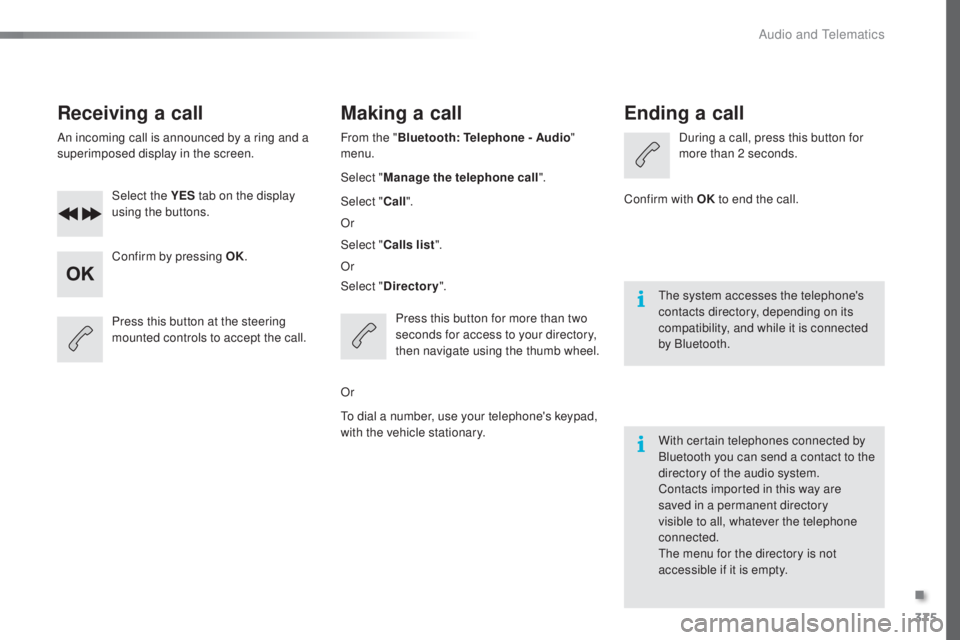
superimposed display in the screen.Select the YES tab on the display
using the buttons.
Confirm by pressing OK.
Press this button at the steering
mounted controls to accept the call.
Making a call
From the " Bluetooth : Telephone - Audio "
menu.
Select " Manage the telephone call".
Select " Call".
Or
Select " Calls list ".
Or
Select " Directory ".
Press this button for more than two
seconds for access to your directory,
then navigate using the thumb wheel.
Or
to di
al a number, use your telephone's keypad,
with the vehicle stationary.
Ending a call
During a call, press this button for
more than 2 seconds.
Confirm with OK to end the call.
the s
ystem accesses the telephone's
contacts directory, depending on its
compatibility, and while it is connected
by Bluetooth.
With certain telephones connected by
Bluetooth you can send a contact to the
directory of the audio system.
Contacts imported in this way are
saved in a permanent directory
visible to all, whatever the telephone
connected.
the m
enu for the directory is not
accessible if it is empty.
.
Audio and telematics
Page 387 of 398
385
308_en_Chap11_index-alpha_ed02-2015
gear lever, manual gearbox .........................16 3gear
shift indicator ....................................... 16
4
glov
e box, refrigerated
................................... 80gui
de-me-home
...............................
.............113
Jack
.............................................................
..250
Hazard warning lamps
..........................
11
9 , 2 4 3
Hazard warning lamps, automatic operation
.................................... 11
9
Headlamp adjustment
................................... 11
4
Headlamps, automatic illumination
...............................
...1 0 9 , 112 , 113
Headlamps, dipped beam
............ 1
08, 256, 258
Headlamps, halogen
............................ 25
6, 258
Headlamps, main beam
....... 10
8, 256, 258, 260
Headlamp wash
............................................ 11
6
Head restraints, front
...................................... 75
H
ead restraints, rear
................................. 7
8, 79
Heating
................
.........................90, 92, 94, 96
Hill start assist
............................................... 162I
dentification, vehicle ....................................
295
I gnition on........................................ 9 9, 150, 152
Immobiliser, electronic
...................... 5
1, 63, 154
I n d i c a t o r, coolant temperature
..................................... 28
I
ndicator, engine oil level
................................31
I
ndicator lamps, operation
.........................1
3 -17
Indicators, direction
...................................... 111
I
nflating tyres
..............................
............10, 295
Inflating tyres and accessories (using the kit)
.............................................. 24
9
Instrument panel
............................................. 12
I
ntelligent
trac
tion Control
............................121
I
nteractive help
........................................41
, 3 41
Inter-vehicle time
........................................... 187
I
SOFIX seats
.................................................1
41
I
SO
FIX
mou
ntings................................. 13 9, 14 0
J
H
Key ............................................................ 48-63
Keyless ent ry
and Starting
...................... 5
6 -58, 63, 151, 154
Key with remote control
.............. 4
9, 51, 57, 154
Kit, hands-free
...................................... 3
5 0 , 374
Kit, temporary puncture repair
.......... 8
6, 87, 244
Labels, identification
..................................... 295
LeDs
- light-emitting diodes
......... 2
56, 261, 263
Level, AdBlue
® additive ................................. 23 5
Level, brake fluid ........................................... 231
L
evel, Diesel additive
............................ 23
2, 233
Level, engine coolant
.............................. 2
8, 231
Level, engine oil
...................................... 3
1, 2 29
Level, headlamp wash
........................... 1
17, 2 3 1
Levels and checks
................ 2
27-229, 231, 232
Level, screenwash fluid
......................... 1
17, 2 3 1
Light-emitting diodes - L
eDs ........ 2
56, 261, 263
Lighting
.......................................................... 10
8
Lighting dimmer
.............................................. 33
L
ighting, guide-me home
........................ 5
1, 113
Lighting, interior
.................................... 10
4, 105
Lighting, mood
..............................
................105
Lighting, welcome
......................................... 11
3
Loading
..............................
..................... 10, 223
Load reduction mode
.................................... 2
19
Locating your vehicle
................................ 51,
5 5
Locking
............................................................ 63
KI
L
.
Alphabetical index
Page 389 of 398
387
308_en_Chap11_index-alpha_ed02-2015
Safety, children ......................125 , 127, 13 0 -14 5
Screen, cold climate ..................................... 2
17
Screen, colour
...................................... 3
04, 305
Screen, instrument panel
.......................... 12
, 3 4
tab
le of weights
....................................
281
, 288
tabl
es of engines
.................
2
78, 280, 284, 287
tab
les of fuses
..............................................
26
6
tan
k, AdBlue
® additive .........................
23 5 -242ta
n k , f u e l ............................... ........................ 213
tec
hnical data
....................................... 2
78-295
tele
phone
............................................. 3
5 0 , 374
temp
erature, coolant
...................................... 28thre
e flashes (direction indicators)
.............. 111time
(setting)
............................................ 4
4 - 47
tMC (tra
ffic info)
.......................................... 332to o
l s
................
...................................... 244, 250
top
ping-up the AdBlue
® additive .......... 23 9 -242top
tether ............................... ....................... 13 9
tot
al distance recorder
................................... 32tou
ch screen ........................35, 37- 44, 173, 211
touc
h screen (Menus)
................. 2
99, 304, 305
to w
b a r
................
................................... 1 4 7, 2 1 8
tow
ed loads
.......................................... 28
1, 288
tow
ing another vehicle
................................. 275tow
ing eye
...................................................... 86
S
T
Storage ..........................................80, 82, 85 - 87
Storage wells ............................................ 8
6, 87
Storing driving positions
................................. 74
S
towing rings
..............................
..............86, 87
Switching off the engine
............................... 148
S
ynchronising the remote control
............. 5
3, 62
Reinitialisation of the under-inflation
detection system ......................................... 2
10
Reinitialising the remote control
............... 53
, 62
Reminder, key in ignition
............................... 15
0
Reminder, lighting on
.................................... 111
R
emote control
.......................................... 48-
63
Removing a wheel
..............................
.......... 252
Removing the mat
...............................
............ 81
Replacing bulbs
..............................
...... 256-265
Replacing fuses
.................................... 2
6 6 -271
Replacing the air filter
................................... 23
3
Replacing the oil filter
................................... 233
R
eplacing the passenger compartment
filter
........
..................................................... 233
Reservoir, headlamp wash
........................... 2
31
Reservoir, screenwash
................................. 23
1
Resetting the service indicator
....................... 3
0
Resetting the trip recorder
.............................. 32
R
eversing camera
...............................
.......... 200
Reversing lamp
..................................... 261
, 263
Risk areas (update)
....................................... 3
31
Roof bars
....................................................... 223
R
unning out of fuel (Diesel)
.......................... 27
7 Screen menu ........................
3
06, 308, 310, 320,
322, 326, 334, 346, 348
Screen, multifunction (with audio system)
........................ 4
5, 46, 366
Screen, multifunction (without audio system)
.................................. 47
S
creenwash
..............................
.................... 11 6
Screenwash, rear
...............................
........... 11 6
SCR (Selective Catalytic Reduction)
............ 23
5
Seat belts
....................................... 123
-125, 13 6
Seats, electric
................................................. 73
Se
ats, front
................................................. 7
2 -74
Seats, heated
...............................
................... 75
Seats, rear
................................................. 7
7, 7 8
Serial number, vehicle
.................................. 295
S
ervice indicator
............................................. 28
S
ervice (warning lamp)
................................... 19
Ser
vicing
......................................................... 10
S
ettings, equipment
........................................ 41
S
ettings (Menus)
...............................
............ 334
Settings, system
...............................
............. 342
Sidelamps
............. 1
08, 256, 257, 259 -261, 263
Side repeater
................................................ 26
0
Ski flap
............................................................ 85
S
now chains
.......................................... 20
9, 216
Socket, 12 V accessory
...................... 80
, 83, 87
Socket, 230 V
............................................ 8
0, 84
Sockets, audio
.......................... 8
0, 83, 316, 371
Speed limiter
...............................
.......... 173 , 174
Spotlamps, side
.................................... 11
4 , 2 6 0
Stability control (
eS
C)............................. 17, 1 2 0
Starting the engine
....................................... 14
8
Station, radio
......................................... 312
, 3 6 6
Stay, bonnet
...............................
................... 226
Steering mounted controls, audio
....... 3
03, 365
Steering wheel, adjustment
............................ 71
St
op & Start
........................ 1
6, 24, 36, 101, 170,
171, 213, 226, 233, 272
Stop (warning lamp)
........................................ 18
.
Alphabetical index