engine PEUGEOT 308 2017 Owners Manual
[x] Cancel search | Manufacturer: PEUGEOT, Model Year: 2017, Model line: 308, Model: Peugeot 308 2017Pages: 566, PDF Size: 16.05 MB
Page 252 of 566

250
3008-2_en_Chap06_conduite_ed01-2016
Active Safety Brake
This function, also called automatic emergency
braking, aims to reduce the speed of impact or
avoid a frontal collision by your vehicle where
the driver fails to react.
Using a radar and a camera, this function acts
on the vehicle's braking system.If the radar and the camera have
confirmed the presence of a vehicle
or a pedestrian, this warning lamp
flashes once the function is acting on
the vehicle's brakes.
Important
: if operation of the
automatic emergency braking is
triggered, you should take back
control of your vehicle and brake
with the pedal to add to or finish the
automatic braking action.
The driver can take back control of the vehicle
at any time by sharply turning the steering
wheel and/or pressing the accelerator pedal. Operation of the function may be felt by
slight vibration in the brake pedal.
If the vehicle comes to a complete stop,
the automatic braking is maintained for
1 to 2 seconds.
With a manual gearbox, in the event
of the automatic emergency braking
bringing the vehicle to a complete stop,
the engine may stall.
With an automatic gearbox, in the event
of the automatic emergency braking
bringing the vehicle to a complete stop,
keep the brake pedal pressed to stop
the vehicle moving off again.
The point at which braking is triggered
may be adjusted according to the
reaction from the driver, such as
movement of the steering wheel or
pressing the accelerator pedal.
Driving
Page 253 of 566
251
3008-2_en_Chap06_conduite_ed01-2016
Deactivation / ActivationOperating fault
In the event of a fault, you are alerted
by the illumination of this warning
lamp, accompanied by the display of
a message and an audible signal.
Clean the windscreen regularly,
particularly the area in front of the
camera.
Do not allow snow to accumulate on
the bonnet or roof of the vehicle as this
could mask the camera's view.
Clean the front bumper, removing mud,
snow, ...
If the front bumper is to be repainted,
contact a PEUGEOT dealer or a
qualified workshop. Certain types of
paint could inter fere with the operation
of the radar.
Check that the sensors (camera and radar) are
not covered by dirt, mud, frost, snow...
If the problem persists, contact a PEUGEOT
dealer or a qualified workshop to have the
system checked.
By default, the system is automatically
activated at every engine start.
The system can be deactivated or activated in
the vehicle settings menu in the screen.
Deactivation of the system is
signalled by the illumination of this
indicator lamp, accompanied by the
display of a message. There may be interference in the
operation of the camera or it may not
work at all in the following situations:
-
p
oor visibility (inadequate street
lighting, falling snow, heavy rain,
dense fog, ...),
-
d
azzle (headlamps of an
approaching vehicle on the other
side of the road, low sun, reflection
on a wet road, leaving a tunnel,
alternating between light and
shade, ...),
-
c
amera or radar masked (mud,
frost, snow, ...).
In these situations, detection
performance may be reduced.
6
Driving
Page 267 of 566
265
3008-2_en_Chap06_conduite_ed01-2016
Panoramic vision
General points
Visiopark 1 - Visiopark 2
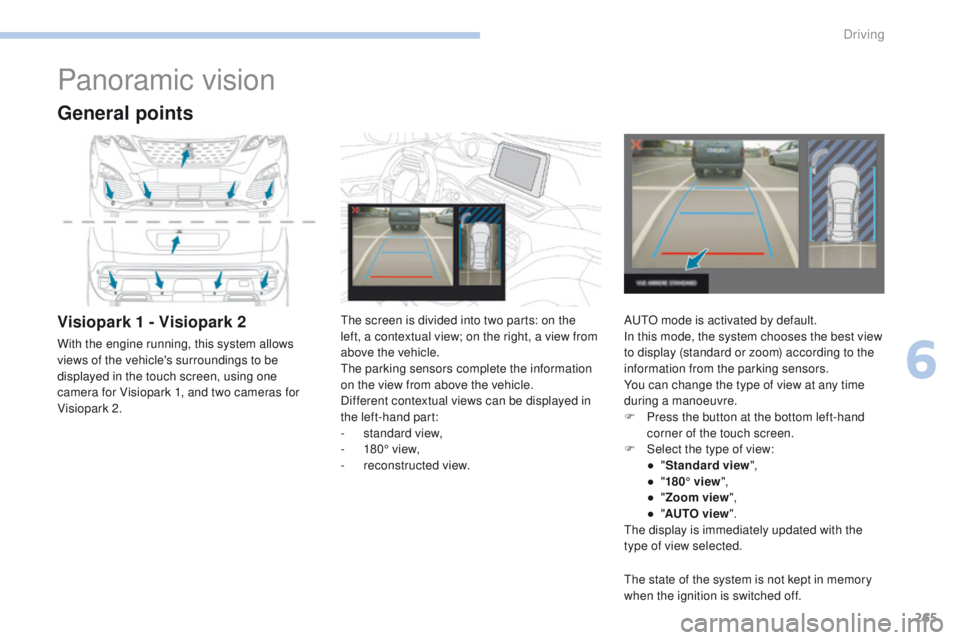
With the engine running, this system allows
views of the vehicle's surroundings to be
displayed in the touch screen, using one
camera for Visiopark 1, and two cameras for
Visiopark 2.The screen is divided into two parts: on the
left, a contextual view; on the right, a view from
above the vehicle.
The parking sensors complete the information
on the view from above the vehicle.
Different contextual views can be displayed in
the left-hand part:
-
s
tandard view,
-
1
80° view,
-
r
econstructed view.AUTO mode is activated by default.
In this mode, the system chooses the best view
to display (standard or zoom) according to the
information from the parking sensors.
You can change the type of view at any time
during a manoeuvre.
F
P
ress the button at the bottom left-hand
corner of the touch screen.
F
Sel
ect the type of view:
●
"St
andard view",
●
"1
80° view",
●
"Z
oom view",
●
"AU
TO view".
The display is immediately updated with the
type of view selected.
The state of the system is not kept in memory
when the ignition is switched off.
6
Driving
Page 272 of 566
270
3008-2_en_Chap06_conduite_ed01-2016
Front and rear visionAUTO mode
This mode is activated by default.
Using sensors in the front bumper, the
automatic view changes from front view to the
view from above as an obstacle is approached
during a manoeuvre.
Standard view
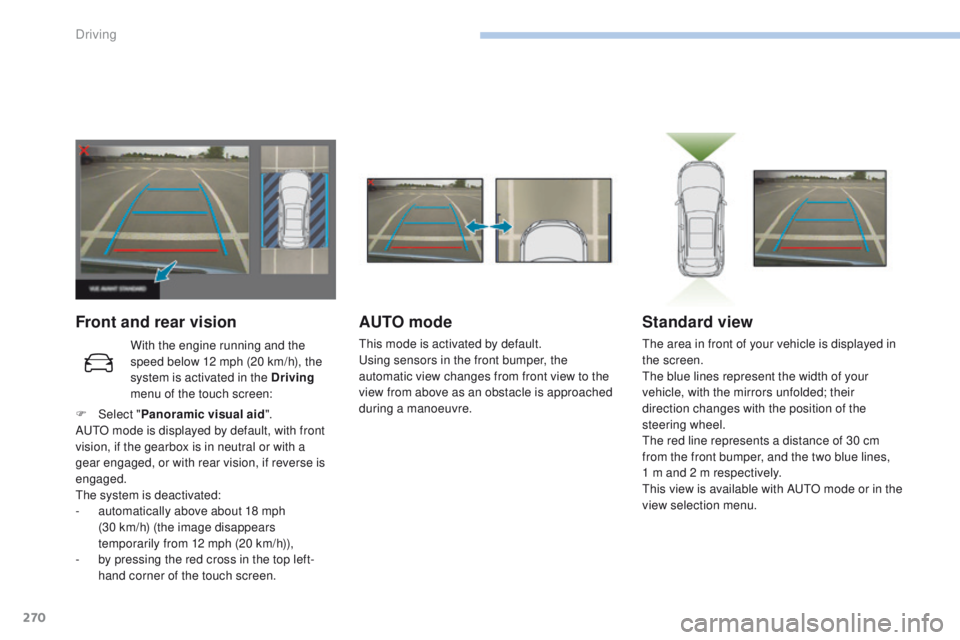
The area in front of your vehicle is displayed in
the screen.
The blue lines represent the width of your
vehicle, with the mirrors unfolded; their
direction changes with the position of the
steering wheel.
The red line represents a distance of 30 cm
from the front bumper, and the two blue lines,
1 m and 2 m respectively.
This view is available with AUTO mode or in the
view selection menu.
With the engine running and the
speed below 12 mph (20 km/h), the
system is activated in the Driving
menu of the touch screen:
F
Sel
ect " Panoramic visual aid ".
AUTO mode is displayed by default, with front
vision, if the gearbox is in neutral or with a
gear engaged, or with rear vision, if reverse is
engaged.
The system is deactivated:
-
a
utomatically above about 18 mph
(30
km/h) (the image disappears
temporarily from 12 mph (20 km/h)),
-
b
y pressing the red cross in the top left-
hand corner of the touch screen.
Driving
Page 274 of 566
272
3008-2_en_Chap06_conduite_ed01-2016
Park Assist
This system provides active assistance with
parking. It detects a parking space then
operates the steering to park in the space.
It operates the steering while the driver
manages the accelerator, brakes, gears and
clutch (manual gearbox). During phases of
entry into and exit from a parking space, the
system provides visual and audible information
to the driver in order to make the manoeuvres
safe. It may be necessary to move for wards
and backwards more than once.During a manoeuvre, the steering
wheel turns quickly: do not hold the
steering wheel, do not place your
hands between the spokes of the
steering wheel and take care with
loose and bulky clothing (scarves, ties,
handbags...) - Risk of injury!
When Park Assist is activated, it
prevents a change to STOP mode of
Stop & Start. In STOP mode, activation
of Park Assist restarts the engine.
This manoeuvring assistance system
cannot, in any circumstances, replace
the need for vigilance on the part of the
driver.
The driver must remain in control of their
vehicle ensuring that the space remains
clear throughout the manoeuvre.
In some circumstances, the sensors may
not detect small obstacles located in
their blind spots.
The driver can take control at any time by
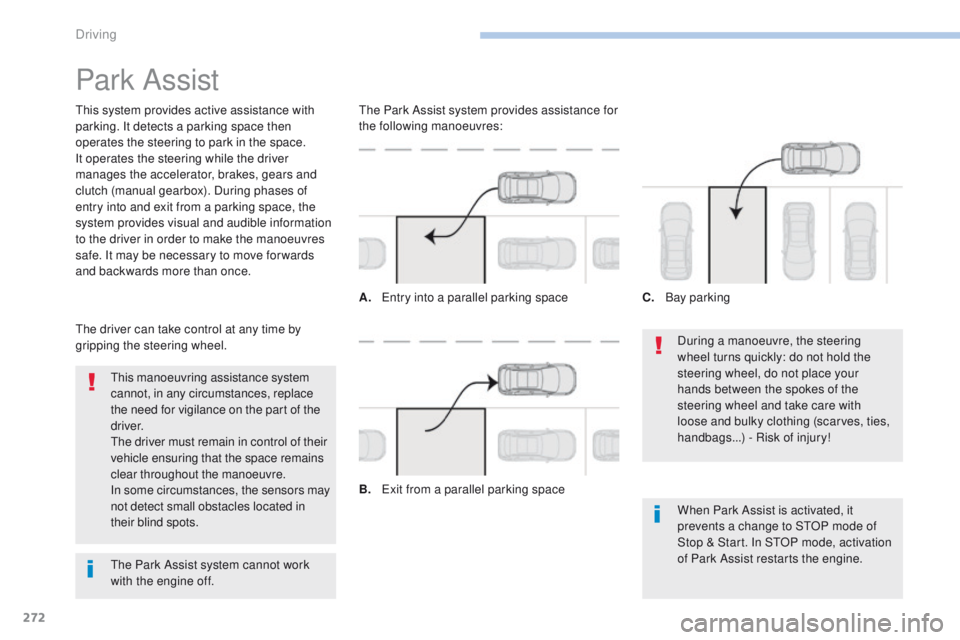
gripping the steering wheel. The Park Assist system provides assistance for
the following manoeuvres:
A.
E
ntry into a parallel parking space
B.
E
xit from a parallel parking spaceC.
B
ay parking
The Park Assist system cannot work
with the engine off.
Driving
Page 278 of 566
276
3008-2_en_Chap06_conduite_ed01-2016
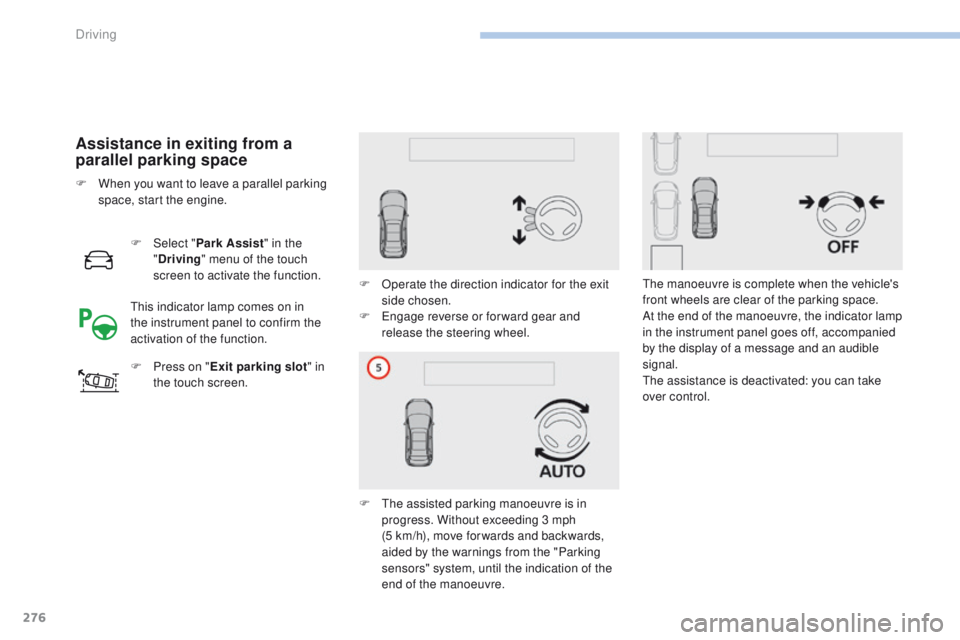
Assistance in exiting from a
parallel parking space
F Select "Park Assist " in the
" Driving " menu of the touch
screen to activate the function.
F
P
ress on " Exit parking slot " in
the touch screen. F
O
perate the direction indicator for the exit
side chosen.
F
E
ngage reverse or for ward gear and
release the steering wheel.
F
T
he assisted parking manoeuvre is in
progress. Without exceeding 3 mph
(5
km/h), move for wards and backwards,
aided by the warnings from the "Parking
sensors" system, until the indication of the
end of the manoeuvre.
F
W
hen you want to leave a parallel parking
space, start the engine.
This indicator lamp comes on in
the instrument panel to confirm the
activation of the function. The manoeuvre is complete when the vehicle's
front wheels are clear of the parking space.
At the end of the manoeuvre, the indicator lamp
in the instrument panel goes off, accompanied
by the display of a message and an audible
signal.
The assistance is deactivated: you can take
over control.
Driving
Page 281 of 566
279
3008-2_en_Chap06_conduite_ed01-2016
The system is deactivated by pressing the control.The system is deactivated automatically:
- o n switching off the ignition,
-
i
f the engine stalls,
-
i
f no manoeuvre is started within 5 minutes
of selection of the type of manoeuvre,
-
a
fter a prolonged stop of the vehicle during
a manoeuvre,
-
i
f the road wheel anti-slip regulation (ASR)
is triggered,
-
i
f the speed of the vehicle exceeds the
stated limit,
-
w
hen the driver interrupts movement of the
steering wheel,
-
a
fter 4 manoeuvre cycles,
-
o
n opening the driver's door,
-
i
f one of the front wheels encounters an
obstacle.
The operation indicator lamp goes off in the
instrument panel and a message is displayed
accompanied by an audible signal.
The driver should then take back control of the
vehicle's steering.
Deactivation
The system is switched off automatically:
- w hen towing a trailer, connected
electrically,
-
i
f the driver's door is opened,
-
i
f the speed of the vehicle is above 42 mph
(70 km/h).
To switch the system of for a prolonged period,
contact a PEUGEOT dealer or a qualified
workshop.
Operating faults
In the event of a fault with the power
steering, this warning lamp flashes in
the instrument panel, accompanied
by a message.
Contact a PEUGEOT dealer or a qualified
workshop.
Switching off
If the lateral distance between your
vehicle and the space is too great, the
system may not be able to measure the
space.
Anything projecting beyond the envelope
of the vehicle (a ladder on the roof, for
example) is not taken into account by the
Park Assist system during a manoeuvre.
In bad weather or in winter, ensure that
the sensors are not covered by road
dirt, ice or snow.
In the event of a fault, have the system
checked by a PEUGEOT dealer or a
qualified workshop.
If the system is deactivated during a
manoeuvre, the drive should reactivate
it to repeat the measurement. In the event of a fault, this warning
lamp flashes for a few seconds,
accompanied by an audible signal.
If the fault occurs during the use
of the system, the warning lamp
goes
off. High pressure jet washing
When washing your vehicle, keep the lance at
least 30 cm away from the sensors.
6
Driving
Page 282 of 566
3008-2_en_Chap07_infos-pratiques_ed01-2016
RECOMMENDS
PEUGEOT & TOTAL,
A PARTNERSHIP TO DELIVER
BETTER PERFORMANCE!
2015 was marked by PEUGEOT's return to Rally-Raid,
one of the most difficult motorsport disciplines in the
world. To obtain the best performance in these trials,
PEUGEOT Sport chose TOTAL QUARTZ for the
PEUGEOT 2008 DKR, a lubricant of high technology
which protects the engine in the most severe
conditions.
TOTAL QUARTZ protects your engine against the effects
of time.
TOTAL QUARTZ Ineo First is a high performance lubricant,
the result of work done together by PEUGEOT and TOTAL
R&D. Specially formulated for the engines in PEUGEOT
vehicles, its innovative technology significantly reduces CO
2
emissions and keeps your engine clean.
Page 283 of 566
281
3008-2_en_Chap07_infos-pratiques_ed01-2016
Fuel tank
Fuel tank capacity: approximately 53 litres.
When the low fuel level is reached in the
fuel tank, this warning lamp comes on on
the instrument panel, accompanied by
the display of a message and an audible
signal. When it first comes on there remains
approximately 6 litres of fuel in the tank.
Low fuel level
A label affixed to the inside of the flap reminds
you of the type of fuel to be used depending on
your engine.
Additions of fuel must be of at least 5 litres, in
order to be registered by the fuel gauge.
Opening the filler cap may create a noise a
caused by an inrush of air. This vacuum is
entirely normal, resulting from the sealing of the
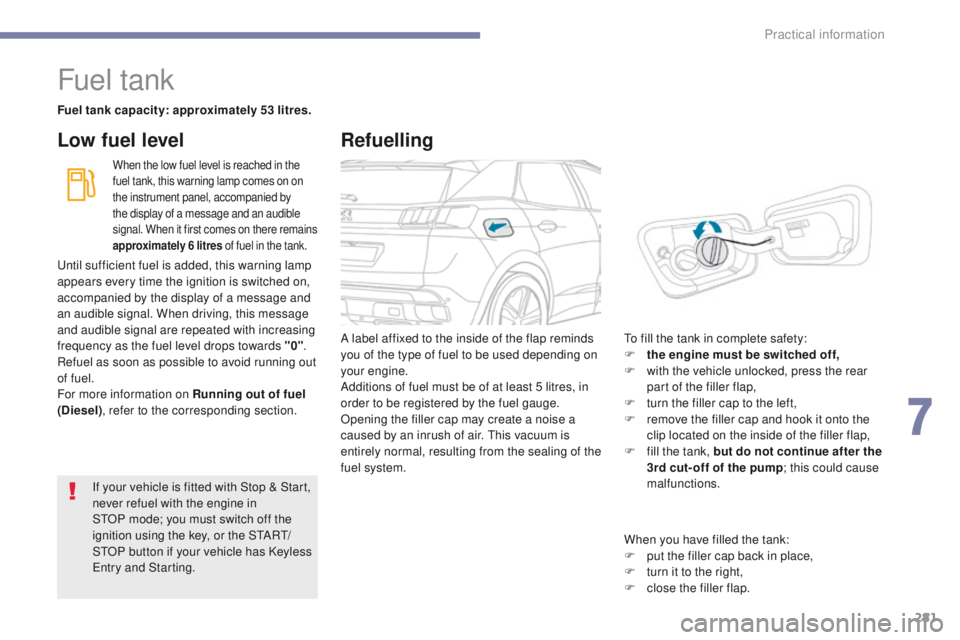
fuel system. To fill the tank in complete safety:
F
t he engine must be switched off,
F
w
ith the vehicle unlocked, press the rear
part of the filler flap,
F
t
urn the filler cap to the left,
F
r
emove the filler cap and hook it onto the
clip located on the inside of the filler flap,
F
f
ill the tank, but do not continue after the
3rd cut- off of the pump ; this could cause
malfunctions.
If your vehicle is fitted with Stop
&
Start,
never refuel with the engine in
STOP
mode; you must switch off the
ignition using the key, or the START/
STOP button if your vehicle has Keyless
Entry and Starting.
Until sufficient fuel is added, this warning lamp
appears every time the ignition is switched on,
accompanied by the display of a message and
an audible signal. When driving, this message
and audible signal are repeated with increasing
frequency as the fuel level drops towards "0"
.
Refuel as soon as possible to avoid running out
of fuel.
For more information on Running out of fuel
(Diesel) , refer to the corresponding section.
Refuelling
When you have filled the tank:
F
p ut the filler cap back in place,
F
t
urn it to the right,
F
c
lose the filler flap.
7
Practical information
Page 284 of 566
282
3008-2_en_Chap07_infos-pratiques_ed01-2016
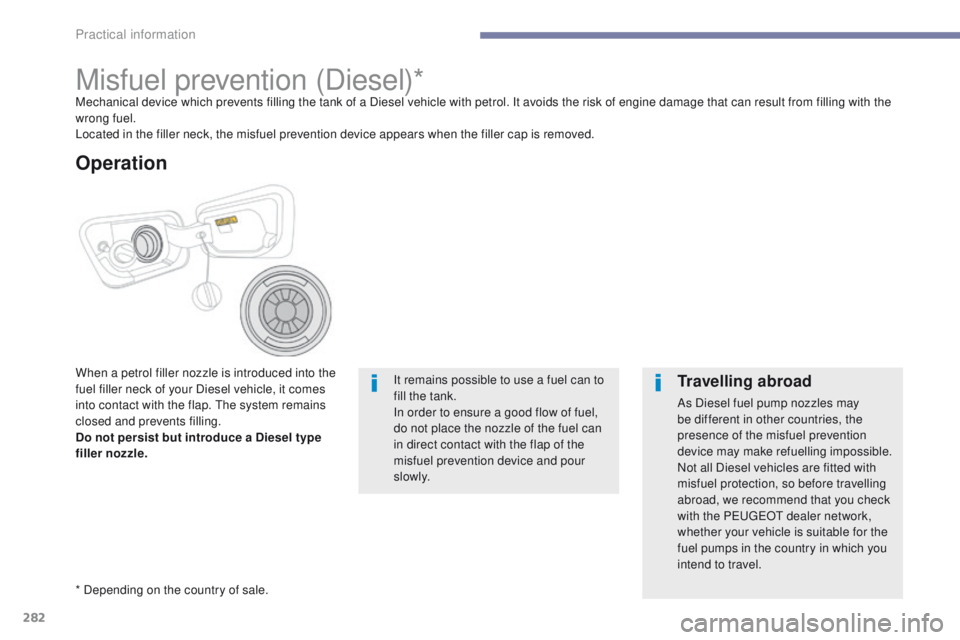
Misfuel prevention (Diesel)*Mechanical device which prevents filling the tank of a Diesel vehicle with petrol. It avoids the risk of engine damage that can result from filling with the
wrong fuel.
Located in the filler neck, the misfuel prevention device appears when the filler cap is removed.
When a petrol filler nozzle is introduced into the
fuel filler neck of your Diesel vehicle, it comes
into contact with the flap. The system remains
closed and prevents filling.
Do not persist but introduce a Diesel type
filler nozzle.
* Depending on the country of sale.It remains possible to use a fuel can to
fill the tank.
In order to ensure a good flow of fuel,
do not place the nozzle of the fuel can
in direct contact with the flap of the
misfuel prevention device and pour
s l ow l y.
Travelling abroad
As Diesel fuel pump nozzles may
be different in other countries, the
presence of the misfuel prevention
device may make refuelling impossible.
Not all Diesel vehicles are fitted with
misfuel protection, so before travelling
abroad, we recommend that you check
with the PEUGEOT dealer network,
whether your vehicle is suitable for the
fuel pumps in the country in which you
intend to travel.
Operation
Practical information