engine PEUGEOT 308 2017 Owners Manual
[x] Cancel search | Manufacturer: PEUGEOT, Model Year: 2017, Model line: 308, Model: Peugeot 308 2017Pages: 566, PDF Size: 16.05 MB
Page 353 of 566
351
3008-2_en_Chap11_index-alpha_ed01-2016
U
Under-inflation (detection) ................................................... 223
Unlocking
..............................
....................55, 58
Unlocking from the inside
...............................68
U
nlocking the boot .................................... 57, 59
Unlocking the tailgate
...............................57, 59
Ticket holder
.................................................
11
9
Time (setting)
..............................
....................
45
Tool box
.........................................................
13 9
To o l s
..............................................................
309
Total distance recorder
...................................
41
Touch screen ....................... 42, 48 , 50, 102 , 121
Towball, quickly detachable
..................................................
285
To w b a r
..........................................
163, 19 6 , 284
Towbar with quickly detachable towball
...................................... 28
5
Towed loads
..........................................
339, 342
Towing another vehicle
................................. 33
6
Traction control (ASR)
...........
26, 160 , 162, 16 4
Tr a i l e r
...........................................
163, 19 6 , 284
Trailer stability assist (TSA)
..................
160, 163
Trajectory control systems ............................
160
Triangle, warning ........................................... 307
Trip computer
............................................
43, 44
Trip distance recorder
.....................................
41
Ty r e s
........................................................
10, 345
Tyre under-inflation detection
.............................................
223, 316
V
Ventilation .............................. .10 , 104 -10 6 , 108
Visibility ......................................................... 11 6
Vision, 180° for ward
..................................... 26
9
Vision, panoramic
......................................... 265
Visio Park
...................................... 265, 267 , 269
W
Warning and indicator
lamps .............................. ..................16, 21 , 22
Warning lamp, braking system
........................................................... 26
Warning lamp, Diesel engine pre-heater
...............................
..........18
Warning lamps
.............................. 19, 22 , 25, 40
Warning lamp, Service ....................................23
Weights
................................................. 339, 342
Welcome lighting ..................................... 57, 148
Wheel, spare
................................. 309, 317 , 345
Window controls
............................................. 82
Windscreen, heated
...................................... 117
Wiper blades (changing)
............................... 15
4
Wiper, rear ..................................................... 153
Wipers
............................................. 20, 152 , 155
Wipers, automatic rain sensitive
....................................... 15
2, 155
.
Alphabetical index
Page 362 of 566
2
FM/87.5 MHz
87.5MHz
12:13
18,5 21,5
23 °C
Audio and Telematics
Transversal-Peugeot_en_Chap01_NAC-2-2-0_ed01-2016
First steps
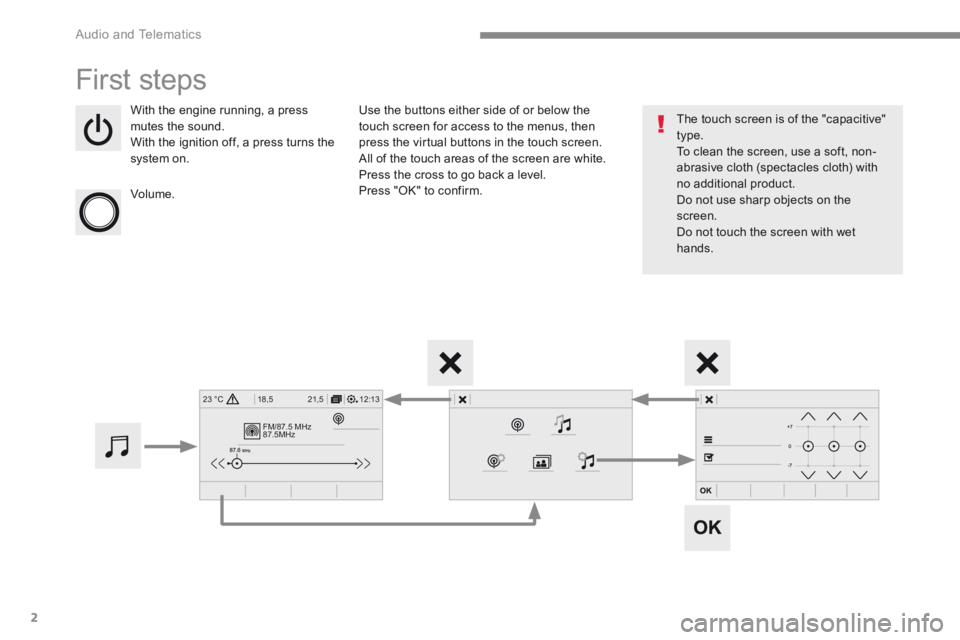
With the engine running, a press mutes the sound. With the ignition off, a press turns the system on.
Volume.
Use the buttons either side of or below the touch screen for access to the menus, then press the virtual buttons in the touch screen. All of the touch areas of the screen are white. Press the cross to go back a level. Press "OK" to confirm.
The touch screen is of the "capacitive" type. To clean the screen, use a soft, non-abrasive cloth (spectacles cloth) with no additional product. Do not use sharp objects on the screen. Do not touch the screen with wet hands.
Page 456 of 566
96
Audio and Telematics
Transversal-Peugeot_en_Chap01_NAC-2-2-0_ed01-2016
QUESTIONANSWERSOLUTION
There is a difference in sound quality between the different audio sources.
For optimum sound quality, the audio settings can be adapted to the different sound sources, which may result in audible differences when changing source.
Check that the audio settings are adapted to the sources listened to. Adjust Balance, Treble, Bass to the middle position, select the "None" musical ambience and set the loudness correction to the "Active" position in CD mode or to the "Inactive" position in radio mode.
With the engine off, the system switches off after a few minutes of use.
When the engine is switched off, the system's operating time depends on the state of charge of the battery. The switch-off is normal: the system switches to economy mode and switches off to prevent discharging of the vehicle's battery.
Start the vehicle's engine to increase the battery charge.
The date and time cannot be set. Setting of the date and time is only available if the synchronisation with the satellites is deactivated. Settings menu / Options / Time-Date setting. Select the "Time" tab and deactivate the "GPS synchronisation" (UTC).
Page 458 of 566
98
Audio and Telematics
Transversal-Peugeot_en_Chap02_RCC-2-2-0_ed01-2016
First steps
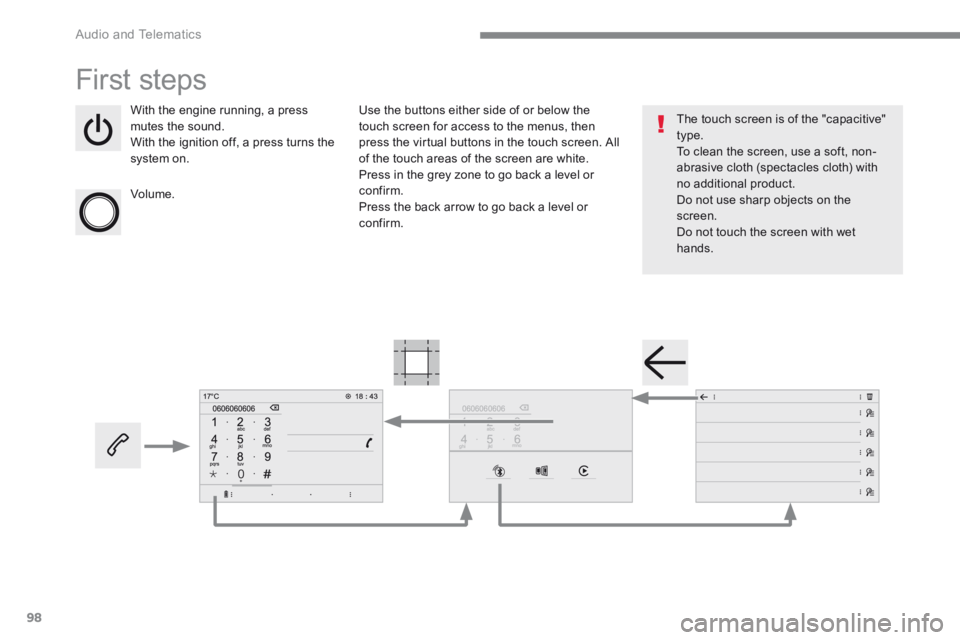
With the engine running, a press mutes the sound. With the ignition off, a press turns the system on.
Volume.
Use the buttons either side of or below the touch screen for access to the menus, then press the virtual buttons in the touch screen. All of the touch areas of the screen are white. Press in the grey zone to go back a level or confirm. Press the back arrow to go back a level or confirm.
The touch screen is of the "capacitive" type. To clean the screen, use a soft, non-abrasive cloth (spectacles cloth) with no additional product. Do not use sharp objects on the screen. Do not touch the screen with wet hands.
Page 512 of 566
152
Audio and Telematics
Transversal-Peugeot_en_Chap02_RCC-2-2-0_ed01-2016
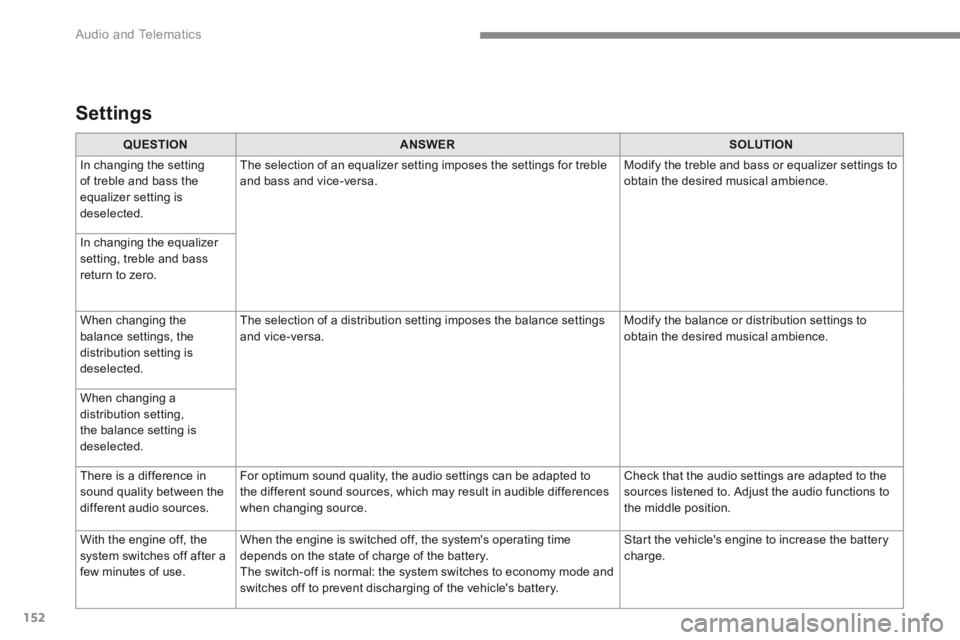
QUESTIONANSWERSOLUTION
In changing the setting of treble and bass the equalizer setting is deselected.
The selection of an equalizer setting imposes the settings for treble and bass and vice-versa. Modify the treble and bass or equalizer settings to obtain the desired musical ambience.
In changing the equalizer setting, treble and bass return to zero.
When changing the balance settings, the distribution setting is deselected.
The selection of a distribution setting imposes the balance settings and vice-versa. Modify the balance or distribution settings to obtain the desired musical ambience.
When changing a distribution setting, the balance setting is deselected.
There is a difference in sound quality between the different audio sources.
For optimum sound quality, the audio settings can be adapted to the different sound sources, which may result in audible differences when changing source.
Check that the audio settings are adapted to the sources listened to. Adjust the audio functions to the middle position.
With the engine off, the system switches off after a few minutes of use.
When the engine is switched off, the system's operating time depends on the state of charge of the battery. The switch-off is normal: the system switches to economy mode and switches off to prevent discharging of the vehicle's battery.
Start the vehicle's engine to increase the battery charge.
Settings
Page 515 of 566
153
.
Audio and Telematics
Transversal-Peugeot_en_Chap03_RD6_ed01-2016
Bluetooth ® audio system
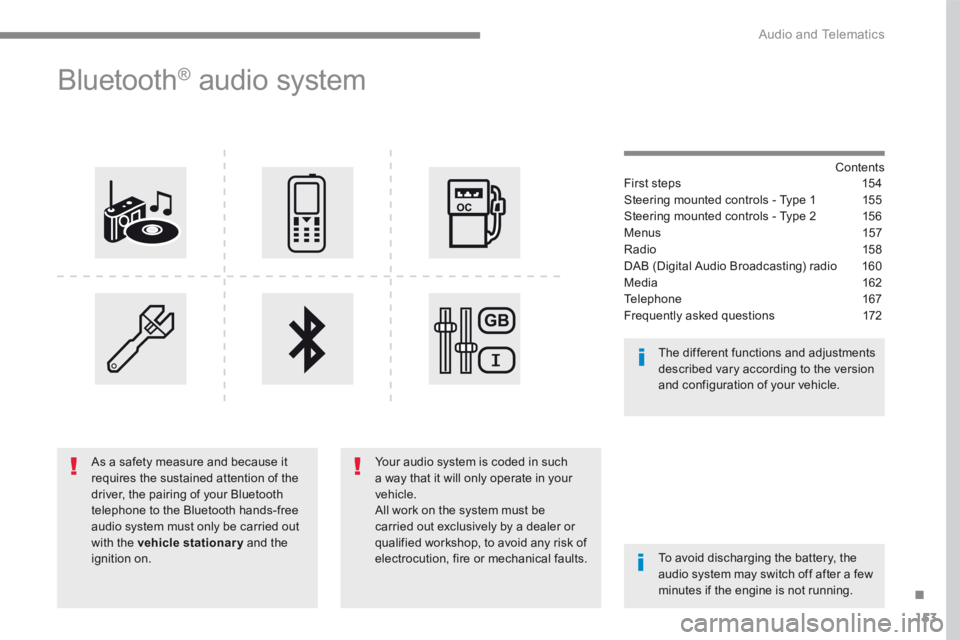
Contents First steps 154
Steering mounted controls - Type 1 155
Steering mounted controls - Type 2 156
Menus 157
Radio 15 8
DAB (Digital Audio Broadcasting) radio 160
Media 162
Telephone 167
Frequently asked questions 172
Your audio system is coded in such a way that it will only operate in your vehicle. All work on the system must be carried out exclusively by a dealer or qualified workshop, to avoid any risk of electrocution, fire or mechanical faults. To avoid discharging the battery, the audio system may switch off after a few minutes if the engine is not running.
The different functions and adjustments described vary according to the version and configuration of your vehicle.
As a safety measure and because it requires the sustained attention of the driver, the pairing of your Bluetooth telephone to the Bluetooth hands-free audio system must only be carried out with the vehicle stationary and the ignition on.
Page 534 of 566
172
Audio and Telematics
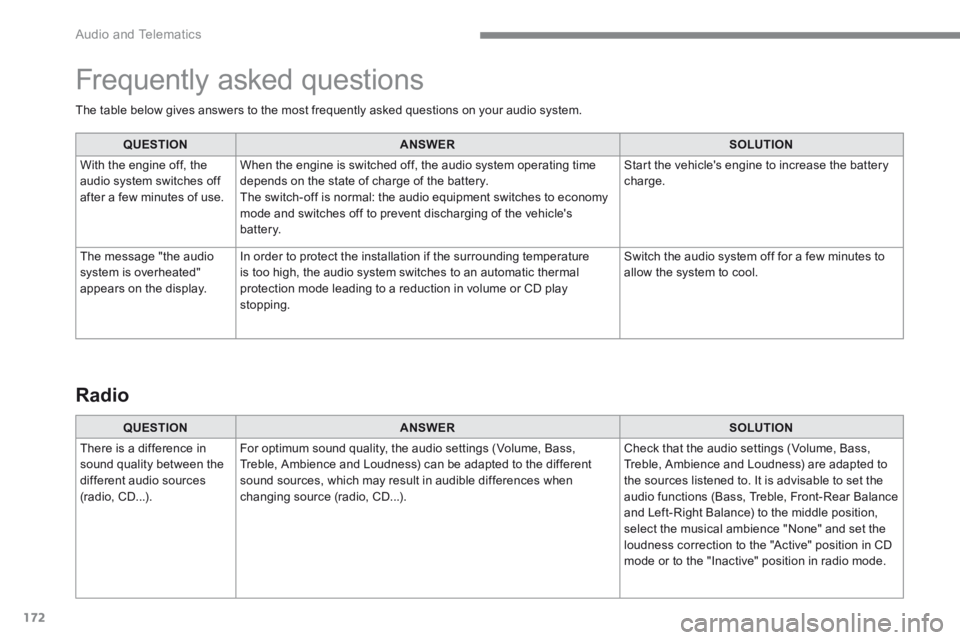
The table below gives answers to the most frequently asked questions on your audio system.
QUESTIONANSWERSOLUTION
With the engine off, the audio system switches off after a few minutes of use.
When the engine is switched off, the audio system operating time depends on the state of charge of the battery. The switch-off is normal: the audio equipment switches to economy mode and switches off to prevent discharging of the vehicle's battery.
Start the vehicle's engine to increase the battery charge.
The message "the audio system is overheated" appears on the display.
In order to protect the installation if the surrounding temperature is too high, the audio system switches to an automatic thermal protection mode leading to a reduction in volume or CD play stopping.
Switch the audio system off for a few minutes to allow the system to cool.
Frequently asked questions
QUESTIONANSWERSOLUTION
There is a difference in sound quality between the different audio sources (radio, CD...).
For optimum sound quality, the audio settings (Volume, Bass, Treble, Ambience and Loudness) can be adapted to the different sound sources, which may result in audible differences when changing source (radio, CD...).
Check that the audio settings (Volume, Bass, Treble, Ambience and Loudness) are adapted to the sources listened to. It is advisable to set the audio functions (Bass, Treble, Front-Rear Balance and Left-Right Balance) to the middle position, select the musical ambience "None" and set the loudness correction to the "Active" position in CD mode or to the "Inactive" position in radio mode.
Radio
Page 546 of 566
6
The programmable heating operates independently from the engine.
With the engine off, it preheats the coolant circuit to ensure optimal engine operating temperature
as soon as it is started up.
The programmable heating is switched on by the long range remote control. It may be immediate or
deferred thanks to a programming function.
Programmable heating
Always switch off the programmable heating when refuelling to avoid any risk of fire or
explosion.
The programmable heating is powered by the vehicle fuel tank. Before use, ensure that
the remaining quantity of fuel is sufficient. If the fuel tank is in its reser ve, we strongly
recommend you do not programme the heating.
To avoid the risks of intoxication or asphyxia, the programmable heating must not be used,
even for short periods, in a closed environment such as a garage or workshop which are not
equipped with an exhaust gas extraction system.
Do not park the vehicle on a flammable sur face (dry grass, dead leaves, paper, etc.) - risk of
fire!
The volumetric alarm movement detector
may be disrupted by the programmable
heating air flows when it is operating.
To avoid any untimely triggering of the
alarm when using the programmable
heating, it is advisable that the volumetric
monitoring is deactivated. Adapting the programmable heating
enables you to use it to preheat the
passenger compartment of your vehicle.
Contact a PEUGEOT dealer or a qualified
workshop.
Presentation
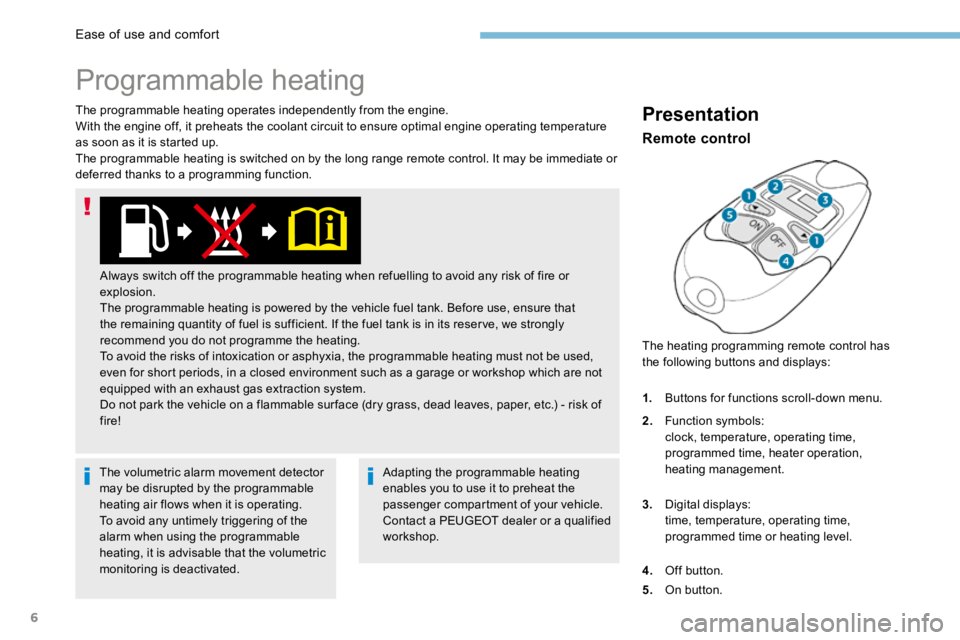
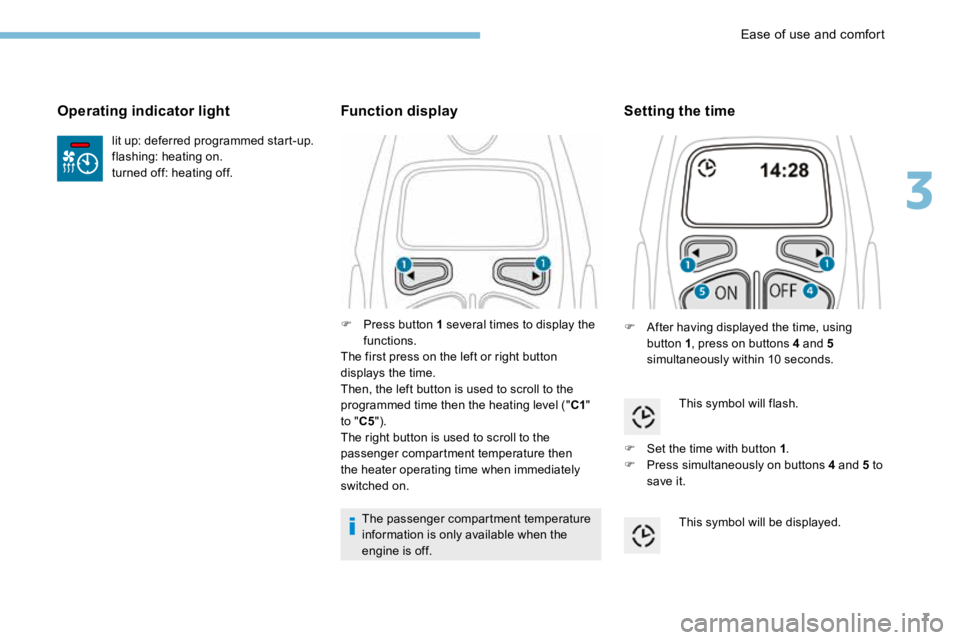
The heating programming remote control has
the following buttons and displays:
Remote control
1.
Buttons for functions scroll-down menu.
2. Function symbols:
clock, temperature, operating time,
programmed time, heater operation,
heating management.
3. Digital displays:
time, temperature, operating time,
programmed time or heating level.
4. Off button.
5. On button.
Ease of use and comfort
Page 547 of 566
7
lit up: deferred programmed start-up.
flashing: heating on.
turned off: heating off.
Operating indicator light
F Press button 1 several times to display the
functions.
The first press on the left or right button
displays the time.
Then, the left button is used to scroll to the
programmed time then the heating level (" C1"
to " C5").
The right button is used to scroll to the
passenger compartment temperature then
the heater operating time when immediately
switched on.
Function display
The passenger compartment temperature
information is only available when the
engine is off.
Setting the time
F After having displayed the time, using
button 1 , press on buttons 4 and 5
simultaneously within 10 seconds.
This symbol will flash.
F Set the time with button 1 .
F Press simultaneously on buttons 4 and 5 to
save it.
This symbol will be displayed.
3
Ease of use and comfort
Page 553 of 566
13
Trailer stability assist
When towing, this system reduces the risk of the vehicle or trailer swaying.
Operation
The system is activated automatically when the
ignition is switched on.
The electronic stability programme (ESC) must
not have any faults.
Between 36 and 100 mph (60 and 160 km/h),
if the system detects swaying movements in
the trailer, it acts on the brakes to stabilise the
trailer and, if necessary, reduces engine power
to slow down the vehicle.The correction is signalled by the
flashing of the indicator lamp in the
instrument panel and activation of the
brake lights.
Operating fault
Should a fault occur with the system,
this warning lamp comes on in the
instrument panel, accompanied by
the display of a message and an
audible signal. The trailer stability assist system
offers increased safety in normal
driving conditions, provided that the
recommendations on towing a trailer are
obser ved. It must not encourage the driver
to take additional risks, such as towing
a trailer in adverse operating conditions
(overloading, failure to obser ve the trailer
nose weight, worn or under-inflated tyres,
faulty braking system, etc.) or drive at too
high a speed.
In certain cases, the swaying of the trailer
may not be detected by the ESC system,
particularly with a light trailer.
When driving on slippery or poor sur faces,
the system may not be able to prevent
sudden swaying of the trailer.
If you continue to tow a trailer, reduce your
speed and drive carefully!
Contact a PEUGEOT dealer or a qualified
workshop to have the system checked.
For information on the weights and towed
loads, refer to the "Technical data" section or
the registration certificate for your vehicle.
For advice on driving safely when Towing a
trailer , refer to the corresponding section.
5
Safety