engine PEUGEOT 308 2024 Owners Manual
[x] Cancel search | Manufacturer: PEUGEOT, Model Year: 2024, Model line: 308, Model: PEUGEOT 308 2024Pages: 280, PDF Size: 8.13 MB
Page 221 of 280
219
In the event of a breakdown
82WD: 2-wheel drive.
In case of battery or electric parking brake failure, it is essential to call a professional using flatbed recovery vehicles (excluding manual gearbox).
Accessing the tools
For more information on accessing the Tool kit,
refer to the corresponding section.
Towing your vehicle
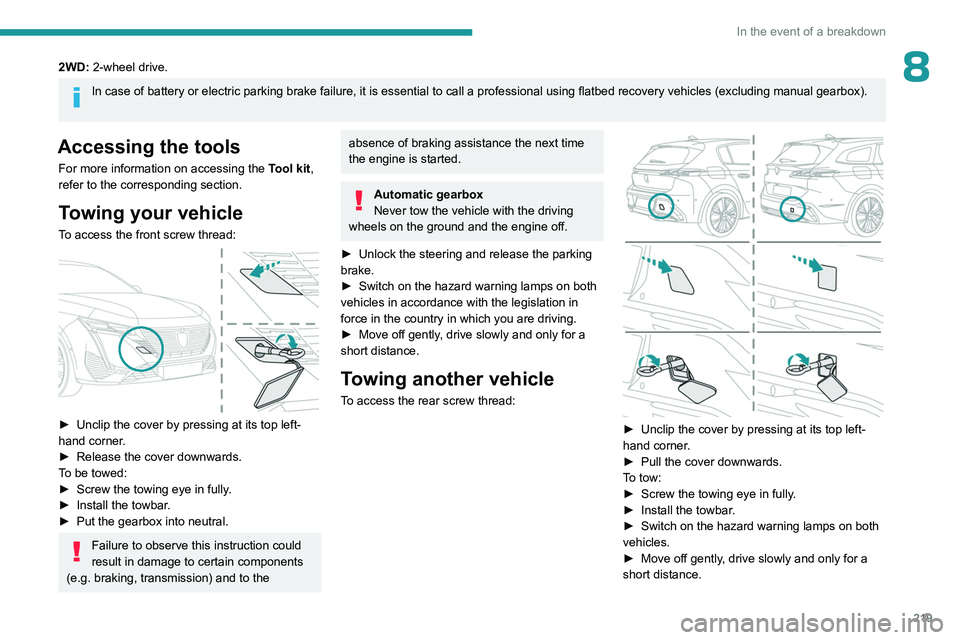
To access the front screw thread:
► Unclip the cover by pressing at its top left-
hand corner .
►
Release the cover downwards.
T
o be towed:
►
Screw the towing eye in fully
.
►
Install the towbar
.
►
Put the gearbox into neutral.
Failure to observe this instruction could
result in damage to certain components
(e.g. braking, transmission) and to the
absence of braking assistance the next time
the engine is started.
Automatic gearbox
Never tow the vehicle with the driving
wheels on the ground and the engine off.
►
Unlock the steering and release the parking
brake.
►
Switch on the hazard warning lamps on both
vehicles in accordance with the legislation in
force in the country in which you are driving.
►
Move off gently
, drive slowly and only for a
short distance.
Towing another vehicle
To access the rear screw thread:
► Unclip the cover by pressing at its top left-
hand corner .
►
Pull the cover downwards.
T
o tow:
►
Screw the towing eye in fully
.
►
Install the towbar
.
►
Switch on the hazard warning lamps on both
vehicles.
►
Move off gently
, drive slowly and only for a
short distance.
Page 222 of 280
220
Technical data
Engine technical data and
towed loads
Engines
The engine characteristics are given in the
vehicle's registration document, as well as in
sales brochures.
Only the values available at the time of
publication are presented in the tables.
Contact a PEUGEOT dealer or a qualified
workshop to obtain missing values.
The maximum power corresponds to the value type-approved on a test bed, under
conditions defined by European legislation
(Directive 1999/99/EC).
For more information, contact a PEUGEOT
dealer or a qualified workshop.
Weights and towed loads
The weights and towed loads relating to
the vehicle are indicated on the registration
document, as well as in sales brochures.
These values are also indicated on the
manufacturer's plate or label.
For more information, contact a PEUGEOT
dealer or a qualified workshop.
The GTW (Gross Train Weight) and towed load
values indicated are valid up to a maximum
altitude of 1,000 metres. The towed load value
must be reduced by 10% for each additional
1,000 metres of altitude.
The maximum authorised nose weight
corresponds to the weight permitted on the
towball.
When exterior temperatures are high, the
vehicle performance may be limited in
order to protect the engine. When the exterior
temperature is higher than 37°C, reduce the
towed weight.
Towing even with a lightly loaded vehicle can adversely affect its road holding.
Braking distances are increased when towing
a trailer.
When using a vehicle to tow, never exceed
a speed of 62 mph (100
km/h) (observe the
local legislation in force).
Page 223 of 280
221
Technical data
9Engines and towed loads - Petrol
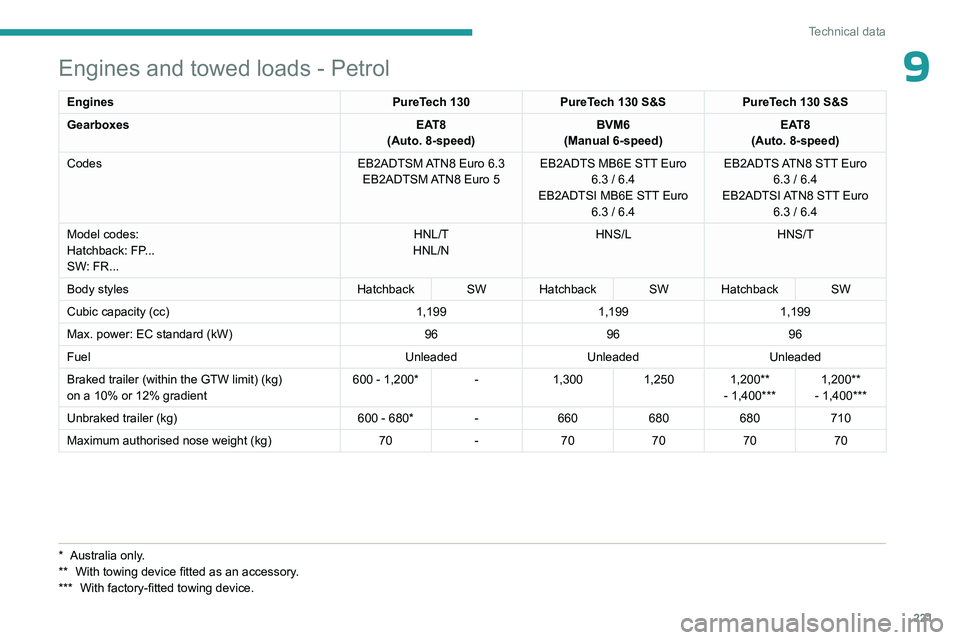
EnginesPureTech 130PureTech 130 S&S PureTech 130 S&S
Gearboxes EAT8
(Auto. 8-speed) BVM6
(Manual 6-speed) EAT8
(Auto. 8-speed)
Codes EB2ADTSM ATN8 Euro
6.3
EB2ADTSM ATN8 Euro
5EB2ADTS MB6E STT Euro
6.3 / 6.4
EB2ADTSI MB6E STT Euro 6.3 / 6.4 EB2ADTS ATN8 STT Euro
6.3 / 6.4
EB2ADTSI ATN8 STT Euro 6.3 / 6.4
Model codes:
Hatchback: FP...
SW: FR... HNL/T
HNL/N HNS/L
HNS/T
Body styles Hatchback SW Hatchback SW Hatchback SW
Cubic capacity (cc) 1,1991,1991,199
Max. power: EC standard (kW) 969696
Fuel UnleadedUnleadedUnleaded
Braked trailer (within the GTW limit) (kg)
on a 10% or 12% gradient 600 - 1,200* -
1,3001,250 1,200**
- 1,400*** 1,200**
- 1,400***
Unbraked trailer (kg) 600 - 680*-660 680680710
Maximum authorised nose weight (kg) 70-70 707070
* Australia only.
** With towing devi ce fitted as an accessory.
***
With factory-fitted towing device.
Page 224 of 280
222
Technical data
Engines and towed loads - Diesel
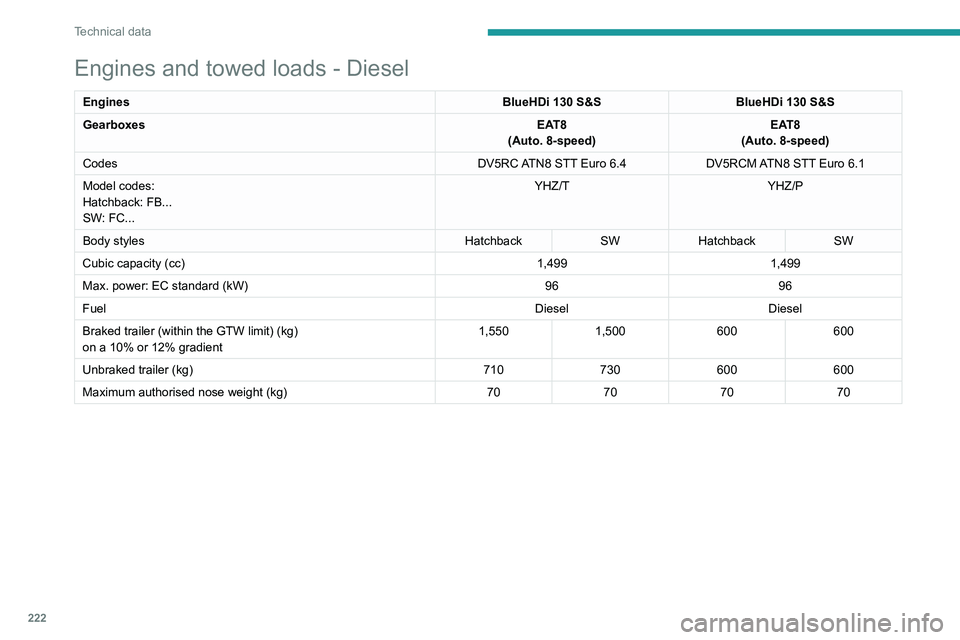
EnginesBlueHDi 130 S&SBlueHDi 130 S&S
Gearboxes EAT8
(Auto. 8-speed) EAT8
(Auto. 8-speed)
Codes DV5RC ATN8 STT Euro
6.4DV5RCM ATN8 STT Euro
6.1
Model codes:
Hatchback: FB...
SW: FC... YHZ/T
YHZ/P
Body styles HatchbackSWHatchback SW
Cubic capacity (cc) 1,4991,499
Max. power: EC standard (kW) 9696
Fuel DieselDiesel
Braked trailer (within the GTW limit) (kg)
on a 10% or 12% gradient 1,550
1,500 600600
Unbraked trailer (kg) 710730600600
Maximum authorised nose weight (kg) 70707070
Page 225 of 280
223
Technical data
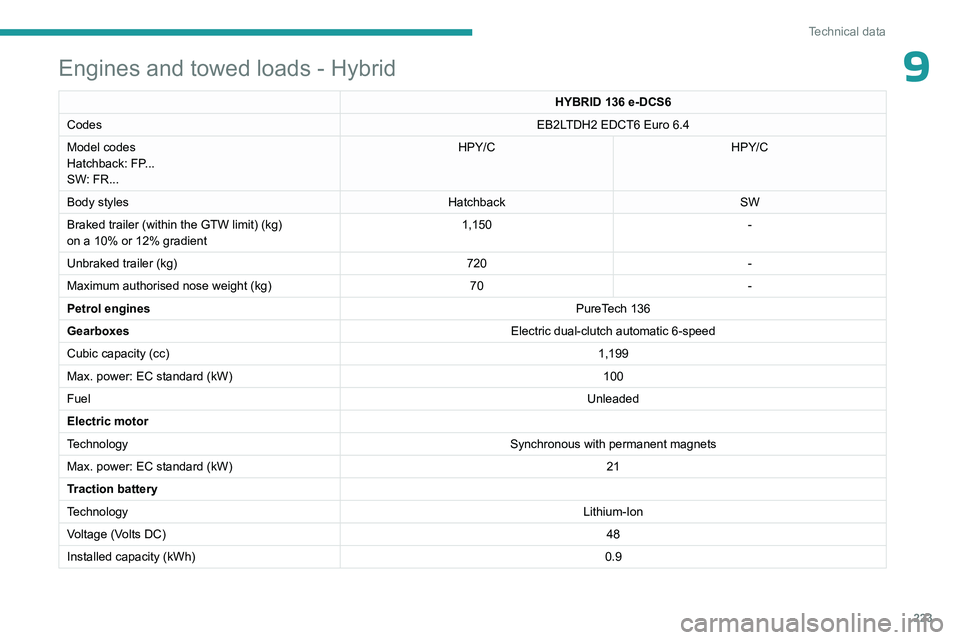
9Engines and towed loads - Hybrid
HYBRID 136 e-DCS6
Codes EB2LTDH2 EDCT6 Euro 6.4
Model codes
Hatchback: FP...
SW: FR... HPY/C
HPY/C
Body styles HatchbackSW
Braked trailer (within the GTW limit) (kg)
on a 10% or 12% gradient 1,150
-
Unbraked trailer (kg) 720-
Maximum authorised nose weight (kg) 70-
Petrol engines PureTech 136
Gearboxes Electric dual-clutch automatic 6-speed
Cubic capacity (cc) 1,199
Max. power: EC standard (kW) 100
Fuel Unleaded
Electric motor
Technology Synchronous with permanent magnets
Max. power: EC standard (kW) 21
Traction battery
Technology Lithium-Ion
Voltage (Volts DC) 48
Installed capacity (kWh) 0.9
Page 226 of 280
224
Technical data
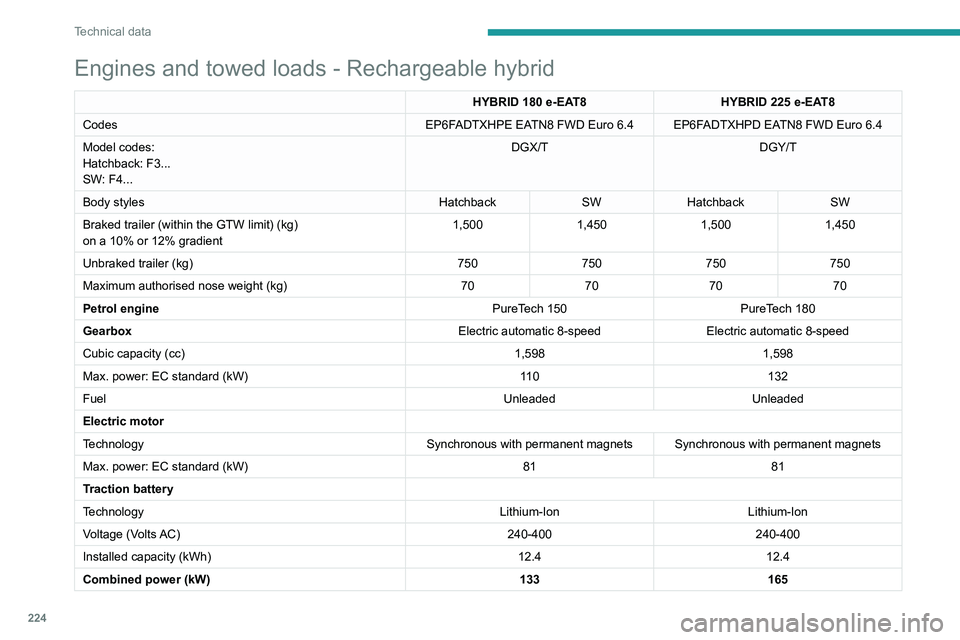
Engines and towed loads - Rechargeable hybrid
HYBRID 180 e-EAT8 HYBRID 225 e-EAT8
Codes EP6FADTXHPE EATN8 FWD Euro
6.4 EP6FADTXHPD EATN8 FWD Euro 6.4
Model codes:
Hatchback: F3...
SW: F4... DGX/T
DGY/T
Body styles HatchbackSWHatchback SW
Braked trailer (within the GTW limit) (kg)
on a 10% or 12% gradient 1,500
1,4501,5001,450
Unbraked trailer (kg) 750750750750
Maximum authorised nose weight (kg) 70707070
Petrol engine PureTech
150 PureTech
180
Gearbox Electric automatic 8-speedElectric automatic 8-speed
Cubic capacity (cc) 1,5981,598
Max. power: EC standard (kW) 11 0132
Fuel UnleadedUnleaded
Electric motor
Technology Synchronous with permanent magnets Synchronous with permanent magnets
Max. power: EC standard (kW) 8181
Traction battery
Technology Lithium-IonLithium-Ion
Voltage (Volts AC) 240-400240-400
Installed capacity (kWh) 12.412.4
Combined power (kW) 133165
Page 227 of 280
225
Technical data
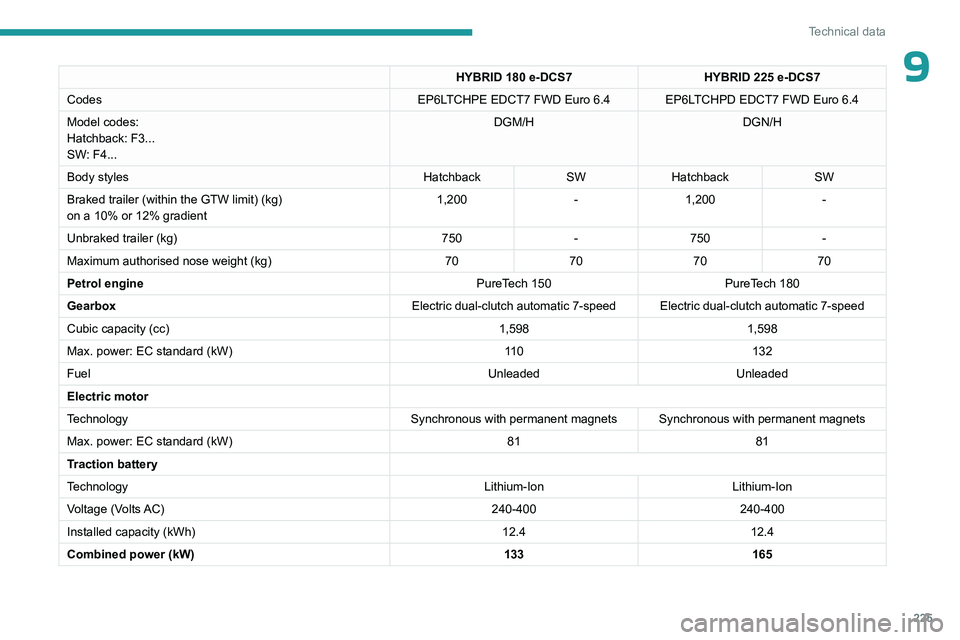
9HYBRID 180 e-DCS7HYBRID 225 e-DCS7
Codes EP6LTCHPE EDCT7 FWD Euro
6.4 EP6LTCHPD EDCT7 FWD Euro 6.4
Model codes:
Hatchback: F3...
SW: F4... DGM/H
DGN/H
Body styles HatchbackSWHatchback SW
Braked trailer (within the GTW limit) (kg)
on a 10% or 12% gradient 1,200
-1,200 -
Unbraked trailer (kg) 750-750 -
Maximum authorised nose weight (kg) 70707070
Petrol engine PureTech
150 PureTech
180
Gearbox Electric dual-clutch automatic 7-speed Electric dual-clutch automatic 7-speed
Cubic capacity (cc) 1,5981,598
Max. power: EC standard (kW) 11 0132
Fuel UnleadedUnleaded
Electric motor
Technology Synchronous with permanent magnets Synchronous with permanent magnets
Max. power: EC standard (kW) 8181
Traction battery
Technology Lithium-IonLithium-Ion
Voltage (Volts AC) 240-400240-400
Installed capacity (kWh) 12.412.4
Combined power (kW) 133165
Page 228 of 280
226
Technical data
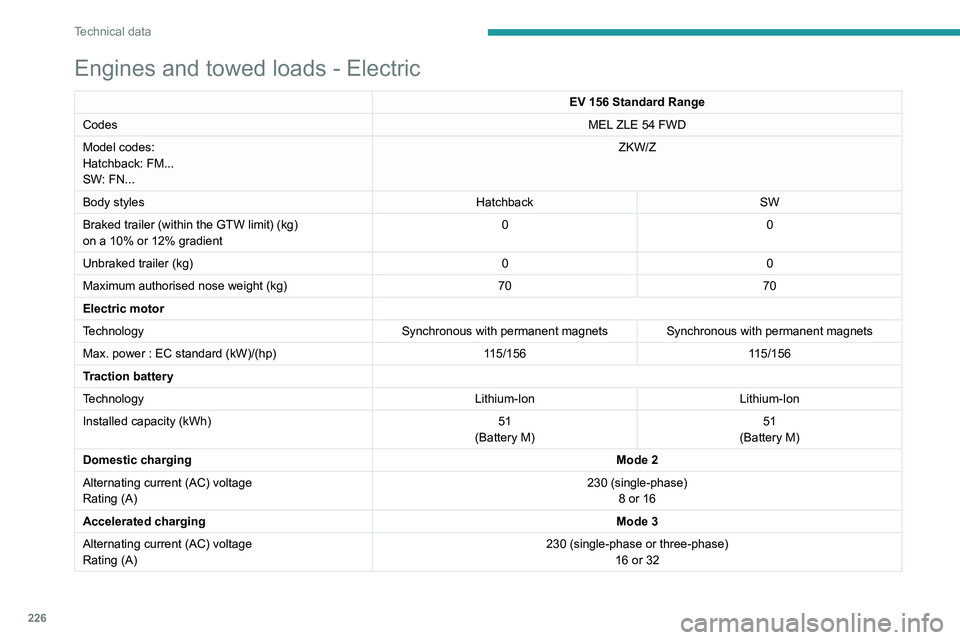
Engines and towed loads - Electric
EV 156 Standard Range
Codes MEL ZLE 54 FWD
Model codes:
Hatchback: FM...
SW: FN... ZKW/Z
Body styles HatchbackSW
Braked trailer (within the GTW limit) (kg)
on a 10% or 12% gradient 0
0
Unbraked trailer (kg) 00
Maximum authorised nose weight (kg) 7070
Electric motor
Technology Synchronous with permanent magnets Synchronous with permanent magnets
Max. power : EC standard (kW)/(hp) 115/156115/156
Traction battery
Technology Lithium-IonLithium-Ion
Installed capacity (kWh) 51
(Battery M) 51
(Battery M)
Domestic charging Mode 2
Alternating current (AC) voltage
Rating (A) 230 (single-phase)
8 or 16
Accelerated charging Mode 3
Alternating current (AC) voltage
Rating (A) 230 (single-phase or three-phase)
16 or 32
Page 234 of 280
232
PEUGEOT i-Connect Advanced - PEUGEOT i-Connect
and the Manufacturer's device management
server each time the ignition is switched on,
when a mobile telephone network is available.
Depending on the vehicle's equipment,
the connection configuration must be set
to "Connected vehicle" to enable to the
connection to the radio network.
Irrespective of a valid subscription to a
connected service, the remote management
of devices relating to or connected with
the security of devices, and the updating
of software and firmware, will be carried
out when necessary in order to comply
with a legal requirement applicable to the
Manufacturer (e.g. the applicable law in terms
of product liability, the regulations governing
e-call) or when necessary to protect the
respective vital interests of the vehicle's users
and passengers.
The establishment of a secure connection via
radio network and the corresponding remote
updates are not affected by the privacy
settings and are intended to be carried out
after being initialised by the user in response
to a related notification.
The system can notify the receipt of an update
when it is connected to an exterior Wi-Fi network
or a mobile telephone network.
Large updates are downloaded only via the Wi-Fi
network.
The availability of an update is notified on the
screen at the end of the journey with an option of immediate installation or postponement of
installation.
The installation time is variable and can take
several minutes with a maximum of about 30
minutes. A notification will give an estimate of the
duration and a description of the update.
Update information is available through the
"Settings" application.
Press the "Settings" application.
In the list, select the "Updates" tab.
This button allows you to change the authorisation for automatic downloading
of updates via an exterior Wi-Fi network.
For safety reasons and because it
requires sustained attention on the part
of the driver, the installation must be carried
out with the ignition on but without starting the
engine.
The installation cannot be carried out in the
following cases:
–
engine running.
–
emergency call in progress.
–
insufficient battery level.
–
when charging for electric vehicles.
If an update has failed or has expired, contact a
dealer or a qualified workshop.
The Manufacturer does not charge for the use of this service.
However, the use of Wi-Fi and/or mobile
telephone networks by your smartphone may
incur extra charges if you exceed the data
allowance included in your contract.
Any associated costs will be billed to you by
your mobile telephone operator.
Personalisation
Press and hold the screen from one of the
system's home pages.
Or
Press the "Settings" application.
In the list, select the "Customization" tab.
Press the "Displays" field.
A page divided into 2 parts is displayed.
Press the HOME button at any time to leave this
page.
Personalising the screen
Press the pencil in the "Customize
Touchscreen" part.
A representation of the organisation of the
different home page ( HOME) Widgets
is
displayed.
A Widget is a reduced window of an application or service.
Adding a Widget
To add a Widget, press "Widget" on the left of the screen.
Or
Page 236 of 280
234
PEUGEOT i-Connect Advanced - PEUGEOT i-Connect
Radio: automatic search for the
previous/next station (in the list of
radio stations sorted by name or by frequencies).
Media: previous/next track, movement in the
lists.
Phone: browse the telephone's call log.
Short press: validate a selection. Out of
selection, display the lists.
Applications
From the home page, press this button to
access the applications wall.
From any page, press the touch screen
with three or more fingers to display the
applications wall.
Help
Access the handbook and watch tutorials.
Media
Select an audio source or radio station.
Mirror Screen®
Smartphone connected with Mirror
Screen®: access to the projected view of
Apple®CarPlay® or Android Auto.
Smartphone not connected: access the menu
allowing you to connect a smartphone.
Navigation
(depending on equipment)
Enter navigation settings and choose a
destination.
Use services available in real time, depending on
equipment.
Voice commands
(depending on equipment)
Use the system or smartphone voice recognition
via the system.
Phone
Telephone not connected: access the
menu allowing you to connect a telephone.
Telephone connected: access the call log,
contacts and telephone settings.
Two connected telephones: access the contents
of the priority telephone with the possibility of
changing the priority of the telephone.
Settings
Main settings for the audio system, touch
screen and digital instrument panel.
Voice commands
First steps
(depending on equipment)
The voice recognition service offers a
choice of 20 languages minimum (French,
German, English (UK), English (US), Arabic,
Brazilian, Chinese, Danish, Spanish, Hebrew,
Italian, Japanese, Dutch, Norwegian, Polish,
Portuguese, Russian, Swedish, Czech, Turkish)
available with the cellular network and in line
with the language chosen and previously
configured in the system. The system supports two languages
for cases
where the area in which the vehicle is travelling
is not covered by the cellular network.
These languages, referred to as on-board
languages,
are downloaded into the system.
If the chosen language has not been
downloaded, a message on the screen appears
as soon as the cellular network is not connected
for the first time and offers to download it.
T
o use this new language in all areas, download
it beforehand (ignition on without starting the
engine) via the Wi-Fi network.
Apply the download procedure displayed on the
screen.
Downloading this new language removes the
least used on-board language.
Information - Using the
system
When voice commands are activated, say
your command after the audible signal.
For commands in several stages, interaction
takes place with the system to complete the
initial request.
Some commands self-validate after 7
seconds.
If the system has not taken your command into
account, it will indicate this by a voice message
and an on-screen display.
Press the "Settings" application.
In the list, select the "Voice Assistant" tab.