CD player Peugeot 308 CC 2011 Owner's Guide
[x] Cancel search | Manufacturer: PEUGEOT, Model Year: 2011, Model line: 308 CC, Model: Peugeot 308 CC 2011Pages: 292, PDF Size: 40.04 MB
Page 270 of 292
268
05
1
1
2
3
PEUGEOT CONNECT USB
The system puts together playlists (temporary memory) created
over a period which depends on the capacity of the USB device.
The other sources are available during this time.
The playlists are updated each time the ignition is switched off or
each time a USB memory stick is connected.
When connecting for the fi rst time, the classifi cation suggested
is by folder. When you reconnect, the classifi cation selected
previously is retained.
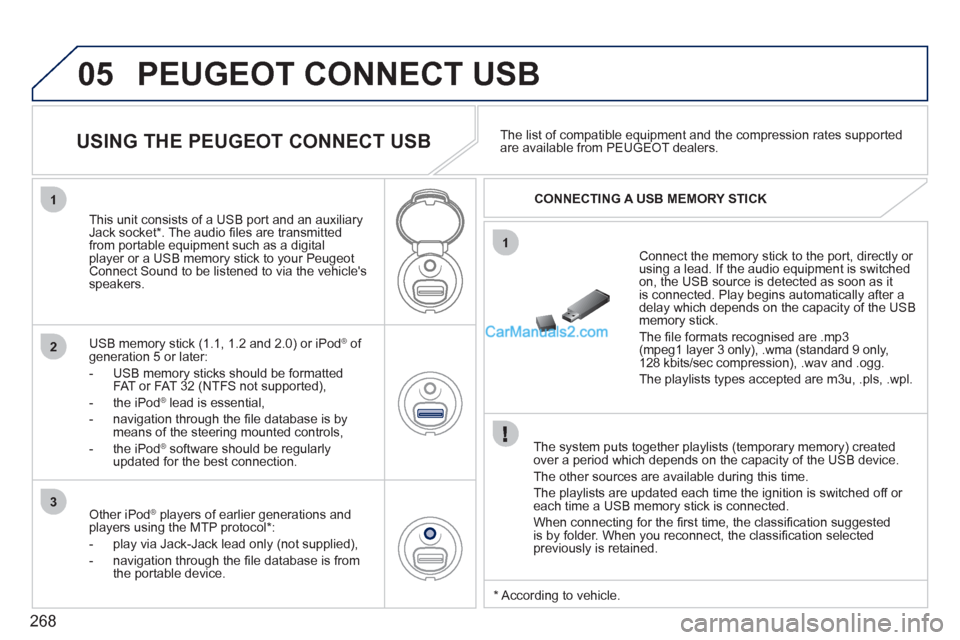
Connect the memory stick to the port, directly or
using a lead. If the audio equipment is switched
on, the USB source is detected as soon as it
is connected. Play begins automatically after a
delay which depends on the capacity of the USB
memory stick.
The fi le formats recognised are .mp3
(mpeg1 layer 3 only), .wma (standard 9 only,
128 kbits/sec compression), .wav and .ogg.
The playlists types accepted are m3u, .pls, .wpl.
This unit consists of a USB port and an auxiliary
Jack socket * . The audio fi les are transmitted
from portable equipment such as a digital
player or a USB memory stick to your Peugeot
Connect Sound to be listened to via the vehicle's
speakers.
USB memory stick (1.1, 1.2 and 2.0) or iPod
®
of
generation 5 or later:
- USB memory sticks should be formatted
FAT or FAT 32 (NTFS not supported),
- the iPod
®
lead is essential,
- navigation through the fi le database is by
means of the steering mounted controls,
- the iPod
®
software should be regularly
updated for the best connection.
The list of compatible equipment and the compression rates supported
are available from PEUGEOT dealers.
USING THE PEUGEOT CONNECT USB
CONNECTING A USB MEMORY STICK
Other iPod
®
players of earlier generations and
players using the MTP protocol * :
- play via Jack-Jack lead only (not supplied),
- navigation through the fi le database is from
the portable device.
* According to vehicle.
Page 272 of 292
270
05
1
2
1
2
The display and control is via the portable device. First adjust the volume of your portable device.
Then adjust the volume of your
audio system.
USING THE AUXILIARY SOCKET (AUX)
ADJUSTING THE VOLUME OF
THE AUXILIARY SOURCE
PEUGEOT CONNECT USB
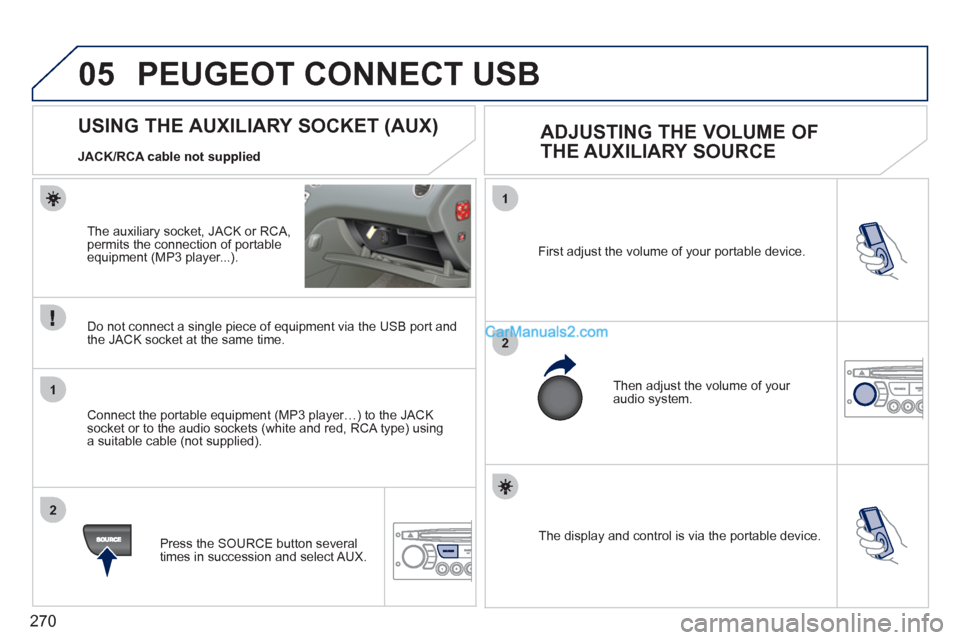
The auxiliary socket, JACK or RCA,
permits the connection of portable
equipment (MP3 player...).
Do not connect a single piece of equipment via the USB port and
the JACK socket at the same time.
Connect the portable equipment (MP3 player…) to the JACK
socket or to the audio sockets (white and red, RCA type) using
a suitable cable (not supplied).
Press the SOURCE button several
times in succession and select AUX.
JACK/RCA cable not supplied
Page 279 of 292
277
FREQUENTLY ASKED QUESTIONS
QUESTION
ANSWER
SOLUTION
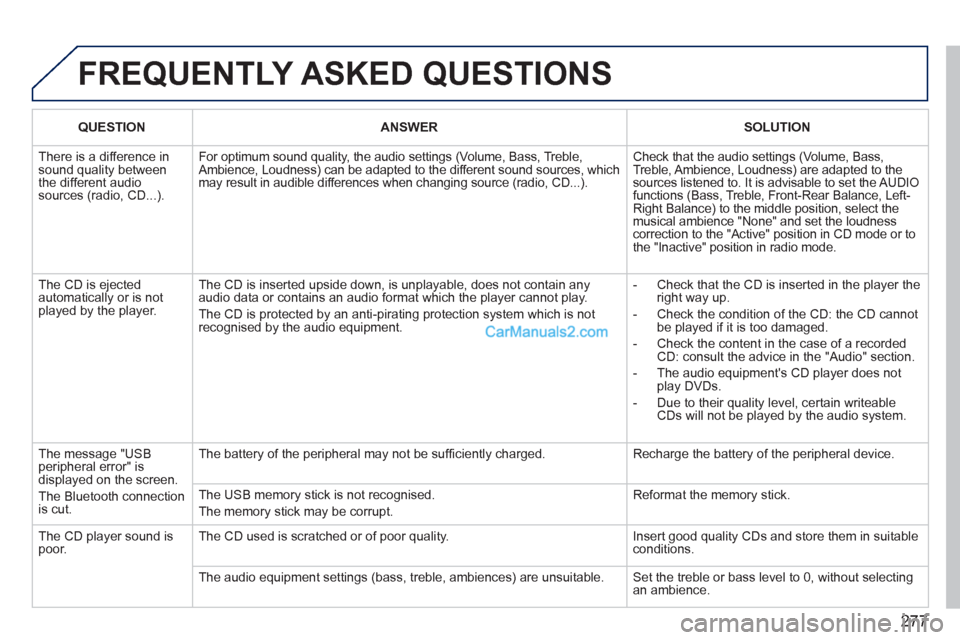
There is a difference in
sound quality between
the different audio
sources (radio, CD...). For optimum sound quality, the audio settings (Volume, Bass, Treble,
Ambience, Loudness) can be adapted to the different sound sources, which
may result in audible differences when changing source (radio, CD...). Check that the audio settings (Volume, Bass,
Treble, Ambience, Loudness) are adapted to the
sources listened to. It is advisable to set the AUDIO
functions (Bass, Treble, Front-Rear Balance, Left-
Right Balance) to the middle position, select the
musical ambience "None" and set the loudness
correction to the "Active" position in CD mode or to
the "Inactive" position in radio mode.
The CD is ejected
automatically or is not
played by the player. The CD is inserted upside down, is unplayable, does not contain any
audio data or contains an audio format which the player cannot play.
The CD is protected by an anti-pirating protection system which is not
recognised by the audio equipment.
- Check that the CD is inserted in the player the
right way up.
- Check the condition of the CD: the CD cannot
be played if it is too damaged.
- Check the content in the case of a recorded
CD: consult the advice in the "Audio" section.
- The audio equipment's CD player does not
play DVDs.
- Due to their quality level, certain writeable
CDs will not be played by the audio system.
The message "USB
peripheral error" is
displayed on the screen.
The Bluetooth connection
is cut. The battery of the peripheral may not be suffi ciently charged. Recharge the battery of the peripheral device.
The USB memory stick is not recognised.
The memory stick may be corrupt. Reformat the memory stick.
The CD player sound is
poor. The CD used is scratched or of poor quality. Insert good quality CDs and store them in suitable
conditions.
The audio equipment settings (bass, treble, ambiences) are unsuitable. Set the treble or bass level to 0, without selecting
an ambience.
Page 287 of 292
285
ALPHABETICAL INDEX
Oil filter ........................................... 144
Oil level ..................................... 37, 142
Opening the bonnet ........................ 138
Opening the boot ........................ 70, 82
Opening the doors ................ 70, 79, 81
Opening the retractable roof .............. 6
Opening the retractable screen ........ 49
Opening the windows ....................... 77
Operation indicator lamps ........... 26-35 Main beam ........................ 85, 155, 156
Manual gearbox ......122, 123, 128, 145
Manufacturer's
identification plates ..................... 179
Map reading lamps ........................... 93
Markings, identification ................... 179
Mat.................................................... 98
Menu, main ..................................... 264
Mini fuel level.................................... 83
Misfuel prevention ............................ 84 Labels, identification ....................... 179
Lamps, warning
and indicator ............................ 26-35
Lateral airbags ........................ 112, 113 Inflating accessories
(using the kit) ............................. 150
Inflating tyres .................................... 21
Inputs for
audio system .............. 212, 248, 270
Instrument panel lighting .................. 41
Instrument panels ........................ 22-24
Instrument panel screen .............. 22-25
Interior fittings ................................... 95
Interior mood lighting ........................ 94
ISOFIX child seats.................. 120, 121
ISOFIX mountings .......................... 119
Keeping children
safe ..................... 109, 111, 114-121
Key in ignition warning ..................... 72
Key with remote control ............... 70-74Navigation............................... 196, 235
Neck heater ...................................... 65
Neck heater control .......................... 65
Number plate lamps ....................... 158
J
K
L
N
M
OJack ................................................ 151
Jukebox (copy) ............................... 210
Jukebox (playing) ........................... 211LED lamps ........................................ 87
Level, brake fluid ............................ 142
Level, headlamp wash.............. 92, 143
Level, power steering fluid ............. 142
Levels and checks ................... 140-143
Lighting, guide-me home ............ 87, 88
Lighting, interior .......................... 93, 94
Lighting bulbs (replacement) ... 155-159
Lighting dimmer ................................ 41
Lighting stalk .................................... 85
Loading ............................................. 20
Load reduction mode...................... 168
Locating your vehicle........................ 72
Locking from the inside .................... 80
Locking the boot ............................... 82
Luggage retaining net..................... 100
Luggage retaining strap.................... 99Monochrome screen ............... 264, 274
Mountings for ISOFIX seats ........... 119
MP3 CD .......................... 208, 247, 267
Multifunction screen (with audio
equipment) .................42, 45, 47, 49
Music media players....... 208, 246, 266
Paint colour code............................ 179
Parking brake ......................... 122, 145
Particle emission filter ............ 143, 144
P
Page 288 of 292
286
ALPHABETICAL INDEX
Reduction of electrical load ............ 168
Refitting a wheel ............................. 154
Reinitialising partial opening
of the windows ............................. 78
Reinitialising the electric windows .... 78
Reinitialising the remote control ....... 73
Remote control ............................ 70-74
Removable screen
(snow shield) .............................. 172
Removing a wheel .......................... 153
Removing the mat ............................ 98
Repair kit, puncture ................ 100, 146
Replacing bulbs ....................... 155-159
Replacing fuses ....................... 160-165
Replacing the air filter .................... 144
Replacing the oil filter ..................... 144
Replacing the particle
emission filter ............................. 144
Replacing the passenger
compartment filter ...................... 144
Replacing wiper blades ............ 93, 169
Resetting the service indicator ......... 39
Resetting the trip recorder ................ 40
Retractable colour screen .... 45, 47, 49
Retractable roof .......................... 6, 100
Rev counter ................................. 22-24
Reversing lamps ............................. 158
Roll-over bars ........................... 66, 106
Routine checks ....................... 144, 145
Routine maintenance ....................... 20
Running out of fuel (Diesel)............ 139 Radio .............................. 207, 245, 265
Rear armrest .................................... 66
Rear foglamps .......................... 86, 158
Rear head restraints ......................... 66
Rear lamps ..................................... 158
Rear parking sensors ..................... 135
Rear screen (demisting) ................... 56
Rear seats ................................ 66, 106
Rear view mirror ............................... 69
Recharging the battery ................... 167Satellite navigation system ..... 196, 235
Screen,
colour 16/9 .........191, 219, 232, 253
Screen, monochrome C ................... 50
Screen, multifunction (with audio
equipment) .................42, 45, 47, 49
Screen-wash reservoir ................... 143
Screen menu map .......... 219, 253, 274
Screenwash fluid level.............. 92, 143
Seat adjustment ......................... 62, 63
Seat belts ............................... 107, 109
Serial number, vehicle .................... 179
Service indicator ............................... 38
Servicing ........................................... 20
Setting the clock ............. 218, 252, 273
Short-cut menus ............. 192, 233, 234
Sidelamps ...................85, 87, 155, 158
Side repeater .................................. 157
Side spotlamps ......................... 89, 157
SIM card ......................................... 216
Snow chains ................................... 179
Spare wheel ................................... 151
Speed limiter .................................. 131
Speedometer ............................... 22-24
Stability control (ESP) .................... 105
Starting the vehicle ................... 72, 125
Steering mounted
controls ....................... 190, 231, 263
Stopping the vehicle ................. 72, 125
Stop Start ....................52, 57, 83, 128,
138, 144, 166 Passenger compartment filter ........ 144
Petrol engine ............................ 84, 140
PEUGEOT call button ............ 182, 183
PEUGEOT CONNECT
ASSISTANCE ..................... 182, 183
Peugeot Connect Media ...... 25, 47, 49,
50, 185-228
Peugeot Connect Navigation..... 45, 49,
229-260
PEUGEOT CONNECT SOS .......... 182
Peugeot Connect Sound ................. 42,
261-278
PEUGEOT services ........................ 183
PIN code ......................................... 216
Player, CD MP3 .............. 208, 246, 267
Priming the fuel system .................. 139
Protecting children ... 109, 111, 114-121
Puncture ......................................... 146
R
S