navigation Peugeot 308 CC 2011 Owner's Guide
[x] Cancel search | Manufacturer: PEUGEOT, Model Year: 2011, Model line: 308 CC, Model: Peugeot 308 CC 2011Pages: 292, PDF Size: 40.04 MB
Page 230 of 292
228
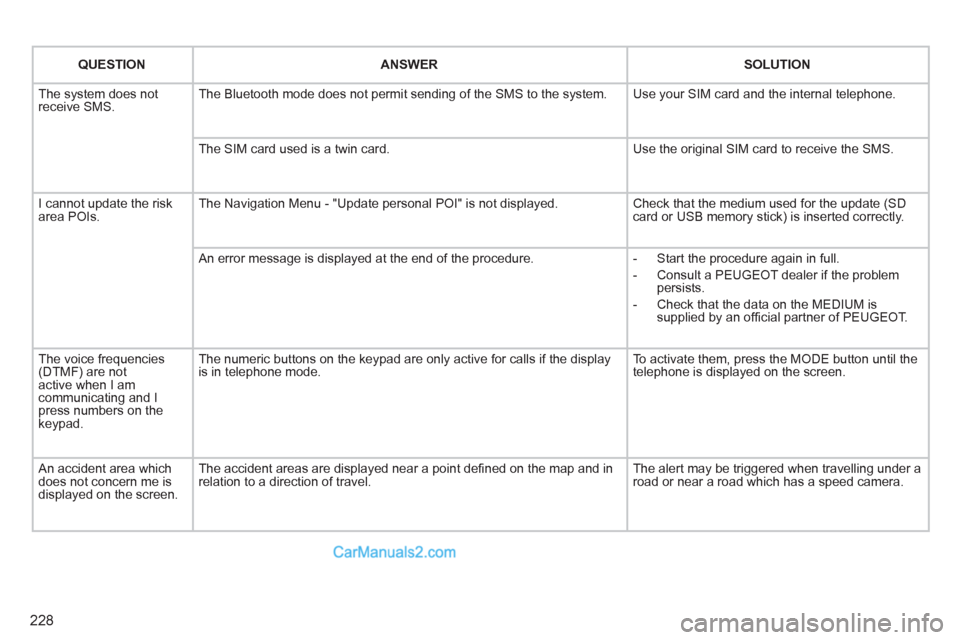
QUESTION
ANSWER
SOLUTION
The system does not
receive SMS. The Bluetooth mode does not permit sending of the SMS to the system. Use your SIM card and the internal telephone.
The SIM card used is a twin card. Use the original SIM card to receive the SMS.
I cannot update the risk
area POIs. The Navigation Menu - "Update personal POI" is not displayed. Check that the medium used for the update (SD
card or USB memory stick) is inserted correctly.
An error message is displayed at the end of the procedure.
- Start the procedure again in full.
- Consult a PEUGEOT dealer if the problem
persists.
- Check that the data on the MEDIUM is
supplied by an offi cial partner of PEUGEOT.
The voice frequencies
(DTMF) are not
active when I am
communicating and I
press numbers on the
keypad. The numeric buttons on the keypad are only active for calls if the display
is in telephone mode. To activate them, press the MODE button until the
telephone is displayed on the screen.
An accident area which
does not concern me is
displayed on the screen. The accident areas are displayed near a point defi ned on the map and in
relation to a direction of travel. The alert may be triggered when travelling under a
road or near a road which has a speed camera.
Page 231 of 292
229
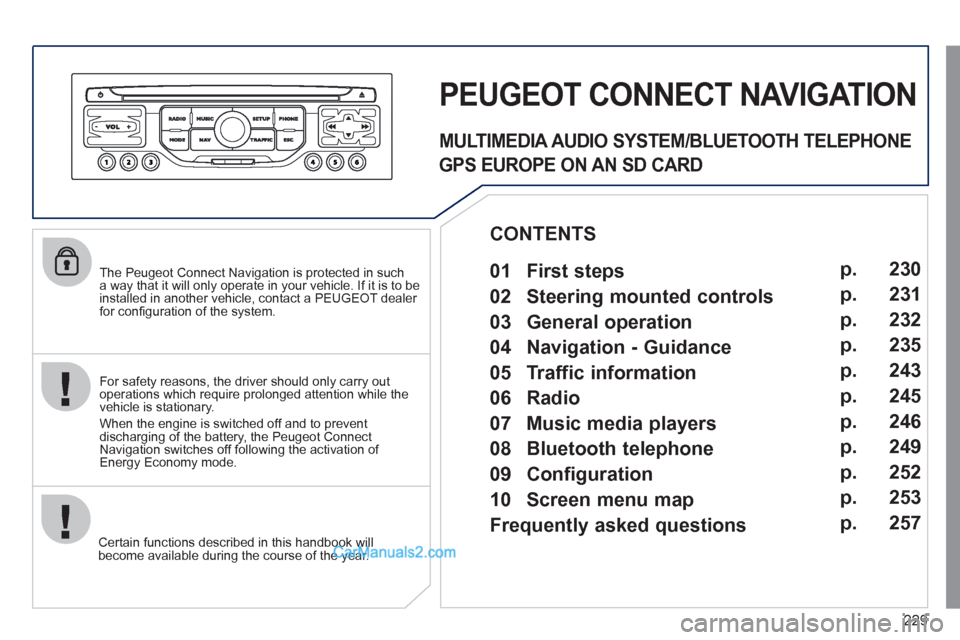
The Peugeot Connect Navigation is protected in such
a way that it will only operate in your vehicle. If it is to be
installed in another vehicle, contact a PEUGEOT dealer
for confi guration of the system.
Certain functions described in this handbook will
become available during the course of the year.
PEUGEOT CONNECT NAVIGATION
For safety reasons, the driver should only carry out
operations which require prolonged attention while the
vehicle is stationary.
When the engine is switched off and to prevent
discharging of the battery, the Peugeot Connect
Navigation switches off following the activation of
Energy Economy mode.
MULTIMEDIA AUDIO SYSTEM/BLUETOOTH TELEPHONE
GPS EUROPE ON AN SD CARD
01 First steps
CONTENTS
02 Steering mounted controls
03 General operation
04 Navigation - Guidance
05 Traffic information
06 Radio
07 Music media players
08 Bluetooth telephone
09 Configuration
10 Screen menu map p.
p.
p.
p.
p.
p.
p.
p.
p.
p.
Frequently asked questions p. 230
231
232
235
243
245
246
249
252
253
257
Page 232 of 292
230
01
1
5
10 234 6
1311
9
14 157812 16
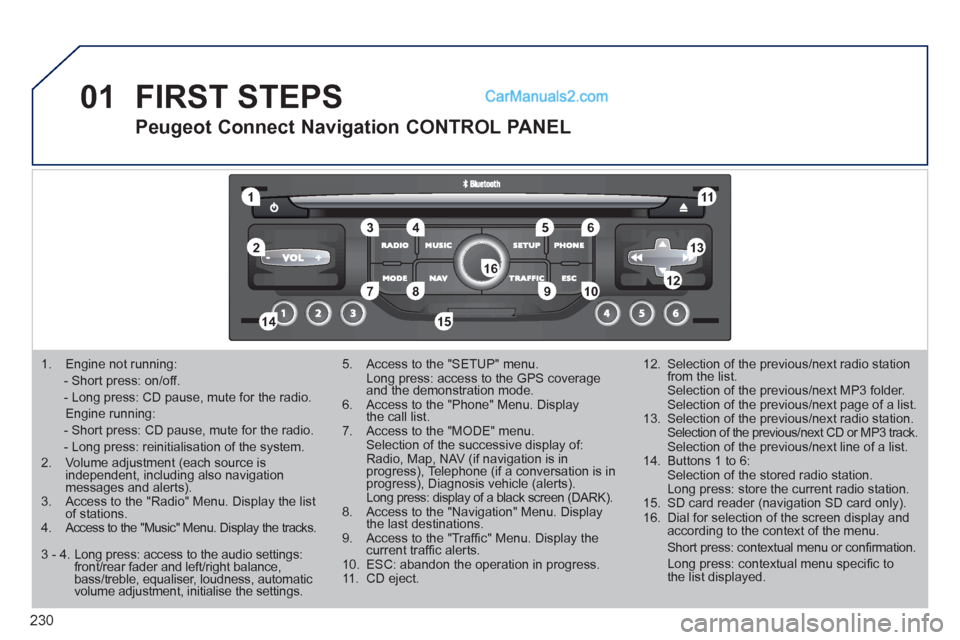
1. Engine not running:
- Short press: on/off.
- Long press: CD pause, mute for the radio.
Engine running:
- Short press: CD pause, mute for the radio.
- Long press: reinitialisation of the system.
2. Volume adjustment (each source is
independent, including also navigation
messages and alerts).
3. Access to the "Radio" Menu. Display the list
of stations.
4. Access to the "Music" Menu. Display the tracks.
5. Access to the "SETUP" menu.
Long press: access to the GPS coverage
and the demonstration mode.
6. Access to the "Phone" Menu. Display
the call list.
7. Access to the "MODE" menu.
Selection of the successive display of:
Radio, Map, NAV (if navigation is in
progress), Telephone (if a conversation is in
progress), Diagnosis vehicle (alerts).
Long press: display of a black screen (DARK).
8. Access to the "Navigation" Menu. Display
the last destinations.
9. Access to the "Traffi c" Menu. Display the
current traffi c alerts.
10. ESC: abandon the operation in progress.
11. CD eject.
12. Selection of the previous/next radio station
from the list.
Selection of the previous/next MP3 folder.
Selection of the previous/next page of a list.
13. Selection of the previous/next radio station.
Selection of the previous/next CD or MP3 track.
Selection of the previous/next line of a list.
14. Buttons 1 to 6:
Selection of the stored radio station.
Long press: store the current radio station.
15. SD card reader (navigation SD card only).
16. Dial for selection of the screen display and
according to the context of the menu.
Short press: contextual menu or confi rmation.
Long press: contextual menu specifi c to
the list displayed.
FIRST STEPS
Peugeot Connect Navigation CONTROL PANEL
3 - 4. Long press: access to the audio settings:
front/rear fader and left/right balance,
bass/treble, equaliser, loudness, automatic
volume adjustment, initialise the settings.
Page 234 of 292
232
03 GENERAL OPERATION
For cleaning the screen, the use of a soft, non-abrasive cloth
(spectacles cloth) is recommended, with no additional product.
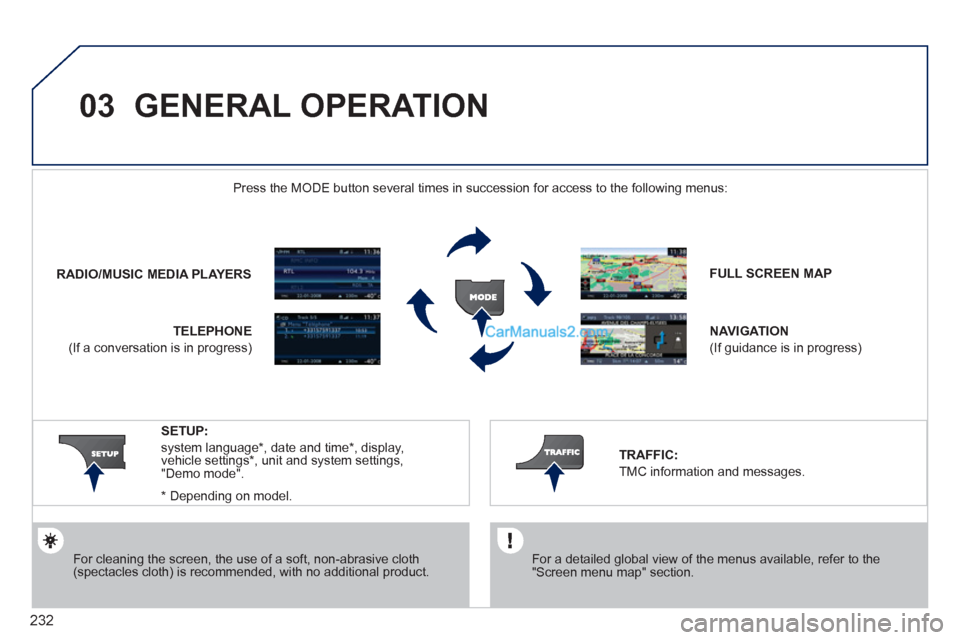
FULL SCREEN MAP
NAVIGATION
(If guidance is in progress)
SETUP:
system language*
, date and time*
, display,
vehicle settings*
, unit and system settings,
"Demo mode".
*
Depending on model.
RADIO
/
MUSIC MEDIA PLAYERS
Press the MODE button several times in succession for access to the following menus:
TELEPHONE
(If a conversation is in progress)
TRAFFIC:
TMC information and messages.
For a detailed global view of the menus available, refer to the
"Screen menu map" section.
Page 235 of 292
233
03 GENERAL OPERATION
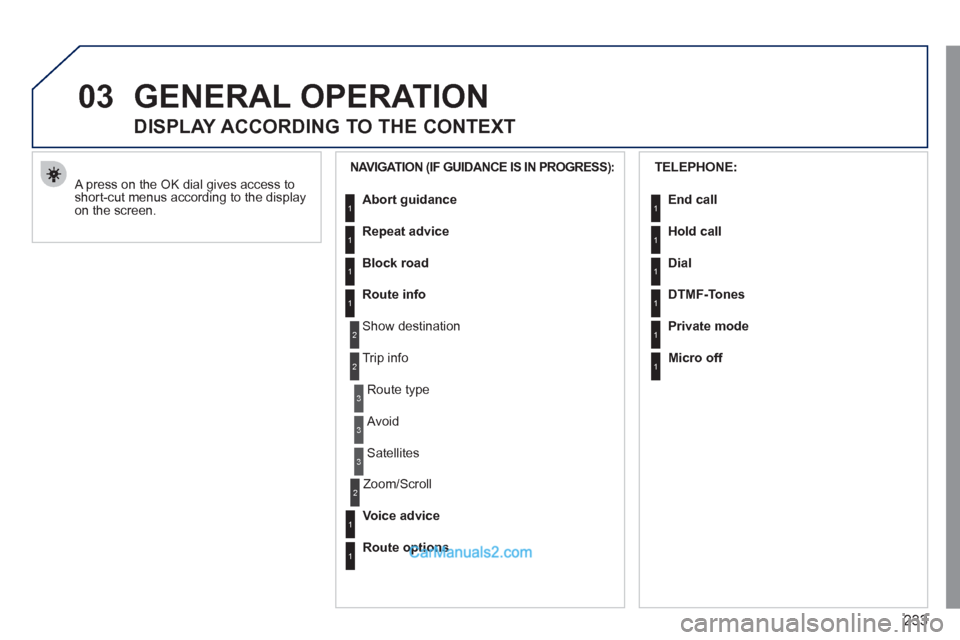
A press on the OK dial gives access to
short-cut menus according to the display
on the screen.
DISPLAY ACCORDING TO THE CONTEXT
NAVIGATION (IF GUIDANCE IS IN PROGRESS):
Abort guidance
Repeat advice
Block road
Route info
Show destination
Trip info
Route type
Avoid
Satellites
Zoom/Scroll
Voice advice
Route options
1
2
3
3
2
1
1
1
3
1
1
2
TELEPHONE:
End call
Hold call
Dial
DTMF-Tones
Private mode
Micro off
1
1
1
1
1
1
Page 237 of 292
235
04
1
2
3
5
6
4
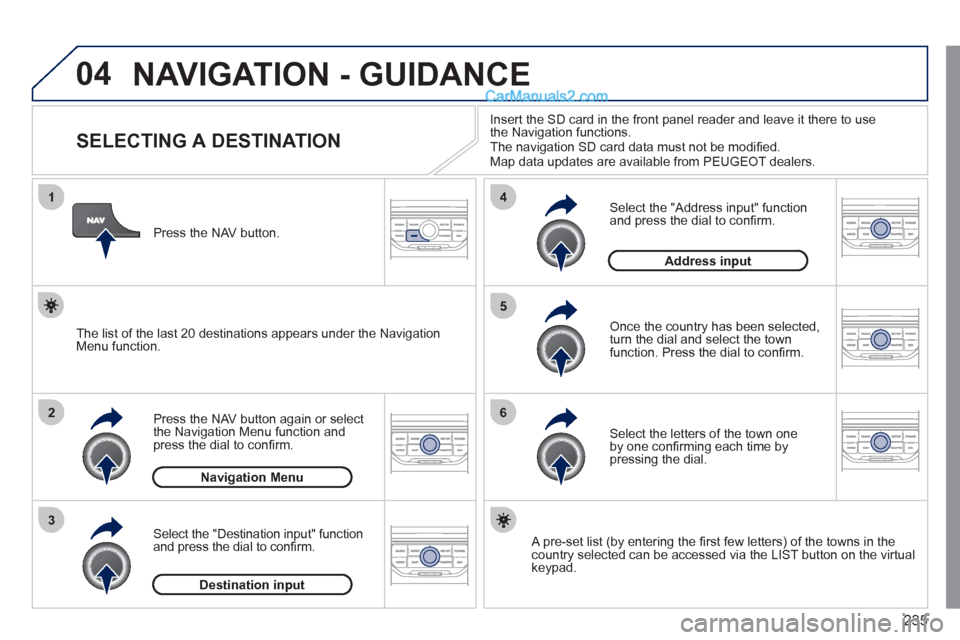
NAVIGATION - GUIDANCE
SELECTING A DESTINATION
Press the NAV button again or select
the Navigation Menu function and
press the dial to confi rm.
Select the "Destination input" function
and press the dial to confi rm.
Press the NAV button.
Select the letters of the town one
by one confi rming each time by
pressing the dial.
Once the country has been selected,
turn the dial and select the town
function. Press the dial to confi rm.
Insert the SD card in the front panel reader and leave it there to use
the Navigation functions.
The navigation SD card data must not be modifi ed.
Map data updates are available from PEUGEOT dealers.
A pre-set list (by entering the fi rst few letters) of the towns in the
country selected can be accessed via the LIST button on the virtual
keypad.
Select the "Address input" function
and press the dial to confi rm.
The list of the last 20 destinations appears under the Navigation
Menu function.
Navigation Menu
Destination input
Address input
Page 238 of 292
236
04
7
8
9
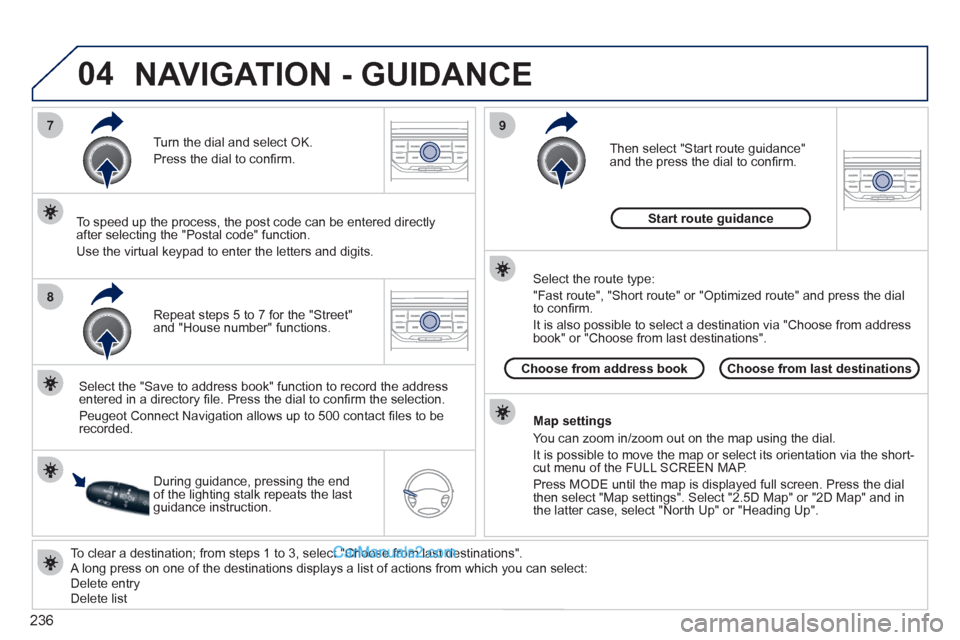
To clear a destination; from steps 1 to 3, select "Choose from last destinations".
A long press on one of the destinations displays a list of actions from which you can select:
Delete entry
Delete list
Repeat steps 5 to 7 for the "Street"
and "House number" functions.
Turn the dial and select OK.
Press the dial to confi rm.
Select the "Save to address book" function to record the address
entered in a directory fi le. Press the dial to confi rm the selection.
Peugeot Connect Navigation allows up to 500 contact fi les to be
recorded.
To speed up the process, the post code can be entered directly
after selecting the "Postal code" function.
Use the virtual keypad to enter the letters and digits.
Then select "Start route guidance"
and the press the dial to confi rm.
During guidance, pressing the end
of the lighting stalk repeats the last
guidance instruction.
Map settings
You can zoom in/zoom out on the map using the dial.
It is possible to move the map or select its orientation via the short-
cut menu of the FULL SCREEN MAP.
Press MODE until the map is displayed full screen. Press the dial
then select "Map settings". Select "2.5D Map" or "2D Map" and in
the latter case, select "North Up" or "Heading Up".
Select the route type:
"Fast route", "Short route" or "Optimized route" and press the dial
to confi rm.
It is also possible to select a destination via "Choose from address
book" or "Choose from last destinations".
Choose from last destinations
Choose from address book
Start route guidance
NAVIGATION - GUIDANCE
Page 239 of 292
237
04
1
2
3
5
4
NAVIGATION - GUIDANCE
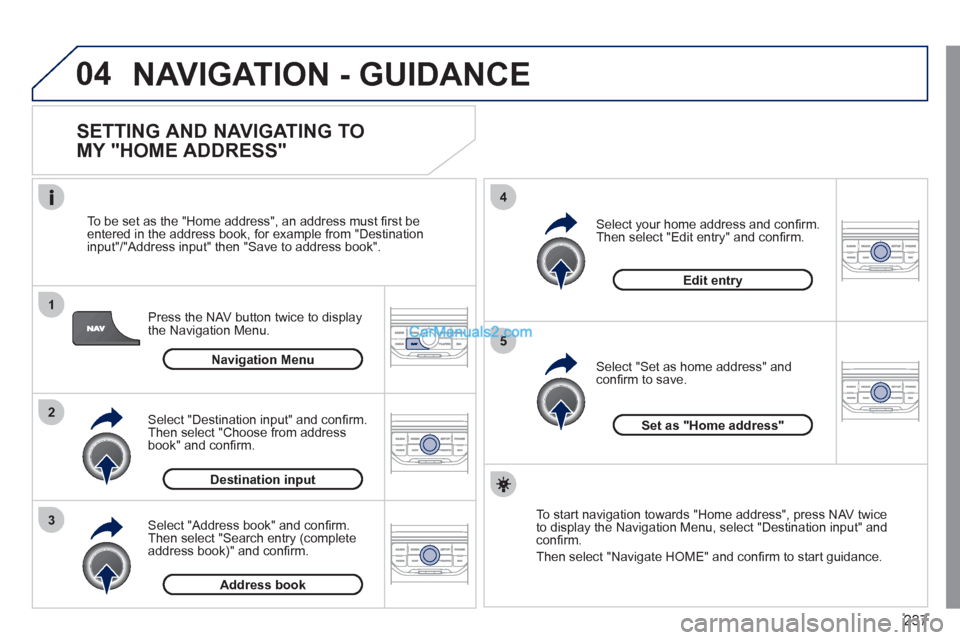
SETTING AND NAVIGATING TO
MY "HOME ADDRESS"
Press the NAV button twice to display
the Navigation Menu.
To be set as the "Home address", an address must fi rst be
entered in the address book, for example from "Destination
input"/"Address input" then "Save to address book".
Select "Address book" and confi rm.
Then select "Search entry (complete
address book)" and confi rm.
Select "Destination input" and confi rm.
Then select "Choose from address
book" and confi rm.
Select "Set as home address" and
confi rm to save.
Select your home address and confi rm.
Then select "Edit entry" and confi rm.
To start navigation towards "Home address", press NAV twice
to display the Navigation Menu, select "Destination input" and
confi rm.
Then select "Navigate HOME" and confi rm to start guidance.
Navigation Menu
Destination input
Address book
Edit entry
Set as "Home address"
Page 240 of 292
238
04
4
3
2
1
7
6
5
NAVIGATION - GUIDANCE
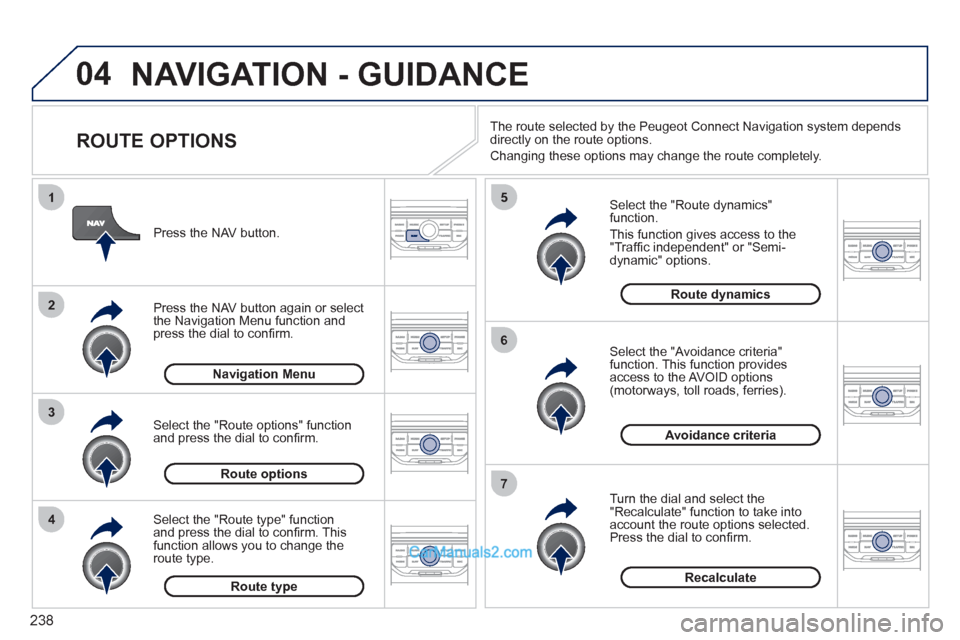
ROUTE OPTIONS
Select the "Route dynamics"
function.
This function gives access to the
"Traffi c independent" or "Semi-
dynamic" options.
Select the "Avoidance criteria"
function. This function provides
access to the AVOID options
(motorways, toll roads, ferries).
Turn the dial and select the
"Recalculate" function to take into
account the route options selected.
Press the dial to confi rm.
Press the NAV button.
Press the NAV button again or select
the Navigation Menu function and
press the dial to confi rm.
Select the "Route type" function
and press the dial to confi rm. This
function allows you to change the
route type.
Select the "Route options" function
and press the dial to confi rm.
Recalculate
Avoidance criteria
Route dynamics
Route type
Route options
Navigation Menu
The route selected by the Peugeot Connect Navigation system depends
directly on the route options.
Changing these options may change the route completely.
Page 241 of 292
239
04
7
6
5
4
3
2
1
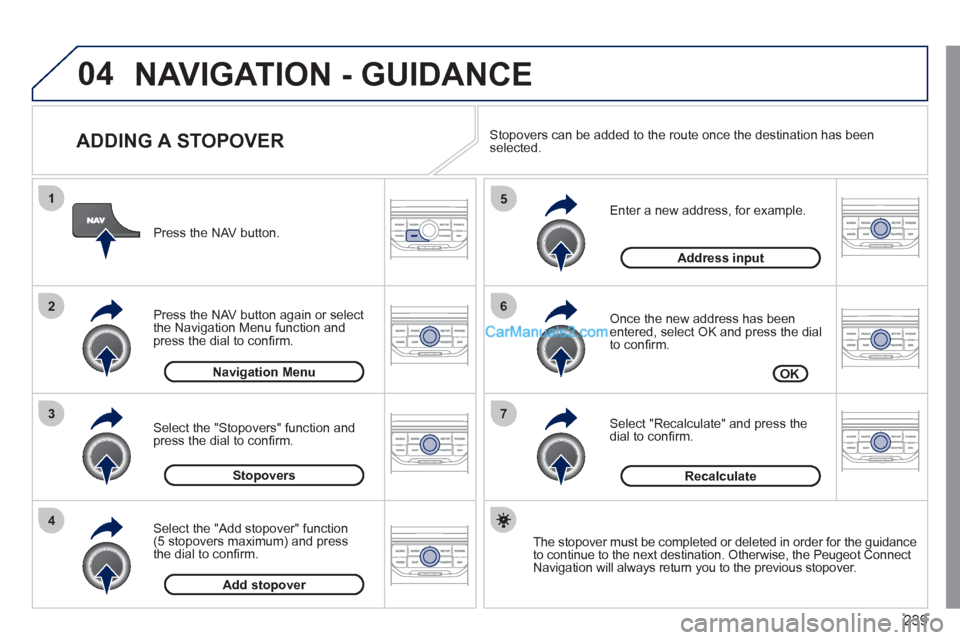
ADDING A STOPOVER
Enter a new address, for example.
Once the new address has been
entered, select OK and press the dial
to confi rm.
Select "Recalculate" and press the
dial to confi rm.
Press the NAV button.
Press the NAV button again or select
the Navigation Menu function and
press the dial to confi rm.
Select the "Add stopover" function
(5 stopovers maximum) and press
the dial to confi rm.
Select the "Stopovers" function and
press the dial to confi rm.
OK
Address input
Add stopover
Stopovers
Navigation Menu
Recalculate
The stopover must be completed or deleted in order for the guidance
to continue to the next destination. Otherwise, the Peugeot Connect
Navigation will always return you to the previous stopover.
Stopovers can be added to the route once the destination has been
selected.
NAVIGATION - GUIDANCE