Rear Peugeot 308 CC 2011 Repair Manual
[x] Cancel search | Manufacturer: PEUGEOT, Model Year: 2011, Model line: 308 CC, Model: Peugeot 308 CC 2011Pages: 292, PDF Size: 40.04 MB
Page 222 of 292
220
NAV
RADIO
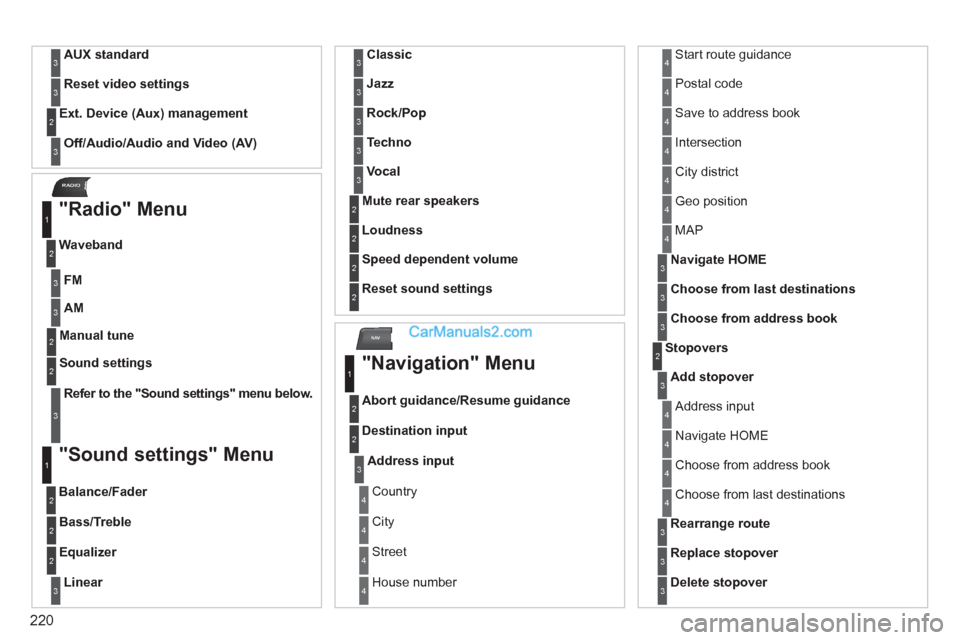
AUX standard 3
Reset video settings
3
Off/Audio/Audio and Video (AV)
Ext. Device (Aux) management
2
3
"Radio" Menu
FM
Waveband
1
2
3
AM
3
Manual tune 2
Refer to the "
Sound settings
" menu below.
Sound settings
2
3
"Sound settings" Menu
Balance/Fader
1
2
Bass/Treble 2
Equalizer 2
Linear
3
Classic
3
Jazz
3
Rock/Pop
3
Techno
3
Vocal
3
Mute rear speakers 2
Loudness 2
Speed dependent volume 2
Reset sound settings
2
"Navigation" Menu
Abort guidance/Resume guidance
1
2
Destination input 2
Address input
3
Country 4
City 4
Street 4
House number 4
Start route guidance 4
Postal code 4
Save to address book 4
Intersection 4
City district 4
Geo position 4
MAP 4
Navigate HOME
3
Choose from last destinations
3
Choose from address book
3
Stopovers 2
Add stopover
3
Address input 4
Navigate HOME 4
Choose from address book 4
Choose from last destinations 4
Rearrange route
3
Replace stopover
3
Delete stopover
3
Page 226 of 292
224
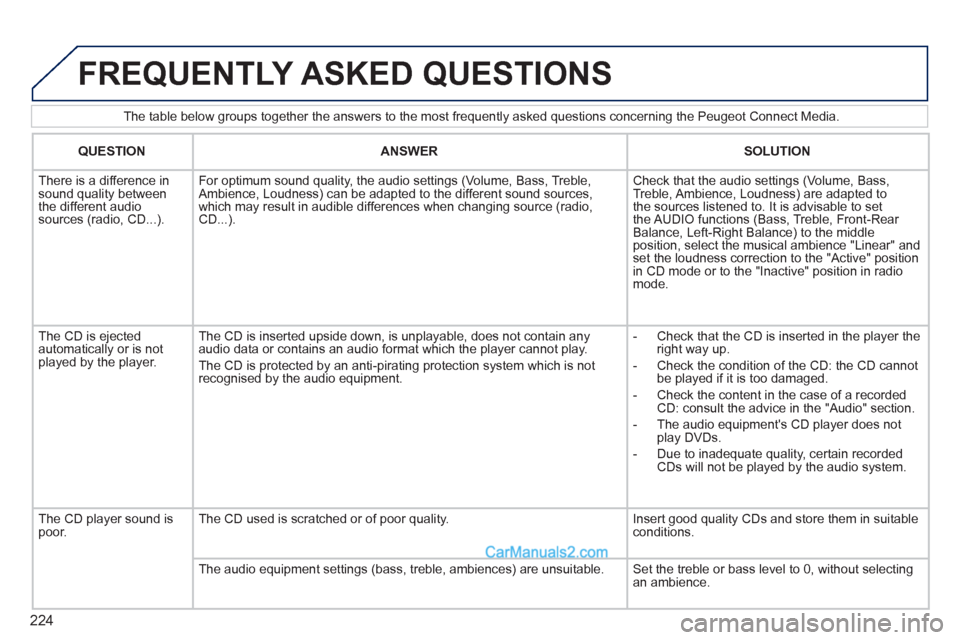
The table below groups together the answers to the most frequently asked questions concerning the Peugeot Connect Media.
FREQUENTLY ASKED QUESTIONS
QUESTION
ANSWER
SOLUTION
There is a difference in
sound quality between
the different audio
sources (radio, CD...).
For optimum sound quality, the audio settings (Volume, Bass, Treble,
Ambience, Loudness) can be adapted to the different sound sources,
which may result in audible differences when changing source (radio,
CD...).
Check that the audio settings (Volume, Bass,
Treble, Ambience, Loudness) are adapted to
the sources listened to. It is advisable to set
the AUDIO functions (Bass, Treble, Front-Rear
Balance, Left-Right Balance) to the middle
position, select the musical ambience "Linear" and
set the loudness correction to the "Active" position
in CD mode or to the "Inactive" position in radio
mode.
The CD is ejected
automatically or is not
played by the player. The CD is inserted upside down, is unplayable, does not contain any
audio data or contains an audio format which the player cannot play.
The CD is protected by an anti-pirating protection system which is not
recognised by the audio equipment.
- Check that the CD is inserted in the player the
right way up.
- Check the condition of the CD: the CD cannot
be played if it is too damaged.
- Check the content in the case of a recorded
CD: consult the advice in the "Audio" section.
- The audio equipment's CD player does not
play DVDs.
- Due to inadequate quality, certain recorded
CDs will not be played by the audio system.
The CD player sound is
poor. The CD used is scratched or of poor quality. Insert good quality CDs and store them in suitable
conditions.
The audio equipment settings (bass, treble, ambiences) are unsuitable. Set the treble or bass level to 0, without selecting
an ambience.
Page 232 of 292
230
01
1
5
10 234 6
1311
9
14 157812 16
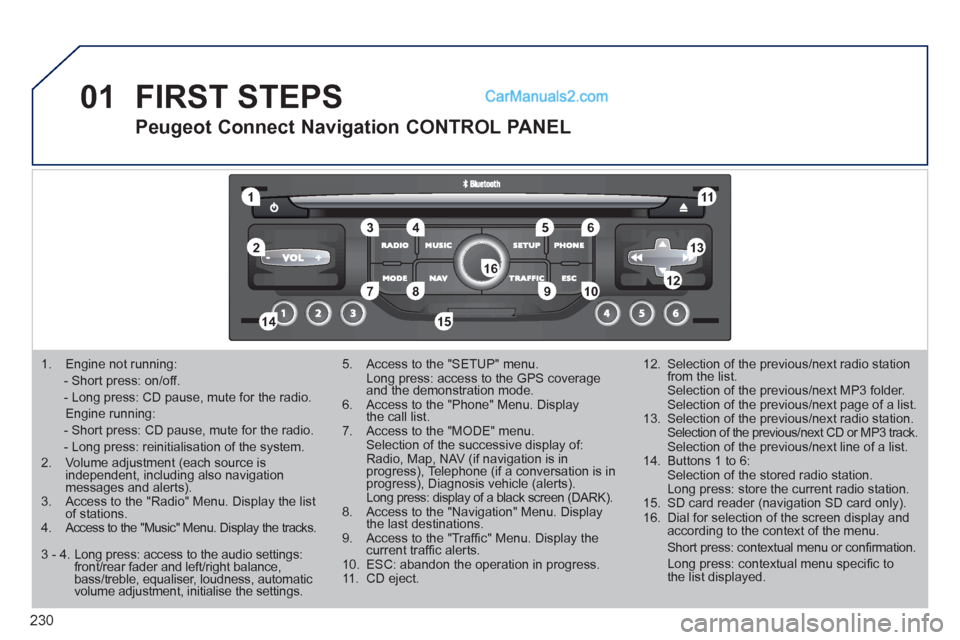
1. Engine not running:
- Short press: on/off.
- Long press: CD pause, mute for the radio.
Engine running:
- Short press: CD pause, mute for the radio.
- Long press: reinitialisation of the system.
2. Volume adjustment (each source is
independent, including also navigation
messages and alerts).
3. Access to the "Radio" Menu. Display the list
of stations.
4. Access to the "Music" Menu. Display the tracks.
5. Access to the "SETUP" menu.
Long press: access to the GPS coverage
and the demonstration mode.
6. Access to the "Phone" Menu. Display
the call list.
7. Access to the "MODE" menu.
Selection of the successive display of:
Radio, Map, NAV (if navigation is in
progress), Telephone (if a conversation is in
progress), Diagnosis vehicle (alerts).
Long press: display of a black screen (DARK).
8. Access to the "Navigation" Menu. Display
the last destinations.
9. Access to the "Traffi c" Menu. Display the
current traffi c alerts.
10. ESC: abandon the operation in progress.
11. CD eject.
12. Selection of the previous/next radio station
from the list.
Selection of the previous/next MP3 folder.
Selection of the previous/next page of a list.
13. Selection of the previous/next radio station.
Selection of the previous/next CD or MP3 track.
Selection of the previous/next line of a list.
14. Buttons 1 to 6:
Selection of the stored radio station.
Long press: store the current radio station.
15. SD card reader (navigation SD card only).
16. Dial for selection of the screen display and
according to the context of the menu.
Short press: contextual menu or confi rmation.
Long press: contextual menu specifi c to
the list displayed.
FIRST STEPS
Peugeot Connect Navigation CONTROL PANEL
3 - 4. Long press: access to the audio settings:
front/rear fader and left/right balance,
bass/treble, equaliser, loudness, automatic
volume adjustment, initialise the settings.
Page 256 of 292
254
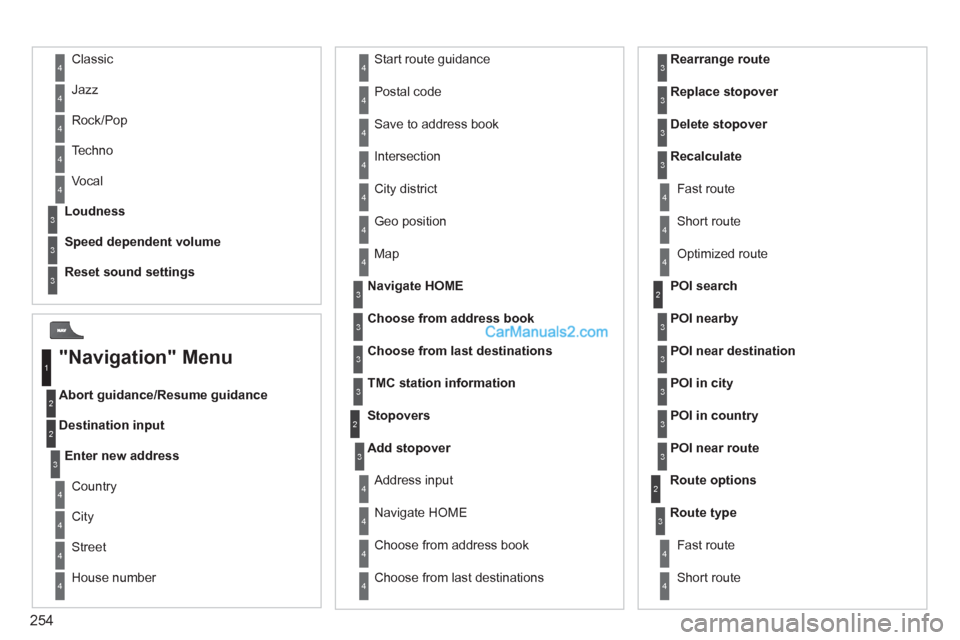
Abort guidance/Resume guidance
Destination input Geo position
Map
Stopovers
Add stopover
Navigate HOME
Choose from address book
Rearrange route
Choose from last destinations
Replace stopover
Delete stopover
Recalculate
Fast route
Short route
Optimized route
POI search
POI nearby
Route options
Route type
Short route Fast route
"Navigation" Menu
City
Street
Enter new address
Country
Navigate HOME
City district
House number Start route guidance
Postal code
Save to address book
Intersection
Address input
POI near destination
POI in city
POI in country
POI near route
Choose from address book
3
3
Choose from last destinations
TMC station information
Loudness
Speed dependent volume
Reset sound settings
3
3
3
1
2
4
4
4
4
4
4
4
4
4
4
4
3
2
3
3
2
3
4
4
4
4
3
3
3
3
4
4
4
2
4
2
3
3
3
3
3
3
4
Classic
Jazz
Rock/Pop
Techno
Vocal 4
4
4
4
4
Page 259 of 292
257
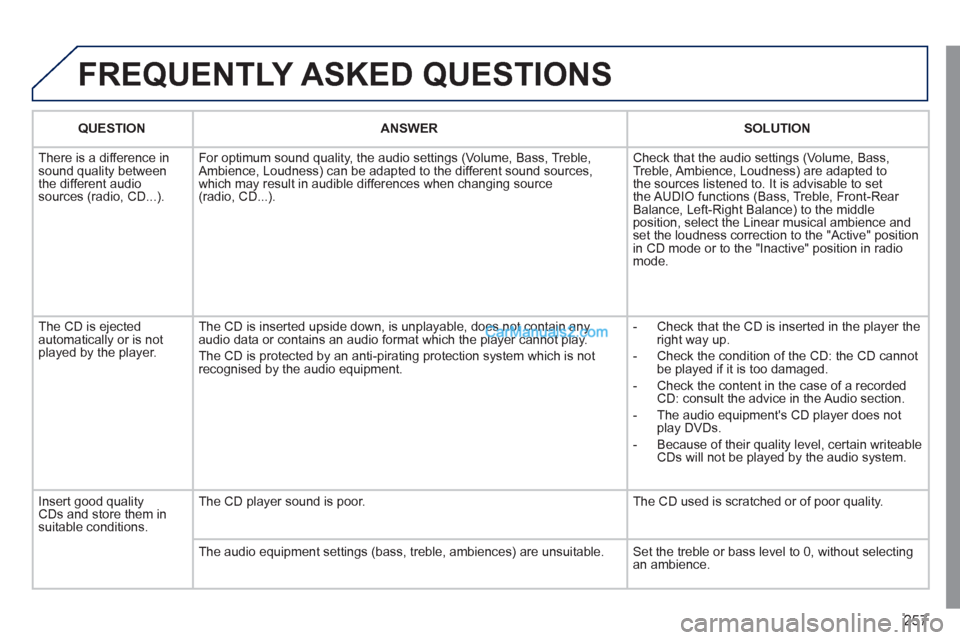
FREQUENTLY ASKED QUESTIONS
QUESTION
ANSWER
SOLUTION
There is a difference in
sound quality between
the different audio
sources (radio, CD...). For optimum sound quality, the audio settings (Volume, Bass, Treble,
Ambience, Loudness) can be adapted to the different sound sources,
which may result in audible differences when changing source
(radio, CD...). Check that the audio settings (Volume, Bass,
Treble, Ambience, Loudness) are adapted to
the sources listened to. It is advisable to set
the AUDIO functions (Bass, Treble, Front-Rear
Balance, Left-Right Balance) to the middle
position, select the Linear musical ambience and
set the loudness correction to the "Active" position
in CD mode or to the "Inactive" position in radio
mode.
The CD is ejected
automatically or is not
played by the player. The CD is inserted upside down, is unplayable, does not contain any
audio data or contains an audio format which the player cannot play.
The CD is protected by an anti-pirating protection system which is not
recognised by the audio equipment.
- Check that the CD is inserted in the player the
right way up.
- Check the condition of the CD: the CD cannot
be played if it is too damaged.
- Check the content in the case of a recorded
CD: consult the advice in the Audio section.
- The audio equipment's CD player does not
play DVDs.
- Because of their quality level, certain writeable
CDs will not be played by the audio system.
Insert good quality
CDs and store them in
suitable conditions. The CD player sound is poor. The CD used is scratched or of poor quality.
The audio equipment settings (bass, treble, ambiences) are unsuitable. Set the treble or bass level to 0, without selecting
an ambience.
Page 264 of 292
262
01
1 2
1011
13 14 153456 789
12
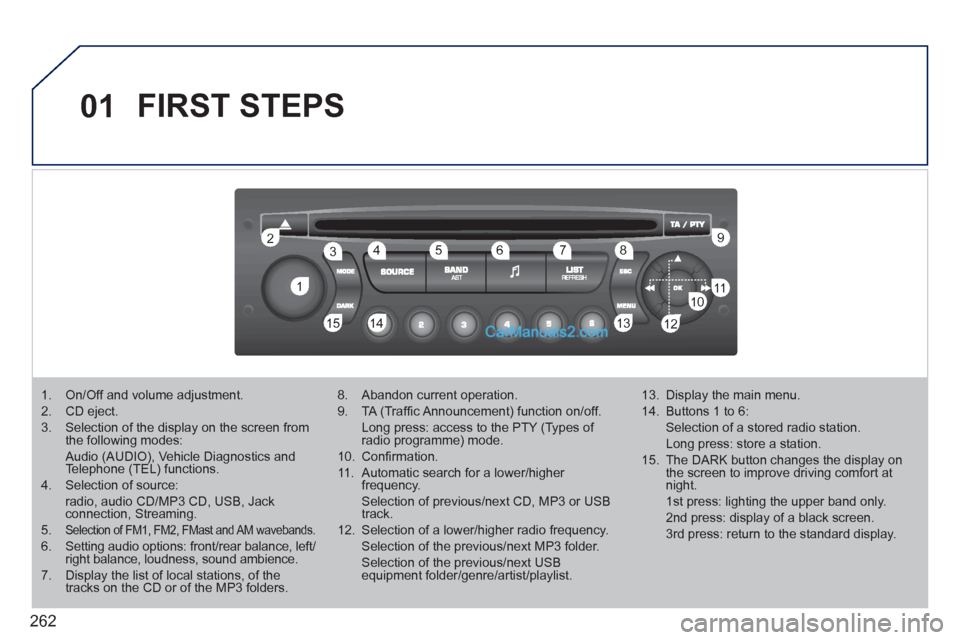
FIRST STEPS
1. On/Off and volume adjustment.
2. CD eject.
3. Selection of the display on the screen from
the following modes:
Audio (AUDIO), Vehicle Diagnostics and
Telephone (TEL) functions.
4. Selection of source:
radio, audio CD/MP3 CD, USB, Jack
connection, Streaming.
5.
Selection of FM1, FM2, FMast and AM wavebands.
6. Setting audio options: front/rear balance, left/
right balance, loudness, sound ambience.
7. Display the list of local stations, of the
tracks on the CD or of the MP3 folders.
8. Abandon current operation.
9. TA (Traffi c Announcement) function on/off.
Long press: access to the PTY (Types of
radio programme) mode.
10. Confi rmation.
11. Automatic search for a lower/higher
frequency.
Selection of previous/next CD, MP3 or USB
track.
12. Selection of a lower/higher radio frequency.
Selection of the previous/next MP3 folder.
Selection of the previous/next USB
equipment folder/genre/artist/playlist.
13. Display the main menu.
14. Buttons 1 to 6:
Selection of a stored radio station.
Long press: store a station.
15. The DARK button changes the display on
the screen to improve driving comfort at
night.
1st press: lighting the upper band only.
2nd press: display of a black screen.
3rd press: return to the standard display.
Page 279 of 292
277
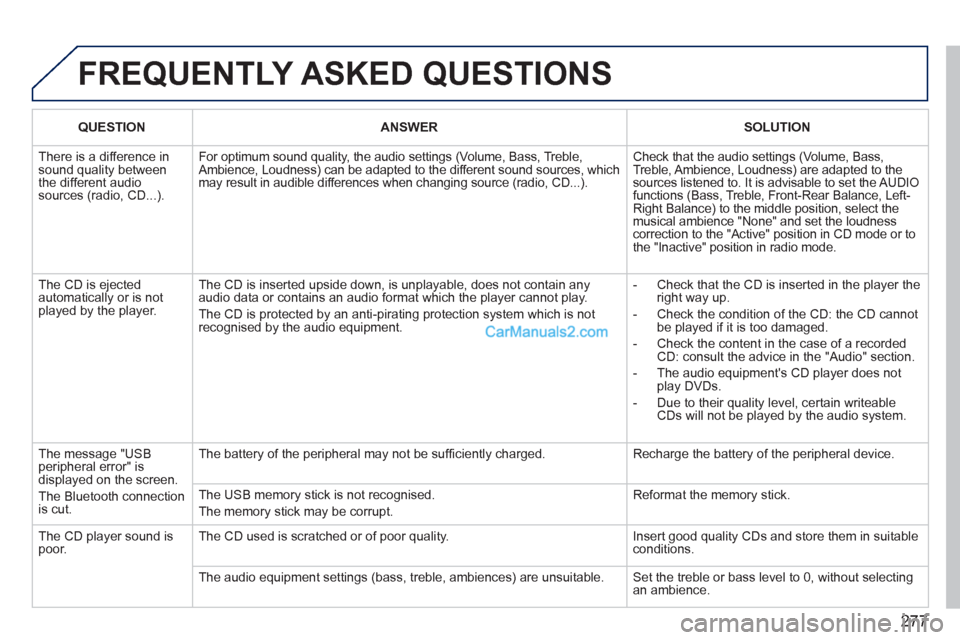
FREQUENTLY ASKED QUESTIONS
QUESTION
ANSWER
SOLUTION
There is a difference in
sound quality between
the different audio
sources (radio, CD...). For optimum sound quality, the audio settings (Volume, Bass, Treble,
Ambience, Loudness) can be adapted to the different sound sources, which
may result in audible differences when changing source (radio, CD...). Check that the audio settings (Volume, Bass,
Treble, Ambience, Loudness) are adapted to the
sources listened to. It is advisable to set the AUDIO
functions (Bass, Treble, Front-Rear Balance, Left-
Right Balance) to the middle position, select the
musical ambience "None" and set the loudness
correction to the "Active" position in CD mode or to
the "Inactive" position in radio mode.
The CD is ejected
automatically or is not
played by the player. The CD is inserted upside down, is unplayable, does not contain any
audio data or contains an audio format which the player cannot play.
The CD is protected by an anti-pirating protection system which is not
recognised by the audio equipment.
- Check that the CD is inserted in the player the
right way up.
- Check the condition of the CD: the CD cannot
be played if it is too damaged.
- Check the content in the case of a recorded
CD: consult the advice in the "Audio" section.
- The audio equipment's CD player does not
play DVDs.
- Due to their quality level, certain writeable
CDs will not be played by the audio system.
The message "USB
peripheral error" is
displayed on the screen.
The Bluetooth connection
is cut. The battery of the peripheral may not be suffi ciently charged. Recharge the battery of the peripheral device.
The USB memory stick is not recognised.
The memory stick may be corrupt. Reformat the memory stick.
The CD player sound is
poor. The CD used is scratched or of poor quality. Insert good quality CDs and store them in suitable
conditions.
The audio equipment settings (bass, treble, ambiences) are unsuitable. Set the treble or bass level to 0, without selecting
an ambience.
Page 281 of 292
279
VISUAL SEARCH
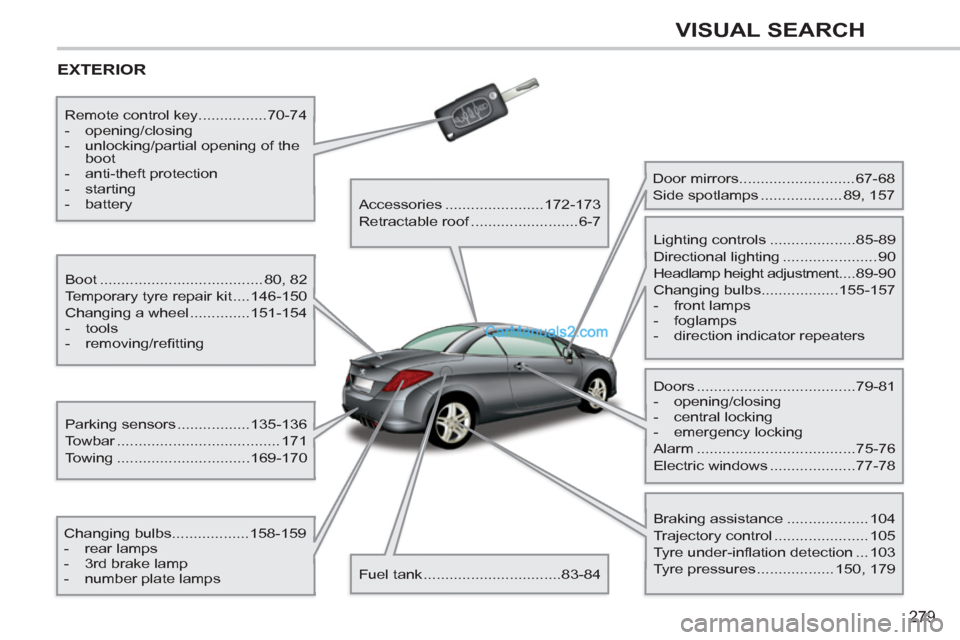
EXTERIOR
Boot ...................................... 80, 82
Temporary tyre repair kit ....146-150
Changing a wheel ..............151-154
- tools
- removing/refi tting
Changing bulbs..................158-159
- rear lamps
- 3rd brake lamp
- number plate lamps
Parking sensors .................135-136
Towbar ...................................... 171
Towing ...............................169-170
Remote control key................70-74
- opening/closing
- unlocking/partial opening of the
boot
- anti-theft protection
- starting
- battery
Accessories .......................172-173
Retractable roof .........................6-7
Fuel tank ................................83-84
Door mirrors ...........................67-68
Side spotlamps ................... 89, 157
Doors .....................................79-81
- opening/closing
- central locking
- emergency locking
Alarm .....................................75-76
Electric windows ....................77-78
Lighting controls ....................85-89
Directional lighting ...................... 90
Headlamp height adjustment....89-90
Changing bulbs..................155-157
- front lamps
- foglamps
- direction indicator repeaters
Braking assistance ................... 104
Trajectory control ...................... 105
Tyre under-inflation detection ... 103
Tyre pressures .................. 150, 179
Page 282 of 292
280
VISUAL SEARCH
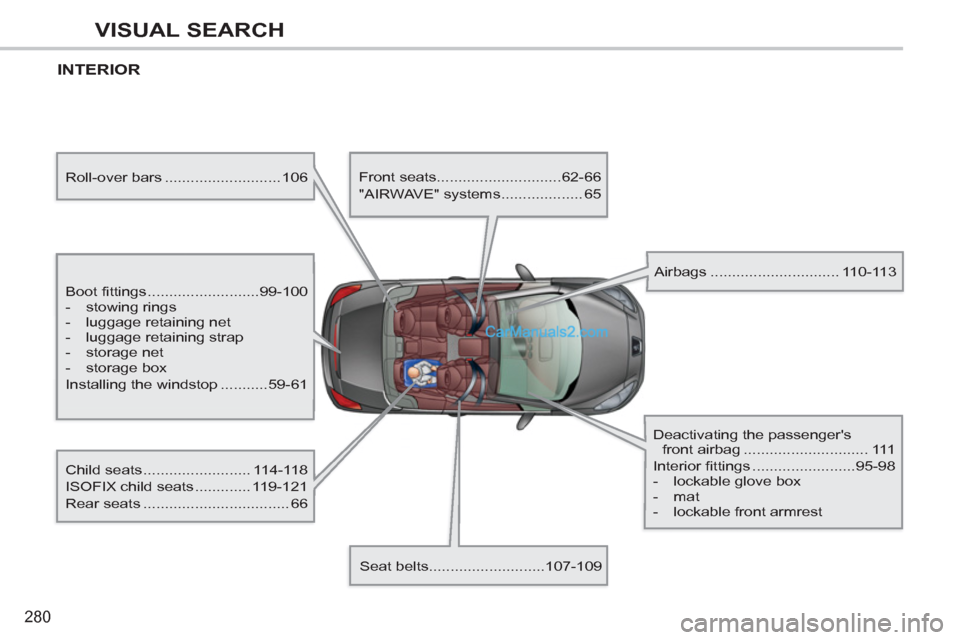
INTERIOR
Boot fittings ..........................99-100
- stowing rings
- luggage retaining net
- luggage retaining strap
- storage net
- storage box
Installing the windstop ...........59-61
Child seats ......................... 114-118
ISOFIX child seats ............. 119-121
Rear seats .................................. 66
Front seats.............................62-66
"AIRWAVE" systems ................... 65
Seat belts...........................107-109
Airbags .............................. 110-113
Deactivating the passenger's
front airbag ............................. 111
Interior fittings ........................95-98
- lockable glove box
- mat
- lockable front armrest
Roll-over bars ........................... 106
Page 283 of 292
281
VISUAL SEARCH
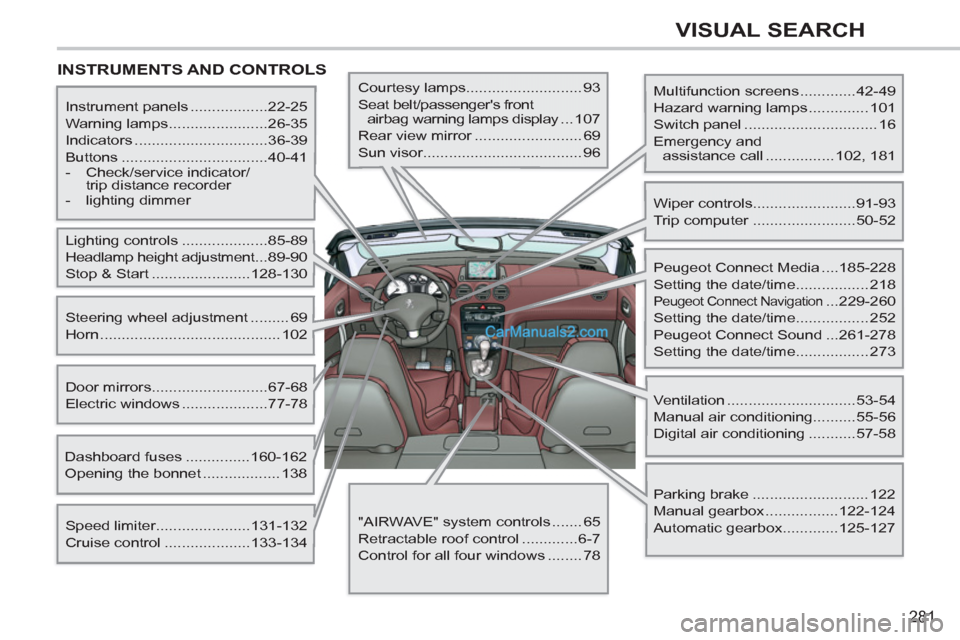
INSTRUMENTS AND CONTROLS
Multifunction screens .............42-49
Hazard warning lamps .............. 101
Switch panel ............................... 16
Emergency and
assistance call ................ 102, 181
Instrument panels ..................22-25
Warning lamps .......................26-35
Indicators ...............................36-39
Buttons ..................................40-41
- Check/service indicator/
trip distance recorder
- lighting dimmer
Lighting controls ....................85-89
Headlamp height adjustment ...89-90
Stop & Start .......................128-130
Speed limiter......................131-132
Cruise control ....................133-134
Door mirrors ...........................67-68
Electric windows ....................77-78
Dashboard fuses ...............160-162
Opening the bonnet .................. 138
Steering wheel adjustment ......... 69
Horn .......................................... 102
Courtesy lamps........................... 93
Seat belt/passenger's front
airbag warning lamps display ...107
Rear view mirror ......................... 69
Sun visor..................................... 96
Wiper controls........................91-93
Trip computer ........................50-52
Peugeot Connect Media ....185-228
Setting the date/time................. 218
Peugeot Connect Navigation ...229-260
Setting the date/time................. 252
Peugeot Connect Sound ...261-278
Setting the date/time................. 273
Ventilation ..............................53-54
Manual air conditioning..........55-56
Digital air conditioning ...........57-58
Parking brake ........................... 122
Manual gearbox .................122-124
Automatic gearbox.............125-127
"AIRWAVE" system controls ....... 65
Retractable roof control .............6-7
Control for all four windows ........ 78