radio Peugeot 308 CC 2013.5 Owner's Manual - RHD (UK, Australia)
[x] Cancel search | Manufacturer: PEUGEOT, Model Year: 2013.5, Model line: 308 CC, Model: Peugeot 308 CC 2013.5Pages: 268, PDF Size: 16.54 MB
Page 41 of 268
2
39
MULTIFUNCTION SCREENS
Main menu "Audio functions" menu
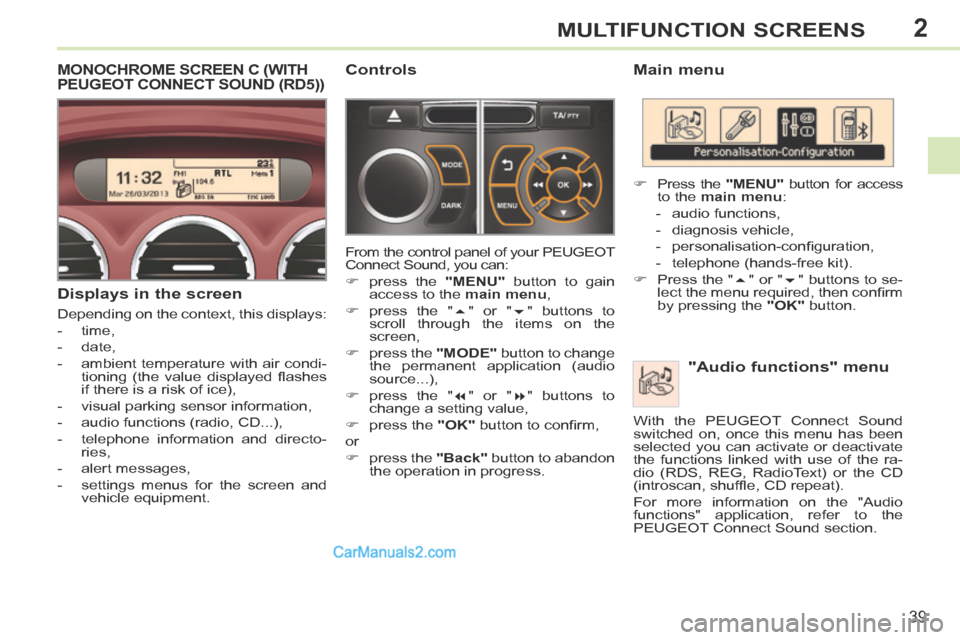
Press the "MENU" button for access
to the main menu :
- audio functions,
- diagnosis vehicle,
- personalisation-confi guration,
- telephone (hands-free kit).
Press the " " or " " buttons to se-
lect the menu required, then confi rm
by pressing the "OK" button.
With the PEUGEOT Connect Sound
switched on, once this menu has been
selected you can activate or deactivate
the functions linked with use of the ra-
dio (RDS, REG, RadioText) or the CD
(introscan, shuffl e, CD repeat).
For more information on the "Audio
functions" application, refer to the
PEUGEOT Connect Sound section.
MONOCHROME SCREEN C (WITH PEUGEOT CONNECT SOUND (RD5))
Displays in the screen
Depending on the context, this displays:
- time,
- date,
- ambient temperature with air condi- tioning (the value displayed fl ashes
if there is a risk of ice),
- visual parking sensor information,
- audio functions (radio, CD...),
- telephone information and directo- ries,
- alert messages,
- settings menus for the screen and vehicle equipment.
Controls
From the control panel of your PEUGEOT
Connect Sound, you can:
press the "MENU" button to gain
access to the main menu ,
press the " " or " " buttons to
scroll through the items on the
screen,
press the "MODE" button to change
the permanent application (audio
source...),
press the " " or " " buttons to
change a setting value,
press the "OK" button to confi rm,
or
press the "Back" button to abandon
the operation in progress.
Page 44 of 268
2
!
i
42
MULTIFUNCTION SCREENS
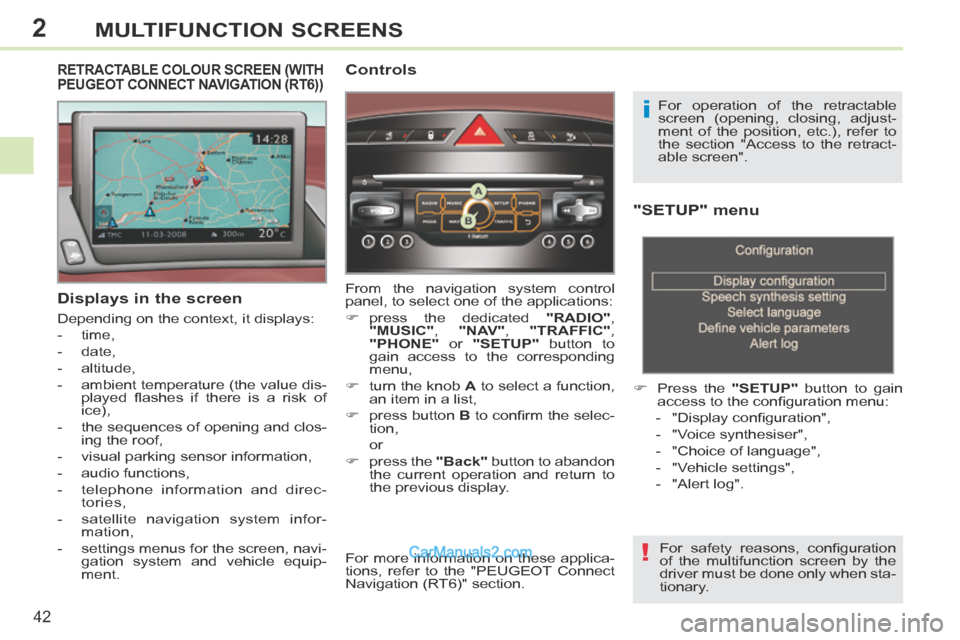
"SETUP" menu
Press the "SETUP" button to gain
access to the confi guration menu:
- "Display confi guration",
- "Voice synthesiser",
- "Choice of language",
- "Vehicle settings",
- "Alert log".
For safety reasons, confi guration
of the multifunction screen by the
driver must be done only when sta-
tionary.
Displays in the screen
Depending on the context, it displays:
- time,
- date,
- altitude,
- ambient temperature (the value dis- played fl ashes if there is a risk of
ice),
- the sequences of opening and clos- ing the roof,
- visual parking sensor information,
- audio functions,
- telephone information and direc- tories,
- satellite navigation system infor- mation,
- settings menus for the screen, navi- gation system and vehicle equip-
ment.
RETRACTABLE COLOUR SCREEN (WITH PEUGEOT CONNECT NAVIGATION (RT6)) Controls
From the navigation system control
panel, to select one of the applications:
press the dedicated "RADIO" ,
"MUSIC" , "NAV" , "TRAFFIC" ,
"PHONE" or "SETUP" button to
gain access to the corresponding
menu,
turn the knob A to select a function,
an item in a list,
press button B to confi rm the selec-
tion,
or
press the "Back" button to abandon
the current operation and return to
the previous display. For operation of the retractable
screen (opening, closing, adjust-
ment of the position, etc.), refer to
the section "Access to the retract-
able screen".
For more information on these applica-
tions, refer to the "PEUGEOT Connect
Navigation (RT6)" section.
Page 171 of 268
10
!
i
i
169
PRACTICAL INFORMATION
The fi tting of electrical equipment
or accessories which are not rec-
ommended by PEUGEOT may
result in a failure of your vehicle's
electronic system and excessive
electrical consumption.
Please note this precaution. You
are advised to contact a PEUGEOT
representative to be shown the
range of recommended equipment
and accessories.
Depending on the legislation in
force in the country, certain safety
equipment may be compulsory:
high visibility safety vests, warn-
ing triangles, breathalyzers, spare
bulbs, spare fuses, a fi re extin-
guisher, a fi rst aid kit, mud fl aps at
the rear of the vehicle.
By visiting a PEUGEOT dealer, you can
also obtain products for maintenance and
cleaning (interior and exterior), including
products in the "TECHNATURE" range,
products for topping up (screenwash...),
touch-up pens and paint aerosols in the
exact colour of your vehicle, and refi lls
(sealant cartridge for the temporary punc-
ture repair kit), ...
Installation of radio
communication transmitters Before installing any after-market
radio communication transmit-
ter, you can contact a PEUGEOT
dealer for the specifi cation of
transmitters which can be fi tted
(frequency, maximum power, aer-
ial position, specifi c installation re-
quirements), in line with the Vehicle
Electromagnetic Compatibility
Directive (2004/104/EC).
"Multimedia":
portable satellite navigation systems,
Bluetooth hands-free kit, telephone
carrier...
Page 181 of 268
179
The system is protected in such a way that it will only operate in your vehicle.
PEUGEOT Connect Navigation (RT6)
01 First steps - Control panel
For safety reasons, the driver must only carry out operations which require prolonged attention while the vehicle is stationary.
When the engine is switched off and to prevent discharging of the battery, the system switches off following the activation of the energy economy mode.
CONTENTS
02 Steering mounted controls
03 General operation
04 Navigation - Guidance
05 Traffic information
06 Using the telephone
07 Radio
08 Music media players
09 Audio settings
10 Configuration
11 Screen menu map
p.
p.
p.
p.
p.
p.
p.
p.
p.
p.
p.
180
182
183
185
198
201
2 11
214
220
221
222
SATELLITE NAVIGATION SYSTEM
MULTIMEDIA BLUETOOTH
TELEPHONE AUDIO SYSTEM
Frequently asked questions p. 226
Page 182 of 268
01
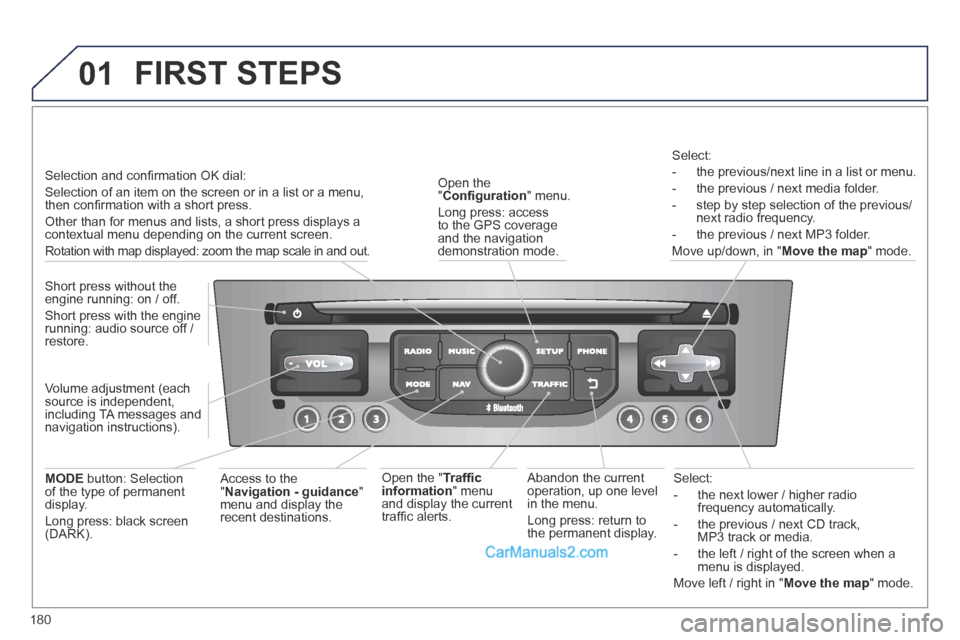
180
Select:
- the next lower / higher radio frequency automatically.
- the previous / next CD track, MP3 track or media.
- the left / right of the screen when a menu is displayed.
Move left / right in " Move the map " mode.
Abandon the current operation, up one level in the menu.
Long press: return to the permanent display.
Open the " Confi guration " menu.
Long press: access to the GPS coverage and the navigation demonstration mode.
Open the " Traffi c information " menu and display the current traffi c alerts.
Select:
- the previous/next line in a list or menu.
- the previous / next media folder.
- step by step selection of the previous/next radio frequency.
- the previous / next MP3 folder.
Move up/down, in " Move the map " mode.
FIRST STEPS
Access to the " Navigation - guidance " menu and display the recent destinations.
Short press without the engine running: on / off.
Short press with the engine running: audio source off / restore.
MODE button: Selection of the type of permanent display.
Long press: black screen (DARK).
Selection and confi rmation OK dial:
Selection of an item on the screen or in a list or a menu, then confi rmation with a short press.
Other than for menus and lists, a short press displays a contextual menu depending on the current screen.
Rotation with map displayed: zoom the map scale in and out.
Volume adjustment (each source is independent, including TA messages and navigation instructions).
Page 183 of 268
01
181
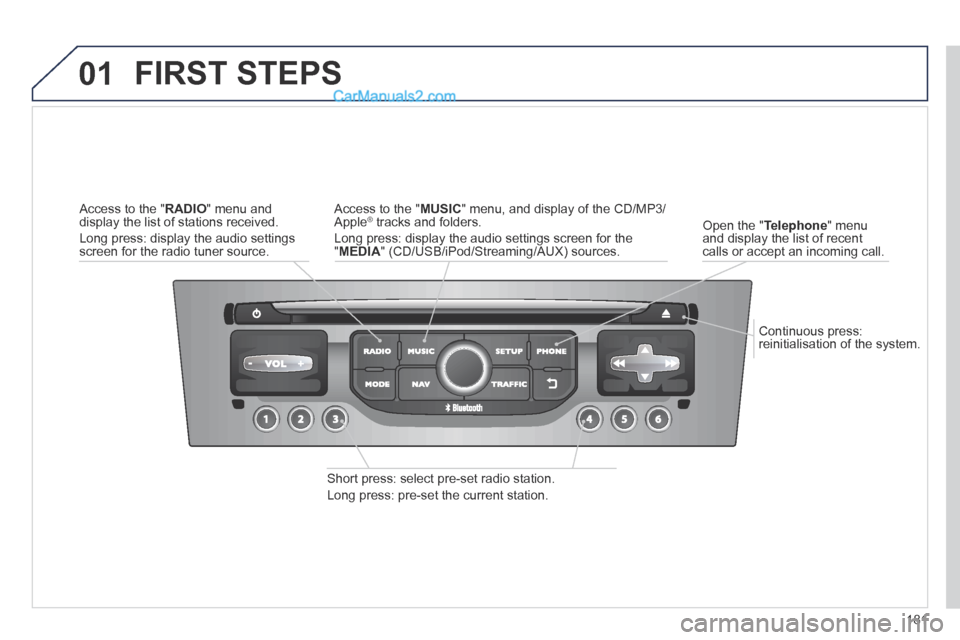
Continuous press: reinitialisation of the system.
Open the " Telephone " menu and display the list of recent calls or accept an incoming call.
FIRST STEPS
Short press: select pre-set radio station.
Long press: pre-set the current station.
Access to the " MUSIC " menu, and display of the CD/MP3/Apple ® tracks and folders. ® tracks and folders. ®
Long press: display the audio settings screen for the " MEDIA " (CD/USB/iPod/Streaming/AUX) sources.
Access to the " RADIO " menu and display the list of stations received.
Long press: display the audio settings screen for the radio tuner source.
Page 184 of 268
02
182
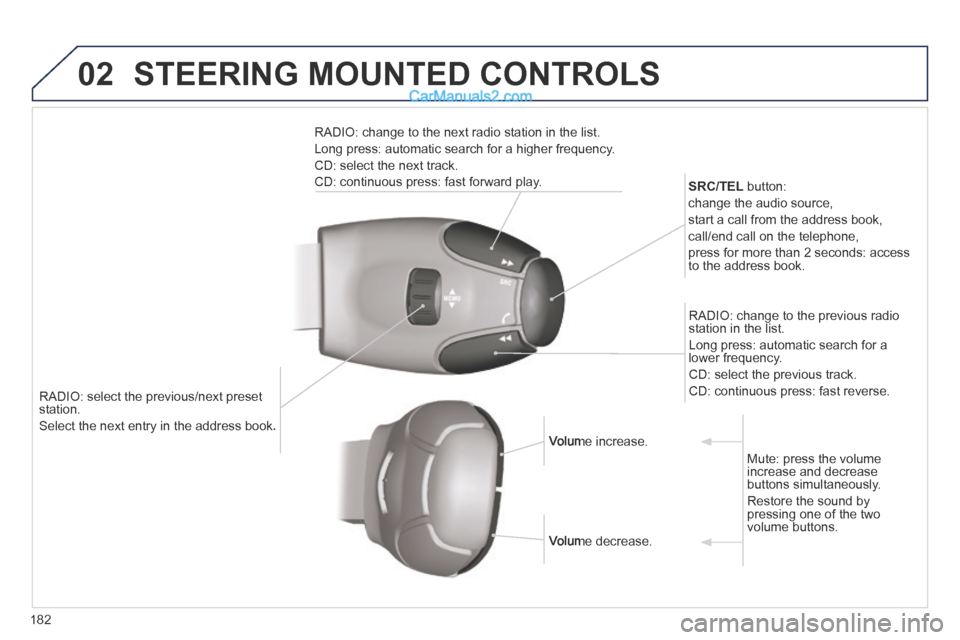
RADIO: select the previous/next preset station.
Select the next entry in the address book. Select the next entry in the address book.
SRC/TEL button:
change the audio source,
start a call from the address book,
call/end call on the telephone,
press for more than 2 seconds: access to the address book.
RADIO: change to the previous radio station in the list.
Long press: automatic search for a lower frequency.
CD: select the previous track.
CD: continuous press: fast reverse.
RADIO: change to the next radio station in the list.
Long press: automatic search for a higher frequency.
CD: select the next track.
CD: continuous press: fast forward play.
Volume increase. Volume increase.
Volume decrease. Volume decrease.
Mute: press the volume increase and decrease buttons simultaneously.
Restore the sound by pressing one of the two volume buttons.
STEERING MOUNTED CONTROLS
Page 185 of 268
03
183
For the details of the menus, refer to the "Screen menu map" section. For cleaning the screen, the use of a soft, non-abrasive cloth (spectacles cloth) is recommended, with no additional product.
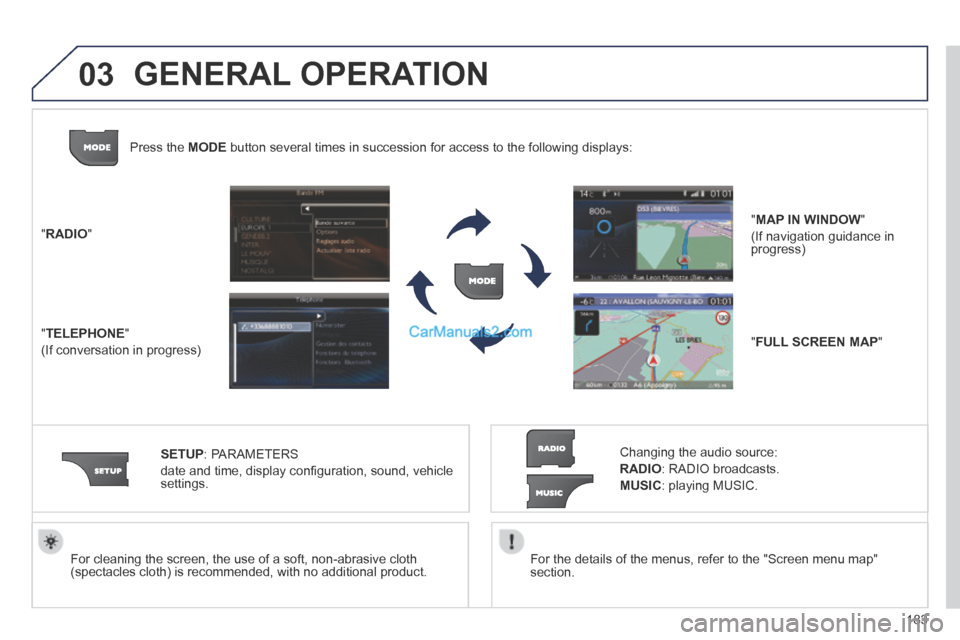
" RADIO "
" TELEPHONE "
(If conversation in progress)
SETUP : PARAMETERS
date and time, display confi guration, sound, vehicle settings.
Changing the audio source:
RADIO : RADIO broadcasts.
MUSIC : playing MUSIC.
Press the MODE button several times in succession for access to the following displays\
:
" FULL SCREEN MAP "
" MAP IN WINDOW "
(If navigation guidance in progress)
GENERAL OPERATION
Page 186 of 268
03
184
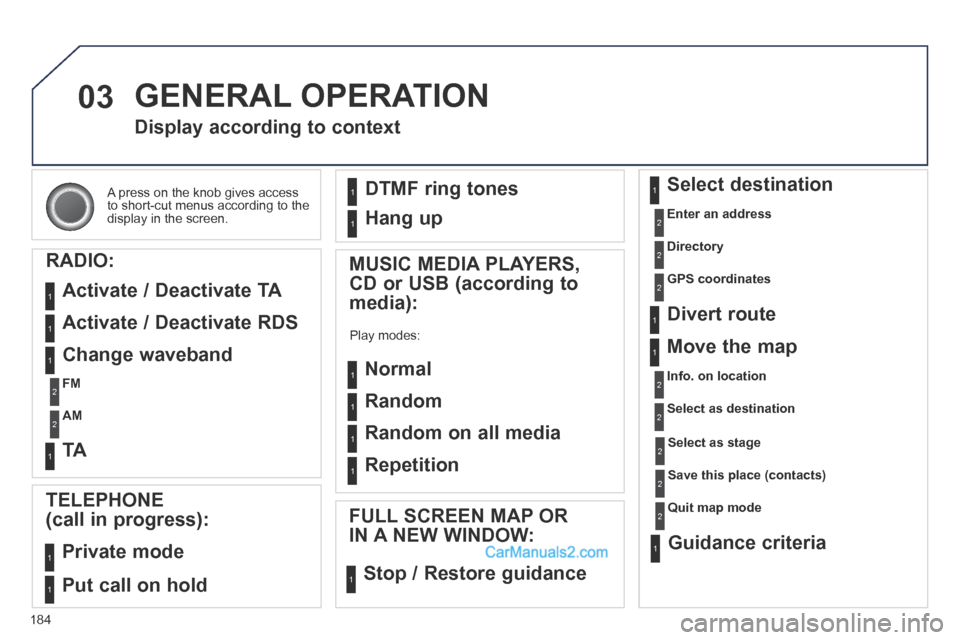
A press on the knob gives access to short-cut menus according to the display in the screen.
Display according to context
RADIO:
Activate / Deactivate TA
Activate / Deactivate RDS
MUSIC MEDIA PLAYERS,
CD or USB (according to
media):
Play modes:
Normal
Random
Random on all media
Repetition
TELEPHONE
(call in progress):
Private mode
FULL SCREEN MAP OR
IN A NEW WINDOW:
Stop / Restore guidance
Select destination
Enter an address
Directory
GPS coordinates
Divert route
Move the map
Info. on location
Select as destination
Select as stage
Save this place (contacts)
Quit map mode
Guidance criteria
Put call on hold
DTMF ring tones
Hang up
1
1
1
1
1
1
1
1
2
2
2
2
2
1
2
2
2
1
1
1
1
1
1
Change waveband
FM
AM
2
2
1
TA 1
GENERAL OPERATION
Page 202 of 268
05
200
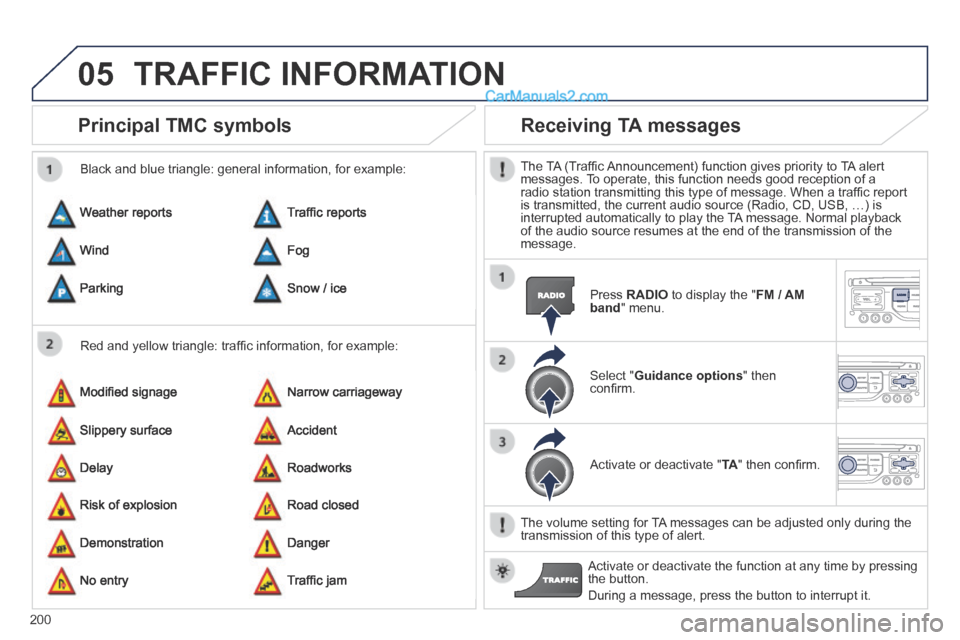
Principal TMC symbols
Red and yellow triangle: traffi c information, for example:
Black and blue triangle: general information, for example:
Weather reports
Modifi ed signage
Risk of explosion
Traffi c reports
Narrow carriageway
Road closed
Wind
Slippery surface
Demonstration
Fog
Accident
Danger
Parking
Delay
No entry
Snow / ice
Roadworks
Traffi c jam
Receiving TA messages
The TA (Traffi c Announcement) function gives priority to TA alert messages. To operate, this function needs good reception of a radio station transmitting this type of message. When a traffi c report is transmitted, the current audio source (Radio, CD, USB, …) is interrupted automatically to play the TA message. Normal playback of the audio source resumes at the end of the transmission of the message.
Press RADIO to display the " FM / AM band " menu.
Select " Guidance options " then confi rm.
Activate or deactivate " TA " then confi rm.
The volume setting for TA messages can be adjusted only during the transmission of this type of alert.
Activate or deactivate the function at any time by pressing the button.
During a message, press the button to interrupt it.
TRAFFIC INFORMATION