display Peugeot 308 CC 2014 User Guide
[x] Cancel search | Manufacturer: PEUGEOT, Model Year: 2014, Model line: 308 CC, Model: Peugeot 308 CC 2014Pages: 268, PDF Size: 15.33 MB
Page 34 of 268
1
i
32
MONITORING
The level shown will only be cor-
rect if the vehicle is on level ground
and the engine has been off for
more than 30 minutes.
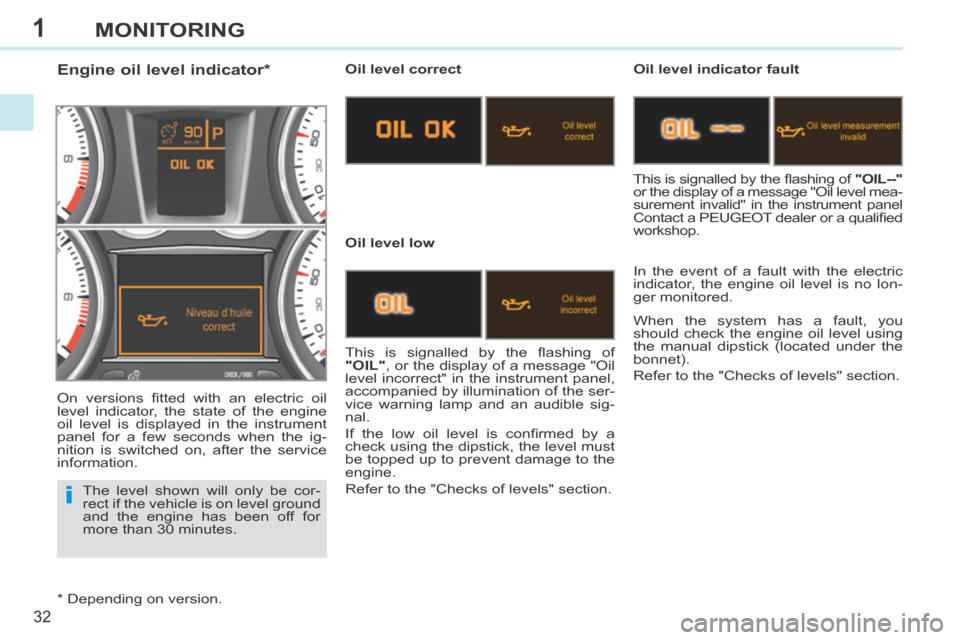
Engine oil level indicator * Oil level correct
Oil level low Oil level indicator fault
In the event of a fault with the electric
indicator, the engine oil level is no lon-
ger monitored.
This is signalled by the fl ashing of
"OIL" , or the display of a message "Oil
level incorrect" in the instrument panel,
accompanied by illumination of the ser-
vice warning lamp and an audible sig-
nal.
If the low oil level is confi rmed by a
check using the dipstick, the level must
be topped up to prevent damage to the
engine.
Refer to the "Checks of levels" section. This is signalled by the fl ashing of
"OIL--"
or the display of a message "Oil level mea-
surement invalid" in the instrument panel
Contact a PEUGEOT dealer or a qualifi ed
workshop.
When the system has a fault, you
should check the engine oil level using
the manual dipstick (located under the
bonnet).
Refer to the "Checks of levels" section.
On versions fi tted with an electric oil
level indicator, the state of the engine
oil level is displayed in the instrument
panel for a few seconds when the ig-
nition is switched on, after the service
information.
* Depending on version.
Page 35 of 268
1
33
MONITORING
Service indicator
This information is displayed for a few
seconds when the ignition is switched
on. It informs the driver when the next
service is due, in accordance with the
manufacturer's servicing schedule.
The point at which the service is due is
calculated from the last indicator zero
reset. It is determined by two param-
eters:
- the distance travelled,
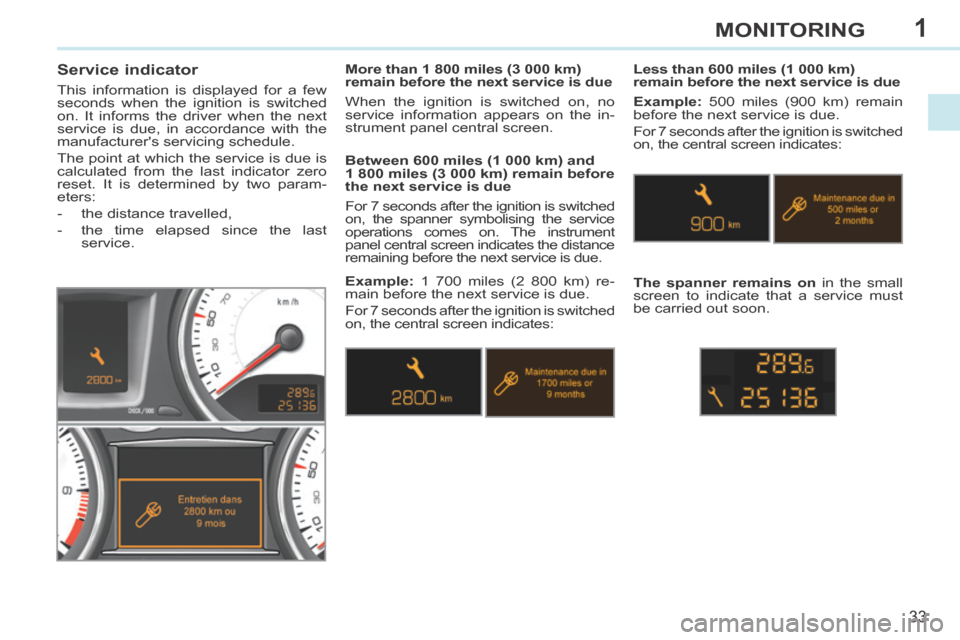
- the time elapsed since the last service. Between 600 miles (1 000 km) and
1 800 miles (3 000 km) remain before
the next service is due
For 7 seconds after the ignition is switched
on, the spanner symbolising the service
operations comes on. The instrument
panel central screen indicates the distance
remaining before the next service is due. Less than 600 miles (1 000 km)
remain before the next service is due
Example: 500 miles (900 km) remain
before the next service is due.
For 7 seconds after the ignition is switched
on, the central screen indicates:
The spanner remains on in the small
screen to indicate that a service must
be carried out soon.
More than 1 800 miles (3 000 km)
remain before the next service is due
When the ignition is switched on, no
service information appears on the in-
strument panel central screen.
Example: 1 700 miles (2 800 km) re-
main before the next service is due.
For 7 seconds after the ignition is switched
on, the central screen indicates:
Page 36 of 268
1
i
i
34
MONITORING
Following this operation, if you wish
to disconnect the battery, lock the
vehicle and wait at least fi ve minutes
for the zero reset to be registered.
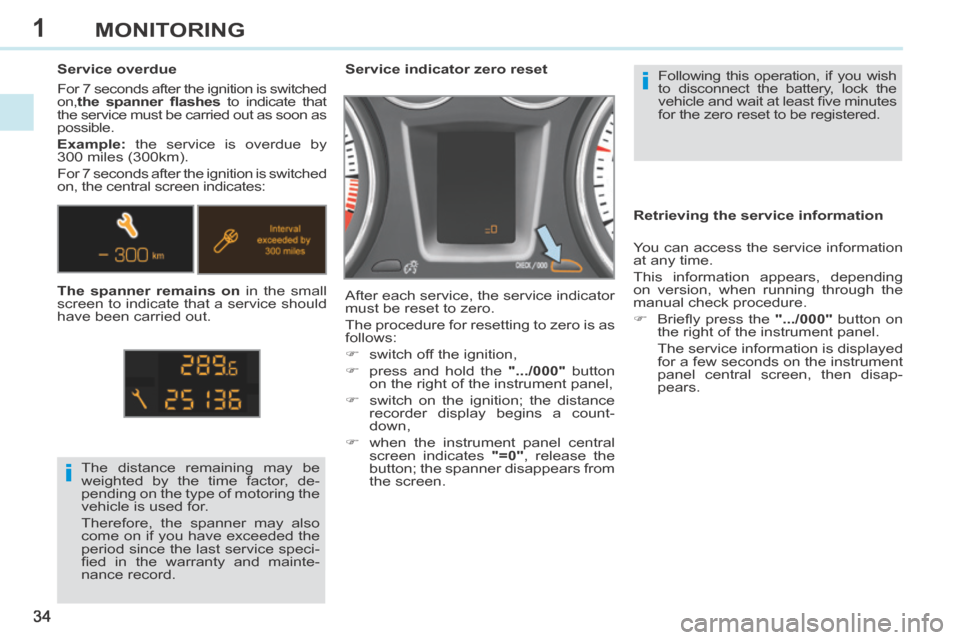
Service indicator zero reset
After each service, the service indicator
must be reset to zero.
The procedure for resetting to zero is as
follows:
switch off the ignition,
press and hold the
".../000" button
on the right of the instrument panel,
switch on the ignition; the distance recorder display begins a count-
down,
when the instrument panel central screen indicates "=0" , release the
button; the spanner disappears from
the screen.
The distance remaining may be
weighted by the time factor, de-
pending on the type of motoring the
vehicle is used for.
Therefore, the spanner may also
come on if you have exceeded the
period since the last service speci-
fi ed in the warranty and mainte-
nance record.
Service overdue
For 7 seconds after the ignition is switched
on,
the spanner fl ashes to indicate that
the service must be carried out as soon as
possible.
Example: the service is overdue by
300 miles (300km).
For 7 seconds after the ignition is switched
on, the central screen indicates:
The spanner remains on in the small
screen to indicate that a service should
have been carried out. Retrieving the service information
You can access the service information
at any time.
This information appears, depending
on version, when running through the
manual check procedure.
Briefl y press the
".../000" button on
the right of the instrument panel.
The service information is displayed for a few seconds on the instrument
panel central screen, then disap-
pears.
Page 39 of 268
1
37
MONITORING
TRIP COMPUTER
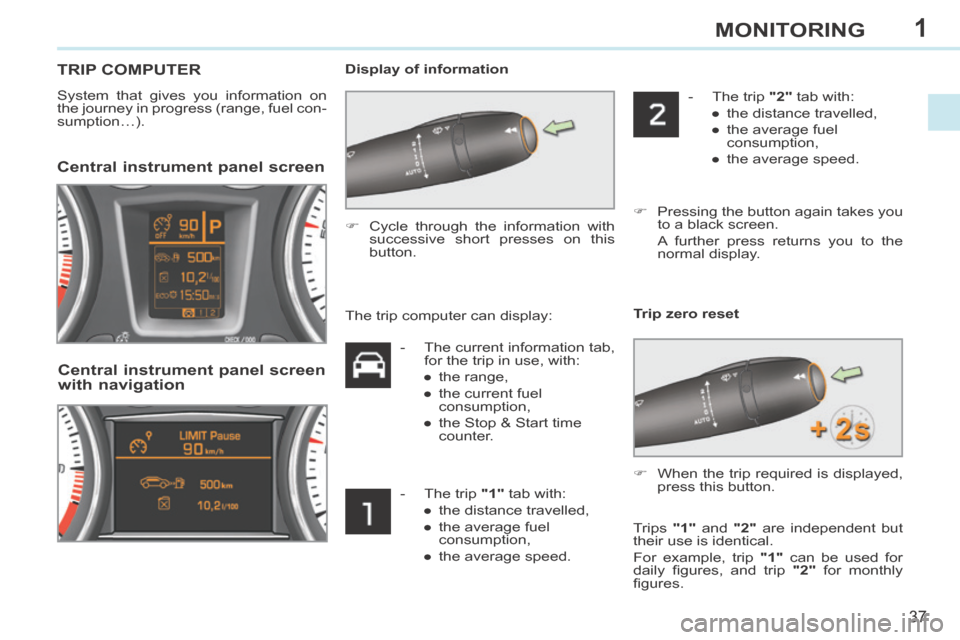
System that gives you information on
the journey in progress (range, fuel con-
sumption…). Display of information
Central instrument panel screen
Cycle through the information with
successive short presses on this
button.
Central instrument panel screen
with navigation
Trip zero reset
- The current information tab, for the trip in use, with:
● the range,
● the current fuel consumption,
● the Stop & Start time counter.
- The trip "1" tab with: ● the distance travelled,
● the average fuel consumption,
● the average speed. - The trip "2" tab with:
● the distance travelled,
● the average fuel consumption,
● the average speed.
Pressing the button again takes you to a black screen.
A further press returns you to the normal display.
The trip computer can display:
When the trip required is displayed, press this button.
Trips "1" and "2" are independent but
their use is identical.
For example, trip "1" can be used for
daily fi gures, and trip "2" for monthly
fi gures.
Page 40 of 268
1
!
i
i
38
MONITORING
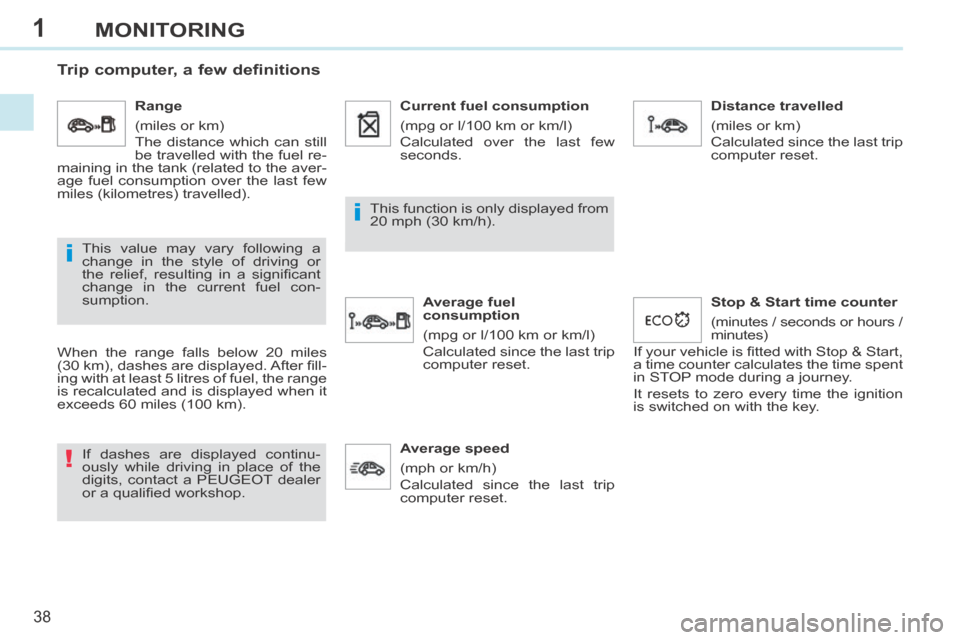
Trip computer, a few definitions
When the range falls below 20 miles
(30 km), dashes are displayed. After fi ll-
ing with at least 5 litres of fuel, the range
is recalculated and is displayed when it
exceeds 60 miles (100 km). If dashes are displayed continu-
ously while driving in place of the
digits, contact a PEUGEOT dealer
or a qualifi ed workshop. This function is only displayed from
20 mph (30 km/h).
This value may vary following a
change in the style of driving or
the relief, resulting in a signifi cant
change in the current fuel con-
sumption. Range
(miles or km)
The distance which can still
be travelled with the fuel re-
maining in the tank (related to the aver-
age fuel consumption over the last few
miles (kilometres) travelled). Current fuel consumption
(mpg or l/100 km or km/l)
Calculated over the last few
seconds.
Average fuel
consumption
(mpg or l/100 km or km/l)
Calculated since the last trip
computer reset. Distance travelled
(miles or km)
Calculated since the last trip
computer reset.
Average speed
(mph or km/h)
Calculated since the last trip
computer reset. Stop & Start time counter
(minutes / seconds or hours /
minutes)
If your vehicle is fi tted with Stop & Start,
a time counter calculates the time spent
in STOP mode during a journey.
It resets to zero every time the ignition
is switched on with the key.
Page 41 of 268
2
39
MULTIFUNCTION SCREENS
Main menu "Audio functions" menu
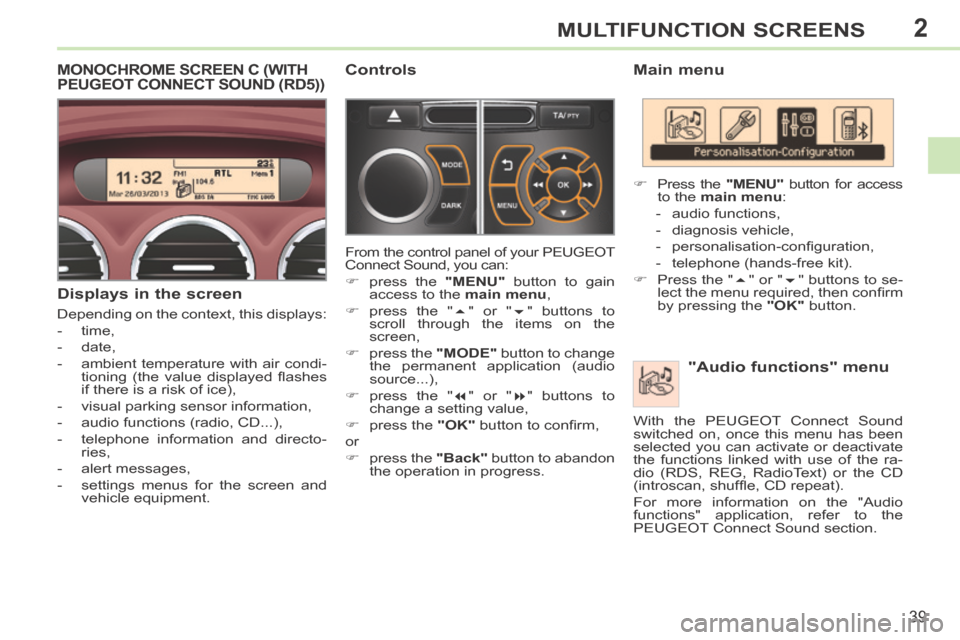
Press the "MENU" button for access
to the main menu :
- audio functions,
- diagnosis vehicle,
- personalisation-confi guration,
- telephone (hands-free kit).
Press the " " or " " buttons to se-
lect the menu required, then confi rm
by pressing the "OK" button.
With the PEUGEOT Connect Sound
switched on, once this menu has been
selected you can activate or deactivate
the functions linked with use of the ra-
dio (RDS, REG, RadioText) or the CD
(introscan, shuffl e, CD repeat).
For more information on the "Audio
functions" application, refer to the
PEUGEOT Connect Sound section.
MONOCHROME SCREEN C (WITH PEUGEOT CONNECT SOUND (RD5))
Displays in the screen
Depending on the context, this displays:
- time,
- date,
- ambient temperature with air condi- tioning (the value displayed fl ashes
if there is a risk of ice),
- visual parking sensor information,
- audio functions (radio, CD...),
- telephone information and directo- ries,
- alert messages,
- settings menus for the screen and vehicle equipment.
Controls
From the control panel of your PEUGEOT
Connect Sound, you can:
press the "MENU" button to gain
access to the main menu ,
press the " " or " " buttons to
scroll through the items on the
screen,
press the "MODE" button to change
the permanent application (audio
source...),
press the " " or " " buttons to
change a setting value,
press the "OK" button to confi rm,
or
press the "Back" button to abandon
the operation in progress.
Page 42 of 268
2
40
MULTIFUNCTION SCREENS
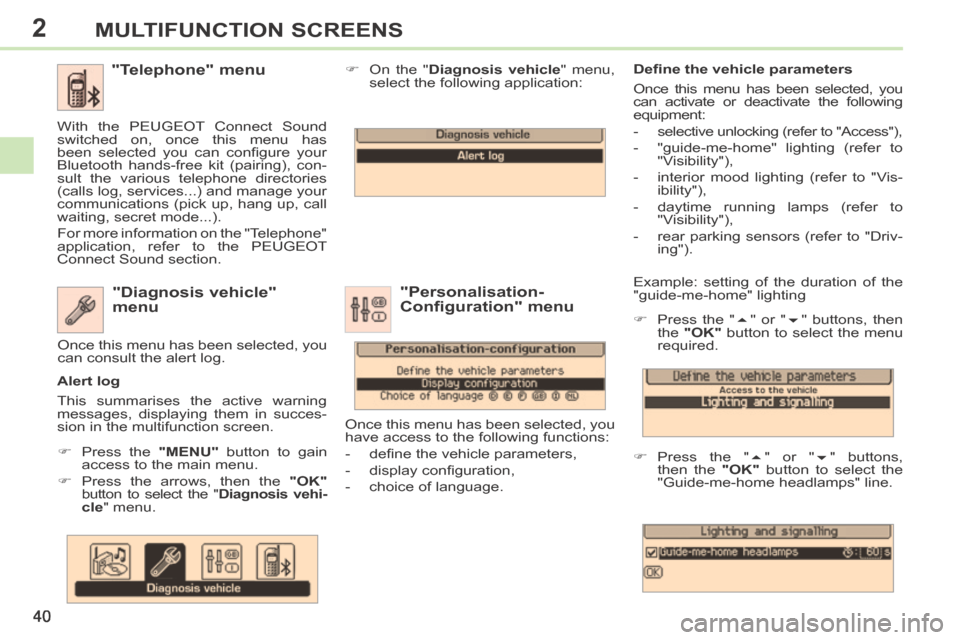
Example: setting of the duration of the
"guide-me-home" lighting
Press the " " or " " buttons, then
the "OK" button to select the menu
required.
Press the " " or " " buttons,
then the "OK" button to select the
"Guide-me-home headlamps" line. "Diagnosis vehicle"
menu
Press the "MENU" button to gain
access to the main menu.
Press the arrows, then the "OK"
button to select the " Diagnosis vehi-cle " menu. On the "
Diagnosis vehicle " menu,
select the following application:
Alert log
This summarises the active warning
messages, displaying them in succes-
sion in the multifunction screen. Once this menu has been selected, you
can consult the alert log.
Defi ne the vehicle parameters
Once this menu has been selected, you
can activate or deactivate the following
equipment:
- selective unlocking (refer to "Access"),
- "guide-me-home" lighting (refer to
"Visibility"),
- interior mood lighting (refer to "Vis- ibility"),
- daytime running lamps (refer to "Visibility"),
- rear parking sensors (refer to "Driv- ing").
"Personalisation-
Configuration" menu
Once this menu has been selected, you
have access to the following functions:
- defi ne the vehicle parameters,
- display confi guration,
- choice of language.
"Telephone" menu
With the PEUGEOT Connect Sound
switched on, once this menu has
been selected you can confi gure your
Bluetooth hands-free kit (pairing), con-
sult the various telephone directories
(calls log, services...) and manage your
communications (pick up, hang up, call
waiting, secret mode...).
For more information on the "Telephone"
application, refer to the PEUGEOT
Connect Sound section.
Page 43 of 268
2
!
!
41
MULTIFUNCTION SCREENS
For safety reasons, confi guration
of the multifunction screen by the
driver must be done only when sta-
tionary.
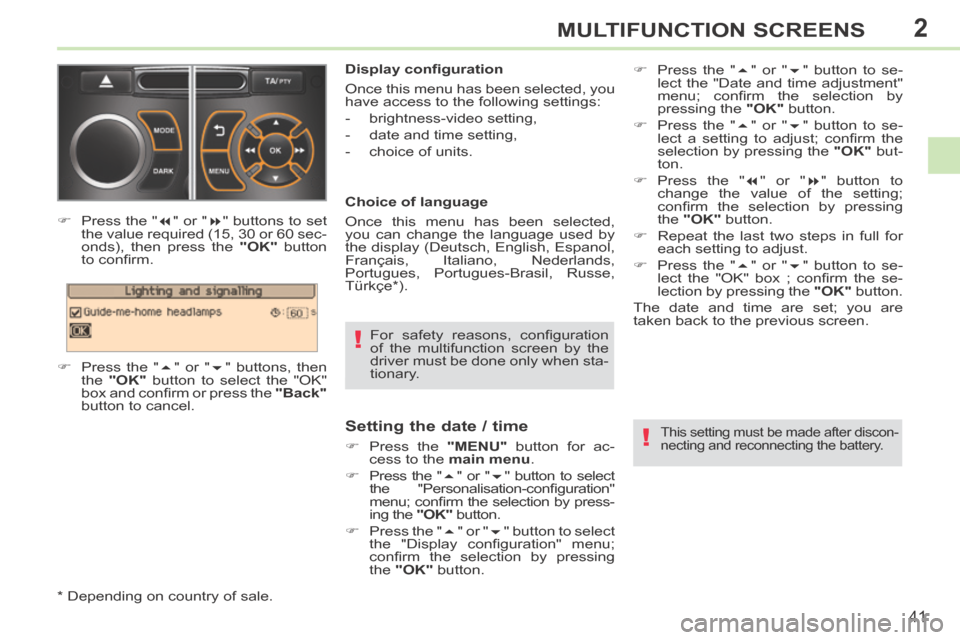
Display confi guration
Once this menu has been selected, you
have access to the following settings:
- brightness-video setting,
- date and time setting,
- choice of units.
Choice of language
Once this menu has been selected,
you can change the language used by
the display (Deutsch, English, Espanol,
Français, Italiano, Nederlands,
Portugues, Portugues-Brasil, Russe,
Türkçe * ).
Press the "
" or " " buttons to set
the value required (15, 30 or 60 sec-
onds), then press the "OK" button
to confi rm.
Press the " " or " " buttons, then
the "OK" button to select the "OK"
box and confi rm or press the "Back"
button to cancel.
* Depending on country of sale.
Setting the date / time
Press the "MENU" button for ac-
cess to the main menu .
Press the " " or " " button to select
the "Personalisation-confi guration"
menu; confi rm the selection by press-
ing the "OK" button.
Press the " " or " " button to select
the "Display confi guration" menu;
confi rm the selection by pressing
the "OK" button. This setting must be made after discon-
necting and reconnecting the battery.
Press the " " or " " button to se-
lect the "Date and time adjustment"
menu; confi rm the selection by
pressing the "OK" button.
Press the " " or " " button to se-
lect a setting to adjust; confi rm the
selection by pressing the "OK" but-
ton.
Press the " " or " " button to
change the value of the setting;
confi rm the selection by pressing
the "OK" button.
Repeat the last two steps in full for each setting to adjust.
Press the " " or " " button to se-
lect the "OK" box ; confi rm the se-
lection by pressing the "OK" button.
The date and time are set; you are
t aken back to the previous screen.
Page 44 of 268
2
!
i
42
MULTIFUNCTION SCREENS
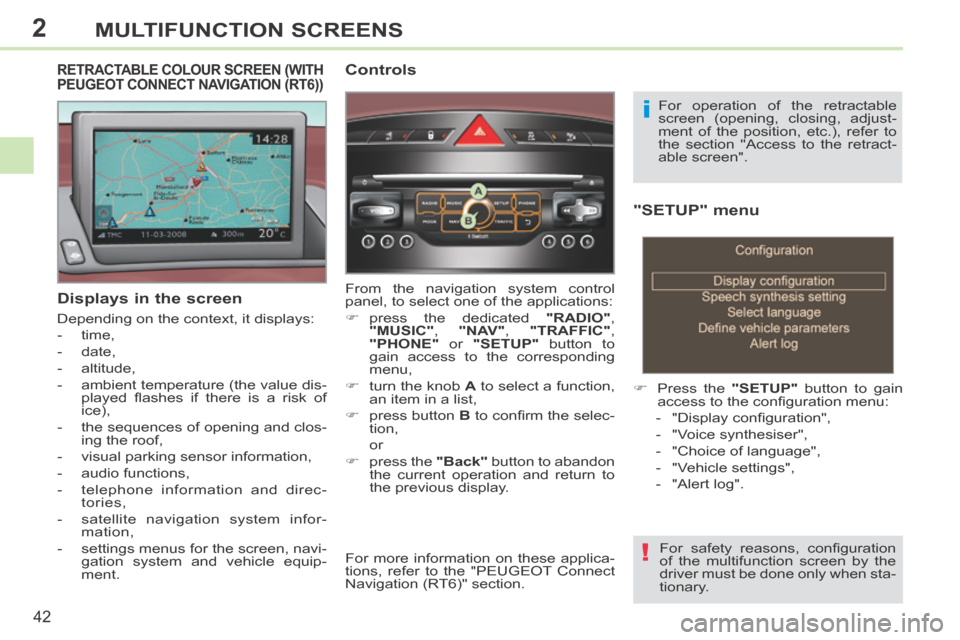
"SETUP" menu
Press the "SETUP" button to gain
access to the confi guration menu:
- "Display confi guration",
- "Voice synthesiser",
- "Choice of language",
- "Vehicle settings",
- "Alert log".
For safety reasons, confi guration
of the multifunction screen by the
driver must be done only when sta-
tionary.
Displays in the screen
Depending on the context, it displays:
- time,
- date,
- altitude,
- ambient temperature (the value dis- played fl ashes if there is a risk of
ice),
- the sequences of opening and clos- ing the roof,
- visual parking sensor information,
- audio functions,
- telephone information and direc- tories,
- satellite navigation system infor- mation,
- settings menus for the screen, navi- gation system and vehicle equip-
ment.
RETRACTABLE COLOUR SCREEN (WITH PEUGEOT CONNECT NAVIGATION (RT6)) Controls
From the navigation system control
panel, to select one of the applications:
press the dedicated "RADIO" ,
"MUSIC" , "NAV" , "TRAFFIC" ,
"PHONE" or "SETUP" button to
gain access to the corresponding
menu,
turn the knob A to select a function,
an item in a list,
press button B to confi rm the selec-
tion,
or
press the "Back" button to abandon
the current operation and return to
the previous display. For operation of the retractable
screen (opening, closing, adjust-
ment of the position, etc.), refer to
the section "Access to the retract-
able screen".
For more information on these applica-
tions, refer to the "PEUGEOT Connect
Navigation (RT6)" section.
Page 45 of 268
2
i
!
43
MULTIFUNCTION SCREENS
Display confi guration
This menu is used to select the colour
scheme for the screen, adjust its bright-
ness, set the date and time and select
the units for distance (km or miles),
fuel consumption (l/100 km, mpg or
km/l) and temperature (°Celsius or
°Fahrenheit).
Voice synthesiser
This menu is used to set the volume for
navigation instructions and to select the
type of voice (male or female).
Choice of language
This menu allows you to select the
language used by the screen: French,
English, Italian, Portuguese, Spanish,
German, Dutch, Turkish, Polish,
Russian). Vehicle settings *
This menu is used to activate or deacti-
vate certain driving and comfort equip-
ment, sorted by category:
- Access to the vehicle
● Plip action: "Driver's door" or "All doors".
- Parking assistance
- Rear wiper operation ● Operation of rear wiper in reverse (Rear wiper coupled to reverse;
see "Visibility"),
- Lighting confi guration (see "Visibility"):
●
Duration of guide-me-home lighting,
● Directional headlamps (Main / ad- ditional directional lighting),
● Mood lighting (Interior mood light- ing),
● Daytime running lamps ** .
Alert log
This summarises the active alerts by
displaying their associated messages
in turn.
* Depending on version.
** Depending on country of sale. When setting the time you can
select "Synchronise minutes with
GPS", so that the minutes are set
automatically by satellite reception.
Setting the date / time
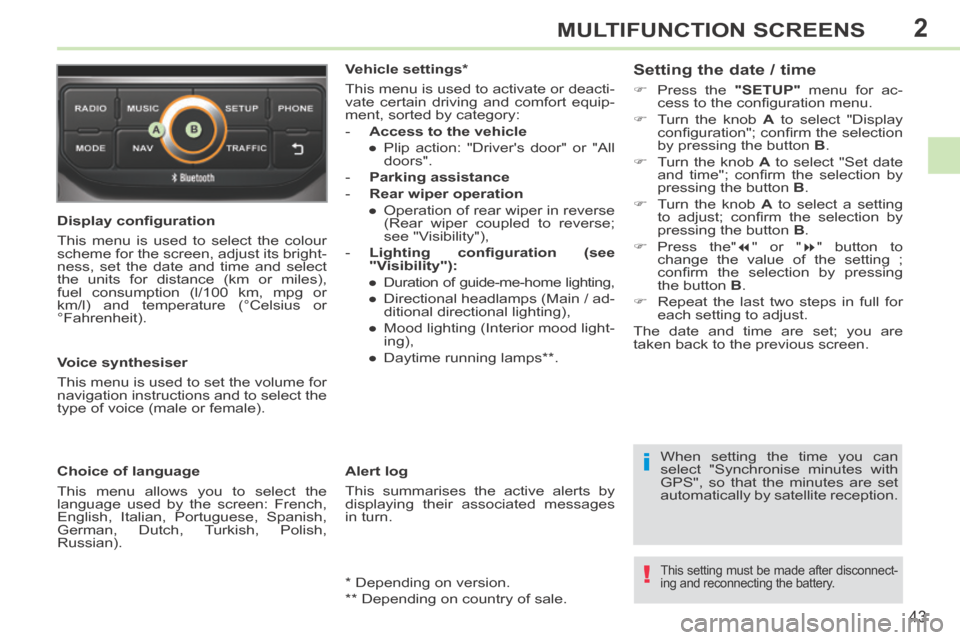
Press the
"SETUP" menu for ac-
cess to the confi guration menu.
Turn the knob A to select "Display
confi guration"; confi rm the selection
by pressing the button B .
Turn the knob A to select "Set date
and time"; confi rm the selection by
pressing the button B .
Turn the knob A to select a setting
to adjust; confi rm the selection by
pressing the button B .
Press the" " or " " button to
change the value of the setting ;
confi rm the selection by pressing
the button B .
Repeat the last two steps in full for each setting to adjust.
The date and time are set; you are
t aken back to the previous screen.
This setting must be made after disconnect-
ing and reconnecting the battery.