display Peugeot 308 CC 2014 Owner's Guide
[x] Cancel search | Manufacturer: PEUGEOT, Model Year: 2014, Model line: 308 CC, Model: Peugeot 308 CC 2014Pages: 268, PDF Size: 15.33 MB
Page 46 of 268
2
44
MULTIFUNCTION SCREENS
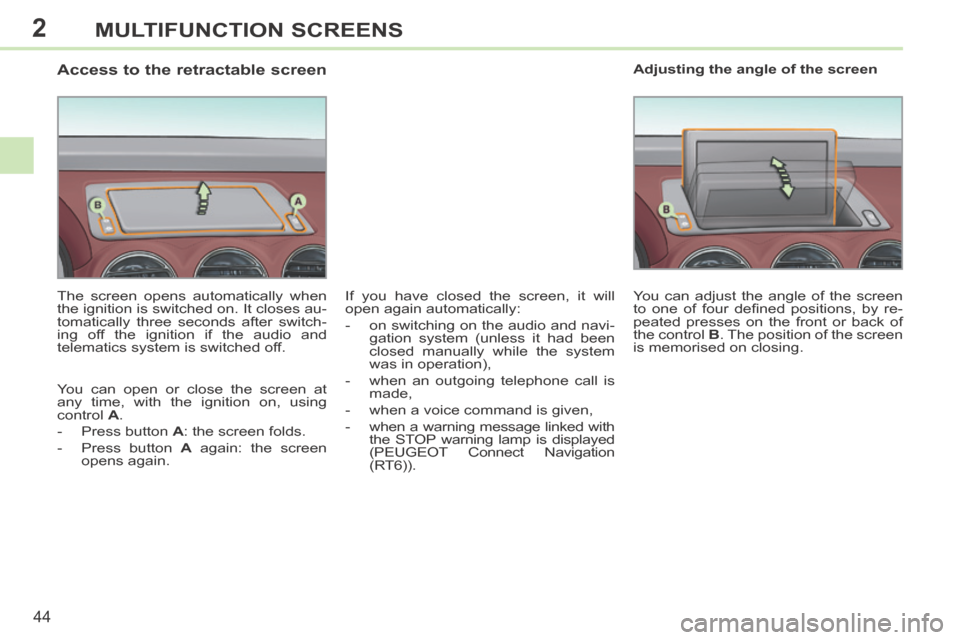
Access to the retractable screen
The screen opens automatically when
the ignition is switched on. It closes au-
tomatically three seconds after switch-
ing off the ignition if the audio and
telematics system is switched off.
You can open or close the screen at
any time, with the ignition on, using
control A .
- Press button A : the screen folds.
- Press button A again: the screen opens again. You can adjust the angle of the screen
to one of four defi ned positions, by re-
peated presses on the front or back of
the control
B . The position of the screen
is memorised on closing. Adjusting the angle of the screen
If you have closed the screen, it will
open again automatically:
- on switching on the audio and navi- gation system (unless it had been
closed manually while the system
was in operation),
- when an outgoing telephone call is made,
- when a voice command is given,
- when a warning message linked with the STOP warning lamp is displayed
(PEUGEOT Connect Navigation
(RT6)).
Page 50 of 268
3
ii
i
48
COMFORT
When the engine is cold, to prevent
too great a distribution of cold air,
the air fl ow will reach its optimum
level gradually.
In cold weather, it favours the dis-
tribution of warm air to the wind-
screen, side windows and footwells
only. On entering the vehicle, if the in-
terior temperature is much colder
or warmer than the comfort value,
there is no need to change the
value displayed in order to obtain
the comfort required. The system
corrects the difference in tempera-
ture automatically and as quickly
as possible.
The air conditioning can only operate
with the engine running. The driver and front passen-
ger can each adjust the tem-
perature to their requirements.
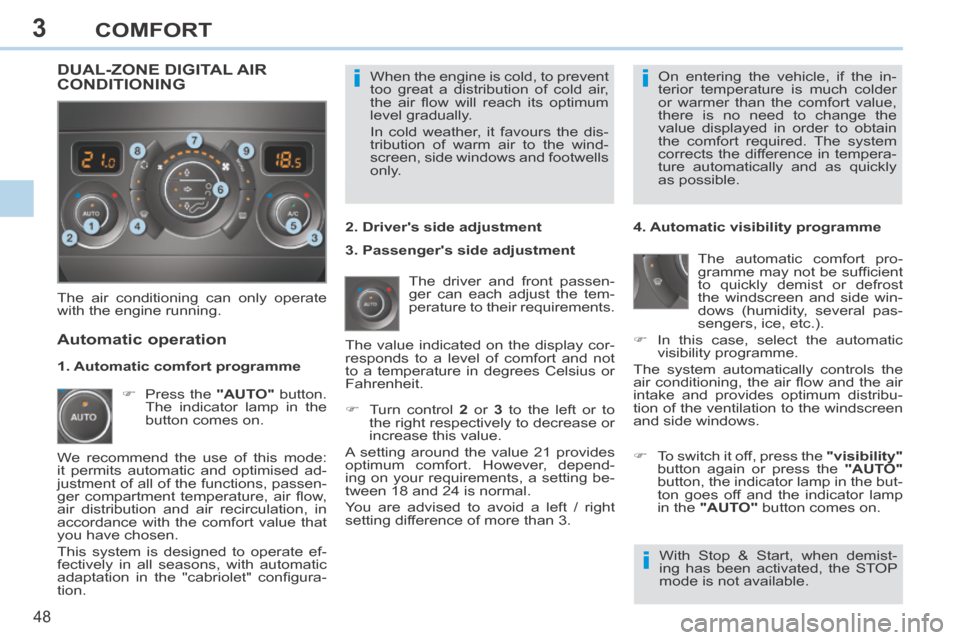
Turn control 2 or 3 to the left or to
the right respectively to decrease or
increase this value.
A setting around the value 21 provides
optimum comfort. However, depend-
ing on your requirements, a setting be-
tween 18 and 24 is normal.
You are advised to avoid a left / right
setting difference of more than 3. 4. Automatic visibility programme
The automatic comfort pro-
gramme may not be suffi cient
to quickly demist or defrost
the windscreen and side win-
dows (humidity, several pas-
sengers, ice, etc.).
In this case, select the automatic visibility programme.
The system automatically controls the
air conditioning, the air fl ow and the air
intake and provides optimum distribu-
tion of the ventilation to the windscreen
and side windows.
Automatic operation
Press the "AUTO" button.
The indicator lamp in the
button comes on. 2. Driver's side adjustment
DUAL-ZONE DIGITAL AIR CONDITIONING
We recommend the use of this mode:
it permits automatic and optimised ad-
justment of all of the functions, passen-
ger compartment temperature, air fl ow,
air distribution and air recirculation, in
accordance with the comfort value that
you have chosen.
This system is designed to operate ef-
fectively in all seasons, with automatic
adaptation in the "cabriolet" confi gura-
tion. The value indicated on the display cor-
responds to a level of comfort and not
to a temperature in degrees Celsius or
Fahrenheit.
To switch it off, press the "visibility"
button again or press the "AUTO"
button, the indicator lamp in the but-
ton goes off and the indicator lamp
in the "AUTO" button comes on.
1. Automatic comfort programme
3. Passenger's side adjustment
With Stop & Start, when demist-
ing has been activated, the STOP
mode is not available.
Page 51 of 268
3
!
i
49
COMFORT
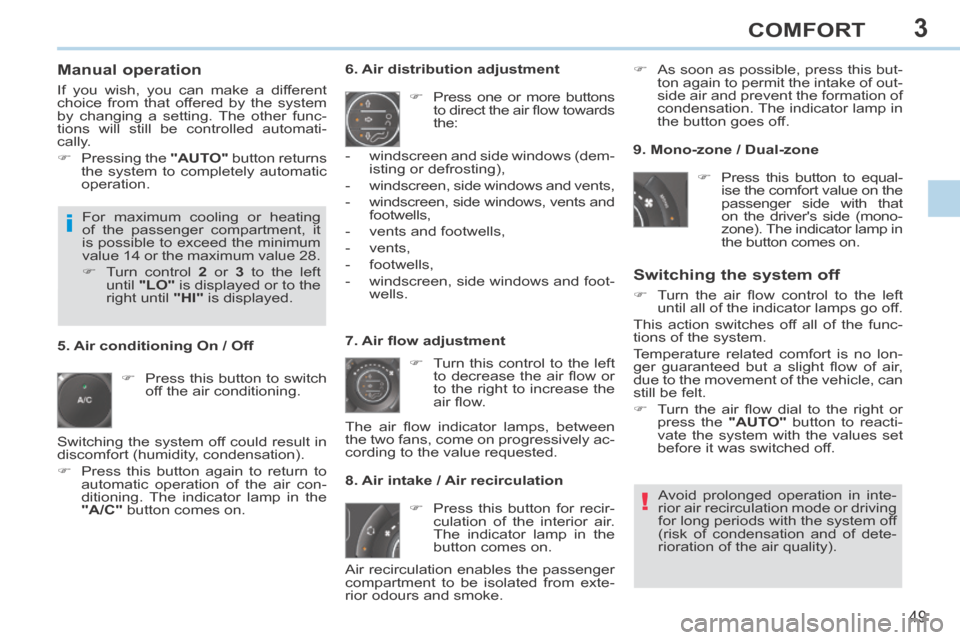
Manual operation
If you wish, you can make a different
choice from that offered by the system
by changing a setting. The other func-
tions will still be controlled automati-
cally.
Pressing the "AUTO" button returns
the system to completely automatic
operation.
Press this button to switch off the air conditioning. 6. Air distribution adjustment
Press one or more buttons to direct the air fl ow towards
the:
7. Air fl ow adjustment Turn this control to the left to decrease the air fl ow or
to the right to increase the
air fl ow.
8. Air intake / Air recirculation
Switching the system off
Turn the air fl ow control to the left until all of the indicator lamps go off.
This action switches off all of the func-
tions of the system.
Temperature related comfort is no lon-
ger guaranteed but a slight fl ow of air,
due to the movement of the vehicle, can
still be felt.
Turn the air fl ow dial to the right or press the "AUTO" button to reacti-
vate the system with the values set
before it was switched off.
Press this button for recir- culation of the interior air.
The indicator lamp in the
button comes on.
5. Air conditioning On / Off
Avoid prolonged operation in inte-
rior air recirculation mode or driving
for long periods with the system off
(risk of condensation and of dete-
rioration of the air quality).
- windscreen and side windows (dem-
isting or defrosting),
- windscreen, side windows and vents,
- windscreen, side windows, vents and footwells,
- vents and footwells,
- vents,
- footwells,
- windscreen, side windows and foot- wells.
The air fl ow indicator lamps, between
the two fans, come on progressively ac-
cording to the value requested. As soon as possible, press this but-
ton again to permit the intake of out-
side air and prevent the formation of
condensation. The indicator lamp in
the button goes off.
For maximum cooling or heating
of the passenger compartment, it
is possible to exceed the minimum
value 14 or the maximum value 28.
Turn control 2 or 3 to the left
until "LO" is displayed or to the
right until "HI" is displayed. 9. Mono-zone / Dual-zone
Press this button to equal-ise the comfort value on the
passenger side with that
on the driver's side (mono-
zone). The indicator lamp in
the button comes on.
Air recirculation enables the passenger
compartment to be isolated from exte-
rior odours and smoke.
Switching the system off could result in
discomfort (humidity, condensation).
Press this button again to return to
automatic operation of the air con-
ditioning. The indicator lamp in the
"A/C" button comes on.
Page 65 of 268
4
!
i
63
ACCESS
308CC_EN_CHAP04_OUVERTURES_ED01-2013
Locating your vehicle
Press the closed padlock to locate your locked ve-
hicle in a car park.
Electronic engine immobiliser
The key contains an electronic chip
which has a special code. When the
ignition is switched on, this code must
be recognised in order for starting to be
possible.
This electronic engine immobiliser locks
the engine management system a few
minutes after the ignition is switched off
and prevents starting of the engine by
anyone who does not have the key.
Anti-theft protection
In the event of a fault, you are
informed by illumination of this
warning lamp, an audible signal
and a message in the screen.
In this case, your vehicle will not start;
contact a PEUGEOT dealer as soon as
possible.
This is indicated by lighting of the cour-
tesy lamps and side spotlamps and
fl ashing of the direction indicators for a
few seconds.
Starting the vehicle
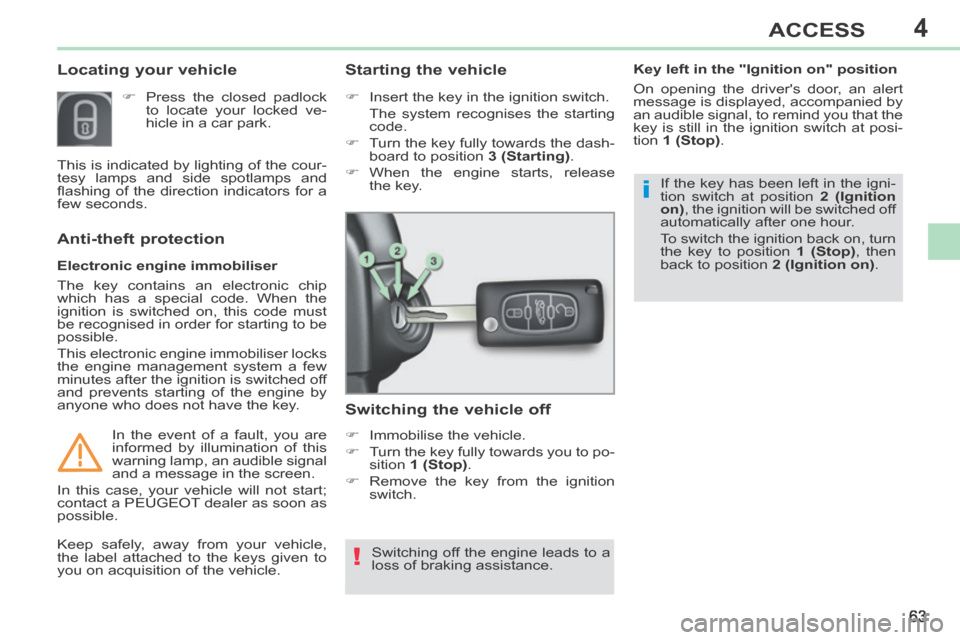
Insert the key in the ignition switch.
The system recognises the starting
code.
Turn the key fully towards the dash- board to position 3 (Starting) .
When the engine starts, release the key.
Switching the vehicle off
Immobilise the vehicle.
Turn the key fully towards you to po-sition 1 (Stop) .
Remove the key from the ignition switch.
Switching off the engine leads to a
loss of braking assistance.
Keep safely, away from your vehicle,
the label attached to the keys given to
you on acquisition of the vehicle. If the key has been left in the igni-
tion switch at position
2 (Ignition
on) , the ignition will be switched off
automatically after one hour.
To switch the ignition back on, turn
the key to position 1 (Stop) , then
back to position 2 (Ignition on) .
Key left in the "Ignition on" position
On opening the driver's door, an alert
message is displayed, accompanied by
an audible signal, to remind you that the
key is still in the ignition switch at posi-
tion
1 (Stop) .
Page 78 of 268
5
76
VISIBILITY
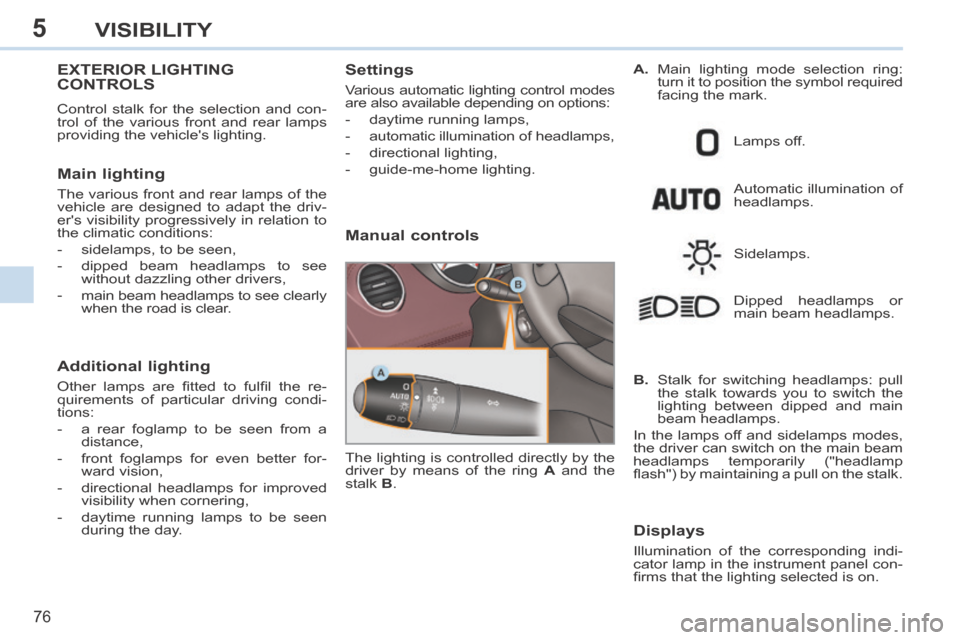
EXTERIOR LIGHTING CONTROLS
Control stalk for the selection and con-
trol of the various front and rear lamps
providing the vehicle's lighting.
Main lighting
The various front and rear lamps of the
vehicle are designed to adapt the driv-
er's visibility progressively in relation to
the climatic conditions:
- sidelamps, to be seen,
- dipped beam headlamps to see without dazzling other drivers,
-
main beam headlamps to see clearly
when the road is clear.
Additional lighting
Other lamps are fi tted to fulfi l the re-
quirements of particular driving condi-
tions:
- a rear foglamp to be seen from a distance,
- front foglamps for even better for- ward vision,
- directional headlamps for improved visibility when cornering,
- daytime running lamps to be seen during the day.
Settings
Various automatic lighting control modes
are also available depending on options:
- daytime running lamps,
- automatic illumination of headlamps,
- directional lighting,
- guide-me-home lighting.
Manual controls
Automatic illumination of
headlamps.
The lighting is controlled directly by the
driver by means of the ring A and the
stalk B . Lamps off.
Sidelamps.
B. Stalk for switching headlamps: pull the stalk towards you to switch the
lighting between dipped and main
beam headlamps.
In the lamps off and sidelamps modes,
the driver can switch on the main beam
headlamps temporarily ("headlamp
fl ash") by maintaining a pull on the stalk. Dipped headlamps or
main beam headlamps.
Displays
Illumination of the corresponding indi-
cator lamp in the instrument panel con-
fi rms that the lighting selected is on. A.
Main lighting mode selection ring:
turn it to position the symbol required
facing the mark.
Page 81 of 268
5
!
AUTO
79
VISIBILITY
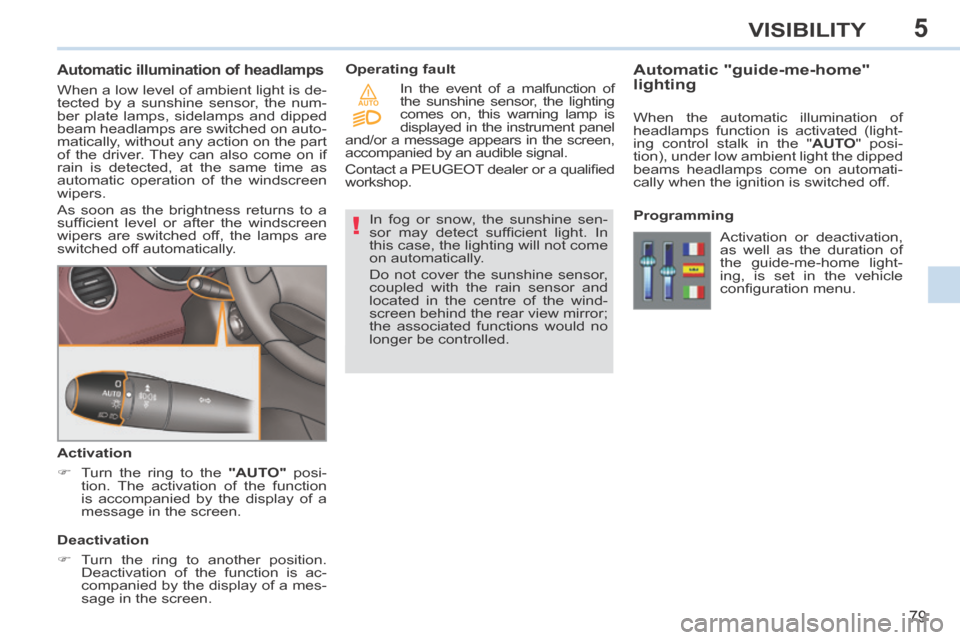
Automatic illumination of headlamps
When a low level of ambient light is de-
tected by a sunshine sensor, the num-
ber plate lamps, sidelamps and dipped
beam headlamps are switched on auto-
matically, without any action on the part
of the driver. They can also come on if
rain is detected, at the same time as
automatic operation of the windscreen
wipers.
As soon as the brightness returns to a
suffi cient level or after the windscreen
wipers are switched off, the lamps are
switched off automatically.
Activation
Turn the ring to the "AUTO" posi-
tion. The activation of the function
is accompanied by the display of a
message in the screen.
Deactivation
Turn the ring to another position. Deactivation of the function is ac-
companied by the display of a mes-
sage in the screen. In fog or snow, the sunshine sen-
sor may detect suffi cient light. In
this case, the lighting will not come
on automatically.
Do not cover the sunshine sensor,
coupled with the rain sensor and
located in the centre of the wind-
screen behind the rear view mirror;
the associated functions would no
longer be controlled.
Operating fault
Automatic "guide-me-home"
lighting
When the automatic illumination of
headlamps function is activated (light-
ing control stalk in the "
AUTO " posi-
tion), under low ambient light the dipped
beams headlamps come on automati-
cally when the ignition is switched off.
In the event of a malfunction of
the sunshine sensor, the lighting
comes on, this warning lamp is
displayed in the instrument panel
and/or a message appears in the screen,
accompanied by an audible signal.
Contact a PEUGEOT dealer or a qualifi ed
workshop.
Programming Activation or deactivation,
as well as the duration of
the guide-me-home light-
ing, is set in the vehicle
confi guration menu.
Page 82 of 268
5
ii
!
80
VISIBILITY
EXTERIOR WELCOME LIGHTING
The remote switching on of the light-
ing and side spotlamps makes your
approach to the vehicle easier in poor
light. It is activated in accordance with
the light intensity detected by the bright-
ness sensor.
Switching on
Press the open padlock on the re-mote control.
The dipped beam headlamps and the sidelamps come on, as well as
the side spotlamps, located in the
exterior mirrors; your vehicle is also
unlocked.
The welcome lighting duration is
associated with and identical to
that of the automatic guide-me-
home lighting.
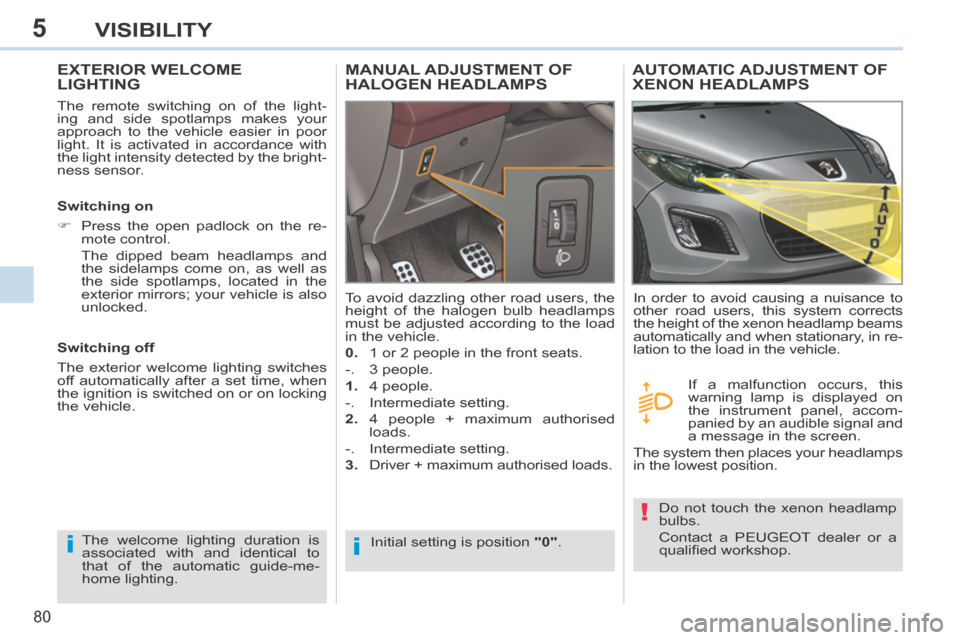
MANUAL ADJUSTMENT OF HALOGEN HEADLAMPS
Initial setting is position "0" .
To avoid dazzling other road users, the
height of the halogen bulb headlamps
must be adjusted according to the load
in the vehicle.
0.
1 or 2 people in the front seats.
-. 3 people.
1. 4 people.
-. Intermediate setting.
2. 4 people + maximum authorised
loads.
-. Intermediate setting.
3. Driver + maximum authorised loads.
Switching off
The exterior welcome lighting switches
off automatically after a set time, when
the ignition is switched on or on locking
the vehicle.
AUTOMATIC ADJUSTMENT OF XENON HEADLAMPS
Do not touch the xenon headlamp
bulbs.
Contact a PEUGEOT dealer or a
qualifi ed workshop.
In order to avoid causing a nuisance to
other road users, this system corrects
the height of the xenon headlamp beams
automatically and when stationary, in re-
lation to the load in the vehicle.
If a malfunction occurs, this
warning lamp is displayed on
the instrument panel, accom-
panied by an audible signal and
a message in the screen.
The system then places your headlamps
in the lowest position.
Page 85 of 268
5
!
i
83
VISIBILITY
Screenwash/headlamp wash low In the case of vehicles fi tted
with headlamp washers, when
the minimum level of the res-
ervoir is reached, this warning
lamp and/or the service warning lamp
is displayed in the instrument panel, ac-
companied by an audible signal and a
message in the screen.
Next time you stop, fi ll the screenwash /
headlamp wash fl uid reservoir.
The warning lamp is displayed when
the ignition is switched on, or every time
the stalk is operated, until the reservoir
is fi lled. Automatic rain sensitive
windscreen wipers
The windscreen wipers operate automati-
cally, without any action on the part of the
driver, if rain is detected (sensor behind
the rear view mirror), adapting their speed
to the intensity of the rainfall.
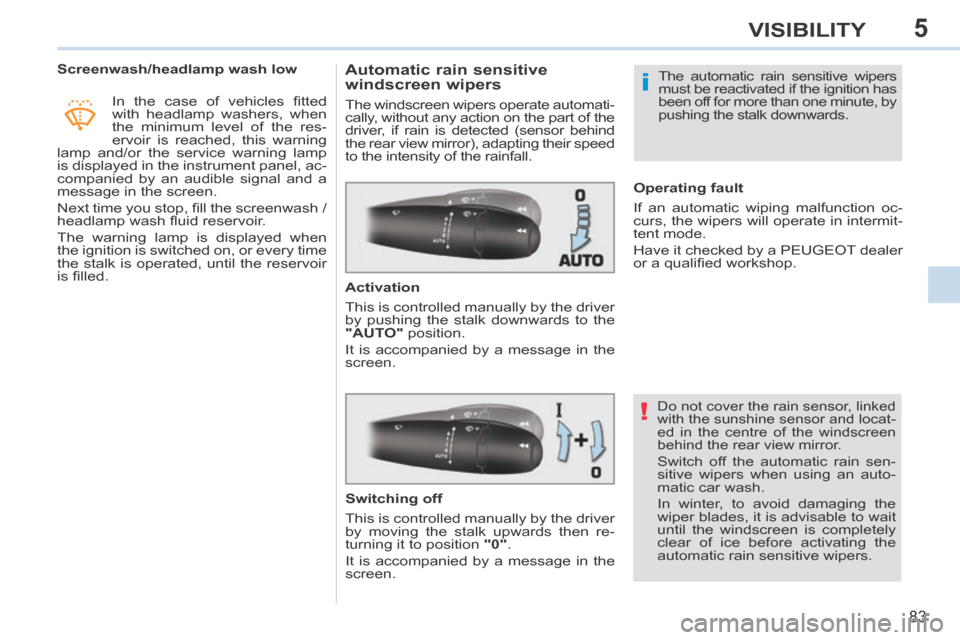
Activation
This is controlled manually by the driver
by pushing the stalk downwards to the
"AUTO" position.
It is accompanied by a message in the
screen.
Do not cover the rain sensor, linked
with the sunshine sensor and locat-
ed in the centre of the windscreen
behind the rear view mirror.
Switch off the automatic rain sen-
sitive wipers when using an auto-
matic car wash.
In winter, to avoid damaging the
wiper blades, it is advisable to wait
until the windscreen is completely
clear of ice before activating the
automatic rain sensitive wipers. The automatic rain sensitive wipers
must be reactivated if the ignition has
been off for more than one minute, by
pushing the stalk downwards.
Switching off
This is controlled manually by the driver
by moving the stalk upwards then re-
turning it to position "0" .
It is accompanied by a message in the
screen. Operating fault
If an automatic wiping malfunction oc-
curs, the wipers will operate in intermit-
tent mode.
Have it checked by a PEUGEOT dealer
or a qualifi ed workshop.
Page 90 of 268
6
88
FITTINGS
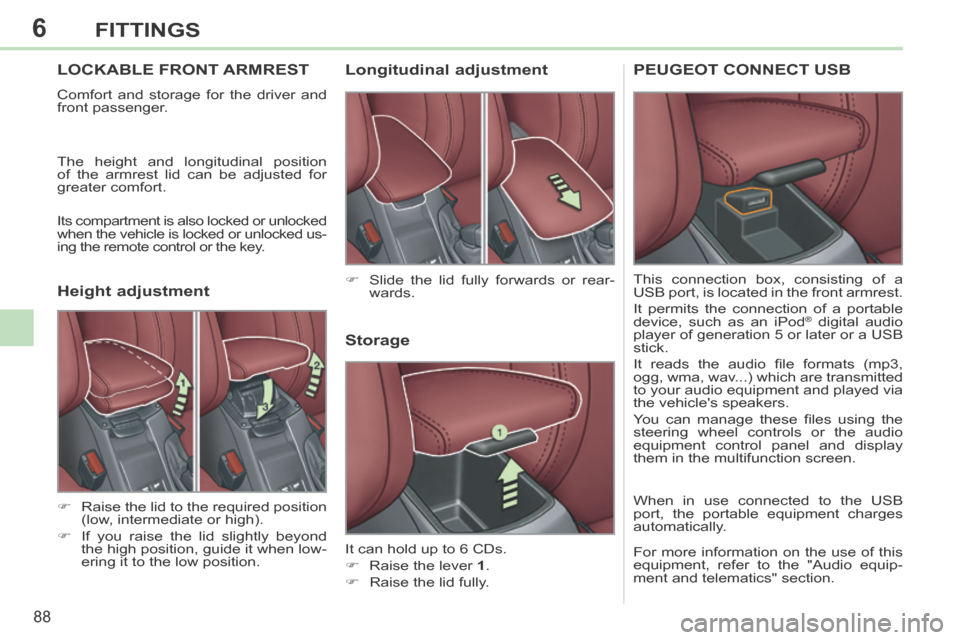
LOCKABLE FRONT ARMREST
Comfort and storage for the driver and
front passenger.
The height and longitudinal position
of the armrest lid can be adjusted for
greater comfort.
Its compartment is also locked or unlocked
when the vehicle is locked or unlocked us-
ing the remote control or the key.
Storage
It can hold up to 6 CDs.
Raise the lever 1 .
Raise the lid fully. Slide the lid fully forwards or rear- wards.
Raise the lid to the required position (low, intermediate or high).
If you raise the lid slightly beyond the high position, guide it when low-
ering it to the low position.
Longitudinal adjustment
Height adjustment PEUGEOT CONNECT USB
This connection box, consisting of a
USB port, is located in the front armrest.
It permits the connection of a portable
device, such as an iPod
® digital audio
player of generation 5 or later or a USB
stick.
It reads the audio fi le formats (mp3,
ogg, wma, wav...) which are transmitted
to your audio equipment and played via
the vehicle's speakers.
You can manage these fi les using the
steering wheel controls or the audio
equipment control panel and display
them in the multifunction screen.
When in use connected to the USB
port, the portable equipment charges
automatically.
For more information on the use of this
equipment, refer to the "Audio equip-
ment and telematics" section.
Page 99 of 268
7
97
SAFETY
SEAT BELTS
Front seat belts
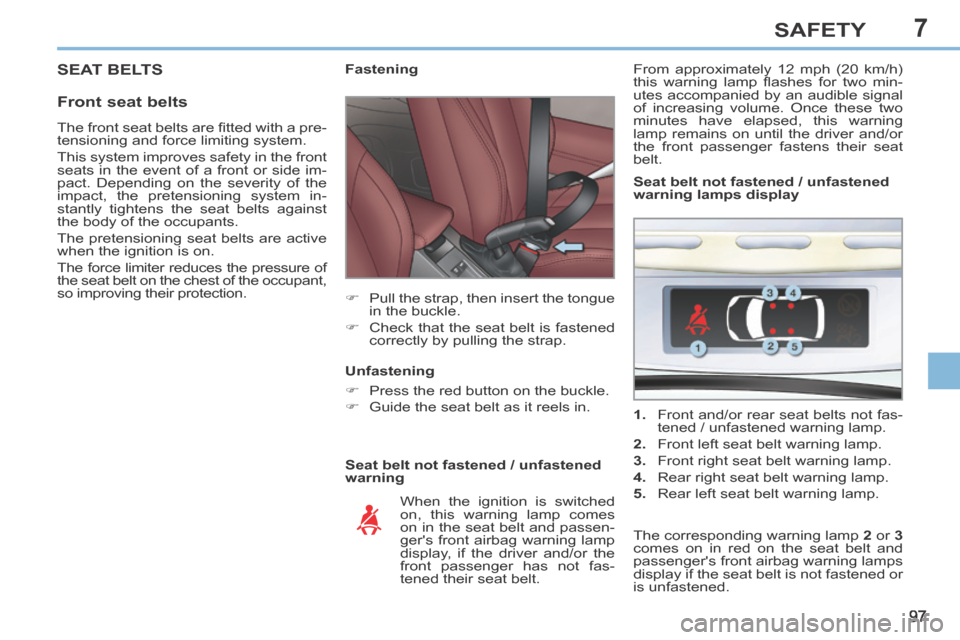
Seat belt not fastened / unfastened
warning Fastening
Pull the strap, then insert the tongue in the buckle.
Check that the seat belt is fastened correctly by pulling the strap.
When the ignition is switched
on, this warning lamp comes
on in the seat belt and passen-
ger's front airbag warning lamp
display, if the driver and/or the
front passenger has not fas-
tened their seat belt.
Unfastening
Press the red button on the buckle.
Guide the seat belt as it reels in.
1. Front and/or rear seat belts not fas-
tened / unfastened warning lamp.
2. Front left seat belt warning lamp.
3. Front right seat belt warning lamp.
4. Rear right seat belt warning lamp.
5. Rear left seat belt warning lamp. Seat belt not fastened / unfastened
warning lamps display
The corresponding warning lamp 2 or 3
comes on in red on the seat belt and
passenger's front airbag warning lamps
display if the seat belt is not fastened or
is unfastened.
From approximately 12 mph (20 km/h)
this warning lamp fl ashes for two min-
utes accompanied by an audible signal
of increasing volume. Once these two
minutes have elapsed, this warning
lamp remains on until the driver and/or
the front passenger fastens their seat
belt.
The front seat belts are fi tted with a pre-
tensioning and force limiting system.
This system improves safety in the front
seats in the event of a front or side im-
pact. Depending on the severity of the
impact, the pretensioning system in-
stantly tightens the seat belts against
the body of the occupants.
The pretensioning seat belts are active
when the ignition is on.
The force limiter reduces the pressure of
the seat belt on the chest of the occupant,
so improving their protection.