display Peugeot 308 CC 2014 Service Manual
[x] Cancel search | Manufacturer: PEUGEOT, Model Year: 2014, Model line: 308 CC, Model: Peugeot 308 CC 2014Pages: 268, PDF Size: 15.33 MB
Page 129 of 268
8
!
127
DRIVING
When the cruise control is switched
on, be careful if you maintain the
pressure on one of the programmed
speed changing buttons: this may
result in a very rapid change in the
speed of your vehicle.
Do not use the cruise control on
slippery roads or in heavy traffi c.
On a steep descent, the cruise
control will not be able to prevent
the vehicle from exceeding the pro-
grammed speed.
To avoid any risk of jamming of the
pedals:
- ensure that the mat is posi-tioned correctly,
- never fi t one mat on top of an- other.
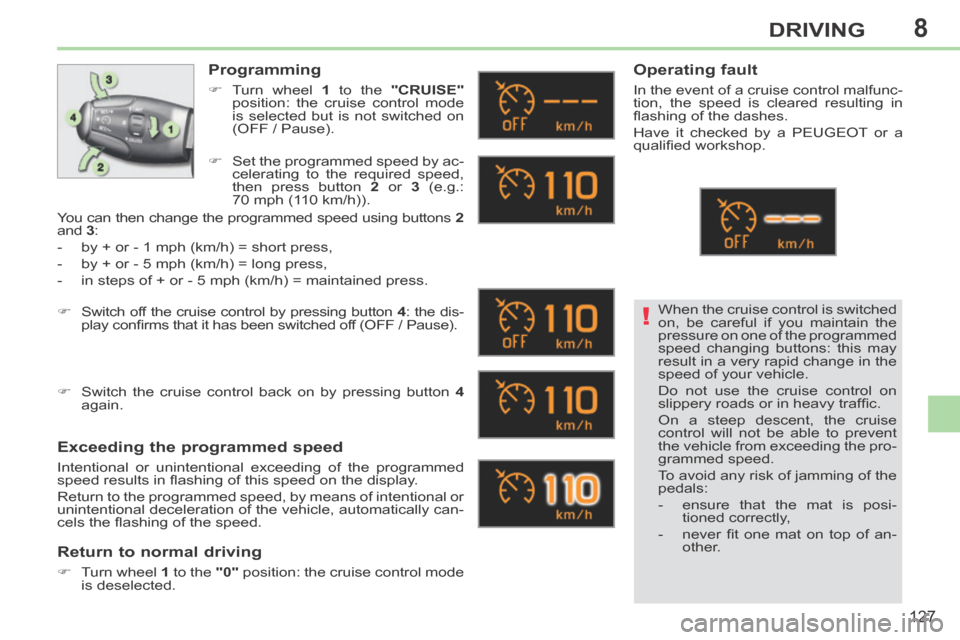
Programming
Turn wheel 1 to the "CRUISE"
position: the cruise control mode
is selected but is not switched on
(OFF / Pause).
Exceeding the programmed speed
Intentional or unintentional exceeding of the programmed
speed results in fl ashing of this speed on the display.
Return to the programmed speed, by means of intentional or
unintentional deceleration of the vehicle, automatically can-
cels the fl ashing of the speed.
Return to normal driving
Turn wheel 1 to the "0" position: the cruise control mode
is deselected.
Operating fault
In the event of a cruise control malfunc-
tion, the speed is cleared resulting in
fl ashing of the dashes.
Have it checked by a PEUGEOT or a
qualifi ed workshop.
Set the programmed speed by ac- celerating to the required speed,
then press button 2 or 3 (e.g.:
70 mph (110 km/h)).
Switch off the cruise control by pressing button 4 : the dis-
play confi rms that it has been switched off (OFF / Pause).
Switch the cruise control back on by pressing button 4
again.
You can then change the programmed speed using buttons
2
and 3 :
- by + or - 1 mph (km/h) = short press,
- by + or - 5 mph (km/h) = long press,
- in steps of + or - 5 mph (km/h) = maintained press.
Page 130 of 268
8
!
128
DRIVING
PARKING SENSORS
This system indicates the proximity of an
obstacle (person, vehicle, tree, gate,
etc.) which comes within the fi eld of de-
tection of sensors located in the bumper.
Certain types of obstacle (stake, road-
works cone, etc.) detected initially will
no longer be detected at the end of the
manoeuvre due to the presence of blind
spots. This function cannot, in any cir-
cumstances, take the place of the
vigilance and responsibility of the
driver.
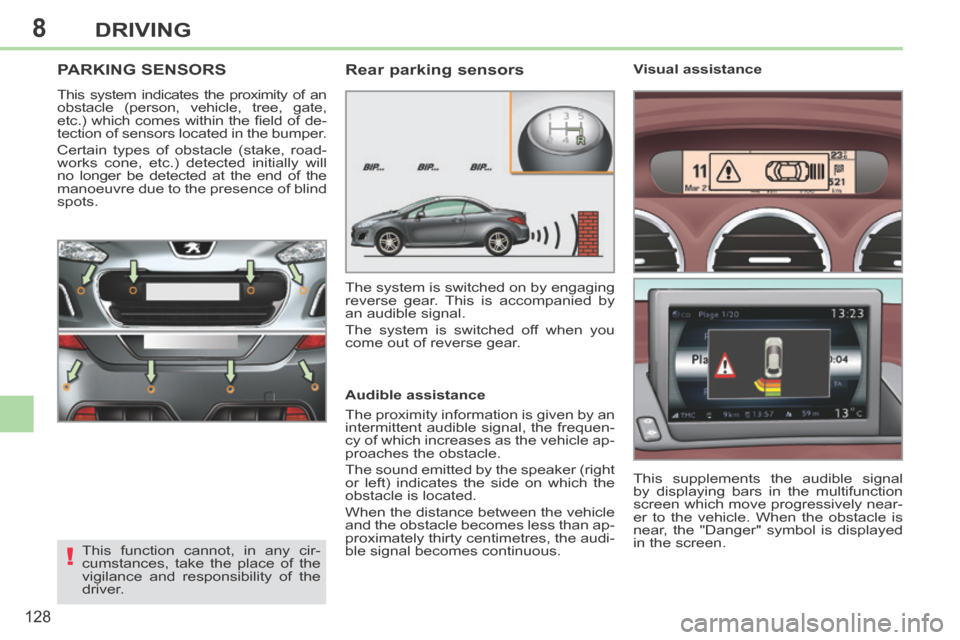
Rear parking sensors
Audible assistance
The proximity information is given by an
intermittent audible signal, the frequen-
cy of which increases as the vehicle ap-
proaches the obstacle.
The sound emitted by the speaker (right
or left) indicates the side on which the
obstacle is located.
When the distance between the vehicle
and the obstacle becomes less than ap-
proximately thirty centimetres, the audi-
ble signal becomes continuous. The system is switched on by engaging
reverse gear. This is accompanied by
an audible signal.
The system is switched off when you
come out of reverse gear. This supplements the audible signal
by displaying bars in the multifunction
screen which move progressively near-
er to the vehicle. When the obstacle is
near, the "Danger" symbol is displayed
in the screen. Visual assistance
Page 131 of 268
8
ii
129
DRIVING
Front parking sensors
In addition to the rear parking sensors,
the front parking sensors are triggered
when an obstacle is detected in front
and the speed of the vehicle is still be-
low 6 mph (10 km/h).
The front parking sensors are interrupted
if the vehicle stops for more than three
seconds in forward gear, if no further ob-
stacles are detected or when the speed
of the vehicle exceeds 6 mph (10 km/h).
The sound emitted by the speaker (front
or rear) indicates whether the obstacle
is in front or behind.
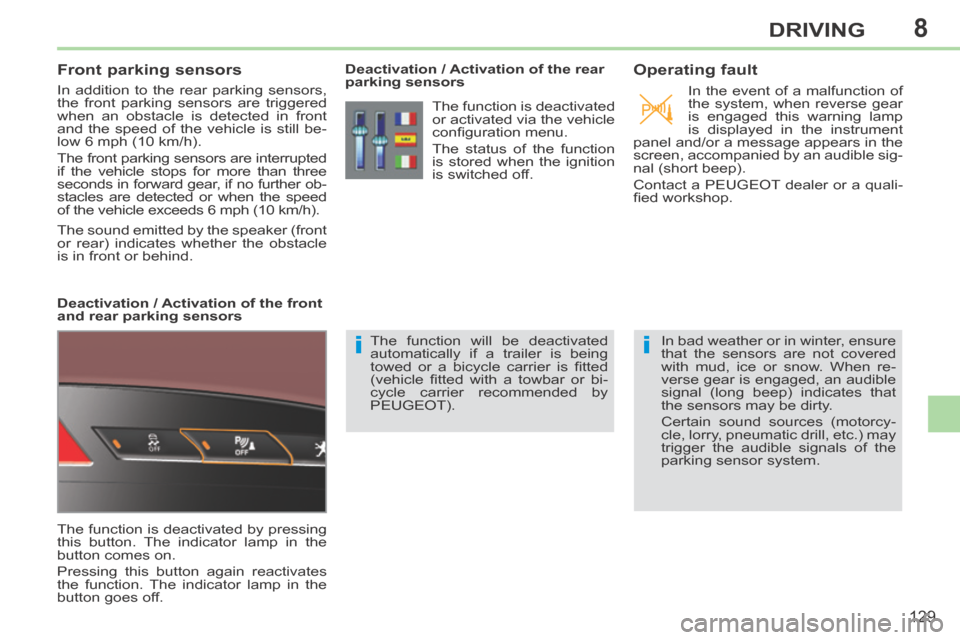
The function is deactivated by pressing
this button. The indicator lamp in the
button comes on.
Pressing this button again reactivates
the function. The indicator lamp in the
button goes off. Deactivation / Activation of the rear
parking sensors
The function will be deactivated
automatically if a trailer is being
towed or a bicycle carrier is fi tted
(vehicle fi tted with a towbar or bi-
cycle carrier recommended by
PEUGEOT).
Operating fault
In the event of a malfunction of
the system, when reverse gear
is engaged this warning lamp
is displayed in the instrument
panel and/or a message appears in the
screen, accompanied by an audible sig-
nal (short beep).
Contact a PEUGEOT dealer or a quali-
fi ed workshop.
In bad weather or in winter, ensure
that the sensors are not covered
with mud, ice or snow. When re-
verse gear is engaged, an audible
signal (long beep) indicates that
the sensors may be dirty.
Certain sound sources (motorcy-
cle, lorry, pneumatic drill, etc.) may
trigger the audible signals of the
parking sensor system.
The function is deactivated
or activated via the vehicle
confi guration menu.
The status of the function
is stored when the ignition
is switched off.
Deactivation / Activation of the front
and rear parking sensors
Page 159 of 268
10
157
PRACTICAL INFORMATION
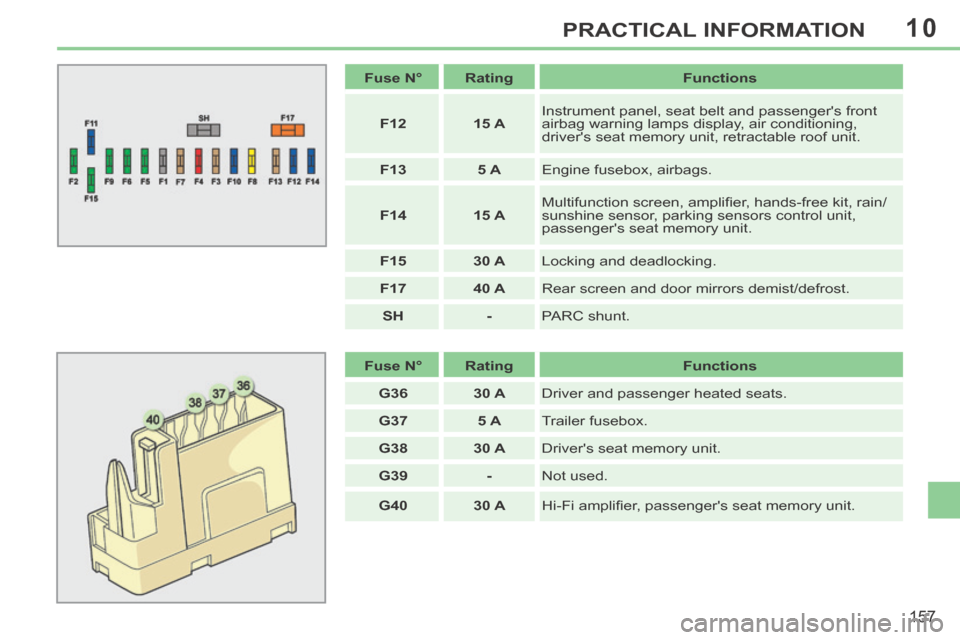
Fuse N° Rating Functions
F12 15 A Instrument panel, seat belt and passenger's front
airbag warning lamps display, air conditioning,
driver's seat memory unit, retractable roof unit.
F13 5 A Engine fusebox, airbags.
F14 15 A Multifunction screen, amplifi er, hands-free kit, rain/
sunshine sensor, parking sensors control unit,
passenger's seat memory unit.
F15 30 A Locking and deadlocking.
F17 40 A Rear screen and door mirrors demist/defrost.
SH - PARC shunt.
Fuse N° Rating Functions
G36 30 A Driver and passenger heated seats.
G37 5 A Trailer fusebox.
G38 30 A Driver's seat memory unit.
G39 - Not used.
G40 30 A Hi-Fi amplifi er, passenger's seat memory unit.
Page 182 of 268
01
180
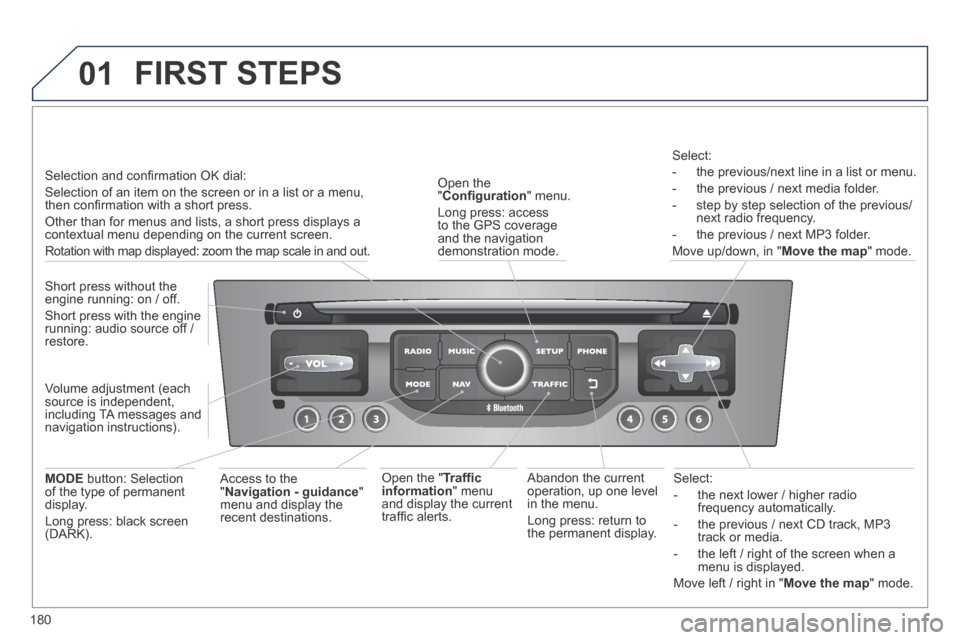
Select:
- the next lower / higher radio frequency automatically.
- the previous / next CD track, MP3 track or media.
- the left / right of the screen when a menu is displayed.
Move left / right in " Move the map " mode.
Abandon the current operation, up one level in the menu.
Long press: return to the permanent display.
Open the " Confi guration " menu.
Long press: access to the GPS coverage and the navigation demonstration mode.
Open the " Traffi c information " menu and display the current traffi c alerts.
Select:
- the previous/next line in a list or menu.
- the previous / next media folder.
- step by step selection of the previous/next radio frequency.
- the previous / next MP3 folder.
Move up/down, in " Move the map " mode.
FIRST STEPS
Access to the " Navigation - guidance " menu and display the recent destinations.
Short press without the engine running: on / off.
Short press with the engine running: audio source off / restore.
MODE button: Selection of the type of permanent display.
Long press: black screen (DARK).
Selection and confi rmation OK dial:
Selection of an item on the screen or in a list or a menu, then confi rmation with a short press.
Other than for menus and lists, a short press displays a contextual menu depending on the current screen.
Rotation with map displayed: zoom the map scale in and out.
Volume adjustment (each source is independent, including TA messages and navigation instructions).
Page 183 of 268
01
181
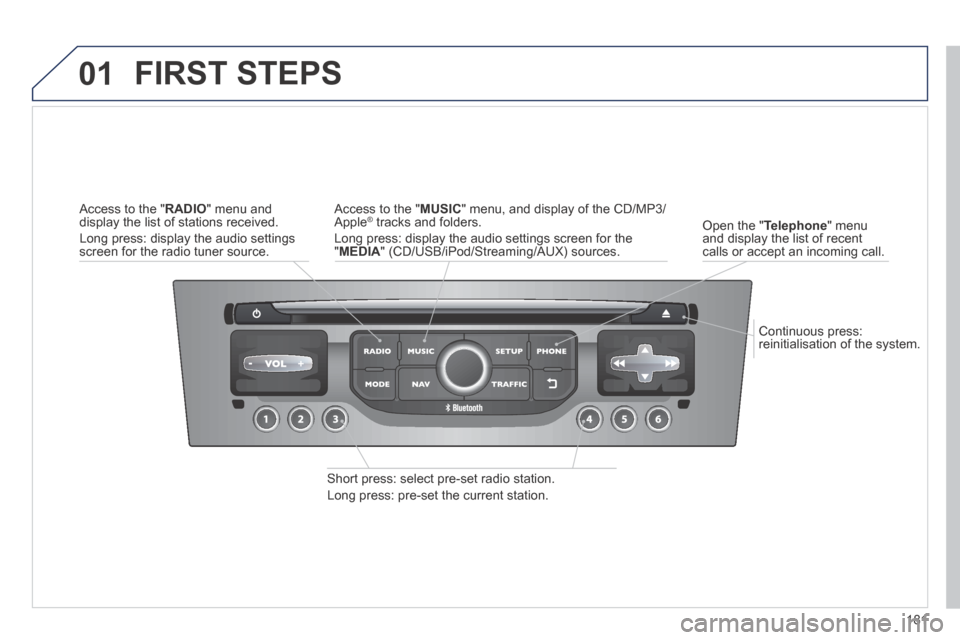
Continuous press: reinitialisation of the system.
Open the " Telephone " menu and display the list of recent calls or accept an incoming call.
FIRST STEPS
Short press: select pre-set radio station.
Long press: pre-set the current station.
Access to the " MUSIC " menu, and display of the CD/MP3/Apple ® tracks and folders. ® tracks and folders. ®
Long press: display the audio settings screen for the " MEDIA " (CD/USB/iPod/Streaming/AUX) sources.
Access to the " RADIO " menu and display the list of stations received.
Long press: display the audio settings screen for the radio tuner source.
Page 185 of 268
03
183
For the details of the menus, refer to the "Screen menu map" section. For cleaning the screen, the use of a soft, non-abrasive cloth (spectacles cloth) is recommended, with no additional product.
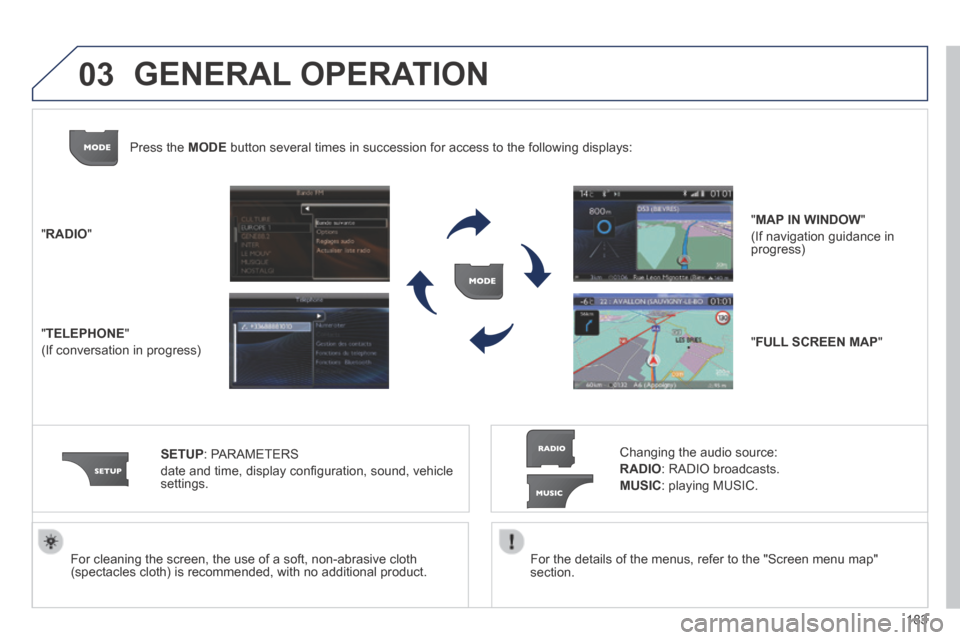
" RADIO "
" TELEPHONE "
(If conversation in progress)
SETUP : PARAMETERS
date and time, display confi guration, sound, vehicle settings.
Changing the audio source:
RADIO : RADIO broadcasts.
MUSIC : playing MUSIC.
Press the MODE button several times in succession for access to the following displays\
:
" FULL SCREEN MAP "
" MAP IN WINDOW "
(If navigation guidance in progress)
GENERAL OPERATION
Page 186 of 268
03
184
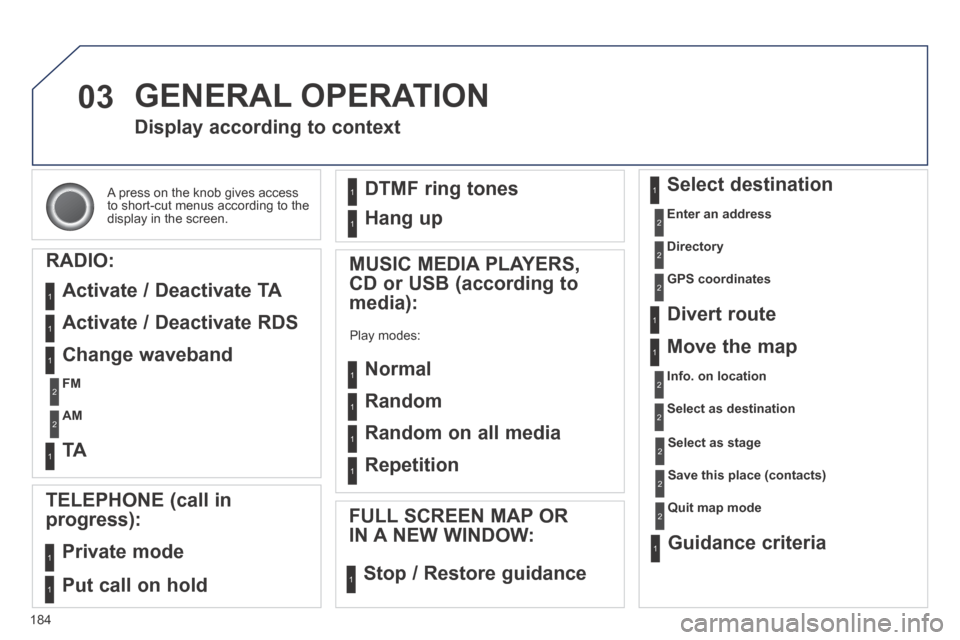
A press on the knob gives access to short-cut menus according to the display in the screen.
Display according to context
RADIO:
Activate / Deactivate TA
Activate / Deactivate RDS
MUSIC MEDIA PLAYERS,
CD or USB (according to
media):
Play modes:
Normal
Random
Random on all media
Repetition
TELEPHONE (call in
progress):
Private mode
FULL SCREEN MAP OR
IN A NEW WINDOW:
Stop / Restore guidance
Select destination
Enter an address
Directory
GPS coordinates
Divert route
Move the map
Info. on location
Select as destination
Select as stage
Save this place (contacts)
Quit map mode
Guidance criteria
Put call on hold
DTMF ring tones
Hang up
1
1
1
1
1
1
1
1
2
2
2
2
2
1
2
2
2
1
1
1
1
1
1
Change waveband
FM
AM
2
2
1
TA 1
GENERAL OPERATION
Page 188 of 268
04
186
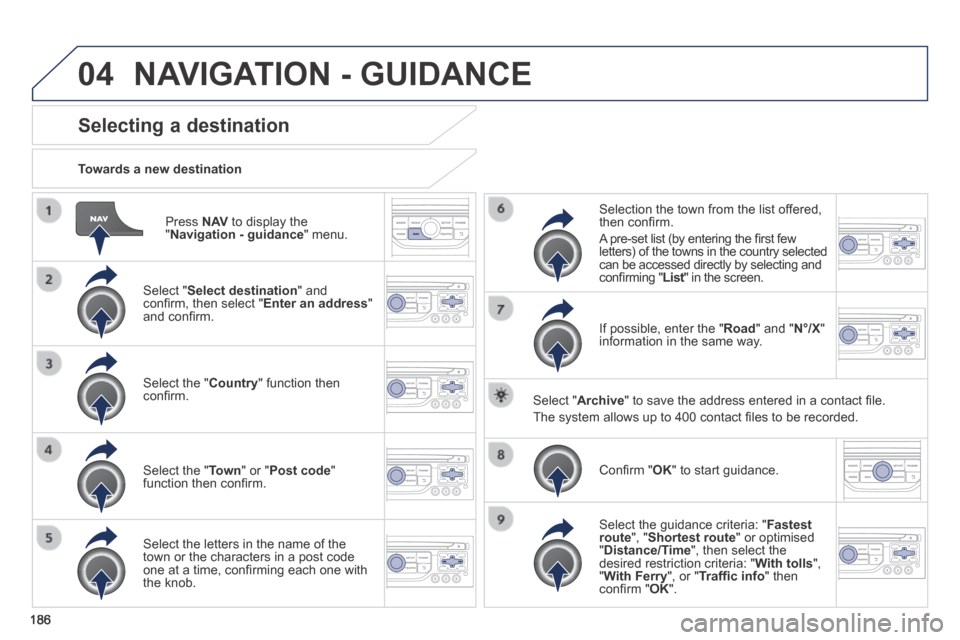
Press N AV to display the " Navigation - guidance " menu.
Towards a new destination
Selecting a destination
Select " Select destination " and confi rm, then select " Enter an address " and confi rm.
Select the " Country " function then confi rm.
Select the " Town " or " Post code " function then confi rm.
Select the letters in the name of the town or the characters in a post code one at a time, confi rming each one with the knob.
Selection the town from the list offered, then confi rm .
A pre-set list (by entering the fi rst few letters) of the towns in the country selected can be accessed directly by selecting and confi rming " List " in the screen. List " in the screen. List
If possible, enter the " Road " and " N°/X " information in the same way.
Select " Archive " to save the address entered in a contact fi le.
The system allows up to 400 contact fi les to be recorded.
Confi rm " OK " to start guidance.
Select the guidance criteria: " Fastest route ", " Shortest route " or optimised " Distance/Time ", then select the desired restriction criteria: " With tolls ", " With Ferry ", or " Traffi c info " then confi rm " OK ".
NAVIGATION - GUIDANCE
Page 189 of 268
04
187
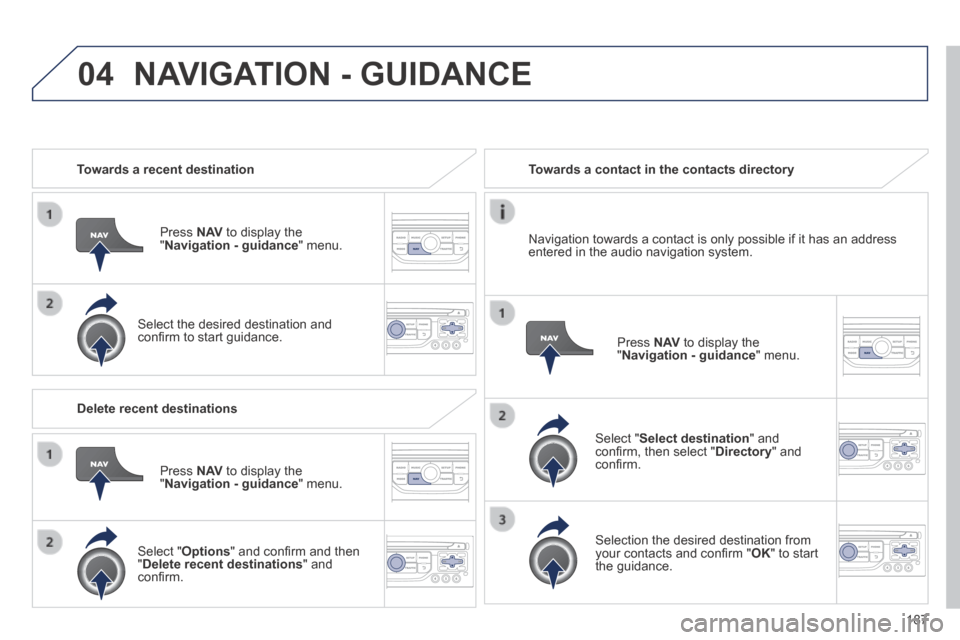
Towards a recent destination
Press N AV to display the " Navigation - guidance " menu.
Select the desired destination and confi rm to start guidance.
Towards a contact in the contacts directory
Select " Select destination " and confi rm, then select " Directory " and confi rm.
Selection the desired destination from your contacts and confi rm " OK " to start the guidance.
Press N AV to display the " Navigation - guidance " menu.
Navigation towards a contact is only possible if it has an address entered in the audio navigation system.
Delete recent destinations
Press N AV to display the " Navigation - guidance " menu.
Select " Options " and confi rm and then " Delete recent destinations " and confi rm.
NAVIGATION - GUIDANCE