audio PEUGEOT 4007 2008 Owner's Guide
[x] Cancel search | Manufacturer: PEUGEOT, Model Year: 2008, Model line: 4007, Model: PEUGEOT 4007 2008Pages: 226, PDF Size: 13.63 MB
Page 189 of 226
11
GH
G1G2G3
G4G5
H1H2
H3H4
AUDIO EQUIPMENT and TELEMATICS
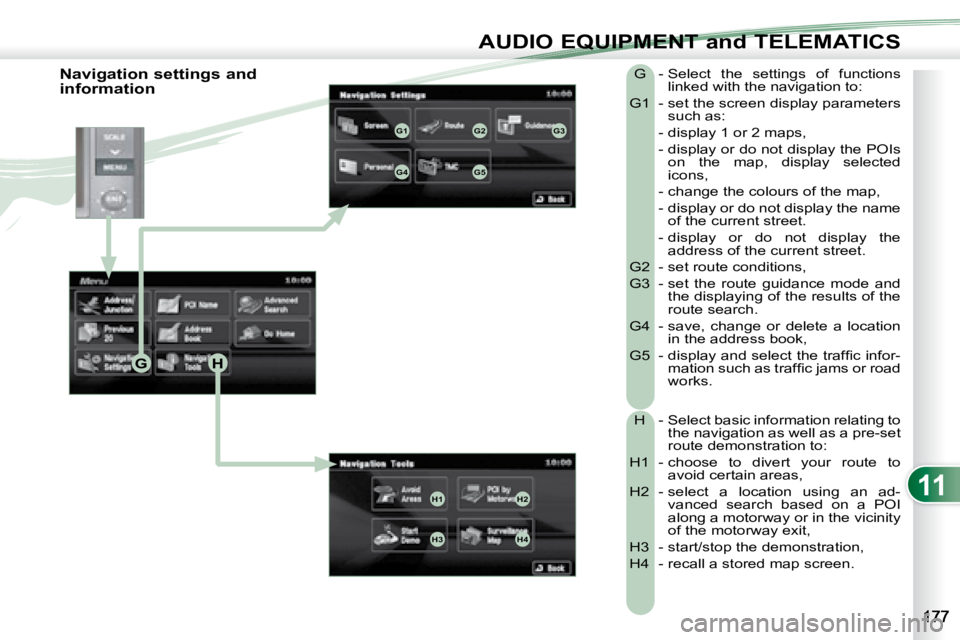
Navigation settings and
information G - Select the settings of functions
linked with the navigation to:
G1 - set the screen display parameters such as:
- display 1 or 2 maps,
- display or do not display the POIs on the map, display selected
icons,
- change the colours of the map,
- display or do not display the name of the current street.
- display or do not display the address of the current street.
G2 - set route conditions,
G3 - set the route guidance mode and the displaying of the results of the
route search.
G4 - save, change or delete a location in the address book,
G5 - display and select the traffi c infor- mation such as traffi c jams or road
works.
H - Select basic information relating to the navigation as well as a pre-set
route demonstration to:
H1 - choose to divert your route to avoid certain areas,
H2 - select a location using an ad- vanced search based on a POI
along a motorway or in the vicinity
of the motorway exit,
H3 - start/stop the demonstration,
H4 - recall a stored map screen.
Page 190 of 226
11
AUDIO EQUIPMENT and TELEMATICS
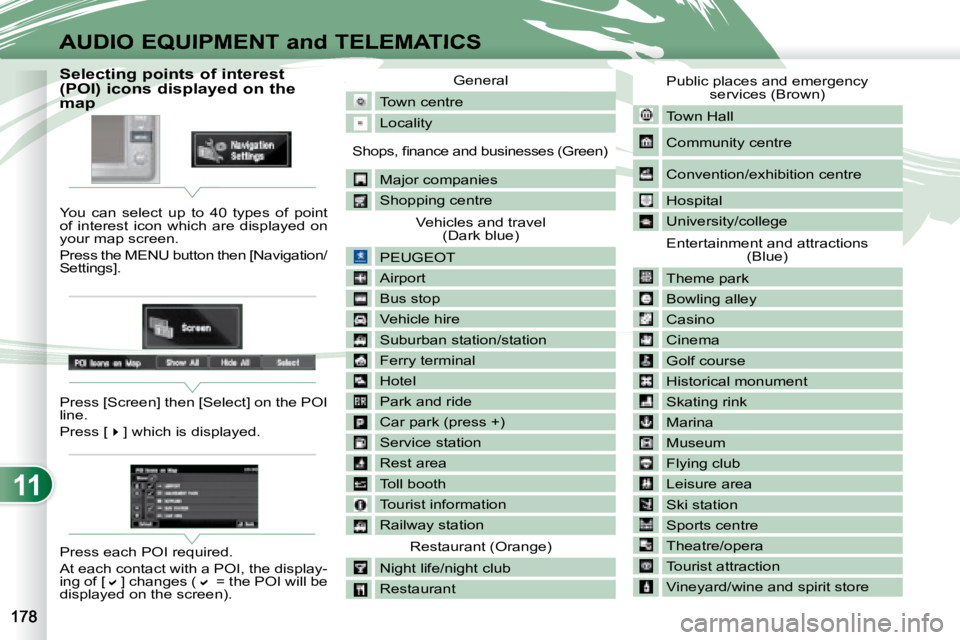
Selecting points of interest
(POI) icons displayed on the
map
You can select up to 40 types of point
of interest icon which are displayed on
your map screen.
Press the MENU button then [Navigation/
Settings].
Press [Screen] then [Select] on the POI
line.
Press [] which is displayed.
Press each POI required.
At each contact with a POI, the display-
ing of [ ] changes ( = the POI will be
displayed on the screen). General
Town centre
Locality
Shops, fi nance and businesses (Green)
Major companies
Shopping centre Vehicles and travel (Dark blue)
PEUGEOT
Airport
Bus stop
Vehicle hire
Suburban station/station
Ferry terminal
Hotel
Park and ride
Car park (press +)
Service station
Rest area
Toll booth
Tourist information
Railway station Restaurant (Orange)
Night life/night club
Restaurant Public places and emergency
services (Brown)
Town Hall
Community centre
Convention/exhibition centre
Hospital
University/college
Entertainment and attractions (Blue)
Theme park
Bowling alley
Casino
Cinema
Golf course
Historical monument
Skating rink
Marina
Museum
Flying club
Leisure area
Ski station
Sports centre
Theatre/opera
Tourist attraction
Vineyard/wine and spirit store
Page 191 of 226
![PEUGEOT 4007 2008 Owners Guide 11
AUDIO EQUIPMENT and TELEMATICS
Press Explanations Result
Press the MENU button.
Press [Address/Junction]. Press [Country] and enter the name of the country using the touch keypad.
When](/img/29/58328/w960_58328-190.png "PEUGEOT 4007 2008 Owners Guide 11
AUDIO EQUIPMENT and TELEMATICS
Press Explanations Result
Press the MENU button.
Press [Address/Junction]. Press [Country] and enter the name of the country using the touch keypad.
When")
11
AUDIO EQUIPMENT and TELEMATICS
Press Explanations Result
Press the MENU button.
Press [Address/Junction]. Press [Country] and enter the name of the country using the touch keypad.
When a character of the name of the country is entered, if 5 countries
or fewer are recognised, you can select a country from a list which is
displayed or press [List].
You can select one of the 5 most recently selected countries by
pressing [Last 5] on the "Country" line.
Press [City] then [Keyword] and enter the name of the city usin g the touch
keypad.
When a character of the name of the city is entered, if 5 ci ties or fewer are
recognised, you can select a city from a list which is displayed or press
[List].
You can select a city using the post code.
Press [Post Code] and enter the number.
You can select one of the 5 most recently selected cities by pressing
[Last 5] on the "City" line.
Entering an address and activating guidance (1/2)
Page 192 of 226
![PEUGEOT 4007 2008 Owners Guide 11
/
AUDIO EQUIPMENT and TELEMATICS
Entering an address and activating guidance (2/2) Press Explanations Result
Press [Street] and enter the name of a street using the touch keypad.
When a](/img/29/58328/w960_58328-191.png "PEUGEOT 4007 2008 Owners Guide 11
/
AUDIO EQUIPMENT and TELEMATICS
Entering an address and activating guidance (2/2) Press Explanations Result
Press [Street] and enter the name of a street using the touch keypad.
When a")
11
/
AUDIO EQUIPMENT and TELEMATICS
Entering an address and activating guidance (2/2) Press Explanations Result
Press [Street] and enter the name of a street using the touch keypad.
When a character of the name of the street is entered, if 5 streets or fewer
are recognised, you can select a street from a list which is displa yed or
press [List].
Press [House #] and enter the number of the house using the touch keypad.
You can enter the name of a junction instead of the numb er
of the street. Press [Junction] and select the name from a
list which is displayed.
This is what you obtain once all of the information has b een entered:
If you agree with the information press [Set], otherwise press one of the
buttons to correct.
Press [Start] to start the navigation.
Page 193 of 226
11
AUDIO EQUIPMENT and TELEMATICS
AUDIO-VIDEO
What is the RDS? RDS station following Traffi c information function
Your radio automatically checks
and selects the best frequency
for the radio station to which it is
tuned (if the station broadcasts on sev-
eral transmitters or frequencies).
The frequency of a radio station covers ap-
proximately 30 miles (50 km). The change
from one frequency to another explains
the loss of reception during a journey.
If the station to which you are listen-
ing does not have several frequencies
in the region in which you are currently
located, you can deactivate the auto-
matic frequency following.
Radio, RDS, AF, REG, TP, PTY
The Radio Data System (RDS) func-
tion on the FM waveband permits:
- tuning to the same station while
travelling through different regions
(if the transmitters of this station
cover the area through which you
are travelling),
- temporary tuning to traffi c informa- tion announcements,
- access to the displaying of the name of the station, etc...
Most FM stations use the RDS.
These stations transmit non-audible
data in addition to their programmes.
The data transmitted in this way allows
you access to various functions, mainly
displaying of the name of the station,
temporary tuning to traffi c information
announcements or automatic station
following.
The RDS allows you to continue listen-
ing to the same station by means of the
frequency following. However, in cer-
tain conditions, this RDS frequency fol-
lowing cannot be provided throughout
the country. Radio stations do not cover
the whole country, which explains the
loss of reception of the station during
a journey. The Traffic Program (TP) function
permits automatic and temporary
switching to an FM station broad-
casting traffi c information.
The radio station or the source that you
are listening to at this point is paused.
Once the traffi c information has ended,
the system switches back to the radio
station or the source that you were lis-
tening to initially.
Regional following mode Some stations are organised in
a network.
In different regions, they broad-
cast different or shared programmes
depending on the time of day.
You can follow:
- a regional station only,
- the entire network, with the possibility that you will be listening to a different
programme. Programme types
Some stations offer the option of
listening to a themed type of pro-
gramme as a priority, selected
from the list available below:
NEWS, AFFAIRS, INFOS, SPORT,
EDUCATE, DRAMA, CULTURE, SCIENCE,VARIED, POP M, ROCK M, EASY
M, LIGHT M, CLASSICS, OTHER M,
WEATHER, FINANCE, CHILDREN,
SOCIAL, RELIGION, PHONE IN, TRAVEL,
LEISURE, JAZZ, COUNTRY, NATION M,
OLDIES, FOLK M, DOCUMENT.
Page 194 of 226
11
ABCDE
G
HIJK
LMN
F
AUDIO EQUIPMENT and TELEMATICS
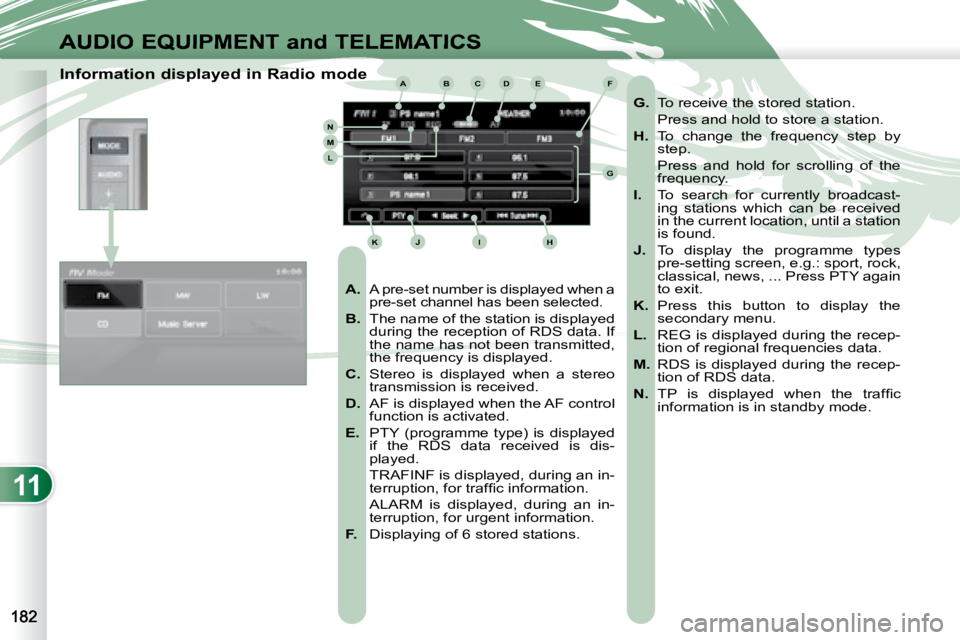
Information displayed in Radio mode
A.
A pre-set number is displayed when a
pre-set channel has been selected.
B. The name of the station is displayed
during the reception of RDS data. If
the name has not been transmitted,
the frequency is displayed.
C. Stereo is displayed when a stereo
transmission is received.
D. AF is displayed when the AF control
function is activated.
E. PTY (programme type) is displayed
if the RDS data received is dis-
played.
TRAFINF is displayed, during an in- terruption, for traffi c information.
ALARM is displayed, during an in- terruption, for urgent information.
F. Displaying of 6 stored stations.
G. To receive the stored station.
Press and hold to store a station.
H. To change the frequency step by
step.
Press and hold for scrolling of the frequency.
I. To search for currently broadcast-
ing stations which can be received
in the current location, until a station
is found.
J. To display the programme types
pre-setting screen, e.g.: sport, rock,
classical, news, ... Press PTY again
to exit.
K. Press this button to display the
secondary menu.
L. REG is displayed during the recep-
tion of regional frequencies data.
M. RDS is displayed during the recep-
tion of RDS data.
N. TP is displayed when the traffi c
information is in standby mode.
Page 195 of 226
![PEUGEOT 4007 2008 Owners Guide 11
AUDIO EQUIPMENT and TELEMATICS
Radio, selecting an FM station and storing Press the MODE button.
Press
Explanations Result
You can select [ Seek] or [Seek ] to](/img/29/58328/w960_58328-194.png "PEUGEOT 4007 2008 Owners Guide 11
AUDIO EQUIPMENT and TELEMATICS
Radio, selecting an FM station and storing Press the MODE button.
Press
Explanations Result
You can select [ Seek] or [Seek ] to")
11
AUDIO EQUIPMENT and TELEMATICS
Radio, selecting an FM station and storing Press the MODE button.
Press
Explanations Result
You can select [ Seek] or [Seek ] to start a continuous
search until the stations which can be received in the current
location are detected.
Press FM. By default the display shows the FM1 stations.
Press [
Tune] to decrease the frequency or [Tune ] to increase the
frequency. The frequency is changed in steps of 0.1 MHz.
Continue to press to tune to a station automatically.
Once the frequency has been selected, a maintained press on t he station
(e.g. 3) will store it.
The name of the station (e.g. PS name 1) is displayed if it is available.
You can start automatic storing on FM3 for 6 stations, which
can be received in the current location, by pressing [^] then
[Auto-Store]. You can also start a search by type of programme by pressing
[PTY].
Page 196 of 226
![PEUGEOT 4007 2008 Owners Guide 11
AUDIO EQUIPMENT and TELEMATICS
Radio, RDS settings Press Explanations Result
Press the MODE button.
Press FM. By default the display shows the stations on FM1.
Press [^].
Press [R](/img/29/58328/w960_58328-195.png "PEUGEOT 4007 2008 Owners Guide 11
AUDIO EQUIPMENT and TELEMATICS
Radio, RDS settings Press Explanations Result
Press the MODE button.
Press FM. By default the display shows the stations on FM1.
Press [^].
Press [R")
11
AUDIO EQUIPMENT and TELEMATICS
Radio, RDS settings Press Explanations Result
Press the MODE button.
Press FM. By default the display shows the stations on FM1.
Press [^].
Press [RDS Settings].
Press [On] or [Off] to activate or deactivate the functions:
- AF: automatic search for the best frequency,
- REG: switch to the regional frequencies,
- TP: automatic selection of stations broadcasting traffi c in formation.
Page 197 of 226
11
AUDIO EQUIPMENT and TELEMATICS
General notes on CDs
Playing an audio CD When the audio CD is
inserted in the player,
playing of the tracks is
automatic and they can
be recorded onto the
hard disc.
Simultaneous access to the music rec-
ognition service "Gracenote CDDB" on
the hard disc permits displaying of the
title information. Switching off the engine or removing
the CD during recording will result in the
tracks being faulty.
The operation of the navigation system
may slow down during recording.
The recording speed may be slower
than 4x due to the processing load on
the equipment or the condition of the
audio CD.
If jumps or other errors occur, return to
the beginning of the track and start the
recording again.
Even if there is no gap between the
tracks on the CD, a brief silence be-
tween tracks is stored on the hard disc. What is the Gracenote CDDB?
The title information for the
track currently being played
can be obtained from the
"Gracenote CDDB" database
stored on the hard disc.
The Gracenote company uses
this standard to identify the music and
the associated information such as:
- the title of the album,
- the name of the artist,
- the title of the tracks,
- the genre, ...
For further details, consult the site:
www.gracenote.com.
The Gracenote CDDB database incorpo-
rated in this equipment cannot guarantee
the content of the data 100 %. You can
update this database using a DVD sold
separately.
Copyright
Your Audio equipment may allow you
to listen to music which is usually pro-
tected by copyright in accordance with
current national and international stand-
ards. Please consult these standards
and comply with them.
Recording onto the music server
The tracks of audio CDs (not
MP3/WMA) can be recorded
onto the hard disc at approximately 4x
speed (e.g.: 60 minutes converted to
15 minutes) and stored on the music
server.
The sounds recorded may be altered
by the noise present and the quality of
the sound may differ from the original.
The tracks recorded on the music server
cannot be reproduced on another medium
(CD-R/RW, HDD, etc...).
Previously recorded tracks cannot be
recorded again from the same CD.
Page 198 of 226
11
ABC
DE
F
GHI
J
K
L
M
AUDIO EQUIPMENT and TELEMATICS
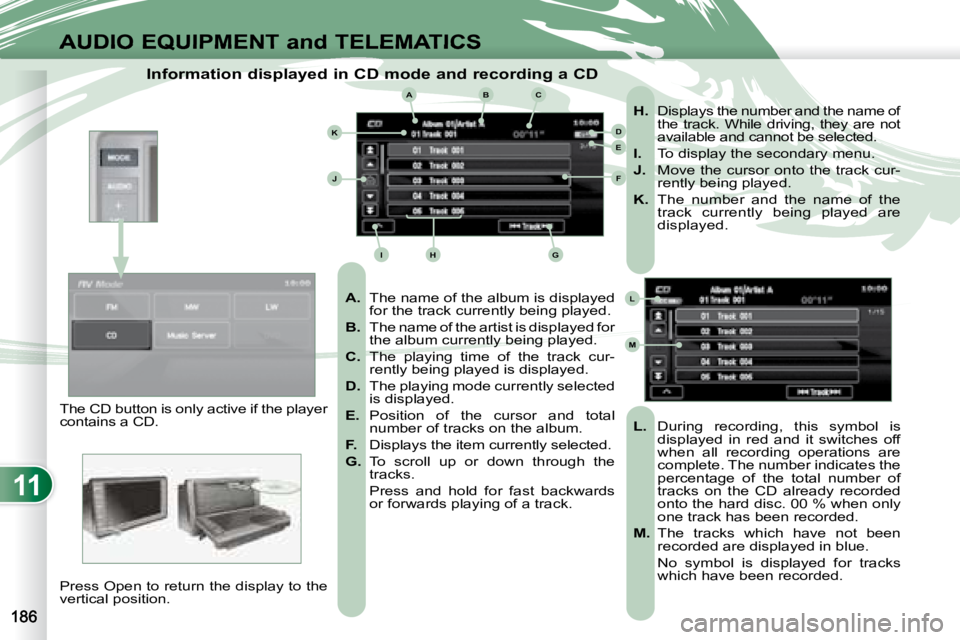
Information displayed in CD mode and recording a CD
A. The name of the album is displayed
for the track currently being played.
B. The name of the artist is displayed for
the album currently being played.
C. The playing time of the track cur-
rently being played is displayed.
D. The playing mode currently selected
is displayed.
E. Position of the cursor and total
number of tracks on the album.
F. Displays the item currently selected.
G. To scroll up or down through the
tracks.
Press and hold for fast backwards or forwards playing of a track.
H. Displays the number and the name of
the track. While driving, they are not
available and cannot be selected.
I. To display the secondary menu.
J. Move the cursor onto the track cur-
rently being played.
K. The number and the name of the
track currently being played are
displayed.
L. During recording, this symbol is
displayed in red and it switches off
when all recording operations are
complete. The number indicates the
percentage of the total number of
tracks on the CD already recorded
onto the hard disc. 00 % when only
one track has been recorded.
M. The tracks which have not been
recorded are displayed in blue.
No symbol is displayed for tracks which have been recorded.
The CD button is only active if the player
contains a CD.
Press Open to return the display to the
vertical position.