brake PEUGEOT 4008 2014 Owner's Manual
[x] Cancel search | Manufacturer: PEUGEOT, Model Year: 2014, Model line: 4008, Model: PEUGEOT 4008 2014Pages: 368, PDF Size: 20.33 MB
Page 128 of 368
126
Driving
Cruise control
System which automatically maintains the vehicle speed at the value programmed by the driver, without any action on the accelerator pedal.
The cruise control is switched on
manually:
the vehicle speed must be at least 25 mph
(40 km/h) and second gear or higher must be
engaged in the case of a manual gearbox.
The cruise control is switched off
manually, by
an action on the brake or clutch pedal or if the
ASC system is triggered.
The programmed speed can be exceeded
temporarily by pressing the accelerator pedal.
The cruise control cannot, in any
circumstances, take the place of the
need to comply with speed limits or of the
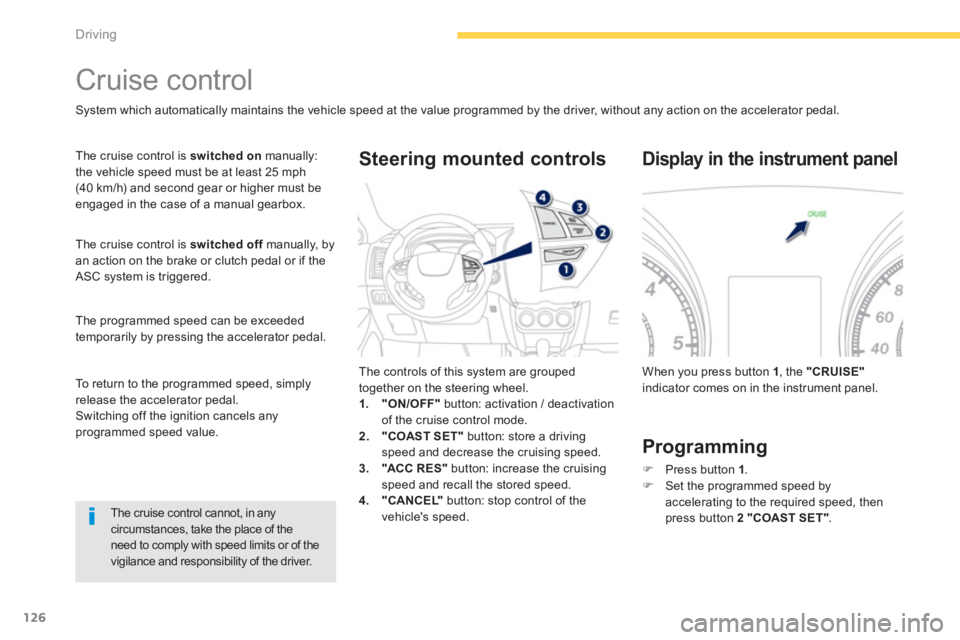
vigilance and responsibility of the driver. The controls of this system are grouped
together on the steering wheel.
1.
"ON/OFF"
button: activation / deactivation
of the cruise control mode.
2.
"COAST SET"
button: store a driving
speed and decrease the cruising speed.
3.
"ACC R ES "
button: increase the cruising
speed and recall the stored speed.
4.
"CANCEL"
button: stop control of the
vehicle's speed.
Steering mounted controls
When you press button 1
, the "CRUISE"
indicator comes on in the instrument panel.
Display in the instrument panel
Programming
)
Press button 1
.
)
Set the programmed speed by
accelerating to the required speed, then
press button 2 "COAST SET"
.
To return to the programmed speed, simply
release the accelerator pedal.
Switching off the ignition cancels any
programmed speed value.
Page 129 of 368
127
4
Driving
Increasing the programmed
speed
Decreasing the
programmed speed
Temporary acceleration/
deceleration
Temporary acceleration
Press the accelerator pedal as normal. When
the pedal is released, you return to the stored
speed.
)
Using button 2 "COAST SET"
:
- successive presses decrease the speed in
steps of approximately 1 mph (1.6 km/h).
- a maintained press of this button
decreases the speed progressively.
Once the speed required has been reached,
release the button, the new speed is stored.
)
Using the brake pedal:
- brake to deactivate the cruise control, then
press button 2 "COAST SET"
. Release to
store the new speed.
)
Using button 3 "ACC RES"
:
- successive presses increase the speed in
steps of approximately 1 mph (1.6 km/h).
- a maintained press of this button increases
the programmed speed progressively.
Once the speed required has been reached,
release the button, the new speed is stored.
)
Using the accelerator pedal:
- accelerate to reach the speed required,
then press button 2 "COAST SET"
.
Release the button to store the new speed.
Temporary deceleration
Press the brake pedal to reduce the speed.
To return to the stored speed, press button 3
"ACC R ES "
.
Page 130 of 368
128
Driving
When the cruise control is in operation,
pay attention if you press and hold one
of the programmed speed adjustment
buttons: this can result in a very rapid
change in the speed of your vehicle.
Do not use the cruise control on
slippery roads or in heavy traffic.
On a steep descent, the cruise control
will not be able to prevent the vehicle
from exceeding the programmed speed.
To prevent the mat from becoming
caught under the pedals:
- ensure that the mat is positioned
correctly,
- never fit one mat on top of another.
To deactivate the cruise control:
)
press the brake
or clutch
pedal, or
)
press button 1 "ON OFF"
, or
)
press button 4 "CANCEL"
.
Deactivating the function
Reactivating the function
When the cruise control has been deactivated
using the button 4 "CANCEL"
, you can return
to the stored speed by pressing button 3 "ACC
RES"
when you reach a minimum speed of
25 mph (40 km/h).
The cruise control may be deactivated
automatically:
)
when the vehicle reaches a speed below
20 mph (35 km/h),
)
when the active stability control system
(ASC) comes into operation.
Page 150 of 368
148
Safety
Group of supplementary systems which help
you to obtain optimum braking in complete
safety in emergency situations:
- anti-lock braking system (ABS),
- electronic brake force distribution (EBFD).
Braking assistance systems
Anti-lock braking system
and electronic brake force
distribution
Linked systems which improve the stability and
manoeuvrability of your vehicle when braking,
in particular on poor or slippery sur faces.
Activation
The anti-lock braking system is active if the
vehicle speed is higher than 6 mph (10 km/h).
It is deactivated when the vehicle speed falls
below 3 mph (5 km/h).
The anti-lock braking system comes into
operation automatically when there is a risk of
wheel lock.
Normal operation of the ABS may make itself
felt by slight vibration of the brake pedal.
Operating fault
When the vehicle is stationary
If this warning lamp comes on, accompanied by
the indication on the instrument panel screen, it
indicates a malfunction of the anti-lock braking
system which could result in a loss of control of
the vehicle when braking.
The vehicle retains normal braking.
Drive carefully at moderate speed and contact
a PEUGEOT dealer or a qualified workshop as
soon as possible.
When braking in an emergency, press
very firmly without releasing the
pressure. The warning lamp comes on for a few
seconds when the ignition is switched on
(ON position). If it does not switch off or
does not come on, contact a PEUGEOT
dealer or a qualified workshop.
Page 151 of 368
149
6
Safety
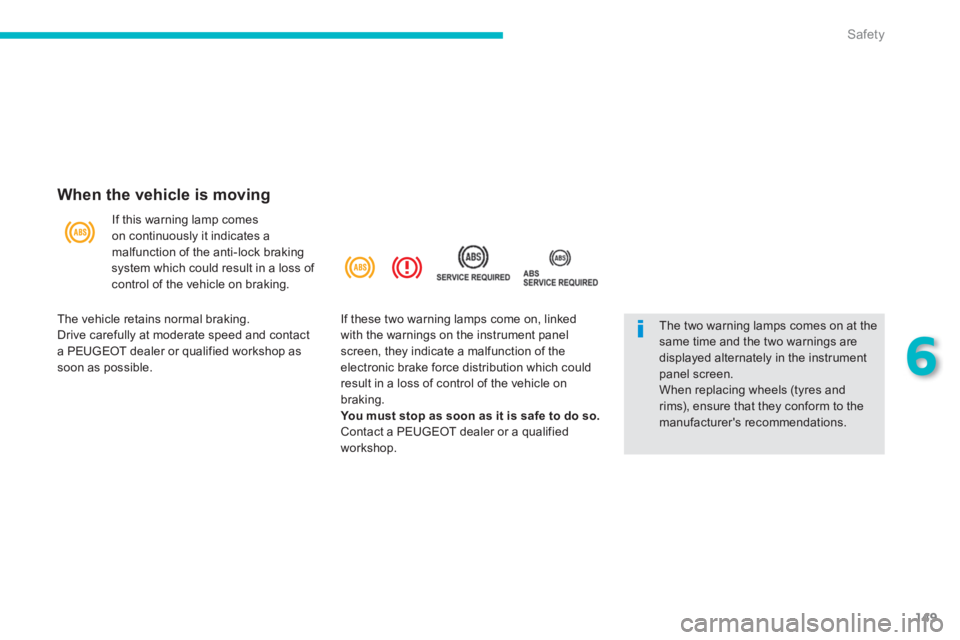
When the vehicle is moving
If this warning lamp comes
on continuously it indicates a
malfunction of the anti-lock braking
system which could result in a loss of
control of the vehicle on braking.
The two warning lamps comes on at the
same time and the two warnings are
displayed alternately in the instrument
panel screen.
When replacing wheels (tyres and
rims), ensure that they conform to the
manufacturer's recommendations.
The vehicle retains normal braking.
Drive carefully at moderate speed and contact
a PEUGEOT dealer or qualified workshop as
soon as possible. If these two warning lamps come on, linked
with the warnings on the instrument panel
screen, they indicate a malfunction of the
electronic brake force distribution which could
result in a loss of control of the vehicle on
braking.
You must stop as soon as it is safe to do so.
Contact a PEUGEOT dealer or a qualified
workshop.
Page 152 of 368
150
Safety
Associated systems which guarantee the directional stability of the vehicle within the limits of the laws of physics:
- traction control (TCL),
- active stability control (ASC).
Traction control and active stability control
Traction control optimises traction to prevent
wheel spin, by acting on the brakes of the
driving wheels and on the engine.
Active stability control acts on the brake of one
or more wheels and on the engine to keep the
vehicle on the trajectory required by the driver.
Activation
These systems are activated automatically
each time the vehicle is started.
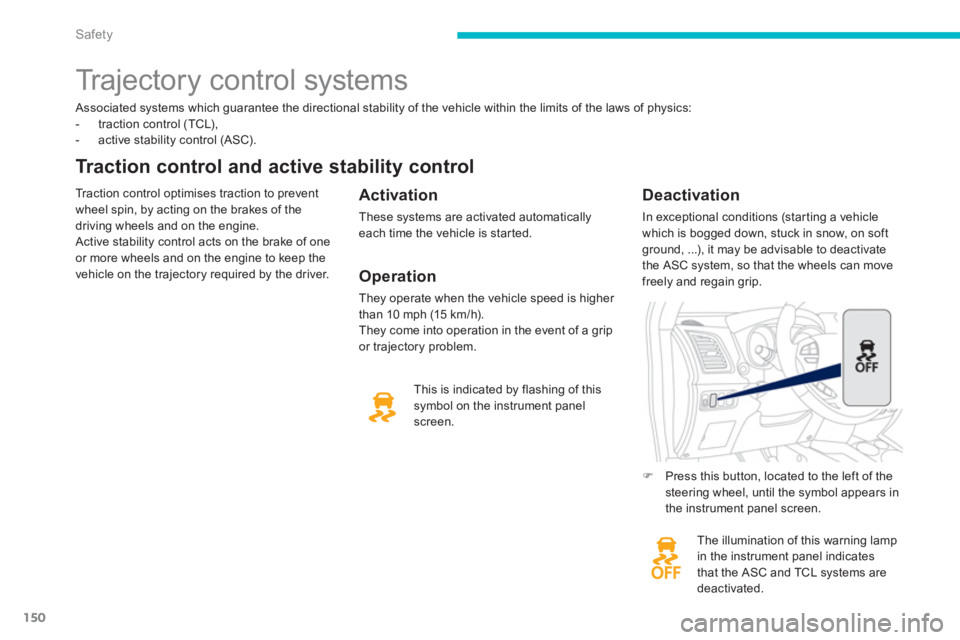
The illumination of this warning lamp
in the instrument panel indicates
that the ASC and TCL systems are
deactivated.
Deactivation
In exceptional conditions (starting a vehicle
which is bogged down, stuck in snow, on soft
ground, ...), it may be advisable to deactivate
the ASC system, so that the wheels can move
freely and regain grip.
This is indicated by flashing of this
symbol on the instrument panel
screen.
Trajectory control systems
)
Press this button, located to the left of the
steering wheel, until the symbol appears in
the instrument panel screen.
Operation
They operate when the vehicle speed is higher
than 10 mph (15 km/h).
They come into operation in the event of a grip
or trajectory problem.
Page 180 of 368
178
Practical information
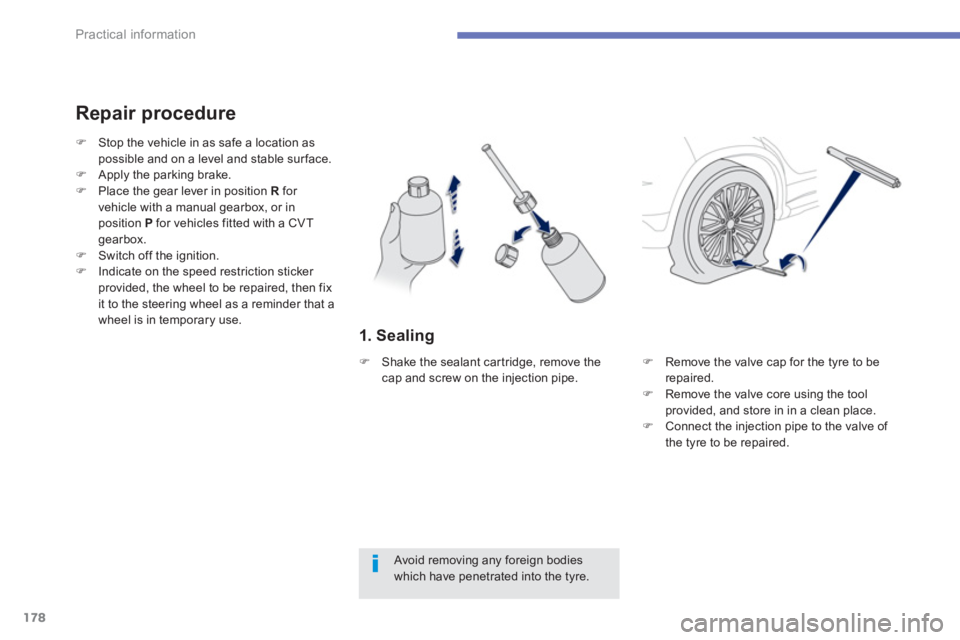
1. Sealing
Repair procedure
Avoid removing any foreign bodies
which have penetrated into the tyre.
)
Stop the vehicle in as safe a location as
possible and on a level and stable sur face.
)
Apply the parking brake.
)
Place the gear lever in position R
for
vehicle with a manual gearbox, or in
position P
for vehicles fitted with a CVT
gearbox.
)
Switch off the ignition.
)
Indicate on the speed restriction sticker
provided, the wheel to be repaired, then fix
it to the steering wheel as a reminder that a
wheel is in temporary use.
)
Remove the valve cap for the tyre to be
repaired.
)
Remove the valve core using the tool
provided, and store in in a clean place.
)
Connect the injection pipe to the valve of
the tyre to be repaired.
)
Shake the sealant cartridge, remove the
cap and screw on the injection pipe.
Page 185 of 368
183
7
Practical information
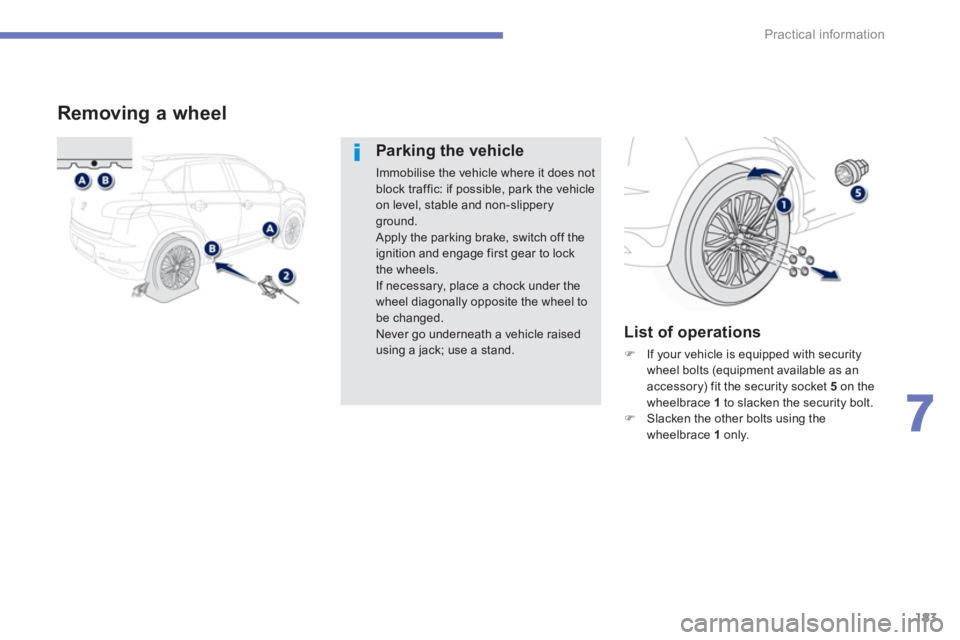
Removing a wheel
Parking the vehicle
Immobilise the vehicle where it does not
block traffic: if possible, park the vehicle
on level, stable and non-slippery
ground.
Apply the parking brake, switch off the
ignition and engage first gear to lock
the wheels.
If necessary, place a chock under the
wheel diagonally opposite the wheel to
be changed.
Never go underneath a vehicle raised
using a jack; use a stand.
List of operations
)
If your vehicle is equipped with security
wheel bolts (equipment available as an
accessory) fit the security socket 5
on the
wheelbrace 1
to slacken the security bolt.
)
Slacken the other bolts using the
wheelbrace 1
only.
Page 189 of 368
187
7
Practical information
For more information on snow chains,
contact a PEUGEOT dealer or a
qualified workshop.
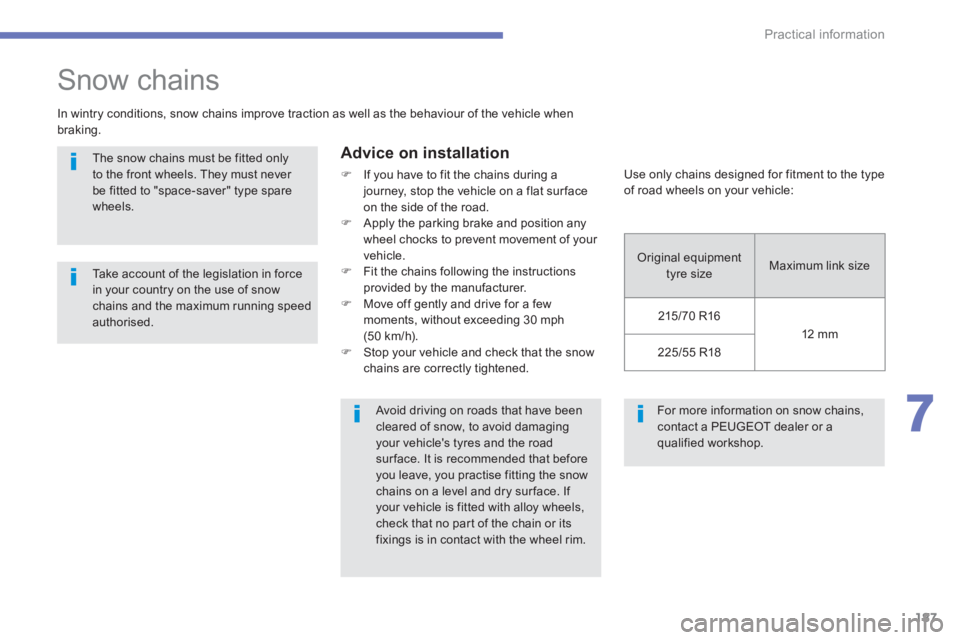
Snow chains
In wintry conditions, snow chains improve traction as well as the behaviour of the vehicle when
braking.
Advice on installation
)
If you have to fit the chains during a
journey, stop the vehicle on a flat sur face
on the side of the road.
)
Apply the parking brake and position any
wheel chocks to prevent movement of your
vehicle.
)
Fit the chains following the instructions
provided by the manufacturer.
)
Move off gently and drive for a few
moments, without exceeding 30 mph
(50 km/h).
)
Stop your vehicle and check that the snow
chains are correctly tightened.
The snow chains must be fitted only
to the front wheels. They must never
be fitted to "space-saver" type spare
wheels.
Take account of the legislation in force
in your country on the use of snow
chains and the maximum running speed
authorised.
Avoid driving on roads that have been
cleared of snow, to avoid damaging
your vehicle's tyres and the road
sur face. It is recommended that before
you leave, you practise fitting the snow
chains on a level and dry sur face. If
your vehicle is fitted with alloy wheels,
check that no part of the chain or its
fixings is in contact with the wheel rim.
Use only chains designed for fitment to the type
of road wheels on your vehicle:
Original equipment
tyre size Maximum link size
215/70 R16
12 mm
225/55 R18
Page 194 of 368
192
Practical information
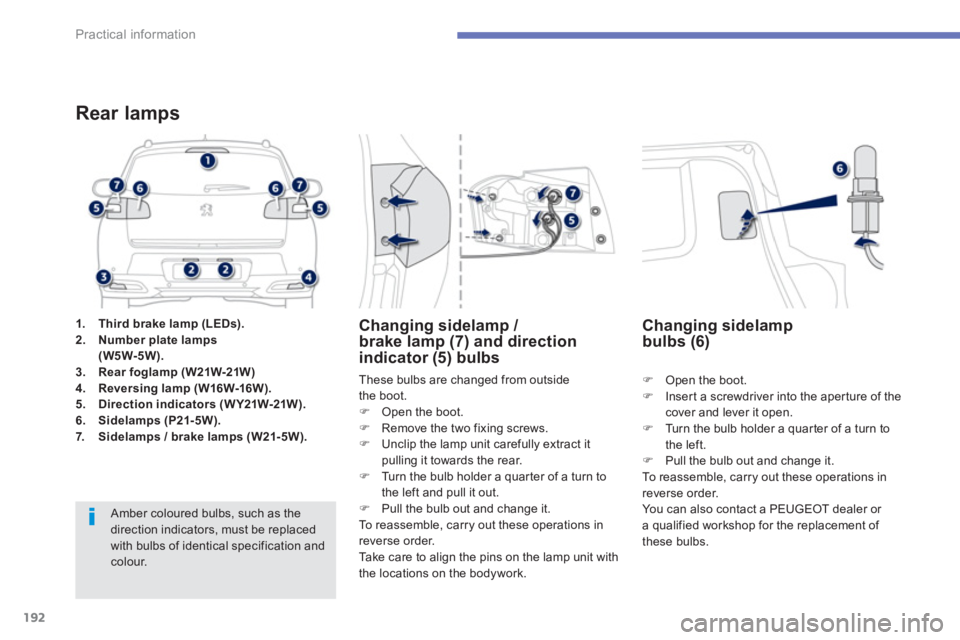
1.
Third brake lamp (LEDs).
2.
Number plate lamps
(W5W-5W).
3.
Rear foglamp (W21W-21W)
4.
Reversing lamp ( W16W-16W ).
5.
Direction indicators ( W Y21W-21W ).
6.
Sidelamps (P21- 5W).
7.
Sidelamps / brake lamps (W21- 5W).
Rear lamps
Amber coloured bulbs, such as the
direction indicators, must be replaced
with bulbs of identical specification and
colour.
These bulbs are changed from outside
the boot.
)
Open the boot.
)
Remove the two fixing screws.
)
Unclip the lamp unit carefully extract it
pulling it towards the rear.
)
Turn the bulb holder a quarter of a turn to
the left and pull it out.
)
Pull the bulb out and change it.
To reassemble, carry out these operations in
reverse order.
Take care to align the pins on the lamp unit with
the locations on the bodywork.
Changing sidelamp /
brake lamp (7) and direction
indicator (5) bulbs
)
Open the boot.
)
Insert a screwdriver into the aperture of the
cover and lever it open.
)
Turn the bulb holder a quarter of a turn to
the left.
)
Pull the bulb out and change it.
To reassemble, carry out these operations in
reverse order.
You can also contact a PEUGEOT dealer or
a qualified workshop for the replacement of
these bulbs.
Changing sidelamp
bulbs (6)