instrument panel PEUGEOT 5008 2012 Owner's Manual
[x] Cancel search | Manufacturer: PEUGEOT, Model Year: 2012, Model line: 5008, Model: PEUGEOT 5008 2012Pages: 340, PDF Size: 16.42 MB
Page 133 of 340
SA
F
131
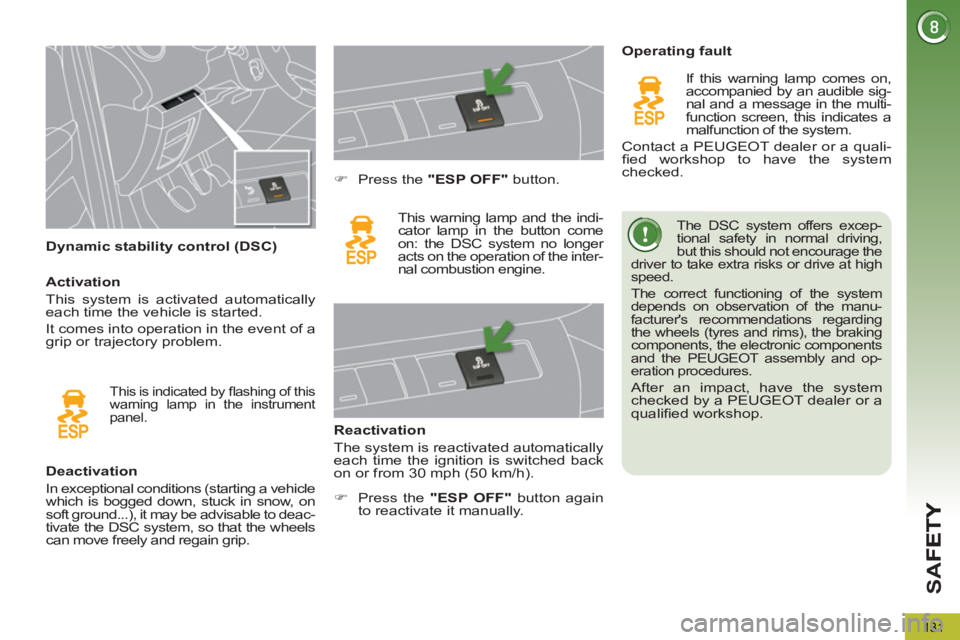
Dynamic stability control (DSC)
The DSC system offers excep-
tional safety in normal driving,
but this should not encourage the
driver to take extra risks or drive at high
speed.
The correct functioning of the system
depends on observation of the manu-
facturer's recommendations regarding
the wheels (tyres and rims), the braking
components, the electronic components
and the PEUGEOT assembly and op-
eration procedures.
After an impact, have the system
checked by a PEUGEOT dealer or a
qualifi ed workshop.
Deactivation
In exceptional conditions (starting a vehicle
which is bogged down, stuck in snow, on
soft ground...), it may be advisable to deac-
tivate the DSC system, so that the wheels
can move freely and regain grip.
)
Press the "ESP OFF"
button.
This warning lamp and the indi-
cator lamp in the button come
on: the DSC system no longer
acts on the operation of the inter-
nal combustion engine.
Reactivation
The system is reactivated automatically
each time the ignition is switched back
on or from 30 mph (50 km/h).
Operating fault
If this warning lamp comes on,
accompanied by an audible sig-
nal and a message in the multi-
function screen, this indicates a
malfunction of the system.
Contact a PEUGEOT dealer or a quali-
fi ed workshop to have the system
checked.
This is indicated by fl ashing of this
warning lamp in the instrument
panel.
Activation
This system is activated automatically
each time the vehicle is started.
It comes into operation in the event of a
grip or trajectory problem.
)
Press the "ESP OFF"
button again
to reactivate it manually.
Page 139 of 340
SA
F
137
If even one of the two airbag
warning lamps comes on con-
tinuously, do not install a child
seat on the front passenger seat.
Have the system checked by a PEUGEOT
dealer or a qualifi ed workshop.
Operating fault
If this warning lamp comes
on in the instrument panel,
accompanied by an audible
warning and a message in the
screen, contact a PEUGEOT
dealer or a qualifi ed workshop to have
the system checked. The airbags may
no longer be deployed in the event of a
serious impact.
Reactivation
When you remove the child seat, turn
the switch to the "ON"
position to re-
activate the airbag and so assure the
safety of your front passenger in the
event of an impact.
With the ignition on, this warning
lamp comes on in the seat belt and
passenger's front airbag warning
lamps display for approximately
one minute, if the passenger's front
airbag is activated.
To assure the safety of your
child, the passenger's front
airbag must be deactivated
when you install a "rear facing" child
seat on the front passenger seat.
Otherwise, the child would risk being
seriously injured or killed if the airbag
were deployed.
According to version, this
warning lamp comes on in
the instrument panel and/or in
the seat belt and passenger's
front airbag warning lamps
display when the ignition is on and until
the airbag is reactivated. If this warning lamp fl ashes in
the instrument panel and/or in
the seat belt and passenger's
front airbag warning lamps
display, contact a PEUGEOT
dealer or a qualifi ed workshop. The
passenger's front airbag may no longer
be deployed in the event of a serious
impact.
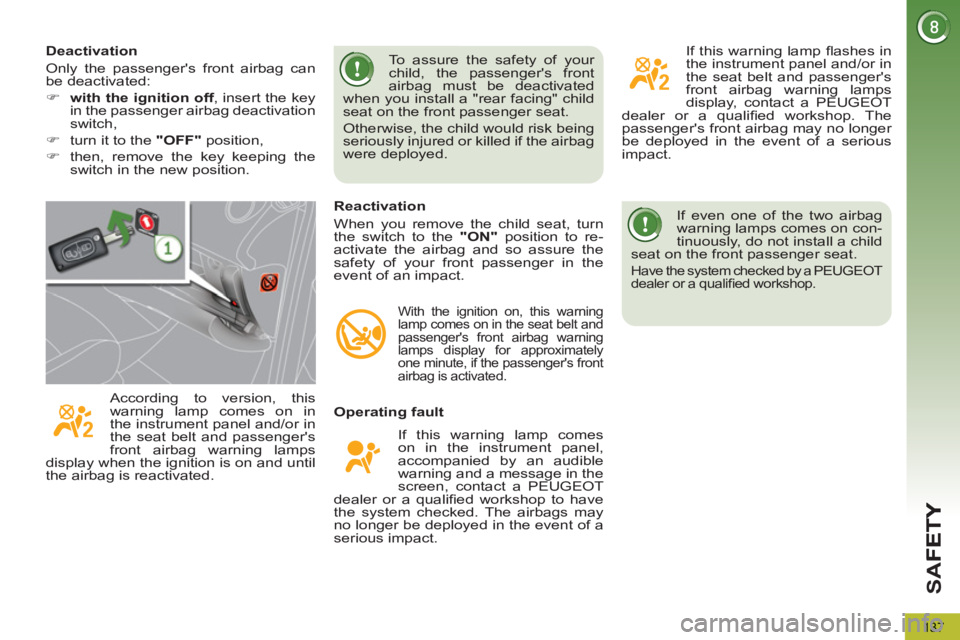
Deactivation
Only the passenger's front airbag can
be deactivated:
)
with the ignition off
, insert the key
in the passenger airbag deactivation
switch,
)
turn it to the "OFF"
position,
)
then, remove the key keeping the
switch in the new position.
Page 140 of 340
SA
F
138
Lateral airbags
System which protects the driver and front
passenger in the event of a serious side
impact in order to limit the risk of injury to
the chest.
Each lateral airbag is fi tted in the front, in
the outer side of the seat back frame.
Deployment
The lateral airbags are deployed unilater-
ally in the event of a serious side impact
applied to all or part of the side impact
zone B
, perpendicular to the longitudinal
centreline of the vehicle on a horizontal
plane and directed from the outside to-
wards the inside of the vehicle.
Curtain airbags
System which protects the driver and
passengers (with the exception of the
rear centre passenger) in the event of a
serious side impact in order to limit the
risk of injury to the side of the head.
Each curtain airbag is built into the pillars
and the upper passenger compartment
area.
Operating fault
Deployment
The curtain airbag is deployed at the same
time as the corresponding lateral airbag in
the event of a serious side impact applied
to all or part of the side impact zone B
, per-
pendicular to the longitudinal centreline of
the vehicle on a horizontal plane and di-
rected from the outside towards the inside
of the vehicle.
The curtain airbag infl ates between the
front or rear occupant of the vehicle and
the windows.
In the event of a minor impact
or bump on the side of the
vehicle or if the vehicle rolls
over, the airbag may not be
deployed.
In the event of a rear or front collision,
the airbag is not deployed.
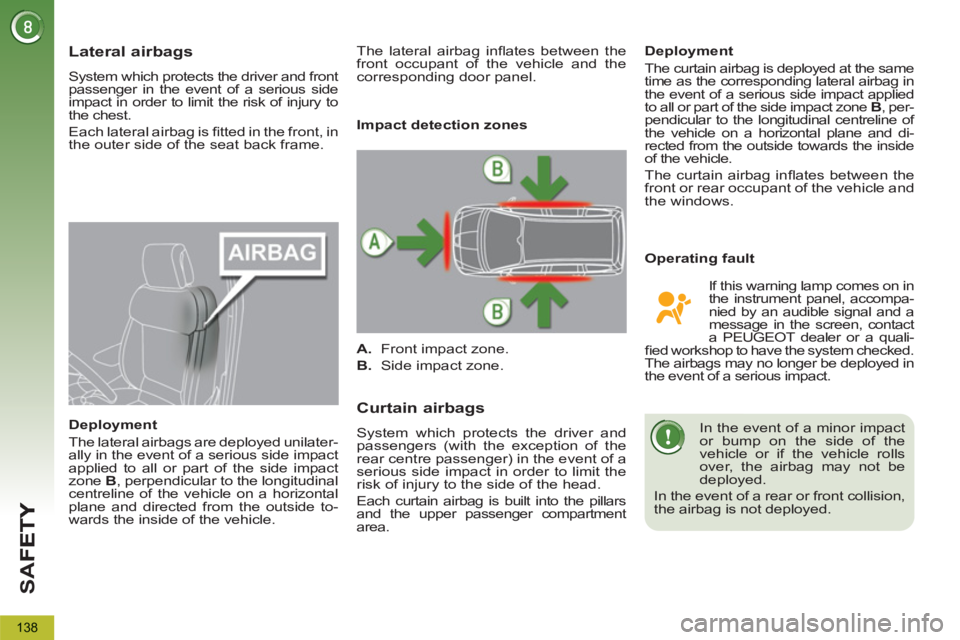
Impact detection zones
A.
Front impact zone.
B.
Side impact zone.
If this warning lamp comes on in
the instrument panel, accompa-
nied by an audible signal and a
message in the screen, contact
a PEUGEOT dealer or a quali-
fi ed workshop to have the system checked.
The airbags may no longer be deployed in
the event of a serious impact. The lateral airbag infl ates between the
front occupant of the vehicle and the
corresponding door panel.
Page 142 of 340
140
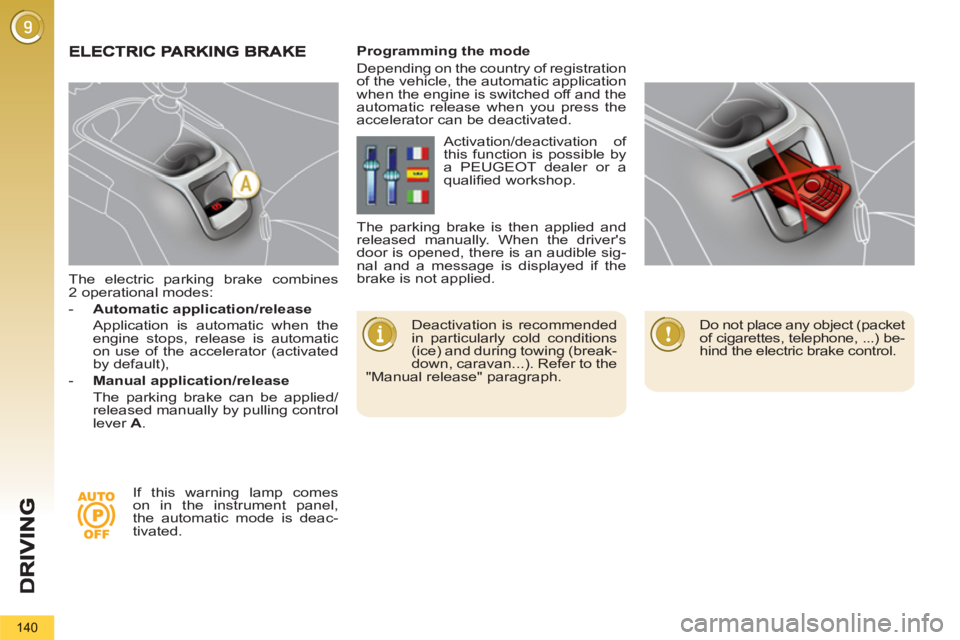
The electric parking brake combines
2 operational modes:
- Automatic application/release
Application is automatic when the
engine stops, release is automatic
on use of the accelerator (activated
by default),
- Manual application/release
The parking brake can be applied/
released manually by pulling control
lever A
.
Deactivation is recommended
in particularly cold conditions
(ice) and during towing (break-
down, caravan...). Refer to the
"Manual release" paragraph.
Programming the mode
Depending on the country of registration
of the vehicle, the automatic application
when the engine is switched off and the
automatic release when you press the
accelerator can be deactivated.
If this warning lamp comes
on in the instrument panel,
the automatic mode is deac-
tivated. Activation/deactivation of
this function is possible by
a PEUGEOT dealer or a
qualifi ed workshop.
The parking brake is then applied and
released manually. When the driver's
door is opened, there is an audible sig-
nal and a message is displayed if the
brake is not applied.
Do not place any object (packet
of cigarettes, telephone, ...) be-
hind the electric brake control.
Page 143 of 340
D
R
141
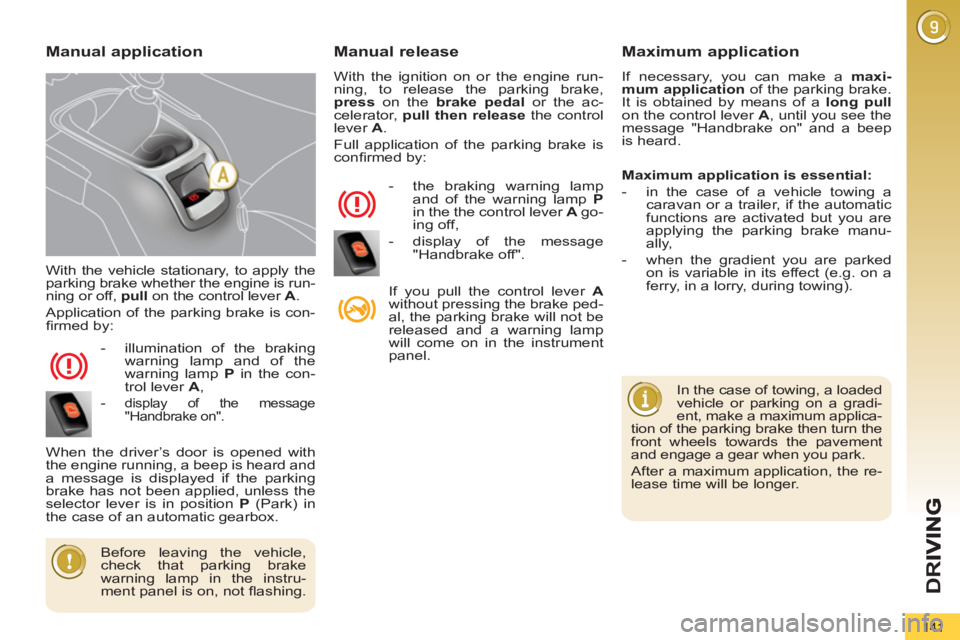
With the vehicle stationary, to apply the
parking brake whether the engine is run-
ning or off, pull
on the control lever A
.
Application of the parking brake is con-
fi rmed by:
- illumination of the braking
warning lamp and of the
warning lamp P
in the con-
trol lever A
,
-
display of the message
"Handbrake on".
When the driver’s door is opened with
the engine running, a beep is heard and
a message is displayed if the parking
brake has not been applied, unless the
selector lever is in position P
(Park) in
the case of an automatic gearbox.
Manual release
With the ignition on or the engine run-
ning, to release the parking brake,
press
on the brake
pedal
or the ac-
celerator, pull then release
the control
lever A
.
Full application of the parking brake is
confi rmed by:
- the braking warning lamp
and of the warning lamp P
in the the control lever A
go-
ing off,
- display of the message
"Handbrake off".
If you pull the control lever A
without pressing the brake ped-
al, the parking brake will not be
released and a warning lamp
will come on in the instrument
panel.
Manual applicationMaximum application
If necessary, you can make a maxi-
mum application
of the parking brake.
It is obtained by means of a long pull
on the control lever A
, until you see the
message "Handbrake on" and a beep
is heard.
In the case of towing, a loaded
vehicle or parking on a gradi-
ent, make a maximum applica-
tion of the parking brake then turn the
front wheels towards the pavement
and engage a gear when you park.
After a maximum application, the re-
lease time will be longer.
Before leaving the vehicle,
check that parking brake
warning lamp in the instru-
ment panel is on, not fl ashing.
Maximum application is essential:
- in the case of a vehicle towing a
caravan or a trailer, if the automatic
functions are activated but you are
applying the parking brake manu-
ally,
- when the gradient you are parked
on is variable in its effect (e.g. on a
ferry, in a lorry, during towing).
Page 144 of 340
D
R
I
142
Automatic application,engine off
With the vehicle stationary, the parking
brake is automatically applied when
the engine is switched off.
The application of the parking brake is
confi rmed by:
-
illumination of the braking warn-
ing lamp and of the warning
lamp P
in the control lever A
,
- display of the message
"Handbrake on".
Automatic release
The electric parking brake releases au-
tomatically and progressively
when
you press the accelerator:
)
Manual gearbox:
press down fully
on the clutch pedal, engage fi rst
gear or reverse, press on the accel-
erator pedal and move off.
)
Electronic gear control gearbox
:
select position A
, M
or R
then press
on the accelerator pedal.
)
Automatic gearbox:
select position
D
, M
or R
then press on the accel-
erator pedal.
Before leaving the vehicle,
check that parking brake
warning lamp in the instrument
panel is on (not fl ashing).
Never leave a child alone inside the
vehicle with the ignition on, as they
could release the parking brake.
- the braking warning lamp
and of the warning lamp P
in
the control lever A
going off,
- display of the message
"Handbrake off". An audible signal will confi rm to you
the application/release of your electric
parking brake.
Full release of the parking brake is con-
fi rmed by: engine running
With the engine running and the vehicle
stationary, in order to immobilise the ve-
hicle it is essential to manually
apply
the parking brake by pulling
on control
lever A
.
The application of the parking brake is
confi rmed by:
-
illumination of the braking
warning lamp and the warning
lamp P
in the control lever A
,
- display of the message
"Handbrake on".
When the driver’s door is opened, an
audible signal heard and a message is
displayed if the parking brake has not
been applied, unless the selector lever
is in position P
(Park) in the case of an
automatic gearbox.
Before leaving the vehicle,
check that parking brake
warning lamp in the instru-
ment panel is on, not fl ashing.
When stationary, with the en-
gine running, do not press the
accelerator pedal unneces-
sarily, as you may release the
parking brake.
In the case of towing, a loaded vehi-
cle or parking on a gradient, turn the
front wheels towards the pavement
and engage a gear when you park.
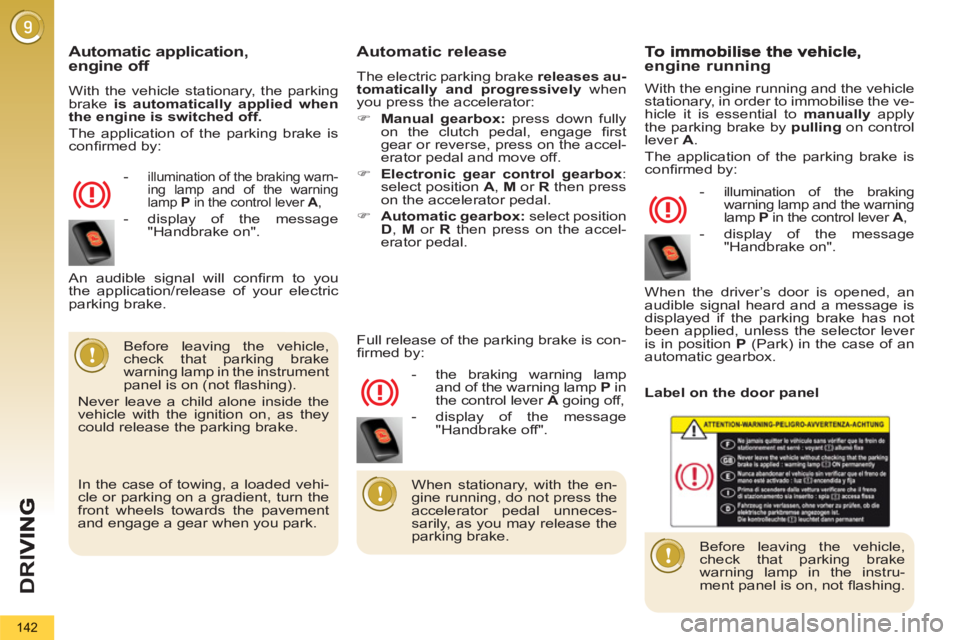
Label on the door panel
Page 154 of 340
D
R
I
152
SPEED LIMITER
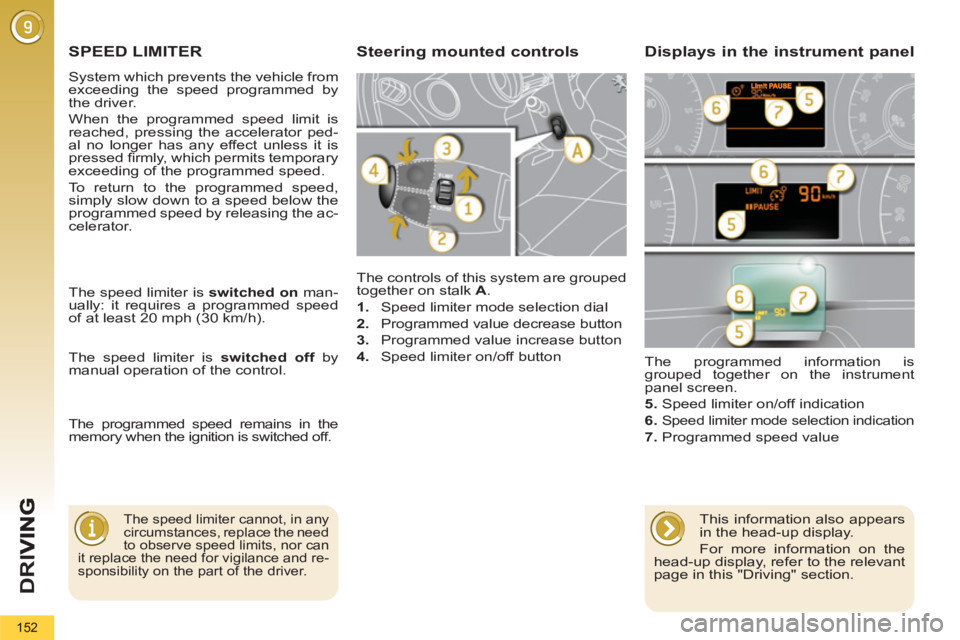
The controls of this system are grouped
together on stalk A
.
1.
Speed limiter mode selection dial
2.
Programmed value decrease button
3.
Programmed value increase button
4.
Speed limiter on/off button
The programmed information is
grouped together on the instrument
panel screen.
5.
Speed limiter on/off indication
6.
Speed limiter mode selection indication
7.
Programmed speed value
Steering mounted controls Displays in the instrument panel
The speed limiter cannot, in any
circumstances, replace the need
to observe speed limits, nor can
it replace the need for vigilance and re-
sponsibility on the part of the driver.
The speed limiter is switched on
man-
ually: it requires a programmed speed
of at least 20 mph (30 km/h).
The speed limiter is switched off
by
manual operation of the control.
The programmed speed remains in the
memory when the ignition is switched off.
This information also appears
in the head-up display.
For more information on the
head-up display, refer to the relevant
page in this "Driving" section.
System which prevents the vehicle from
exceeding the speed programmed by
the driver.
When the programmed speed limit is
reached, pressing the accelerator ped-
al no longer has any effect unless it is
pressed fi rmly, which permits temporary
exceeding of the programmed speed.
To return to the programmed speed,
simply slow down to a speed below the
programmed speed by releasing the ac-
celerator.
Page 156 of 340
D
R
I
154
CRUISE CONTROL
System which automatically maintains
the speed of the vehicle at the value
programmed by the driver, without any
action on the accelerator pedal.
The cruise control is switched on
manually: it requires a minimum vehicle
speed of 25 mph (40 km/h) and the en-
gagement of:
- fourth gear on the manual gearbox,
- second gear in sequential mode on
the electronic gear control gearbox
or automatic gearbox,
- position A
on the electronic gear
control gearbox or D
on the auto-
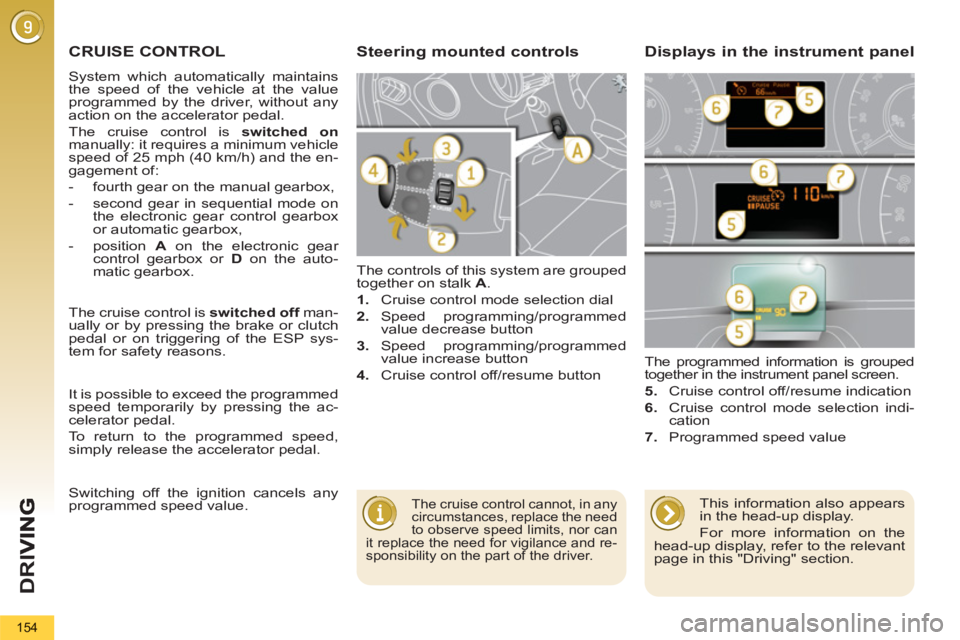
matic gearbox. The controls of this system are grouped
together on stalk A
.
1.
Cruise control mode selection dial
2.
Speed programming/programmed
value decrease button
3.
Speed programming/programmed
value increase button
4.
Cruise control off/resume button The programmed information is grouped
together in the instrument panel screen.
5.
Cruise control off/resume indication
6.
Cruise control mode selection indi-
cation
7.
Programmed speed value
Steering mounted controls Displays in the instrument panel
The cruise control cannot, in any
circumstances, replace the need
to observe speed limits, nor can
it replace the need for vigilance and re-
sponsibility on the part of the driver.
The cruise control is switched off
man-
ually or by pressing the brake or clutch
pedal or on triggering of the ESP sys-
tem for safety reasons.
It is possible to exceed the programmed
speed temporarily by pressing the ac-
celerator pedal.
To return to the programmed speed,
simply release the accelerator pedal.
Switching off the ignition cancels any
programmed speed value.
This information also appears
in the head-up display.
For more information on the
head-up display, refer to the relevant
page in this "Driving" section.
Page 158 of 340
D
R
I
156
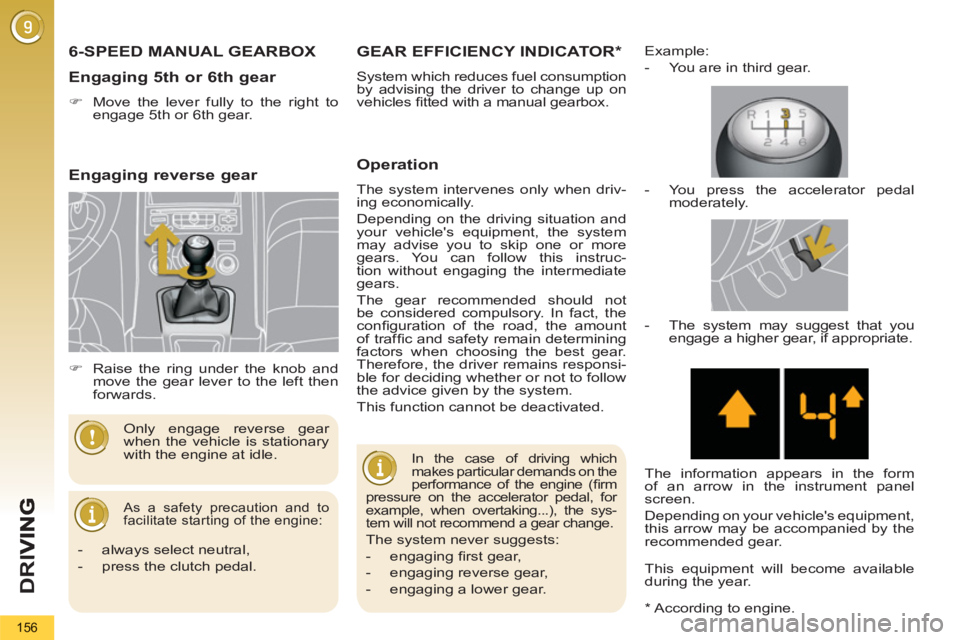
6-SPEED MANUAL GEARBOX
As a safety precaution and to
facilitate starting of the engine:
Only engage reverse gear
when the vehicle is stationary
with the engine at idle.
Engaging 5th or 6th gear
)
Move the lever fully to the right to
engage 5th or 6th gear.
*
According to engine.
GEAR EFFICIENCY INDICATOR *
System which reduces fuel consumption
by advising the driver to change up on
vehicles fi tted with a manual gearbox.
Operation
The system intervenes only when driv-
ing economically.
Depending on the driving situation and
your vehicle's equipment, the system
may advise you to skip one or more
gears. You can follow this instruc-
tion without engaging the intermediate
gears.
The gear recommended should not
be considered compulsory. In fact, the
confi guration of the road, the amount
of traffi c and safety remain determining
factors when choosing the best gear.
Therefore, the driver remains responsi-
ble for deciding whether or not to follow
the advice given by the system.
This function cannot be deactivated.
Example:
- You are in third gear.
In the case of driving which
makes particular demands on the
performance of the engine (fi rm
pressure on the accelerator pedal, for
example, when overtaking...), the sys-
tem will not recommend a gear change.
The system never suggests:
- engaging fi rst gear,
- engaging reverse gear,
- engaging a lower gear.
- You press the accelerator pedal
moderately.
- The system may suggest that you
engage a higher gear, if appropriate.
The information appears in the form
of an arrow in the instrument panel
screen.
Depending on your vehicle's equipment,
this arrow may be accompanied by the
recommended gear.
This equipment will become available
during the year.
- always select neutral,
- press the clutch pedal.
)
Raise the ring under the knob and
move the gear lever to the left then
forwards.
Engaging reverse gear
Page 160 of 340
D
R
I
158
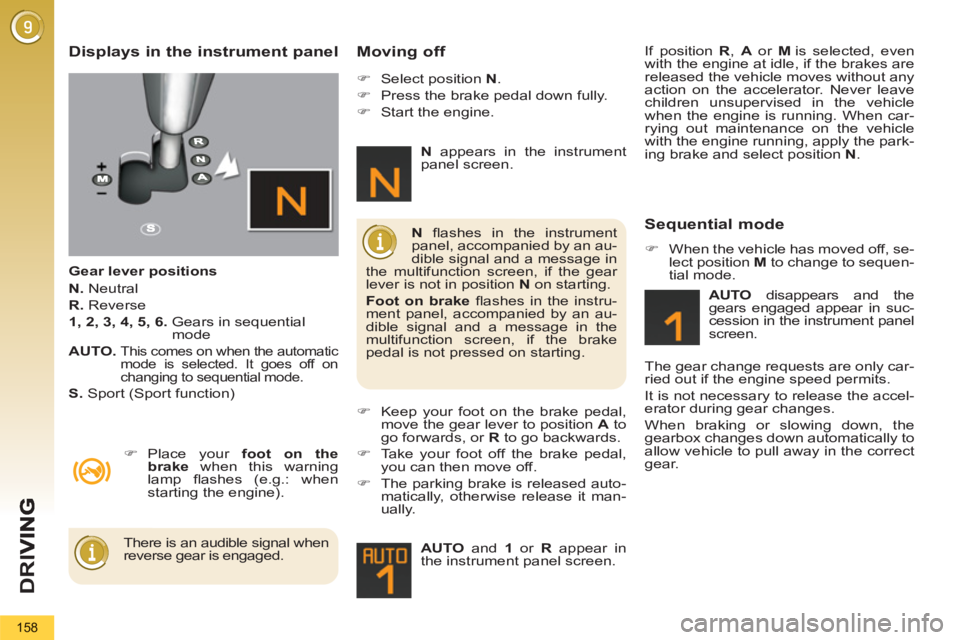
Displays in the instrument panel
Gear lever positions
N.
Neutral
R.
Reverse
1, 2, 3, 4, 5, 6.
Gears in sequential
mode
AUTO.
This comes on when the automatic
mode is selected. It goes off on
changing to sequential mode.
S.
Sport (Sport function)
Moving off
)
Place your foot on the
brake
when this warning
lamp fl ashes (e.g.: when
starting the engine).
)
Select position N
.
)
Press the brake pedal down fully.
)
Start the engine.
)
Keep your foot on the brake pedal,
move the gear lever to position A
to
go forwards, or R
to go backwards.
)
Take your foot off the brake pedal,
you can then move off.
)
The parking brake is released auto-
matically, otherwise release it man-
ually.
AUTO
and 1
or R
appear in
the instrument panel screen.
N
fl ashes in the instrument
panel, accompanied by an au-
dible signal and a message in
the multifunction screen, if the gear
lever is not in position N
on starting.
Foot on brake
fl ashes in the instru-
ment panel, accompanied by an au-
dible signal and a message in the
multifunction screen, if the brake
pedal is not pressed on starting.
There is an audible signal when
reverse gear is engaged.
N
appears in the instrument
panel screen.
Sequential mode
)
When the vehicle has moved off, se-
lect position M
to change to sequen-
tial mode.
AUTO
disappears and the
gears engaged appear in suc-
cession in the instrument panel
screen.
The gear change requests are only car-
ried out if the engine speed permits.
It is not necessary to release the accel-
erator during gear changes.
When braking or slowing down, the
gearbox changes down automatically to
allow vehicle to pull away in the correct
gear. If position R
, A
or M
is selected, even
with the engine at idle, if the brakes are
released the vehicle moves without any
action on the accelerator. Never leave
children unsupervised in the vehicle
when the engine is running. When car-
rying out maintenance on the vehicle
with the engine running, apply the park-
ing brake and select position N
.