radio PEUGEOT 5008 2014 Owner's Guide
[x] Cancel search | Manufacturer: PEUGEOT, Model Year: 2014, Model line: 5008, Model: PEUGEOT 5008 2014Pages: 404, PDF Size: 23.34 MB
Page 302 of 404
300
08
2ABC3DEF5JKL4GHI6MNO8TUV7PQRS9WXYZ0*#
1
2ABC3DEF5JKL4GHI6MNO8TUV7PQR S9WXYZ0*#
1RADIO MEDIA NA
V TRAFFIC
SETUPADDR
BOOK
2ABC3DEF5JKL4GHI6MNO8TUV7PQR S9WXYZ0*#
1NAV TRAFFICADDR
BOOKSETUP2ABC3DEF5JKL4GHI6MNO8TUV7PQRS9WXYZ0*#
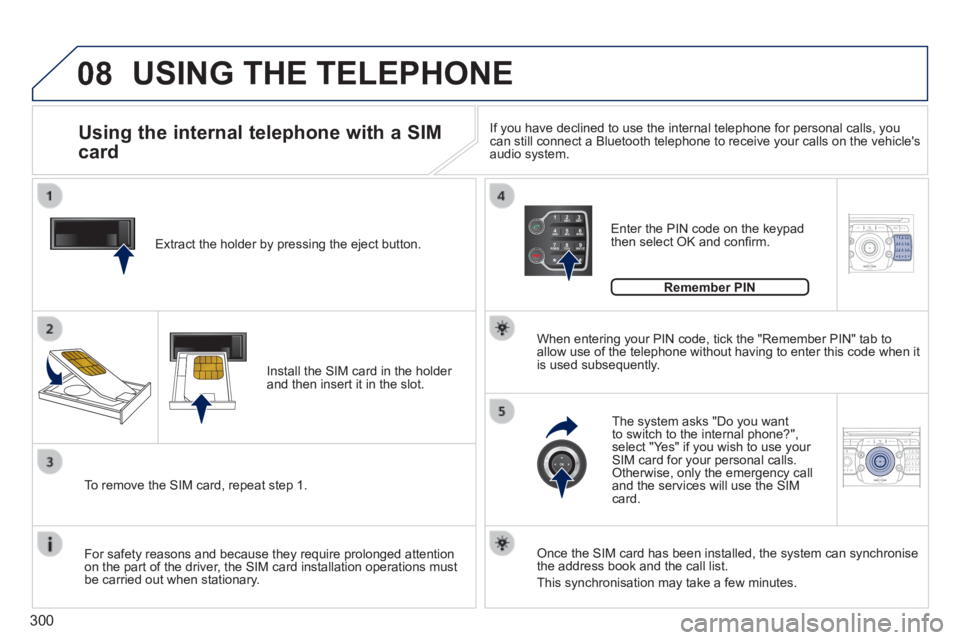
1 Extract the holder by pressing the eject button.
Install the SIM card in the holder and then insert it in the slot.
To remove the SIM card, repeat step 1.
For safety reasons and because they require prolonged attention on the part of the driver, the SIM card installation operations must be carried out when stationary.
Enter the PIN code on the keypad then select OK and confi rm.
The system asks "Do you want to switch to the internal phone?", select "Yes" if you wish to use your SIM card for your personal calls. Otherwise, only the emergency call and the services will use the SIM card.
Remember PIN
When entering your PIN code, tick the "Remember PIN" tab to allow use of the telephone without having to enter this code when it is used subsequently.
Using the internal telephone with a SIM
card
USING THE TELEPHONE
Once the SIM card has been installed, the system can synchronise the address book and the call list.
This synchronisation may take a few minutes.
If you have declined to use the internal telephone for personal calls, y\
ou can still connect a Bluetooth telephone to receive your calls on the veh\
icle's audio system.
Page 303 of 404
301
08
2ABC3DEF5JKL4GHI6MNO8TUV7PQR S9WXYZ0*#
1RADIO MEDIA NA
V TRAFFIC
SETUPADDR
BOOK
2ABC3DEF5JKL4GHI6MNO8TUV7PQR S9WXYZ0*#
1RADIO MEDIA NA
V TRAFFIC
SETUPADDR
BOOK
2ABC3DEF5JKL4GHI6MNO8TUV7PQR S9WXYZ0*#
1RADIO MEDIA NA
V TRAFFIC
SETUPADDR
BOOK
2ABC3DEF5JKL4GHI6MNO8TUV7PQR S9WXYZ0*#
1RADIO MEDIA NA
V TRAFFIC
SETUPADDR
BOOK
2ABC3DEF5JKL4GHI6MNO8TUV7PQR S9WXYZ0*#
1RADIO MEDIA NA
V TRAFFIC
SETUPADDR
BOOK
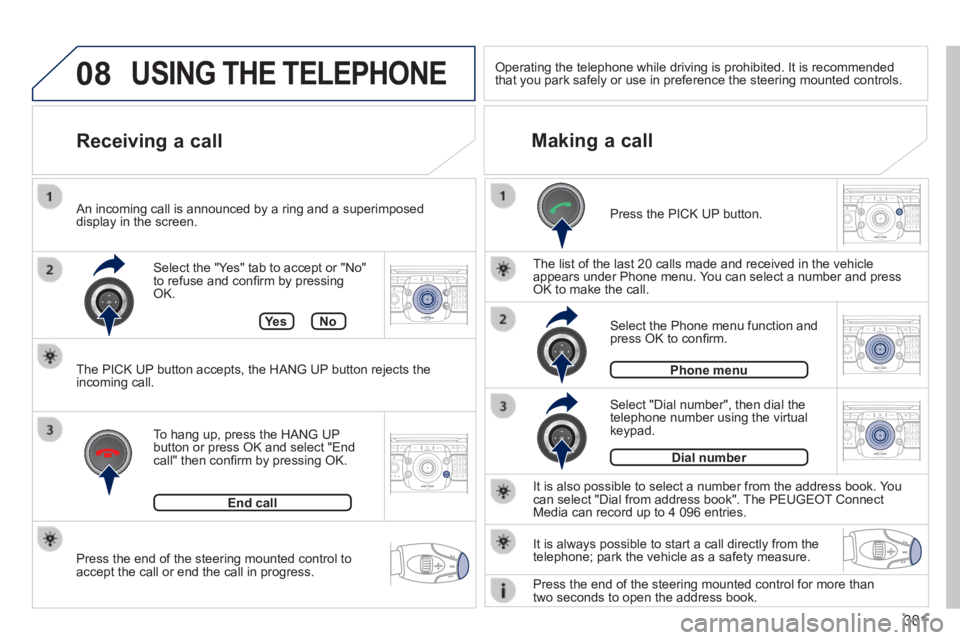
Press the end of the steering mounted control to accept the call or end the call in progress.
Select the "Yes" tab to accept or "No" to refuse and confi rm by pressing OK.
Receiving a call Making a call
An incoming call is announced by a ring and a superimposed display in the screen.
To hang up, press the HANG UP button or press OK and select "End call" then confi rm by pressing OK.
End call
Press the PICK UP button.
It is also possible to select a number from the address book. You can select "Dial from address book". The PEUGEOT Connect Media can record up to 4 096 entries.
Select "Dial number", then dial the telephone number using the virtual keypad.
Select the Phone menu function and press OK to confi rm.
Dial number
Phone menu
The list of the last 20 calls made and received in the vehicle appears under Phone menu. You can select a number and press OK to make the call.
Ye sNo
The PICK UP button accepts, the HANG UP button rejects the incoming call.
USING THE TELEPHONE
It is always possible to start a call directly from the telephone; park the vehicle as a safety measure.
Operating the telephone while driving is prohibited. It is recommended that you park safely or use in preference the steering mounted controls.\
Press the end of the steering mounted control for more than two seconds to open the address book.
Page 305 of 404
303
NAV
RADI O
AUX standard3
Reset video settings3
Off/Audio/Audio and Video (AV)
Ext. Device (Aux) management 2
3
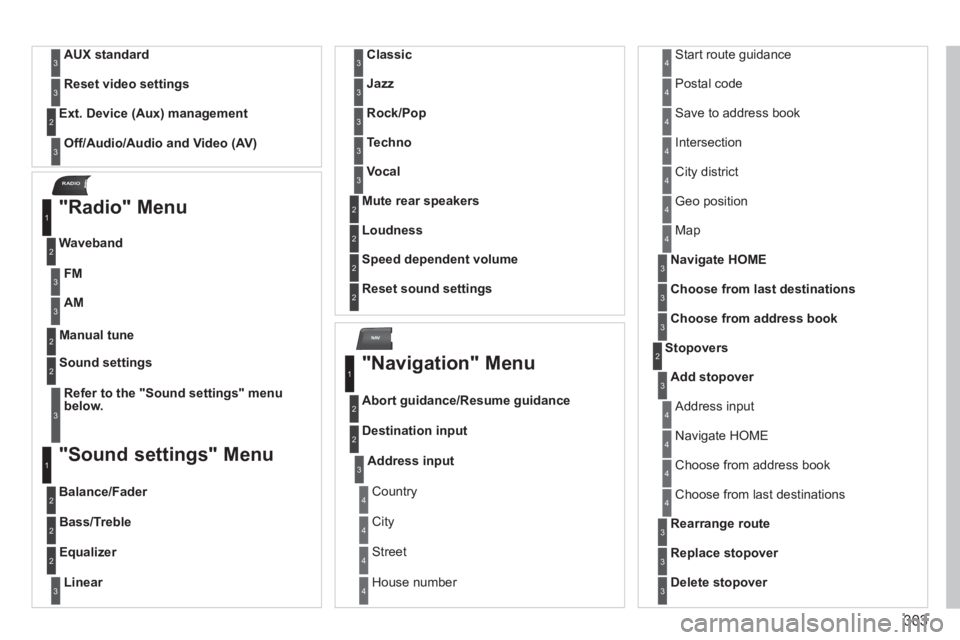
"Radio" Menu
Waveband
1
2
Manual tune 2
Refer to the "Sound settings" menu below.
Sound settings 2
3
"Sound settings" Menu
Balance/Fader
1
2
Bass/Treble 2
Equalizer 2
Linear3
Classic3
Jazz3
Rock/Pop3
Techno3
Vocal3
Mute rear speakers 2
Loudness 2
Speed dependent volume 2
Reset sound settings 2
"Navigation" Menu
Abort guidance/Resume guidance
1
2
Destination input 2
Address input3
Country 4
City 4
Street 4
House number 4
Start route guidance 4
Postal code 4
Save to address book 4
Intersection 4
City district 4
Geo position 4
Map 4
Navigate HOME3
Choose from last destinations3
Choose from address book3
Stopovers 2
Add stopover3
Address input 4
Navigate HOME 4
Choose from address book 4
Choose from last destinations 4
Rearrange route3
Replace stopover3
Delete stopover3
FM3
AM3
Page 309 of 404
307
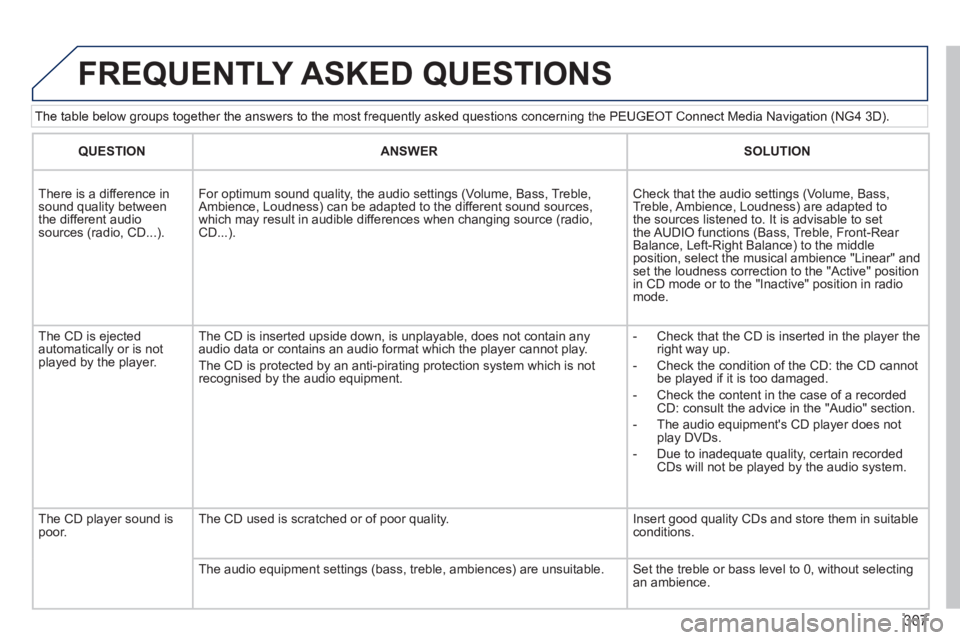
The table below groups together the answers to the most frequently asked questions concerning the PEUGEOT Connect Media Navigation (NG4 3D).
FREQUENTLY ASKED QUESTIONS
QUESTIONANSWERSOLUTION
There is a difference in sound quality between the different audio sources (radio, CD...).
For optimum sound quality, the audio settings (Volume, Bass, Treble, Ambience, Loudness) can be adapted to the different sound sources, which may result in audible differences when changing source (radio, CD...).
Check that the audio settings (Volume, Bass, Treble, Ambience, Loudness) are adapted to the sources listened to. It is advisable to set the AUDIO functions (Bass, Treble, Front-Rear Balance, Left-Right Balance) to the middle position, select the musical ambience "Linear" and set the loudness correction to the "Active" position in CD mode or to the "Inactive" position in radio mode.
The CD is ejected automatically or is not played by the player.
The CD is inserted upside down, is unplayable, does not contain any audio data or contains an audio format which the player cannot play.
The CD is protected by an anti-pirating protection system which is not recognised by the audio equipment.
- Check that the CD is inserted in the player the right way up.
- Check the condition of the CD: the CD cannot be played if it is too damaged.
- Check the content in the case of a recorded CD: consult the advice in the "Audio" section.
- The audio equipment's CD player does not play DVDs.
- Due to inadequate quality, certain recorded CDs will not be played by the audio system.
The CD player sound is poor. The CD used is scratched or of poor quality. Insert good quality CDs and store them in suitable conditions.
The audio equipment settings (bass, treble, ambiences) are unsuitable.\
Set the treble or bass level to 0, without selecting an ambience.
Page 310 of 404
308
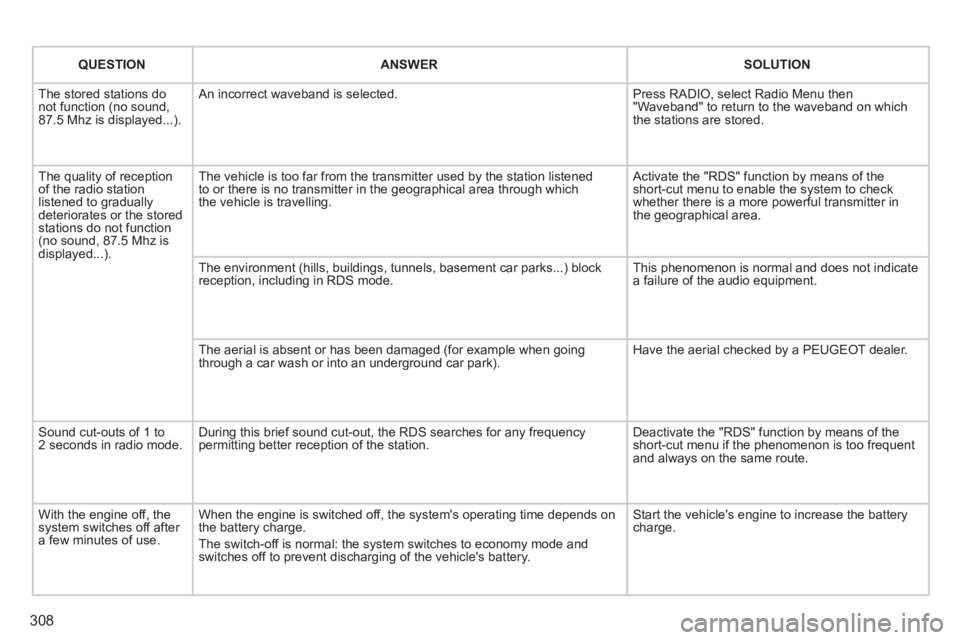
QUESTION ANSWER SOLUTION
The stored stations do not function (no sound, 87.5 Mhz is displayed...).
An incorrect waveband is selected. Press RADIO, select Radio Menu then "Waveband" to return to the waveband on which the stations are stored.
The quality of reception of the radio station listened to gradually deteriorates or the stored stations do not function (no sound, 87.5 Mhz is displayed...).
The vehicle is too far from the transmitter used by the station listened\
to or there is no transmitter in the geographical area through which the vehicle is travelling.
Activate the "RDS" function by means of the short-cut menu to enable the system to check whether there is a more powerful transmitter in the geographical area.
The environment (hills, buildings, tunnels, basement car parks...) blo\
ck reception, including in RDS mode. This phenomenon is normal and does not indicate a failure of the audio equipment.
The aerial is absent or has been damaged (for example when going through a car wash or into an underground car park). Have the aerial checked by a PEUGEOT dealer.
Sound cut-outs of 1 to 2 seconds in radio mode. During this brief sound cut-out, the RDS searches for any frequency permitting better reception of the station. Deactivate the "RDS" function by means of the short-cut menu if the phenomenon is too frequent and always on the same route.
With the engine off, the system switches off after a few minutes of use.
When the engine is switched off, the system's operating time depends on the battery charge.
The switch-off is normal: the system switches to economy mode and switches off to prevent discharging of the vehicle's battery.
Start the vehicle's engine to increase the battery charge.
Page 315 of 404
313
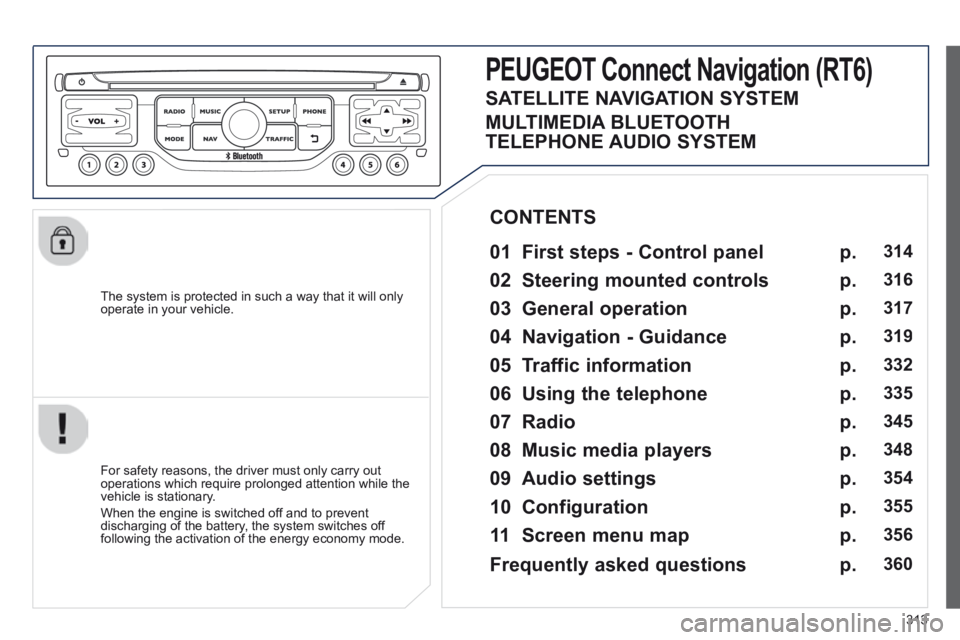
The system is protected in such a way that it will only operate in your vehicle.
PEUGEOT Connect Nonnect Nonnectavigation (RT6)
01 First steps - Control panel
For safety reasons, the driver must only carry out operations which require prolonged attention while the vehicle is stationary.
When the engine is switched off and to prevent discharging of the battery, the system switches off following the activation of the energy economy mode.
CONTENTS
02 Steering mounted controls
03 General operation
04 Navigation - Guidance
05 Traffic information
06 Using the telephone
07 Radio
08 Music media players
09 Audio settings
10 Configuration
11 Screen menu map
p.
p.
p.
p.
p.
p.
p.
p.
p.
p.
p.
314
316
317
319
332
335
345
348
354
355
356
SATELLITE NAVIGATION SYSTEM
MULTIMEDIA BLUETOOTH
TELEPHONE AUDIO SYSTEM
Frequently asked questions p. 360
Page 316 of 404
314
01
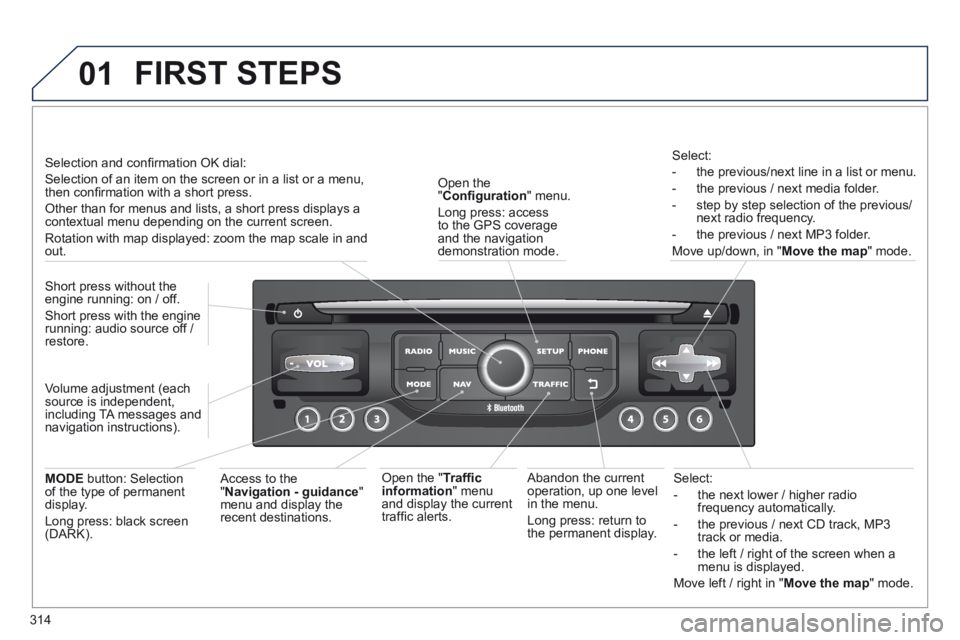
Select:
- the next lower / higher radio frequency automatically.
- the previous / next CD track, MP3 track or media.
- the left / right of the screen when a menu is displayed.
Move left / right in " Move the map " mode.
Abandon the current operation, up one level in the menu.
Long press: return to the permanent display.
Open the " Confi guration " menu.
Long press: access to the GPS coverage and the navigation demonstration mode.
Open the " Traffi c information " menu and display the current traffi c alerts.
Select:
- the previous/next line in a list or menu.
- the previous / next media folder.
- step by step selection of the previous/next radio frequency.
- the previous / next MP3 folder.
Move up/down, in " Move the map " mode.
FIRST STEPS
Access to the " Navigation - guidance " menu and display the recent destinations.
Short press without the engine running: on / off.
Short press with the engine running: audio source off / restore.
MODE button: Selection of the type of permanent display.
Long press: black screen (DARK).
Selection and confi rmation OK dial:
Selection of an item on the screen or in a list or a menu, then confi rmation with a short press.
Other than for menus and lists, a short press displays a contextual menu depending on the current screen.
Rotation with map displayed: zoom the map scale in and out.
Volume adjustment (each source is independent, including TA messages and navigation instructions).
Page 317 of 404
315
01
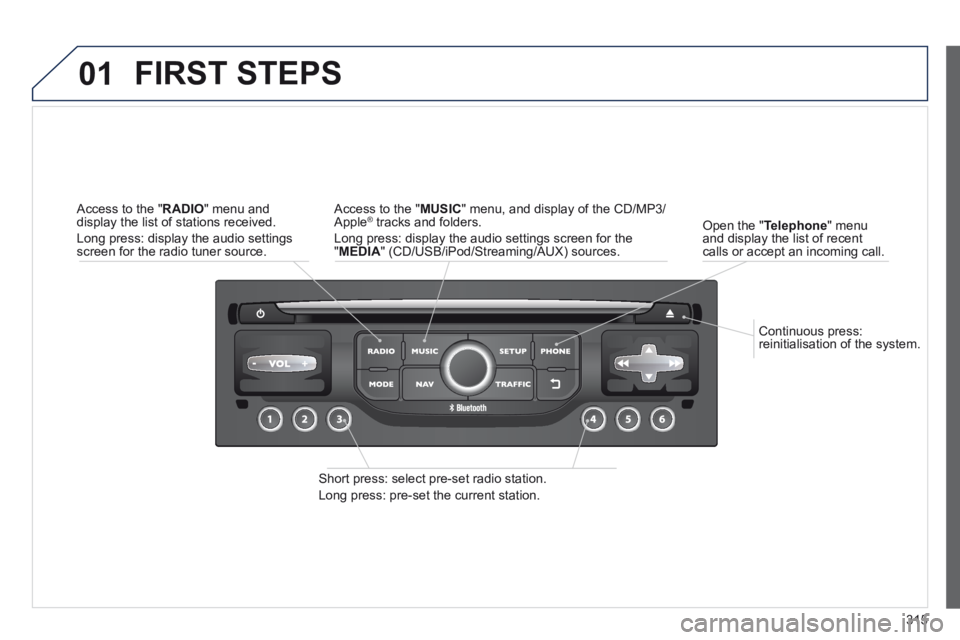
Continuous press: reinitialisation of the system.
Open the " Telephone " menu and display the list of recent calls or accept an incoming call.
FIRST STEPS
Short press: select pre-set radio station.
Long press: pre-set the current station.
Access to the " MUSIC " menu, and display of the CD/MP3/Apple ® tracks and folders. ® tracks and folders. ®
Long press: display the audio settings screen for the " MEDIA " (CD/USB/iPod/Streaming/AUX) sources.
Access to the " RADIO " menu and display the list of stations received.
Long press: display the audio settings screen for the radio tuner source.
Page 318 of 404
316
02
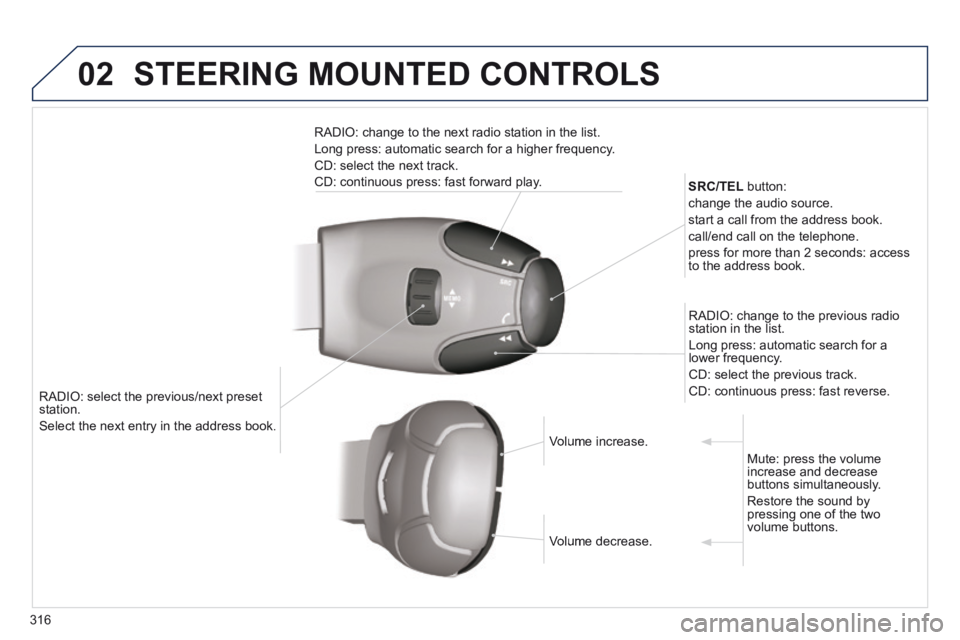
RADIO: select the previous/next preset station.
Select the next entry in the address book. Select the next entry in the address book.
SRC/TEL button:
change the audio source.
start a call from the address book.
call/end call on the telephone.
press for more than 2 seconds: access to the address book.
RADIO: change to the previous radio station in the list.
Long press: automatic search for a lower frequency.
CD: select the previous track.
CD: continuous press: fast reverse.
RADIO: change to the next radio station in the list.
Long press: automatic search for a higher frequency.
CD: select the next track.
CD: continuous press: fast forward play.
Volume increase. Volume increase.
Volume decrease. Volume decrease.
Mute: press the volume increase and decrease buttons simultaneously.
Restore the sound by pressing one of the two volume buttons.
STEERING MOUNTED CONTROLS
Page 319 of 404
317
03
For the details of the menus, refer to the "Screen menu map" section. For cleaning the screen, the use of a soft, non-abrasive cloth (spectacles cloth) is recommended, with no additional product.
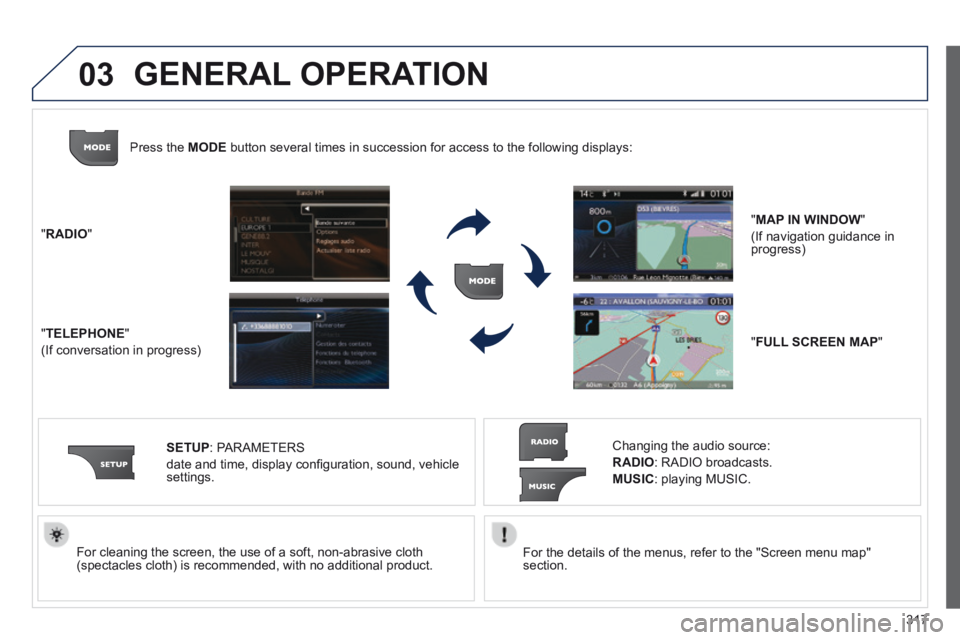
" RADIO "
" TELEPHONE "
(If conversation in progress)
SETUP : PARAMETERS
date and time, display confi guration, sound, vehicle settings.
Changing the audio source:
RADIO : RADIO broadcasts.
MUSIC : playing MUSIC.
Press the MODE button several times in succession for access to the following displays\
:
" FULL SCREEN MAP "
" MAP IN WINDOW "
(If navigation guidance in progress)
GENERAL OPERATION