service PEUGEOT 5008 2014 Owner's Guide
[x] Cancel search | Manufacturer: PEUGEOT, Model Year: 2014, Model line: 5008, Model: PEUGEOT 5008 2014Pages: 404, PDF Size: 23.34 MB
Page 338 of 404
336
06 USING THE TELEPHONE
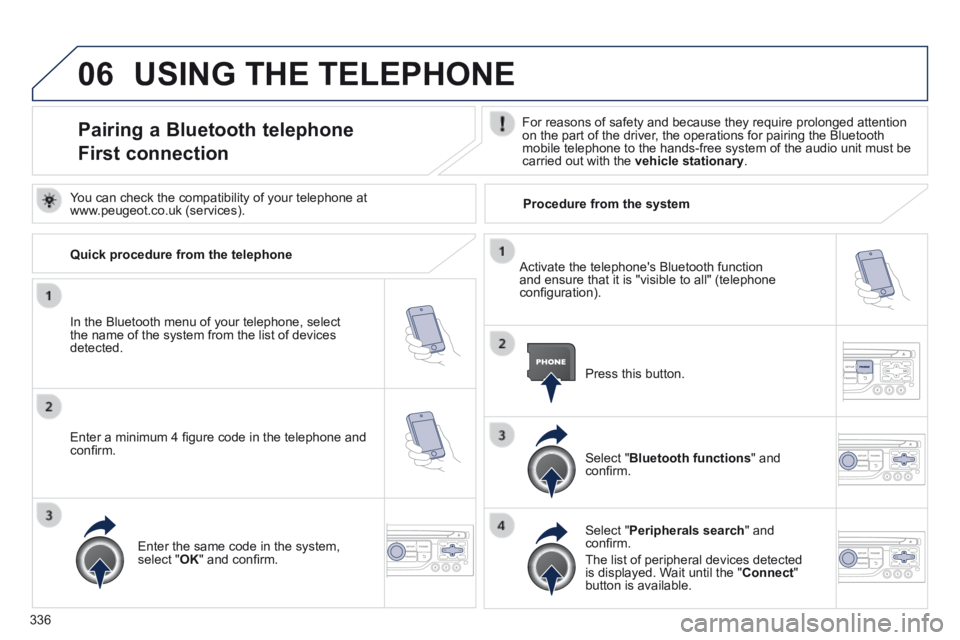
Pairing a Bluetooth telephone
First connection
For reasons of safety and because they require prolonged attention on the part of the driver, the operations for pairing the Bluetooth mobile telephone to the hands-free system of the audio unit must be carried out with the vehicle stationary .
In the Bluetooth menu of your telephone, select the name of the system from the list of devices detected.
Press this button.
Select " Bluetooth functions " and confi rm.
Select " Peripherals search " and confi rm.
The list of peripheral devices detected is displayed. Wait until the " Connect " button is available.
You can check the compatibility of your telephone at www.peugeot.co.uk (services).
Activate the telephone's Bluetooth function and ensure that it is "visible to all" (telephone confi guration).
Quick procedure from the telephone
Enter a minimum 4 fi gure code in the telephone and confi rm.
Enter the same code in the system, select " OK " and confi rm.
Procedure from the system
Page 339 of 404
337
06 USING THE TELEPHONE
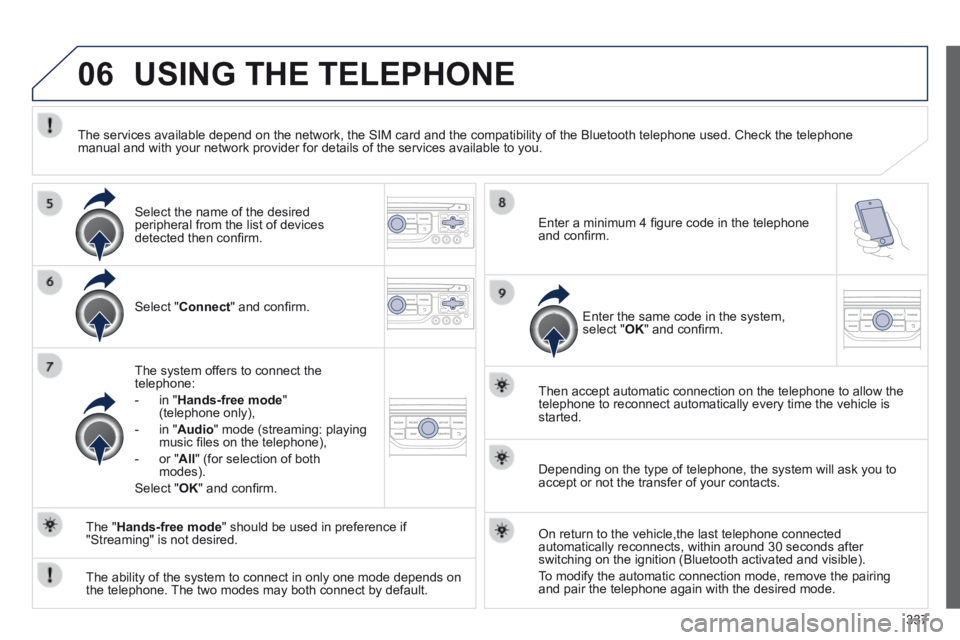
Select " Connect " and confi rm.
The system offers to connect the telephone:
- in " Hands-free mode " (telephone only),
- in " Audio " mode (streaming: playing music fi les on the telephone),
- or " All " (for selection of both modes).
Select " OK " and confi rm.
Then accept automatic connection on the telephone to allow the telephone to reconnect automatically every time the vehicle is started.
The ability of the system to connect in only one mode depends on the telephone. The two modes may both connect by default.
The " Hands-free mode " should be used in preference if "Streaming" is not desired.
The services available depend on the network, the SIM card and the compa\
tibility of the Bluetooth telephone used. Check the telephone manual and with your network provider for details of the services availa\
ble to you.
Depending on the type of telephone, the system will ask you to accept or not the transfer of your contacts.
On return to the vehicle,the last telephone connected automatically reconnects, within around 30 seconds after switching on the ignition (Bluetooth activated and visible).
To modify the automatic connection mode, remove the pairing and pair the telephone again with the desired mode.
Enter a minimum 4 fi gure code in the telephone and confi rm.
Enter the same code in the system, select " OK " and confi rm.
Select the name of the desired peripheral from the list of devices detected then confi rm.
Page 345 of 404
343
06
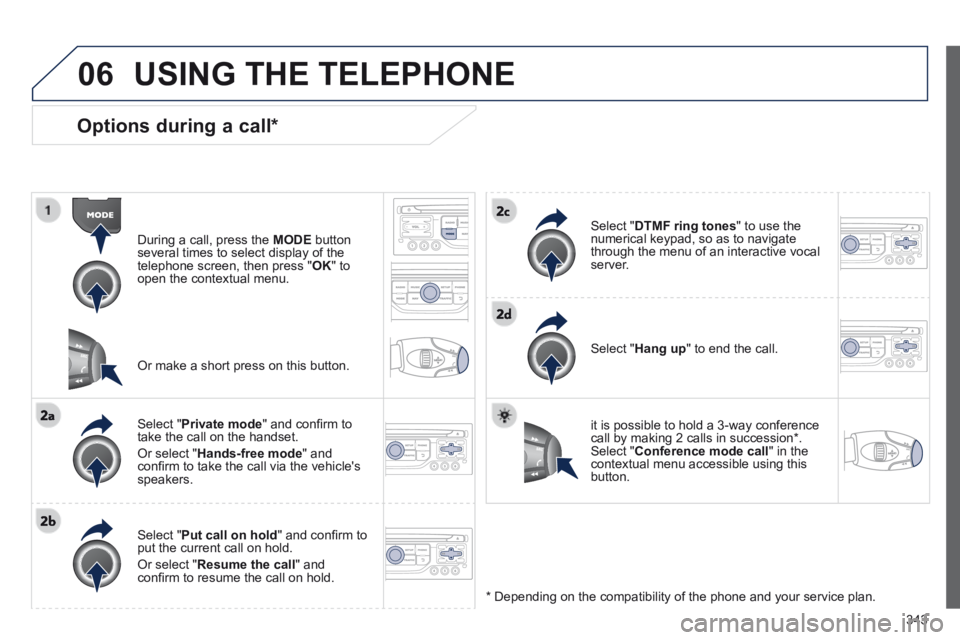
Options during a call *
During a call, press the MODE button several times to select display of the telephone screen, then press " OK " to open the contextual menu.
Select " Private mode " and confi rm to take the call on the handset.
Or select " Hands-free mode " and confi rm to take the call via the vehicle's speakers.
Select " Put call on hold " and confi rm to put the current call on hold.
Or select " Resume the call " and confi rm to resume the call on hold.
Select " DTMF ring tones " to use the numerical keypad, so as to navigate through the menu of an interactive vocal server.
Select " Hang up " to end the call.
* Depending on the compatibility of the phone and your service plan.
it is possible to hold a 3-way conference call by making 2 calls in succession*. Select " Conference mode call " in the contextual menu accessible using this button.
Or make a short press on this button.
USING THE TELEPHONE
Page 363 of 404
361
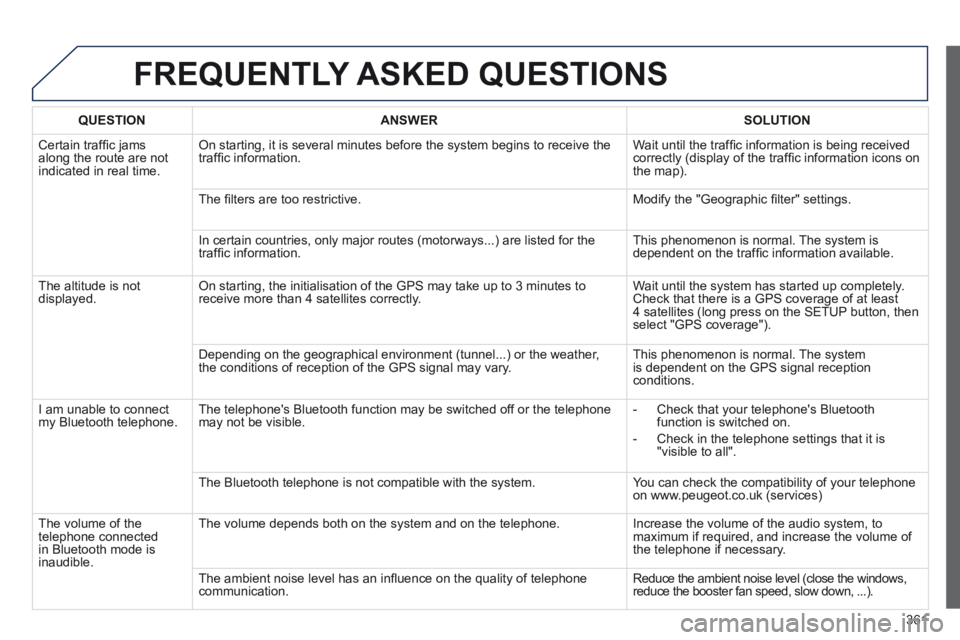
FREQUENTLY ASKED QUESTIONS
QUESTIONANSWERSOLUTION
Certain traffi c jams along the route are not indicated in real time.
On starting, it is several minutes before the system begins to receive t\
he traffi c information. Wait until the traffi c information is being received correctly (display of the traffi c information icons on the map).
The fi lters are too restrictive. Modify the "Geographic fi lter" settings.
In certain countries, only major routes (motorways...) are listed for \
the traffi c information. This phenomenon is normal. The system is dependent on the traffi c information available.
The altitude is not displayed. On starting, the initialisation of the GPS may take up to 3 minutes to receive more than 4 satellites correctly. Wait until the system has started up completely. Check that there is a GPS coverage of at least 4 satellites (long press on the SETUP button, then select "GPS coverage").
Depending on the geographical environment (tunnel...) or the weather, the conditions of reception of the GPS signal may vary. This phenomenon is normal. The system is dependent on the GPS signal reception conditions.
I am unable to connect my Bluetooth telephone. The telephone's Bluetooth function may be switched off or the telephone may not be visible. - Check that your telephone's Bluetooth function is switched on.
- Check in the telephone settings that it is "visible to all".
The Bluetooth telephone is not compatible with the system. You can check the compatibility of your telephone on www.peugeot.co.uk (services)
The volume of the telephone connected in Bluetooth mode is inaudible.
The volume depends both on the system and on the telephone. Increase the volume of the audio system, to maximum if required, and increase the volume of the telephone if necessary.
The ambient noise level has an infl uence on the quality of telephone communication. Reduce the ambient noise level (close the windows, reduce the booster fan speed, slow down, ...).
Page 379 of 404
377
06 BLUETOOTH
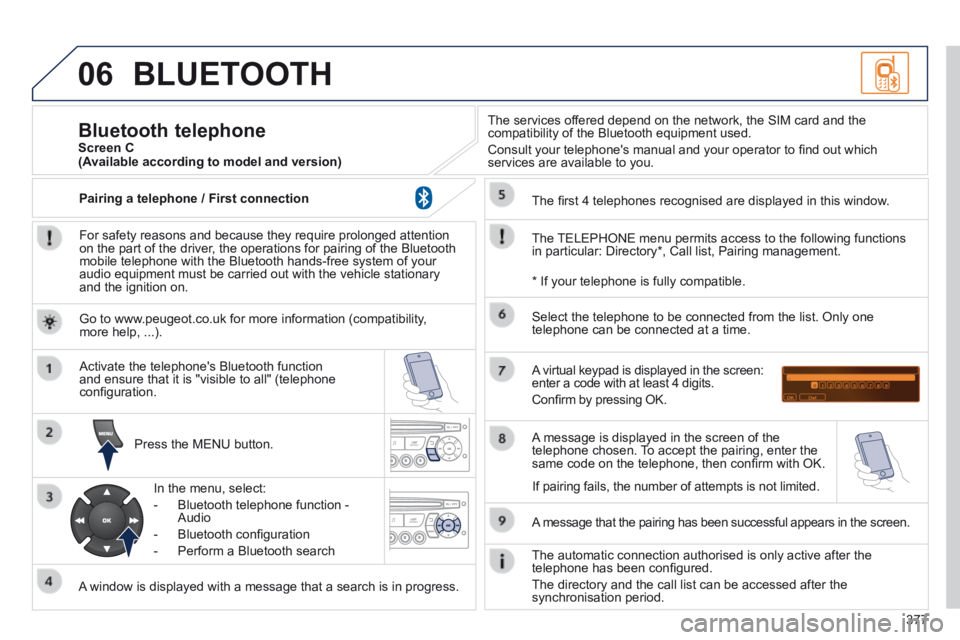
For safety reasons and because they require prolonged attention on the part of the driver, the operations for pairing of the Bluetooth mobile telephone with the Bluetooth hands-free system of your audio equipment must be carried out with the vehicle stationary and the ignition on.
Press the MENU button.
A window is displayed with a message that a search is in progress.
Activate the telephone's Bluetooth function and ensure that it is "visible to all" (telephone confi guration.
In the menu, select:
- Bluetooth telephone function - Audio
- Bluetooth confi guration
- Perform a Bluetooth search
The services offered depend on the network, the SIM card and the compatibility of the Bluetooth equipment used.
Consult your telephone's manual and your operator to fi nd out which services are available to you.
Bluetooth telephone Screen C
The TELEPHONE menu permits access to the following functions in particular: Directory * , Call list, Pairing management.
The fi rst 4 telephones recognised are displayed in this window.
A virtual keypad is displayed in the screen: enter a code with at least 4 digits.
Confi rm by pressing OK.
A message that the pairing has been successful appears in the screen.
Select the telephone to be connected from the list. Only one telephone can be connected at a time.
A message is displayed in the screen of the telephone chosen. To accept the pairing, enter the same code on the telephone, then confi rm with OK.
The automatic connection authorised is only active after the telephone has been confi gured.
The directory and the call list can be accessed after the synchronisation period.
(Available according to model and version)
* If your telephone is fully compatible.
If pairing fails, the number of attempts is not limited.
Go to www.peugeot.co.uk for more information (compatibility, more help, ...).
Pairing a telephone / First connection
Page 388 of 404

386
FREQUENTLY ASKED QUESTIONS
QUESTIONANSWERSOLUTION
I am unable to access my voicemail. Few telephones or service providers allow the use of this function.
The CD player sound is poor. The CD used is scratched or of poor quality. Insert good quality CDs and store them in suitable conditions.
The audio equipment settings (bass, treble, ambiences) are unsuitable.\
Set the treble or bass level to 0, without selecting an ambience.
The stored stations do not function (no sound, 87.5 Mhz is displayed...).
An incorrect waveband is selected. Press the BAND AST button to return to the waveband (AM, FM1, FM2, FMAST) on which the stations are stored.
The traffi c announcement (TA) is displayed. I do not receive any traffi c information.
The radio station is not part of the regional traffi c information network. Tune to a radio station which broadcasts traffi c information.
The quality of reception of the radio station listened to gradually deteriorates or the stored stations do not function (no sound, 87.5 Mhz is displayed...).
The vehicle is too far from the transmitter used by the station listened\
to or there is no transmitter in the geographical area through which the\
vehicle is travelling.
Activate the RDS function to enable the system to check whether there is a more powerful transmitter in the geographical area.
The environment (hills, buildings, tunnels, basement car parks...) blo\
ck reception, including in RDS mode. This phenomenon is normal and does not indicate a failure of the audio equipment.
The aerial is absent or has been damaged (for example when going through a car wash or into an underground car park). Have the aerial checked by a PEUGEOT dealer.
Page 393 of 404

.
Alphabetical index391
Screenwash, front .........................................111Screen-wash reservoir .................................Screen-wash reservoir .................................Screen-wash reservoir210Seat adjustment ..................................66, 67, 72Seat belts ..............................126, 158, 160, 161Seat configurations .........................................77Seats, electric .................................................67Seats, rear ...........................................Seats, rear ...........................................Seats, rear72, 74, 75Serial number, vehicle ..................................264Service indicator .............................................Service indicator .............................................Service indicator40Service warning light ......................................34Servicing .........................................................25Setting the clock ................................44, 46, 48Short-cut menus ...................................276, 318Sidelamps .............................100, 231, 232, 234Side repeater ................................................Side repeater ................................................Side repeater233SIM card ................................................118, 300Snow chains ..................................................230Spare wheel .................................223, 225, 226Spectacles storage .......................................117Speed limiter .................................................Speed limiter .................................................Speed limiter178Speedometer ..................................................Speedometer ..................................................Speedometer27Spotlamps, side ............................................115Start ...............................................................245Starting the vehicle .........................84, 186, 191Steering mounted controls, audio ........274, 369Stopping the vehicle .......................84, 186, 191Stop & Start ...57, 61, 65, 97, 195, 204, 211, 244Storage ...........................117, 119, 121, 125, 126Storage box ...................................................118Storage drawer .............................................Storage drawer .............................................Storage drawer121Storage wells ........................................125, 126Stowing rings ........................................125, 126Sun visor ........................................Sun visor ........................................Sun visor117, 118, 131Synchronising the remote control ...................85Synthesiser, voice .........................................330System, navigation................................280, 320
Radio ....................................291, 345, 346, 371RCA sockets .................................................296Reading lamps, rear ......................................Reading lamps, rear ......................................Reading lamps, rear114Rear foglamp........................................234, 235Rear screen (demisting) ............................62, 78Recharging the battery .................................246Reduction of electrical load ..........................247Regeneration of the particle emissions filter ............................................emissions filter ............................................emissions filter2 11Reinitialising the electric windows ..................89Reinitialising the remote control .....................85Remote control ....................................81, 82, 86Removable screen (snow shield)..................253Removing a wheel ........................................227
Safety for children ...........................89, 140, 151Screen, colour 16/9 ...............................275, 302Screen, colour and mapping.................317, 356Screen menu map ................302, 356, 380, 382Screen, monochrome ..................370, 380, 382Screen, monochrome C ..................................55Screen, multifunction (with audio equipment) ...............46, 48, 51, 53Screen, multifunction (without audio equipment) ............................44Screenwash fluid level ...........................111, 2 1 0
Removing the mat .........................................120Repair kit, puncture ...............................213, 219Replacing bulbs ............................231, 234-236Replacing fuses ............................................237Replacing the air filter ...................................Replacing the air filter ...................................Replacing the air filter2 11Replacing the oil filter ...................................Replacing the oil filter ...................................Replacing the oil filter2 11Replacing the passenger compartment filter ......................................compartment filter ......................................compartment filter2 11Replacing wiper blades.........................113, 248Resetting the service indicator .......................Resetting the service indicator .......................Resetting the service indicator41Resetting the trip recorder ..............................Resetting the trip recorder ..............................Resetting the trip recorder43Rev counter .....................................................Rev counter .....................................................Rev counter27Reversing camera .........................................200Reversing lamp .............................................234Rigid panel ......................................................74Risk areas (update) ...............................287, 324Roof bars .......................................................252Routine checks .....................................211, 212Running out of fuel (Diesel) ..........................205
R
S
PEUGEOT Connect Media Navigation (NG4 3D) ............................269, 272, 275, 302PEUGEOT Connect Navigation (RT6) ...51, 313PEUGEOT Connect SOS ....................266, 267PEUGEOT CONNECT SOS .........................267PEUGEOT Connect Sound (RD5) ...................................48, 367, 380, 382PEUGEOT services ......................................267PIN code .......................................................300Player, CD MP3 .............................................373POIs (updating) .............................................287Port, USB ..............................119, 353, 374, 376Priming the fuel system ................................205Protecting children .......................132, 133, 137,140, 145, 146, 150, 162Puncture ................................................213, 219
Page 398 of 404

Visual search
396
Instruments and controls (continued)
Head-up display 173 -174 Distance alert 175 -177
Lighting controls 100 -106 Direction indicators 152
Speed limiter 178 -180 Cruise control 181-183
Door mirrors 78 Electric windows, deactivating 89 -90
Switch panel 16 Stop & Start 195 -197
Headlamp height adjustment 107
Instrument panels, screens 27-29 Warning lamps 30 -38 Indicators 39 - 42 Gear shift indicator 185 Buttons 41, 43 - check / service indicator / trip distance recorder - lighting dimmer
Steering wheel adjustment 80 H o r n 1 5 2
Multifunction screens 44-52 - Screen A - Screen C - 16/9 colour screen Retractable screen 53 Screen A (setting the date/time) 44- 47
Hazard warning lamps 152 Head-up display 173 -174 Distance alert 175 -177
Wiper controls 109 -113 Trip computer 54-57
P a n o r a m i c s u n r o o f 1 2 4
Ignition switch 84