radio PEUGEOT 5008 2017 Owners Manual
[x] Cancel search | Manufacturer: PEUGEOT, Model Year: 2017, Model line: 5008, Model: PEUGEOT 5008 2017Pages: 404, PDF Size: 15.31 MB
Page 5 of 404
3
.
.
Driving recommendations 175
Anti-theft protection 1 77
Starting / Switching off the engine
with the key
1
77
Starting / Switching off the engine
with Keyless Entry and Starting
1
79
Electric parking brake
1
81
Manual gearbox
1
85
Automatic gearbox
1
85
Hill start assist
1
90
Dynamic pack
1
91
Gear shift indicator
1
91
Stop & Start
1
92
Under-inflation detection
1
95
Memorising speeds
1
97
Recognition of speed limit signs and
recommendation
1
98
Speed limiter
20
1
Cruise control
2
04
Dynamic cruise control with Stop function
2
07
Distance alert and Active Safety Brake
2
15
Fatigue detection system
2
19
Lane Departure Warning System
2
21
Active Lane Departure Warning System
2
22
Blind Spot Monitoring System
2
27
Parking sensors
2
30
Visiopark 1
- Visiopark 2
2
31
Park Assist
2
37Fuel
245
Misfuel prevention (Diesel) 2 46
Compatibility of fuels
2
46
Towing a trailer
2
48
Towbar with quickly detachable towball
2
48
Energy economy mode
2
52
Very cold climate screen
2
53
Snow chains
2
54
Fitting roof bars
2
55
Bonnet
2
56
Engine compartment
2
57
Checking levels
2
58
Checks
26
0
AdBlue
® (BlueHDi engines) 2 62
Warning triangle
2
66
Running out of fuel (Diesel)
2
66
Tool kit
2
67
Temporary puncture repair kit
2
69
Spare wheel
2
73
Changing a bulb
2
78
Changing a wiper blade
2
84
Changing a fuse
2
84
12
V battery
2
85
Towing the vehicle
2
89Characteristics of engines
and towed loads
2
91
Petrol engines
2
92
Diesel engines
2
93
Dimensions
295
Identification markings
2
96
PEUGEOT Connect Nav
PEUGEOT Connect Radio
Bluetooth audio system
Driving Practical information Technical data
Alphabetical index
Audio equipment and telematics
In the event of a breakdown
.
Contents
Page 6 of 404
4
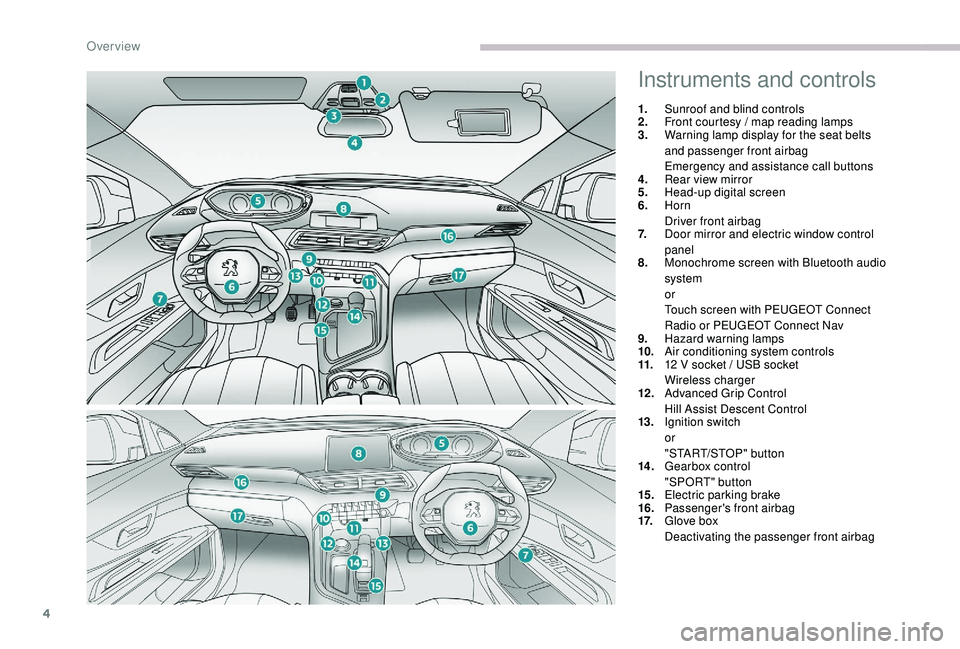
Instruments and controls
1.Sunroof and blind controls
2. Front courtesy / map reading lamps
3. Warning lamp display for the seat belts
and passenger front airbag
Emergency and assistance call buttons
4. Rear view mirror
5. Head-up digital screen
6. Horn
Driver front airbag
7. Door mirror and electric window control
panel
8. Monochrome screen with Bluetooth audio
system
or
Touch screen with PEUGEOT Connect
Radio or PEUGEOT Connect Nav
9. Hazard warning lamps
10. Air conditioning system controls
11. 12
V socket / USB socket
Wireless charger
12 . Advanced Grip Control
Hill Assist Descent Control
13. Ignition switch
or
"START/STOP" button
14 . Gearbox control
"SPORT" button
15. Electric parking brake
16. Passenger's front airbag
17. Glove box
Deactivating the passenger front airbag
Over view
Page 7 of 404
5
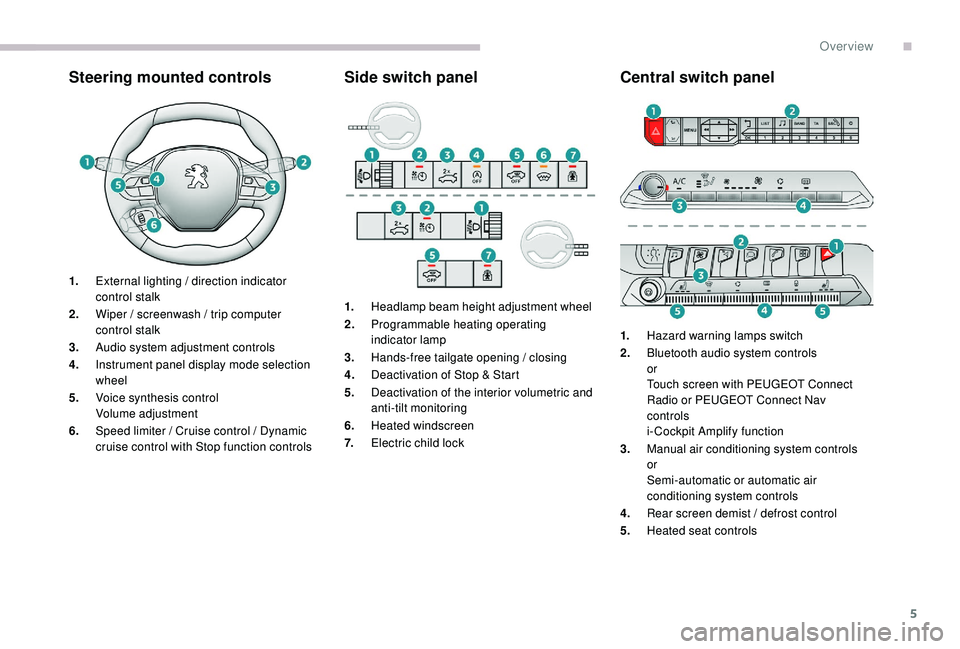
Steering mounted controlsSide switch panelCentral switch panel
1.External lighting / direction indicator
control stalk
2. Wiper / screenwash / trip computer
control stalk
3. Audio system adjustment controls
4. Instrument panel display mode selection
wheel
5. Voice synthesis control
Volume adjustment
6. Speed limiter / Cruise control / Dynamic
cruise control with Stop function controls 1.
Headlamp beam height adjustment wheel
2. Programmable heating operating
indicator lamp
3. Hands-free tailgate opening / closing
4. Deactivation of Stop & Start
5. Deactivation of the interior volumetric and
anti-tilt monitoring
6. Heated windscreen
7. Electric child lock 1.
Hazard warning lamps switch
2. Bluetooth audio system controls
or
Touch screen with PEUGEOT Connect
Radio or PEUGEOT Connect Nav
controls
i- Cockpit Amplify function
3. Manual air conditioning system controls
or
Semi-automatic or automatic air
conditioning system controls
4. Rear screen demist / defrost control
5. Heated seat controls
.
Over view
Page 40 of 404
38
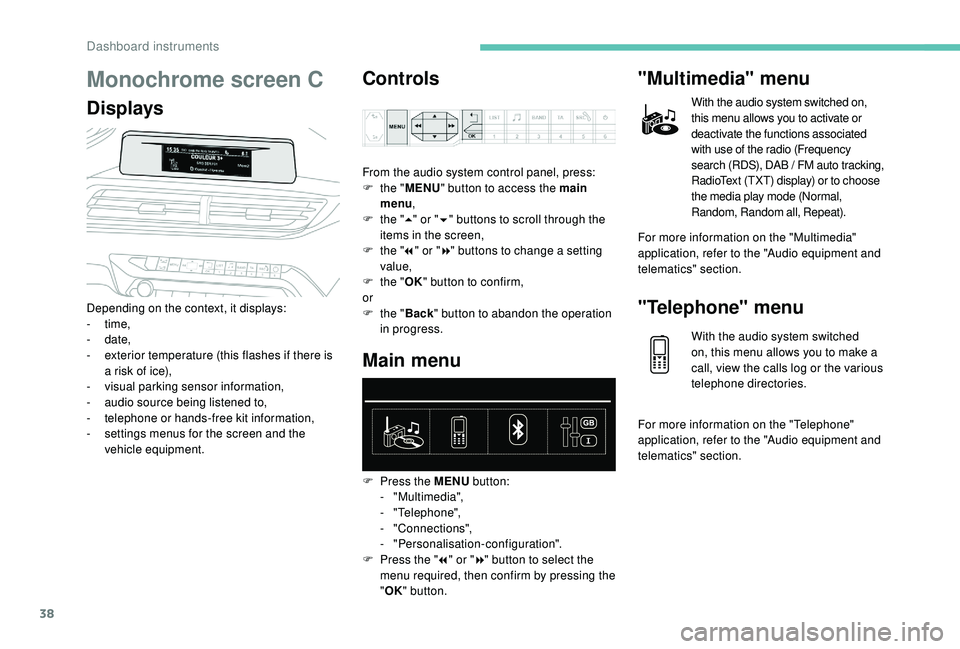
Monochrome screen C
DisplaysControls
Depending on the context, it displays:
-
time,
-
date,
-
e
xterior temperature (this flashes if there is
a risk of ice),
-
v
isual parking sensor information,
-
a
udio source being listened to,
-
t
elephone or hands-free kit information,
-
s
ettings menus for the screen and the
vehicle equipment. From the audio system control panel, press:
F
t
he "
MENU " button to access the main
menu ,
F
t
he "
5" or " 6" buttons to scroll through the
items in the screen,
F
t
he "
7" or " 8" buttons to change a setting
value,
F
t
he "
OK" button to confirm,
or
F t he "Back " button to abandon the operation
in progress.
Main menu
F Press the MENU button:
- "Multimedia",
-
"Telephone",
-
"Connections",
-
"Personalisation-configuration".
F
P
ress the " 7" or " 8" button to select the
menu required, then confirm by pressing the
" OK " button.
"Multimedia" menu
With the audio system switched on,
this menu allows you to activate or
deactivate the functions associated
with use of the radio (Frequency
search (RDS), DAB / FM auto tracking,
RadioText (TXT) display) or to choose
the media play mode (Normal,
Random, Random all, Repeat).
For more information on the "Multimedia"
application, refer to the "Audio equipment and
telematics" section.
"Telephone" menu
With the audio system switched
on, this menu allows you to make a
call, view the calls log or the various
telephone directories.
For more information on the "Telephone"
application, refer to the "Audio equipment and
telematics" section.
Dashboard instruments
Page 43 of 404
41
Upper bar
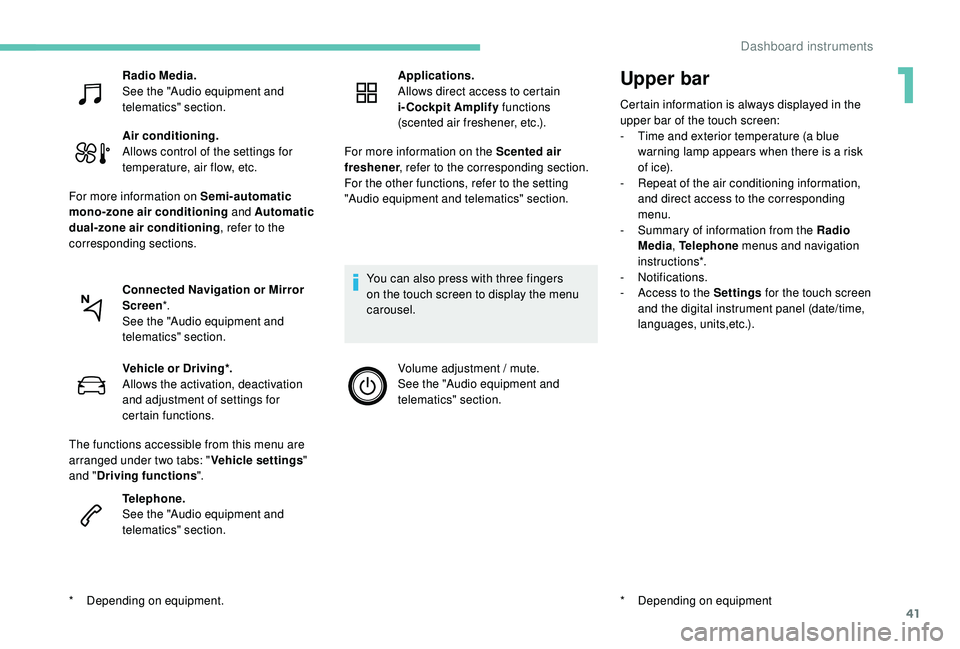
Certain information is always displayed in the
upper bar of the touch screen:
-
T
ime and exterior temperature (a blue
warning lamp appears when there is a risk
of i c e).
-
R
epeat of the air conditioning information,
and direct access to the corresponding
menu.
-
S
ummary of information from the Radio
Media , Telephone menus and navigation
instructions*.
-
Notifications.
-
A
ccess to the Settings for the touch screen
and the digital instrument panel (date/time,
languages, units,etc.).
*
D
epending on equipment
Radio Media.
See the "Audio equipment and
telematics" section.
Air conditioning.
Allows control of the settings for
temperature, air flow, etc.
For more information on Semi-automatic
mono-zone air conditioning and Automatic
dual-zone air conditioning , refer to the
corresponding sections.
Connected Navigation or Mirror
Screen *.
See the "Audio equipment and
telematics" section.
*
D
epending on equipment. Vehicle or Driving*.
Allows the activation, deactivation
and adjustment of settings for
certain functions.
The functions accessible from this menu are
arranged under two tabs: " Vehicle settings"
and " Driving functions ".
Telephone.
See the "Audio equipment and
telematics" section. Applications.
Allows direct access to certain
i-Cockpit Amplify
functions
(scented air freshener, etc.).
For more information on the Scented air
freshener , refer to the corresponding section.
For the other functions, refer to the setting
"Audio equipment and telematics" section.
You can also press with three fingers
on the touch screen to display the menu
carousel. Volume adjustment / mute.
See the "Audio equipment and
telematics" section.
1
Dashboard instruments
Page 45 of 404
43
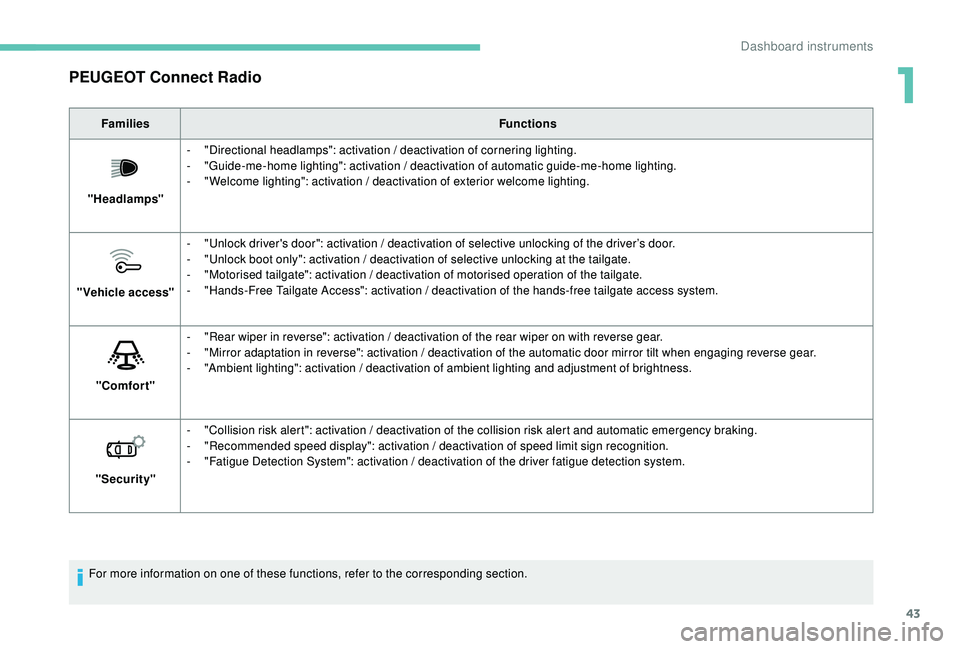
PEUGEOT Connect Radio
FamiliesFunctions
"Headlamps" -
"
Directional headlamps": activation / deactivation of cornering lighting.
-
"
Guide-me-home lighting": activation / deactivation of automatic guide-me-home lighting.
-
"
Welcome lighting": activation / deactivation of exterior welcome lighting.
"Vehicle access" -
"
Unlock driver's door": activation / deactivation of selective unlocking of the driver’s door.
-
"
Unlock boot only": activation / deactivation of selective unlocking at the tailgate.
-
"
Motorised tailgate": activation / deactivation of motorised operation of the tailgate.
-
"
Hands-Free Tailgate Access": activation / deactivation of the hands-free tailgate access system.
"Comfort" -
"
Rear wiper in reverse": activation / deactivation of the rear wiper on with reverse gear.
-
"
Mirror adaptation in reverse": activation / deactivation of the automatic door mirror tilt when engaging reverse gear.
-
"
Ambient lighting": activation / deactivation of ambient lighting and adjustment of brightness.
"Security" -
"
Collision risk alert": activation / deactivation of the collision risk alert and automatic emergency braking.
-
"
Recommended speed display": activation / deactivation of speed limit sign recognition.
-
"
Fatigue Detection System": activation / deactivation of the driver fatigue detection system.
For more information on one of these functions, refer to the corresponding section.
1
Dashboard instruments
Page 49 of 404
47
PEUGEOT Connect Radio
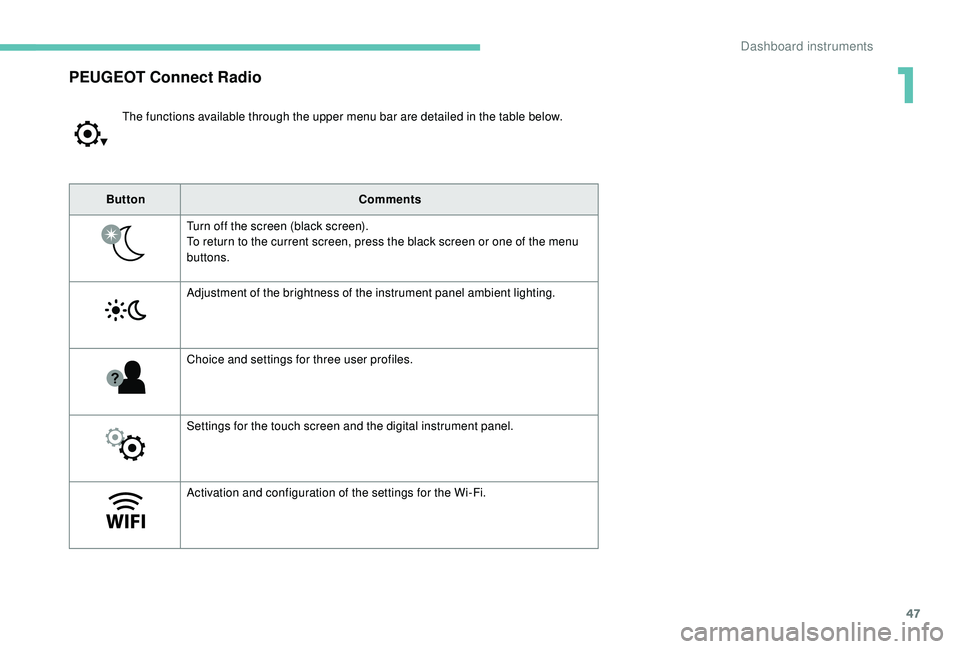
The functions available through the upper menu bar are detailed in the table below.
Button Comments
Turn off the screen (black screen).
To return to the current screen, press the black screen or one of the menu
buttons.
Adjustment of the brightness of the instrument panel ambient lighting.
Choice and settings for three user profiles.
Settings for the touch screen and the digital instrument panel.
Activation and configuration of the settings for the Wi-Fi.
1
Dashboard instruments
Page 140 of 404
138
General safety
recommendations
Labels are attached in different places on
your vehicle. They include safety warnings
as well as identification information for
your vehicle. Do not remove them: they
are an integral part of your vehicle.
For any work on your vehicle, use a
qualified workshop that has the technical
information, skills and equipment required,
all of which a PEUGEOT dealer is able to
provide.We draw your attention to the following
points:
-
T
he fitting of electrical equipment
or accessories not approved by
PEUGEOT may cause excessive
current consumption and faults and
failures with the electrical system of
your vehicle. Contact a PEUGEOT
dealer for information on the range of
recommended accessories.
-
A
s a safety measure, access to
the diagnostic socket, used for the
vehicle's electronic systems, is
reser ved strictly for PEUGEOT dealers
or qualified workshops, equipped
with the special tools required (risk
of malfunctions of the vehicle's
electronic systems that could cause
breakdowns or serious accidents).
The manufacturer cannot be held
responsible if this advice is not
followed.
-
A
ny modification or adaptation not
intended or authorised by PEUGEOT
or carried out without meeting the
technical requirements defined by
the manufacturer will result in the
suspension of the legal and contractual
warranties. Installation of accessory radio
communication transmitters
Before installing a radio communication
transmitter, you must contact a PEUGEOT
dealer for the specification of transmitters
which can be fitted (frequency, maximum
power, aerial position, specific installation
requirements), in line with the Vehicle
Electromagnetic Compatibility Directive
(2004/104/EC).
Depending on country regulations, some
safety equipment may be compulsory:
high visibility safety vests, warning
triangles, breathalysers, spare bulbs,
spare fuses, fire extinguisher, first aid kit,
mud flaps at the rear of the vehicle, etc.
Safety
Page 291 of 404
289
The Stop & Start system may not be
operational during the trip following the
first engine start.
In this case, the system will only be
available again after a continuous
period of immobilisation of the vehicle,
a period which depends on the exterior
temperature and the state of charge of the
battery (up to about 8 hours).
For right-hand drive vehicles, when the
total distance recorder has reached
60
miles (100 km), it is necessary to wait
approx. 15 minutes before starting the
engine.
However, if minor problems persist following
this operation, contact a PEUGEOT dealer or a
qualified workshop.
Referring to the corresponding section, you
must yourself reinitialise or reset certain
systems, such as:
-
t
he key with remote control or electronic key
(depending on version),
-
t
he sunroof and its electric blind,
-
t
he electric windows,
-
t
he date and time,
-
t
he preset radio stations.
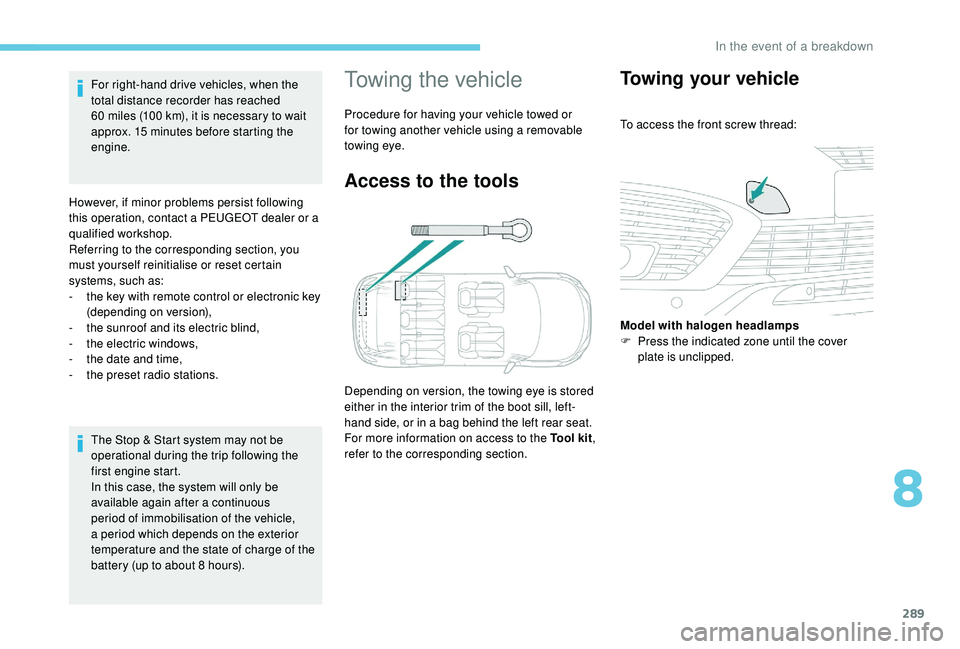
Towing the vehicle
Procedure for having your vehicle towed or
for towing another vehicle using a removable
towing eye.
Access to the tools
Depending on version, the towing eye is stored
either in the interior trim of the boot sill, left-
hand side, or in a bag behind the left rear seat.
For more information on access to the Tool kit
,
refer to the corresponding section.
Towing your vehicle
To access the front screw thread:
Model with halogen headlamps
F
P
ress the indicated zone until the cover
plate is unclipped.
8
In the event of a breakdown
Page 299 of 404
1
PEUGEOT Connect Nav
GPS satellite navigation –
Applications – Multimedia
audio system – Bluetooth
®
telephone
Contents
First steps
2
S
teering mounted controls
3
M
enus
4
V
oice commands
5
N
avigation
1
1
Connected navigation
1
5
Applications
1
8
Radio
2
3
DAB radio (Digital Audio Broadcasting)
2
5
Media
26
T
elephone
2
8
Configuration
3
3
Frequently asked questions
3
7The different functions and settings
described vary according to the version
and configuration of your vehicle.
As a safety measure and because it
requires sustained attention by the
driver, the pairing of a Bluetooth mobile
telephone with the Bluetooth hands-free
system of your audio system must be
done with the vehicle stationary
and the
ignition on.
The system is protected in such a way that
it will only operate in your vehicle.
The display of the Energy Economy
Mode message signals that a change to
standby is imminent.
The link below gives access to OSS (Open
Source Software) codes for the system.
https://www.groupe-psa.com/fr/oss/
https://www.groupe-psa.com/en/oss/
PEUGEOT Connect Nav
.
PEUGEOT Connect Nav