instrument panel PEUGEOT 5008 2018 Service Manual
[x] Cancel search | Manufacturer: PEUGEOT, Model Year: 2018, Model line: 5008, Model: PEUGEOT 5008 2018Pages: 364, PDF Size: 13.03 MB
Page 165 of 364
163
When stationary with the engine running,
do not depress the accelerator pedal
unnecessarily, you risk releasing the
parking brake.
Automatic application
With the vehicle stationary, the parking brake
is automatically applied when the engine is
switched off.
Application of the parking brake
is confirmed by illumination of the
brake indicator lamp and the P
indicator lamp in the control lever,
accompanied by the display of the
message "Parking brake applied".
Automatic application does not take place
if the engine stalls or goes into STOP
mode of Stop & Start.
With automatic operation, you can also
manually apply or release the parking
brake using the control lever.
Special cases
In some situations, you may need to operate
the parking brake manually.
Immobilisation of the vehicle
with the engine running
To immobilise the vehicle with the engine
running, briefly pull the control lever. Application of the parking brake
is confirmed by illumination of the
brake indicator lamp and the P
indicator lamp in the control lever,
accompanied by the display of the
message "Parking brake applied".
Parking the vehicle with the
brake released
In very cold conditions (ice), it is
recommended that the parking brake not
be applied.
To immobilise your vehicle, engage a
gear
or fit the chocks supplied against one of
the wheels.
Immobilisation of the vehicle with the
parking brake released
F
S
witch off the engine.
I
llumination of the indicator lamps in the
instrument panel and control lever confirm
application of the parking brake.
F
S
witch on the ignition again, without starting
the engine.
F
R
elease the parking brake manually by
pushing the control lever while keeping your
foot on the brake. The complete release of the parking
brake is confirmed by the brake
indicator lamp and the P indicator
lamp in the control lever going off,
accompanied by the display of the
message "Parking brake released".
F
S
witch off the ignition.
With an automatic gearbox, mode P is
automatically selected when the ignition is
switched off. The wheels are blocked.
For more information on the Automatic
gearbox , particularly in relation to leaving
the vehicle in free-wheeling mode, refer to
the corresponding section.
With an automatic gearbox, when mode
N is engaged, opening the driver's door
will cause an audible signal to sound. It
will stop when you close the driver's door
again.
6
Driving
Page 166 of 364
164
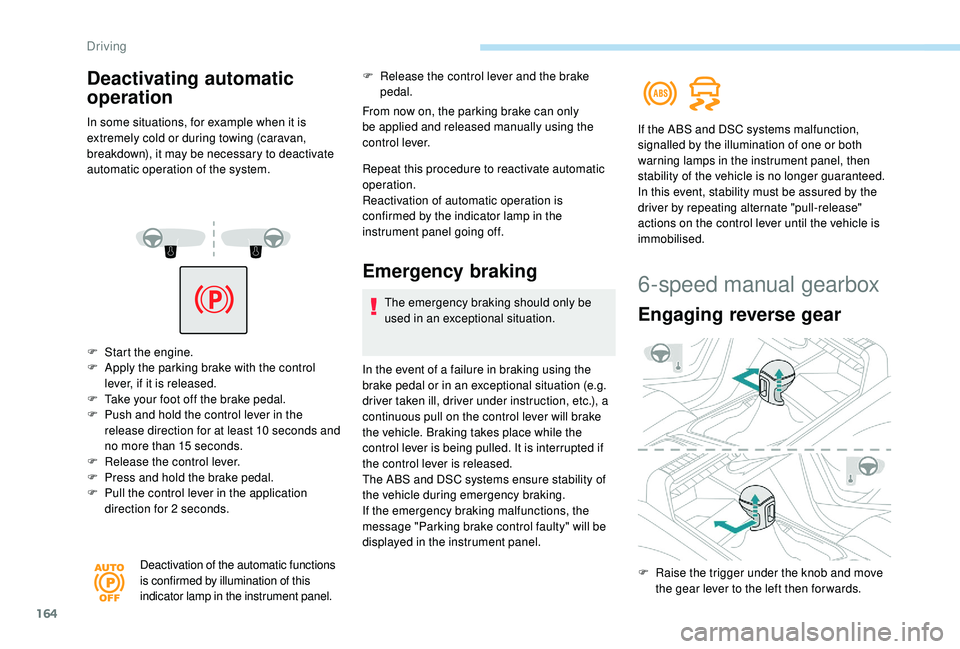
F Start the engine.
F A pply the parking brake with the control
lever, if it is released.
F
T
ake your foot off the brake pedal.
F
P
ush and hold the control lever in the
release direction for at least 10
seconds and
no more than 15
seconds.
F
R
elease the control lever.
F
P
ress and hold the brake pedal.
F
P
ull the control lever in the application
direction for 2
seconds.
Deactivation of the automatic functions
is confirmed by illumination of this
indicator lamp in the instrument panel.
F Release the control lever and the brake pedal.
From now on, the parking brake can only
be applied and released manually using the
control lever.
Repeat this procedure to reactivate automatic
operation.
Reactivation of automatic operation is
confirmed by the indicator lamp in the
instrument panel going off.
Emergency braking
The emergency braking should only be
used in an exceptional situation.
In the event of a
failure in braking using the
brake pedal or in an exceptional situation (e.g.
driver taken ill, driver under instruction, etc.), a
continuous pull on the control lever will brake
the vehicle. Braking takes place while the
control lever is being pulled. It is interrupted if
the control lever is released.
The ABS and DSC systems ensure stability of
the vehicle during emergency braking.
If the emergency braking malfunctions, the
message "Parking brake control faulty" will be
displayed in the instrument panel. If the ABS and DSC systems malfunction,
signalled by the illumination of one or both
warning lamps in the instrument panel, then
stability of the vehicle is no longer guaranteed.
In this event, stability must be assured by the
driver by repeating alternate "pull-release"
actions on the control lever until the vehicle is
immobilised.
Deactivating automatic
operation
In some situations, for example when it is
extremely cold or during towing (caravan,
breakdown), it may be necessary to deactivate
automatic operation of the system.
6-speed manual gearbox
Engaging reverse gear
F Raise the trigger under the knob and move
the gear lever to the left then for wards.
Driving
Page 168 of 364
166
SPORT
SPORT
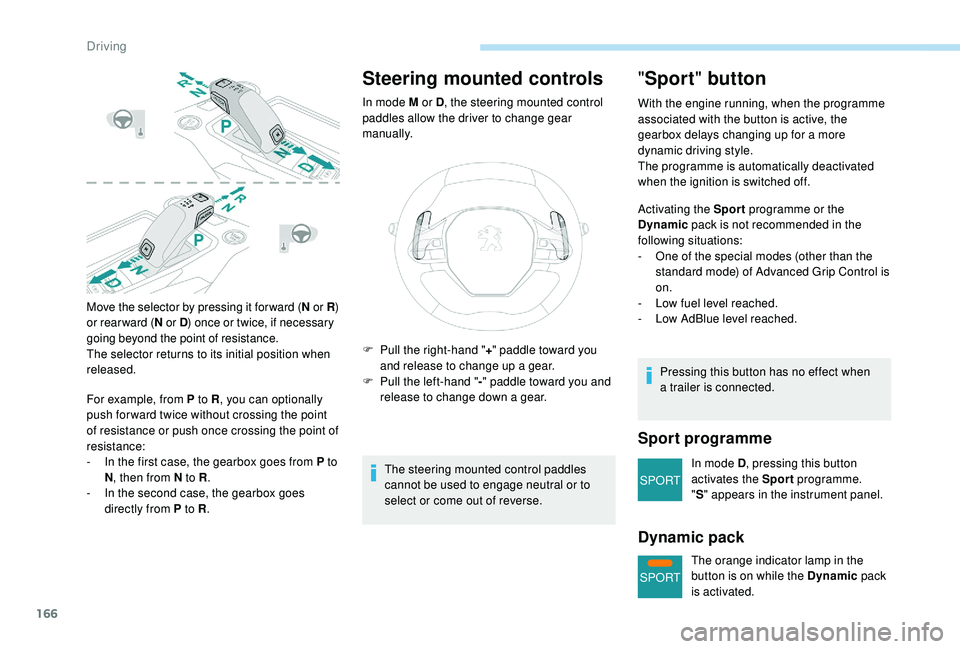
Move the selector by pressing it for ward (N or R )
or rear ward ( N or D ) once or twice, if necessary
going beyond the point of resistance.
The selector returns to its initial position when
released.
For example, from P to R , you can optionally
push for ward twice without crossing the point
of resistance or push once crossing the point of
resistance:
-
I
n the first case, the gearbox goes from P to
N , then from N to R .
-
I
n the second case, the gearbox goes
directly from P to R .
Steering mounted controls
In mode M or D, the steering mounted control
paddles allow the driver to change gear
manually.
The steering mounted control paddles
cannot be used to engage neutral or to
select or come out of reverse.
"Sport " button
With the engine running, when the programme
associated with the button is active, the
gearbox delays changing up for a
more
dynamic driving style.
The programme is automatically deactivated
when the ignition is switched off.
Activating the Sport programme or the
Dynamic pack is not recommended in the
following situations:
-
O
ne of the special modes (other than the
standard mode) of Advanced Grip Control is
on.
-
L
ow fuel level reached.
-
L
ow AdBlue level reached.
Pressing this button has no effect when
a
trailer is connected.
Sport programme
In mode D , pressing this button
activates the Sport programme.
" S " appears in the instrument panel.
Dynamic pack
The orange indicator lamp in the
button is on while the Dynamic pack
is activated.
F
P
ull the right-hand "
+" paddle toward you
and release to change up a
gear.
F
P
ull the left-hand "
-" paddle toward you and
release to change down a
gear.
Driving
Page 169 of 364
167
Displays in the instrument
panel
If the driver's door is opened with the
ignition on, a message is displayed asking
you to put the gearbox into mode P.
The state of the gearbox is displayed in
the instrument panel for a
few moments
after switching off the ignition.
Operation
You can activate or deactivate the function:
- b y pressing this button,
or
-
v
ia the i-Cockpit Amplify function, by
modifying the setting for an ambience in the
touch screen.
For more information on the Dynamic Pack
and the i-Cockpit Amplify function, refer to
the corresponding section.
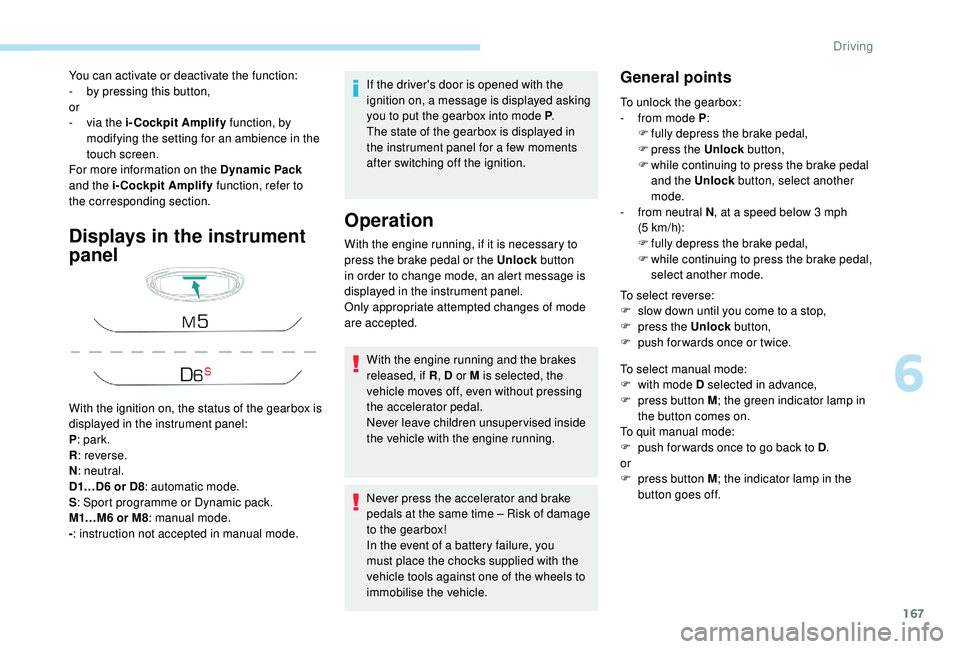
With the ignition on, the status of the gearbox is
displayed in the instrument panel:
P : park.
R : reverse.
N : neutral.
D1…D6
or D8: automatic mode.
S : Sport programme or Dynamic pack.
M1…M6
or M8: manual mode.
- : instruction not accepted in manual mode. With the engine running, if it is necessary to
press the brake pedal or the Unlock
button
in order to change mode, an alert message is
displayed in the instrument panel.
Only appropriate attempted changes of mode
are accepted.
With the engine running and the brakes
released, if R , D or M is selected, the
vehicle moves off, even without pressing
the accelerator pedal.
Never leave children unsuper vised inside
the vehicle with the engine running.
Never press the accelerator and brake
pedals at the same time – Risk of damage
to the gearbox!
In the event of a
battery failure, you
must place the chocks supplied with the
vehicle tools against one of the wheels to
immobilise the vehicle.General points
To unlock the gearbox:
- f rom mode P :
F
f
ully depress the brake pedal,
F
press the Unlock button,
F
w
hile continuing to press the brake pedal
and the Unlock button, select another
mode.
-
f
rom neutral N , at a
speed below 3 mph
(5
km/h):
F
f
ully depress the brake pedal,
F
w
hile continuing to press the brake pedal,
select another mode.
To select reverse:
F
s
low down until you come to a stop,
F
p
ress the Unlock button,
F
p
ush forwards once or twice.
To select manual mode:
F
w
ith mode D selected in advance,
F
p
ress button M ; the green indicator lamp in
the button comes on.
To quit manual mode:
F
p
ush for wards once to go back to D .
or
F
p
ress button M ; the indicator lamp in the
button goes off.
6
Driving
Page 171 of 364
169
Check that mode P has been engaged and
that the electric parking brake was applied
automatically; if not, apply it manually.The corresponding indicator lamps
for the selector panel and the
electric parking brake control lever
must be on, as well as the ones in
the instrument panel.
Operating faults
Malfunction of the gearbox
This is signalled by the illumination
of this warning lamp, accompanied
by the display of a message and an
audible signal, when the ignition is
switched on.
The gearbox switches to back-up mode: drive
mode D is locked in third gear, the steering-
mounted control paddles are inoperative,
mode M is no longer available. You may feel
a
pronounced jolt when engaging reverse. This
does not present any risk for the gearbox.
Do not drive faster than 62
mph (100 km/h),
keeping to the speed limit.
Go to a
PEUGEOT dealer or a qualified
workshop.
Malfunction of the selector
In the event of a minor fault
I n the event of a serious fault
Stop as soon as it is safe to do so, away
from the traffic, and call a
PEUGEOT
dealer or a
qualified workshop.
When the ignition is switched off, the
gearbox goes into mode P automatically.
You are alerted by this warning lamp
lighting up, accompanied by the
display of a
message and an audible
signal.
In certain cases, the selector lamps may not
come on, but the state of the gearbox is still
displayed in the instrument panel.
Drive cautiously and go to a
PEUGEOT or
a
qualified workshop. You are alerted by the illumination of
this warning lamp.
Hill start assist
System which keeps your vehicle immobilised
temporarily (approximately 2 seconds) when
starting on a
gradient, the time it takes to
move your foot from the brake pedal to the
accelerator pedal. This system only operates when:
-
t
he vehicle has been brought to a complete
stop, with your foot on the brake pedal,
-
c
ertain slope conditions are met,
-
w
ith the driver's door closed.
Do not leave the vehicle while it is being
held temporarily by hill start assist.
If you need to leave the vehicle with the
engine running, apply the parking brake
manually then ensure that the parking
brake warning lamp and the indicator lamp
P in the lever of the electric parking brake
control are on fixed (not flashing).
The hill start assist function cannot be
deactivated. However, use of the parking
brake to immobilise the vehicle interrupts
its function.
6
Driving
Page 172 of 364
170
SPORT
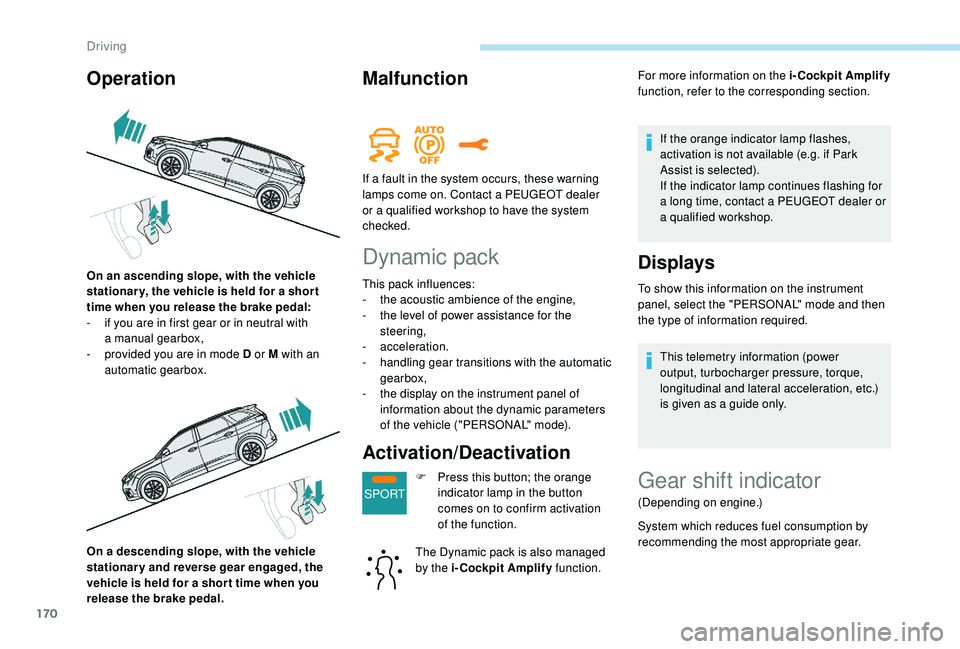
On a descending slope, with the vehicle
s tationary and reverse gear engaged, the
vehicle is held for a
shor t time when you
release the brake pedal.
Malfunction
Dynamic pack
This pack influences:
- t he acoustic ambience of the engine,
-
t
he level of power assistance for the
steering,
-
acceleration.
-
h
andling gear transitions with the automatic
gearbox,
-
t
he display on the instrument panel of
information about the dynamic parameters
of the vehicle ("PERSONAL" mode).
Activation/Deactivation
F Press this button; the orange indicator lamp in the button
comes on to confirm activation
of the function.
The Dynamic pack is also managed
by the i-Cockpit Amplify function.For more information on the i-Cockpit Amplify
function, refer to the corresponding section.
If the orange indicator lamp flashes,
activation is not available (e.g. if Park
Assist is selected).
If the indicator lamp continues flashing for
a long time, contact a PEUGEOT dealer or
a
qualified workshop.
Displays
To show this information on the instrument
panel, select the "PERSONAL" mode and then
the type of information required.
This telemetry information (power
output, turbocharger pressure, torque,
longitudinal and lateral acceleration, etc.)
is given as a
guide only.
Operation
On an ascending slope, with the vehicle
stationar y, the vehicle is held for a shor t
time when you release the brake pedal:
-
i
f you are in first gear or in neutral with
a
manual gearbox,
-
p
rovided you are in mode D or M with an
automatic gearbox. If a
fault in the system occurs, these warning
lamps come on. Contact a PEUGEOT dealer
or a qualified workshop to have the system
checked.
Gear shift indicator
(Depending on engine.)
System which reduces fuel consumption by
recommending the most appropriate gear.
Driving
Page 173 of 364
171
Operation
Depending on the driving situation and your
vehicle's equipment, the system may advise
you to skip one (or more) gear(s). You can
follow this instruction without engaging the
intermediate gears.
Gear efficiency recommendations are for
information only. In fact, the road layout, the
traffic density and safety remain the deciding
factors when choosing the best gear. The driver
therefore remains responsible for deciding
whether or not to follow the indications issued
by the system.
This function cannot be deactivated.With an automatic gearbox, the system is
only active in manual mode.
The information is displayed in the instrument
panel in the form of an arrow.
With a
manual gearbox, the arrow may be
accompanied by the gear recommended. The system adapts its gear efficiency
recommendation according to the driving
conditions (slope, load, etc.) and the
driver's requirements (power, acceleration,
b r a k i n g , e t c .) .
The system never suggests:
-
e
ngaging first gear,
-
enga
ging a
lower gear,
-
enga
ging reverse.
Stop & Start
The Stop & Start system puts the engine
temporarily into standby – STOP mode – during
stops in the traffic (red lights, traffic jams, etc.).
The engine restarts automatically – START
mode – as soon as you want to move off.
The restart takes place instantly, quickly and
silently.
Per fect for urban use, the Stop & Start system
reduces fuel consumption and exhaust
emissions as well as the noise level when
stationary.Never refuel with the engine in STOP
mode; you must switch off the ignition with
the key or the " START/STOP" button.
Operation
Going into engine STOP mode
This indicator lamp comes on in the
instrument panel and the engine
goes into standby automatically:
-
w
ith a
manual gearbox, at a
speed below
2
mph (3 km/h) for 1.5 BlueHDi versions, or
with the vehicle stationary for 1.2
PureTech,
1.6
BlueHDi and 2.0 BlueHDi 150 versions,
when you place the gear lever in neutral and
release the clutch pedal,
-
w
ith an automatic gearbox, at a speed
below 12
mph (20 km/h) for 1.5 BlueHDi
and 2.0
BlueHDi 180 versions, or with the
vehicle stationary for other versions, when
you depress the brake pedal or place the
gear selector to mode N .
A time counter calculates the time spent in
STOP mode during the journey. It is reset to
zero every time the ignition is switched on with
the key or the " START/STOP" button.
6
Driving
Page 175 of 364
173
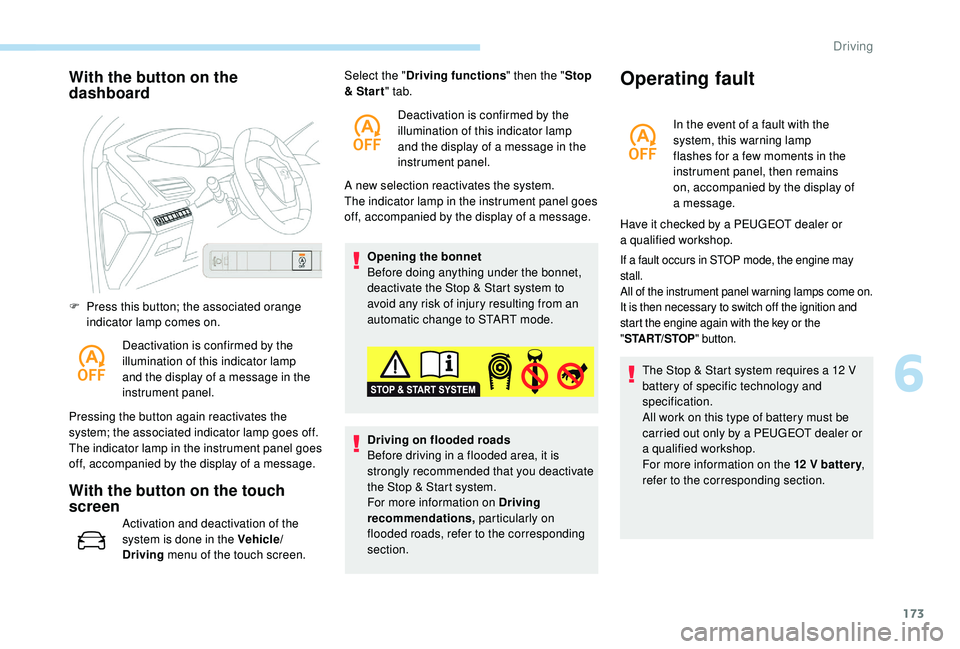
With the button on the
dashboard
F Press this button; the associated orange indicator lamp comes on.
Deactivation is confirmed by the
illumination of this indicator lamp
and the display of a
message in the
instrument panel.
Pressing the button again reactivates the
system; the associated indicator lamp goes off.
The indicator lamp in the instrument panel goes
off, accompanied by the display of a
message.
With the button on the touch
screen
Activation and deactivation of the
system is done in the Vehicle/
Driving menu of the touch screen. A new selection reactivates the system.
The indicator lamp in the instrument panel goes
off, accompanied by the display of a
message.
Opening the bonnet
Before doing anything under the bonnet,
deactivate the Stop & Start system to
avoid any risk of injury resulting from an
automatic change to START mode.
Select the "
Driving functions " then the "Stop
& Star t " tab.
Deactivation is confirmed by the
illumination of this indicator lamp
and the display of a message in the
instrument panel.
Driving on flooded roads
Before driving in a flooded area, it is
strongly recommended that you deactivate
the Stop & Start system.
For more information on Driving
recommendations, particularly on
flooded roads, refer to the corresponding
section.
Operating fault
In the event of a fault with the
s ystem, this warning lamp
flashes for a
few moments in the
instrument panel, then remains
on, accompanied by the display of
a
message.
If a fault occurs in STOP mode, the engine may
s tall.
All of the instrument panel warning lamps come on.
It is then necessary to switch off the ignition and
start the engine again with the key or the
" ST
ART/STOP " button.
The Stop & Start system requires a 12 V
b attery of specific technology and
specification.
All work on this type of battery must be
carried out only by a
PEUGEOT dealer or
a
qualified workshop.
For more information on the 12
V batter y,
refer to the corresponding section.
Have it checked by a
PEUGEOT dealer or
a
qualified workshop.
6
Driving
Page 178 of 364
176
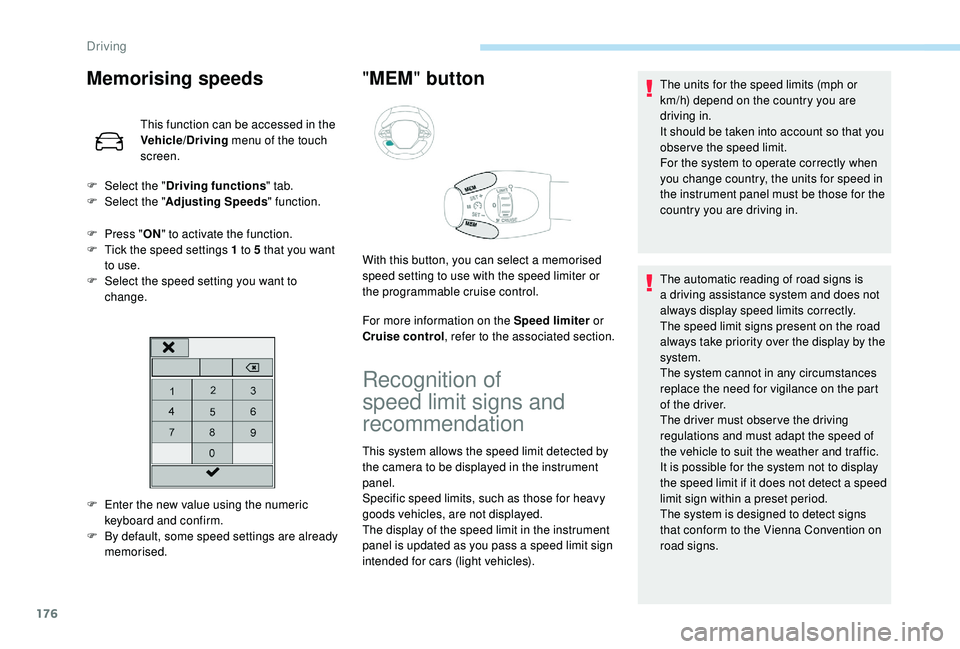
Memorising speeds
This function can be accessed in the
Vehicle/Driving menu of the touch
screen.
F
P
ress " ON" to activate the function.
F
T
ick the speed settings 1 to 5 that you want
to use.
F
S
elect the speed setting you want to
change.
" MEM " button
For more information on the Speed limiter or
Cruise control , refer to the associated section.
F
E
nter the new value using the numeric
keyboard and confirm.
F
B
y default, some speed settings are already
memorised.
F
Sel
ect the "
Driving functions " tab.
F
Sel
ect the "
Adjusting Speeds " function.
With this button, you can select a memorised
speed setting to use with the speed limiter or
the programmable cruise control.
Recognition of
speed limit signs and
recommendation
This system allows the speed limit detected by
the camera to be displayed in the instrument
panel.
Specific speed limits, such as those for heavy
goods vehicles, are not displayed.
The display of the speed limit in the instrument
panel is updated as you pass a
speed limit sign
intended for cars (light vehicles). The units for the speed limits (mph or
km/h) depend on the country you are
driving in.
It should be taken into account so that you
obser ve the speed limit.
For the system to operate correctly when
you change country, the units for speed in
the instrument panel must be those for the
country you are driving in.
The automatic reading of road signs is
a
driving assistance system and does not
always display speed limits correctly.
The speed limit signs present on the road
always take priority over the display by the
system.
The system cannot in any circumstances
replace the need for vigilance on the part
of the driver.
The driver must observe the driving
regulations and must adapt the speed of
the vehicle to suit the weather and traffic.
It is possible for the system not to display
the speed limit if it does not detect a
speed
limit sign within a
preset period.
The system is designed to detect signs
that conform to the Vienna Convention on
road signs.
Driving
Page 179 of 364
177
To maintain correct operation of the
system: regularly clean the area in front of
the camera.
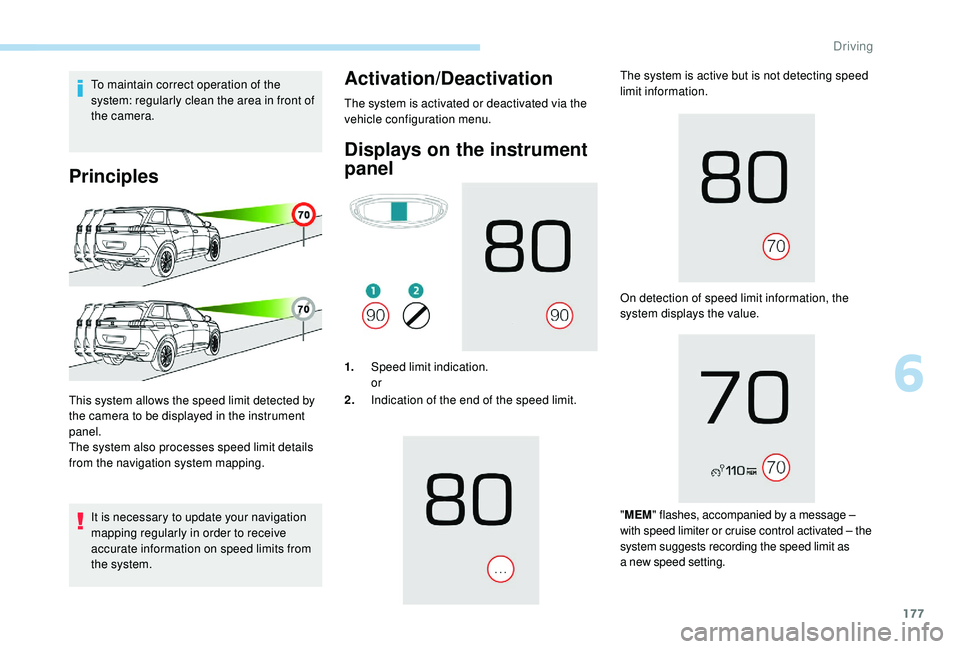
Principles
It is necessary to update your navigation
mapping regularly in order to receive
accurate information on speed limits from
the system.
Activation/Deactivation
This system allows the speed limit detected by
the camera to be displayed in the instrument
panel.
The system also processes speed limit details
from the navigation system mapping.The system is activated or deactivated via the
vehicle configuration menu.
Displays on the instrument
panel
1.
Speed limit indication.
or
2. Indication of the end of the speed limit. The system is active but is not detecting speed
limit information.
On detection of speed limit information, the
system displays the value.
"
MEM " flashes, accompanied by a
message –
with speed limiter or cruise control activated – the
system suggests recording the speed limit as
a
new speed setting.
6
Driving