key PEUGEOT 5008 2018 Owners Manual
[x] Cancel search | Manufacturer: PEUGEOT, Model Year: 2018, Model line: 5008, Model: PEUGEOT 5008 2018Pages: 364, PDF Size: 13.03 MB
Page 3 of 364
Welcome
Thank you for choosing a Peugeot 5008.
T his document presents the information and recommendations required
for you to be able to explore your vehicle in complete safety.
Your vehicle will be fitted with only some of the equipment described in
this document, depending on its trim level, version and the specification
for the country in which it was sold.
The descriptions and illustrations are given as indications only.
Automobiles PEUGEOT reser ves the right to modify the technical
specifications, equipment and accessories without having to update this
edition of the guide.
If ownership of your vehicle is transferred, please ensure this
Handbook is passed on to the new owner. In this document you will find all of the instructions and
recommendations on use that will allow you to enjoy your vehicle to the
fullest. It is strongly recommended that you familiarise yourself with it
as well as the Warranty and Maintenance Record which will provide you
with information about warranties, servicing and roadside assistance
associated with your vehicle.
Key
Safety warning
Additional information
Contributes to the protection of the environment
Left-hand drive vehicle
Right-hand drive vehicle
Page 5 of 364
3
.
bit.ly/helpPSA
.
Driving recommendations 155
Anti-theft protection 1 56
Starting/Switching off the engine with
the key
1
56
Starting/Switching off the engine with
K
eyless Entry and Starting
1
58
Electric parking brake
1
61
Manual gearbox
1
64
Automatic gearbox
1
65
Hill start assist
1
69
Dynamic pack
1
70
Gear shift indicator
1
70
Stop & Start
1
71
Under-inflation detection
1
74
Memorising speeds
1
75
Recognition of speed limit signs and
recommendation
1
76
Speed limiter
1
79
Cruise control
1
81
Adaptive cruise control
1
84
Distance Alert and Active Safety Brake
1
92
Fatigue detection system
1
96
Lane Departure Warning System
1
98
Active Lane Departure Warning System
1
98
Blind Spot Monitoring System
2
03
Parking sensors
2
05
Visiopark 1 - Visiopark 2
2
07
Park Assist
2
12Fuel
220
Misfuel prevention (Diesel) 2 21
Compatibility of fuels
2
22
Towing device
2
23
Towbar with quickly detachable towball
2
24
Load reduction mode
2
27
Energy economy mode
2
27
Very cold climate screen
2
28
Snow chains
2
28
Fitting roof bars
2
29
Bonnet
23
0
Engine compartment
2
31
Checking levels
23
2
Checks
235
AdBlue
® (BlueHDi engines) 2 37
Warning triangle
2
40
Running out of fuel (Diesel)
2
40
Tool kit
2
41
Temporary puncture repair kit
2
43
Spare wheel
2
46
Changing a
bulb
2
52
Changing a
wiper blade
2
57
Changing a
fuse
2
57
12
V battery
2
62
Towing the vehicle
2
65Engine technical data and towed loads
2
67
Petrol engines and towed loads
2
68
Diesel engines and towed loads
2
69
Dimensions
272
Identification markings
2
73
Driving
Practical information Technical data
Alphabetical index
In the event of a
breakdownAudio equipment and telematics
PEUGEOT Connect Nav
PEUGEOT Connect Radio
Bluetooth audio system
Access to additional videos
.
Contents
Page 25 of 364
23
Warning/indicator lampStateCause Action/Observations
Diesel engine
pre-heating Fixed.
When the ignition is switched on
with a
key in the ignition switch
or a
starting instruction is made
using the " START/STOP " button,
the engine temperature makes
engine pre-heating necessary. The period of illumination of the indicator lamp is
determined by the climatic conditions (up to about
thirty seconds in severe winter conditions).
With a
key in the ignition switch, wait until the indicator
lamp goes off before starting.
With
K
eyless Entry and Starting, once it goes off,
starting is immediate, on the condition that the brake
pedal remains pressed with an automatic gearbox.
With
K
eyless Entry and Starting, once it goes off,
starting is immediate, on the condition that the clutch
pedal remains pressed with a
manual gearbox.
If the engine does not start, switch the ignition off and
then on, wait until the indicator lamp goes off again,
then start the engine.
Stop & Star t Fixed, accompanied by
the display of a
message.The Stop & Start system is
deactivated. The engine will not switch off at the next traffic stop.
Reactivate the system by pressing the button again.
For more information on Stop & Star t
, refer to the
corresponding section.
Rear foglamps Fixed. The rear foglamps have been
switched on using the ring on the
lighting control stalk. Turn the ring on the lighting control stalk rear wards to
switch off the rear foglamps.
1
Instruments
Page 48 of 364
46
Remote control
General information
Ejecting the key
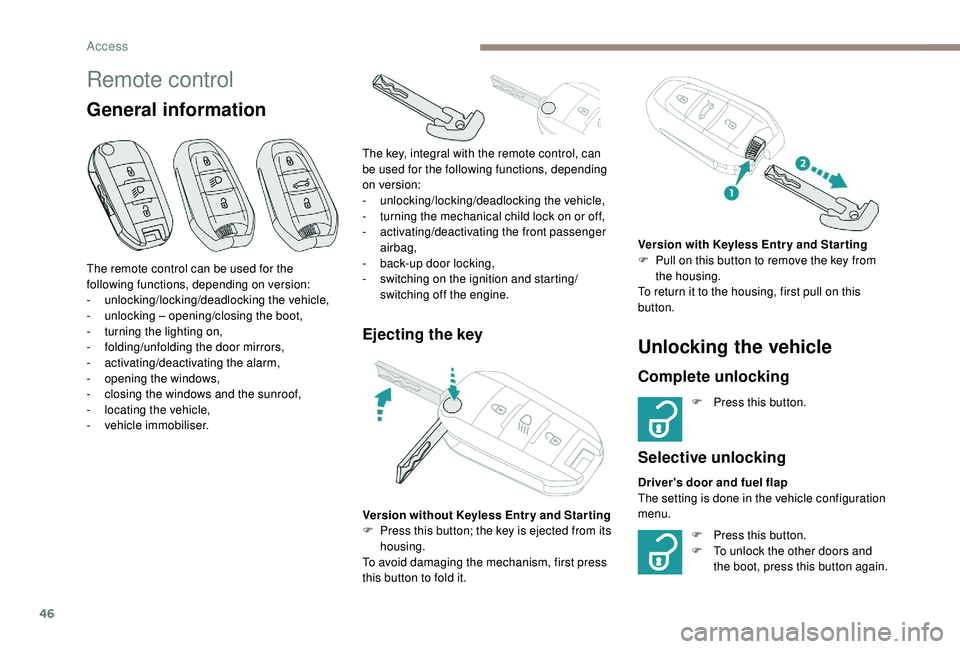
The remote control can be used for the
following functions, depending on version:
-
u
nlocking/locking/deadlocking the vehicle,
-
u
nlocking – opening/closing the boot,
-
t
urning the lighting on,
-
fo
lding/unfolding the door mirrors,
-
a
ctivating/deactivating the alarm,
-
o
pening the windows,
-
c
losing the windows and the sunroof,
-
l
ocating the vehicle,
-
v
ehicle immobiliser. The key, integral with the remote control, can
be used for the following functions, depending
on version:
-
u
nlocking/locking/deadlocking the vehicle,
-
t
urning the mechanical child lock on or off,
-
a
ctivating/deactivating the front passenger
airbag,
- b ack-up door locking,
- s witching on the ignition and starting/
switching off the engine.
Version without
K
eyless Entr y and Star ting
F
P
ress this button; the key is ejected from its
housing.
To avoid damaging the mechanism, first press
this button to fold it.
Unlocking the vehicle
Complete unlocking
F Press this button.
Selective unlocking
Driver's door and fuel flap
The setting is done in the vehicle configuration
menu. Version with
K
eyless Entr y and Star ting
F
P
ull on this button to remove the key from
the housing.
To return it to the housing, first pull on this
button.
F
P
ress this button.
F
T
o unlock the other doors and
the boot, press this button again.
Access
Page 50 of 364
48
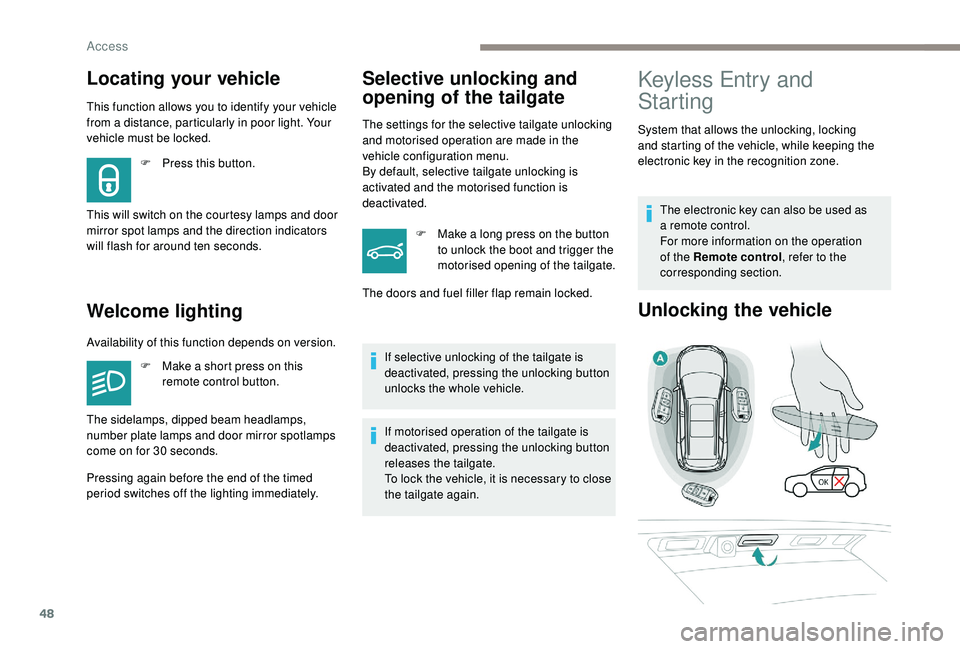
Locating your vehicle
This function allows you to identify your vehicle
from a distance, particularly in poor light. Your
vehicle must be locked.
Welcome lighting
F Press this button.
This will switch on the courtesy lamps and door
mirror spot lamps and the direction indicators
will flash for around ten seconds.
Selective unlocking and
opening of the tailgate
The settings for the selective tailgate unlocking
and motorised operation are made in the
vehicle configuration menu.
By default, selective tailgate unlocking is
activated and the motorised function is
deactivated. F
M
ake a long press on the button
to unlock the boot and trigger the
motorised opening of the tailgate.
If selective unlocking of the tailgate is
deactivated, pressing the unlocking button
unlocks the whole vehicle.
If motorised operation of the tailgate is
deactivated, pressing the unlocking button
releases the tailgate.
To lock the vehicle, it is necessary to close
the tailgate again.
The doors and fuel filler flap remain locked.
Keyless Entry and
Starting
System that allows the unlocking, locking
and starting of the vehicle, while keeping the
electronic key in the recognition zone.
The electronic key can also be used as
a
remote control.
For more information on the operation
of the Remote control , refer to the
corresponding section.
Unlocking the vehicle
Availability of this function depends on version.
F
M
ake a short press on this
remote control button.
Pressing again before the end of the timed
period switches off the lighting immediately. The sidelamps, dipped beam headlamps,
number plate lamps and door mirror spotlamps
come on for 30
seconds.
Access
Page 51 of 364
49
Complete unlocking
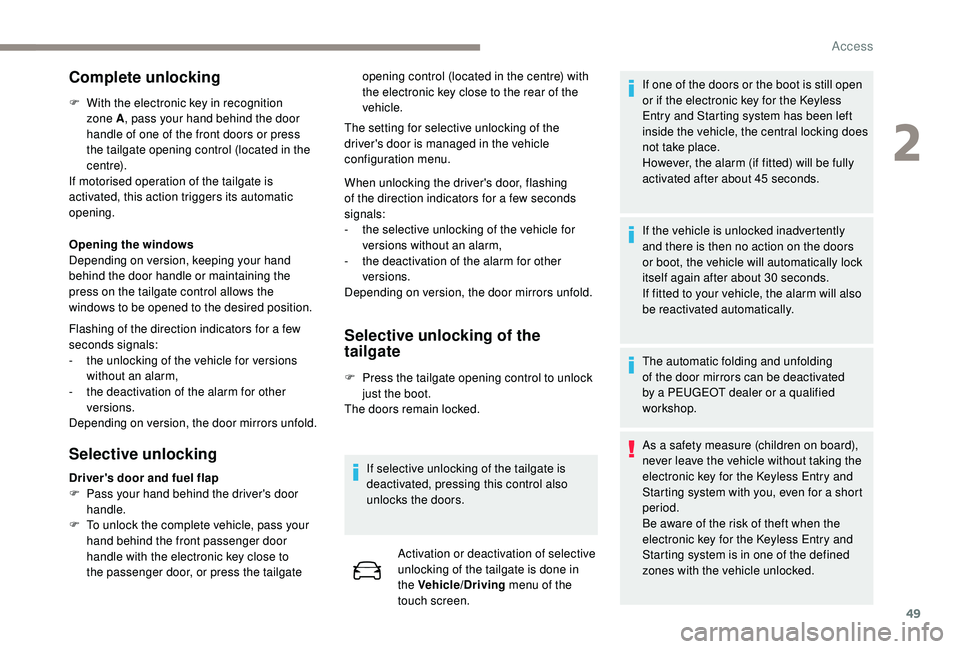
F With the electronic key in recognition zone A , pass your hand behind the door
handle of one of the front doors or press
the tailgate opening control (located in the
c e nt r e).
If motorised operation of the tailgate is
activated, this action triggers its automatic
opening.
Opening the windows
Depending on version, keeping your hand
behind the door handle or maintaining the
press on the tailgate control allows the
windows to be opened to the desired position.
Flashing of the direction indicators for a
few
seconds signals:
-
t
he unlocking of the vehicle for versions
without an alarm,
-
t
he deactivation of the alarm for other
versions.
Depending on version, the door mirrors unfold.
Selective unlocking Selective unlocking of the
tailgate
F Press the tailgate opening control to unlock
just the boot.
The doors remain locked.
If selective unlocking of the tailgate is
deactivated, pressing this control also
unlocks the doors. Activation or deactivation of selective
unlocking of the tailgate is done in
the Vehicle/Driving menu of the
touch screen. If one of the doors or the boot is still open
or if the electronic key for the
K
eyless
Entry and Starting system has been left
inside the vehicle, the central locking does
not take place.
However, the alarm (if fitted) will be fully
activated after about 45
seconds.
If the vehicle is unlocked inadvertently
and there is then no action on the doors
or boot, the vehicle will automatically lock
itself again after about 30
seconds.
If fitted to your vehicle, the alarm will also
be reactivated automatically.
The automatic folding and unfolding
of the door mirrors can be deactivated
by a PEUGEOT dealer or a qualified
workshop.
As a
safety measure (children on board),
never leave the vehicle without taking the
electronic key for the
K
eyless Entry and
Starting system with you, even for a
short
period.
Be aware of the risk of theft when the
electronic key for the
K
eyless Entry and
Starting system is in one of the defined
zones with the vehicle unlocked.
Driver's door and fuel flap
F
P
ass your hand behind the driver's door
handle.
F
T
o unlock the complete vehicle, pass your
hand behind the front passenger door
handle with the electronic key close to
the passenger door, or press the tailgate The setting for selective unlocking of the
driver's door is managed in the vehicle
configuration menu.
When unlocking the driver's door, flashing
of the direction indicators for a
few seconds
signals:
-
t
he selective unlocking of the vehicle for
versions without an alarm,
-
t
he deactivation of the alarm for other
versions.
Depending on version, the door mirrors unfold. opening control (located in the centre) with
the electronic key close to the rear of the
vehicle.
2
Access
Page 52 of 364
50
In order to preser ve the battery in the
electronic key and the vehicle's battery,
the "hands-free" functions are put into
long-term standby after 21 days without
use. To restore these functions, press
one of the remote control buttons or start
the engine with the electronic key in the
reader.
For more information on starting with
K
eyless Entr y and Star ting , refer to the
corresponding section.
Locking the vehicle
Normal locking
Closing the windows and sunroof
Maintaining pressure on the door handle or
the tailgate control allows the windows and,
depending on version, the sunroof to be closed
to the desired position.
This operation also closes the sunroof blind.
Ensure that nothing could prevent the
correct closing of the windows and
sunroof.
Be particularly aware of children when
operating the windows.
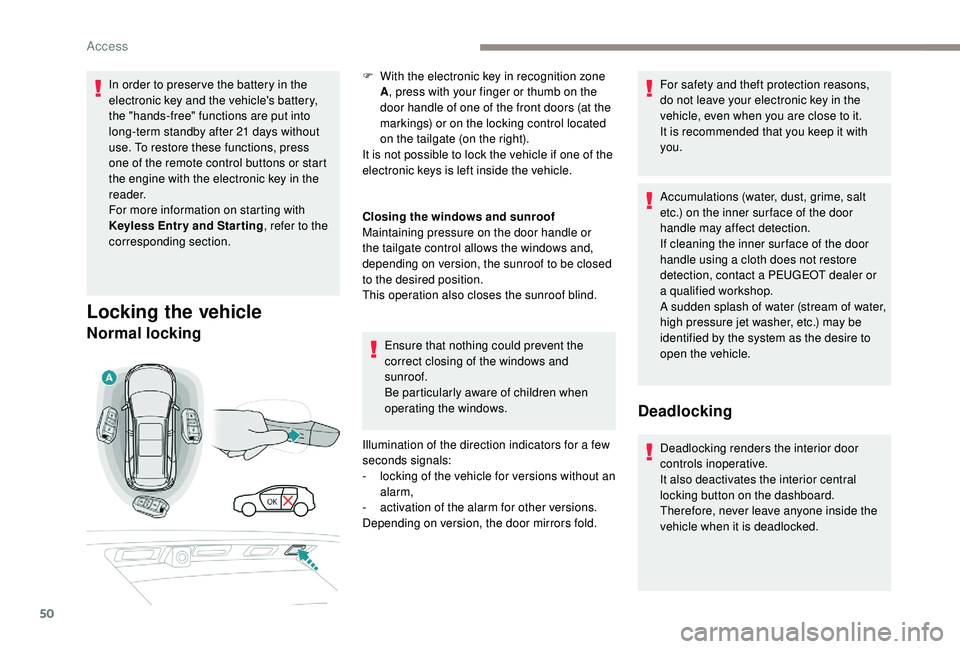
Illumination of the direction indicators for a
few
seconds signals:
-
l
ocking of the vehicle for versions without an
alarm,
-
a
ctivation of the alarm for other versions.
Depending on version, the door mirrors fold. For safety and theft protection reasons,
do not leave your electronic key in the
vehicle, even when you are close to it.
It is recommended that you keep it with
you.
Accumulations (water, dust, grime, salt
etc.) on the inner sur face of the door
handle may affect detection.
If cleaning the inner sur face of the door
handle using a
cloth does not restore
detection, contact a
PEUGEOT dealer or
a
qualified workshop.
A sudden splash of water (stream of water,
high pressure jet washer, etc.) may be
identified by the system as the desire to
open the vehicle.
Deadlocking
Deadlocking renders the interior door
controls inoperative.
It also deactivates the interior central
locking button on the dashboard.
Therefore, never leave anyone inside the
vehicle when it is deadlocked.
F
W
ith the electronic key in recognition zone
A , press with your finger or thumb on the
door handle of one of the front doors (at the
markings) or on the locking control located
on the tailgate (on the right).
It is not possible to lock the vehicle if one of the
electronic keys is left inside the vehicle.
Access
Page 53 of 364
51
Depending on version, the door mirrors fold.
At the second press, illumination of the
direction indicators for a few seconds signals
the deadlocking of the vehicle for versions
without an alarm.
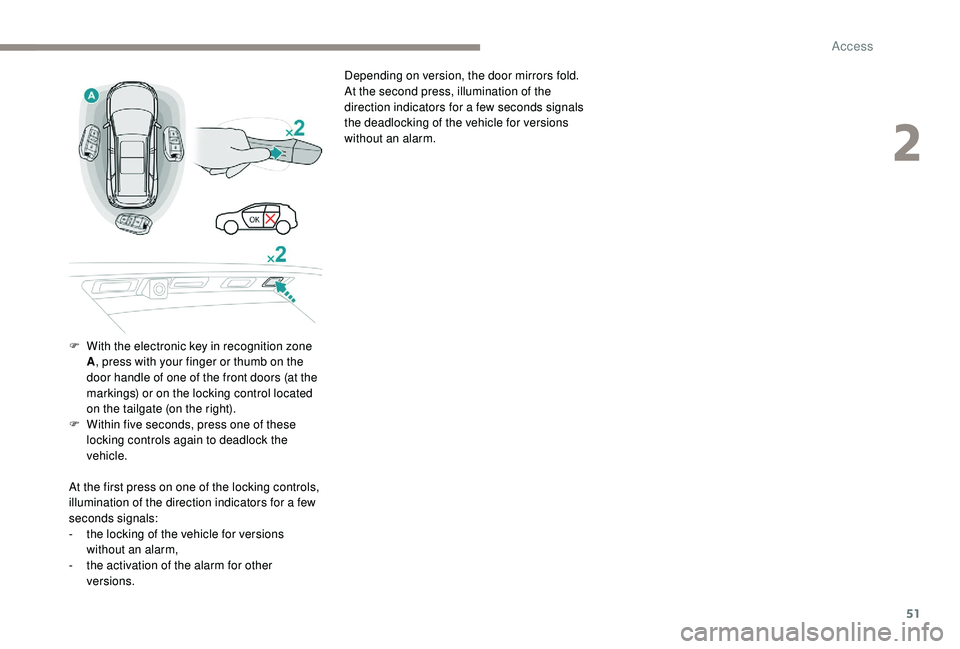
F
W
ith the electronic key in recognition zone
A , press with your finger or thumb on the
door handle of one of the front doors (at the
markings) or on the locking control located
on the tailgate (on the right).
F
W
ithin five seconds, press one of these
locking controls again to deadlock the
vehicle.
At the first press on one of the locking controls,
illumination of the direction indicators for a
few
seconds signals:
-
t
he locking of the vehicle for versions
without an alarm,
-
t
he activation of the alarm for other
versions.
2
Access
Page 54 of 364
52
Lost keys, remote control, electronic key
Visit a PEUGEOT dealer with the vehicle's
registration certificate, your personal
identification documents and if possible, the
label bearing the key code.
The PEUGEOT dealer will be able to retrieve
the key code and the transponder code
required to order a
new key. Do not throw away the remote control
batteries, they contain metals which are
harmful to the environment.
Take them to an approved collection
point.
Electrical interference
The
K eyless Entry and Starting electronic
key may not operate if close to certain
electronic devices: telephone, laptop
computer, strong magnetic fields, etc.
Remote control
The high frequency remote control is
a
sensitive system; do not operate it while it
is in your pocket as there is a
possibility that
it may unlock the vehicle, without you being
aware of it.
Do not repeatedly press the buttons of your
remote control out of range and out of sight
of your vehicle. The remote control may stop
working and need to be reinitialised.
The remote control does not operate when
the key is in the ignition, even when the
ignition is switched off.
Locking the vehicle
Driving with the doors locked may make
access to the passenger compartment by
the emergency ser vices more difficult in an
emergency.
As a
safety precaution (with children on board),
remove the key from the ignition or take the
electronic key when you leave the vehicle, even
for a
short time. Anti-theft protection
Do not make any modifications to the
electronic engine immobiliser system; this
could cause malfunctions.
For vehicles with an ignition switch, do
not forget to remove the key and turn the
steering to engage the steering lock.
When purchasing a
second-hand vehicle
Have the key codes memorised by
a
PEUGEOT dealer, to ensure that the keys
in your possession are the only ones which
can start the vehicle.
Back-up procedures
Complete unlocking/locking
of the vehicle with the key
These procedures should be used in the
following cases:
-
r
emote control cell battery flat,
-
r
emote control fault,
-
v
ehicle in an area subject to strong
electromagnetic interference.
In the first case, you can also replace the
remote control cell battery.
Refer to the corresponding section.
In the second case, you can also reinitialise the
remote control.
Refer to the corresponding section.
Access
Page 55 of 364
53
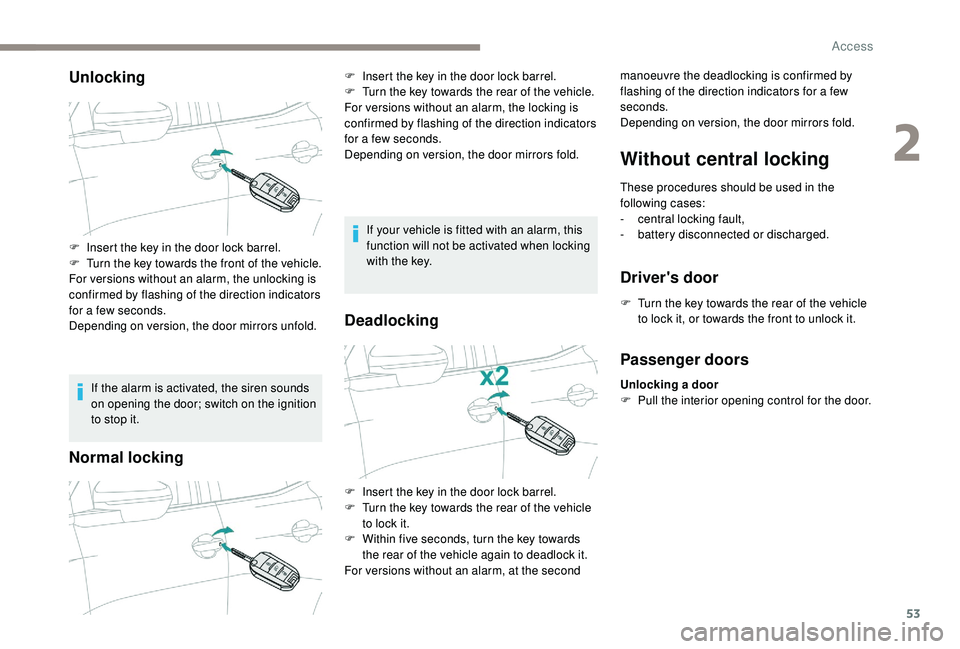
Unlocking
If the alarm is activated, the siren sounds
on opening the door; switch on the ignition
to stop it.
Normal locking
If your vehicle is fitted with an alarm, this
function will not be activated when locking
with the key.
Deadlocking
Without central locking
These procedures should be used in the
following cases:
-
c
entral locking fault,
-
b
attery disconnected or discharged.
Driver's door
F Turn the key towards the rear of the vehicle to lock it, or towards the front to unlock it.
F
I
nsert the key in the door lock barrel.
F
T
urn the key towards the front of the vehicle.
For versions without an alarm, the unlocking is
confirmed by flashing of the direction indicators
for a
few seconds.
Depending on version, the door mirrors unfold. F
I
nsert the key in the door lock barrel.
F
T
urn the key towards the rear of the vehicle.
For versions without an alarm, the locking is
confirmed by flashing of the direction indicators
for a
few seconds.
Depending on version, the door mirrors fold. manoeuvre the deadlocking is confirmed by
flashing of the direction indicators for a few
seconds.
Depending on version, the door mirrors fold.
F
I
nsert the key in the door lock barrel.
F
T
urn the key towards the rear of the vehicle
to lock it.
F
W
ithin five seconds, turn the key towards
the rear of the vehicle again to deadlock it.
For versions without an alarm, at the second
Passenger doors
Unlocking a door
F P ull the interior opening control for the door.
2
Access