buttons Peugeot 508 2016 User Guide
[x] Cancel search | Manufacturer: PEUGEOT, Model Year: 2016, Model line: 508, Model: Peugeot 508 2016Pages: 371, PDF Size: 12.12 MB
Page 71 of 371
69
508_en_Chap02_ouvertures_ed01-2016
Lost keys, remote control, electronic key
Visit a PeugeOt dealer with the vehicle's registration certificate, your personal identification documents and if possible, the label bearing the
key code.
th
e P
e
uge
Ot
dealer will be able to retrieve the key code and the transponder code required to order a new key.
Remote control
the high frequency remote control is a sensitive system; do not operate it while it is in your pocket as there is a possibility that it may unlock the
vehicle, without you being aware of it.
Do not repeatedly press the buttons of your remote control out of range and out of sight of your vehicle. You run the risk of stopping it from
working and the remote control would have to be reinitialised.
th
e remote control does not operate when the key is in the ignition, even when the ignition is switched off.
Locking the vehicle
Driving with the doors locked may make access to the passenger compartment by the emergency services more difficult in an emergency.
As a safety precaution (with children on board), remove the key from the ignition or take the electronic key when you leave the vehicle, even for
a short time.
Electrical interference
the Keyless en try and Starting electronic key may not operate if close to certain electronic devices: telephone, laptop computer, strong
magnetic fields, ...
Anti-theft protection
Do not make any modifications to the electronic engine immobiliser system; this could cause malfunctions.
Don't forget to turn the steering to engage the steering lock.
When purchasing a second-hand vehicle
Have the key codes memorised by a Pe ugeOt dealer, to ensure that the keys in your possession are the only ones which can start the vehicle.
2
Access
Page 79 of 371
77
508_en_Chap03_ergonomie-et-confort_ed01-2016
Storing driving positions
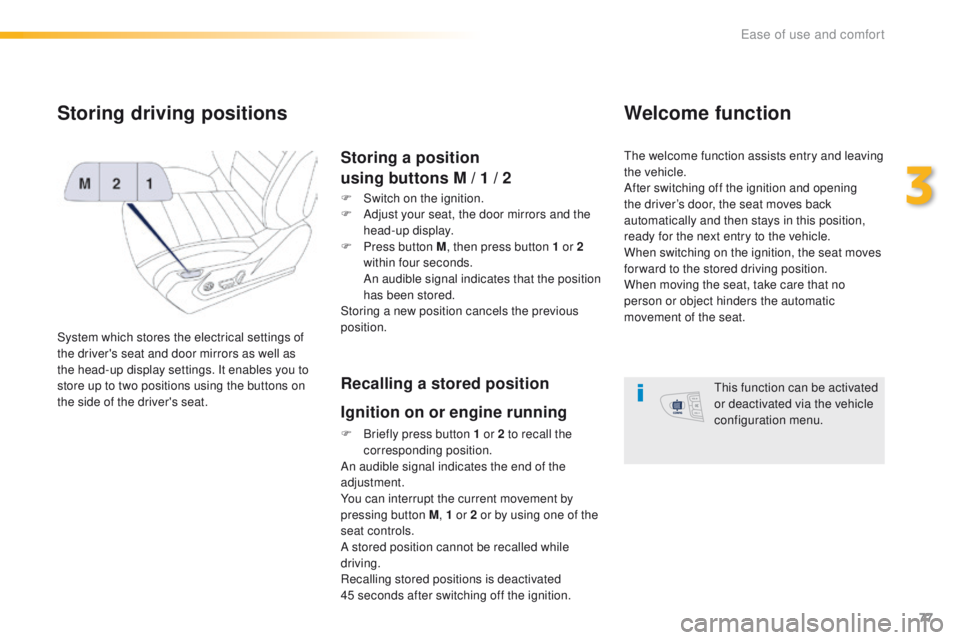
System which stores the electrical settings of
the driver's seat and door mirrors as well as
the head-up display settings. It enables you to
store up to two positions using the buttons on
the side of the driver's seat.
Storing a position
using buttons M / 1 / 2
F Switch on the ignition.
F
A djust your seat, the door mirrors and the
head-up display.
F
P
ress button M , then press button 1 or 2
within four seconds.
A
n audible signal indicates that the position
has been stored.
Storing a new position cancels the previous
position.
Recalling a stored position
Ignition on or engine running
F Briefly press button 1 or 2 to recall the corresponding position.
An audible signal indicates the end of the
adjustment.
You can interrupt the current movement by
pressing button M , 1 or 2 or by using one of the
seat controls.
A stored position cannot be recalled while
driving.
Recalling stored positions is deactivated
45
seconds after switching off the ignition.
Welcome function
the welcome function assists entry and leaving
the vehicle.
After switching off the ignition and opening
the driver’s door, the seat moves back
automatically and then stays in this position,
ready for the next entry to the vehicle.
When switching on the ignition, the seat moves
for ward to the stored driving position.
When moving the seat, take care that no
person or object hinders the automatic
movement of the seat.
th
is function can be activated
or deactivated via the vehicle
configuration menu.
3
ease of use and comfort
Page 85 of 371
83
508_en_Chap03_ergonomie-et-confort_ed01-2016
Heating and Ventilation
Air intake
the air circulating in the passenger compartment
is filtered and originates either from the outside via
the grille located at the base of the windscreen or
from the inside in air recirculation mode.
Controls
the incoming air follows various routes
depending on the controls selected by
the driver, the front passenger and rear
passengers, according to the level of
equipment.
th
e temperature control enables you to obtain
the level of comfort required by mixing the air of
the various circuits.
th
e air distribution control enables you to
select the air vents used in the passenger
compartment by the combined use of the
associated buttons.
th
e air flow control enables you to increase or
reduce the speed of the ventilation fan.
th
ese controls are grouped together on control
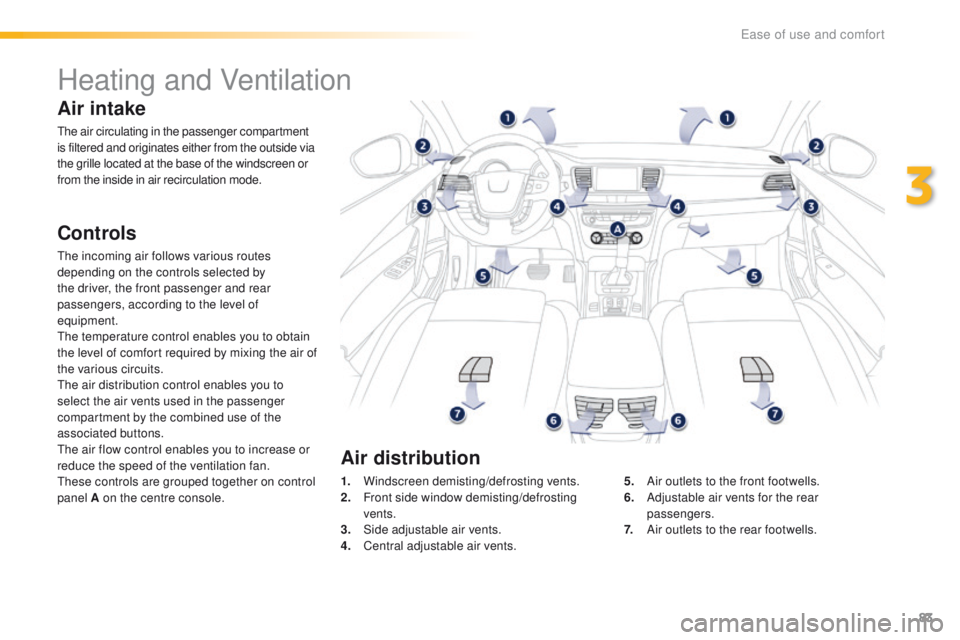
panel A on the centre console. 1.
W
indscreen demisting/defrosting vents.
2.
F
ront side window demisting/defrosting
vents.
3.
S
ide adjustable air vents.
4.
C
entral adjustable air vents.5.
A
ir outlets to the front footwells.
6.
A
djustable air vents for the rear
passengers.
7.
A
ir outlets to the rear footwells.
Air distribution
3
ease of use and comfort
Page 88 of 371
86
508_en_Chap03_ergonomie-et-confort_ed01-2016
Manual air conditioning
the air conditioning can only operate with the engine running.
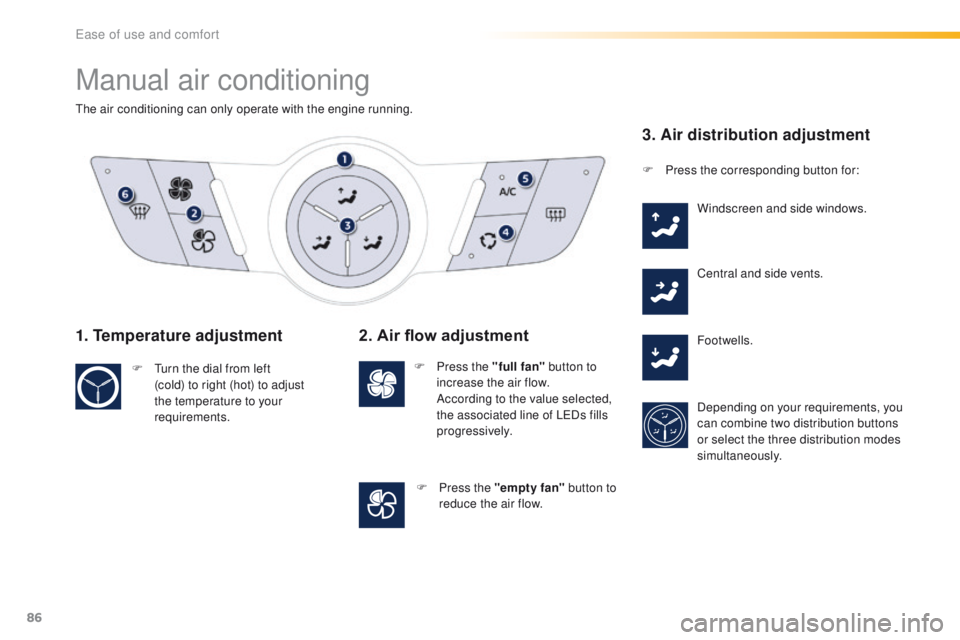
1. Temperature adjustment
F turn the dial from left (cold) to right (hot) to adjust
the temperature to your
requirements.
2. Air flow adjustment
F Press the "full fan" button to
increase the air flow.
A
ccording to the value selected,
the associated line of L
eD
s fills
progressively.
F
P
ress the "empty fan"
button to
reduce the air flow.
3. Air distribution adjustment
F Press the corresponding button for:
Windscreen and side windows.
Central and side vents.
Footwells.
Depending on your requirements, you
can combine two distribution buttons
or select the three distribution modes
simultaneously.
ease of use and comfort
Page 92 of 371
90
508_en_Chap03_ergonomie-et-confort_ed01-2016
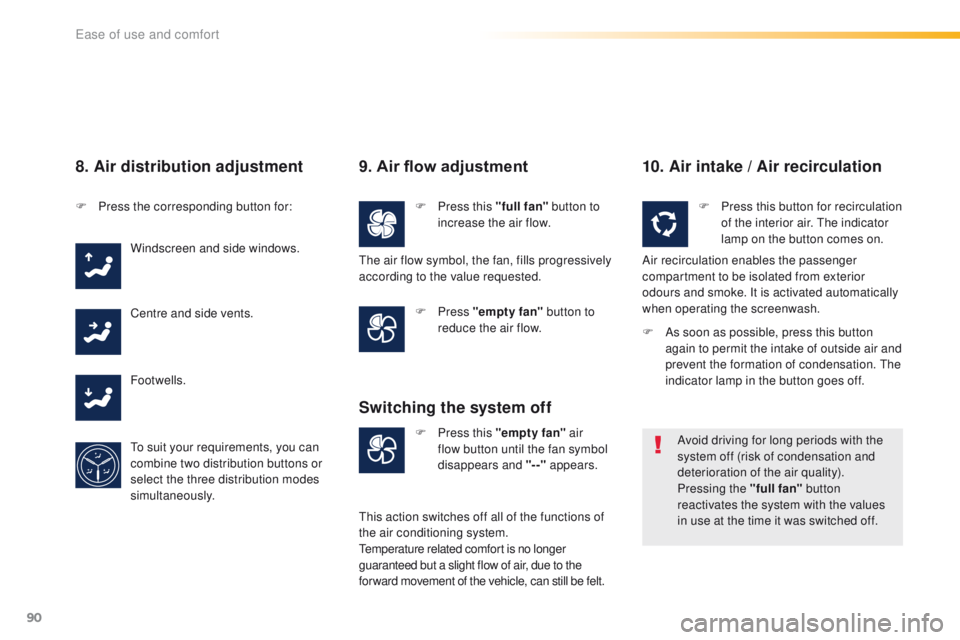
8. Air distribution adjustment
F Press the corresponding button for:Windscreen and side windows.
Centre and side vents.
Footwells.
to s
uit your requirements, you can
combine two distribution buttons or
select the three distribution modes
simultaneously.
9. Air flow adjustment
F Press this "full fan" button to
increase the air flow.
F
Press "empty fan" button to
reduce the air flow.
10. Air intake / Air recirculation
F Press this "empty fan" air
flow button until the fan symbol
disappears and "--" appears.
Switching the system off
F Press this button for recirculation
of the interior air. th e indicator
lamp on the button comes on.
Air recirculation enables the passenger
compartment to be isolated from exterior
odours and smoke. It is activated automatically
when operating the screenwash.
Avoid driving for long periods with the
system off (risk of condensation and
deterioration of the air quality).
Pressing the "full fan" button
reactivates the system with the values
in use at the time it was switched off.
th
e air flow symbol, the fan, fills progressively
according to the value requested.
th
is action switches off all of the functions of
the air conditioning system.
te
mperature related comfort is no longer
guaranteed but a slight flow of air, due to the
for ward movement of the vehicle, can still be felt. F
A
s soon as possible, press this button
again to permit the intake of outside air and
prevent the formation of condensation.
t
h
e
indicator lamp in the button goes off.
ease of use and comfort
Page 94 of 371
92
508_en_Chap03_ergonomie-et-confort_ed01-2016
With Stop & Start, when demisting has
been activated, the StOP mode is not
available.
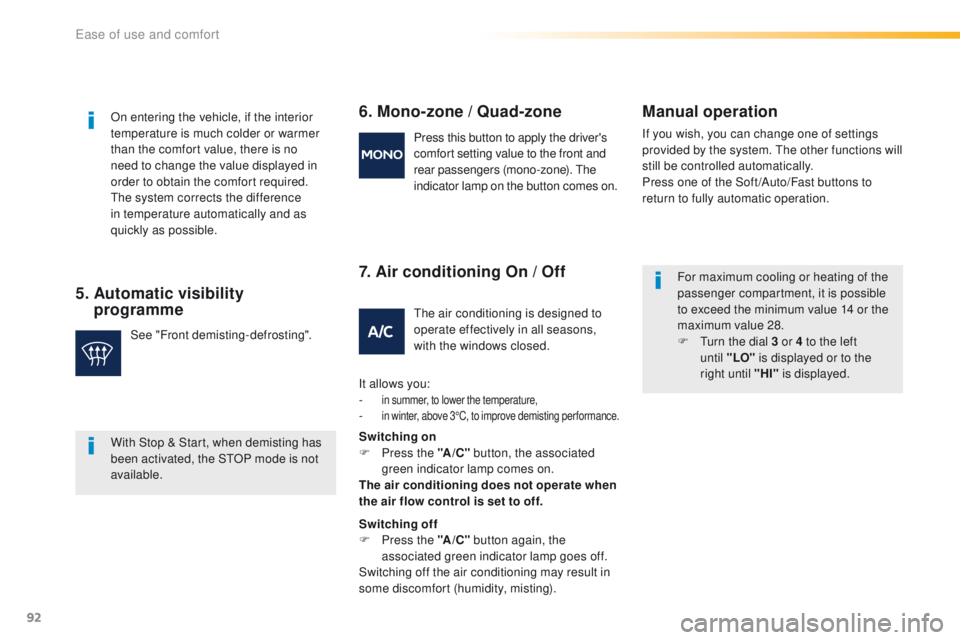
5. Automatic visibility programme 6. Mono-zone
/ Quad-zone
7. Air conditioning On / OffManual operation
If you wish, you can change one of settings
provided by the system.
th e other functions will
still be controlled automatically.
Press one of the Soft /Auto/Fast buttons to
return to fully automatic operation.
On entering the vehicle, if the interior
temperature is much colder or warmer
than the comfort value, there is no
need to change the value displayed in
order to obtain the comfort required.
th
e system corrects the difference
in temperature automatically and as
quickly as possible.
See "Front demisting-defrosting". Press this button to apply the driver's
comfort setting value to the front and
rear passengers (mono-zone).
t
he
indicator lamp on the button comes on.
th
e air conditioning is designed to
operate effectively in all seasons,
with the windows closed.
It allows you:
-
in summer, to lower the temperature,- in winter, above 3°C, to improve demisting per formance.
Switching on
F P ress the "A /C " button, the associated
green indicator lamp comes on.
The air conditioning does not operate when
the air flow control is set to off.
Switching off
F
P
ress the "A /C " button again, the
associated green indicator lamp goes off.
Switching off the air conditioning may result in
some discomfort (humidity, misting). For maximum cooling or heating of the
passenger compartment, it is possible
to exceed the minimum value 14 or the
maximum value 28.
F
t
u
rn the dial 3 or 4 to the left
until "LO" is displayed or to the
right until "HI" is displayed.
ease of use and comfort
Page 95 of 371
93
508_en_Chap03_ergonomie-et-confort_ed01-2016
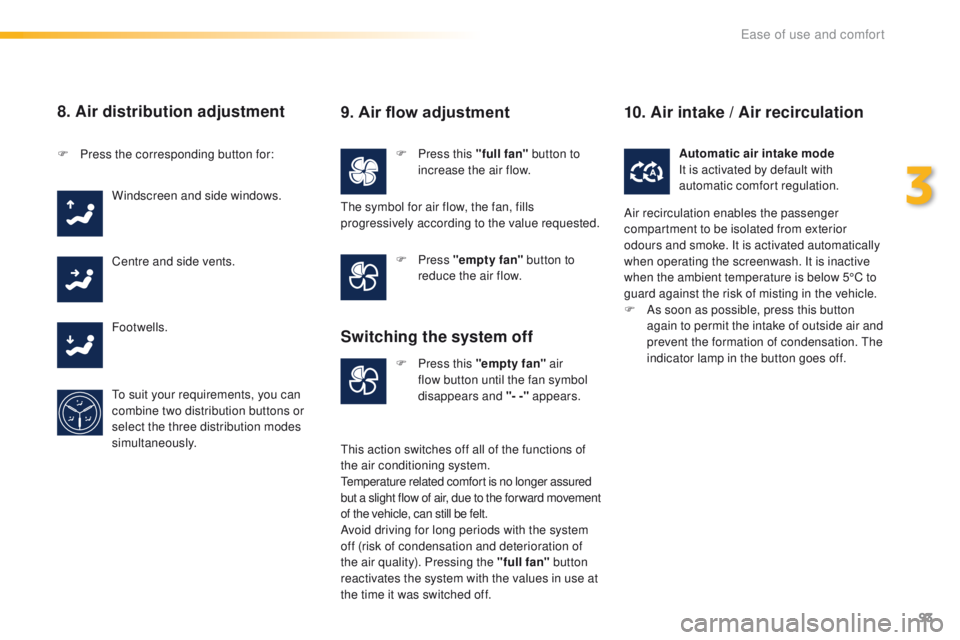
8. Air distribution adjustment
F Press this "full fan" button to
increase the air flow.
F
P
ress the corresponding button for:
Windscreen and side windows.
Centre and side vents.
Footwells.
to s
uit your requirements, you can
combine two distribution buttons or
select the three distribution modes
simultaneously. F
Press "empty fan" button to
reduce the air flow.
F
P
ress this "empty fan" air
flow button until the fan symbol
disappears and "- -" appears. Automatic air intake mode
It is activated by default with
automatic comfort regulation.
9. Air flow adjustment
the symbol for air flow, the fan, fills
progressively according to the value requested.
Switching the system off
this action switches off all of the functions of
the air conditioning system.
te
mperature related comfort is no longer assured
but a slight flow of air, due to the for ward movement
of the vehicle, can still be felt.
Avoid driving for long periods with the system
off (risk of condensation and deterioration of
the air quality). Pressing the "full fan" button
reactivates the system with the values in use at
the time it was switched off.
10. Air intake / Air recirculation
Air recirculation enables the passenger
compartment to be isolated from exterior
odours and smoke. It is activated automatically
when operating the screenwash. It is inactive
when the ambient temperature is below 5°C to
guard against the risk of misting in the vehicle.
F
A
s soon as possible, press this button
again to permit the intake of outside air and
prevent the formation of condensation.
t
h
e
indicator lamp in the button goes off.
3
ease of use and comfort
Page 186 of 371
184
508_en_Chap06_conduite_ed01-2016
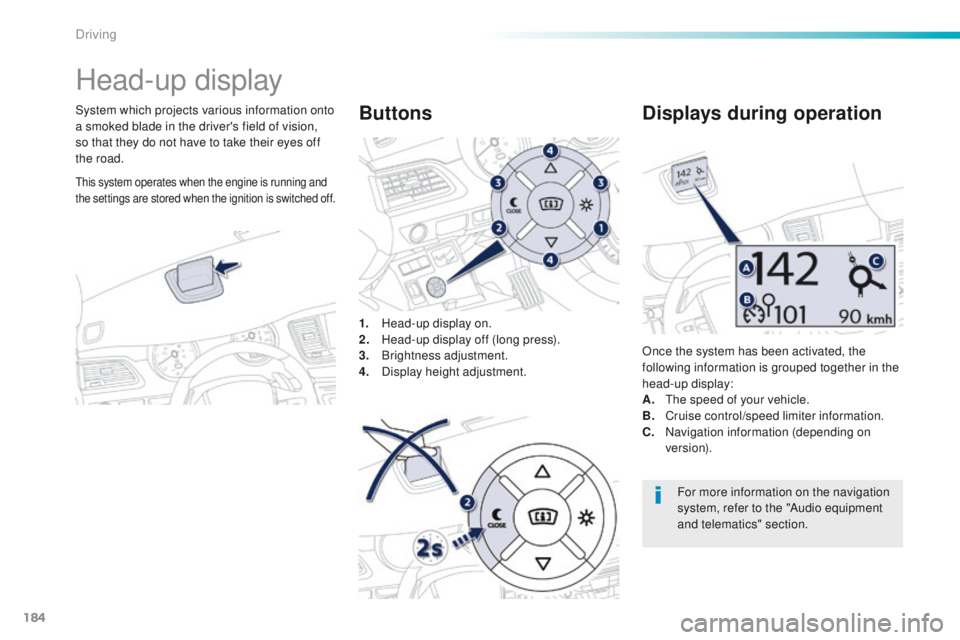
Head-up display
System which projects various information onto
a smoked blade in the driver's field of vision,
so that they do not have to take their eyes off
the road.1.
H
ead-up display on.
2.
H
ead-up display off (long press).
3.
Br
ightness adjustment.
4.
D
isplay height adjustment.Buttons
Once the system has been activated, the
following information is grouped together in the
head-up display:
A.
t
h
e speed of your vehicle.
B.
C
ruise control/speed limiter information.
C.
N
avigation information (depending on
ve r s i o n).
Displays during operation
For more information on the navigation
system, refer to the "Audio equipment
and telematics" section.
this system operates when the engine is running and
the settings are stored when the ignition is switched off.
Driving
Page 187 of 371
185
508_en_Chap06_conduite_ed01-2016
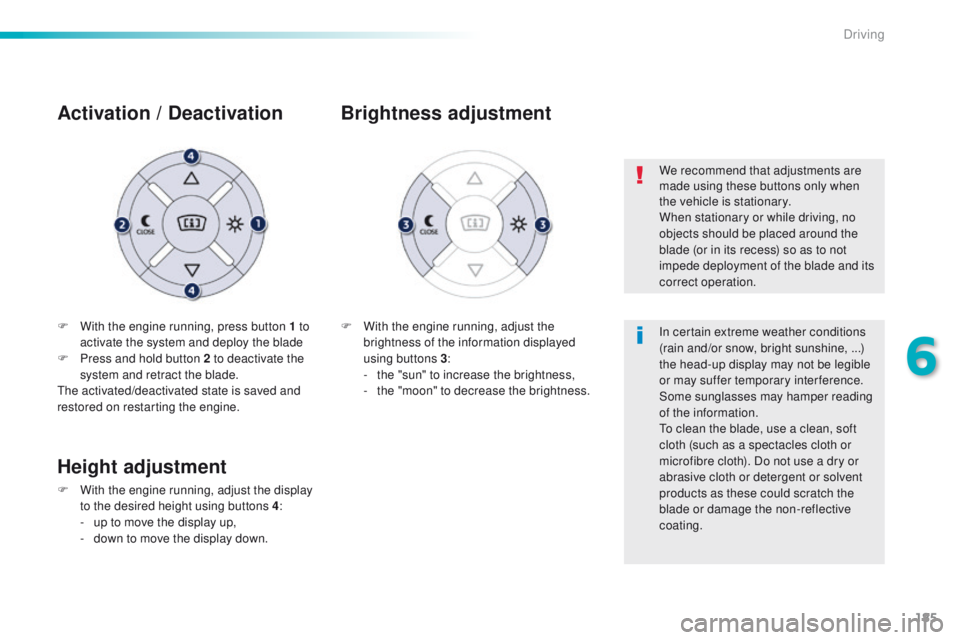
F With the engine running, press button 1 to activate the system and deploy the blade
F
P
ress and hold button 2 to deactivate the
system and retract the blade.
th
e activated/deactivated state is saved and
restored on restarting the engine.
Activation / D eactivation
F With the engine running, adjust the
brightness of the information displayed
using buttons 3 :
-
t
he "sun" to increase the brightness,
-
t
he "moon" to decrease the brightness.
Brightness adjustment
We recommend that adjustments are
made using these buttons only when
the vehicle is stationary.
When stationary or while driving, no
objects should be placed around the
blade (or in its recess) so as to not
impede deployment of the blade and its
correct operation.
In certain extreme weather conditions
(rain and/or snow, bright sunshine, ...)
the head-up display may not be legible
or may suffer temporary interference.
Some sunglasses may hamper reading
of the information.
to c
lean the blade, use a clean, soft
cloth (such as a spectacles cloth or
microfibre cloth). Do not use a dry or
abrasive cloth or detergent or solvent
products as these could scratch the
blade or damage the non-reflective
coating.
Height adjustment
F With the engine running, adjust the display to the desired height using buttons 4 :
-
u
p to move the display up,
-
d
own to move the display down.
6
Driving
Page 190 of 371
188
508_en_Chap06_conduite_ed01-2016
Speed limiter
System which prevents the vehicle from
exceeding the speed programmed by the
driver.
When the programmed speed limit is reached,
pressing the accelerator pedal no longer
has any effect unless it is pressed firmly,
which allows you to temporarily exceed the
programmed speed.
to r
eturn to the programmed speed, simply
slow down to a speed below the programmed
speed by releasing the accelerator.
th
e speed limiter is switched on manually:
it requires a programmed speed of at least
20
mph (30 km/h).
th
e speed limiter is switched off by manual
operation of the control.
th
e programmed speed remains in the memory
when the ignition is switched off.
th
e speed limiter cannot, in any
circumstances, replace the need to
observe speed limits, nor can it replace
the need for vigilance and responsibility
on the part of the driver.
th
is information also appears in the
head-up display.
For more information, refer to the
"Head-up display" section.
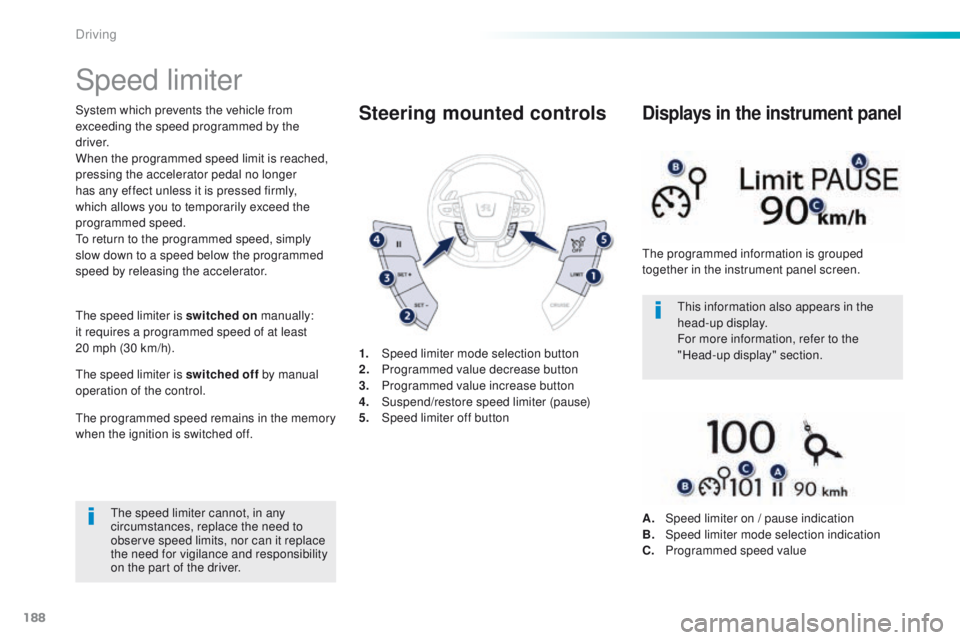
1.
Spe
ed limiter mode selection button
2.
P
rogrammed value decrease button
3.
P
rogrammed value increase button
4.
S
uspend/restore speed limiter (pause)
5.
Spe
ed limiter off buttonSteering mounted controls
the programmed information is grouped
together in the instrument panel screen.
Displays in the instrument panel
A. Speed limiter on / pause indication
B. Spe ed limiter mode selection indication
C.
P
rogrammed speed value
Driving