ESP Peugeot 508 2019 Manual Online
[x] Cancel search | Manufacturer: PEUGEOT, Model Year: 2019, Model line: 508, Model: Peugeot 508 2019Pages: 320, PDF Size: 10.09 MB
Page 221 of 320
219
If a pressure of 2 bars is not reached after
7 minutes, this indicates that the tyre is not
repairable; contact a PEUGEOT dealer or
a qualified workshop for assistance.
F
O
nce the correct pressure is reached, put
the switch in the " O" position.
F
R
emove the kit then stow it. Do not drive more than 125 miles (200
km)
with a repaired tyre; see a PEUGEOT
dealer or a qualified workshop to change
the tyre.
Should the pressure of one or more tyres
be adjusted, it is necessary to reinitialise
the under-inflation detection system.
For more information on Tyre under-
inflation detection , refer to the
corresponding section.
Spare wheel
Scan the QR code on page 3 to view
explanatory videos.
Procedure for changing a damaged wheel with
the spare wheel using the tools provided with
the vehicle.
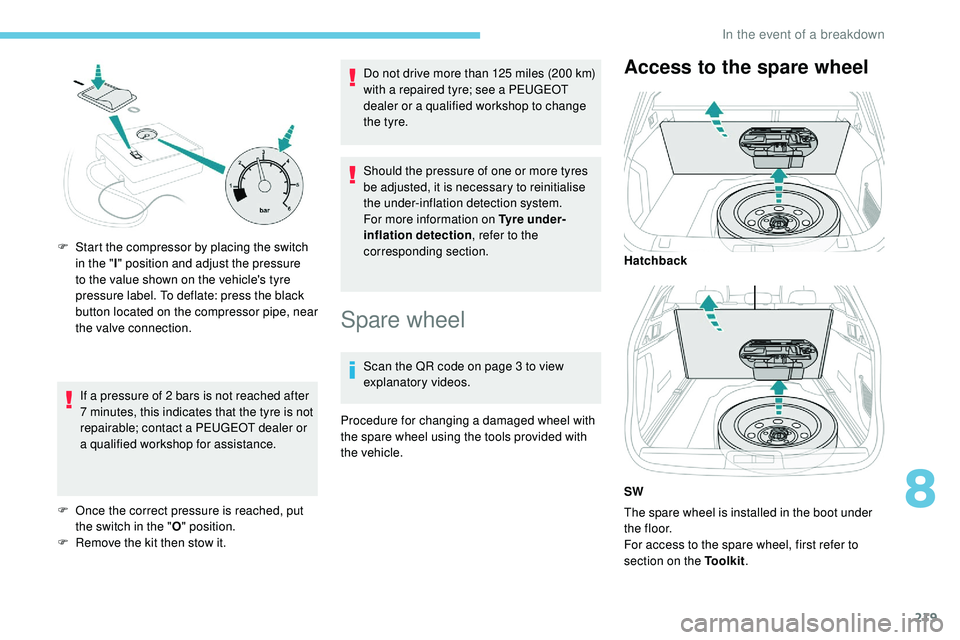
Access to the spare wheel
The spare wheel is installed in the boot under
t h e f l o o r.
For access to the spare wheel, first refer to
section on the Toolkit .
F
S
tart the compressor by placing the switch
in the " I" position and adjust the pressure
to the value shown on the vehicle's tyre
pressure label. To deflate: press the black
button located on the compressor pipe, near
the valve connection. Hatchback
SW
8
In the event of a breakdown
Page 226 of 320
224
Halogen bulbs
To ensure good quality lighting, check
that the bulb is correctly positioned in its
housing.
Front lamps
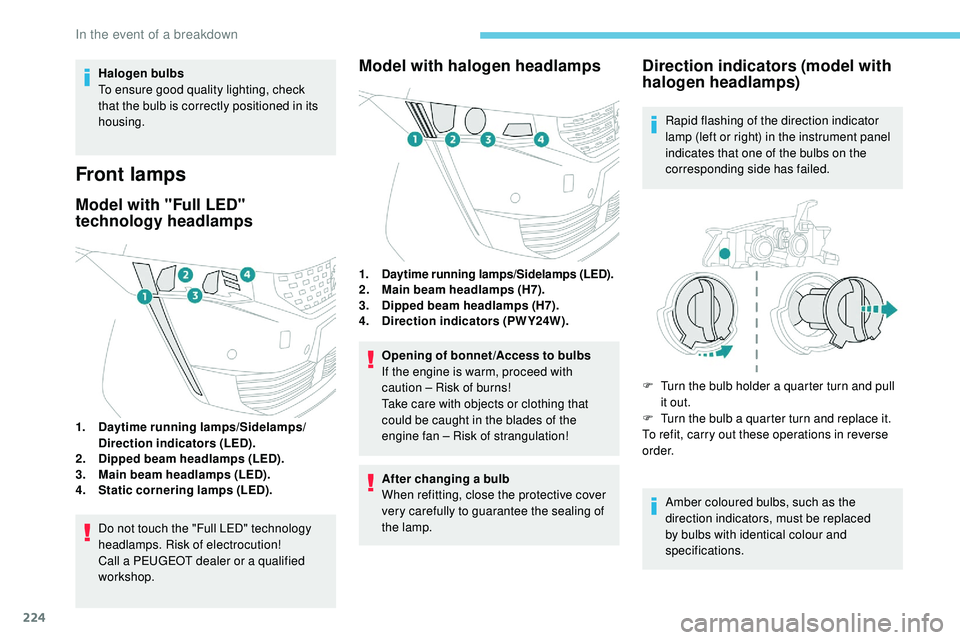
Model with "Full LED"
technology headlamps
1.Daytime running lamps/Sidelamps/
Direction indicators (LED).
2. Dipped beam headlamps (LED).
3. Main beam headlamps (LED).
4. Static cornering lamps (LED).
Do not touch the "Full LED" technology
headlamps. Risk of electrocution!
Call a PEUGEOT dealer or a qualified
workshop.
Model with halogen headlamps
1.Daytime running lamps/Sidelamps (LED).2.Main beam headlamps (H7).
3. Dipped beam headlamps (H7).
4. Direction indicators (PWY24W).
Opening of bonnet /Access to bulbs
If the engine is warm, proceed with
caution – Risk of burns!
Take care with objects or clothing that
could be caught in the blades of the
engine fan – Risk of strangulation!
After changing a bulb
When refitting, close the protective cover
very carefully to guarantee the sealing of
the lamp.
Direction indicators (model with
halogen headlamps)
Rapid flashing of the direction indicator
lamp (left or right) in the instrument panel
indicates that one of the bulbs on the
corresponding side has failed.
F
T
urn the bulb holder a quarter turn and pull
it out.
F
T
urn the bulb a quarter turn and replace it.
To refit, carry out these operations in reverse
o r d e r.
Amber coloured bulbs, such as the
direction indicators, must be replaced
by bulbs with identical colour and
specifications.
In the event of a breakdown
Page 229 of 320
227
Number plate lamps (LED)
Changing a fuse
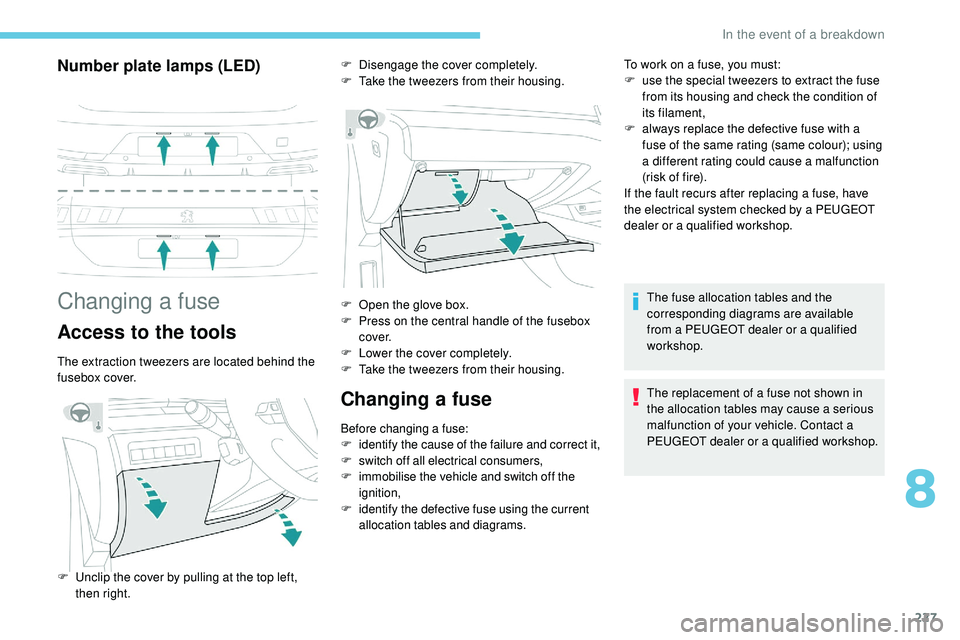
Access to the tools
The extraction tweezers are located behind the
fusebox cover.
Changing a fuse
Before changing a fuse:
F identify the cause of the failure and correct it,
F
s
witch off all electrical consumers,
F
i
mmobilise the vehicle and switch off the
ignition,
F
i
dentify the defective fuse using the current
allocation tables and diagrams. To work on a fuse, you must:
F
u
se the special tweezers to extract the fuse
from its housing and check the condition of
its filament,
F
a
lways replace the defective fuse with a
fuse of the same rating (same colour); using
a different rating could cause a malfunction
(risk of fire).
If the fault recurs after replacing a fuse, have
the electrical system checked by a PEUGEOT
dealer or a qualified workshop.
F
D
isengage the cover completely.
F
T
ake the tweezers from their housing.
F
U
nclip the cover by pulling at the top left,
then right. F
O
pen the glove box.
F
P
ress on the central handle of the fusebox
c ove r.
F
L
ower the cover completely.
F
T
ake the tweezers from their housing. The fuse allocation tables and the
corresponding diagrams are available
from a PEUGEOT dealer or a qualified
workshop.
The replacement of a fuse not shown in
the allocation tables may cause a serious
malfunction of your vehicle. Contact a
PEUGEOT dealer or a qualified workshop.
8
In the event of a breakdown
Page 230 of 320
228
Installing electrical accessories
Your vehicle's electrical system is
designed to operate with standard or
optional equipment.
Before installing other electrical
equipment or accessories on your vehicle,
contact a PEUGEOT dealer or a qualified
workshop.
PEUGEOT will not accept responsibility for
the cost incurred in repairing your vehicle
or for rectifying malfunctions resulting
from the installation of accessories
not supplied and not recommended by
PEUGEOT and not installed in accordance
with its instructions, in particular when
the combined consumption of all of the
additional equipment connected exceeds
10 milliamperes.
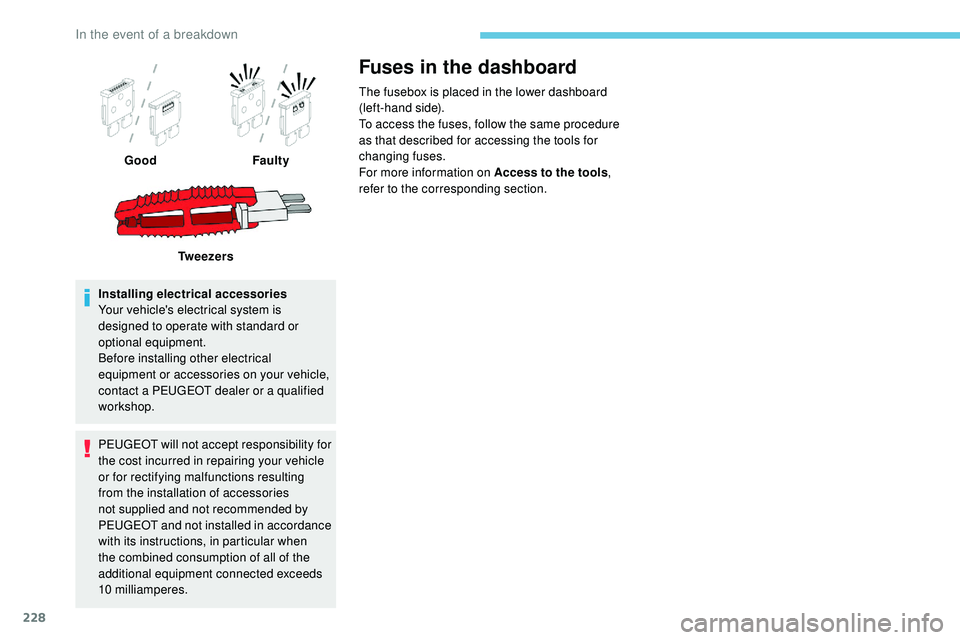
Fuses in the dashboard
The fusebox is placed in the lower dashboard
(left-hand side).
To access the fuses, follow the same procedure
as that described for accessing the tools for
changing fuses.
For more information on Access to the tools,
refer to the corresponding section.
Good
Faulty
Tw e e z e r s
In the event of a breakdown
Page 238 of 320
236
Referring to the corresponding section, you
must yourself reinitialise certain systems,
such
as:
-
t
he electronic key,
-
t
he sunroof and its electric blind,
-
t
he electric windows,
-
t
he date and time,
-
t
he preset radio stations.The Stop & Start system may not be
operational during the trip following the
next engine start.
In this case, the system will only be
available again after a continuous
period of immobilisation of the vehicle,
a period which depends on the exterior
temperature and the state of charge of the
battery (up to about 8 hours).
Towing the vehicle
Procedure for having your vehicle towed or
for towing another vehicle using a removable
towing device.
Access to the tools
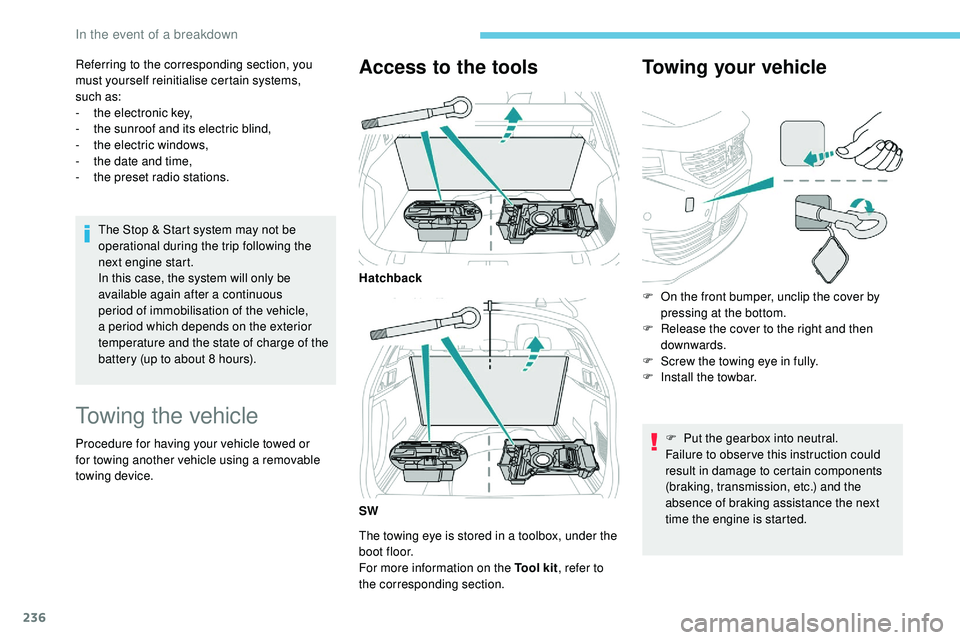
The towing eye is stored in a toolbox, under the
boot floor.
For more information on the Tool kit , refer to
the corresponding section.
Towing your vehicle
Hatchback
SW F
O
n the front bumper, unclip the cover by
pressing at the bottom.
F
R
elease the cover to the right and then
downwards.
F
S
crew the towing eye in fully.
F
I
nstall the towbar.F
P
ut the gearbox into neutral.
Failure to obser ve this instruction could
result in damage to certain components
(braking, transmission, etc.) and the
absence of braking assistance the next
time the engine is started.
In the event of a breakdown
Page 240 of 320
238
Engine technical data and
towed loads
Engines
The engine characteristics are given in the
vehicle's registration document, as well as in
sales brochures.The maximum power corresponds to the
value type-approved on a test bed, under
conditions defined in European legislation
(Directive 1999/99/EC).
For more information, contact a PEUGEOT
dealer or a qualified workshop.
Weights and towed loads
The weights and towed loads relating to your
vehicle are given in the registration document,
as well as in sales brochures.
These values are also given on the
manufacturer's plate or label.
For more information, contact a PEUGEOT
dealer or a qualified workshop. The GTW (Gross Train Weight) and towed load
values indicated are valid up to a maximum
altitude of 1,000 metres. The towed load value
must be reduced by 10% for each additional
1,000 metres of altitude.
The maximum authorised nose weight
corresponds to the weight permitted on the
towball.
High exterior temperatures may result
in a reduction in the per formance of the
vehicle to protect the engine. When the
exterior temperature is higher than 37°C,
limit the towed weight.
Towing by a lightly loaded vehicle can
adversely affect roadholding.
Braking distances are increased when
towing a trailer.
When using a vehicle to tow, never
exceed a speed of approximately 62 mph
(100 km/h) (obser ve the local legislation
in force).
If the exterior temperature is high, it is
recommended that the engine is allowed
to idle for 1 to 2 minutes after the vehicle
comes to a stop, to facilitate its cooling.
Technical data
Page 248 of 320
2
First steps
With the engine running, a press
mutes the sound.
With the ignition off, a press turns
the system on.Certain information is displayed permanently
in
the upper banner of the touch screen:
-
R
epeat of the air conditioning information
(depending on version), and direct access
to
the corresponding menu.
-
R
eminder of the Radio Media and
Telephone menu information.
-
R
eminder of the privacy information.
-
A
ccess to the Settings of the touch screen
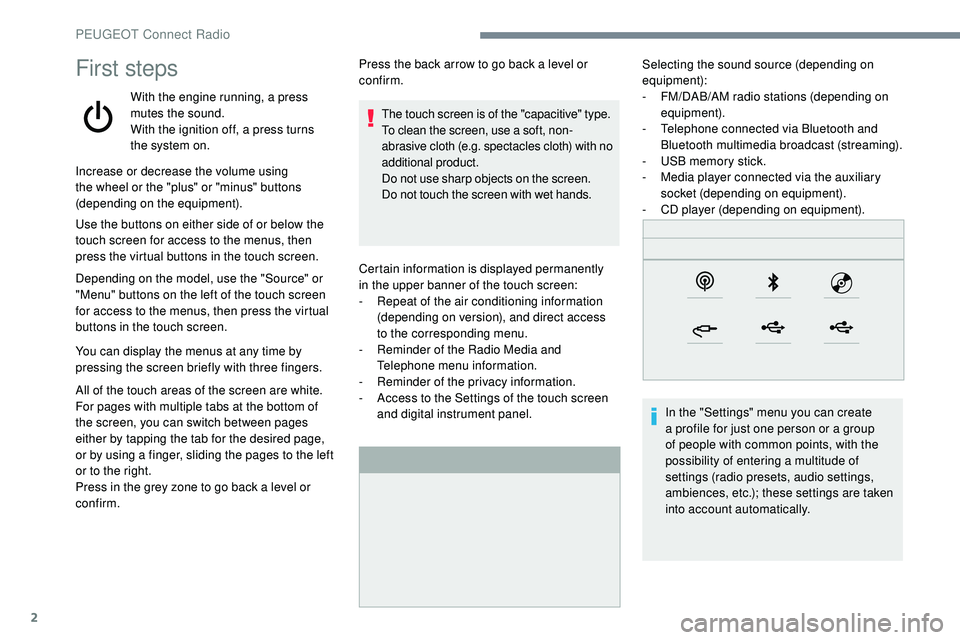
and digital instrument panel. Selecting the sound source (depending on
equipment):
-
F M/DAB/AM radio stations (depending on
equipment).
-
T
elephone connected via Bluetooth and
Bluetooth multimedia broadcast (streaming).
-
U
SB memory stick.
-
M
edia player connected via the auxiliary
socket (depending on equipment).
-
C
D player (depending on equipment).
In the "Settings" menu you can create
a profile for just one person or a group
of people with common points, with the
possibility of entering a multitude of
settings (radio presets, audio settings,
ambiences, etc.); these settings are taken
into account automatically.
Increase or decrease the volume using
the wheel or the "plus" or "minus" buttons
(depending on the equipment).
Use the buttons on either side of or below the
touch screen for access to the menus, then
press the virtual buttons in the touch screen.
Depending on the model, use the "Source" or
"Menu" buttons on the left of the touch screen
for access to the menus, then press the virtual
buttons in the touch screen.
You can display the menus at any time by
pressing the screen briefly with three fingers.
All of the touch areas of the screen are white.
For pages with multiple tabs at the bottom of
the screen, you can switch between pages
either by tapping the tab for the desired page,
or by using a finger, sliding the pages to the left
or to the right.
Press in the grey zone to go back a level or
confirm. Press the back arrow to go back a level or
confirm.
The touch screen is of the "capacitive" type.
To clean the screen, use a soft, non-
abrasive cloth (e.g. spectacles cloth) with no
additional product.
Do not use sharp objects on the screen.
Do not touch the screen with wet hands.
PEUGEOT Connect Radio
Page 254 of 320
8
Press "Audio settings ".
Select the " To n e" or "Balance " or
" Sound " or "Voice " or "Ringtones "
tab to configure the audio settings.
Press the back arrow to confirm.
In the " To n e" tab, the Ambience audio
settings, as well as Bass , Medium and
Tr e b l e are different and independent for
each audio source.
In the " Balance " tab, the All passengers ,
Driver and Front only settings are
common to all sources.
In the " Sound" tab, activate or deactivate
" Volume linked to speed ", "Auxiliary
input " and " Touch tones ".
The balance/distribution (or spatialisation
with the Arkamys
© system) is audio
processing that allows the quality of the
sound to be adapted according to the
number of passengers in the vehicle. Onboard audio: Arkamys
© Sound Staging
optimises the distribution of sound in the
passenger compartment.
DAB (Digital Audio
Broadcasting) radio
Terrestrial Digital Radio
Digital radio provides higher quality
reception.
The different "multiplex/ensemble"
ser vices offer a choice of radio stations
arranged in alphabetical order.
Press Radio Media to display the
primary page.
Press the " OPTIONS" button to go to the
secondary page.
Press "Band" to select the
" DAB
band".
Press in the grey zone to confirm.
FM-DAB Tracking
"DAB" does not cover 100% of the
te r r i to r y.
When the digital radio signal is poor,
the "FM-DAB Tracking" allows you to
continue listening to the same station,
by automatically switching to the
corresponding FM analogue station (if
there is one).
Press Radio Media to display the
primary page.
Press the " OPTIONS" button to go to the
secondary page.
Activate/Deactivate
"FM-DAB
Tracking".
Press in the grey zone to confirm.
If "FM-DAB Tracking" is activated, there
is a difference of a few seconds when the
system switches to FM analogue radio
with sometimes a variation in volume.
Once the digital signal quality is restored,
the system automatically changes back
to " DA B ".
PEUGEOT Connect Radio
Page 265 of 320
19
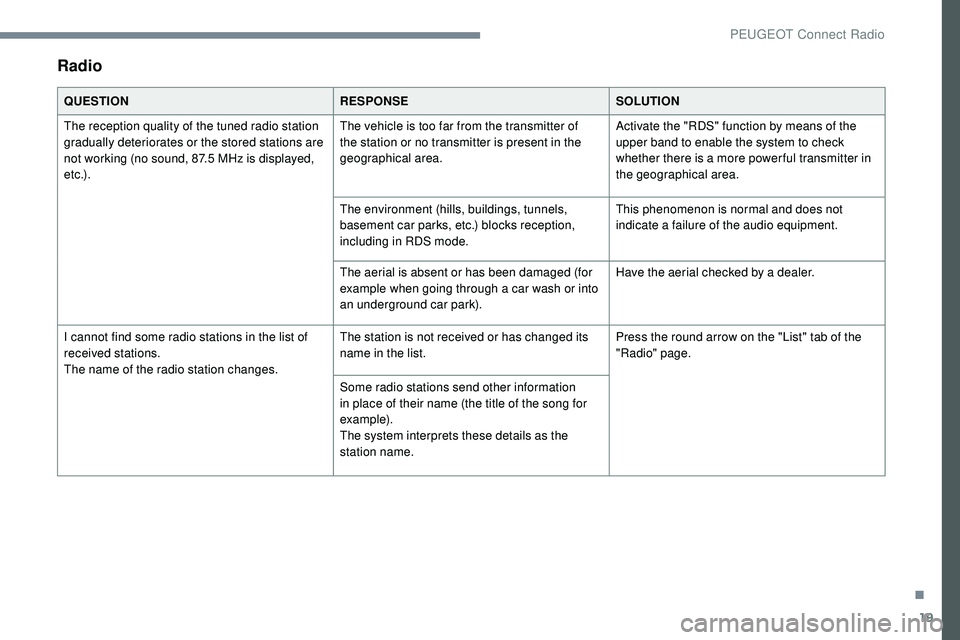
Radio
QUESTIONRESPONSESOLUTION
The reception quality of the tuned radio station
gradually deteriorates or the stored stations are
not working (no sound, 87.5 MHz is displayed,
e t c .) . The vehicle is too far from the transmitter of
the station or no transmitter is present in the
geographical area.
Activate the "RDS" function by means of the
upper band to enable the system to check
whether there is a more power ful transmitter in
the geographical area.
The environment (hills, buildings, tunnels,
basement car parks, etc.) blocks reception,
including in RDS mode. This phenomenon is normal and does not
indicate a failure of the audio equipment.
The aerial is absent or has been damaged (for
example when going through a car wash or into
an underground car park). Have the aerial checked by a dealer.
I cannot find some radio stations in the list of
received stations.
The name of the radio station changes. The station is not received or has changed its
name in the list.
Press the round arrow on the "List" tab of the
"Radio" page.
Some radio stations send other information
in place of their name (the title of the song for
example).
The system interprets these details as the
station name.
.
PEUGEOT Connect Radio
Page 266 of 320
20
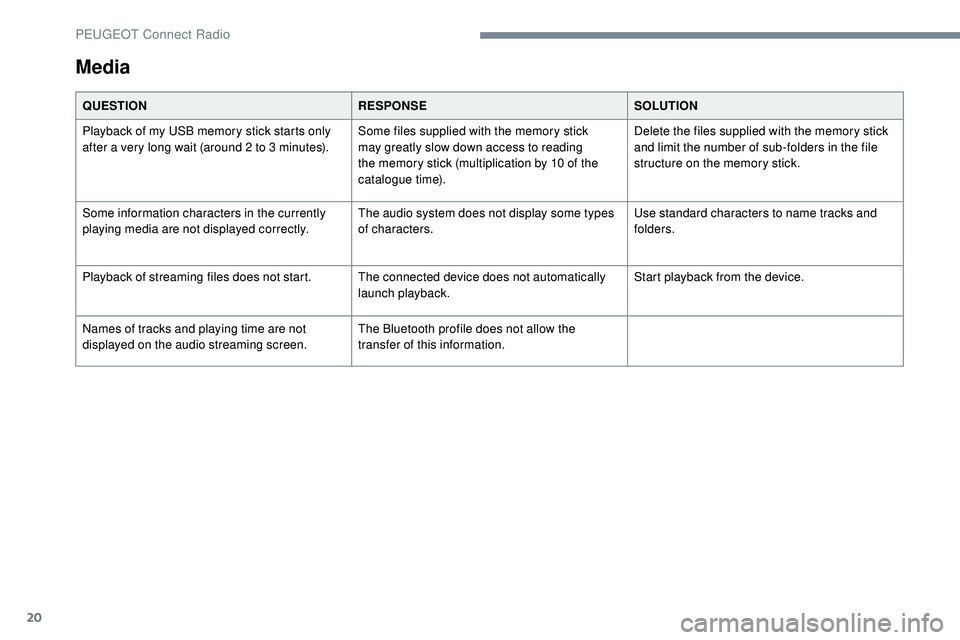
Media
QUESTIONRESPONSESOLUTION
Playback of my USB memory stick starts only
after a very long wait (around 2 to 3 minutes). Some files supplied with the memory stick
may greatly slow down access to reading
the memory stick (multiplication by 10 of the
catalogue time).Delete the files supplied with the memory stick
and limit the number of sub-folders in the file
structure on the memory stick.
Some information characters in the currently
playing media are not displayed correctly. The audio system does not display some types
of characters.Use standard characters to name tracks and
folders.
Playback of streaming files does not start. The connected device does not automatically launch playback.Start playback from the device.
Names of tracks and playing time are not
displayed on the audio streaming screen. The Bluetooth profile does not allow the
transfer of this information.
PEUGEOT Connect Radio