ESP Peugeot 508 2019 Repair Manual
[x] Cancel search | Manufacturer: PEUGEOT, Model Year: 2019, Model line: 508, Model: Peugeot 508 2019Pages: 320, PDF Size: 10.09 MB
Page 180 of 320
178
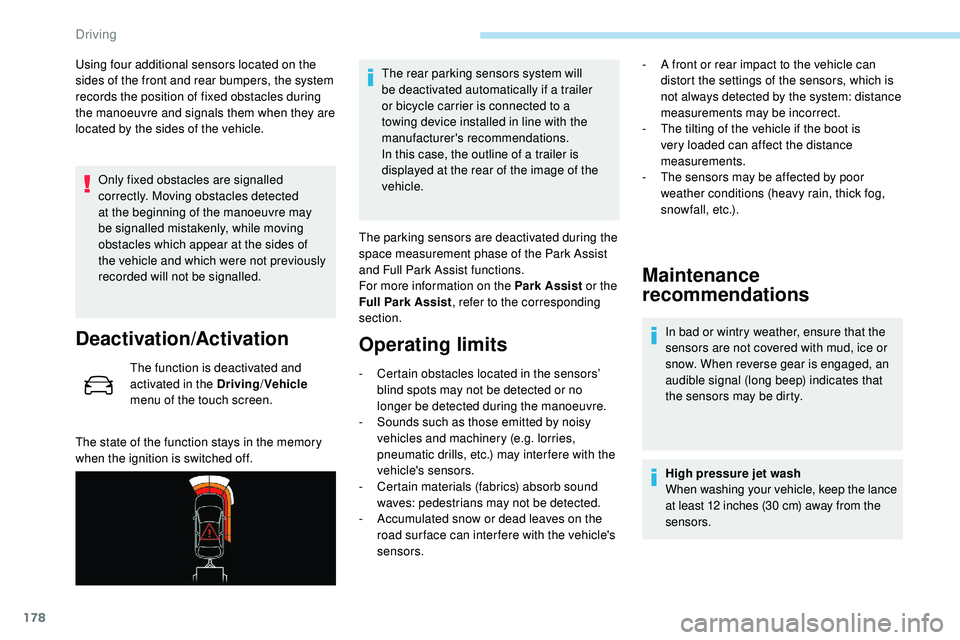
Using four additional sensors located on the
sides of the front and rear bumpers, the system
records the position of fixed obstacles during
the manoeuvre and signals them when they are
located by the sides of the vehicle.Only fixed obstacles are signalled
correctly. Moving obstacles detected
at the beginning of the manoeuvre may
be signalled mistakenly, while moving
obstacles which appear at the sides of
the vehicle and which were not previously
recorded will not be signalled.
Deactivation/Activation
The function is deactivated and
activated in the Driving /Vehicle
menu of the touch screen.
The state of the function stays in the memory
when the ignition is switched off. The rear parking sensors system will
be deactivated automatically if a trailer
or bicycle carrier is connected to a
towing device installed in line with the
manufacturer's recommendations.
In this case, the outline of a trailer is
displayed at the rear of the image of the
vehicle.
The parking sensors are deactivated during the
space measurement phase of the Park Assist
and Full Park Assist functions.
For more information on the Park Assist or the
Full Park Assist , refer to the corresponding
section.
Operating limits
- Certain obstacles located in the sensors’ blind spots may not be detected or no
longer be detected during the manoeuvre.
-
S
ounds such as those emitted by noisy
vehicles and machinery (e.g. lorries,
pneumatic drills, etc.) may inter fere with the
vehicle's sensors.
-
C
ertain materials (fabrics) absorb sound
waves: pedestrians may not be detected.
-
A
ccumulated snow or dead leaves on the
road sur face can inter fere with the vehicle's
sensors.
Maintenance
recommendations
In bad or wintry weather, ensure that the
sensors are not covered with mud, ice or
snow. When reverse gear is engaged, an
audible signal (long beep) indicates that
the sensors may be dirty.
High pressure jet wash
When washing your vehicle, keep the lance
at least 12 inches (30 cm) away from the
sensors.
-
A f
ront or rear impact to the vehicle can
distort the settings of the sensors, which is
not always detected by the system: distance
measurements may be incorrect.
-
T
he tilting of the vehicle if the boot is
very loaded can affect the distance
measurements.
-
T
he sensors may be affected by poor
weather conditions (heavy rain, thick fog,
snowfall, etc.).
Driving
Page 182 of 320
180
This system is a visual aid that cannot in
any circumstances replace the need for
vigilance on the part of the driver.
The images provided by the camera(s)
may be distorted by the relief.
In the presence of areas in shade, or in
conditions of bright sunlight or inadequate
lighting, the image may be darkened and
with lower contrast.
Recommendations on care
In bad or wintry weather, ensure that the
sensors and camera lenses are not covered
with mud, ice or snow.
Check the cleanliness of the camera lenses
regularly.
If necessary, clean the cameras with a soft,
dry cloth.
When washing your vehicle at high pressure,
direct the lance at least 30 cm away from the
cameras and parking aid sensors.
Visiopark 1
Rear vision
To activate the camera, located near the
number plate lamps, engage reverse and keep
the speed of the vehicle below 6 mph (10
k
m/h).
The system is deactivated:
-
a
utomatically above about 6 mph (10 km/h),
-
a
utomatically on opening the tailgate,
-
w
hen shifting out of reverse (the image
remains displayed for 7 seconds),
-
b
y pressing the red cross in the top left-
hand corner of the touch screen.
Standard view
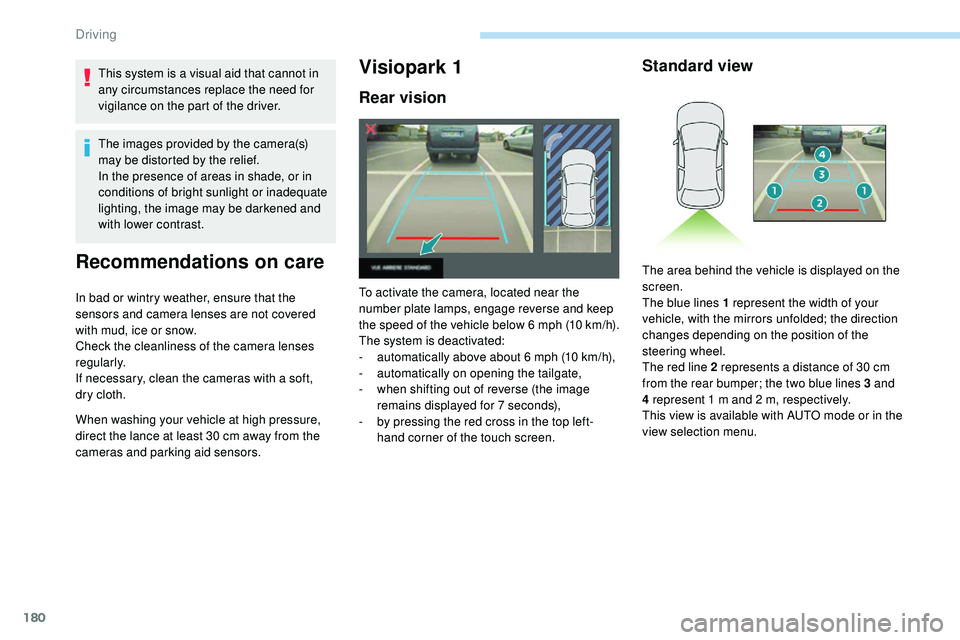
The area behind the vehicle is displayed on the
screen.
The blue lines 1 represent the width of your
vehicle, with the mirrors unfolded; the direction
changes depending on the position of the
steering wheel.
The red line 2 represents a distance of 30 cm
from the rear bumper; the two blue lines 3 and
4 represent 1 m and 2 m, respectively.
This view is available with AUTO mode or in the
view selection menu.
Driving
Page 184 of 320
182
Rear vision
If a trailer or a bicycle carrier is fitted to
the towball, the zone behind the vehicle on
the view from above goes dark.
The surroundings are reconstructed by the
front camera only.
The system activates automatically when
reverse gear is engaged.
The system is deactivated:
-
a
utomatically above about 6 mph (10 km/h),
-
w
hen shifting out of reverse (the rear view
image is replaced by the front view image
for 7 seconds),
-
b
y pressing the red cross in the top left-
hand corner of the touch screen. The rear vision views are similar to those for
Visiopark 1.
For more information on Visiopark 1
, refer to
the corresponding section.
Front and rear vision
With the engine running and the
speed below 12 mph (20 km/h), the
system is activated via the Driving/
Vehicle menu of the touch screen:
Using these cameras, the system displays
the vehicle's near surroundings on the touch
screen, offering views from the rear of the
vehicle (rear vision), when reverse gear is
engaged and views from the front of the vehicle
(front vision), when the gearbox is in neutral or
a gear is engaged.
F Select "Panoramic visual aid ".The system is deactivated:
-
a
utomatically above about 19 mph (30 km/h)
(the image disappears temporarily from 12
mph (20 km/h)),
-
b
y pressing the red cross in the top left-
hand corner of the touch screen.
Standard view
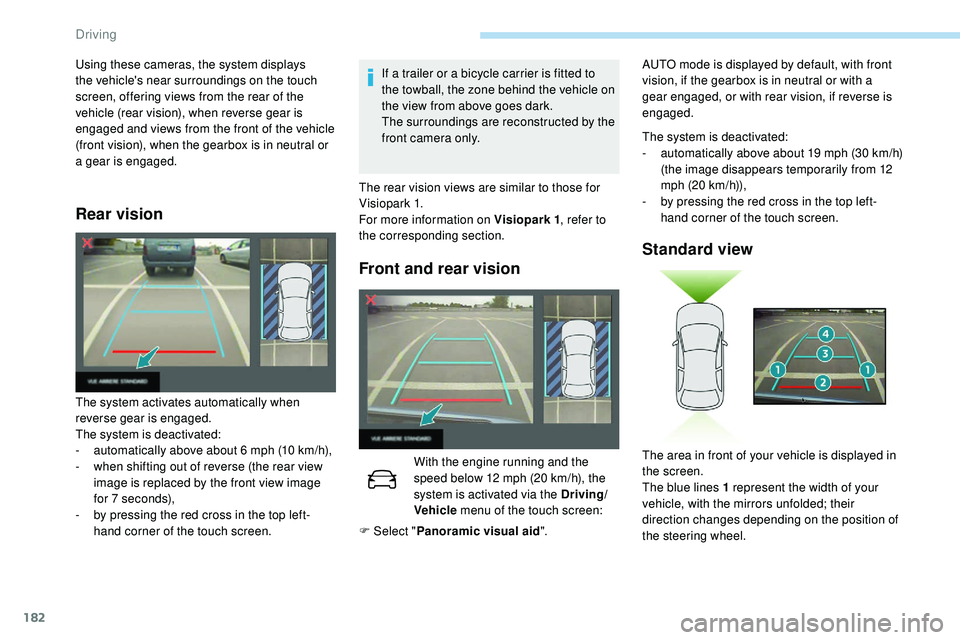
The area in front of your vehicle is displayed in
the screen.
The blue lines 1 represent the width of your
vehicle, with the mirrors unfolded; their
direction changes depending on the position of
the steering wheel.
AUTO mode is displayed by default, with front
vision, if the gearbox is in neutral or with a
gear engaged, or with rear vision, if reverse is
engaged.
Driving
Page 185 of 320
183
Zoom view
Obstacles may appear further away than
they actually are in reality.
It is important to check the sides of the
vehicle during the manoeuvre, using the
mirrors.
The front and rear parking sensors also
provide information on the vehicle's
surroundings.
AUTO mode
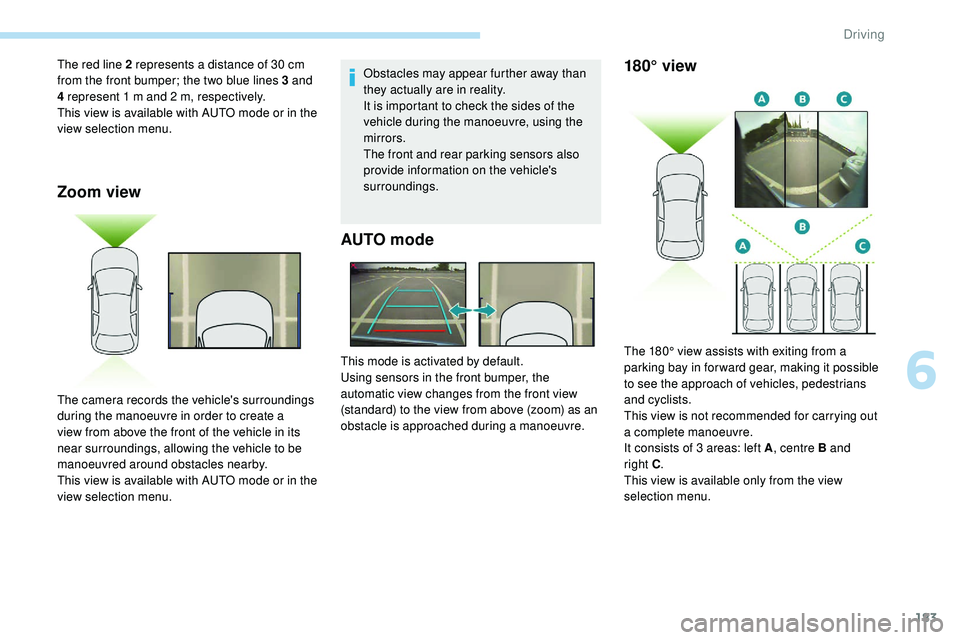
The red line 2 represents a distance of 30 cm
from the front bumper; the two blue lines 3 and
4 represent 1 m and 2 m, respectively.
This view is available with AUTO mode or in the
view selection menu.
The camera records the vehicle's surroundings
during the manoeuvre in order to create a
view from above the front of the vehicle in its
near surroundings, allowing the vehicle to be
manoeuvred around obstacles nearby.
This view is available with AUTO mode or in the
view selection menu.This mode is activated by default.
Using sensors in the front bumper, the
automatic view changes from the front view
(standard) to the view from above (zoom) as an
obstacle is approached during a manoeuvre.180° view
The 180° view assists with exiting from a
parking bay in forward gear, making it possible
to see the approach of vehicles, pedestrians
and cyclists.
This view is not recommended for carrying out
a complete manoeuvre.
It consists of 3 areas: left A
, centre B and
right
C.
This view is available only from the view
selection menu.
6
Driving
Page 188 of 320
186
7
5
Visiopark 1 or Visiopark 2 and the parking
sensors are automatically activated to help
you monitor the close surrounding area of your
vehicle during the manoeuvre.
During the manoeuvre
The system takes over the vehicle's steering. It
gives instructions on the manoeuvring direction
when starting the entry and exit parallel parking
manoeuvres and for all entry manoeuvres for
bay parking.
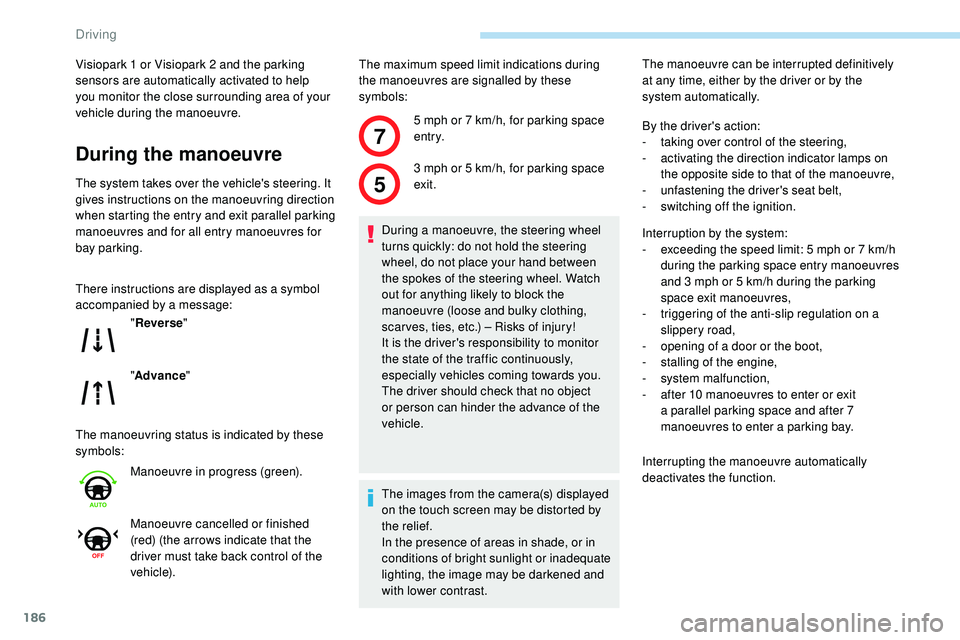
There instructions are displayed as a symbol
accompanied by a message:
The manoeuvring status is indicated by these
symbols:The maximum speed limit indications during
the manoeuvres are signalled by these
symbols:
" Reverse "
" Advance "
Manoeuvre in progress (green).
Manoeuvre cancelled or finished
(red) (the arrows indicate that the
driver must take back control of the
vehicle). 5 mph or 7
km/h, for parking space
e nt r y.
3 mph or 5 km/h, for parking space
exit.
During a manoeuvre, the steering wheel
turns quickly: do not hold the steering
wheel, do not place your hand between
the spokes of the steering wheel. Watch
out for anything likely to block the
manoeuvre (loose and bulky clothing,
scar ves, ties, etc.) – Risks of injury!
It is the driver's responsibility to monitor
the state of the traffic continuously,
especially vehicles coming towards you.
The driver should check that no object
or person can hinder the advance of the
vehicle.
The images from the camera(s) displayed
on the touch screen may be distorted by
the relief.
In the presence of areas in shade, or in
conditions of bright sunlight or inadequate
lighting, the image may be darkened and
with lower contrast. The manoeuvre can be interrupted definitively
at any time, either by the driver or by the
system automatically.
By the driver's action:
-
t
aking over control of the steering,
-
a
ctivating the direction indicator lamps on
the opposite side to that of the manoeuvre,
- u nfastening the driver's seat belt,
-
s
witching off the ignition.
Interruption by the system:
-
e
xceeding the speed limit: 5 mph or 7 km/h
during the parking space entry manoeuvres
and 3 mph or 5 km/h during the parking
space exit manoeuvres,
-
t
riggering of the anti-slip regulation on a
slippery road,
-
o
pening of a door or the boot,
-
s
talling of the engine,
-
s
ystem malfunction,
-
a
fter 10 manoeuvres to enter or exit
a parallel parking space and after 7
manoeuvres to enter a parking bay.
Interrupting the manoeuvre automatically
deactivates the function.
Driving
Page 191 of 320
189
The driver's seat belt must be fastened
and remain in place for the entire
manoeuvre.Full Park Assist is a manoeuvring aid that
cannot under any circumstances replace
the vigilance of the driver.
The manoeuvre remains the responsibility
of the driver.
Full Park Assist is not always able to react
automatically and appropriately due to the
performance limits of the sensors used.
It is the driver’s responsibility to stop the
vehicle when necessary to ensure the
safety of their immediate environment
(particularly where there are pedestrians).
The driver must remain in control of
their vehicle. They must always check
the area surrounding the vehicle before
undertaking a manoeuvre.
Throughout the entire manoeuvre, the
driver must ensure the parking space
remains free of obstruction. They must
remain in the driving seat and must never
try to lock the function control button.
The driver can interrupt the manoeuvre
at any time by pressing the brake pedal,
by retaking control of the steering or by
releasing the function control button.
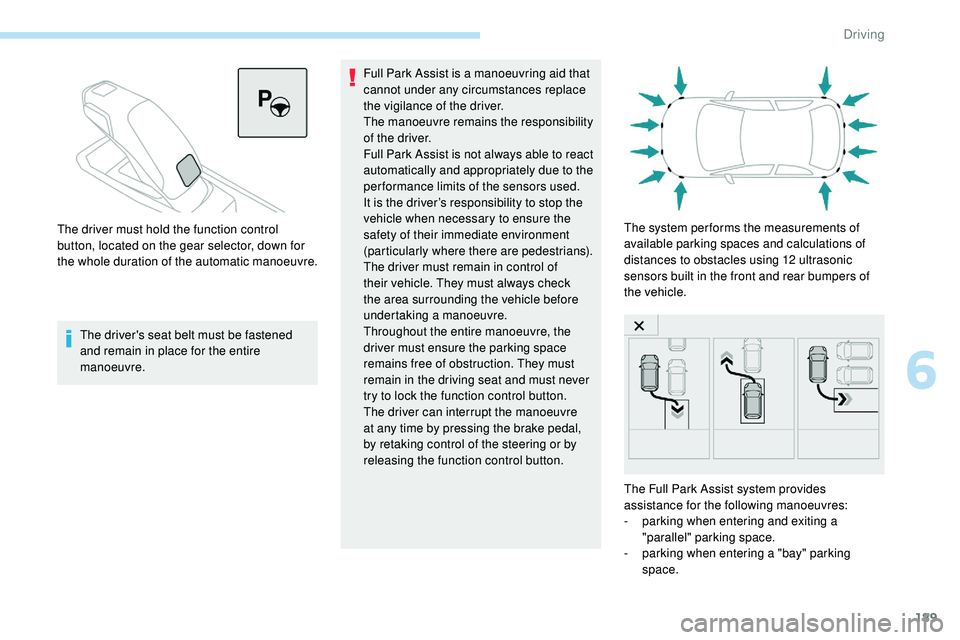
The driver must hold the function control
button, located on the gear selector, down for
the whole duration of the automatic manoeuvre.
The system per forms the measurements of
available parking spaces and calculations of
distances to obstacles using 12 ultrasonic
sensors built in the front and rear bumpers of
the vehicle.
The Full Park Assist system provides
assistance for the following manoeuvres:
-
p
arking when entering and exiting a
"parallel" parking space.
-
p
arking when entering a "bay" parking
space.
6
Driving
Page 194 of 320
192
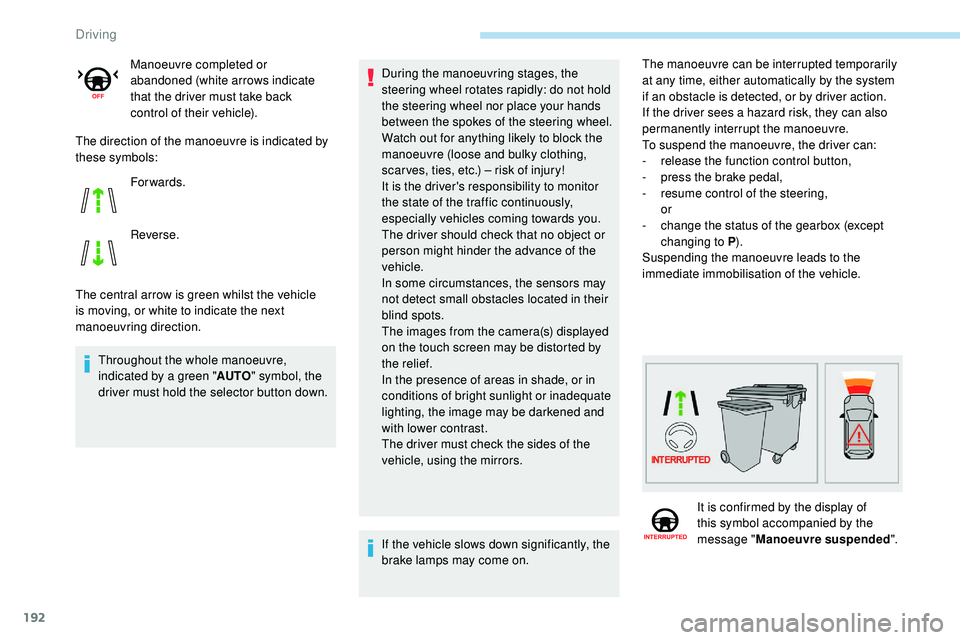
The direction of the manoeuvre is indicated by
these symbols:
The central arrow is green whilst the vehicle
is moving, or white to indicate the next
manoeuvring direction.Throughout the whole manoeuvre,
indicated by a green " AUTO" symbol, the
driver must hold the selector button down. Manoeuvre completed or
abandoned (white arrows indicate
that the driver must take back
control of their vehicle).
For wards.
Reverse.
During the manoeuvring stages, the
steering wheel rotates rapidly: do not hold
the steering wheel nor place your hands
between the spokes of the steering wheel.
Watch out for anything likely to block the
manoeuvre (loose and bulky clothing,
scar ves, ties, etc.) – risk of injury!
It is the driver's responsibility to monitor
the state of the traffic continuously,
especially vehicles coming towards you.
The driver should check that no object or
person might hinder the advance of the
vehicle.
In some circumstances, the sensors may
not detect small obstacles located in their
blind spots.
The images from the camera(s) displayed
on the touch screen may be distorted by
the relief.
In the presence of areas in shade, or in
conditions of bright sunlight or inadequate
lighting, the image may be darkened and
with lower contrast.
The driver must check the sides of the
vehicle, using the mirrors.
If the vehicle slows down significantly, the
brake lamps may come on. The manoeuvre can be interrupted temporarily
at any time, either automatically by the system
if an obstacle is detected, or by driver action.
If the driver sees a hazard risk, they can also
permanently interrupt the manoeuvre.
To suspend the manoeuvre, the driver can:
-
r
elease the function control button,
-
p
ress the brake pedal,
-
r
esume control of the steering,
or
-
c
hange the status of the gearbox (except
changing to P ).
Suspending the manoeuvre leads to the
immediate immobilisation of the vehicle.
It is confirmed by the display of
this symbol accompanied by the
message " Manoeuvre suspended ".
Driving
Page 199 of 320
197
Compatibility of fuels
Fuel used for petrol engines
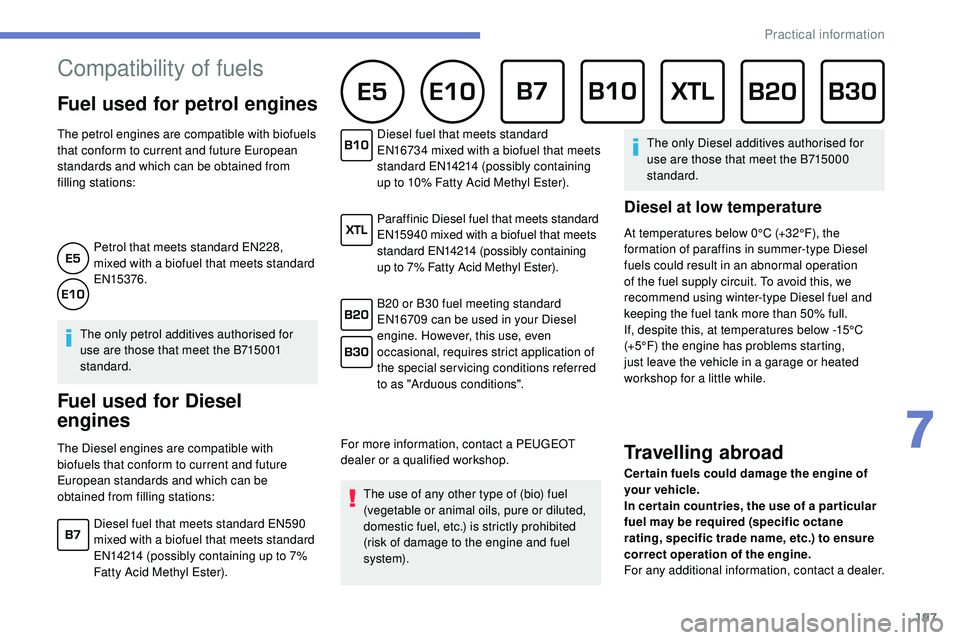
The petrol engines are compatible with biofuels
that conform to current and future European
standards and which can be obtained from
filling stations:Petrol that meets standard EN228,
mixed with a biofuel that meets standard
EN15376.
The only petrol additives authorised for
use are those that meet the B715001
standard.
Fuel used for Diesel
engines
The Diesel engines are compatible with
biofuels that conform to current and future
European standards and which can be
obtained from filling stations: Diesel fuel that meets standard
EN16734 mixed with a biofuel that meets
standard EN14214 (possibly containing
up to 10% Fatty Acid Methyl Ester).
Paraffinic Diesel fuel that meets standard
EN15940 mixed with a biofuel that meets
standard EN14214 (possibly containing
up to 7% Fatty Acid Methyl Ester).
B20 or B30 fuel meeting standard
EN16709 can be used in your Diesel
engine. However, this use, even
occasional, requires strict application of
the special servicing conditions referred
to as "Arduous conditions".
For more information, contact a PEUGEOT
dealer or a qualified workshop. The use of any other type of (bio) fuel
(vegetable or animal oils, pure or diluted,
domestic fuel, etc.) is strictly prohibited
(risk of damage to the engine and fuel
syste m). The only Diesel additives authorised for
use are those that meet the B715000
standard.
Diesel at low temperature
At temperatures below 0°C (+32°F), the
formation of paraffins in summer-type Diesel
fuels could result in an abnormal operation
of the fuel supply circuit. To avoid this, we
recommend using winter-type Diesel fuel and
keeping the fuel tank more than 50% full.
If, despite this, at temperatures below -15°C
(+5°F) the engine has problems starting,
just leave the vehicle in a garage or heated
workshop for a little while.
Travelling abroad
Cer tain fuels could damage the engine of
your vehicle.
In cer tain countries, the use of a par ticular
fuel may be required (specific octane
rating, specific trade name, etc.) to ensure
correct operation of the engine.
For any additional information, contact a dealer.
Diesel fuel that meets standard EN590
mixed with a biofuel that meets standard
EN14214 (possibly containing up to 7%
Fatty Acid Methyl Ester).
7
Practical information
Page 200 of 320
198
Refuelling
Fuel tank capacity: approximately 62 litres
(Petrol) or 55 litres (Diesel).
Reser ve level: 6 litres.
Low fuel level
When the low fluid level is reached in
the tank, this warning lamp comes on
in the instrument panel, accompanied
by a message and an audible signal.
When it first comes on, about
6 litres of fuel is left in the tank.
If your vehicle is fitted with Stop & Start,
never refuel with the engine in STOP
mode; you must switch off the ignition.
Refilling
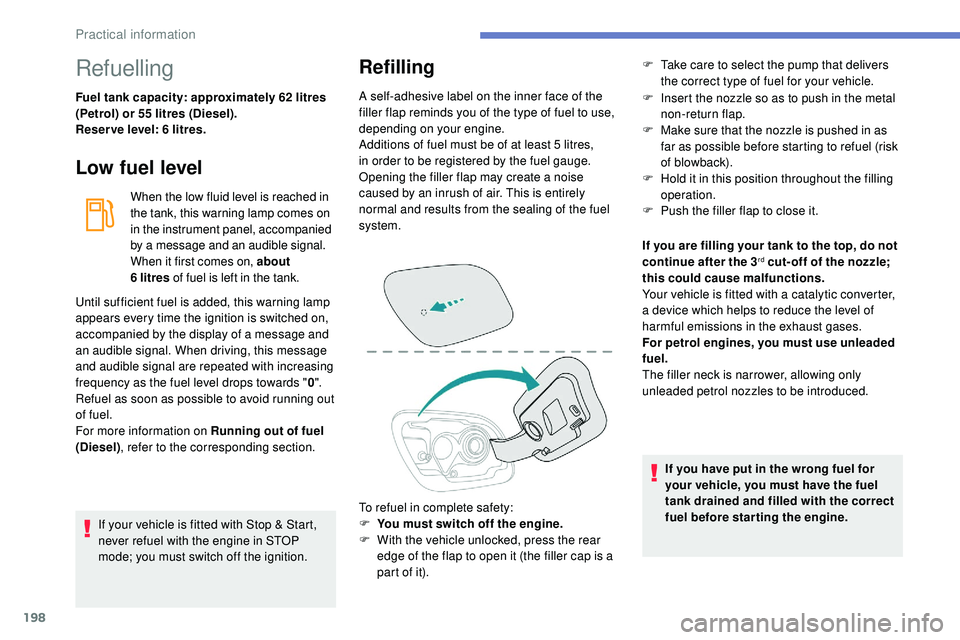
A self-adhesive label on the inner face of the
filler flap reminds you of the type of fuel to use,
depending on your engine.
Additions of fuel must be of at least 5 litres,
in order to be registered by the fuel gauge.
Opening the filler flap may create a noise
caused by an inrush of air. This is entirely
normal and results from the sealing of the fuel
system.
To refuel in complete safety:
F
Y
ou must switch off the engine.
F
W
ith the vehicle unlocked, press the rear
edge of the flap to open it (the filler cap is a
part of it). F
I nsert the nozzle so as to push in the metal
non-return flap.
F
M
ake sure that the nozzle is pushed in as
far as possible before starting to refuel (risk
of blowback).
F
H
old it in this position throughout the filling
operation.
F
P
ush the filler flap to close it.
Until sufficient fuel is added, this warning lamp
appears every time the ignition is switched on,
accompanied by the display of a message and
an audible signal. When driving, this message
and audible signal are repeated with increasing
frequency as the fuel level drops towards " 0".
Refuel as soon as possible to avoid running out
of fuel.
For more information on Running out of fuel
(Diesel) , refer to the corresponding section. If you are filling your tank to the top, do not
continue after the 3
rd cut- off of the nozzle;
this could cause malfunctions.
Your vehicle is fitted with a catalytic converter,
a device which helps to reduce the level of
harmful emissions in the exhaust gases.
For petrol engines, you must use unleaded
fuel.
The filler neck is narrower, allowing only
unleaded petrol nozzles to be introduced.
If you have put in the wrong fuel for
your vehicle, you must have the fuel
tank drained and filled with the correct
fuel before star ting the engine.
F
T
ake care to select the pump that delivers
the correct type of fuel for your vehicle.
Practical information
Page 202 of 320
200
Obser ve the maximum authorised towable
weight, indicated on your vehicle's
registration certificate, the manufacturer's
label as well as in the Technical data
section of this guide.
Complying with the maximum
authorised nose weight (towball)
also includes the use of accessories
(bicycle carriers, tow boxes, etc.).
Obser ve the legislation in force in the
country in which you are driving.
Vehicle equipped with motorised
tailgate with hands-free function
To avoid unwanted opening of the tailgate
when using the towing device:
-
p
lease deactivate this function in
advance in your vehicle's configuration
menu,
-
o
r remove the electronic key from the
recognition zone, with the tailgate
closed.Towing device with
retractable towball
When this towing device is not in use, it is
folded away underneath the rear bumper.
No tools are required to install or stow it.
Before any operation, the vehicle must be
stationary with the parking brake applied.
The area close to the exhaust pipe may
reach a high temperature: risk of burns!
Vehicle equipped with motorised
tailgate with hands-free function
To avoid unwanted opening of the
tailgate, follow the recommendations on
the Towing device by referring to the
corresponding section.
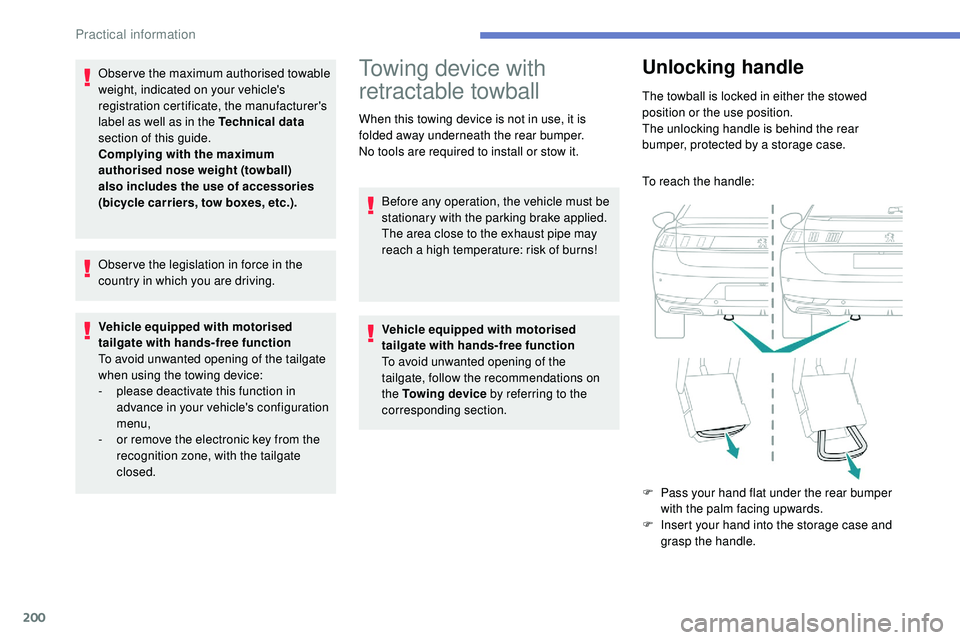
Unlocking handle
The towball is locked in either the stowed
position or the use position.
The unlocking handle is behind the rear
bumper, protected by a storage case.
To reach the handle:
F
P
ass your hand flat under the rear bumper
with the palm facing upwards.
F
I
nsert your hand into the storage case and
grasp the handle.
Practical information