mode Peugeot 508 2020 Workshop Manual
[x] Cancel search | Manufacturer: PEUGEOT, Model Year: 2020, Model line: 508, Model: Peugeot 508 2020Pages: 276, PDF Size: 8.43 MB
Page 109 of 276
107
Driving
6Operation
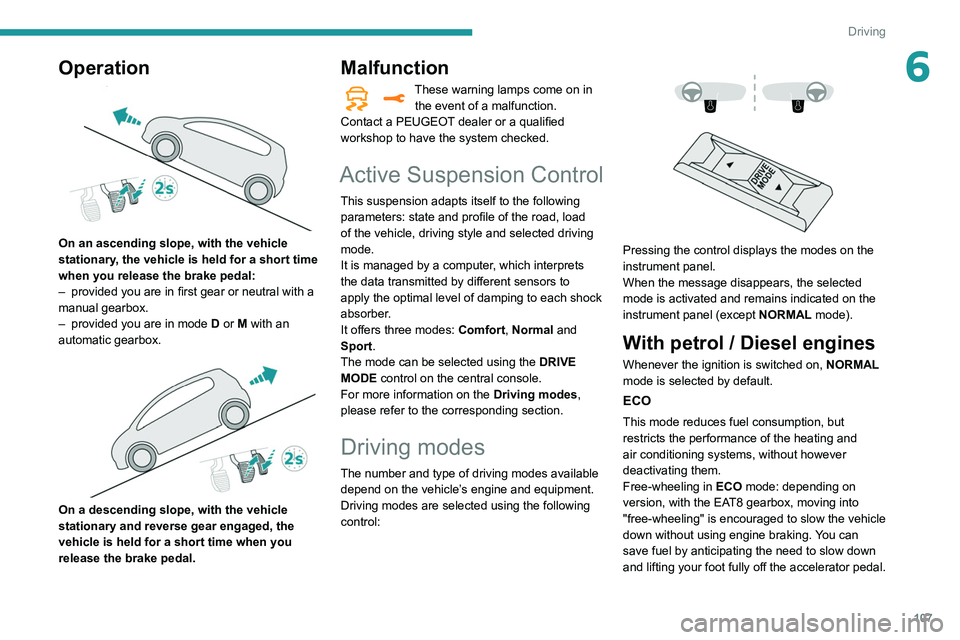
On an ascending slope, with the vehicle
stationary, the vehicle is held for a short time
when you release the brake pedal:
–
provided you are in first gear or neutral with a
manual gearbox.
–
provided you are in mode D
or M with an
automatic gearbox.
On a descending slope, with the vehicle
stationary and reverse gear engaged, the
vehicle is held for a short time when you
release the brake pedal.
Malfunction
These warning lamps come on in the event of a malfunction.
Contact a PEUGEOT dealer or a qualified
workshop to have the system checked.
Active Suspension Control
This suspension adapts itself to the following
parameters: state and profile of the road, load
of the vehicle, driving style and selected driving
mode.
It is managed by a computer, which interprets
the data transmitted by different sensors to
apply the optimal level of damping to each shock
absorber.
It offers three modes: Comfort, Normal and
Sport.
The mode can be selected using the DRIVE
MODE control on the central console.
For more information on the Driving modes,
please refer to the corresponding section.
Driving modes
The number and type of driving modes available depend on the vehicle’s engine and equipment.
Driving modes are selected using the following
control:
Pressing the control displays the modes on the
instrument panel.
When the message disappears, the selected
mode is activated and remains indicated on the
instrument panel (except NORMAL mode).
With petrol / Diesel engines
Whenever the ignition is switched on, NORMAL
mode is selected by default.
ECO
This mode reduces fuel consumption, but
restricts the performance of the heating and
air conditioning systems, without however
deactivating them.
Free-wheeling in ECO mode: depending on
version, with the EAT8 gearbox, moving into
"free-wheeling" is encouraged to slow the vehicle
down without using engine braking. You can
save fuel by anticipating the need to slow down
and lifting your foot fully off the accelerator pedal.
Page 110 of 276
108
Driving
COMFORT
(with Active Suspension Control)
Allows more comfortable driving and softer
suspension.
NORMAL
Restores the vehicle’s original settings.
Together with Active Suspension Control, this
mode offers the best compromise between
comfort and handling.
SPORT
Enables more dynamic driving, acting on the
power steering, accelerator and gear changes
with an automatic gearbox and the possibility of
displaying the vehicle’s dynamic settings on the
instrument panel.
MANUAL
Permanent "Manual" mode with an automatic
gearbox and Full Park Assist.
Enables manual gear changing using the
steering-mounted paddles.
With hybrid engine
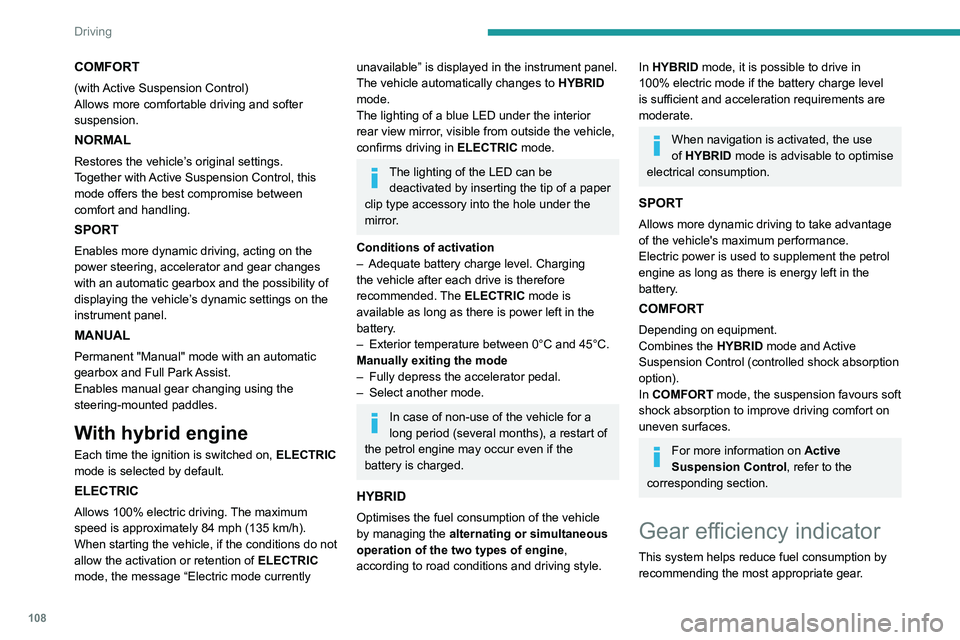
Each time the ignition is switched on, ELECTRIC
mode is selected by default.
ELECTRIC
Allows 100% electric driving. The maximum
speed is approximately 84 mph (135 km/h).
When starting the vehicle, if the conditions do not
allow the activation or retention of
ELECTRIC
mode, the message
“Electric mode currently
unavailable” is displayed in the instrument panel.
The vehicle automatically changes to HYBRID
mode.
The lighting of a blue LED under the interior
rear view mirror, visible from outside the vehicle,
confirms driving in ELECTRIC mode.
The lighting of the LED can be
deactivated by inserting the tip of a paper
clip type accessory into the hole under the
mirror
.
Conditions of activation
–
Adequate battery charge level. Charging
the vehicle after each drive is therefore
recommended.
The ELECTRIC mode is
available as long as there is power left in the
battery.
–
Exterior temperature between 0°C and 45°C.
Manually exiting the mode
–
Fully depress the accelerator pedal.
–
Select another mode.
In case of non-use of the vehicle for a
long period (several months), a restart of
the petrol engine may occur even if the
battery is charged.
HYBRID
Optimises the fuel consumption of the vehicle
by managing the alternating or simultaneous
operation of the two types of engine ,
according to road conditions and driving style.
In HYBRID mode, it is possible to drive in
100% electric mode if the battery charge level
is sufficient and acceleration requirements are
moderate.
When navigation is activated, the use
of HYBRID mode is advisable to optimise
electrical consumption.
SPORT
Allows more dynamic driving to take advantage
of the vehicle's maximum performance.
Electric power is used to supplement the petrol
engine as long as there is energy left in the
battery.
COMFORT
Depending on equipment.
Combines the HYBRID mode and Active
Suspension Control (controlled shock absorption
option).
In COMFORT mode, the suspension favours soft
shock absorption to improve driving comfort on
uneven surfaces.
For more information on Active
Suspension Control , refer to the
corresponding section.
Gear efficiency indicator
This system helps reduce fuel consumption by
recommending the most appropriate gear.
Operation
Depending on the driving situation and the
vehicle's equipment, the system may advise
skipping one or more gears.
Gear engagement recommendations are only
optional. In fact, the configuration of the road,
the traffic density and safety remain determining
factors when choosing the best gear. Therefore,
the driver remains responsible for deciding
whether or not to follow the system’s advice.
This function cannot be deactivated.
With an automatic gearbox, the system is
only active in manual operation.
The information appears in the instrument panel in the form of an arrow and the
recommended gear.
The system adapts its gear shift recommendation according to the driving
conditions (slope, load, etc.) and the driver’s
requirements (power, acceleration, braking,
etc.).
The system never suggests:
– engaging first gear,
– engaging reverse.
Stop & Start
The Stop & Start function puts the engine
temporarily into standby - STOP mode - during
phases when the vehicle is stopped (red lights,
Page 111 of 276
109
Driving
6Operation
Depending on the driving situation and the
vehicle's equipment, the system may advise
skipping one or more gears.
Gear engagement recommendations are only
optional. In fact, the configuration of the road,
the traffic density and safety remain determining
factors when choosing the best gear. Therefore,
the driver remains responsible for deciding
whether or not to follow the system’s advice.
This function cannot be deactivated.
With an automatic gearbox, the system is
only active in manual operation.
The information appears in the instrument panel in the form of an arrow and the
recommended gear.
The system adapts its gear shift recommendation according to the driving
conditions (slope, load, etc.) and the driver’s
requirements (power, acceleration, braking,
etc.).
The system never suggests:
–
engaging first gear
,
–
engaging reverse.
Stop & Start
The Stop & Start function puts the engine temporarily into standby - STOP mode - during
phases when the vehicle is stopped (red lights, queues, etc.). The engine restarts automatically
- START mode - as soon as the driver wishes to
move off again.
Primarily designed for urban use, the function
is intended to reduce fuel consumption and
exhaust emissions as well as the noise level
when stationary.
The function does not affect the functionalities of
the vehicle, in particular the braking.
Deactivation/Reactivation
The function is activated by default when the
ignition is switched on.
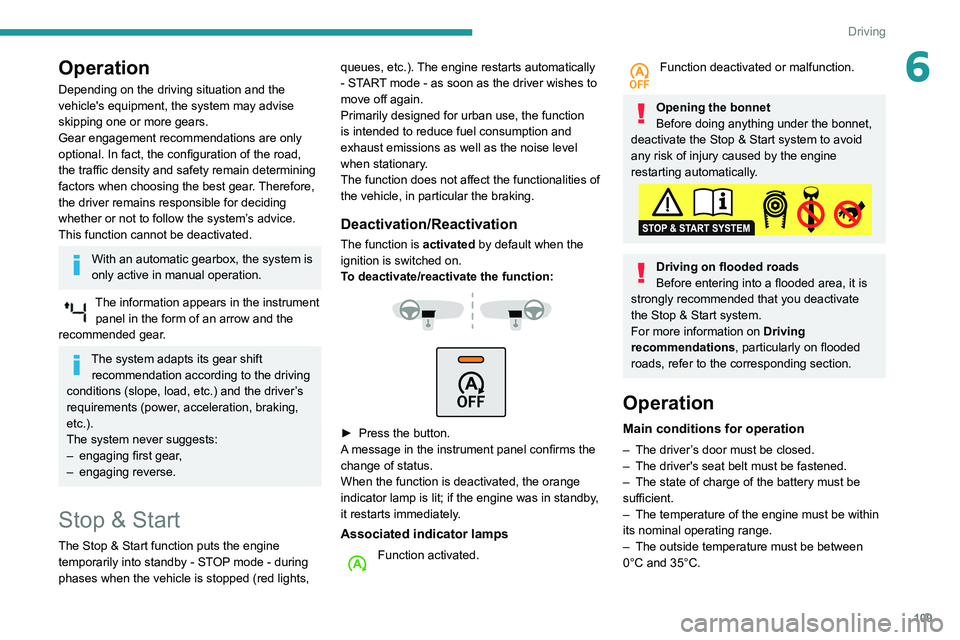
To deactivate/reactivate the function:
► Press the button.
A message in the instrument panel confirms the
change of status.
When the function is deactivated, the orange
indicator lamp is lit; if the engine was in standby,
it restarts immediately.
Associated indicator lamps
Function activated.
Function deactivated or malfunction.
Opening the bonnet
Before doing anything under the bonnet,
deactivate the Stop & Start system to avoid
any risk of injury caused by the engine
restarting automatically.
Driving on flooded roads
Before entering into a flooded area, it is
strongly recommended that you deactivate
the Stop & Start system.
For more information on Driving
recommendations, particularly on flooded
roads, refer to the corresponding section.
Operation
Main conditions for operation
– The driver ’s door must be closed.
– The driver's seat belt must be fastened.
–
The state of charge of the battery must be
sufficient.
–
The temperature of the engine must be within
its nominal operating range.
–
The outside temperature must be between
0°C and 35°C.
Page 112 of 276
11 0
Driving
Putting the engine into standby
(STOP mode)
The engine automatically goes into standby
as soon as the driver indicates the intention of
stopping.
–
W
ith a manual gearbox, at a speed below 2
mph (3
km/h), when you place the gear lever in
neutral and release the clutch pedal.
–
W
ith an automatic gearbox:
•
at a speed below 12 mph (20
km/h) for
BlueHDi versions, or below 0.6 mph (1
km/h)
for PureTech 180 and 225 versions, when
you brake hard with the gear selector in
mode D,
•
with the vehicle stationary
, when you place
the gear selector in mode N.
Time counter
A time counter adds up the time spent in standby
during a journey. It resets to zero every time the
ignition is switched on.
Special cases:
The engine will not go into standby if all of the
conditions for operation are not met and in the
following cases.
–
Steep slope (ascending or descending).
–
Needed
to maintain a comfortable temperature
in the passenger compartment.
–
Demisting active.
In these cases, this indicator lamp flashes
for a few seconds, then goes off.
After the engine has restarted, STOP mode is not available until the vehicle
has reached a speed of 5 mph (8
km/h).
During parking manoeuvres, STOP mode
is not available for a few seconds after
coming out of reverse gear or turning the
steering wheel.
Engine restarting (START mode)
The engine automatically restarts as soon as the
driver indicates the intention of moving off again.
►
W
ith a manual gearbox: with the clutch
pedal fully depressed.
►
W
ith an automatic gearbox:
•
With the selector in position D
or M: with the
brake pedal released.
•
With the selector in position N
and the brake
pedal released: with the selector at D or M.
•
With the selector in position P
and the brake
pedal depressed: with the selector at R, N,
D or M.
•
Reverse gear engaged.
Special cases
The engine restarts automatically if all the
operating conditions are met again and in the
following cases.
–
With a manual gearbox: vehicle speed
exceeds 2.5 mph (4
km/h),
–
With an automatic gearbox, in mode N
, vehicle
speed exceeds 0.6 mph (1
km/h).
In these cases, this indicator lamp flashes
for a few seconds, then goes off.
Malfunctions
In the event of a malfunction, this warning
lamp flashes for a few moments, then
remains on, accompanied by an onscreen
message.
Have the vehicle checked by a PEUGEOT
dealer or a qualified workshop.
The vehicle stalls in STOP mode
All of the instrument panel warning lamps come
on if there is a fault.
►
Switch off the ignition then start the engine
again with the " ST
ART/STOP" button.
The Stop & Start system requires a 12 V
battery of specific technology and
specification.
All work concerning the battery must be
carried out only by a PEUGEOT
dealer or a
qualified workshop.
Under-inflation detection
This system automatically checks the pressures of the tyres while driving.
It compares the information given by the wheel
speed sensors with reference values, which
must be reinitialised every time the tyre
pressures are adjusted or a wheel changed.
Page 113 of 276
111
Driving
6The system triggers an alert as soon as it
detects a drop in the inflation pressure of one or
more tyres.
Under-inflation detection does not
replace the need for vigilance on the part
of the driver.
This system does not avoid the need to
regularly check the tyre pressures (including
the spare wheel) as well as before a long
journey.
Driving with under-inflated tyres, particularly
in adverse conditions (heavy load, high
speed, long journey):
–
worsens road-holding.
–
lengthens braking distances.
–
causes premature wear of the tyres.
–
increases fuel consumption.
The inflation pressures defined for the vehicle can be found on the tyre pressure
label.
For more information on the Identification
markings, refer to the corresponding section.
Checking tyre pressures
This check should be done when the
tyres are "cold" (vehicle stopped for 1 hour or
after a journey of less than 6 miles (10
km) at
moderate speeds).
Otherwise, add 0.3 bar to the pressures
shown on the label.
Snow chains
The system does not have to be
reinitialised after fitting or removing snow
chains.
Under-inflation alert
This is signalled by the fixed illumination of this warning lamp, accompanied by an
audible signal and, depending on equipment, the
display of a message.
►
Reduce speed immediately
, avoid excessive
steering movements and avoid sudden braking.
►
Stop the vehicle as soon as it is safe to do
so.
The loss of pressure detected does not always cause visible bulging of the tyre.
Do not rely on just a visual check.
►
Using a compressor
, such as the one in
the temporary puncture repair kit, check the
pressures of the four tyres when cold.
►
If it is not possible to make this check
immediately
, drive carefully at reduced speed.
►
In the event of a puncture, use the
temporary puncture repair kit or the spare wheel
(depending on equipment).
The alert is kept active until the system is reinitialised.
Reinitialisation
Reinitialise the system after adjusting one or
more tyre pressures and after changing one or
more wheels.
Before reinitialising the system, make
sure that the pressures of the four tyres
are correct for the conditions of use of the
vehicle and conform to the values written on
the tyre pressure label.
Check the pressures of the four tyres before
performing the reinitialisation.
The system does not advise if a pressure is
incorrect at the time of reinitialisation.
With the vehicle stationary, the system is
reinitialised via the Driving /
V
ehicle touch screen menu..
Malfunction
These warning lamps come on in the event of a malfunction.
A message appears, accompanied by an audible
signal.
In this case, the tyre under-inflation monitoring
function is no longer performed.
Have the system checked by a PEUGEOT
dealer or a qualified workshop.
Page 117 of 276
11 5
Driving
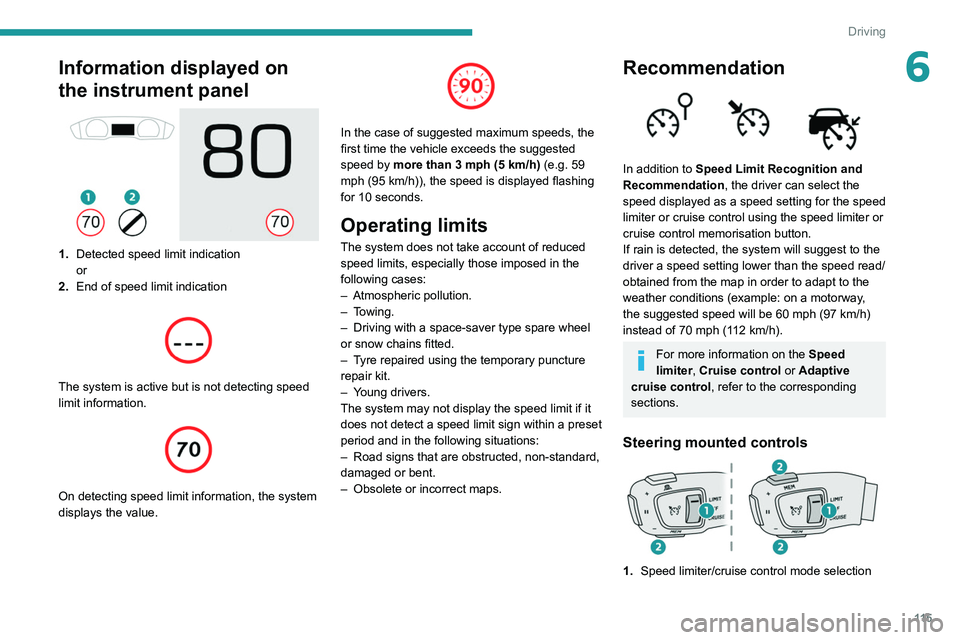
6Information displayed on
the instrument panel
1.Detected speed limit indication
or
2. End of speed limit indication
The system is active but is not detecting speed
limit information.
On detecting speed limit information, the system
displays the value.
In the case of suggested maximum speeds, the
first time the vehicle exceeds the suggested
speed by more than 3 mph (5
km/h) (e.g. 59
mph (95
km/h)), the speed is displayed flashing
for 10 seconds.
Operating limits
The system does not take account of reduced
speed limits, especially those imposed in the
following cases:
–
Atmospheric pollution.
–
Towing.
–
Driving with a space-saver type spare wheel
or snow chains fitted.
–
T
yre repaired using the temporary puncture
repair kit.
–
Y
oung drivers.
The system may not display the speed limit if it
does not detect a speed limit sign within a preset
period and in the following situations:
–
Road signs that are obstructed, non-standard,
damaged or bent.
–
Obsolete or incorrect maps.
Recommendation
In addition to Speed Limit Recognition and
Recommendation, the driver can select the
speed displayed as a speed setting for the speed
limiter or cruise control using the speed limiter or
cruise control memorisation button.
If rain is detected, the system will suggest to the
driver a speed setting lower than the speed read/
obtained from the map in order to adapt to the
weather conditions (example: on a motorway,
the suggested speed will be 60 mph (97 km/h)
instead of 70 mph (112 km/h).
For more information on the Speed
limiter, Cruise control or Adaptive
cruise control, refer to the corresponding
sections.
Steering mounted controls
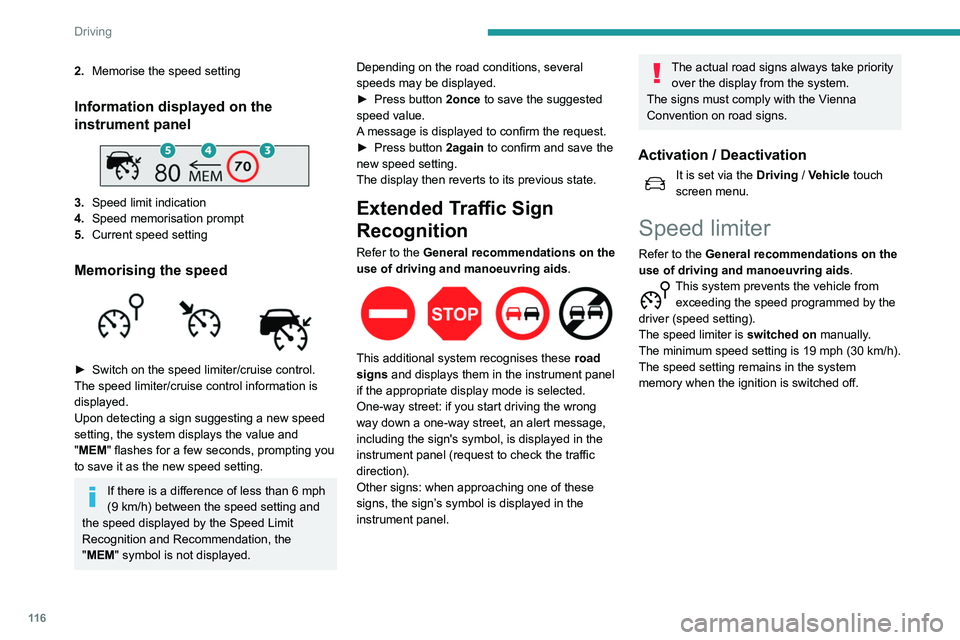
1. Speed limiter/cruise control mode selection
Page 118 of 276
11 6
Driving
2.Memorise the speed setting
Information displayed on the
instrument panel
3.Speed limit indication
4. Speed memorisation prompt
5. Current speed setting
Memorising the speed
► Switch on the speed limiter/cruise control.
The speed limiter/cruise control information is
displayed.
Upon detecting a sign suggesting a new speed
setting, the system displays the value and
"
MEM" flashes for a few seconds, prompting you
to save it as the new speed setting.
If there is a difference of less than 6 mph
(9 km/h) between the speed setting and
the speed displayed by the Speed Limit
Recognition and Recommendation, the
"MEM" symbol is not displayed. Depending on the road conditions, several
speeds may be displayed.
►
Press button
2once to save the suggested
speed value.
A message is displayed to confirm the request.
►
Press button
2again to confirm and save the
new speed setting.
The display then reverts to its previous state.
Extended Traffic Sign
Recognition
Refer to the General recommendations on the
use of driving and manoeuvring aids .
This additional system recognises these road
signs and displays them in the instrument panel
if the appropriate display mode is selected.
One-way street: if you start driving the wrong
way down a one-way street, an alert message,
including the sign's symbol, is displayed in the
instrument panel (request to check the traffic
direction).
Other signs: when approaching one of these
signs, the sign’s symbol is displayed in the
instrument panel.
The actual road signs always take priority over the display from the system.
The signs must comply with the Vienna
Convention on road signs.
Activation / Deactivation
It is set via the Driving / Vehicle touch
screen menu.
Speed limiter
Refer to the General recommendations on the
use of driving and manoeuvring aids .
This system prevents the vehicle from
exceeding the speed programmed by the
driver (speed setting).
The speed limiter is switched on manually.
The minimum speed setting is 19 mph (30
km/h).
The speed setting remains in the system
memory when the ignition is switched off.
Steering mounted control
1. ON (LIMIT position) / OFF
2. Reduce the speed setting
3. Increase the speed setting
4. Pause / resume speed limiter with the speed
setting previously stored
5. Depending on version:
Display of speed thresholds recorded using
Memorising speeds
or
Use the speed suggested by the Speed Limit
Recognition and Recommendation ( MEM
display)
For more information on Memorising speeds
or on the Speed Limit Recognition and
Recommendation, refer to the corresponding
sections.
Page 119 of 276
11 7
Driving
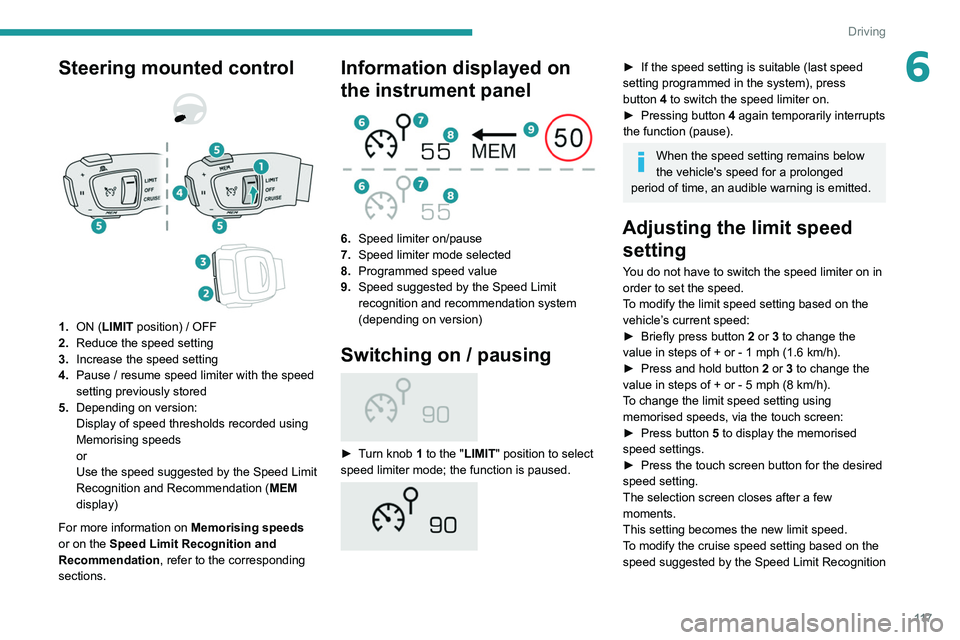
6Steering mounted control
1. ON (LIMIT position) / OFF
2. Reduce the speed setting
3. Increase the speed setting
4. Pause / resume speed limiter with the speed
setting previously stored
5. Depending on version:
Display of speed thresholds recorded using
Memorising speeds
or
Use the speed suggested by the Speed Limit
Recognition and Recommendation ( MEM
display)
For more information on Memorising speeds
or on the Speed Limit Recognition and
Recommendation, refer to the corresponding
sections.
Information displayed on
the instrument panel
6. Speed limiter on/pause
7. Speed limiter mode selected
8. Programmed speed value
9. Speed suggested by the Speed Limit
recognition and recommendation system
(depending on version)
Switching on / pausing
► Turn knob 1 to the "LIMIT " position to select
speed limiter mode; the function is paused.
► If the speed setting is suitable (last speed
setting programmed in the system), press
button
4 to switch the speed limiter on.
►
Pressing button 4
again temporarily interrupts
the function (pause).
When the speed setting remains below
the vehicle's speed for a prolonged
period of time, an audible warning is emitted.
Adjusting the limit speed setting
You do not have to switch the speed limiter on in
order to set the speed.
To modify the limit speed setting based on the
vehicle’s current speed:
►
Briefly press button
2 or 3 to change the
value in steps of +
or - 1 mph (1.6 km/h).
►
Press and hold button
2
or 3 to change the
value in steps of +
or - 5 mph (8 km/h).
To change the limit speed setting using memorised speeds, via the touch screen:
►
Press button
5 to display the memorised
speed settings.
►
Press the touch screen button for the desired
speed setting.
The selection screen closes after a few
moments.
This setting becomes the new limit speed.
T
o modify the cruise speed setting based on the
speed suggested by the Speed Limit Recognition
Page 120 of 276
11 8
Driving
and Recommendation, as shown on the
instrument panel:
►
Press button
5 once; a message is displayed
to confirm the memorisation request.
►
Press button
5 again to save the suggested
speed.
The speed is immediately shown on the
instrument panel as the new speed setting.
Temporarily exceeding the
speed setting
► Press the accelerator pedal down fully .
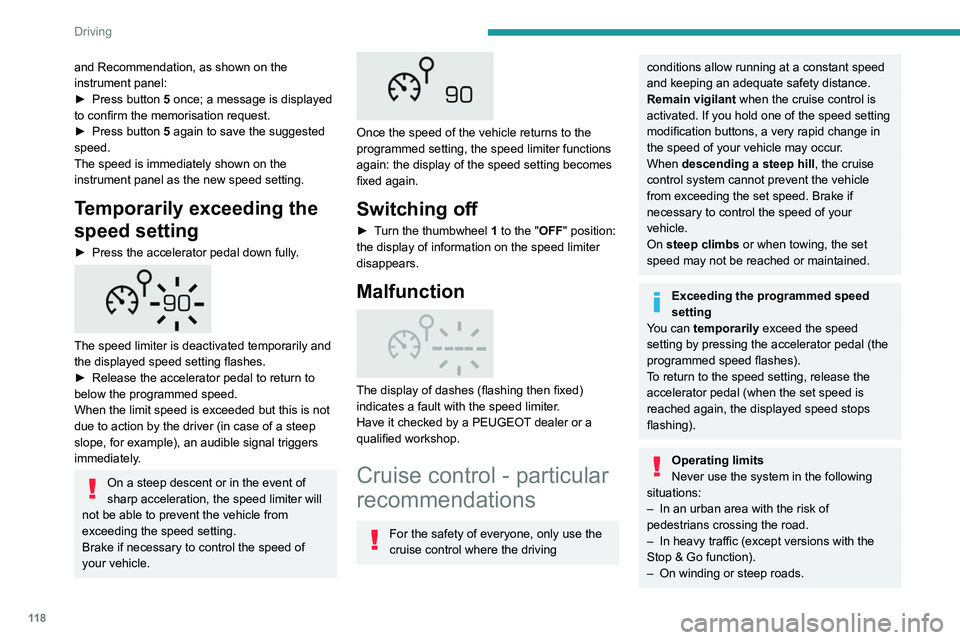
The speed limiter is deactivated temporarily and
the displayed speed setting flashes.
►
Release the accelerator pedal to return to
below the programmed speed.
When the limit speed is exceeded but this is not
due to action by the driver (in case of a steep
slope, for example), an audible signal triggers
immediately
.
On a steep descent or in the event of
sharp acceleration, the speed limiter will
not be able to prevent the vehicle from
exceeding the speed setting.
Brake if necessary to control the speed of
your vehicle.
Once the speed of the vehicle returns to the
programmed setting, the speed limiter functions
again: the display of the speed setting becomes
fixed again.
Switching off
► Turn the thumbwheel 1 to the "OFF" position:
the display of information on the speed limiter
disappears.
Malfunction
The display of dashes (flashing then fixed)
indicates a fault with the speed limiter.
Have it checked by a PEUGEOT dealer or a
qualified workshop.
Cruise control - particular
recommendations
For the safety of everyone, only use the
cruise control where the driving
conditions allow running at a constant speed
and keeping an adequate safety distance.
Remain vigilant when the cruise control is
activated. If you hold one of the speed setting
modification buttons, a very rapid change in
the speed of your vehicle may occur.
When descending a steep hill , the cruise
control system cannot prevent the vehicle
from exceeding the set speed. Brake if
necessary to control the speed of your
vehicle.
On steep climbs or when towing, the set
speed may not be reached or maintained.
Exceeding the programmed speed
setting
You can temporarily exceed the speed
setting by pressing the accelerator pedal (the
programmed speed flashes).
To return to the speed setting, release the
accelerator pedal (when the set speed is
reached again, the displayed speed stops
flashing).
Operating limits
Never use the system in the following
situations:
–
In an urban area with the risk of
pedestrians crossing the road.
–
In heavy traffic (except versions with the
Stop & Go function).
–
On winding or steep roads.
– On slippery or flooded roads.
– In poor weather conditions.
– Driving on a speed circuit.
– Driving on a rolling road.
– When using snow chains, non-slip covers
or studded tyres.
Programmable cruise
control
Refer to the General recommendations on the
use of driving and manoeuvring aids and to
Cruise control - particular recommendations.
This system automatically keeps the vehicle’s speed at the cruise value
programmed by the driver (speed setting),
without using the accelerator pedal.
The cruise control is switched on manually.
It requires a minimum vehicle speed of 25 mph
(40 km/h).
With a manual gearbox, third gear or higher must
be engaged.
With an automatic gearbox, mode D or second
gear or higher in mode M must be engaged.
The cruise control remains active after
changing gear, regardless of the gearbox
type, on engines fitted with Stop & Start.
Switching off the ignition cancels any
speed setting.
Page 121 of 276
11 9
Driving
6– On slippery or flooded roads.
– In poor weather conditions.
–
Driving on a speed circuit.
–
Driving on a rolling road.
–
When using snow chains, non-slip covers
or studded tyres.
Programmable cruise
control
Refer to the General recommendations on the
use of driving and manoeuvring aids and to
Cruise control - particular recommendations.
This system automatically keeps the vehicle’s speed at the cruise value
programmed by the driver (speed setting),
without using the accelerator pedal.
The cruise control is switched on manually.
It requires a minimum vehicle speed of 25 mph
(40
km/h).
With a manual gearbox, third gear or higher must
be engaged.
With an automatic gearbox, mode
D
or second
gear or higher in mode
M
must be engaged.
The cruise control remains active after changing gear, regardless of the gearbox
type, on engines fitted with Stop & Start.
Switching off the ignition cancels any
speed setting.
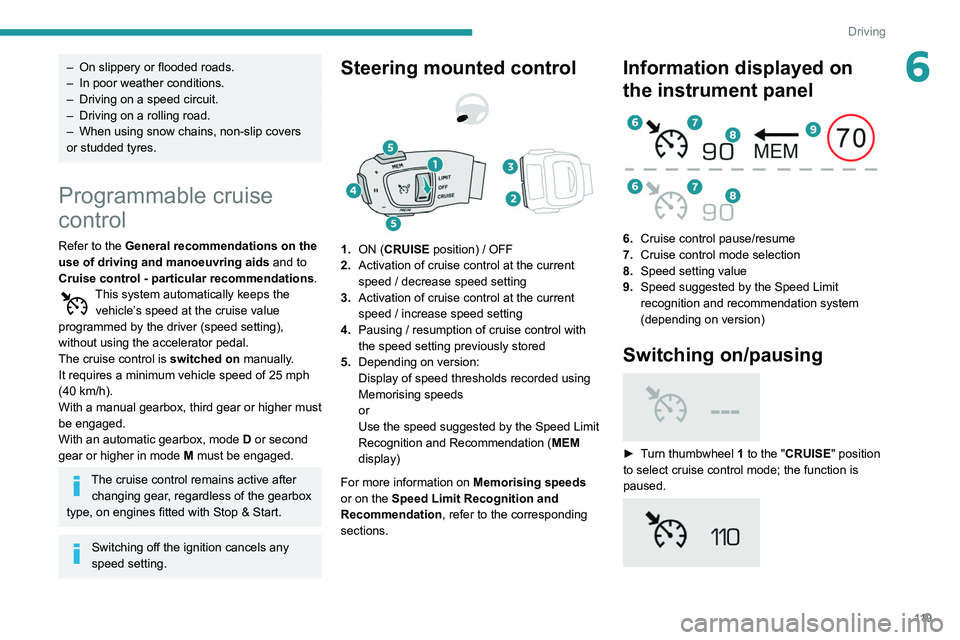
Steering mounted control
1. ON (CRUISE position) / OFF
2. Activation of cruise control at the current
speed / decrease speed setting
3. Activation of cruise control at the current
speed / increase speed setting
4. Pausing / resumption of cruise control with
the speed setting previously stored
5. Depending on version:
Display of speed thresholds recorded using
Memorising speeds
or
Use the speed suggested by the Speed Limit
Recognition and Recommendation ( MEM
display)
For more information on Memorising speeds
or on the Speed Limit Recognition and
Recommendation, refer to the corresponding
sections.
Information displayed on
the instrument panel
6. Cruise control pause/resume
7. Cruise control mode selection
8. Speed setting value
9. Speed suggested by the Speed Limit
recognition and recommendation system
(depending on version)
Switching on/pausing
► Turn thumbwheel 1 to the "CRUISE" position
to select cruise control mode; the function is
paused.