mode Peugeot 508 2020 Manual Online
[x] Cancel search | Manufacturer: PEUGEOT, Model Year: 2020, Model line: 508, Model: Peugeot 508 2020Pages: 276, PDF Size: 8.43 MB
Page 183 of 276
181
In the event of a breakdown
8Light-emitting diode (LED)
headlamps and lamps
Depending on version, the affected types of
headlamps / lamps are:
–
Full LED technology headlamps.
–
Offset daytime running lamps.
–
Direction indicator side repeaters.
–
Side spotlamps.
–
3D rear lamps.
–
Third brake lamp.
–
Number plate lamps.
For the replacement of this type of bulb,
you must contact a PEUGEOT dealer or
a qualified workshop.
Do not touch the "Full LED" technology
headlamps - risk of electrocution!
Front lamps
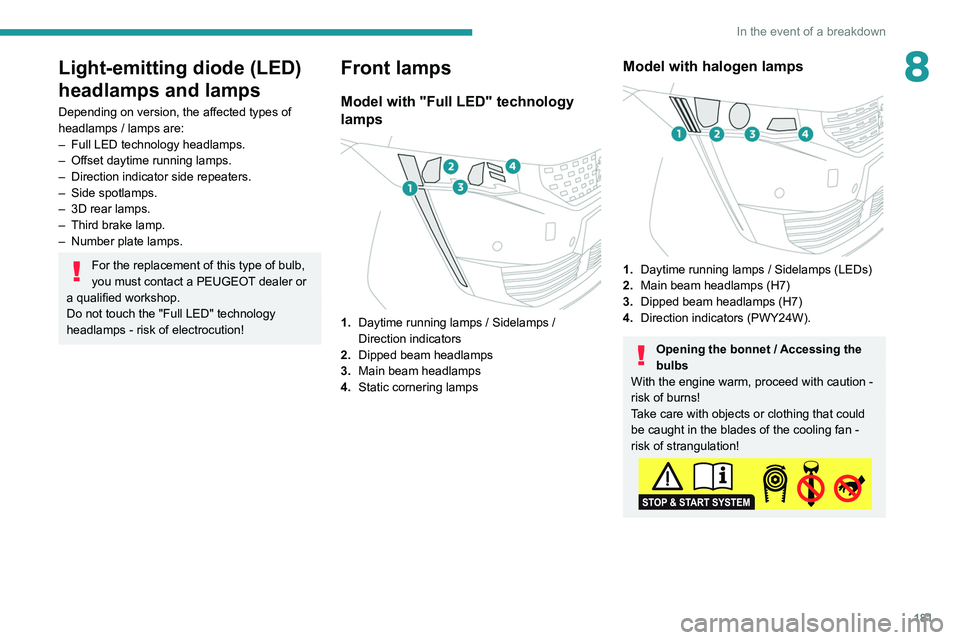
Model with "Full LED" technology
lamps
1. Daytime running lamps / Sidelamps /
Direction indicators
2. Dipped beam headlamps
3. Main beam headlamps
4. Static cornering lamps
Model with halogen lamps
1.Daytime running lamps / Sidelamps (LEDs)
2. Main beam headlamps (H7)
3. Dipped beam headlamps (H7)
4. Direction indicators (PWY24W).
Opening the bonnet / Accessing the
bulbs
With the engine warm, proceed with caution -
risk of burns!
Take care with objects or clothing that could
be caught in the blades of the cooling fan -
risk of strangulation!
Page 184 of 276
182
In the event of a breakdown
Halogen bulbs (Hx)
To ensure good quality lighting, check
that the bulb is correctly positioned in its
housing.
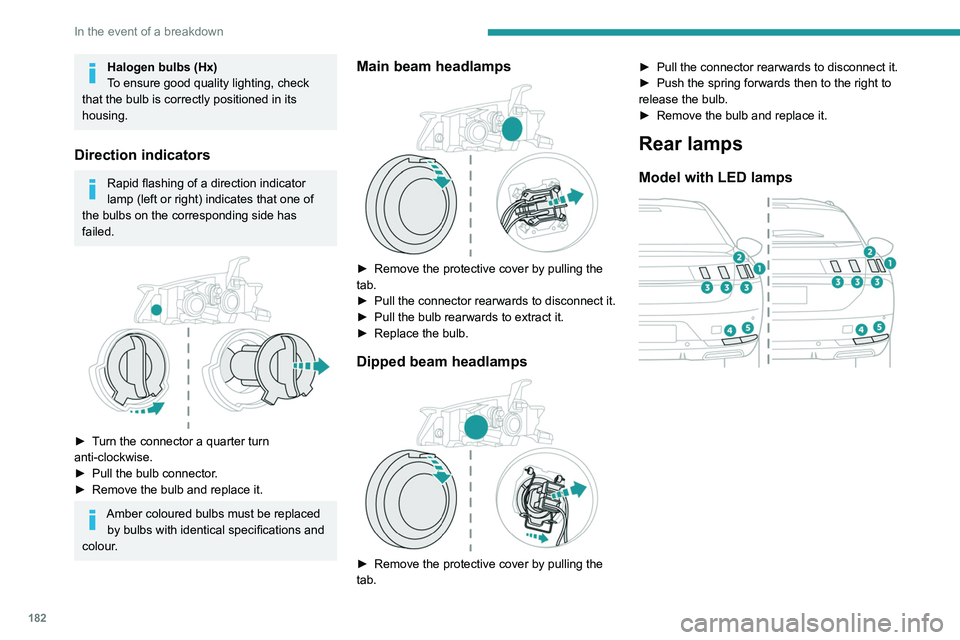
Direction indicators
Rapid flashing of a direction indicator
lamp (left or right) indicates that one of
the bulbs on the corresponding side has
failed.
► Turn the connector a quarter turn
anti-clockwise.
►
Pull the bulb connector
.
►
Remove the bulb and replace it.
Amber coloured bulbs must be replaced by bulbs with identical specifications and
colour.
Main beam headlamps
► Remove the protective cover by pulling the
tab.
►
Pull the connector rearwards to disconnect it.
►
Pull the bulb rearwards to extract it.
►
Replace the bulb.
Dipped beam headlamps
► Remove the protective cover by pulling the
tab. ►
Pull the connector rearwards to disconnect it.
►
Push the spring forwards then to the right to
release the bulb.
►
Remove the bulb and replace it.
Rear lamps
Model with LED lamps
Page 185 of 276
183
In the event of a breakdown
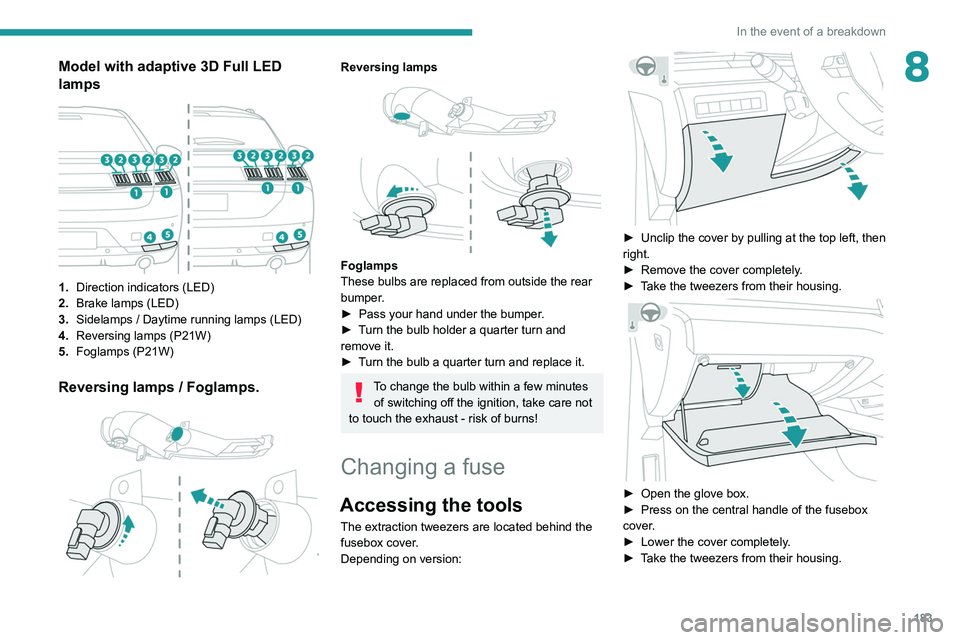
8Model with adaptive 3D Full LED
lamps
1.Direction indicators (LED)
2. Brake lamps (LED)
3. Sidelamps / Daytime running lamps (LED)
4. Reversing lamps (P21W)
5. Foglamps (P21W)
Reversing lamps / Foglamps.
Reversing lamps
Foglamps
These bulbs are replaced from outside the rear
bumper.
►
Pass your hand under the bumper
.
►
T
urn the bulb holder a quarter turn and
remove it.
►
T
urn the bulb a quarter turn and replace it.
To change the bulb within a few minutes of switching off the ignition, take care not
to touch the exhaust - risk of burns!
Changing a fuse
Accessing the tools
The extraction tweezers are located behind the
fusebox cover.
Depending on version:
► Unclip the cover by pulling at the top left, then
right.
►
Remove the cover completely
.
►
T
ake the tweezers from their housing.
► Open the glove box.
► Press on the central handle of the fusebox
cover
.
►
Lower the cover completely
.
►
T
ake the tweezers from their housing.
Page 197 of 276
195
In the event of a breakdown
8Hybrid vehicles
Before any intervention, with the ignition on, depress the brake pedal and select mode N, then switch off the hybrid system (READY indicator lamp
off).
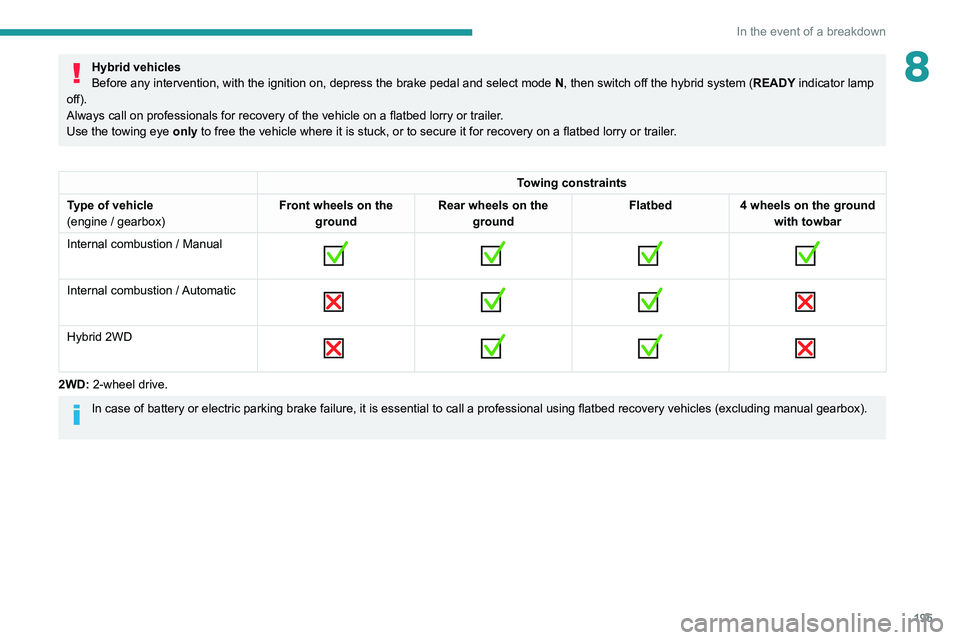
Always call on professionals for recovery of the vehicle on a flatbed lorry or trailer .
Use the towing eye only
to free the vehicle where it is stuck, or to secure it for recovery on a flatbed lorry or trailer .
Towing constraints
Type of vehicle
(engine / gearbox) Front wheels on the
ground Rear wheels on the
ground Flatbed
4 wheels on the ground
with towbar
Internal combustion / Manual
Internal combustion / Automatic
Hybrid 2WD
2WD: 2-wheel drive.
In case of battery or electric parking brake failure, it is essential to call a p
rofessional using flatbed recovery vehicles (excluding manual gearbox).
Page 200 of 276
198
Technical data
Engines and towed loads – Diesel BlueHDi
EnginesBlueHDi 130 S&S BVM6BlueHDi 130 S&S EAT8
Gearboxes Manual 6-speedAutomatic 8-speed
Codes DV5RC ML6C STTDV5RC ATN8 STT
Model codes
Hatchback: FB...
SW: FC... YHZJ
YHZR
Body styles HatchbackSWHatchback SW
Cubic capacity (cc) 1,4991499
Max. power: EC standard (kW) 9696
Fuel DieselDiesel
Braked trailer (within the GTW limit) (kg)
on a 10% or 12% gradient 1500
150015001500
Unbraked trailer (kg) 745745745745
Maximum authorised nose weight (kg) 75757575
Engines BlueHDi 160 S&S EAT8BlueHDi 180 S&S EAT8
Gearboxes Automatic 8-speedAutomatic 8-speed
Codes DW10FCC AMN8 STTDW10FC AMN8 STT
Model codes
Hatchback: FH...
SW: FJ... EHYR
EHZR
Body styles HatchbackSWHatchback SW
Cubic capacity (cc) 1,9971,997
Max. power: EC standard (kW) 120133
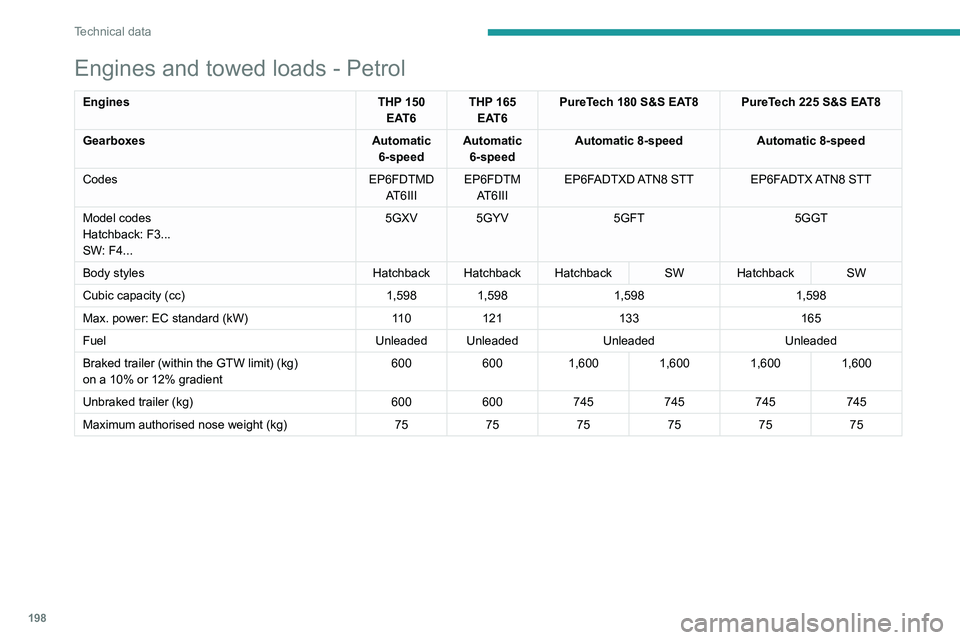
Engines and towed loads - Petrol
Engines THP 150
EAT6 THP 165
EAT6 PureTech 180 S&S EAT8 PureTech 225 S&S EAT8
Gearboxes Automatic
6-speed Automatic
6-speed Automatic 8-speed
Automatic 8-speed
Codes EP6FDTMD
AT6III EP6FDTM
AT6III EP6FADTXD ATN8 STT EP6FADTX ATN8 STT
Model codes
Hatchback: F3...
SW: F4... 5GXV 5GYV
5GFT5GGT
Body styles Hatchback Hatchback Hatchback SW Hatchback SW
Cubic capacity (cc) 1,5981,598 1,598 1,598
Max. power: EC standard (kW) 11 0121 133 165
Fuel Unleaded Unleaded Unleaded Unleaded
Braked trailer (within the GTW limit) (kg)
on a 10% or 12% gradient 600
6001,600 1,6001,6001,600
Unbraked trailer (kg) 600600745745745745
Maximum authorised nose weight (kg) 757575757575
Page 201 of 276
199
Technical data
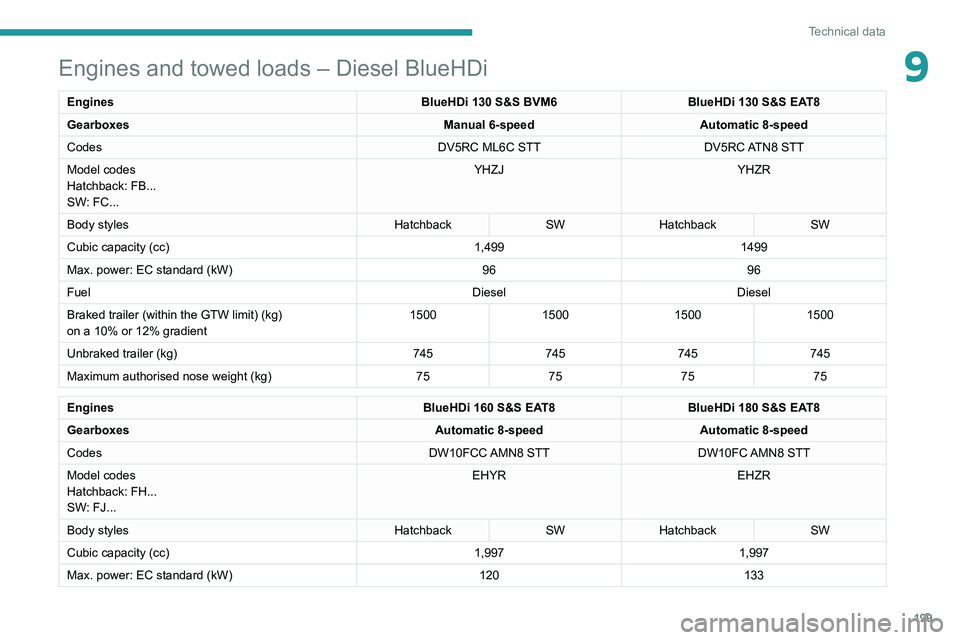
9Engines and towed loads – Diesel BlueHDi
EnginesBlueHDi 130 S&S BVM6BlueHDi 130 S&S EAT8
Gearboxes Manual 6-speedAutomatic 8-speed
Codes DV5RC ML6C STTDV5RC ATN8 STT
Model codes
Hatchback: FB...
SW: FC... YHZJ
YHZR
Body styles HatchbackSWHatchback SW
Cubic capacity (cc) 1,4991499
Max. power: EC standard (kW) 9696
Fuel DieselDiesel
Braked trailer (within the GTW limit) (kg)
on a 10% or 12% gradient 1500
150015001500
Unbraked trailer (kg) 745745745745
Maximum authorised nose weight (kg) 75757575
Engines BlueHDi 160 S&S EAT8BlueHDi 180 S&S EAT8
Gearboxes Automatic 8-speedAutomatic 8-speed
Codes DW10FCC AMN8 STTDW10FC AMN8 STT
Model codes
Hatchback: FH...
SW: FJ... EHYR
EHZR
Body styles HatchbackSWHatchback SW
Cubic capacity (cc) 1,9971,997
Max. power: EC standard (kW) 120133
Page 202 of 276
200
Technical data
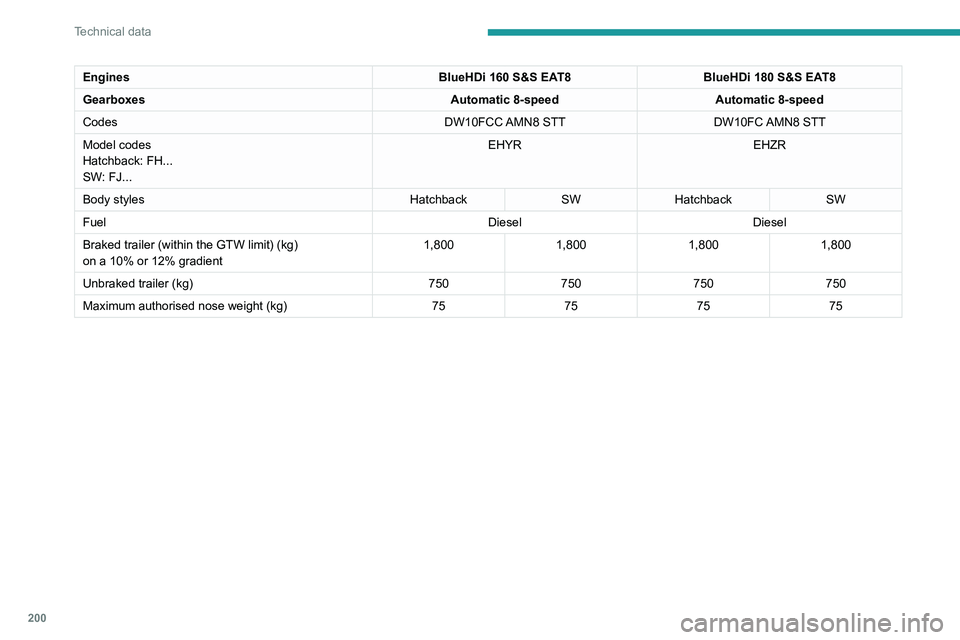
Engines and towed loads - Diesel
EnginesHDi 180 EAT8
Gearboxes Automatic 8-speed
Codes DW10FC AMN8
Model codes
Hatchback: FH...
SW: FJ... EHZN
Body styles HatchbackSW
Cubic capacity (cc) 1,997
Max. power: EC standard (kW) 133
Fuel Diesel
Braked trailer (within the GTW limit) (kg)
on a 10% or 12% gradient 600
1,800* 600
1,800*
Unbraked trailer (kg) 600
750* 600
750*
Maximum authorised nose weight (kg) 7575
* Only for Russia.
Engines BlueHDi 160 S&S EAT8BlueHDi 180 S&S EAT8
Gearboxes Automatic 8-speedAutomatic 8-speed
Codes DW10FCC AMN8 STTDW10FC AMN8 STT
Model codes
Hatchback: FH...
SW: FJ... EHYR
EHZR
Body styles HatchbackSWHatchback SW
Fuel DieselDiesel
Braked trailer (within the GTW limit) (kg)
on a 10% or 12% gradient 1,800
1,8001,8001,800
Unbraked trailer (kg) 750750750750
Maximum authorised nose weight (kg) 75757575
Page 203 of 276
201
Technical data
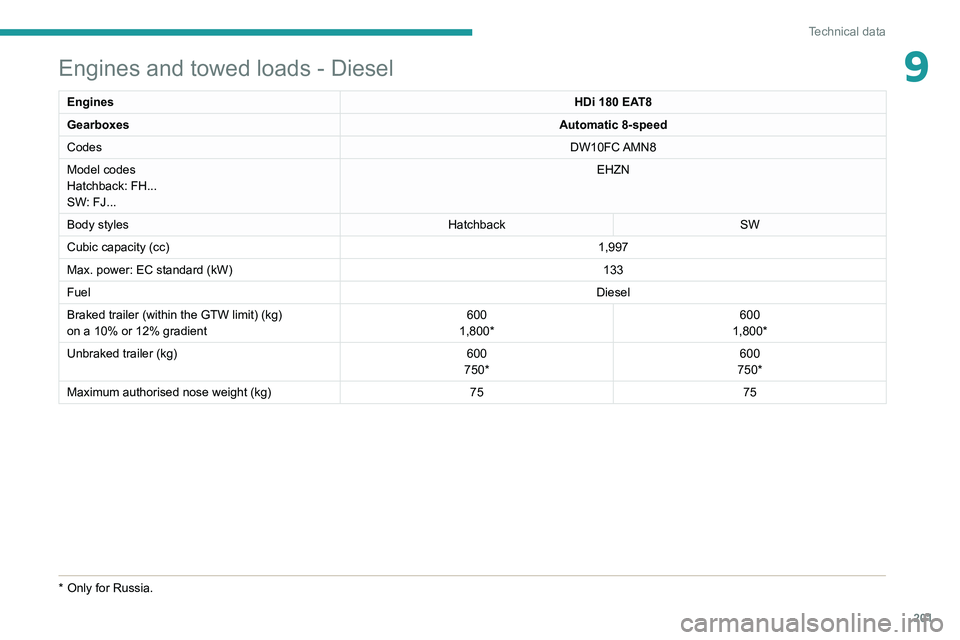
9Engines and towed loads - Diesel
EnginesHDi 180 EAT8
Gearboxes Automatic 8-speed
Codes DW10FC AMN8
Model codes
Hatchback: FH...
SW: FJ... EHZN
Body styles HatchbackSW
Cubic capacity (cc) 1,997
Max. power: EC standard (kW) 133
Fuel Diesel
Braked trailer (within the GTW limit) (kg)
on a 10% or 12% gradient 600
1,800* 600
1,800*
Unbraked trailer (kg) 600
750* 600
750*
Maximum authorised nose weight (kg) 7575
* Only for Russia.
Page 204 of 276
202
Technical data
Dimensions (mm)
These dimensions have been measured on an unladen vehicle.
Hatchback
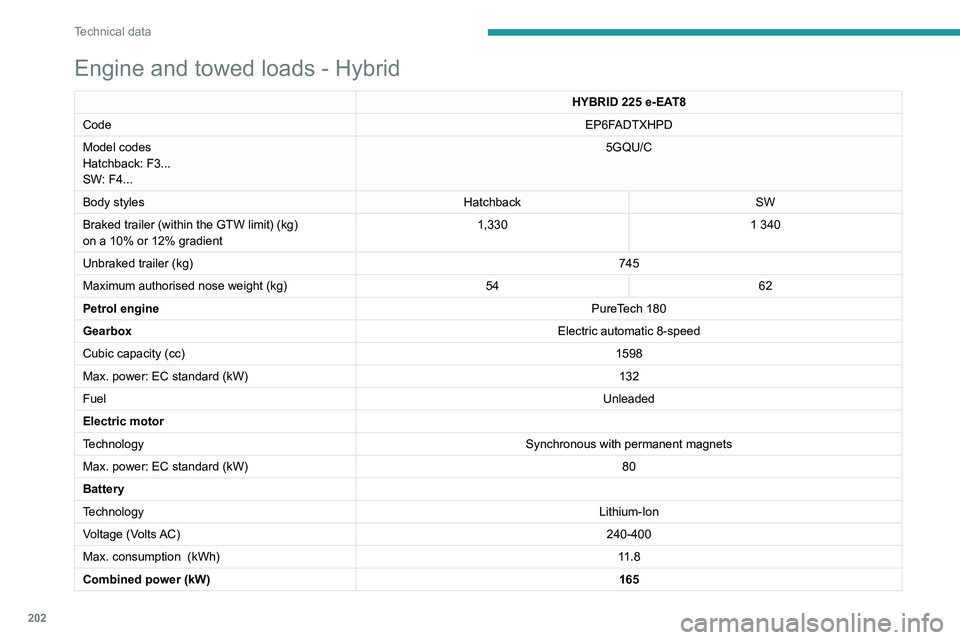
Engine and towed loads - Hybrid
HYBRID 225 e-EAT8
Code EP6F
ADTXHPD
Model codes
Hatchback: F3...
SW: F4... 5GQU/C
Body styles HatchbackSW
Braked trailer (within the GTW limit) (kg)
on a 10% or 12% gradient 1,330
1 340
Unbraked trailer (kg) 745
Maximum authorised nose weight (kg) 5462
Petrol engine PureTech
180
Gearbox Electric automatic 8-speed
Cubic capacity (cc) 1598
Max. power: EC standard (kW) 132
Fuel Unleaded
Electric motor
Technology Synchronous with permanent magnets
Max. power: EC standard (kW) 80
Battery
Technology Lithium-Ion
Voltage (Volts AC) 240-400
Max. consumption
(kWh) 11.8
Combined power (kW) 165
Page 207 of 276
205
PEUGEOT Connect Radio
10PEUGEOT Connect
Radio
Multimedia audio system -
Applications - Bluetooth
®
telephone
The functions and settings described
vary according to the vehicle version and
configuration.
For safety reasons and because they
require sustained attention by the driver,
the following operations must be carried out
with the vehicle stationary and the ignition
on:
–
Pairing the smartphone with the system in
Bluetooth mode.
–
Using the smartphone.
–
Connection to the CarPlay®, MirrorLinkTM
or Android Auto applications (certain
applications interrupt their display while the
vehicle is moving).
–
Changing the system settings and
configuration.
The system is protected in such a way that it will only operate in the vehicle.
The Energy Economy Mode message is
displayed when the system is about to enter
the corresponding mode.
The system’s Open Source Software (OSS) source codes are available at the
following addresses:
https://www.groupe-psa.com/fr/oss/
https://www.groupe-psa.com/en/oss/
First steps
With the engine running, a press mutes
the sound.
With the ignition off, a press turns the system on.
Increase or decrease the volume using
the wheel or the "plus" or "minus" buttons
(depending on the equipment).
Use the buttons on either side of or below the
touch screen for access to the menus, then
press the virtual buttons in the touch screen.
Depending on the model, use the "Source" or
"Menu" buttons on the left of the touch screen
for access to the menus, then press the virtual
buttons in the touch screen.
At all times it is possible to display the rolling
menus by pressing the screen briefly with three
fingers.
All of the touch areas of the screen are white.
For pages with multiple tabs at the bottom of the
screen, it is possible to switch between pages
either by tapping the tab for the desired page, or
by using a finger, sliding the pages to the left or
to the right.
Press in the grey zone to go back up a level or
to confirm.
Press the back arrow to go back a level or
confirm.
The touch screen is of the "capacitive" type.
To clean the screen, use a soft, non-abrasive
cloth (e.g. spectacles cloth) with no additional
product.
Do not use sharp objects on the screen.
Do not touch the screen with wet hands.
Certain information is displayed permanently in
the upper bar of the touch screen:
–
Air conditioning status information (depending
on version), and direct access to the
corresponding menu.
–
Radio Media and
Telephone menu status
information.
–
Privacy status information.
–
Access to the touch screen and digital
instrument panel settings.
Audio source selection (depending on
equipment):