fuel Peugeot 508 Hybrid 2014 Owner's Manual
[x] Cancel search | Manufacturer: PEUGEOT, Model Year: 2014, Model line: 508 Hybrid, Model: Peugeot 508 Hybrid 2014Pages: 380, PDF Size: 10.94 MB
Page 4 of 380
.
.
508_en_Chap00a_sommaire_ed02-2014
Instrument panel 12
Indicator and warning lamps
1
4
ga
uges and indicators
2
6
tr
ip computer
3
1
to
uch screen
3
5
Setting the date and time
3
9
MonitoringOver view
e
co-driving
Remote control key 4
1
Alarm
52
el
ectric windows
5
4
Boot
56
Motorised tailgate (SW)
5
7
Sunroof
6
0
Panoramic sunroof (SW)
6
2
Fuel tank
6
3
Diesel misfuel prevention
6
4
Access
Front seats 6 6
Rear seats
7
1
Mirrors
7
3
Steering wheel adjustment
7
5
Interior fittings
7
6
Boot fittings (Saloon)
7
9
Boot fittings (SW)
8
0
Heating and Ventilation
8
4
Manual air conditioning
8
7
Dual-zone digital air conditioning
8
9
Quad-zone digital air conditioning
9
2
Switching off the air conditioning may result in some discomfort (humidity, misting).
9
3
Front demist - defrost
9
7
Rear screen demist - defrost
9
7
Programmable Heating / Ventilation
9
8
Comfort
Starting-switching off the engine 100
el
ectric parking brake
1
03
Manual parking brake
1
09
Manual gearbox
1
10
ge
ar shift indicator
1
11
Automatic gearbox
1
12
ele
ctronic gearbox
1
16
Stop & Start
1
20
Hill start assist
1
23
Head-up display
1
24
Blind spot sensors
1
26
Speed limiter
1
30
Cruise control
1
32
Parking sensors
1
34
Reversing camera
1
37
Driving
Lighting controls 138
Automatic illumination of headlamps
1
43
Headlamp adjustment
1
46
Additional headlamps
1
47
Wiper controls
1
49
Automatic rain sensitive wipers
1
51
Courtesy lamps
1
53
Interior mood lighting
1
54
Visibility
Contents
Page 5 of 380
.
.
508_en_Chap00a_sommaire_ed02-2014
Child seats 155
Deactivating the passenger's front airbag
1
58
ISOFIX child seats
1
64
Child lock
1
70
Child safety
Direction indicators 1 71
em
ergency or assistance call
1
72
H o r n
172
Warning triangle
1
73
Tyre under-inflation detection
1
74
e
SC system
1
76
Seat belts
1
79
Airbags
1
82
Safety
temporary puncture repair kit 186
Changing a wheel
1
92
Snow chains
1
99
Changing a bulb
2
00
Changing a fuse
2
07
12 V battery
2
11
Removing - refitting the battery
2
15
en
ergy economy mode
2
19
Changing a wiper blade
2
20
to
wing the vehicle
2
21
to
wing a trailer
2
23
Fitting roof bars
2
25
Very cold climate screen
2
26
Accessories
227
Practical information
Opening the bonnet 2 30
Running out of fuel (Diesel)
2
31
Petrol engines
2
32
Diesel engines
2
34
BlueHDi Diesel engines
2
36
Checking levels
23
7
Checks
240
AdBlue
® additive and SCR system
(BlueHDi Diesel) 2 42
Checks
Petrol engines 2 50
Petrol weights
2
52
Diesel engines
2
54
Diesel weights
2
58
Dimensions
262
Identification markings
2
64
technical data
emergency or assistance 2 65
JBL equipment
2
67
7-inch touch screen
2
69
Audio system
3
41
Audio equipment and telematics
Alphabetical indexVisual search
Contents
Page 6 of 380
4
4 4, 10124262
120
508_en_Chap00b_vue-ensemble_ed02-2014
Over view
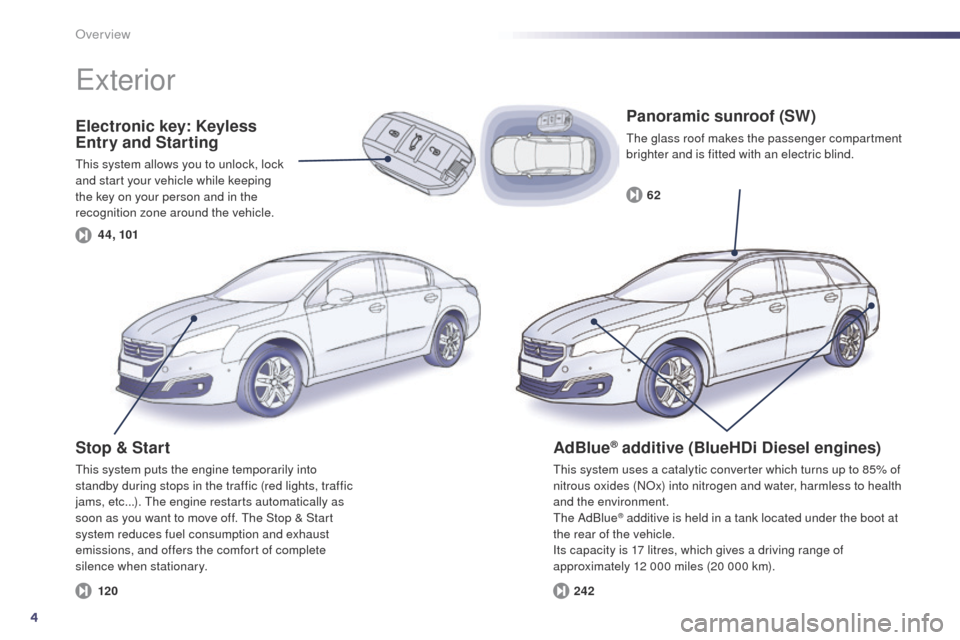
Electronic key: Keyless
Entry and Starting
this system allows you to unlock, lock
and start your vehicle while keeping
the key on your person and in the
recognition zone around the vehicle.
exterior
Stop & Start
this system puts the engine temporarily into
standby during stops in the traffic (red lights, traffic
jams, etc...). t
h
e engine restarts automatically as
soon as you want to move off.
t
h
e Stop & Start
system reduces fuel consumption and exhaust
emissions, and offers the comfort of complete
silence when stationary.
Panoramic sunroof (SW)
the glass roof makes the passenger compartment
brighter and is fitted with an electric blind.
AdBlue® additive (BlueHDi Diesel engines)
this system uses a catalytic converter which turns up to 85% of
nitrous oxides (NOx) into nitrogen and water, harmless to health
and the environment.
th
e AdBlue
® additive is held in a tank located under the boot at
the rear of the vehicle.
Its capacity is 17 litres, which gives a driving range of
approximately 12 000 miles (20 000 km).
Page 9 of 380
7
44, 56, 57
70
52
126
6398
103
101 122
124
135 170 178
14 4
508_en_Chap00b_vue-ensemble_ed02-2014
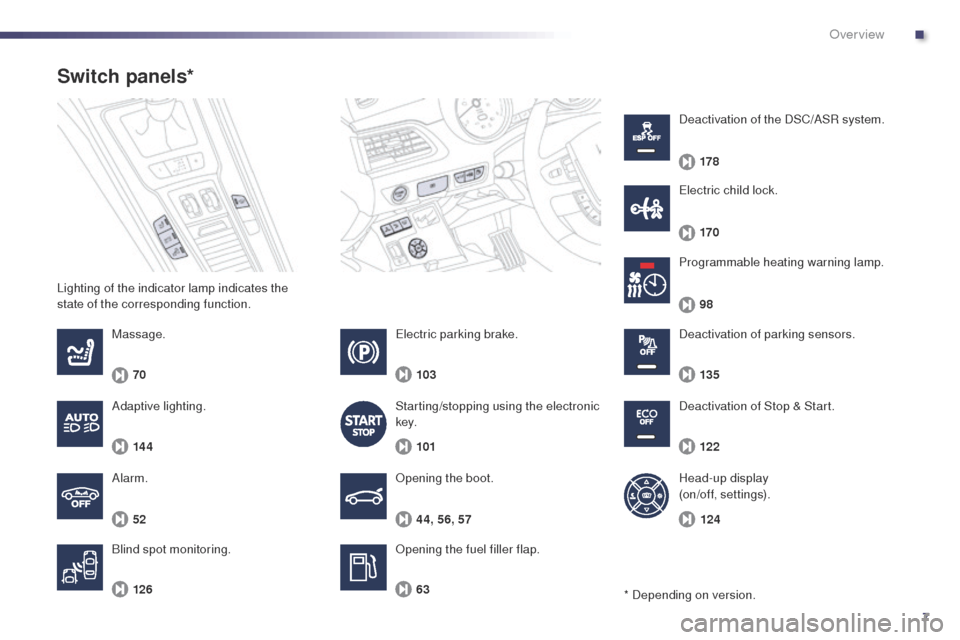
Lighting of the indicator lamp indicates the
state of the corresponding function.
Switch panels*
Opening the boot.
Opening the fuel filler flap.
Massage.
Alarm.
Blind spot monitoring. Programmable heating warning lamp.
el
ectric parking brake.
Starting/stopping using the electronic
key. Deactivation of Stop & Start. Deactivation of parking sensors.
el
ectric child lock.
Deactivation of the DSC/ASR system.
Adaptive lighting. Head-up display
(on/off, settings).
* Depending on version.
.
Over view
Page 12 of 380
10
eco-driving
eco-driving is a range of everyday practices that allow the motorist to optimise their fuel consumption and CO2 emissions.
Optimise the use of your gearbox
With a manual gearbox, move off gently and change up without waiting.
During acceleration change up early.
With an automatic or electronic gearbox, give preference to automatic
mode and avoid pressing the accelerator pedal heavily or suddenly.
th
e gear shift indicator invites you engage the most suitable gear: as
soon as the indication is displayed in the instrument panel, follow it
straight away.
For vehicles fitted with an electronic or automatic gearbox, this
indicator appears only in manual mode.
Drive smoothly
Maintain a safe distance between vehicles, use engine braking rather
than the brake pedal, and press the accelerator progressively. th ese
practices contribute towards a reduction in fuel consumption and CO
2
emissions and also helps reduce the background traffic noise.
If your vehicle has cruise control, make use of the system at speeds
above 25 mph (40 km/h) when the traffic is flowing well.
Control the use of your electrical
equipment
Before moving off, if the passenger compartment is too warm, ventilate it
by opening the windows and air vents before using the air conditioning.
Above 30 mph (50 km/h), close the windows and leave the air vents
open.
Remember to make use of equipment that can help keep the
temperature in the passenger compartment down (sunroof and window
blinds...).
Switch off the air conditioning, unless it has automatic regulation, as
soon as the desired temperature is attained.
Switch off the demisting and defrosting controls, if not automatic.
Switch off the heated seat as soon as possible.
Switch off the headlamps and front foglamps when the level of light
does not require their use.
Avoid running the engine before moving off, particularly in winter; your
vehicle will warm up much faster while driving.
As a passenger, if you avoid connecting your multimedia devices
(film, music, video game...), you will contribute towards limiting the
consumption of electrical energy, and so of fuel.
Disconnect your portable devices before leaving the vehicle.
eco-driving
Page 13 of 380
11
Limit the causes of excess consumption
Spread loads throughout the vehicle; place the heaviest items in the
bottom of the boot, as close as possible to the rear seats.
Limit the loads carried in the vehicle and reduce wind resistance (roof
bars, roof rack, bicycle carrier, trailer...). u
s
e a roof box in preference.
Remove roof bars and roof racks after use.
At the end of winter, remove snow tyres and refit your summer tyres.
Observe the recommendations on
maintenance
Check the tyre pressures regularly, when cold, referring to the label in
the door aperture, driver's side.
Carry out this check in particular:
-
b
efore a long journey,
-
a
t each change of season,
-
a
fter a long period out of use.
Don't forget the spare wheel and the tyres on any trailer or caravan.
Have your vehicle serviced regularly (engine oil, oil filter, air filter,
passenger compartment filter...) and observe the schedule of
operations recommended in the warranty and maintenance record.
When refuelling, do not continue after the third cut-off of the nozzle to
avoid any over flow.
At the wheel of your new vehicle, it is only after the first 1 800 miles
(3 000 kilometres) that you will see the fuel consumption settle down to
a consistent average.
.
Eco-driving
Page 15 of 380
13
1
2
2
2
2
3
3
3
3
3
3
3
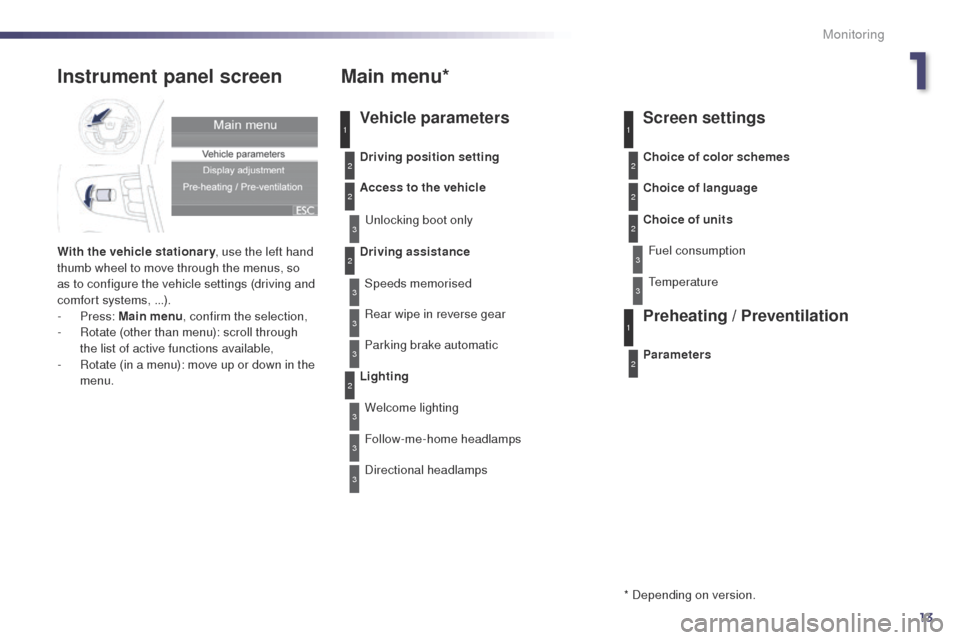
Instrument panel screen
With the vehicle stationary, use the left hand
thumb wheel to move through the menus, so
as to configure the vehicle settings (driving and
comfort systems, ...).
-
Press: Main menu , confirm the selection,
-
R
otate (other than menu): scroll through
the list of active functions available,
-
R
otate (in a menu): move up or down in the
menu.
Main menu*
Vehicle parameters Screen settings
Preheating / Preventilation
Driving position setting
Access to the vehicle
unl
ocking boot only
Driving assistance Speeds memorised
Rear wipe in reverse gear
Parking brake automatic
Lighting Welcome lighting
Follow-me-home headlamps
Directional headlamps Parameters Choice of color schemes
Choice of language
Choice of units
Fuel consumption
1
2
2
2
3
3
1
2
* Depending on version.
te
mperature
1
Monitoring
Page 23 of 380
21
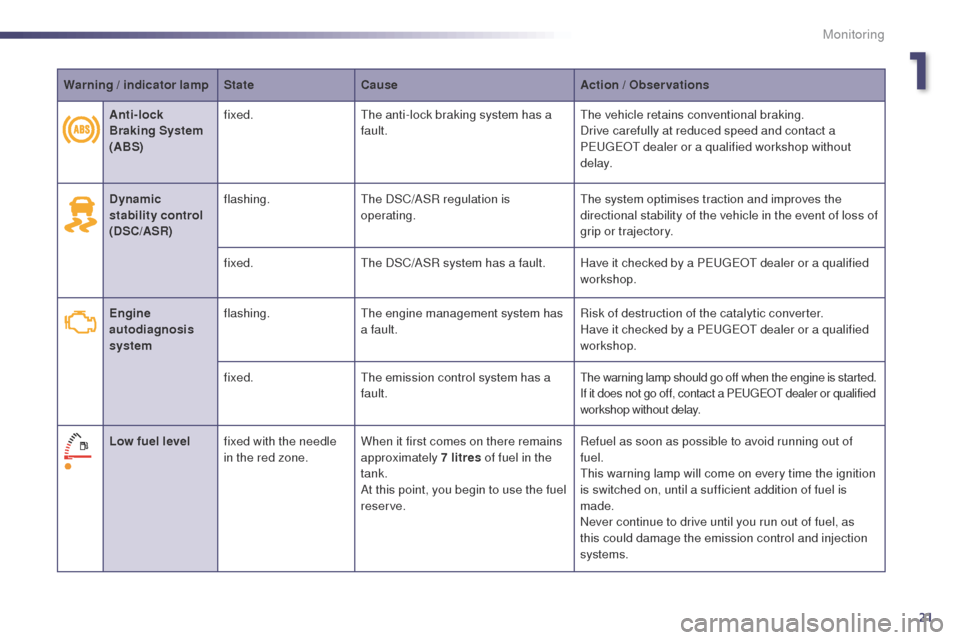
Warning / indicator lampStateCause Action / Observations
Dynamic
stability control
(DSC/ASR) flashing.
th
e DSC/ASR regulation is
operating.
th
e system optimises traction and improves the
directional stability of the vehicle in the event of loss of
grip or trajectory.
fixed.
th
e DSC/ASR system has a fault. Have it checked by a P
e
uge
Ot
dealer or a qualified
workshop.
Engine
autodiagnosis
system flashing.
the
engine management system has
a fault. Risk of destruction of the catalytic converter.
Have it checked by a P
e
uge
Ot
dealer or a qualified
workshop.
fixed.
th
e emission control system has a
fault.
the warning lamp should go off when the engine is started.
If it does not go off, contact a Pe ugeOt dealer or qualified
workshop without delay.
Low fuel level fixed with the needle
in the red zone. When it first comes on there remains
approximately 7 litres of fuel in the
tank.
At this point, you begin to use the fuel
reserve. Refuel as soon as possible to avoid running out of
fuel.
th
is warning lamp will come on every time the ignition
is switched on, until a sufficient addition of fuel is
made.
Never continue to drive until you run out of fuel, as
this could damage the emission control and injection
systems.
Anti-lock
Braking System
(ABS)
fixed.
th
e anti-lock braking system has a
fault.
th
e vehicle retains conventional braking.
Drive carefully at reduced speed and contact a
P
e
uge
Ot
dealer or a qualified workshop without
d e l ay.
1
Monitoring
Page 33 of 380
31
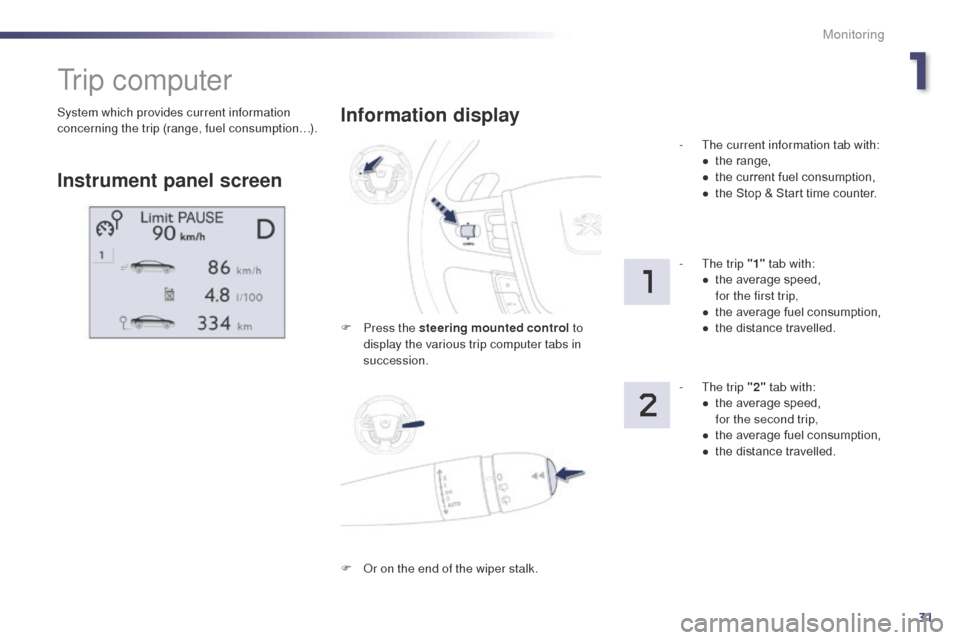
System which provides current information
concerning the trip (range, fuel consumption…).
tr i p c o m p u t e r
Instrument panel screenInformation display
F Press the steering mounted control
to
display the various trip computer tabs in
succession. -
t
h
e current information tab with:
●
t
he range,
●
t
he current fuel consumption,
●
t
he Stop & Start time counter.
- t
h
e trip "1"
tab with:
●
t
he average speed,
f
or the first trip,
●
t
he average fuel consumption,
● t he distance travelled.
- t
h
e trip "2" tab with:
●
t
he average speed,
f
or the second trip,
●
t
he average fuel consumption,
●
t
he distance travelled.
F
O
r on the end of the wiper stalk.
1
Monitoring
Page 35 of 380
33
Information display
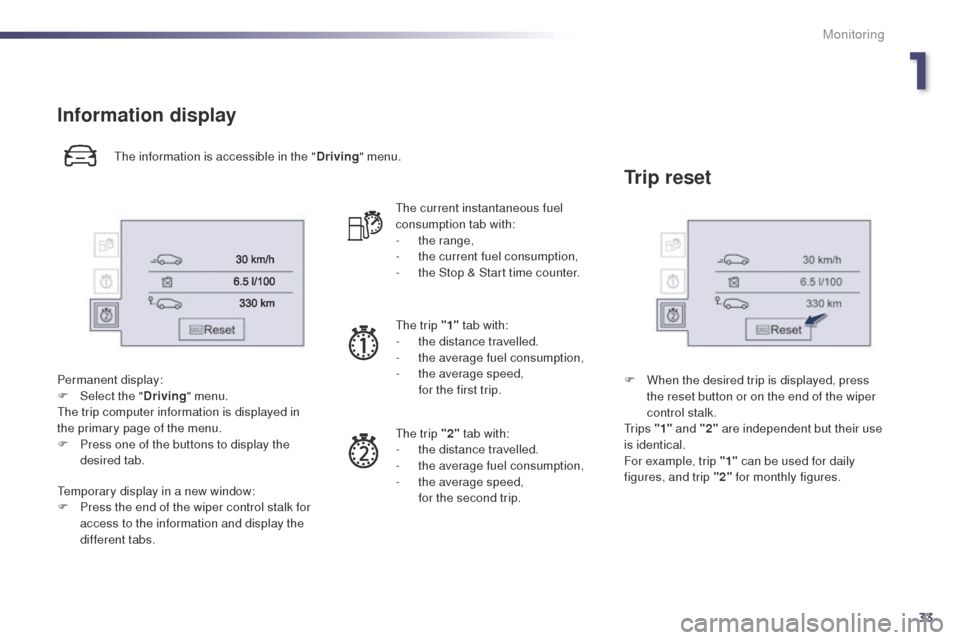
the information is accessible in the "Driving" menu.
Permanent display:
F
Sel
ect the " Driving" menu.
th
e trip computer information is displayed in
the primary page of the menu.
F
P
ress one of the buttons to display the
desired tab.
te
mporary display in a new window:
F
P
ress the end of the wiper control stalk for
access to the information and display the
different tabs.
th
e current instantaneous fuel
consumption tab with:
-
t
he range,
-
t
he current fuel consumption,
-
t
he Stop & Start time counter.
th
e trip "1" tab with:
-
t
he distance travelled.
-
t
he average fuel consumption,
-
t
he average speed,
f
or the first trip.
th
e trip "2" tab with:
-
t
he distance travelled.
-
t
he average fuel consumption,
-
t
he average speed,
f
or the second trip.
Trip reset
F When the desired trip is displayed, press the reset button or on the end of the wiper
control stalk.
t
r i p s "1" and "2" are independent but their use
is identical.
For example, trip "1" can be used for daily
figures, and trip "2" for monthly figures.
1
Monitoring