glove box Peugeot 508 Hybrid 2014 Owner's Manual
[x] Cancel search | Manufacturer: PEUGEOT, Model Year: 2014, Model line: 508 Hybrid, Model: Peugeot 508 Hybrid 2014Pages: 380, PDF Size: 10.94 MB
Page 19 of 380
17
Warning / indicator lampStateCause Action / Observations
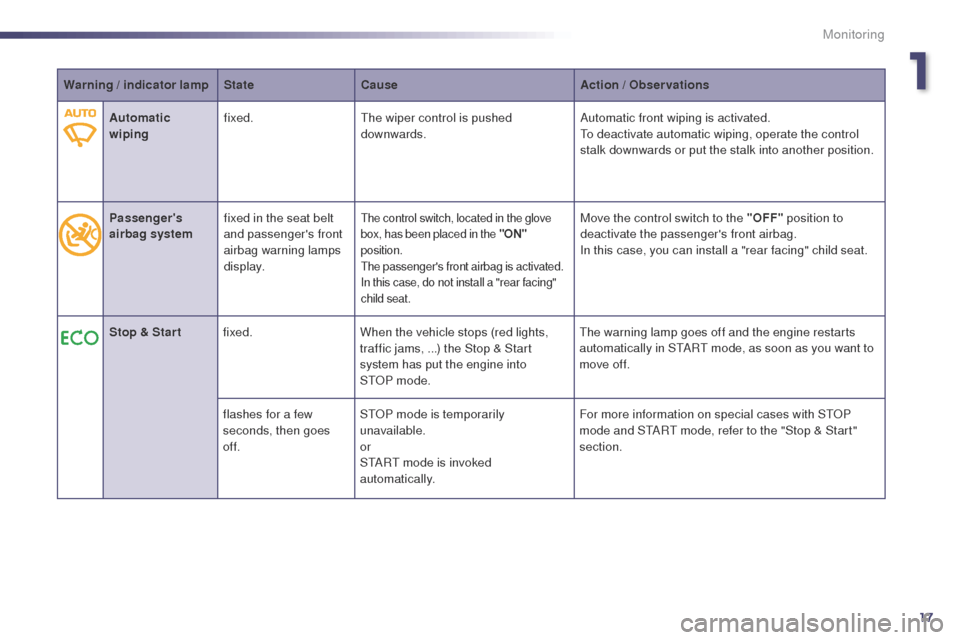
Automatic
wiping fixed.
th
e wiper control is pushed
downwards. Automatic front wiping is activated.
to d
eactivate automatic wiping, operate the control
stalk downwards or put the stalk into another position.
Passenger's
airbag system fixed in the seat belt
and passenger's front
airbag warning lamps
display.
the control switch, located in the glove
box, has been placed in the "ON"
position.
the
passenger's front airbag is activated.
In this case, do not install a "rear facing"
child seat.Move the control switch to the "OFF" position to
deactivate the passenger's front airbag.
In this case, you can install a "rear facing" child seat.
Stop & Star t fixed. When the vehicle stops (red lights,
traffic jams, ...) the Stop & Start
system has put the engine into
S
t
OP
mode.
th
e warning lamp goes off and the engine restarts
automatically in S
tA
R
t
mode, as soon as you want to
move off.
flashes for a few
seconds, then goes
of f. S
tO
P mode is temporarily
unavailable.
or
S
tA
R
t
mode is invoked
automatically. For more information on special cases with S
tO
P
mode and S
tA
R
t
mode, refer to the "Stop & Start"
section.
1
Monitoring
Page 20 of 380
18
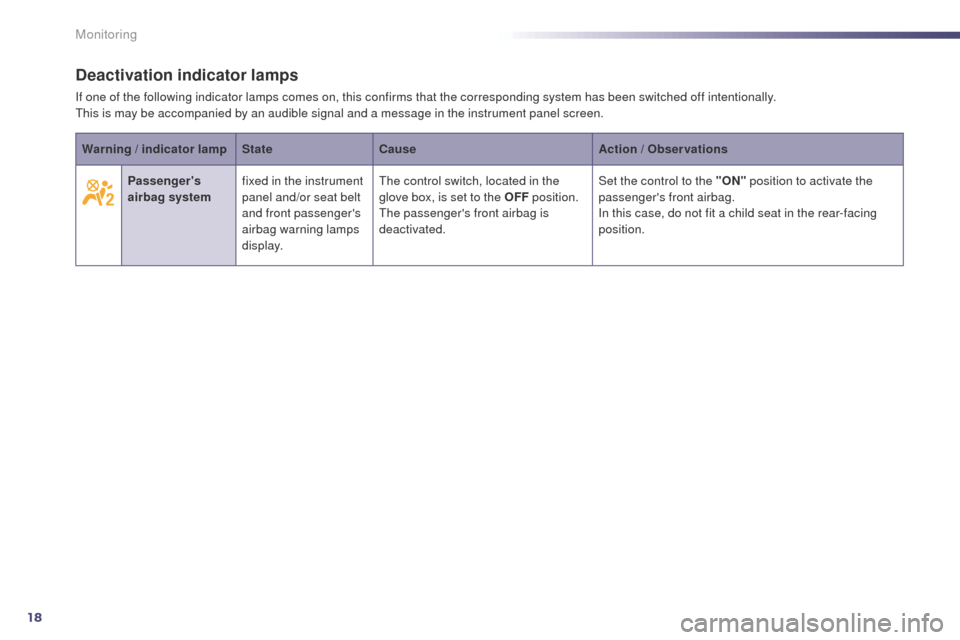
Deactivation indicator lamps
If one of the following indicator lamps comes on, this confirms that the corresponding system has been switched off intentionally.this is may be accompanied by an audible signal and a message in the instrument panel screen.
Warning / indicator lamp StateCause Action / Observations
Passenger's
airbag system fixed in the instrument
panel and/or seat belt
and front passenger's
airbag warning lamps
display.
th
e control switch, located in the
glove box, is set to the OFF position.
the
passenger's front airbag is
deactivated. Set the control to the "ON"
position to activate the
passenger's front airbag.
In this case, do not fit a child seat in the rear-facing
position.
Monitoring
Page 78 of 380
76
508_en_Chap03_confort_ed02-2014
Interior fittings
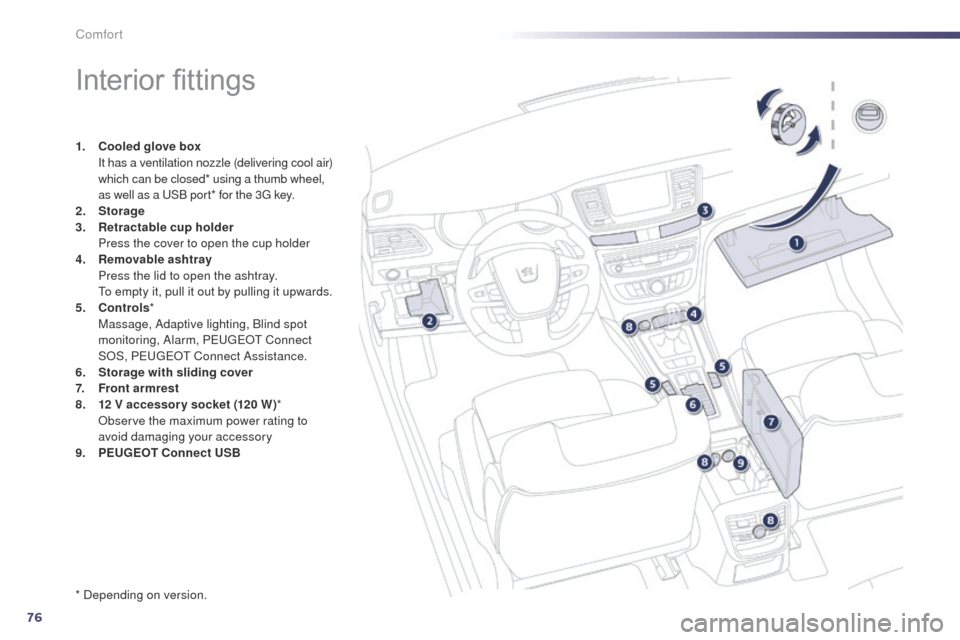
1. Cooled glove box I
t has a ventilation nozzle (delivering cool air)
which can be closed* using a thumb wheel,
as well as a
u
S
B port* for the 3
g
key.
2.
Sto
rage
3.
R
etractable cup holder
P
ress the cover to open the cup holder
4.
Re
movable ashtray
P
ress the lid to open the ashtray.
t
o e
mpty it, pull it out by pulling it upwards.
5.
C
ontrols *
M
assage, Adaptive lighting, Blind spot
monitoring, Alarm, P
e
uge
Ot
Connect
SOS, P
e
uge
Ot C
onnect Assistance.
6.
S
torage with sliding cover
7.
F
ront armrest
8.
1 2
V accessory socket (120 W )*
O
bserve the maximum power rating to
avoid damaging your accessory
9.
P
EUGEOT Connect USB
* Depending on version.
Comfort
Page 184 of 380

182
508_en_Chap07_securite_ed02-2014
Airbags
System designed to maximise the safety of the
occupants (with the exception of the rear centre
passenger) in the event of violent collisions.
th
e airbags supplement the action of the force-
limiting seat belts (with the exception of the
centre rear passenger).
If a collision occurs, the electronic detectors
record and analyse the front and side impacts
sustained in the impact detection zones:
-
i
n the case of a serious impact, the airbags
are deployed instantly and contribute
towards better protection of the occupants
of the vehicle (with the exception of the
rear centre passenger); immediately after
the impact, the airbags deflate rapidly so
that they do not hinder visibility or the exit
of the occupants,
-
i
n the case of a minor or rear impact
or in certain roll-over conditions, the
airbags will not be deployed; the seat belt
alone contributes towards ensuring your
protection in these situations.
The airbags do not operate when the
ignition is switched off.
th
is equipment will only deploy once.
If a second impact occurs (during the
same or a subsequent accident), the
airbag will not be deployed again. Deployment of the airbag(s) is
accompanied by a slight emission
of smoke and a noise, due to the
activation of the pyrotechnic cartridge
incorporated in the system.
th
is smoke is not harmful, but sensitive
individuals may experience slight
irritation.
th
e noise of the detonation may result
in a slight loss of hearing for a short
time.
Impact detection zones
A. Front impact zone.
B. S ide impact zone.
Front airbags
Deployment
the airbags are deployed, except the
passenger's front airbag if it is deactivated, in the
event of a serious front impact to all or part of the
front impact zone A , in the longitudinal centreline
of the vehicle on a horizontal plane and directed
from the front to the rear of the vehicle.
th
e front airbag inflates between the thorax and
head of the front occupant of the vehicle and the
steering wheel, driver's side, and the dashboard,
passenger's side to cushion their forward
movement. System which protects the driver and front
passenger in the event of a serious front impact
in order to limit the risk of injury to the head and
thorax.
th
e driver's airbag is fitted in the centre of the
steering wheel; the front passenger's airbag is
fitted in the dashboard above the glove box.
Safety
Page 194 of 380

192
508_en_Chap08_info-pratiques_ed02-2014
Changing a wheel
the tools are installed in the boot under the
f l o o r.
to g
ain access to them:
F
o
pen the boot,
F
p
osition the floor vertically (SW: in its
guide) for access to the tools.
Procedure for changing a faulty wheel for the spare wheel using the tools provided with the vehicle.
List of tools
All of these tools are specific to your
vehicle and can vary according to the level
of equipment. Do not use them for other
purposes.
1.
Wheelbrace.
F
or removing the wheel trim and removing
the wheel bolts.
2.
J
ack with integral handle.
F
or raising the vehicle. 3.
"
Bolt cover" tool.
F
or removing the bolt protectors (covers)
on alloy wheels.
4.
S
ocket for the security bolts (located in the
glove box).
F
or adapting the wheelbrace to the special
"security" bolts.
5.
A w
heel chock for immobilising the vehicle*.
6.
t
o
wing eye.
S
ee "
to
wing the vehicle".
Access to the tools
* Depending on country of sale or equipment.
Practical information
Page 209 of 380
207
508_en_Chap08_info-pratiques_ed02-2014
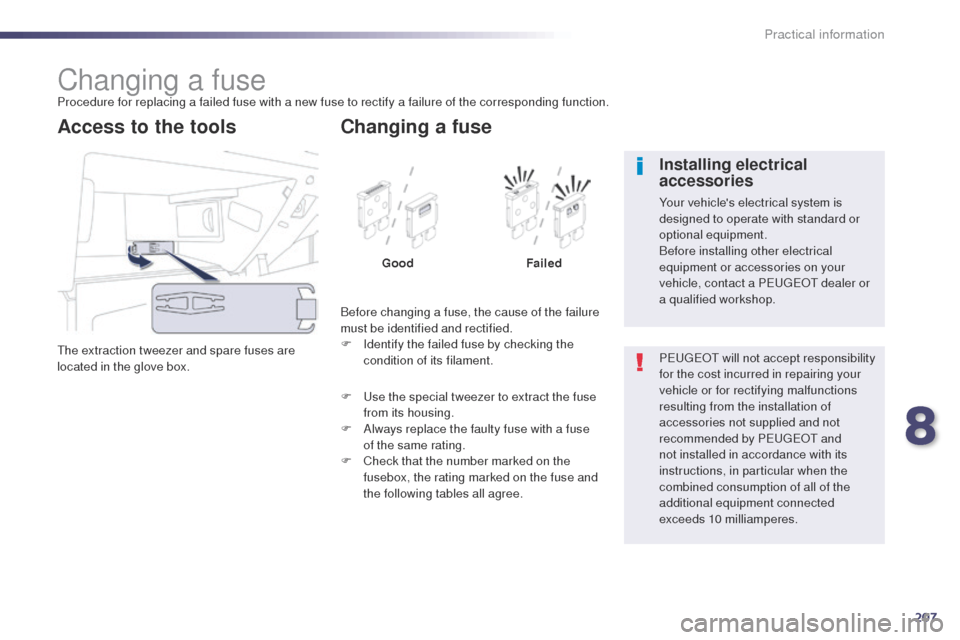
Changing a fuseProcedure for replacing a failed fuse with a new fuse to rectify a failure of the corresponding function.
th
e extraction tweezer and spare fuses are
located in the glove box.
Access to the tools
Before changing a fuse, the cause of the failure
must be identified and rectified.
F
I
dentify the failed fuse by checking the
condition of its filament.
Changing a fuse
Good Failed
F
u
s
e the special tweezer to extract the fuse
from its housing.
F
A
lways replace the faulty fuse with a fuse
of the same rating.
F
C
heck that the number marked on the
fusebox, the rating marked on the fuse and
the following tables all agree. P
e
uge
Ot
will not accept responsibility
for the cost incurred in repairing your
vehicle or for rectifying malfunctions
resulting from the installation of
accessories not supplied and not
recommended by P
e
uge
Ot
and
not installed in accordance with its
instructions, in particular when the
combined consumption of all of the
additional equipment connected
exceeds 10 milliamperes.
Installing electrical
accessories
Your vehicle's electrical system is
designed to operate with standard or
optional equipment.
Before installing other electrical
equipment or accessories on your
vehicle, contact a P
e
uge
Ot
dealer or
a qualified workshop.
8
Practical information
Page 211 of 380
209
508_en_Chap08_info-pratiques_ed02-2014
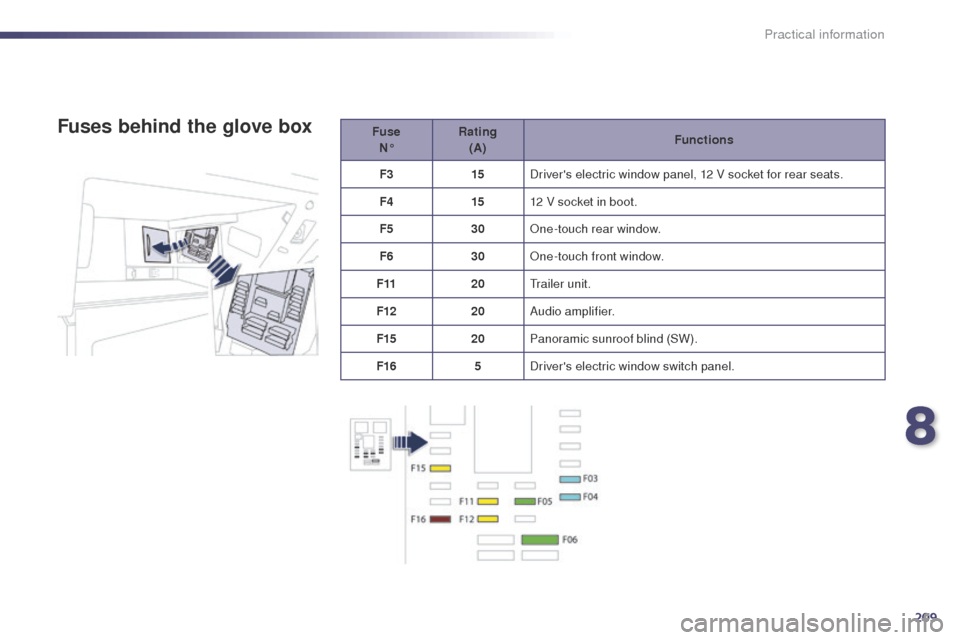
Fuse N° Rating
(A) Functions
F3 15Driver's electric window panel, 12 V socket for rear seats.
F4 1512 V socket in boot.
F5 30One-touch rear window.
F6 30One-touch front window.
F11 20
tr
ailer unit.
F12 20Audio amplifier.
F15 20Panoramic sunroof blind (SW).
F16 5Driver's electric window switch panel.Fuses behind the glove box
8
Practical information
Page 274 of 380
272
02
508_en_Chap11c_SMegplus-i_ed02-2014
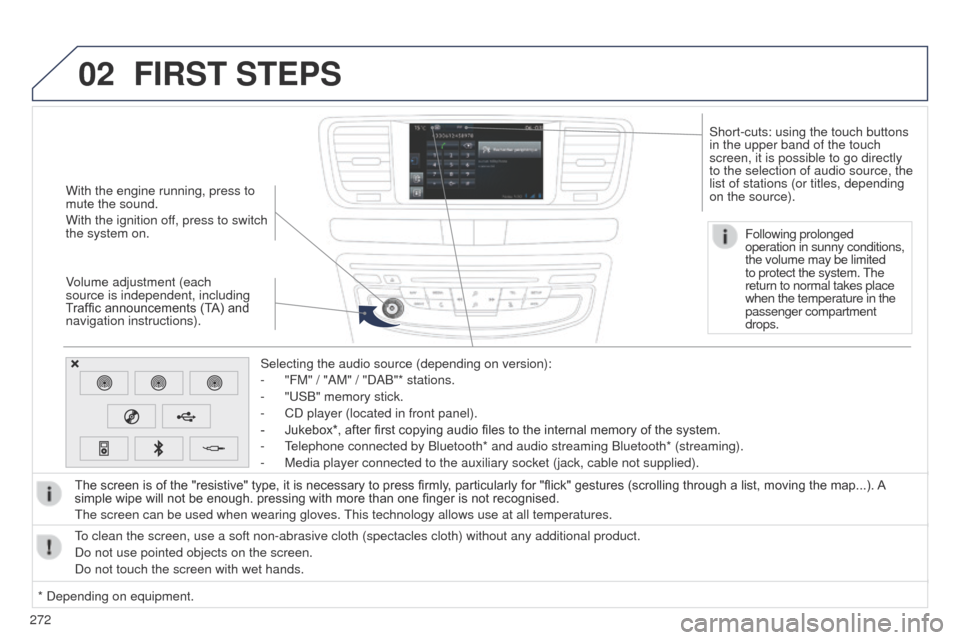
With the engine running, press to
mute the sound.
With the ignition off, press to switch
the system on.
Volume adjustment (each
source is independent, including
Traffic announcements (TA) and
navigation instructions).Selecting the audio source (depending on version):
-
"FM" / "AM" / "DAB"* stations.
-
"
u SB" memory stick.
-
CD player (located in front panel).
-
Jukebox*, after first copying audio files to the internal memory of the system.
-
t
elephone connected by Bluetooth* and audio streaming Bluetooth* (stream\
ing).
-
Media player connected to the auxiliary socket (jack, cable not supplie\
d).
The screen is of the "resistive" type, it is necessary to press firmly , particularly for "flick" gestures (scrolling through a list, moving the map...). A
simple wipe will not be enough. pressing with more than one finger is not recognised.
t
he screen can be used when wearing gloves.
t
his technology allows use at all temperatures.
FIRST STEPS
* Depending on equipment.
to clean the screen, use a soft non-abrasive cloth (spectacles cloth) w\
ithout any additional product.
Do not use pointed objects on the screen.
Do not touch the screen with wet hands. Following prolonged
operation in sunny conditions,
the volume may be limited
to protect the system.
t
he
return to normal takes place
when the temperature in the
passenger compartment
drops.
Short-cuts: using the touch buttons
in the upper band of the touch
screen, it is possible to go directly
to the selection of audio source, the
list of stations (or titles, depending
on the source).
Page 325 of 380
323
07
323
508_en_Chap11c_SMegplus-i_ed02-2014
PEUGEOT CONNECT APPS
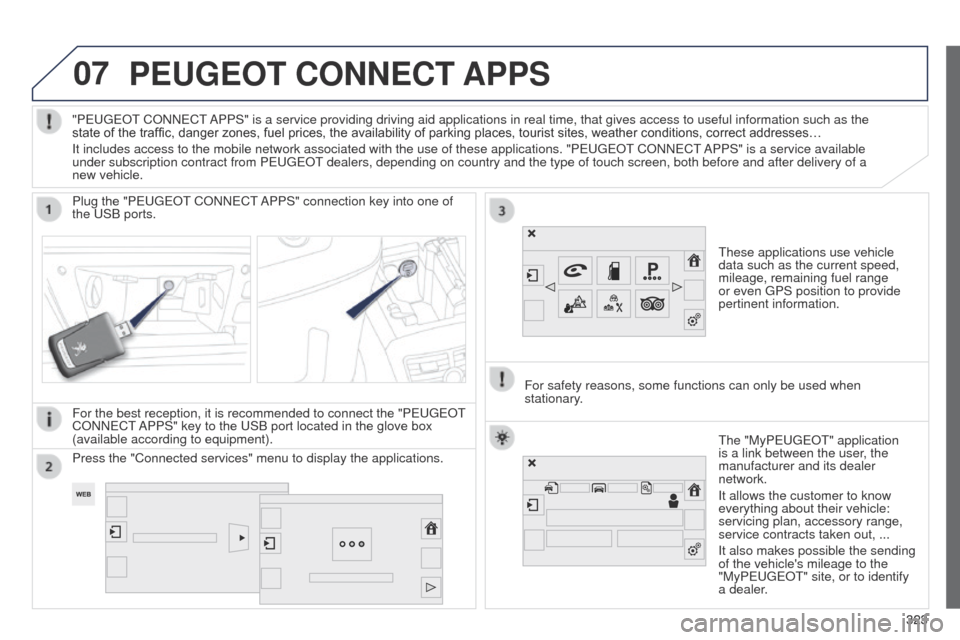
these applications use vehicle
data such as the current speed,
mileage, remaining fuel range
or even
g PS position to provide
pertinent information.
Plug the "P
euge
O
t
CONN
e
C
t
APPS" connection key into one of
the
u
SB ports.
For the best reception, it is recommended to connect the "P
euge
O
t
CONN
e
C
t
APPS" key to the
u
SB port located in the glove box
(available according to equipment).
t
he "MyPeuge O t" application
is a link between the user, the
manufacturer and its dealer
network.
It allows the customer to know
everything about their vehicle:
servicing plan, accessory range,
service contracts taken out, ...
It also makes possible the sending
of the vehicle's mileage to the
"MyPeuge
O t" site, or to identify
a dealer.
"P
euge
O
t
CONN
e
C
t
APPS" is a service providing driving aid applications in real time, that\
gives access to useful information such as the
state of the traffic, danger zones, fuel prices, the availability of parking places, tourist sites, weather conditions, correct addresses…
It includes access to the mobile network associated with the use of thes\
e applications. "P
euge
O
t
CONN
e
C
t
APPS" is a service available
under subscription contract from P
euge
O
t
dealers, depending on country and the type of touch screen, both before\
and after delivery of a
new vehicle.
For safety reasons, some functions can only be used when
stationary
.
Press the "Connected services" menu to display the applications.
Page 366 of 380
364
508_en_Chap12_recherche-visuelle_ed02-2014
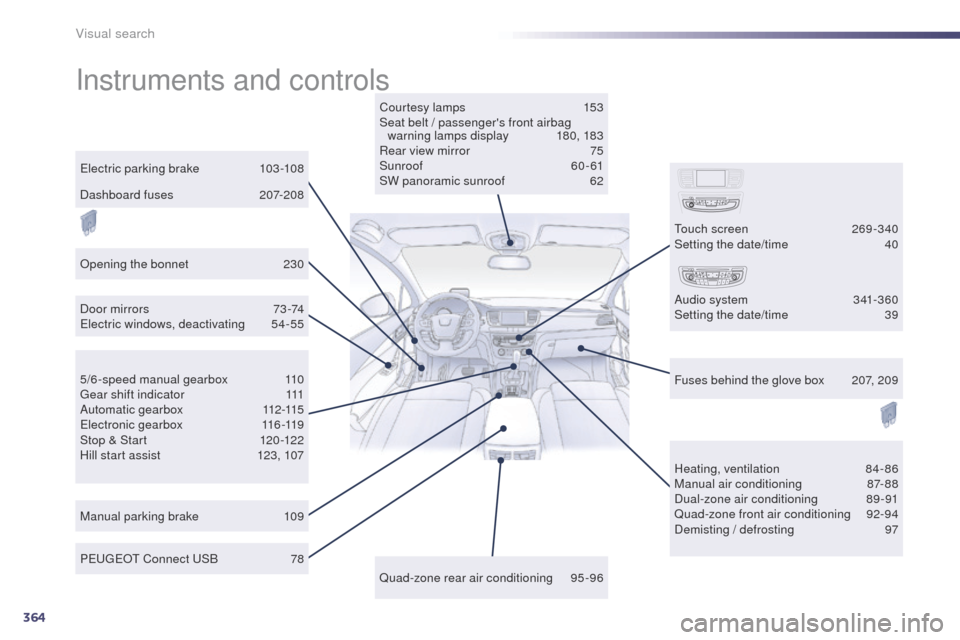
Instruments and controls
Courtesy lamps 153
Seat belt / passenger's front airbag warning lamps display
1
80, 183
Rear view mirror
7
5
Sunroof
6
0 - 61
SW panoramic sunroof
6
2
Door mirrors
7
3 -74
el
ectric windows, deactivating
5
4-55
Manual parking brake
1
09 Heating, ventilation
8
4-86
Manual air conditioning
8
7-88
Dual-zone air conditioning
8
9-91
Quad-zone front air conditioning
9
2-94
Demisting / defrosting
9
7
Peuge
O
t Connect
u
S
B
7
8
el
ectric parking brake
1
03 -108
5/6-speed manual gearbox
1
10
ge
ar shift indicator
1
11
A u t o m a t i c g e a r b o x
11
2 -115
ele
ctronic gearbox
1
16-119
Stop & Start
1
20-122
Hill start assist
1
23, 107 Fuses behind the glove box
2
07, 209
Quad-zone rear air conditioning
9
5-96
to
uch screen
2
69 -340
Setting the date/time
4
0
Audio system
3
41-360
Setting the date/time
3
9
Opening the bonnet
2
30
Dashboard fuses
2
07-208
Visual search