steering wheel Peugeot 508 Hybrid 2014 Owner's Manual
[x] Cancel search | Manufacturer: PEUGEOT, Model Year: 2014, Model line: 508 Hybrid, Model: Peugeot 508 Hybrid 2014Pages: 380, PDF Size: 10.94 MB
Page 4 of 380
.
.
508_en_Chap00a_sommaire_ed02-2014
Instrument panel 12
Indicator and warning lamps
1
4
ga
uges and indicators
2
6
tr
ip computer
3
1
to
uch screen
3
5
Setting the date and time
3
9
MonitoringOver view
e
co-driving
Remote control key 4
1
Alarm
52
el
ectric windows
5
4
Boot
56
Motorised tailgate (SW)
5
7
Sunroof
6
0
Panoramic sunroof (SW)
6
2
Fuel tank
6
3
Diesel misfuel prevention
6
4
Access
Front seats 6 6
Rear seats
7
1
Mirrors
7
3
Steering wheel adjustment
7
5
Interior fittings
7
6
Boot fittings (Saloon)
7
9
Boot fittings (SW)
8
0
Heating and Ventilation
8
4
Manual air conditioning
8
7
Dual-zone digital air conditioning
8
9
Quad-zone digital air conditioning
9
2
Switching off the air conditioning may result in some discomfort (humidity, misting).
9
3
Front demist - defrost
9
7
Rear screen demist - defrost
9
7
Programmable Heating / Ventilation
9
8
Comfort
Starting-switching off the engine 100
el
ectric parking brake
1
03
Manual parking brake
1
09
Manual gearbox
1
10
ge
ar shift indicator
1
11
Automatic gearbox
1
12
ele
ctronic gearbox
1
16
Stop & Start
1
20
Hill start assist
1
23
Head-up display
1
24
Blind spot sensors
1
26
Speed limiter
1
30
Cruise control
1
32
Parking sensors
1
34
Reversing camera
1
37
Driving
Lighting controls 138
Automatic illumination of headlamps
1
43
Headlamp adjustment
1
46
Additional headlamps
1
47
Wiper controls
1
49
Automatic rain sensitive wipers
1
51
Courtesy lamps
1
53
Interior mood lighting
1
54
Visibility
Contents
Page 10 of 380
8
508_en_Chap00b_vue-ensemble_ed02-2014
9. Fusebox.
10. F ront door window demisting/defrosting
vent.
11.
W
indscreen demisting/defrosting vent.
12 .
S
teering lock and starting with the key.
13.
S
tarting using the electronic key.
14 .
A
udio equipment steering wheel controls.
15.
W
iper / screenwash / trip computer stalk.
16.
C
entral locking and hazard warning
buttons.
17.
t
ou
ch screen (depending on version).
Instruments and controls
1. Cruise control / speed limiter controls.
2. Headlamp height adjustment.
3.
L
ighting and direction indicator stalk
4.
I
nstrument panel.
5.
D
river's airbag.
Horn.
6.
g
ea
r lever.
7.
1
2 V accessory socket
u
S
B port / auxiliary socket.
8.
B
onnet release lever. 18. C
entral adjustable air vents.
19. P assenger's airbag.
20.
S
ide adjustable air vents.
21.
g
l
ove box / Passenger's airbag
deactivation.
22.
e
l
ectric parking brake.
23.
C
entral armrest with storage.
24.
Storage.
25.
A
udio system.
26.
H
eating / air conditioning controls.
Over view
Page 34 of 380
32
Trip reset
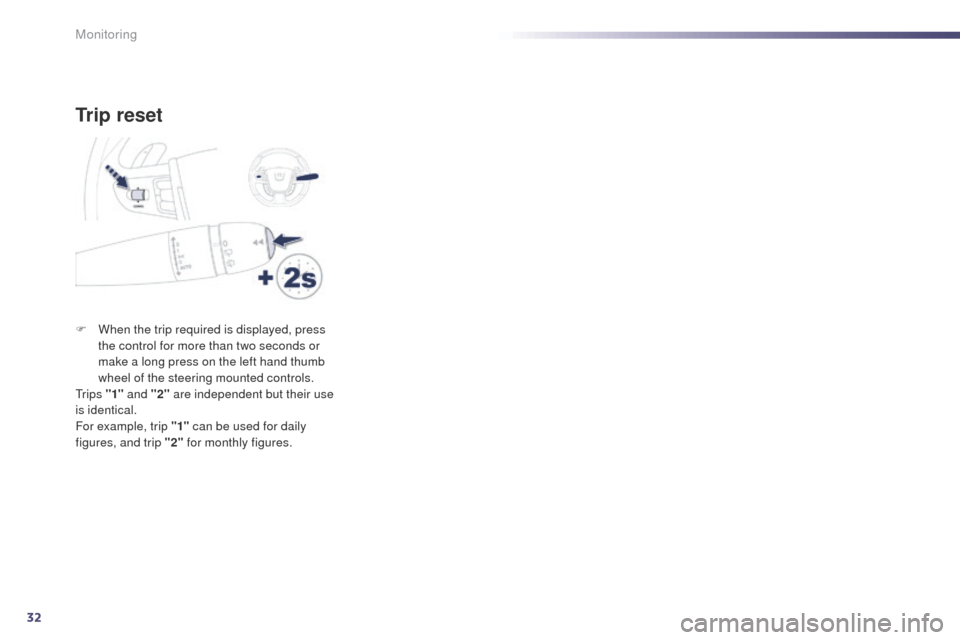
F When the trip required is displayed, press the control for more than two seconds or
make a long press on the left hand thumb
wheel of the steering mounted controls.
t
r i p s "1" and "2" are independent but their use
is identical.
For example, trip "1" can be used for daily
figures, and trip "2" for monthly figures.
Monitoring
Page 77 of 380
75
508_en_Chap03_confort_ed02-2014
Automatic day/night model
By means of a sensor, which measures the
light from the rear of the vehicle, this system
automatically and progressively changes
between the day and night uses.
Adjustable mirror providing a central rearward
view.
eq
uipped with an anti-dazzle system, which
darkens the mirror glass and reduces the
nuisance to the driver caused by the sun,
headlamps from other vehicles...
Rear view mirror
Manual day/night model
Adjustment
F Adjust the mirror so that the glass is directed correctly in the "day" position.
Day / night position
F Pull the lever to change to the "night" anti-dazzle position.
F
P
ush the lever to change to the normal
"day" position. In order to ensure optimum visibility
during your manoeuvres, the mirror
lightens automatically when reverse
gear is engaged.
Steering wheel adjustment
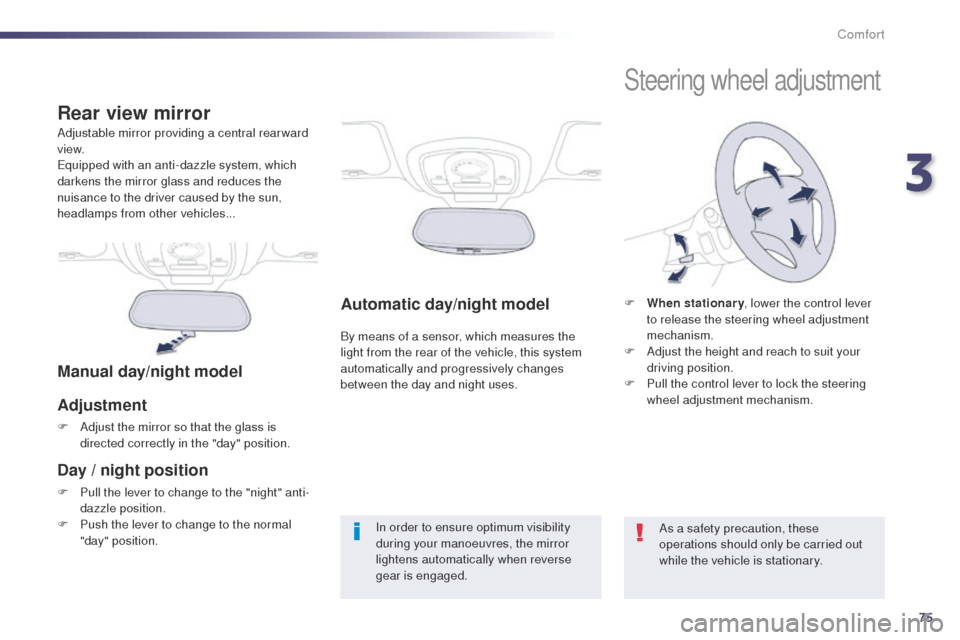
F When stationary
, lower the control lever
to release the steering wheel adjustment
mechanism.
F
A
djust the height and reach to suit your
driving position.
F
P
ull the control lever to lock the steering
wheel adjustment mechanism.
As a safety precaution, these
operations should only be carried out
while the vehicle is stationary.
3
Comfort
Page 100 of 380
98
508_en_Chap03_confort_ed02-2014
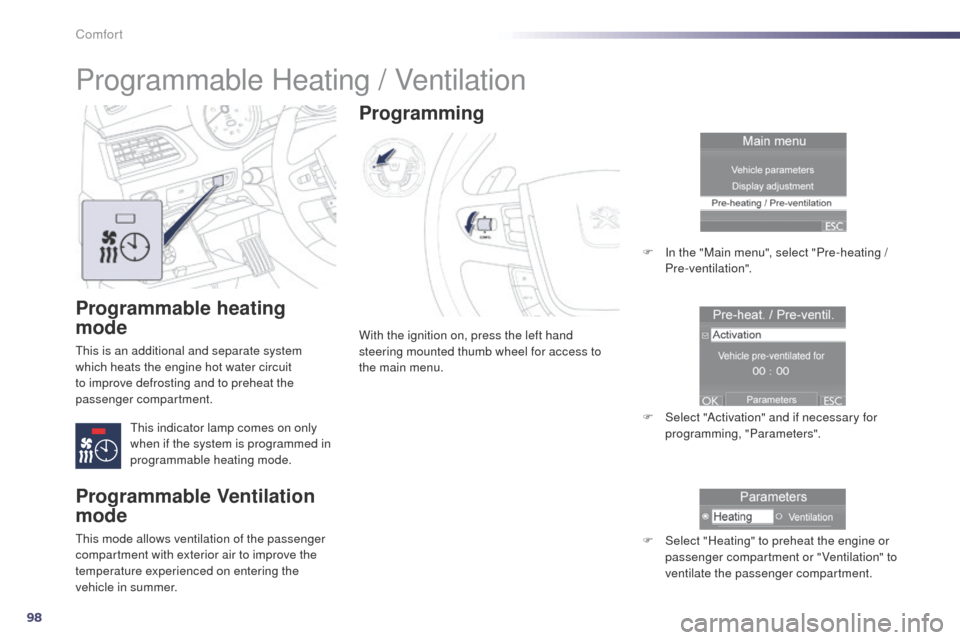
Programmable heating
mode
this is an additional and separate system
which heats the engine hot water circuit
to improve defrosting and to preheat the
passenger compartment.
th
is indicator lamp comes on only
when if the system is programmed in
programmable heating mode. With the ignition on, press the left hand
steering mounted thumb wheel for access to
the main menu.
Programming
F In the "Main menu", select "Pre-heating /
Pre-ventilation".
F
S
elect "Activation" and if necessary for
programming, "Parameters".
F
S
elect "Heating" to preheat the engine or
passenger compartment or "Ventilation" to
ventilate the passenger compartment.
Programmable Heating / Ventilation
Programmable Ventilation
mode
this mode allows ventilation of the passenger
compartment with exterior air to improve the
temperature experienced on entering the
vehicle in summer.
Comfort
Page 103 of 380
101
For Diesel vehicles, in very cold
weather the engine will not start until
the pre-heater warning lamp has
gone of f. If the vehicle is not immobilised, the
engine will not stop.
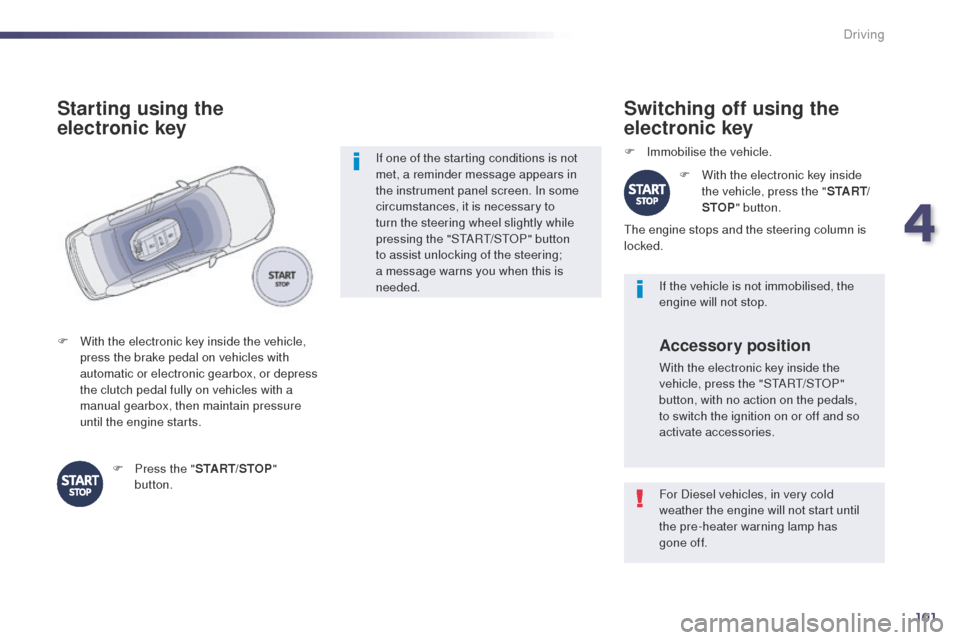
Switching off using the
electronic key
F Immobilise the vehicle.F
W
ith the electronic key inside
the vehicle, press the " S TA R T/
STOP " button.
th
e engine stops and the steering column is
locked.
Accessory position
With the electronic key inside the
vehicle, press the "StA Rt/ StO P"
button, with no action on the pedals,
to switch the ignition on or off and so
activate accessories.
If one of the starting conditions is not
met, a reminder message appears in
the instrument panel screen. In some
circumstances, it is necessary to
turn the steering wheel slightly while
pressing the "S
tA
R
t/
S
tO
P" button
to assist unlocking of the steering;
a message warns you when this is
needed.
F
W
ith the electronic key inside the vehicle,
press the brake pedal on vehicles with
automatic or electronic gearbox, or depress
the clutch pedal fully on vehicles with a
manual gearbox, then maintain pressure
until the engine starts.
Starting using the
electronic key
F Press the " START/STOP"
button.
508_en_Chap04_conduite_ed02-2014
4
Driving
Page 114 of 380
112
Six speed automatic gearbox which offers a
choice between the comfort of fully automatic
operation, enhanced by sport and snow
programmes, or manual gear changing.
Four driving modes are offered:
-
a
utomatic operation for electronic
management of the gears by the gearbox,
-
sp
ort programme for a more dynamic style
of driving,
-
s
now programme to improve driving when
traction is poor,
-
m
anual operation for sequential changing
of the gears by the driver.
"Porsche ti ptronic System" automatic gearbox
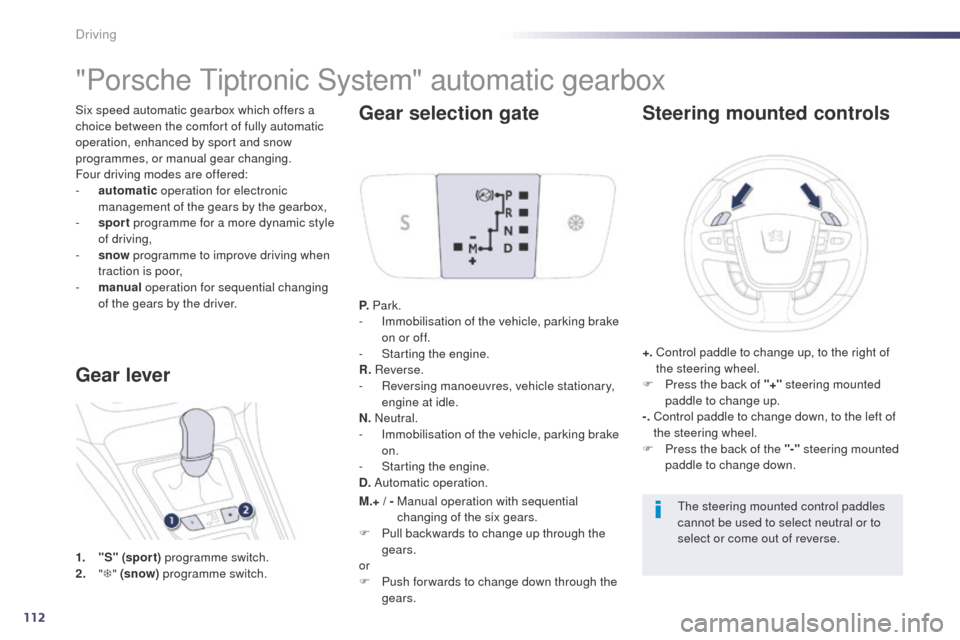
1. "S" (spor t) programme switch.
2. " T "
(snow) programme switch.
Gear lever Gear selection gate
P.
Park.
- I mmobilisation of the vehicle, parking brake
on or off.
-
S
tarting the engine.
R. Reverse.
-
R
eversing manoeuvres, vehicle stationary,
engine at idle.
N. Neutral.
-
I
mmobilisation of the vehicle, parking brake
on.
-
S
tarting the engine.
D. Automatic operation.
Steering mounted controls
+. Control paddle to change up, to the right of
the steering wheel.
F
P
ress the back of "+" steering mounted
paddle to change up.
-.
C
ontrol paddle to change down, to the left of
the steering wheel.
F
P
ress the back of the "-" steering mounted
paddle to change down.
th
e steering mounted control paddles
cannot be used to select neutral or to
select or come out of reverse.
M.+ / -
M
anual operation with sequential
changing of the six gears.
F
P
ull backwards to change up through the
gears.
or
F
P
ush for wards to change down through the
gears.
Driving
Page 118 of 380
116
electronic gearbox
Six-speed electronic gearbox which offers a
choice between the comfort of fully automatic
operation or the pleasure of manual gear
changing.
th
ere are two driving modes:
-
a
utomated mode for automatic control of
the gears by the gearbox,
-
m
anual mode for sequential gear changing
by the driver.
In automated mode, it remains possible to
change gear manually by using the steering
mounted control paddles when required, when
overtaking, for example.
th
is gearbox provides you with the benefit of
additional functions:
-
h
ill start assist,
-
t
he creep function (movement of the
vehicle on releasing the brake pedal) in
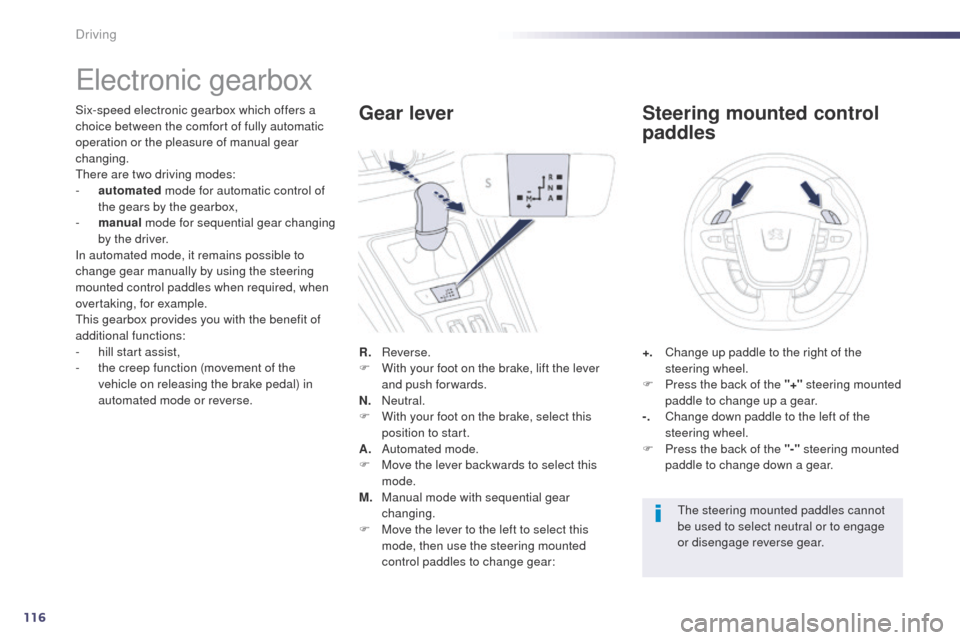
automated mode or reverse. R.
R
everse.
F
W
ith your foot on the brake, lift the lever
and push forwards.
N.
N
eutral.
F
W
ith your foot on the brake, select this
position to start.
A.
A
utomated mode.
F
M
ove the lever backwards to select this
mode.
M.
M
anual mode with sequential gear
changing.
F
M
ove the lever to the left to select this
mode, then use the steering mounted
control paddles to change gear:Gear lever
+. Change up paddle to the right of the
steering wheel.
F
P
ress the back of the "+" steering mounted
paddle to change up a gear.
-.
C
hange down paddle to the left of the
steering wheel.
F
P
ress the back of the "-" steering mounted
paddle to change down a gear.
Steering mounted control
paddles
the steering mounted paddles cannot
be used to select neutral or to engage
or disengage reverse gear.
Driving
Page 149 of 380
147
508_en_Chap05_visibilite_ed02-2014
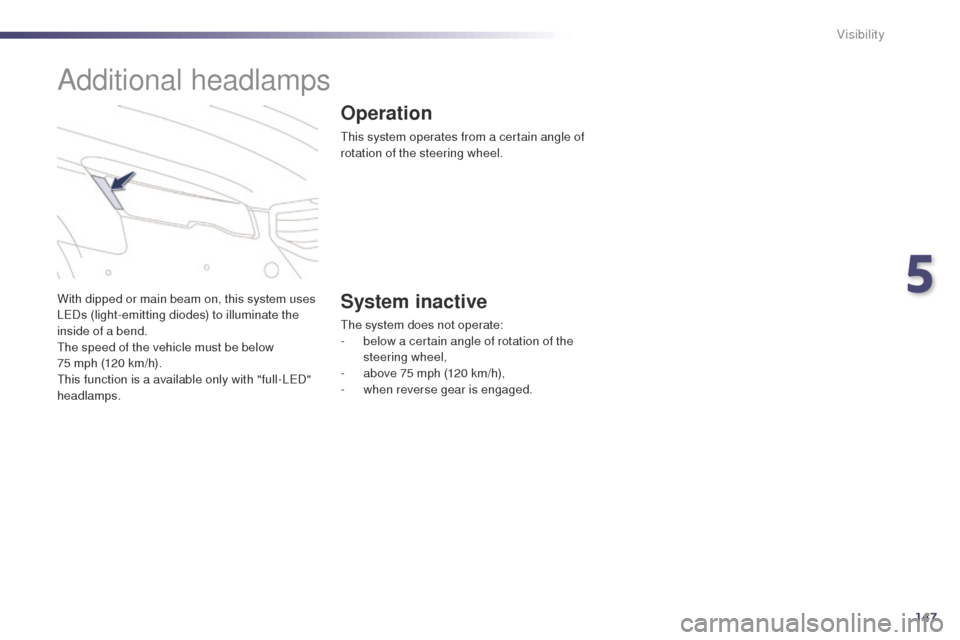
With dipped or main beam on, this system uses
LeDs (light-emitting diodes) to illuminate the
inside of a bend.
th
e speed of the vehicle must be below
75 mph (120 km/h).
th
is function is a available only with "full-L
eD
"
headlamps.
Additional headlamps
Operation
this system operates from a certain angle of
rotation of the steering wheel.
System inactive
the system does not operate:
- b elow a certain angle of rotation of the
steering wheel,
-
a
bove 75 mph (120 km/h),
-
w
hen reverse gear is engaged.
5
Visibility
Page 150 of 380
148
508_en_Chap05_visibilite_ed02-2014
Secondary additional headlamps
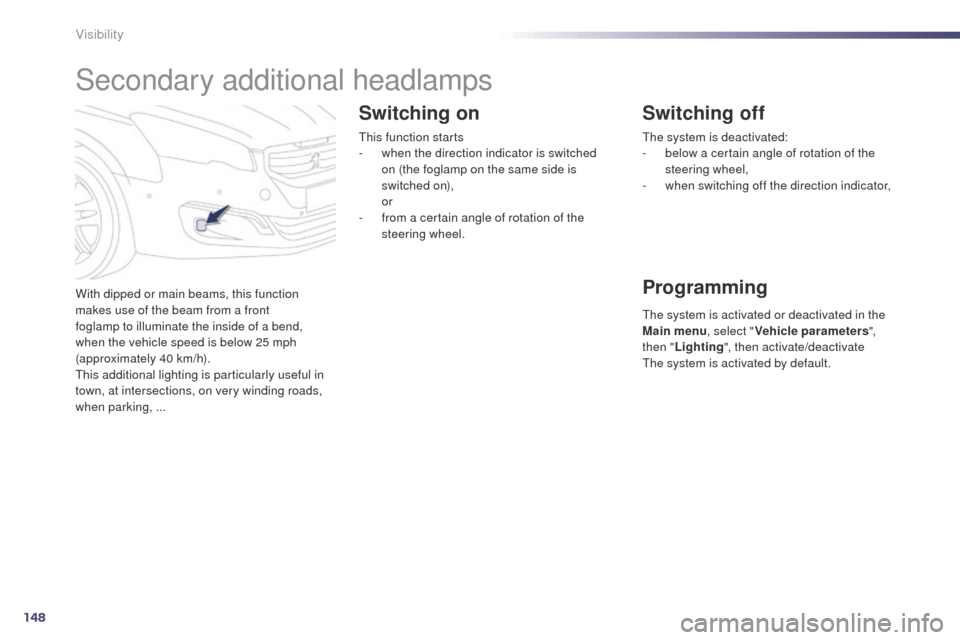
With dipped or main beams, this function
makes use of the beam from a front
foglamp to illuminate the inside of a bend,
when the vehicle speed is below 25 mph
(approximately
40 km/h).
th
is additional lighting is particularly useful in
town, at intersections, on very winding roads,
when parking, ...
Switching on
this function starts
- w hen the direction indicator is switched
on (the foglamp on the same side is
switched
on),
or
-
f
rom a certain angle of rotation of the
steering wheel.
Switching off
Programming
the system is deactivated:
- b elow a certain angle of rotation of the
steering wheel,
-
w
hen switching off the direction indicator,
th
e system is activated or deactivated in the
Main menu , select "Vehicle parameters ",
then " Lighting ", then activate/deactivate
th
e system is activated by default.
Visibility