display PEUGEOT 807 2010 Service Manual
[x] Cancel search | Manufacturer: PEUGEOT, Model Year: 2010, Model line: 807, Model: PEUGEOT 807 2010Pages: 237, PDF Size: 11.66 MB
Page 159 of 237
9.19
11
22
33
44
55
66
77
04
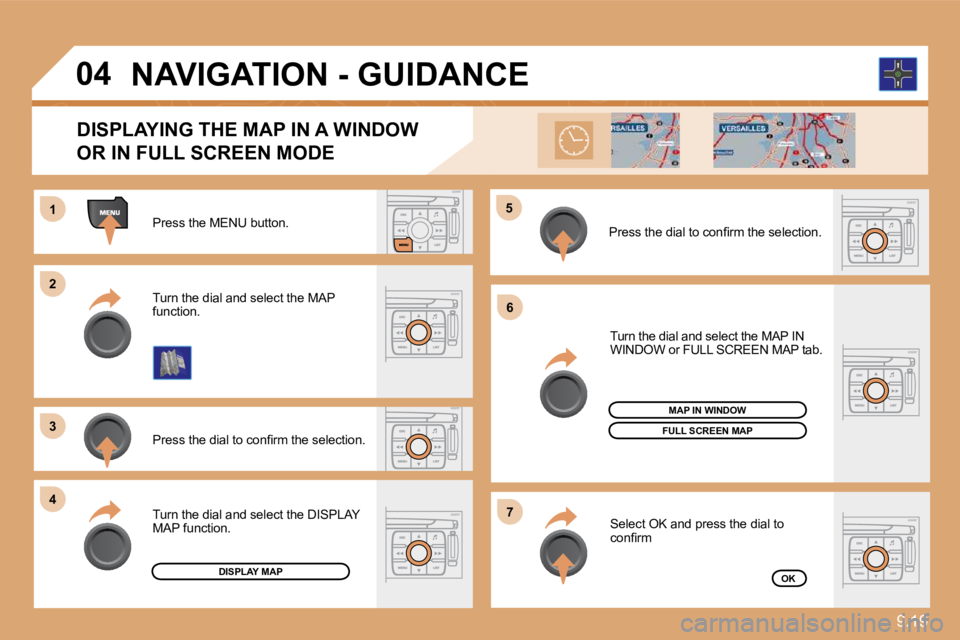
Press the MENU button.
Press the dial to confi rm the selection.
Turn the dial and select the MAP function.
Turn the dial and select the MAP IN WINDOW or FULL SCREEN MAP tab.
Select OK and press the dial to confi rm
Press the dial to confi rm the selection.
Turn the dial and select the DISPLAY MAP function.
DISPLAYING THE MAP IN A WINDOW
OR IN FULL SCREEN MODE
DISPLAY MAP
FULL SCREEN MAP
OK
MAP IN WINDOW
NAVIGATION - GUIDANCE
Page 161 of 237
9.21
11
22
33
44
66
55
77
05
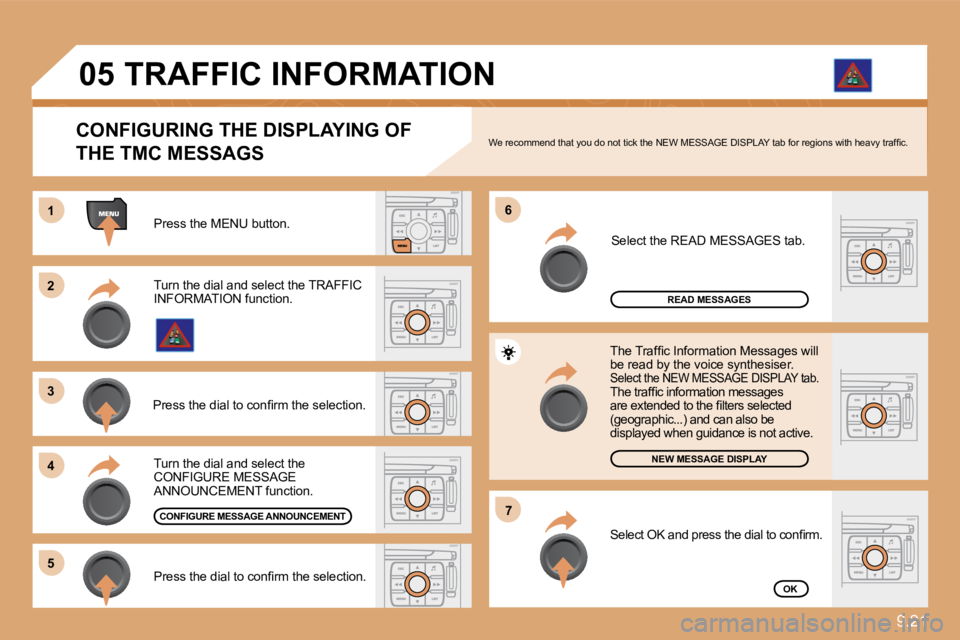
Press the MENU button.
READ MESSAGES
NEW MESSAGE DISPLAY
OK
CONFIGURING THE DISPLAYING OF
THE TMC MESSAGS We recommend that you do not tick the NEW MESSAGE DISPLAY tab for regions with heavy traffi c.
Turn the dial and select the TRAFFIC INFORMATION function.
Press the dial to confi rm the selection.
Press the dial to confi rm the selection.
Turn the dial and select the CONFIGURE MESSAGE ANNOUNCEMENT function.
Select the READ MESSAGES tab.
The Traffi c Information Messages will be read by the voice synthesiser. Select the NEW MESSAGE DISPLAY tab. The traffi c information messages are extended to the fi lters selected (geographic...) and can also be displayed when guidance is not active.
CONFIGURE MESSAGE ANNOUNCEMENT
TRAFFIC INFORMATION
Select OK and press the dial to confi rm.
Page 162 of 237
9.22
05
2
1
3
2
1
TRAFFIC INFORMATION
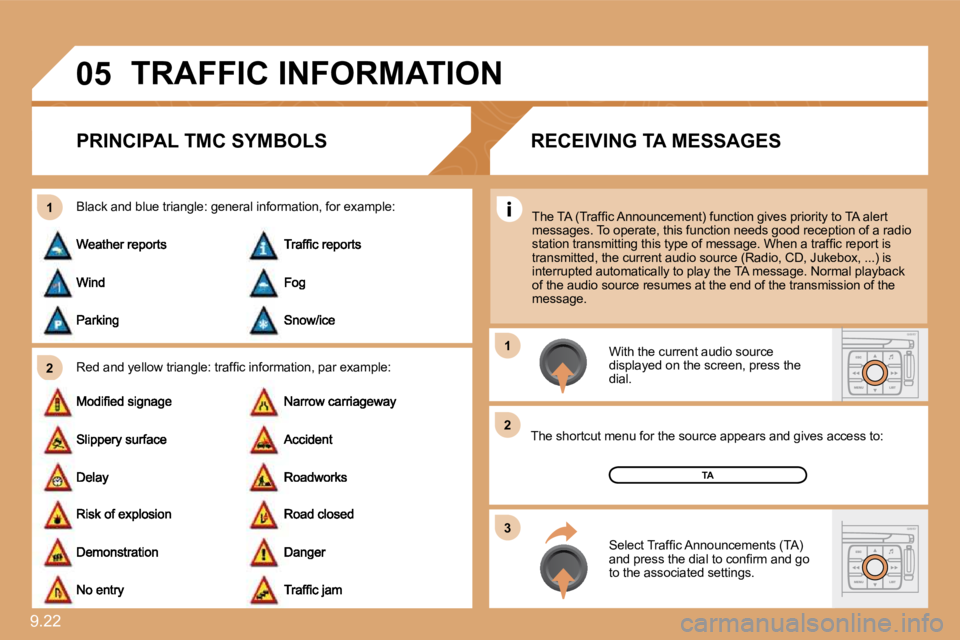
PRINCIPAL TMC SYMBOLS
Red and yellow triangle: traffi c information, par
example:
Black and blue triangle: general information, for example:
With the current audio source displayed on the screen, press the dial.
The shortcut menu for the source appears and give s acces access to:
Select Traffi c Announcements (TA) and press the dial to confi rm and go to the associated settings.
TA
The TA (Traffi c Announcement) function gives priority to TA alert messages. To operate, this function needs good rece ption of a radio station transmitting this type of message. When a traffi c report is transmitted, the current audio source (Radio, CD, J ukebox, ...) is interrupted automatically to play the TA message. N ormal playback of the audio source resumes at the end of the transmission of the message.
RECEIVING TA MESSAGES
Page 163 of 237
9.23
11
22
33
44
11
22
33
44
06
RADIO
SELECTING A STATION
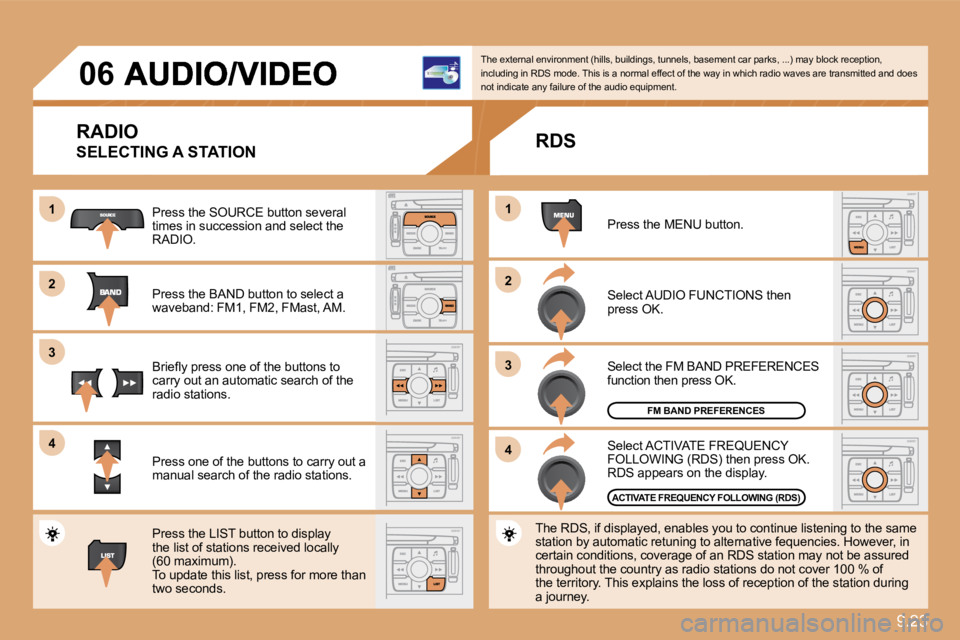
Press the SOURCE button several times in succession and select the RADIO.
Press the BAND button to select a waveband: FM1, FM2, FMast, AM.
Briefl y press one of the buttons to carry out an automatic search of the radio stations.
Press one of the buttons to carry out a manual search of the radio stations.
Press the LIST button to display the list of stations received locally (60 maximum). To update this list, press for more than two seconds.
The external environment (hills, buildings, tunnels, basement car parks, ...) may block reception, including in RDS mode. This is a normal effect of t he way in which radio waves are transmitted and doe s not indicate any failure of the audio equipment.
RDS
Select ACTIVATE FREQUENCY FOLLOWING (RDS) then press OK. RDS appears on the display.
Select the FM BAND PREFERENCES function then press OK.
Select AUDIO FUNCTIONS then press OK.
Press the MENU button.
The RDS, if displayed, enables you to continue lis tening to the same station by automatic retuning to alternative fequen cies. However, in certain conditions, coverage of an RDS station may not be assured throughout the country as radio stations do not cover 100 % of the territory. This explains the loss of reception of the station during a journey.
FM BAND PREFERENCES
ACTIVATE FREQUENCY FOLLOWING (RDS)
Page 164 of 237
9.24
11
22
06 AUDIO/VIDEO
INFORMATION AND ADVICE
The MP3 format, an abbreviation of MPEG 1.2 & 2.5 Audio Layer 3, is an audio compression standard which permits the recording of several tens of music fi les on a single disc.
In order to be able to play a recorded CDR or CDRW, when recording it is preferable to select standards ISO 9660 level 1.2 or Joliet. If the disc is recorded in another format, it may not be played correctly. It is recommended that the same recording standard is always used for an individual disc, with as low a speed as possible (4x maximum) for optimum sound quality. In the particular case of a multi-session CD, the Joliet standard is recommended.
The audio equipment will only play fi les with the extension ".mp3" with a sampling rate of 22.05 KHz or 44.1 KHz. No o ther type of fi le (.wma, .mp4, .m3u...) can be played.
It is advisable to restrict fi le names to 20 characters without using special characters (e.g. " ? ; ù) to avoid any play ing or displaying problems.
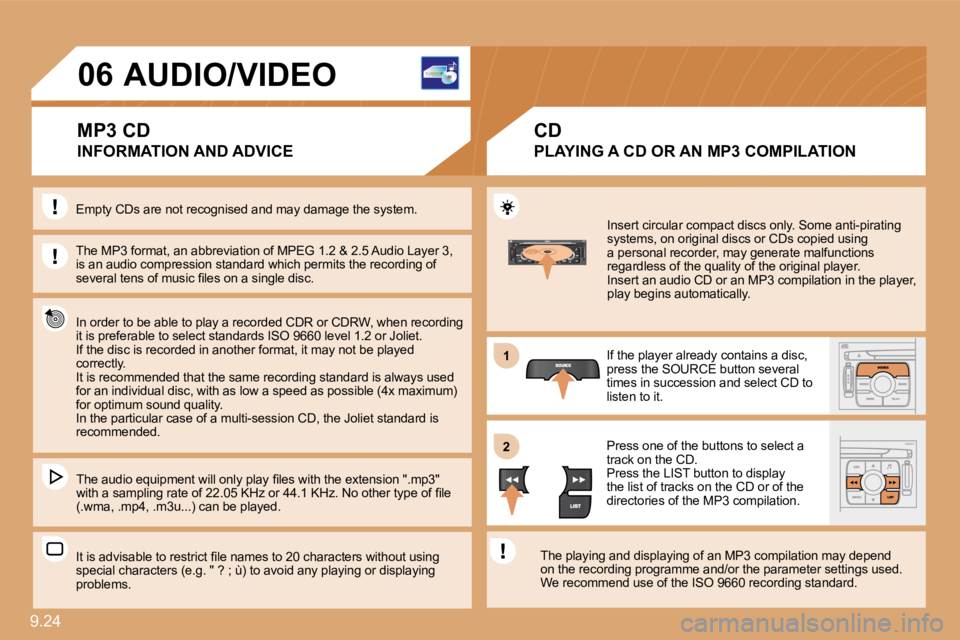
Insert circular compact discs only. Some anti-pirating systems, on original discs or CDs copied using a personal recorder, may generate malfunctions regardless of the quality of the original player. Insert an audio CD or an MP3 compilation in the pl ayer, play begins automatically.
If the player already contains a disc, press the SOURCE button several times in succession and select CD to listen to it.
Press one of the buttons to select a track on the CD. Press the LIST button to display the list of tracks on the CD or of the directories of the MP3 compilation.
The playing and displaying of an MP3 compilation m ay depend on the recording programme and/or the parameter set tings used. We recommend use of the ISO 9660 recording standard .
MP3 CD
PLAYING A CD OR AN MP3 COMPILATION
CD
Empty CDs are not recognised and may damage the system.
Page 167 of 237
9.27
22
11
33
44
55
22
33
11
06
USB
COPY USB TO JUKEBOX
COMPLETE DISC
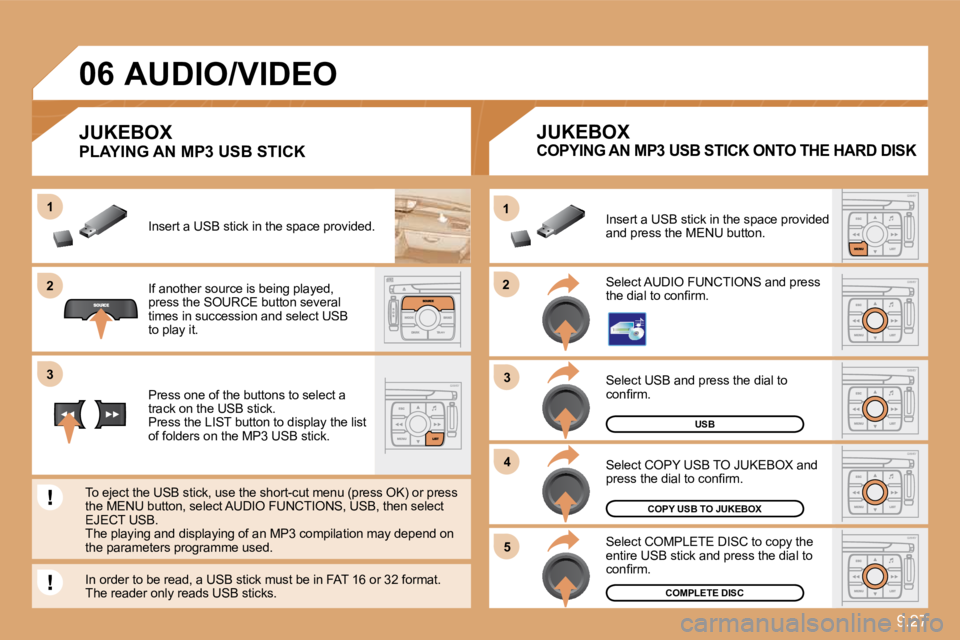
Select USB and press the dial to confi rm.
Select COPY USB TO JUKEBOX and press the dial to confi rm.
Select COMPLETE DISC to copy the entire USB stick and press the dial to confi rm.
Select AUDIO FUNCTIONS and press the dial to confi rm.
Insert a USB stick in the space provided and press the MENU button.
JUKEBOX
If another source is being played, press the SOURCE button several times in succession and select USB to play it.
Press one of the buttons to select a track on the USB stick. Press the LIST button to display the list of folders on the MP3 USB stick.
To eject the USB stick, use the short-cut menu (press OK) or press the MENU button, select AUDIO FUNCTIONS, USB, then select EJECT USB. The playing and displaying of an MP3 compilation may depend on the parameters programme used.
JUKEBOX
Insert a USB stick in the space provided. ded.
AUDIO/VIDEO
In order to be read, a USB stick must be in FAT 16 or 32 format. The reader only reads USB sticks.
PLAYING AN MP3 USB STICK COPYING AN MP3 USB STICK ONTO THE HARD DISK
Page 170 of 237
9.30
11
22
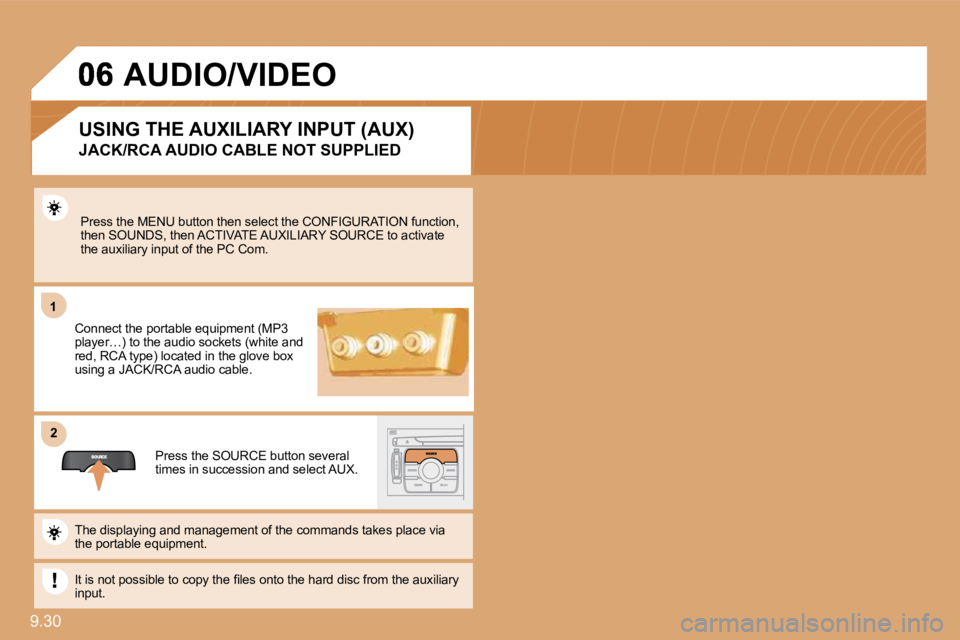
Press the MENU button then select the CONFIGURATION function, then SOUNDS, then ACTIVATE AUXILIARY SOURCE to acti vate the auxiliary input of the PC Com.
Connect the portable equipment (MP3 player…) to the audio sockets (white and red, RCA type) located in the glove box using a JACK/RCA audio cable.
Press the SOURCE button several times in succession and select AUX.
The displaying and management of the commands takes place via the portable equipment.
It is not possible to copy the fi les onto the hard disc from the auxiliary input.
USING THE AUXILIARY INPUT (AUX)
JACK/RCA AUDIO CABLE NOT SUPPLIED
AUDIO/VIDEO
Page 171 of 237
9.31
11
22
33
44
55
66
77
06
ACTIVATE VIDEO MODE
VIDEO PARAMETERS
You can connect video equipment (camcorder, digital camera, DVD player...) to the three audio/video sockets, located in the glove box.
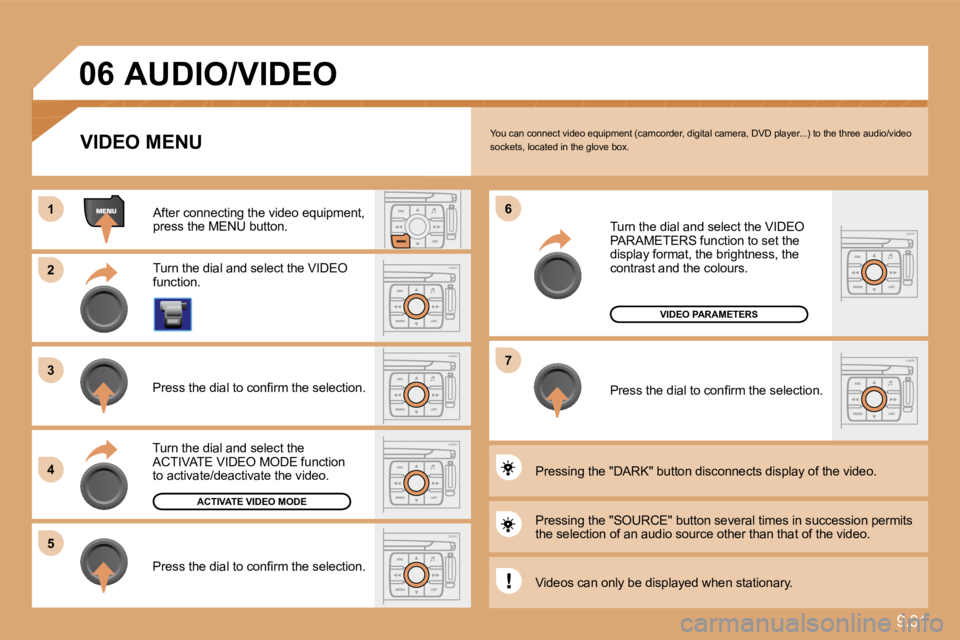
Turn the dial and select the VIDEO function.
After connecting the video equipment, press the MENU button.
Turn the dial and select the ACTIVATE VIDEO MODE function to activate/deactivate the video.
Press the dial to confi rm the selection.
Press the dial to confi rm the selection.
Pressing the "SOURCE" button several times in suc cession permits the selection of an audio source other than that of the video.
Pressing the "DARK" button disconnects display of the video.
Turn the dial and select the VIDEO PARAMETERS function to set the display format, the brightness, the contrast and the colours.
Press the dial to confi rm the selection.
VIDEO MENU
Videos can only be displayed when stationary.
AUDIO/VIDEO
Page 175 of 237
9.35
1
22
33
55
66
44
07 USING THE TELEPHONE
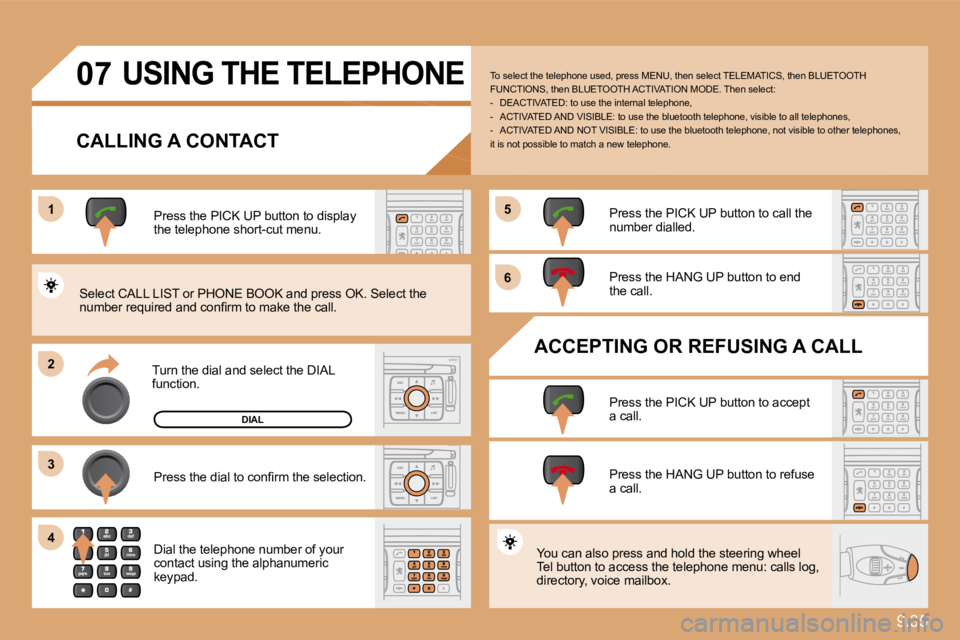
CALLING A CONTACT
Turn the dial and select the DIAL function.
Press the PICK UP button to display the telephone short-cut menu.
Press the dial to confi rm the selection.
Dial the telephone number of your contact using the alphanumeric keypad.
Press the PICK UP button to call the number dialled.
Press the HANG UP button to end the call.
ACCEPTING OR REFUSING A CALL
Press the PICK UP button to accept a call.
Press the HANG UP button to refuse a call.
You can also press and hold the steering wheel Tel button to access the telephone menu: calls log, directory, voice mailbox.
To select the telephone used, press MENU, then select TELEMATICS, then BLUETOOTH FUNCTIONS, then BLUETOOTH ACTIVATION MODE. Then sel ect: - DEACTIVATED: to use the internal telephone, - ACTIVATED AND VISIBLE: to use the bluetooth telephone, visible to all telephones, - ACTIVATED AND NOT VISIBLE: to use the bluetoot h telephone, not visible to other telephones, it is not possible to match a new telephone.
Select CALL LIST or PHONE BOOK and press OK. Sele ct the number required and confi rm to make the call.
DIAL
Page 176 of 237
9.36
08 TRIP COMPUTER
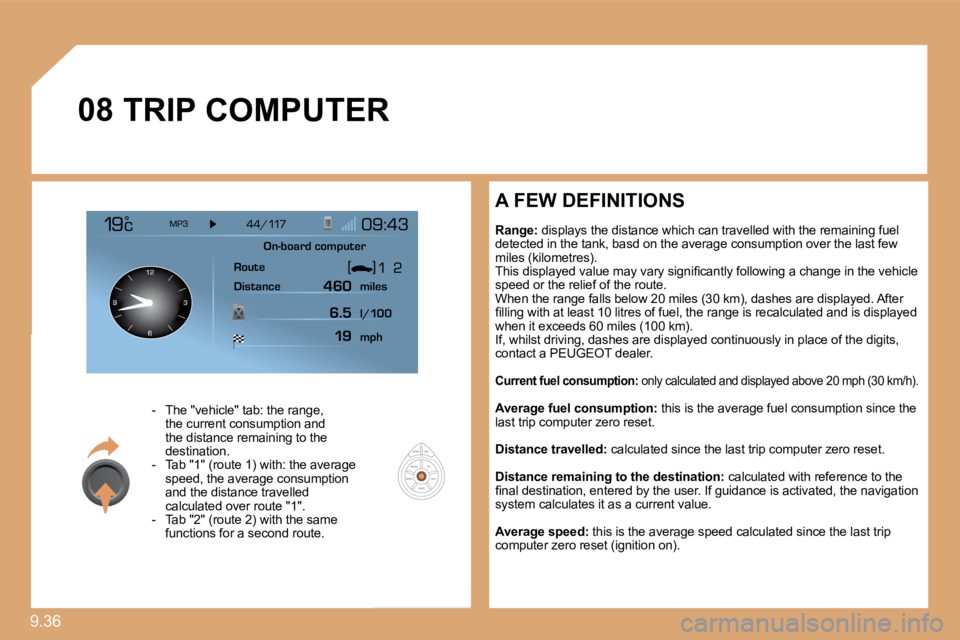
- The "vehicle" tab: the range, the current consumption and the distance remaining to the destination. - Tab "1" (route 1) with: the average speed, the average consumption and the distance travelled calculated over route "1". - Tab "2" (route 2) with the same functions for a second route.
A FEW DEFINITIONS
Range: displays the distance which can travelled with the remaining fuel detected in the tank, basd on the average consumpti on over the last few miles (kilometres). This displayed value may vary signifi cantly following a change in the vehicle speed or the relief of the route. When the range falls below 20 miles (30 km), dashe s are displayed. After fi lling with at least 10 litres of fuel, the range is recalculated and is displayed when it exceeds 60 miles (100 km). If, whilst driving, dashes are displayed continuou sly in place of the digits, contact a PEUGEOT dealer.
Current fuel consumption: only calculated and displayed above 20 mph (30 km /h).
Average fuel consumption: this is the average fuel consumption since the last trip computer zero reset.
Distance travelled: calculated since the last trip computer zero reset.
Distance remaining to the destination: calculated with reference to the fi nal destination, entered by the user. If guidance is activated, the navigation system calculates it as a current value.
Average speed: this is the average speed calculated since the last trip computer zero reset (ignition on).
On-board computer
Route
Distance miles
mph
l/100
460
6.519