audio PEUGEOT BOXER 2003 Owner's Manual
[x] Cancel search | Manufacturer: PEUGEOT, Model Year: 2003, Model line: Boxer, Model: Peugeot Boxer 2003Pages: 180, PDF Size: 1.86 MB
Page 72 of 180
05-05-2003
YOUR BOXER IN DETAIL
74
Emergency 112
In an emergency, select and confirm this function by pressing button Lto contact the emergency call service .
Before making a call of this type, the audio/telephone/GPS must detect a cell network. No security mode is required and, depending on the network, you do not have to insert your SIM card or enter your PIN.
PEUGEOT customer contact centre Select and confirm this function by pressing button Lto contact the PEUGEOT Customer Contact Centre and gain access
to the services offered (this type of call is suspended if an emergency call is made).
Page 73 of 180
05-05-2003
YOUR BOXER IN DETAIL75
V oice commands
The voice commands enable you to control a certain number of audio/telephone/GPS functions using pre-recorded words or expressions. The voice commands which you can send to the system are divided into two categories: - voice commands without voice identification which permit selection of the system's modes (TEL, RADIO, CD, ...),
- voice commands with voice identification which relate to the entering / recalling of names in the telephone directory
and/or navigation addresses.
Activation / Deactivation of the voice commands Press button Non the audio/telephone/GPS control panel or control 4on the steering wheel to activate or deactivate this
function. Notes: - in the absence of voice commands, this function will be deactivated after approximately ten seconds,
- if a voice command is not understood, a double bleep is emitted.
- the voice command operations are interrupted immediately if an incoming call is received; in this case, when the call ends, the entire operation must be repeated.
Example: to recall the radio station stored on button 3, the key words are: "Radio" "Memory" or"Station" "3" .
To use these key words, you must say the word "Radio", wait for the confirmation bleep, then say the word "Memory"or
"Station" , wait until the system asks "number please?", then end with the word "3", wait for the confirmation bleep which will
carry out the action requested.
List of recognisable commands available The voice commands (key words) which can be recognised by the system are organised into three levels (levels 1, 2 and 3). When a level 1 command is given, the system makes the level 2 commands available; when a level 2 command is given, the system makes the level 3 commands available. - the level 1 commands are the following:
"MEMO" / "RADIO" / "CD PLAYER" / "NAVIGATION" / "CALL" / "DIAL" / "REDIAL" / "PIN" / "DIRECTORY" / "INTERRUPT"
Page 76 of 180
05-05-2003
YOUR BOXER IN DETAIL
78
SATELLITE NAVIGATION SYSTEM Introduction The satellite navigation system guides you, by means of vocal and
visual instructions (graphics), to
your chosen destination. The heart of the system lies in the use of a map data base and GPS
(Global Positioning System) . With
this system you can fix the positionof your vehicle by means of a satel-lite network. The system uses the following ele- ments: - the CD-Rom drive,
- the configuration CD-Rom,
- the navigation CD-Rom,
- the last voice message recall con- trol,
- the control keypad,
- the monochrome screen or thecolour screen.
Certain functions or servicesdescribed may vary depending onthe version of the CD-Rom or thecountry where the vehicle is sold.
For safety reasons, the inputting of navigation information by the drivermust be carried out when the vehicle
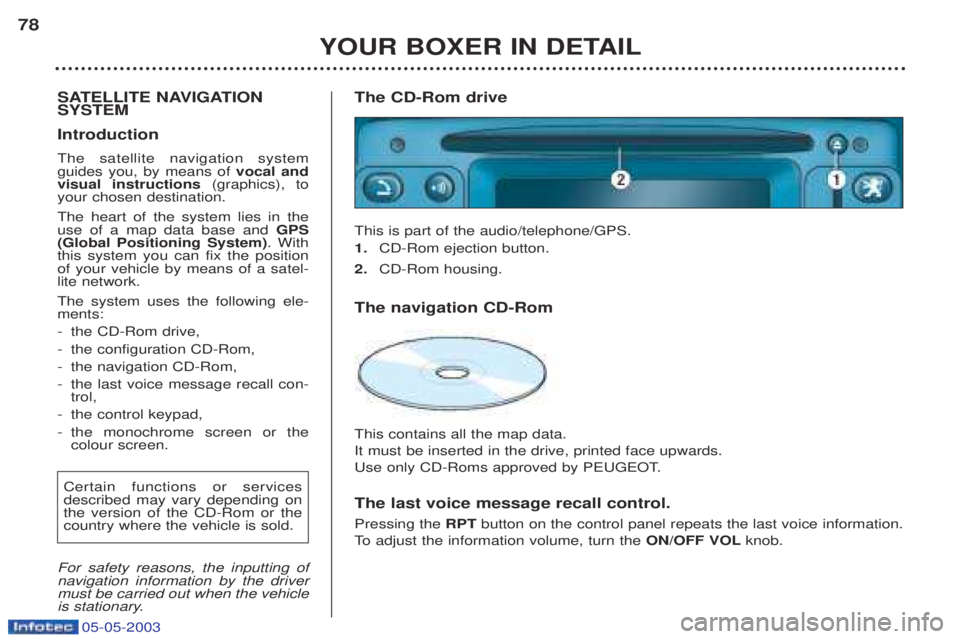
is stationary. The CD-Rom drive This is part of the audio/telephone/GPS. 1.
CD-Rom ejection button.
2. CD-Rom housing.
The navigation CD-Rom This contains all the map data. It must be inserted in the drive, printed face upwards.
Use only CD-Roms approved by PEUGEOT. The last voice message recall control. Pressing the RPTbutton on the control panel repeats the last voice information.
To adjust the information volume, turn the ON/OFF VOLknob.
Page 77 of 180
05-05-2003
YOUR BOXER IN DETAIL79
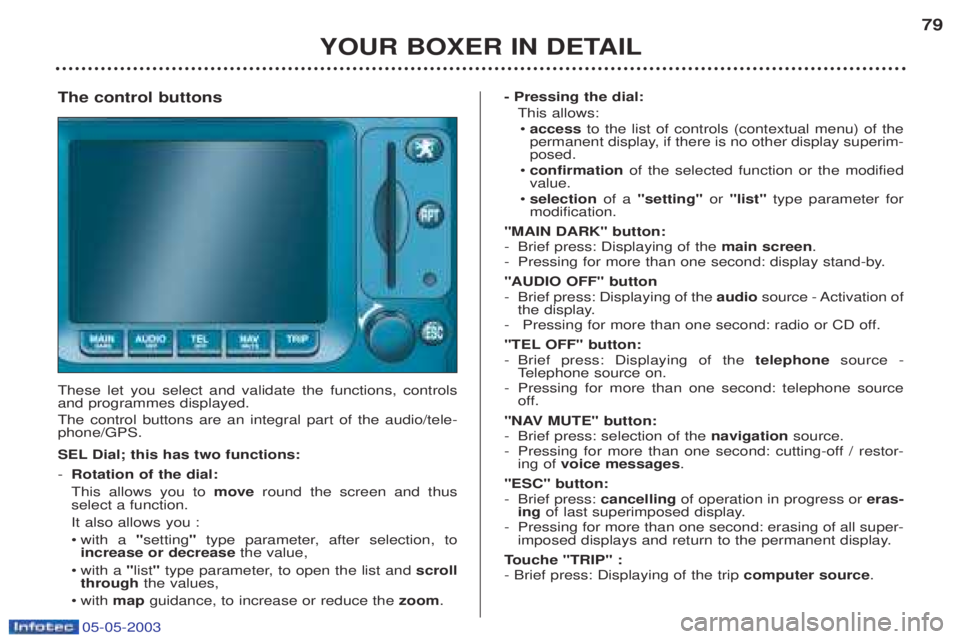
The control buttons These let you select and validate the functions, controls and programmes displayed. The control buttons are an integral part of the audio/tele- phone/GPS.
SEL Dial; this has two functions: - Rotation of the dial: This allows you to moveround the screen and thus
select a function.It also allows you :¥ with a "setting "type parameter, after selection, to
increase or decrease the value,
¥ with a "list "type parameter, to open the list and scroll
through the values,
¥w ith map guidance, to increase or reduce the zoom. - Pressing the dial:
This allows:¥ access to the list of controls (contextual menu) of the
permanent display, if there is no other display superim- posed.
¥ confirmation of the selected function or the modified
value.
¥ selection of a "setting" or "list" type parameter for
modification.
"MAIN DARK" button:
- Brief press: Displaying of the main screen.
- Pressing for more than one second: display stand-by. "AUDIO OFF" button
- Brief press: Displaying of the audiosource - Activation of
the display.
- Pressing for more than one second: radio or CD off.
"TEL OFF" button: - Brief press: Displaying of the telephonesource -
T elephone source on.
- Pressing for more than one second: telephone source
off.
"NAV MUTE" button: - Brief press: selection of the navigationsource.
- Pressing for more than one second: cutting-off / restor- ing of voice messages .
"ESC" button:
- Brief press: cancellingof operation in progress or eras-
ing of last superimposed display.
- Pressing for more than one second: erasing of all super- imposed displays and return to the permanent display.
T ouche "TRIP" :
- Brief press: Displaying of the trip computer source.
Page 78 of 180
05-05-2003
General menu Switch the audio/telephone/GPS on and insert the navigation CD-Rom. Press the "NAV"button to gain
access to the "Warnings" page. Note: the "Warnings" page appears
when the engine is switched on and when you select the "Navigation"function.
YOUR BOXER IN DETAIL
80
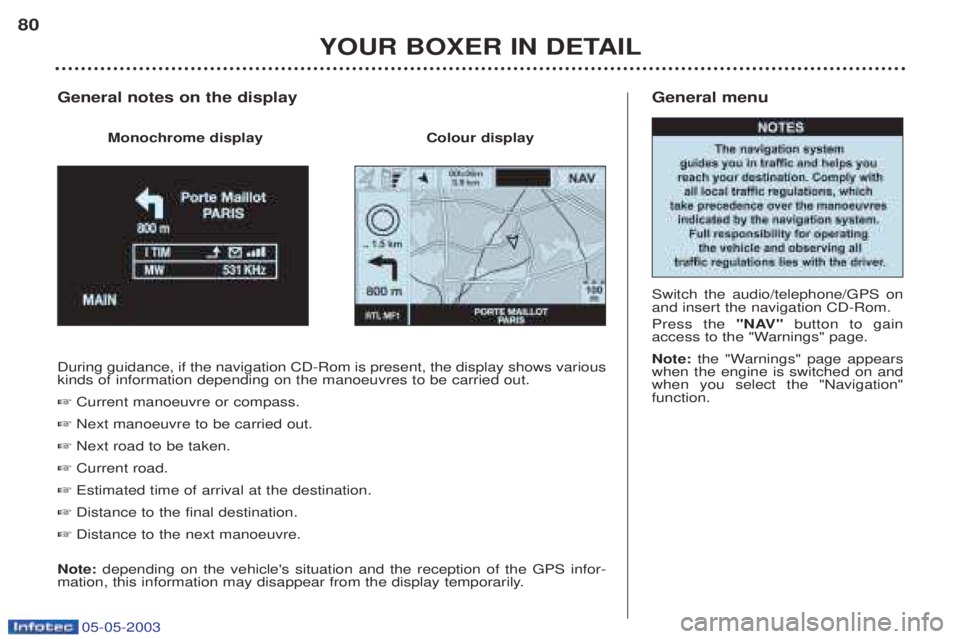
During guidance, if the navigation CD-Rom is present, the display shows various kinds of information depending on the manoeuvres to be carried out. ☞
Current manoeuvre or compass.
☞ Next manoeuvre to be carried out.
☞ Next road to be taken.
☞ Current road.
☞ Estimated time of arrival at the destination.
☞ Distance to the final destination.
☞ Distance to the next manoeuvre.
Note: depending on the vehicle's situation and the reception of the GPS infor-
mation, this information may disappear from the display temporarily.
General notes on the display
Monochrome display Colour display
Page 88 of 180
05-05-2003
YOUR BOXER IN DETAIL
90
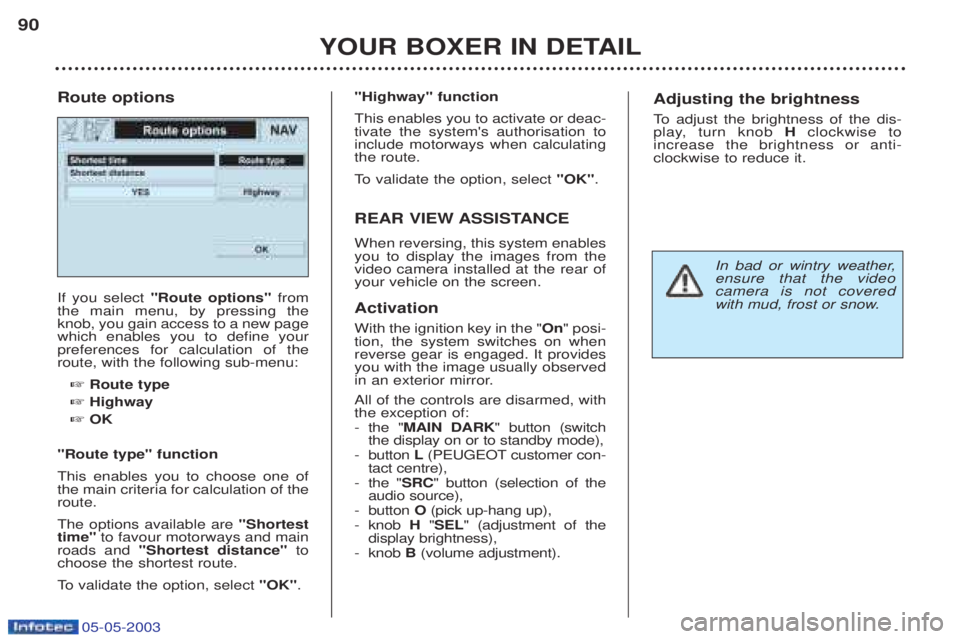
If you select
"Route options" from
the main menu, by pressing the knob, you gain access to a new pagewhich enables you to define yourpreferences for calculation of theroute, with the following sub-menu:
☞ Route type
☞ Highway
☞ OK
"Route type" function This enables you to choose one of the main criteria for calculation of theroute. The options available are "Shortest
time" to favour motorways and main
roads and "Shortest distance" to
choose the shortest route.
To validate the option, select "OK".
Route options
"Highway" function This enables you to activate or deac- tivate the system's authorisation toinclude motorways when calculatingthe route.
To
validate the option, select "OK".
REAR VIEW ASSISTANCE When reversing, this system enables you to display the images from thevideo camera installed at the rear ofyour vehicle on the screen. Activation With the ignition key in the " On" posi-
tion, the system switches on when reverse gear is engaged. It providesyou with the image usually observed
in an exterior mirror. All of the controls are disarmed, with the exception of: - the " MAIN DARK " button (switch
the display on or to standby mode),
- button L(PEUGEOT customer con-
tact centre),
- the " SRC" button (selection of the
audio source),
- button O(pick up-hang up),
- knob H"SEL " (adjustment of the
display brightness),
- knob B(volume adjustment).Adjusting the brightness
To adjust the brightness of the dis-
play, turn knob Hclockwise to
increase the brightness or anti- clockwise to reduce it.
In bad or wintry weather, ensure that the videocamera is not covered
with mud, frost or snow.
Page 89 of 180
05-05-2003
YOUR BOXER IN DETAIL
90
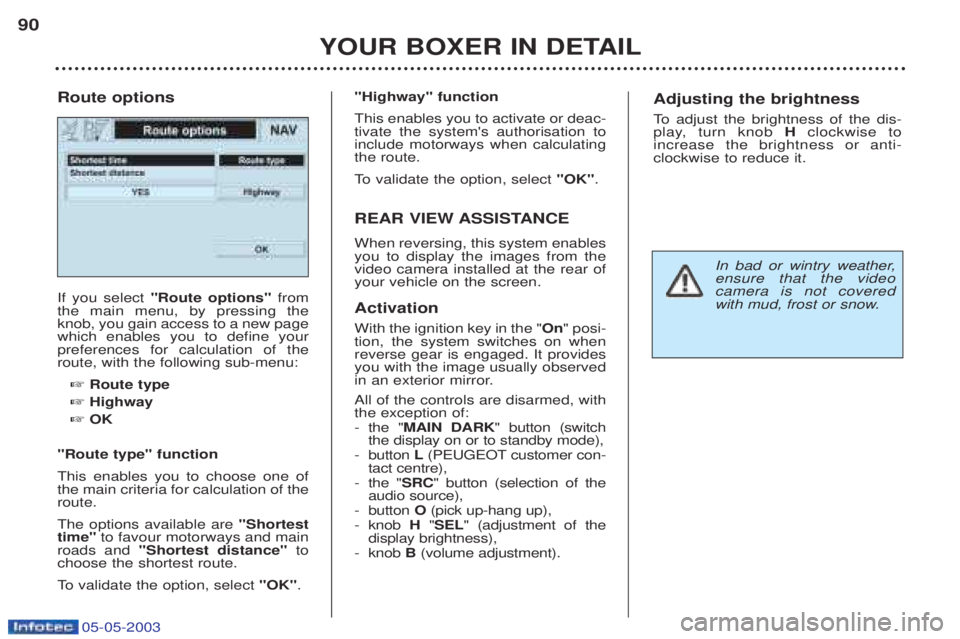
If you select
"Route options" from
the main menu, by pressing the knob, you gain access to a new pagewhich enables you to define yourpreferences for calculation of theroute, with the following sub-menu:
☞ Route type
☞ Highway
☞ OK
"Route type" function This enables you to choose one of the main criteria for calculation of theroute. The options available are "Shortest
time" to favour motorways and main
roads and "Shortest distance" to
choose the shortest route.
To validate the option, select "OK".
Route options
"Highway" function This enables you to activate or deac- tivate the system's authorisation toinclude motorways when calculatingthe route.
To
validate the option, select "OK".
REAR VIEW ASSISTANCE When reversing, this system enables you to display the images from thevideo camera installed at the rear ofyour vehicle on the screen. Activation With the ignition key in the " On" posi-
tion, the system switches on when reverse gear is engaged. It providesyou with the image usually observed
in an exterior mirror. All of the controls are disarmed, with the exception of: - the " MAIN DARK " button (switch
the display on or to standby mode),
- button L(PEUGEOT customer con-
tact centre),
- the " SRC" button (selection of the
audio source),
- button O(pick up-hang up),
- knob H"SEL " (adjustment of the
display brightness),
- knob B(volume adjustment).Adjusting the brightness
To adjust the brightness of the dis-
play, turn knob Hclockwise to
increase the brightness or anti- clockwise to reduce it.
In bad or wintry weather, ensure that the videocamera is not covered
with mud, frost or snow.
Page 118 of 180
YOUR BOXER IN DETAIL115
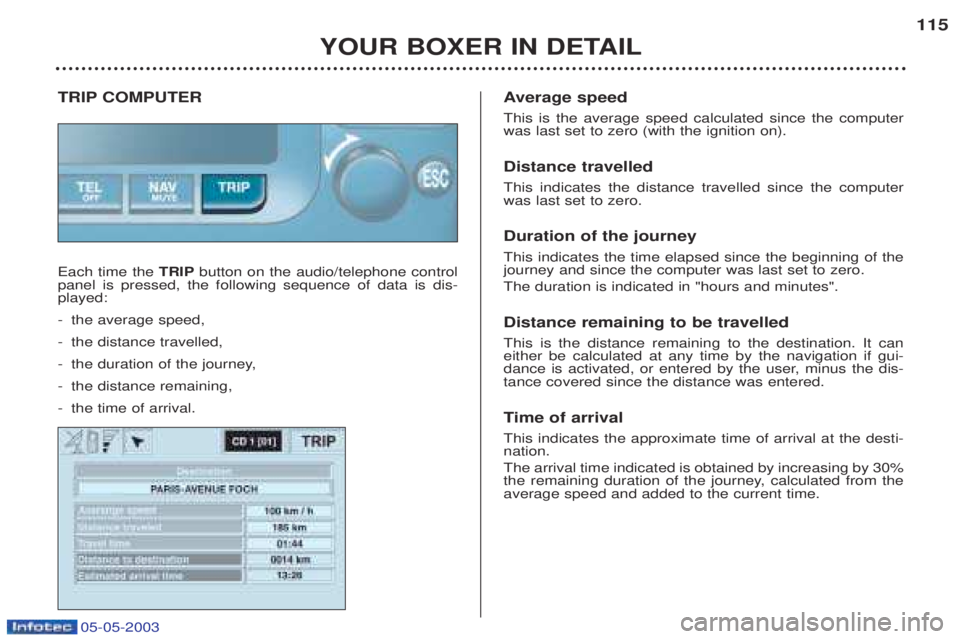
TRIP COMPUTER Each time the
TRIPbutton on the audio/telephone control
panel is pressed, the following sequence of data is dis- played: - the average speed,
- the distance travelled,
- the duration of the journey,
- the distance remaining,
- the time of arrival. A
verage speed
This is the average speed calculated since the computer was last set to zero (with the ignition on). Distance travelled This indicates the distance travelled since the computer was last set to zero. Duration of the journey This indicates the time elapsed since the beginning of the journey and since the computer was last set to zero. The duration is indicated in "hours and minutes". Distance remaining to be travelled This is the distance remaining to the destination. It can either be calculated at any time by the navigation if gui-
dance is activated, or entered by the user, minus the dis-tance covered since the distance was entered. Ti me of arrival
This indicates the approximate time of arrival at the desti- nation. The arrival time indicated is obtained by increasing by 30%
the remaining duration of the journey, calculated from theaverage speed and added to the current time.
05-05-2003
Page 153 of 180
05-05-2003
PRACTICAL INFORMATION
142
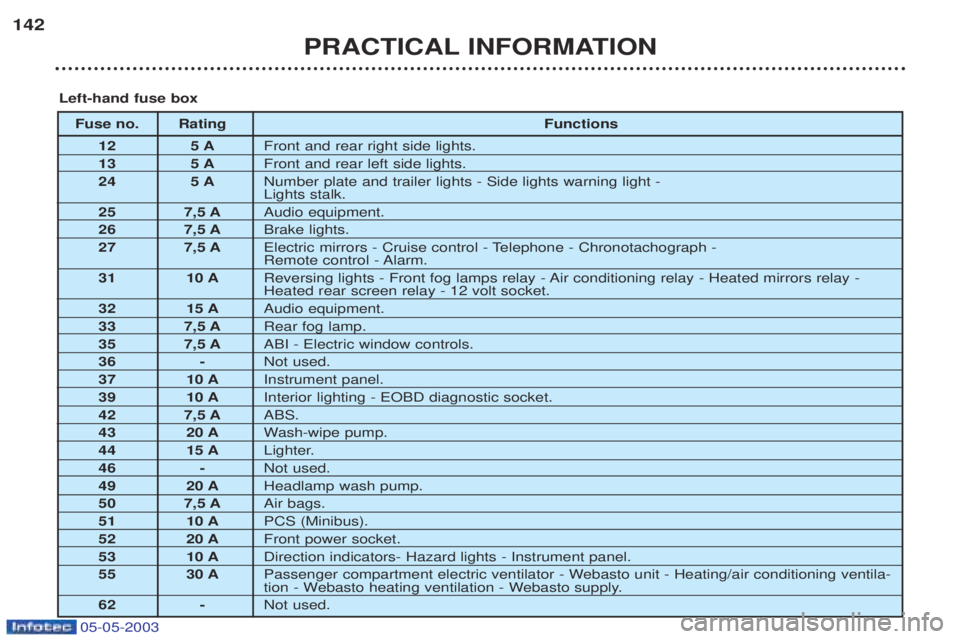
Fuse no. Rating
Functions
12 5 A Front and rear right side lights.
13 5 A Front and rear left side lights.
24 5 A Number plate and trailer lights - Side lights warning light - Lights stalk.
25 7,5 A Audio equipment.
26 7,5 A Brake lights.
27 7,5 A Electric mirrors - Cruise control - Telephone - Chronotachograph -
Remote control - Alarm.
31 10 A Reversing lights - Front fog lamps relay - Air conditioning relay - Heated mirrors relay -Heated rear screen relay - 12 volt socket.
32 15 A Audio equipment.
33 7,5 A Rear fog lamp.
35 7,5 A ABI - Electric window controls.
36 - Not used.
37 10 A Instrument panel.
39 10 A Interior lighting - EOBD diagnostic socket.
42 7,5 A ABS.
43 20 A Wash-wipe pump.
44 15 A Lighter.
46 - Not used.
49 20 A Headlamp wash pump.
50 7,5 A Air bags.
51 10 A PCS (Minibus).
52 20 A Front power socket.
53 10 A Direction indicators- Hazard lights - Instrument panel.
55 30 A Passenger compartment electric ventilator - Webasto unit - Heating/air conditioning ventila-
tion - Webasto heating ventilation - Webasto supply.
62 - Not used.
Left-hand fuse box
Page 156 of 180
05-05-2003
PRACTICAL INFORMATION147
FITTING AUDIO EQUIPMENT
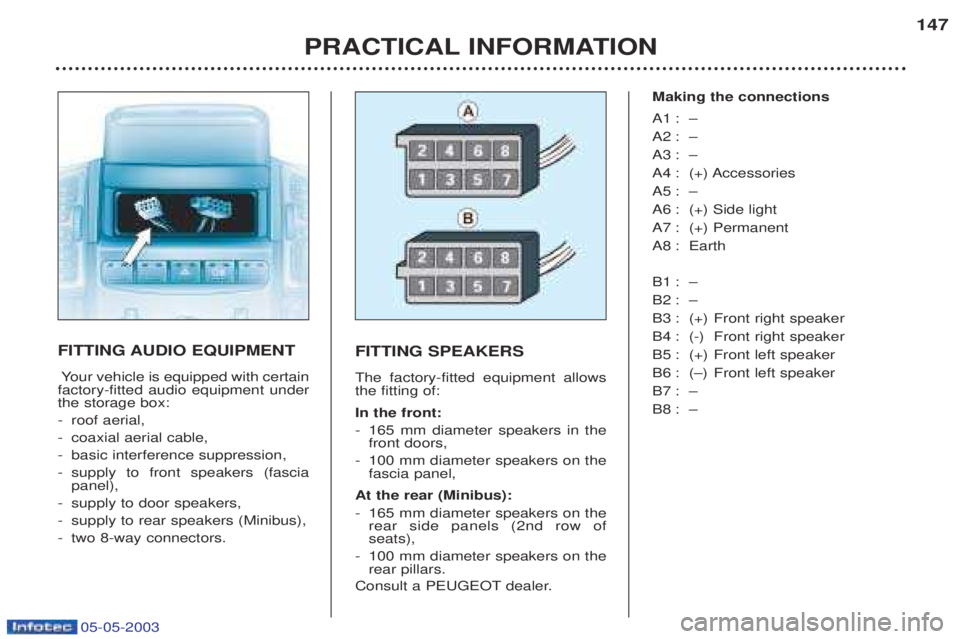
Y our vehicle is equipped with certain
factory-fitted audio equipment under the storage box: - roof aerial,
- coaxial aerial cable,
- basic interference suppression,
- supply to front speakers (fascia panel),
- supply to door speakers,
- supply to rear speakers (Minibus),
- two 8-way connectors. FITTING SPEAKERS The factory-fitted equipment allows the fitting of: In the front: -
165 mm diameter speakers in the front doors,
- 100 mm diameter speakers on thefascia panel,
At the rear (Minibus): - 165 mm diameter speakers on the rear side panels (2nd row ofseats),
- 100 mm diameter speakers on therear pillars.
Consult a PEUGEOT dealer. Making the connections
A1 : Ð
A2 : Ð
A3 : Ð
A4 : (+) Accessories
A5 : Ð
A6 : (+) Side light
A7 : (+) Permanent
A8 : Earth
B1 : Ð
B2 : Ð
B3 : (+) Front right speaker
B4 : (-) Front right speaker
B5 : (+) Front left speaker
B6 : (Ð) Front left speaker
B7 : Ð
B8 : Ð