lock Peugeot Boxer 2008.5 User Guide
[x] Cancel search | Manufacturer: PEUGEOT, Model Year: 2008.5, Model line: Boxer, Model: Peugeot Boxer 2008.5Pages: 167, PDF Size: 4.17 MB
Page 20 of 167
23
2
Accesses
READY TO SET OFF
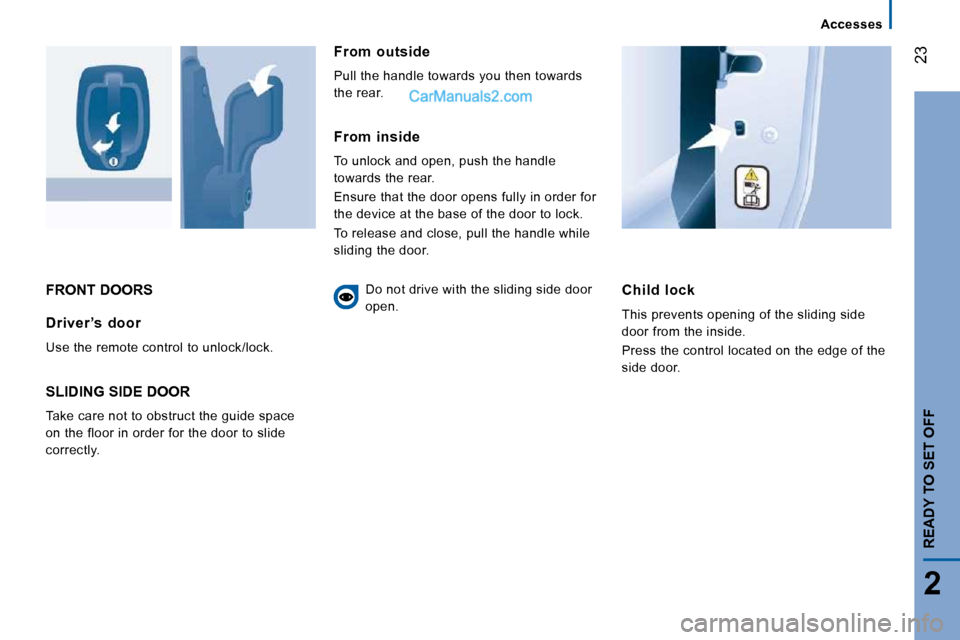
FRONT DOORS Child lock
This prevents opening of the sliding side
door from the inside.
Press the control located on the edge of the
side door. Driver ’s door
Use the remote control to unlock/lock.
SLIDING SIDE DOOR
Take care not to obstruct the guide space
on the floor in order for the door to slide
correctly.
From outside
Pull the handle towards you then towards
the rear.
From inside
To unlock and open, push the handle
towards the rear.
Ensure that the door opens fully in order for
the device at the base of the door to lock.
To release and close, pull the handle while
sliding the door. Do not drive with the sliding side door
open.
Page 22 of 167
25
2
Accesses
READY TO SET OFF
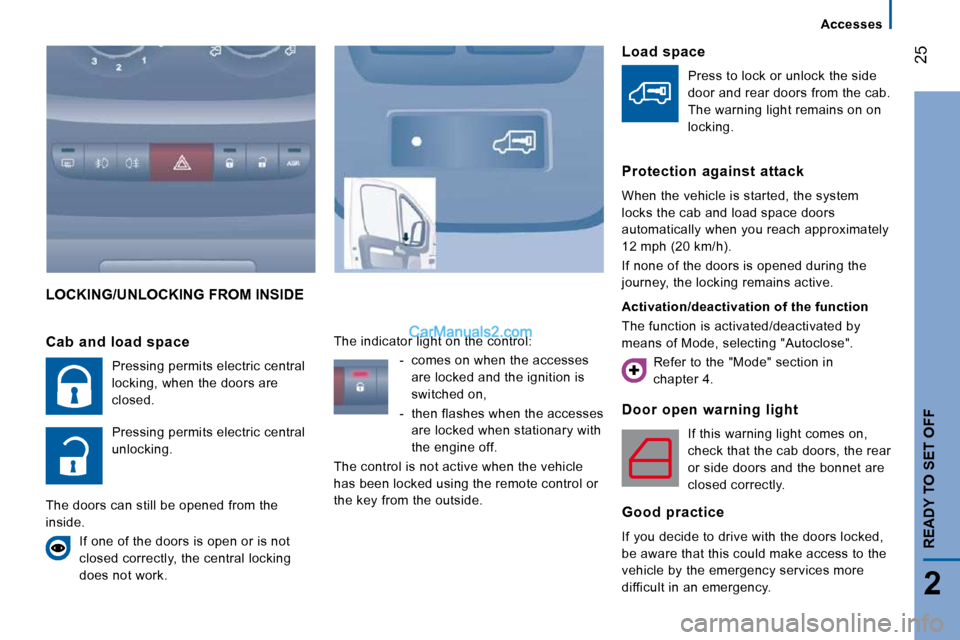
LOCKING/UNLOCKING FROM INSIDE
Door open warning light
If this warning light comes on,
check that the cab doors, the rear
or side doors and the bonnet are
closed correctly.
Good practice
If you decide to drive with the doors locked,
be aware that this could make access to the
vehicle by the emergency services more
difficult in an emergency.
Cab and load space
Pressing permits electric central
locking, when the doors are
closed.
Pressing permits electric central
unlocking.
The doors can still be opened from the
inside. If one of the doors is open or is not
closed correctly, the central locking
does not work. The indicator light on the control:
- comes on when the accesses are locked and the ignition is
switched on,
- then flashes when the accesses are locked when stationary with
the engine off.
The control is not active when the vehicle
has been locked using the remote control or
the key from the outside.
Load space
Press to lock or unlock the side
door and rear doors from the cab.
The warning light remains on on
locking.
Protection against attack
When the vehicle is started, the system
locks the cab and load space doors
automatically when you reach approximately
12 mph (20 km/h).
If none of the doors is opened during the
journey, the locking remains active.
Activation/deactivation of the function
The function is activated/deactivated by
means of Mode, selecting "Autoclose". Refer to the "Mode" section in
chapter 4.
Page 33 of 167
36
Gearboxes and steering wheel
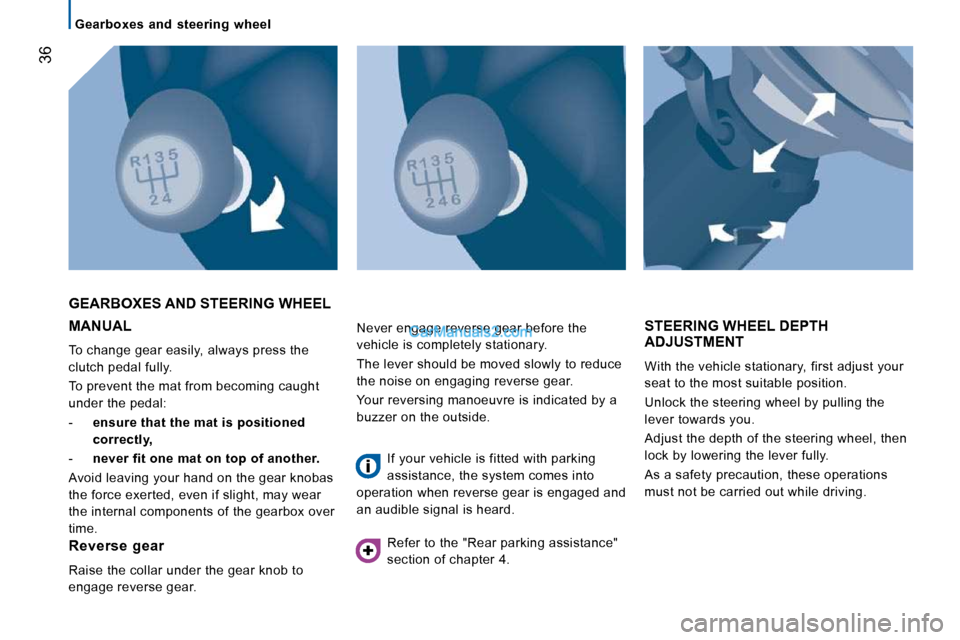
MANUAL
To change gear easily, always press the
clutch pedal fully.
To prevent the mat from becoming caught
under the pedal:
- ensure that the mat is positioned
correctly,
- never fit one mat on top of another.
Avoid leaving your hand on the gear knobas
the force exerted, even if slight, may wear
the internal components of the gearbox over
time.
GEARBOXES AND STEERING WHEEL
STEERING WHEEL DEPTH ADJUSTMENT
With the vehicle stationary, first adjust your
seat to the most suitable position.
Unlock the steering wheel by pulling the
lever towards you.
Adjust the depth of the steering wheel, then
lock by lowering the lever fully.
As a safety precaution, these operations
must not be carried out while driving.
Reverse gear
Raise the collar under the gear knob to
engage reverse gear. Never engage reverse gear before the
vehicle is completely stationary.
The lever should be moved slowly to reduce
the noise on engaging reverse gear.
Your reversing manoeuvre is indicated by a
buzzer on the outside.
If your vehicle is fitted with parking
assistance, the system comes into
operation when reverse gear is engaged and
an audible signal is heard.
Refer to the "Rear parking assistance"
section of chapter 4.
Page 34 of 167
37
2
READY TO SET OFF
Starting and stopping
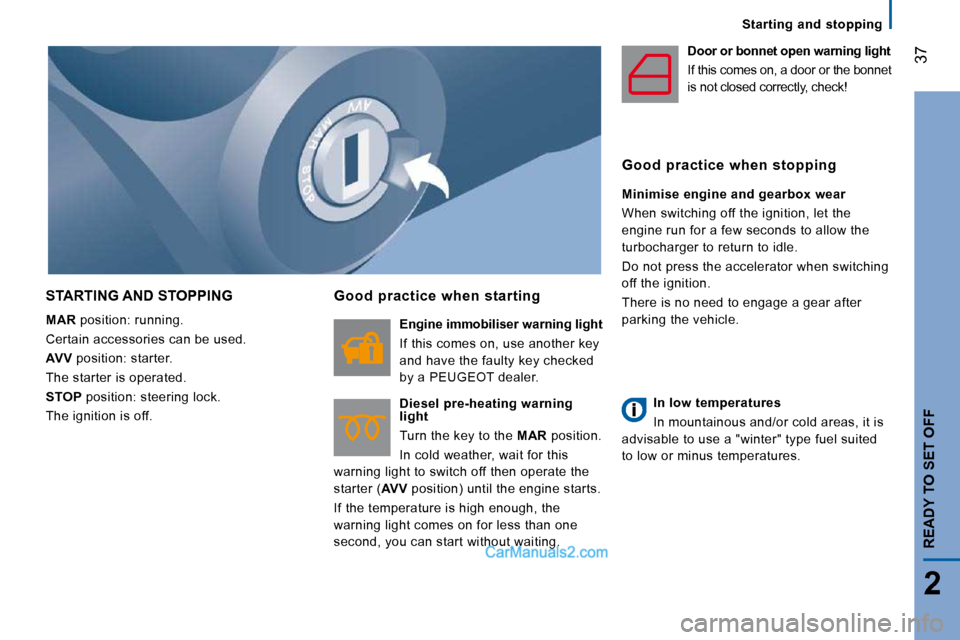
STARTING AND STOPPING
MAR position: running.
Certain accessories can be used.
AVV position: starter.
The starter is operated.
STOP position: steering lock.
The ignition is off.
Good practice when starting
Engine immobiliser warning light
If this comes on, use another key
and have the faulty key checked
by a PEUGEOT dealer.
Diesel pre-heating warning
light
Turn the key to the MAR position.
In cold weather, wait for this
warning light to switch off then operate the
starter ( AVV position) until the engine starts.
If the temperature is high enough, the
warning light comes on for less than one
second, you can start without waiting. Door or bonnet open warning light
If this comes on, a door or the bonnet
is not closed correctly, check!
Good practice when stopping
Minimise engine and gearbox wear
When switching off the ignition, let the
engine run for a few seconds to allow the
turbocharger to return to idle.
Do not press the accelerator when switching
off the ignition.
There is no need to engage a gear after
parking the vehicle.
In low temperatures
In mountainous and/or cold areas, it is
advisable to use a "winter" type fuel suited
to low or minus temperatures.
Page 53 of 167
3
ERGONOMICS and COMFORT
Ventilation
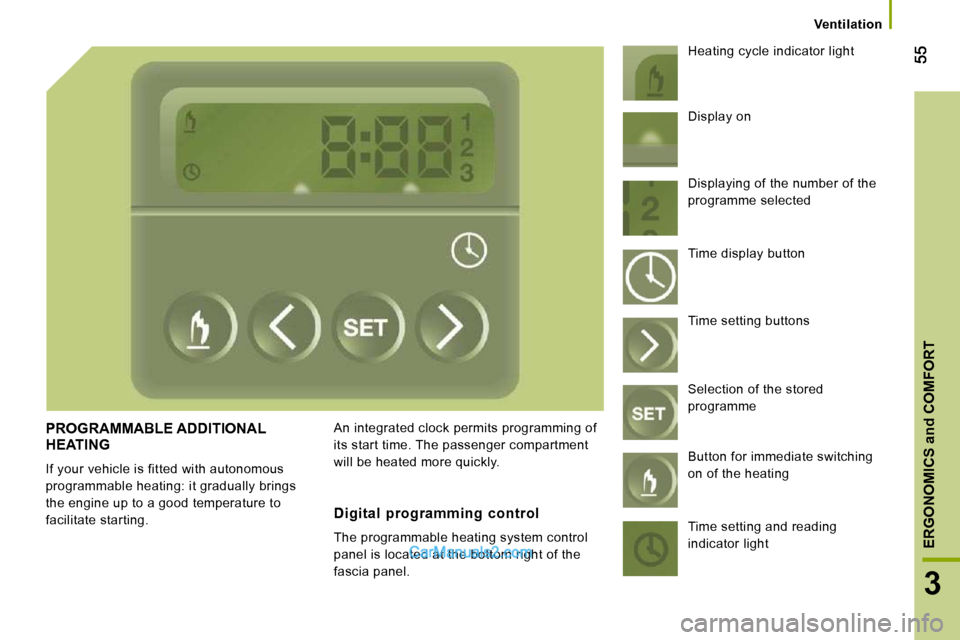
PROGRAMMABLE ADDITIONAL HEATING
If your vehicle is fitted with autonomous
programmable heating: it gradually brings
the engine up to a good temperature to
facilitate starting. An integrated clock permits programming of
its start time. The passenger compartment
will be heated more quickly. Heating cycle indicator light
Digital programming control
The programmable heating system control
panel is located at the bottom right of the
fascia panel. Display on
Displaying of the number of the
programme selected
Time display button
Time setting buttons
Selection of the stored
programme
Button for immediate switching
on of the heating
Time setting and reading
indicator light
Page 54 of 167
56
Ventilation
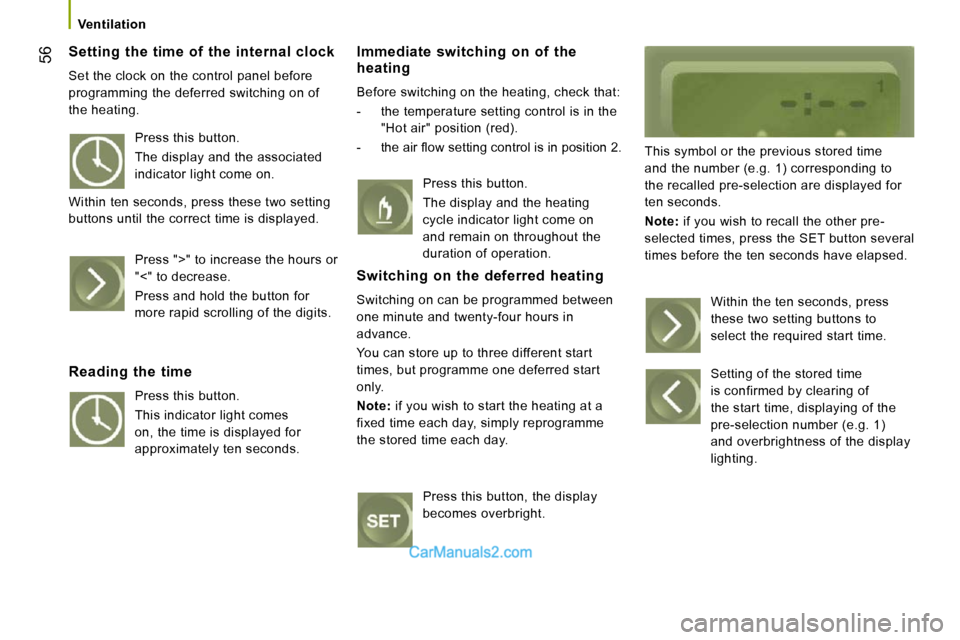
Setting the time of the internal clock
Set the clock on the control panel before
programming the deferred switching on of
the heating.
Immediate switching on of the heating
Before switching on the heating, check that:
- the temperature setting control is in the "Hot air" position (red).
- the air fl ow setting control is in position 2.
This symbol or the previous stored time
and the number (e.g. 1) corresponding to
the recalled pre-selection are displayed for
ten seconds.
Note: if you wish to recall the other pre-
selected times, press the SET button several
times before the ten seconds have elapsed.
Press this button.
The display and the associated
indicator light come on.
Within ten seconds, press these two setting
buttons until the correct time is displayed.
Press ">" to increase the hours or
"<" to decrease.
Press and hold the button for
more rapid scrolling of the digits.
Reading the time
Press this button.
This indicator light comes
on, the time is displayed for
approximately ten seconds. Press this button.
The display and the heating
cycle indicator light come on
and remain on throughout the
duration of operation.
Switching on the deferred heating
Switching on can be programmed between
one minute and twenty-four hours in
advance.
You can store up to three different start
times, but programme one deferred start
only.
Note : if you wish to start the heating at a
fixed time each day, simply reprogramme
the stored time each day.
Press this button, the display
becomes overbright. Within the ten seconds, press
these two setting buttons to
select the required start time.
Setting of the stored time
is confirmed by clearing of
the start time, displaying of the
pre-selection number (e.g. 1)
and overbrightness of the display
lighting.
Page 65 of 167
67
3
ERGONOMICS and COMFORT
Practical information
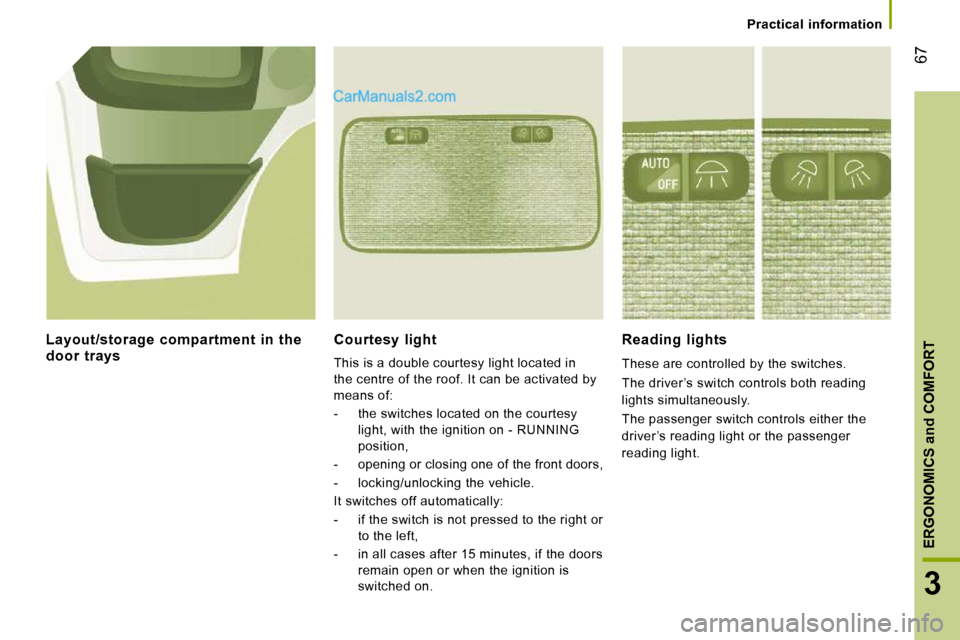
Courtesy light
This is a double courtesy light located in
the centre of the roof. It can be activated by
means of:
- the switches located on the courtesy light, with the ignition on - RUNNING
position,
- opening or closing one of the front doors,
- locking/unlocking the vehicle.
It switches off automatically:
- if the switch is not pressed to the right or to the left,
- in all cases after 15 minutes, if the doors remain open or when the ignition is
switched on.
Reading lights
These are controlled by the switches.
The driver ’s switch controls both reading
lights simultaneously.
The passenger switch controls either the
driver ’s reading light or the passenger
reading light.
Layout/storage compartment in the door trays
Page 72 of 167
74
Mode
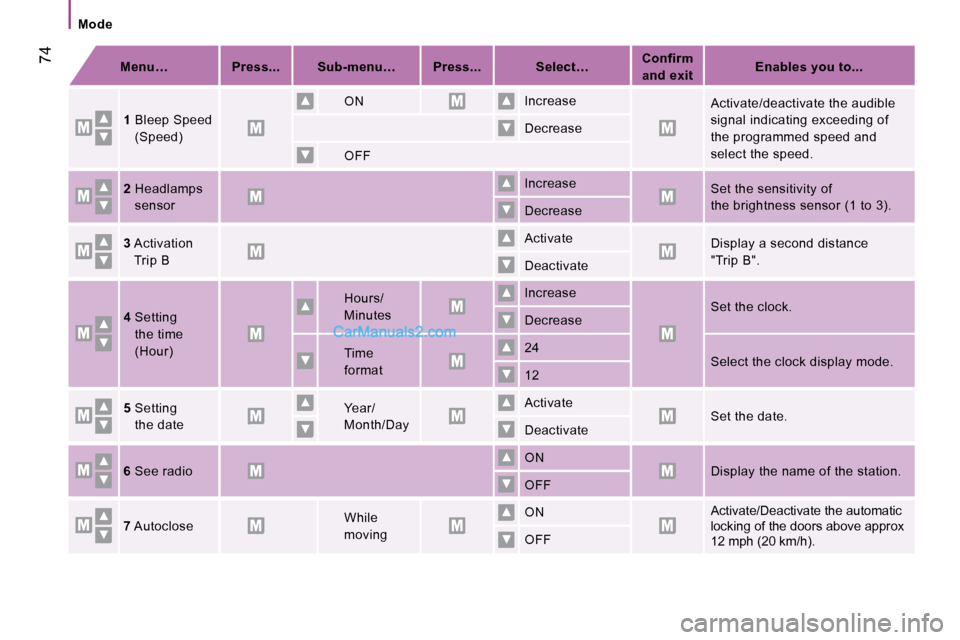
Menu… Press... Sub-menu… Press... Select…
Confirm
and exit
Enables you to...
1 Bleep Speed
(Speed)
ON
Increase
Activate/deactivate the audible
signal indicating exceeding of
the programmed speed and
select the speed.
Decrease
OFF
2 Headlamps
sensor Increase Set the sensitivity of
the brightness sensor (1 to 3).
Decrease
3 Activation
Trip B
Activate Display a second distance
"Trip B".
Deactivate
4 Setting
the time
(Hour)
Hours/
Minutes
Increase
Set the clock.
Decrease
Time
format 24
Select the clock display mode.
12
5 Setting
the date
Year/
Month/Day Activate Set the date.
Deactivate
6 See radio
ON Display the name of the station.
OFF
7 Autoclose
While
moving ON Activate/Deactivate the automatic
locking of the doors above approx
12 mph (20 km/h).
OFF
Page 101 of 167
103
5
SAFETY
Driving safety
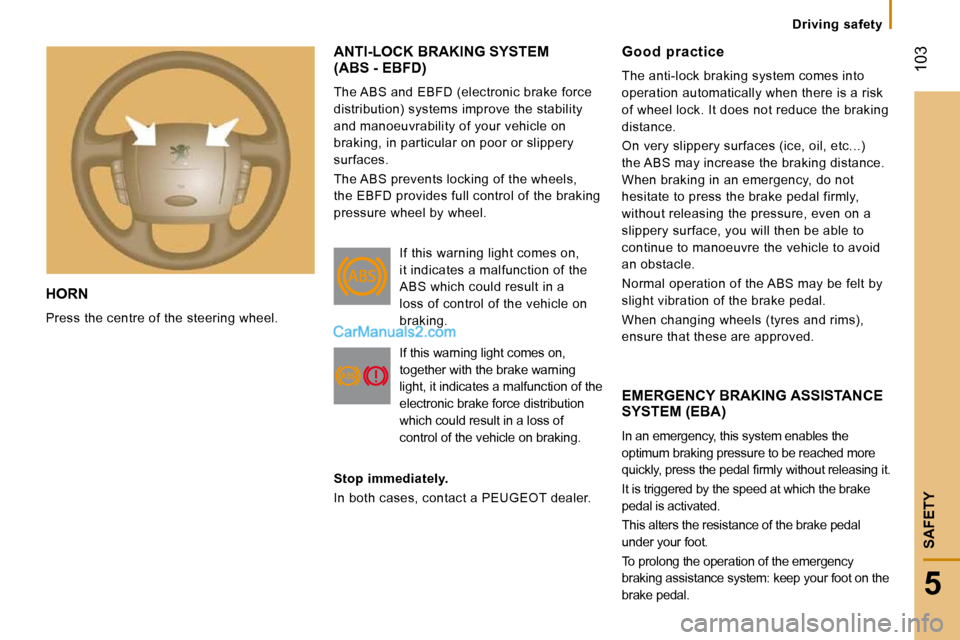
HORN
Press the centre of the steering wheel.
ANTI-LOCK BRAKING SYSTEM(ABS - EBFD)
The ABS and EBFD (electronic brake force
distribution) systems improve the stability
and manoeuvrability of your vehicle on
braking, in particular on poor or slippery
surfaces.
The ABS prevents locking of the wheels,
the EBFD provides full control of the braking
pressure wheel by wheel.
EMERGENCY BRAKING ASSISTANCE SYSTEM (EBA)
In an emergency, this system enables the
optimum braking pressure to be reached more
quickly, press the pedal fi rmly without releasing it.
It is triggered by the speed at which the brake
pedal is activated.
This alters the resistance of the brake pedal
under your foot.
To prolong the operation of the emergency
braking assistance system: keep your foot on the
brake pedal.
Good practice
The anti-lock braking system comes into
operation automatically when there is a risk
of wheel lock. It does not reduce the braking
distance.
On very slippery surfaces (ice, oil, etc...)
the ABS may increase the braking distance.
When braking in an emergency, do not
hesitate to press the brake pedal firmly,
without releasing the pressure, even on a
slippery surface, you will then be able to
continue to manoeuvre the vehicle to avoid
an obstacle.
Normal operation of the ABS may be felt by
slight vibration of the brake pedal.
When changing wheels (tyres and rims),
ensure that these are approved.
If this warning light comes on,
it indicates a malfunction of the
ABS which could result in a
loss of control of the vehicle on
braking.
If this warning light comes on,
together with the brake warning
light, it indicates a malfunction of the
electronic brake force distribution
which could result in a loss of
control of the vehicle on braking.
Stop immediately.
In both cases, contact a PEUGEOT dealer.
Page 105 of 167
106
Seat belts
SEAT BELTS
CAB SEAT BELTS
The front seats are fitted with pre-tensioners
and force limiters. REAR SEAT BELTS
The seats/bench seats are fitted with three-
point seat belts and inertia reels.
The centre seat has a seat belt guide and
inertia reel, solid with the seat back.
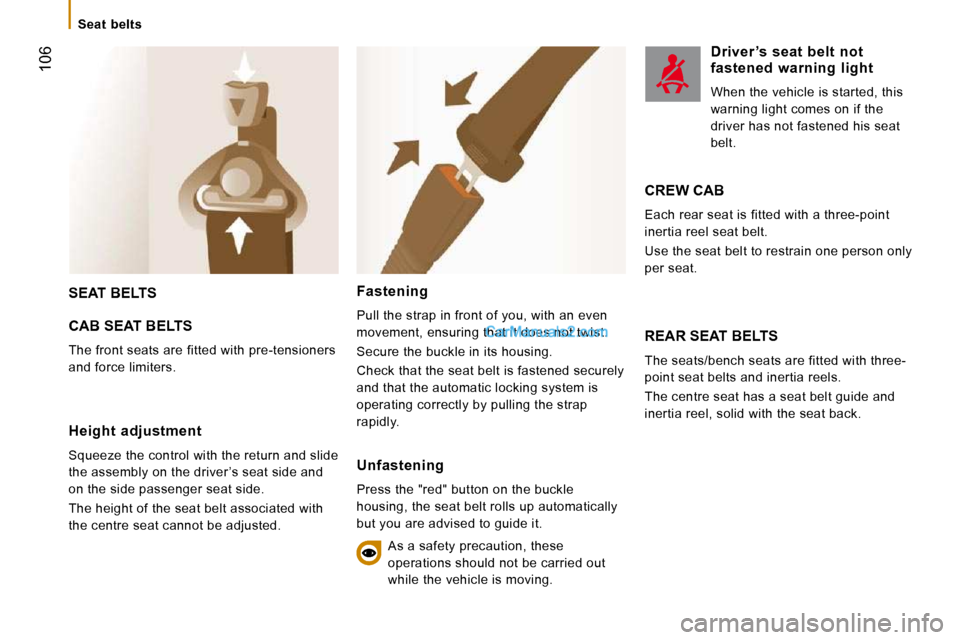
Height adjustment
Squeeze the control with the return and slide
the assembly on the driver ’s seat side and
on the side passenger seat side.
The height of the seat belt associated with
the centre seat cannot be adjusted.
Fastening
Pull the strap in front of you, with an even
movement, ensuring that it does not twist.
Secure the buckle in its housing.
Check that the seat belt is fastened securely
and that the automatic locking system is
operating correctly by pulling the strap
rapidly.
Unfastening
Press the "red" button on the buckle
housing, the seat belt rolls up automatically
but you are advised to guide it. As a safety precaution, these
operations should not be carried out
while the vehicle is moving.
Driver ’s seat belt not fastened warning light
When the vehicle is started, this
warning light comes on if the
driver has not fastened his seat
belt.
CREW CAB
Each rear seat is fitted with a three-point
inertia reel seat belt.
Use the seat belt to restrain one person only
per seat.