Mode Peugeot Boxer 2012 User Guide
[x] Cancel search | Manufacturer: PEUGEOT, Model Year: 2012, Model line: Boxer, Model: Peugeot Boxer 2012Pages: 184, PDF Size: 4.88 MB
Page 39 of 184
37
2
READY TO SET OFF
Instruments and controls
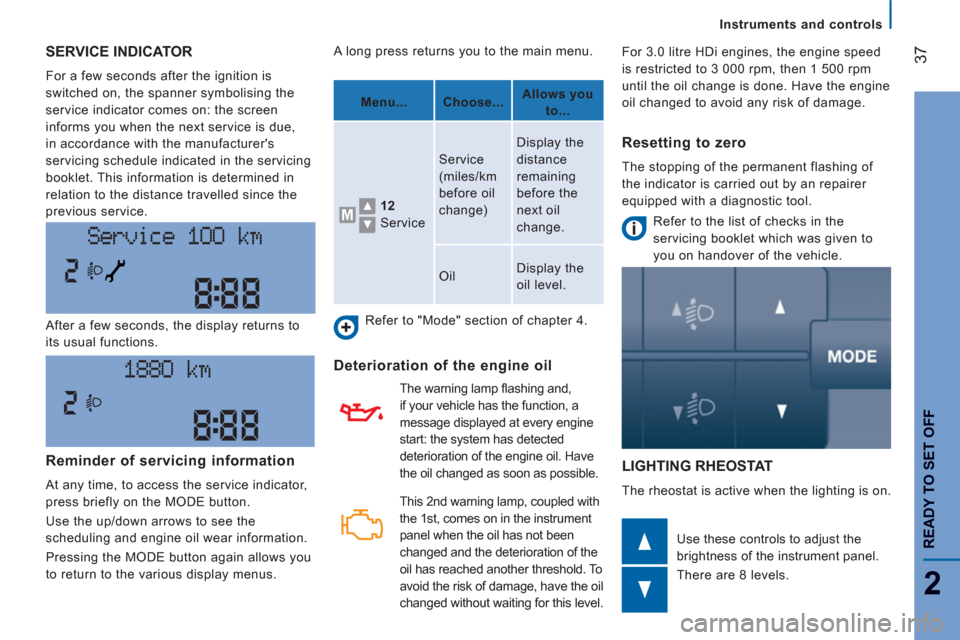
SERVICE INDICATOR
For a few seconds after the ignition is
switched on, the spanner symbolising the
service indicator comes on: the screen
informs you when the next service is due,
in accordance with the manufacturer's
servicing schedule indicated in the servicing
booklet. This information is determined in
relation to the distance travelled since the
previous service.
LIGHTING RHEOSTAT
The rheostat is active when the lighting is on. After a few seconds, the display returns to
its usual functions.
Use these controls to adjust the
brightness of the instrument panel.
There are 8 levels. A long press returns you to the main menu.
Refer to "Mode" section of chapter 4.
Deterioration of the engine oil
Refer to the list of checks in the
servicing booklet which was given to
you on handover of the vehicle.
Reminder of servicing information
At any time, to access the service indicator,
press briefly on the MODE button.
Use the up/down arrows to see the
scheduling and engine oil wear information.
Pressing the MODE button again allows you
to return to the various display menus.
Menu...
Choose...
Allows you
to...
12
Service Service
(miles/km
before oil
change) Display the
distance
remaining
before the
next oil
change.
Oil Display the
oil level.
Resetting to zero
The stopping of the permanent flashing of
the indicator is carried out by an repairer
equipped with a diagnostic tool.
This 2 nd warning lamp, coupled with
the 1 st , comes on in the instrument
panel when the oil has not been
changed and the deterioration of the
oil has reached another threshold. To
avoid the risk of damage, have the oil
changed without waiting for this level. The warning lamp fl ashing and,
if your vehicle has the function, a
message displayed at every engine
start: the system has detected
deterioration of the engine oil. Have
the oil changed as soon as possible. For 3.0 litre HDi engines, the engine speed
is restricted to 3 000 rpm, then 1 500 rpm
until the oil change is done. Have the engine
oil changed to avoid any risk of damage.
Page 45 of 184
43
3
EASE OF USE AND COMFOR
T
Steering mounted controls
AUTOMATIC ILLUMINATION OF HEADLAMPS
If your vehicle is fitted with this function, the
sidelamps and dipped beam headlamps are
switched on automatically if the light is poor.
In fog or snow, the sunshine sensor may
detect sufficient light. Therefore, the lamps
will not be switched on automatically. If
necessary, you must switch on the dipped
beam headlamps manually.
They are switched off when the light returns
to a sufficient level.
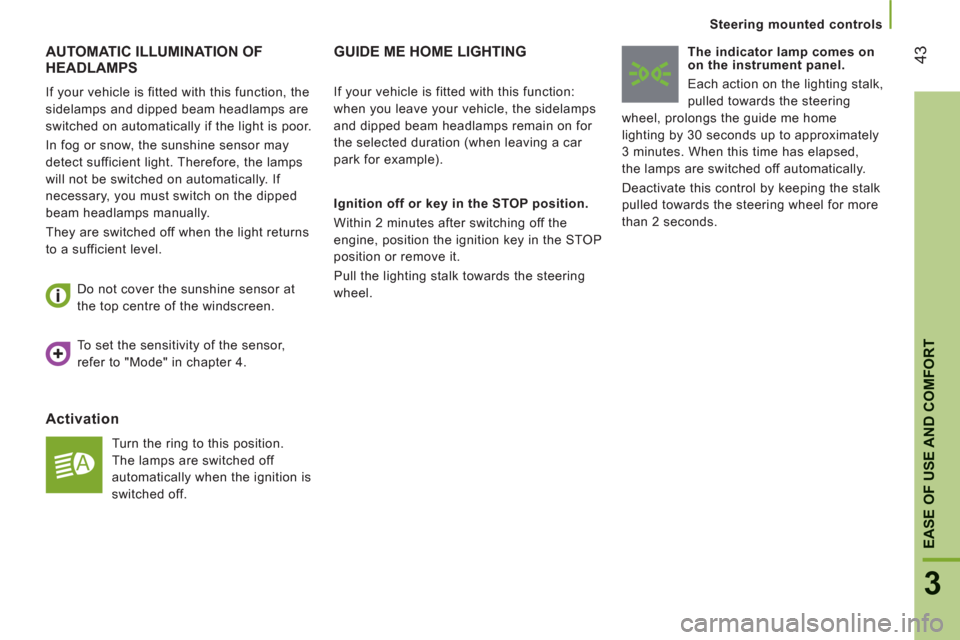
Activation
Turn the ring to this position.
The lamps are switched off
automatically when the ignition is
switched off. Do not cover the sunshine sensor at
the top centre of the windscreen.
GUIDE ME HOME LIGHTING
Ignition off or key in the STOP position.
Within 2 minutes after switching off the
engine, position the ignition key in the STOP
position or remove it.
Pull the lighting stalk towards the steering
wheel.
The indicator lamp comes on
on the instrument panel.
Each action on the lighting stalk,
pulled towards the steering
wheel, prolongs the guide me home
lighting by 30 seconds up to approximately
3 minutes. When this time has elapsed,
the lamps are switched off automatically.
Deactivate this control by keeping the stalk
pulled towards the steering wheel for more
than 2 seconds.
If your vehicle is fitted with this function:
when you leave your vehicle, the sidelamps
and dipped beam headlamps remain on for
the selected duration (when leaving a car
park for example).
To set the sensitivity of the sensor,
refer to "Mode" in chapter 4.
Page 51 of 184
49
3
EASE OF USE AND COMFOR
T
Ventilation
VENTILATION
DEMISTING AND DEFROSTING
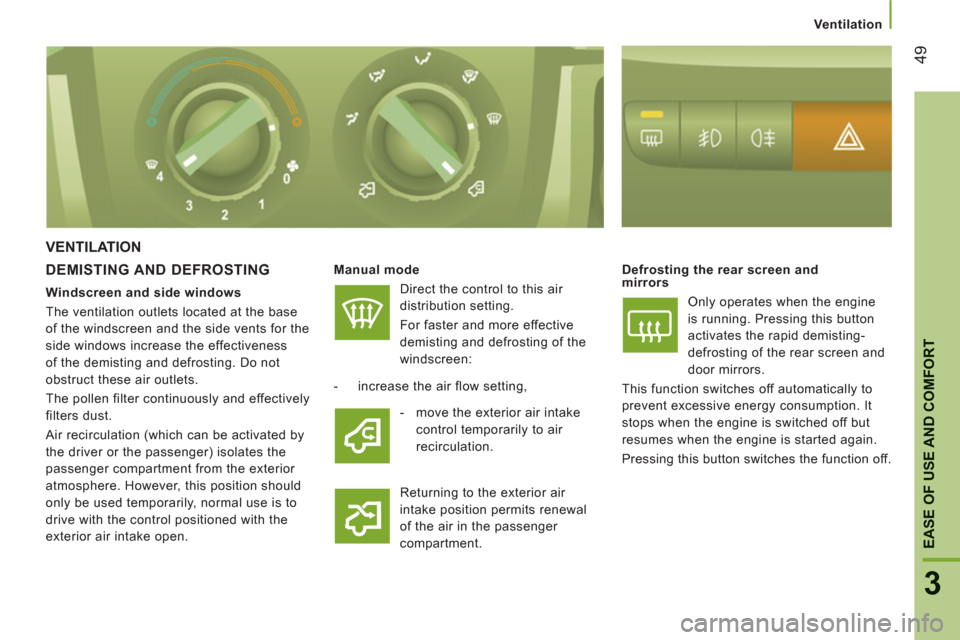
Manual mode
Direct the control to this air
distribution setting.
For faster and more effective
demisting and defrosting of the
windscreen:
Defrosting the rear screen and
mirrors
Only operates when the engine
is running. Pressing this button
activates the rapid demisting-
defrosting of the rear screen and
door mirrors.
This function switches off automatically to
prevent excessive energy consumption. It
stops when the engine is switched off but
resumes when the engine is started again.
Pressing this button switches the function off.
- increase the air flow setting,
Returning to the exterior air
intake position permits renewal
of the air in the passenger
compartment.
Windscreen and side windows
The ventilation outlets located at the base
of the windscreen and the side vents for the
side windows increase the effectiveness
of the demisting and defrosting. Do not
obstruct these air outlets.
The pollen filter continuously and effectively
filters dust.
Air recirculation (which can be activated by
the driver or the passenger) isolates the
passenger compartment from the exterior
atmosphere. However, this position should
only be used temporarily, normal use is to
drive with the control positioned with the
exterior air intake open.
- move the exterior air intake
control temporarily to air
recirculation.
Page 53 of 184
51
3
EASE OF USE AND COMFOR
T
Ventilation
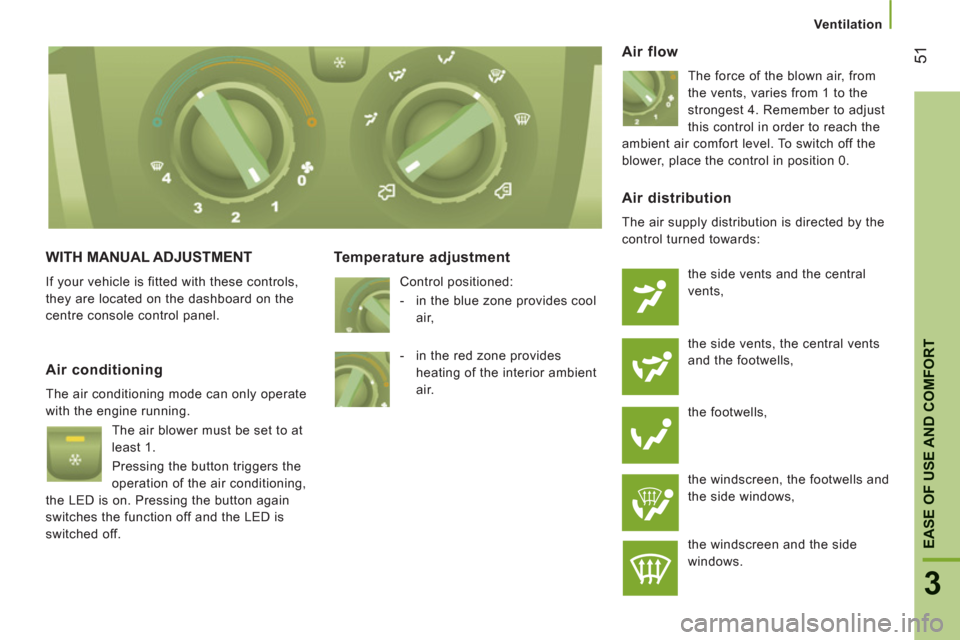
WITH MANUAL ADJUSTMENT
If your vehicle is fitted with these controls,
they are located on the dashboard on the
centre console control panel.
Temperature adjustment
Control positioned:
- in the blue zone provides cool
air,
Air flow
The force of the blown air, from
the vents, varies from 1 to the
strongest 4. Remember to adjust
this control in order to reach the
ambient air comfort level. To switch off the
blower, place the control in position 0.
Air conditioning
The air conditioning mode can only operate
with the engine running.
The air blower must be set to at
least 1.
Pressing the button triggers the
operation of the air conditioning,
the LED is on. Pressing the button again
switches the function off and the LED is
switched off.
Air distribution
The air supply distribution is directed by the
control turned towards:
the side vents and the central
vents,
the side vents, the central vents
and the footwells,
the footwells,
the windscreen, the footwells and
the side windows,
the windscreen and the side
windows.
- in the red zone provides
heating of the interior ambient
air.
Page 54 of 184
Ventilation
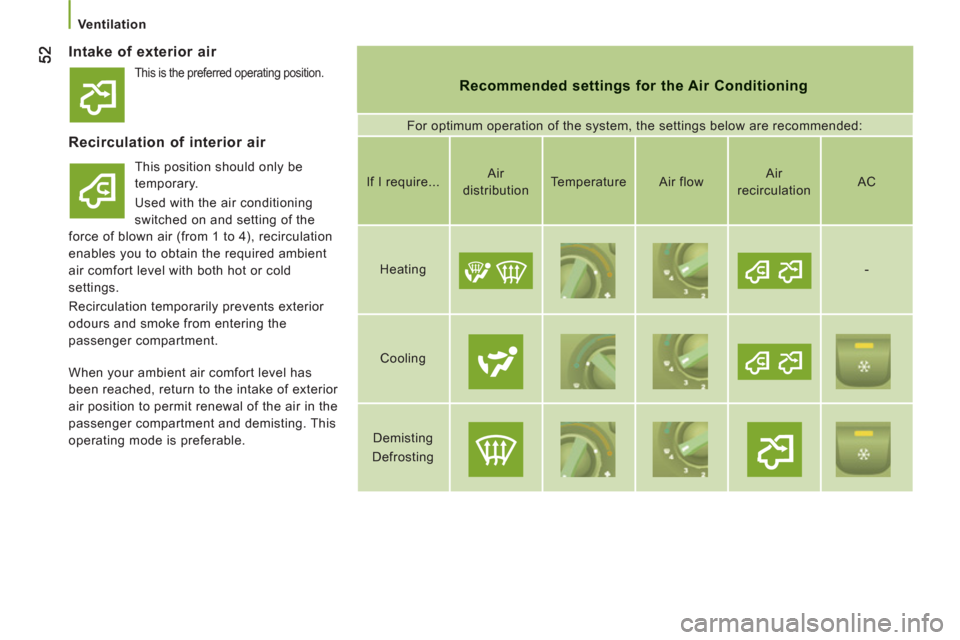
Intake of exterior air
Recommended settings for the Air Conditioning
For optimum operation of the system, the settings below are recommended:
Recirculation of interior air
This position should only be
temporary.
Used with the air conditioning
switched on and setting of the
force of blown air (from 1 to 4), recirculation
enables you to obtain the required ambient
air comfort level with both hot or cold
settings.
Recirculation temporarily prevents exterior
odours and smoke from entering the
passenger compartment.
If I require...
Air
distribution
Temperature
Air flow
Air
recirculation
AC
Heating
-
Cooling
Demisting
Defrosting
When your ambient air comfort level has
been reached, return to the intake of exterior
air position to permit renewal of the air in the
passenger compartment and demisting. This
operating mode is preferable.
This is the preferred operating position.
Page 55 of 184
53
3
EASE OF USE AND COMFOR
T
Ventilation
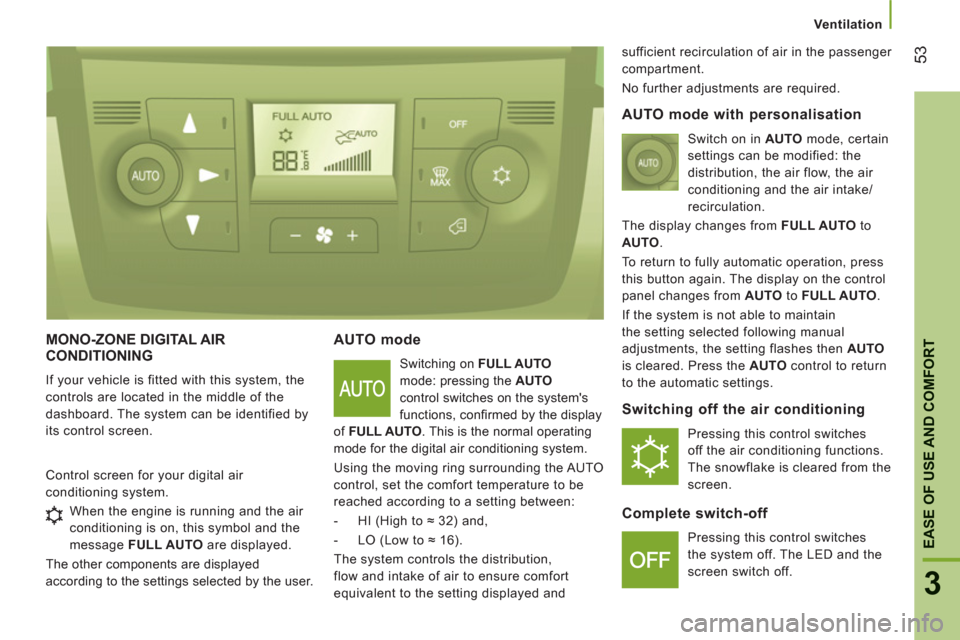
MONO-ZONE DIGITAL AIRCONDITIONING
If your vehicle is fitted with this system, the
controls are located in the middle of the
dashboard. The system can be identified by
its control screen.
AUTO mode
Switching on FULL AUTO
mode: pressing the AUTO
control switches on the system's
functions, confi rmed by the display
of FULL AUTO
. This is the normal operating
mode for the digital air conditioning system.
Using the moving ring surrounding the AUTO
control, set the comfort temperature to be
reached according to a setting between:
- HI (High to ≈ 32) and,
- LO (Low to ≈ 16).
The system controls the distribution,
flow and intake of air to ensure comfort
equivalent to the setting displayed and sufficient recirculation of air in the passenger
compartment.
No further adjustments are required.
Control screen for your digital air
conditioning system.
AUTO mode with personalisation
Switch on in AUTO
mode, certain
settings can be modified: the
distribution, the air flow, the air
conditioning and the air intake/
recirculation.
The display changes from FULL AUTO
to
AUTO
.
To return to fully automatic operation, press
this button again. The display on the control
panel changes from AUTO
to FULL AUTO
.
If the system is not able to maintain
the setting selected following manual
adjustments, the setting flashes then AUTO
is cleared. Press the AUTO
control to return
to the automatic settings.
Switching off the air conditioning
Pressing this control switches
off the air conditioning functions.
The snowflake is cleared from the
screen.
Complete switch-off
Pressing this control switches
the system off. The LED and the
screen switch off. When the engine is running and the air
conditioning is on, this symbol and the
message FULL AUTO
are displayed.
The other components are displayed
according to the settings selected by the user.
Page 57 of 184
55
3
EASE OF USE AND COMFOR
T
Ventilation
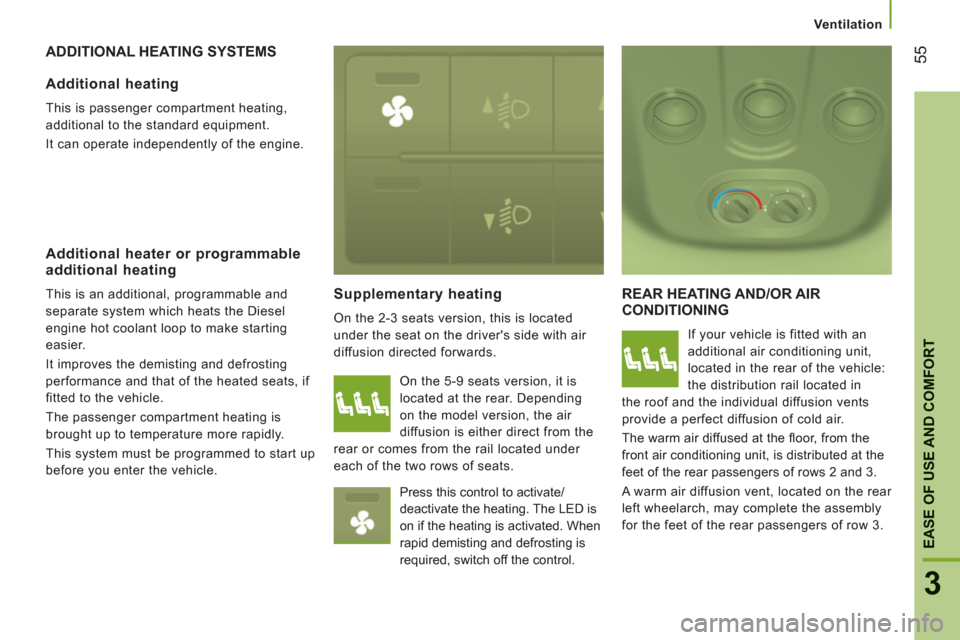
ADDITIONAL HEATING SYSTEMS
Supplementar
y heating
On the 2-3 seats version, this is located
under the seat on the driver's side with air
diffusion directed forwards.
REAR HEATING AND/OR AIR
CONDITIONING
If your vehicle is fitted with an
additional air conditioning unit,
located in the rear of the vehicle:
the distribution rail located in
the roof and the individual diffusion vents
provide a perfect diffusion of cold air.
The warm air diffused at the fl oor, from the
front air conditioning unit, is distributed at the
feet of the rear passengers of rows 2 and 3.
A warm air diffusion vent, located on the rear
left wheelarch, may complete the assembly
for the feet of the rear passengers of row 3.
Additional heating
This is passenger compartment heating,
additional to the standard equipment.
It can operate independently of the engine.
Additional heater or programmableadditional heating
This is an additional, programmable and
separate system which heats the Diesel
engine hot coolant loop to make starting
easier.
It improves the demisting and defrosting
performance and that of the heated seats, if
fitted to the vehicle.
The passenger compartment heating is
brought up to temperature more rapidly.
This system must be programmed to start up
before you enter the vehicle. On the 5-9 seats version, it is
located at the rear. Depending
on the model version, the air
diffusion is either direct from the
rear or comes from the rail located under
each of the two rows of seats.
Press this control to activate/
deactivate the heating. The LED is
on if the heating is activated. When
rapid demisting and defrosting is
required, switch off the control.
Page 76 of 184
74
Trip computer
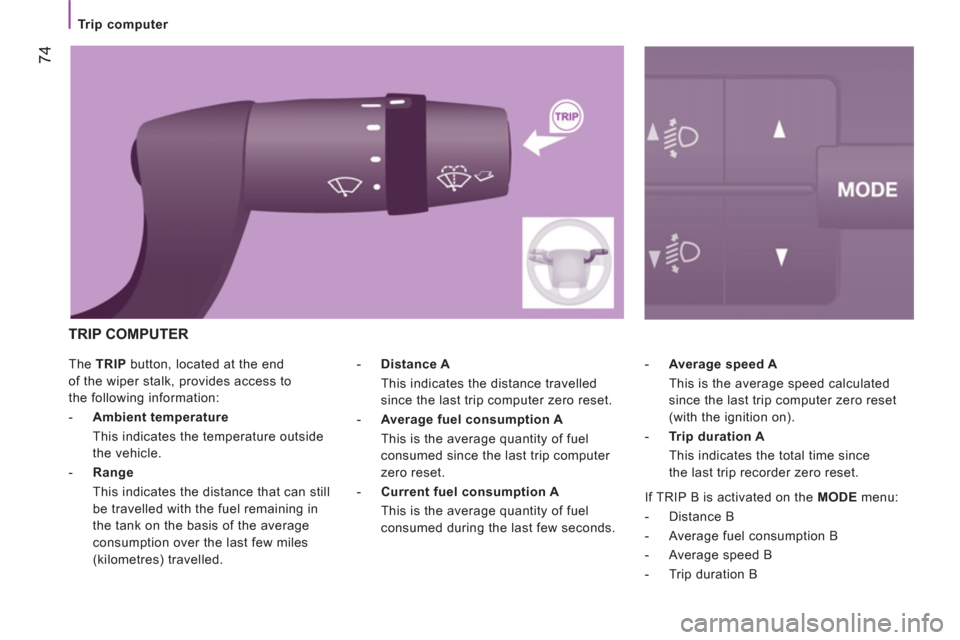
The TRIP
button, located at the end
of the wiper stalk, provides access to
the following information:
- Ambient
temperature
This indicates the temperature outside
the vehicle.
- Range
This indicates the distance that can still
be travelled with the fuel remaining in
the tank on the basis of the average
consumption over the last few miles
(kilometres) travelled.
- Average speed A
This is the average speed calculated
since the last trip computer zero reset
(with the ignition on).
- Trip duration A
This indicates the total time since
the last trip recorder zero reset.
- Distance A
This indicates the distance travelled
since the last trip computer zero reset.
- Average
fuel
consumption A
This is the average quantity of fuel
consumed since the last trip computer
zero reset.
- Current
fuel
consumption A
This is the average quantity of fuel
consumed during the last few seconds.
TRIP COMPUTER
If TRIP B is activated on the MODE
menu:
- Distance B
- Average fuel consumption B
- Average speed B
- Trip duration B
Page 77 of 184
75
4
TECHNOLOGY
on
BOARD
Mode
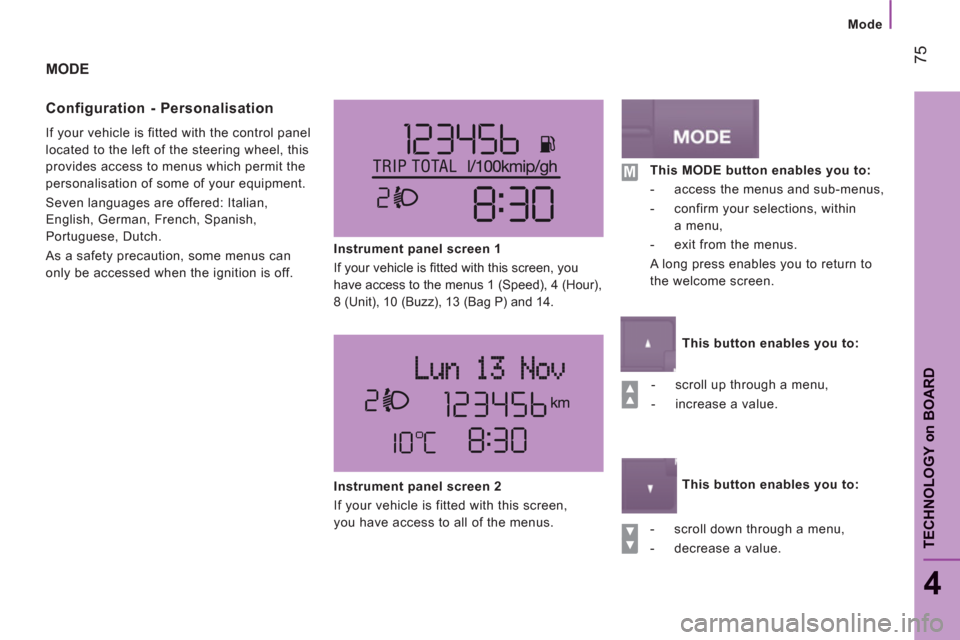
MODE
Confi
guration - Personalisation
If your vehicle is fitted with the control panel
located to the left of the steering wheel, this
provides access to menus which permit the
personalisation of some of your equipment.
Seven languages are offered: Italian,
English, German, French, Spanish,
Portuguese, Dutch.
As a safety precaution, some menus can
only be accessed when the ignition is off.
Instrument panel screen 1
If your vehicle is fi tted with this screen, you
have access to the menus 1 (Speed), 4 (Hour),
8 (Unit), 10 (Buzz), 13 (Bag P) and 14.
- scroll up through a menu,
- increase a value.
- scroll down through a menu,
- decrease a value.
Instrument panel screen 2
If your vehicle is fitted with this screen,
you have access to all of the menus.
This MODE button enables you to:
- access the menus and sub-menus,
- confirm your selections, within
a menu,
- exit from the menus.
A long press enables you to return to
the welcome screen.
This button enables you to:
This button enables you to:
Page 78 of 184
76
Mode
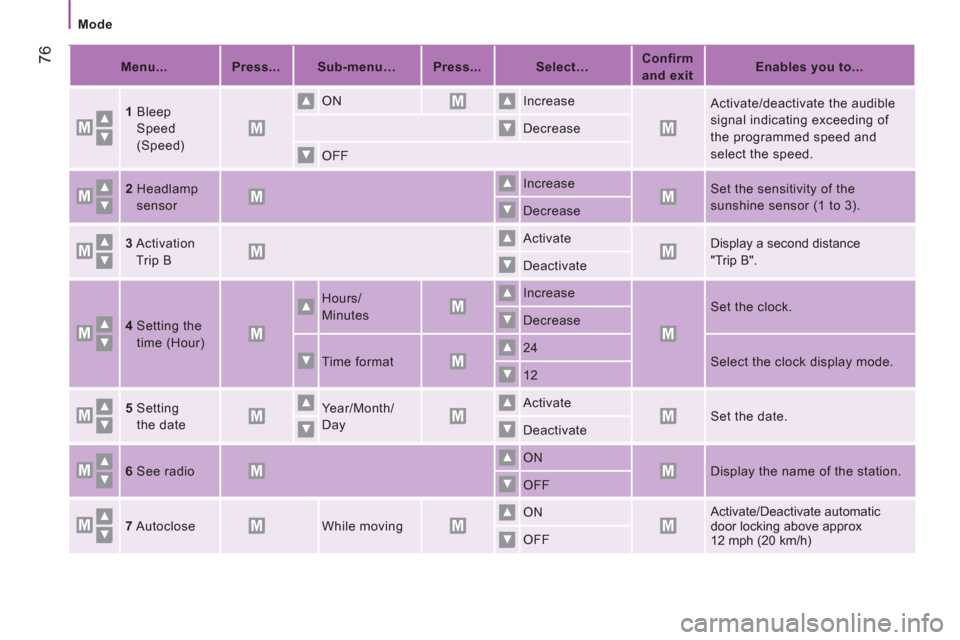
Menu...
Press...
Sub-menu…
Press...
Select…
Confirm
and exit
Enables you to...
1
Bleep
Speed
(Speed)
ON
Increase
Activate/deactivate the audible
signal indicating exceeding of
the programmed speed and
select the speed.
Decrease
OFF
2
Headlamp
sensor
Increase
Set the sensitivity of the
sunshine sensor (1 to 3).
Decrease
3
Activation
Trip B
Activate
Display a second distance
"Trip B".
Deactivate
4
Setting the
time (Hour)
Hours/
Minutes
Increase
Set the clock.
Decrease
Time format
24
Select the clock display mode.
12
5
Setting
the date
Year/Month/
Day
Activate
Set the date.
Deactivate
6
See radio
ON
Display the name of the station.
OFF
7
Autoclose
While moving
ON
Activate/Deactivate automatic
door locking above approx
12 mph (20 km/h) OFF