Reverse Peugeot Boxer 2020 User Guide
[x] Cancel search | Manufacturer: PEUGEOT, Model Year: 2020, Model line: Boxer, Model: Peugeot Boxer 2020Pages: 196, PDF Size: 5.1 MB
Page 116 of 196
11 4
In the event of a breakdown
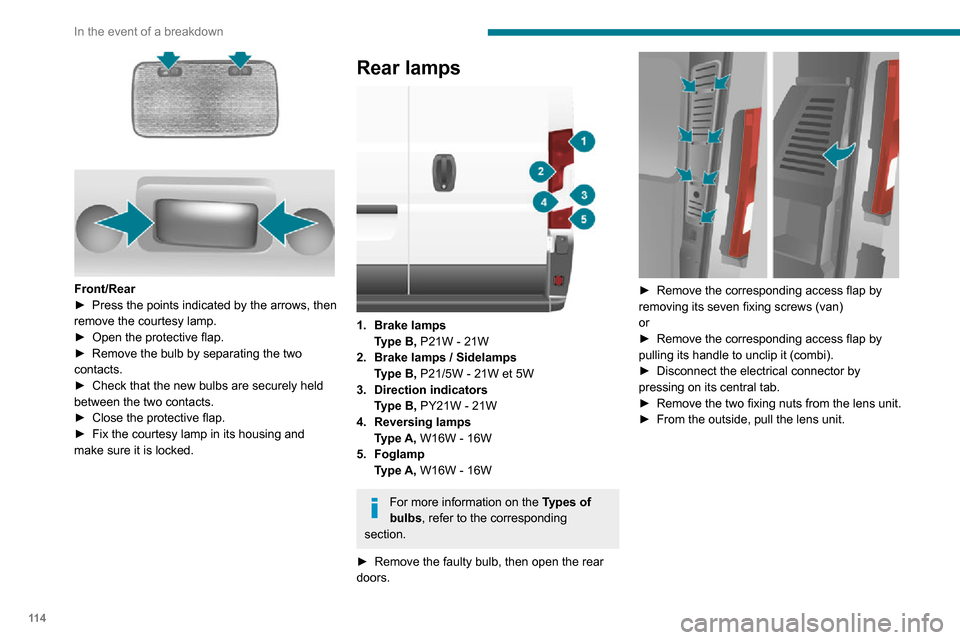
Front/Rear► Press the points indicated by the arrows, then remove the courtesy lamp.► Open the protective flap.► Remove the bulb by separating the two contacts.► Check that the new bulbs are securely held between the two contacts.► Close the protective flap.► Fix the courtesy lamp in its housing and make sure it is locked.
Rear lamps
1.Brake lamps
Type B, P21W - 21W
2. Brake lamps / Sidelamps
Type B, P21/5W - 21W et 5W
3. Direction indicators
Type B, PY21W - 21W
4. Reversing lamps
Type A, W16W - 16W
5. Foglamp
Type A, W16W - 16W
For more information on the Types of
bulbs , refer to the corresponding
section.
► Remove the faulty bulb, then open the rear doors.
► Remove the corresponding access flap by removing its seven fixing screws (van)
or
► Remove the corresponding access flap by pulling its handle to unclip it (combi).► Disconnect the electrical connector by pressing on its central tab.► Remove the two fixing nuts from the lens unit.► From the outside, pull the lens unit.
► Remove the six fixing screws from the bulb holder.► Open the three retaining tabs and pull the bulb holder out of its housing.► Change the bulb.► Carry out the operations in reverse order to reposition each bulb.
Number plate lamps
Type C, C5W - 5W
Page 117 of 196
11 5
In the event of a breakdown
8
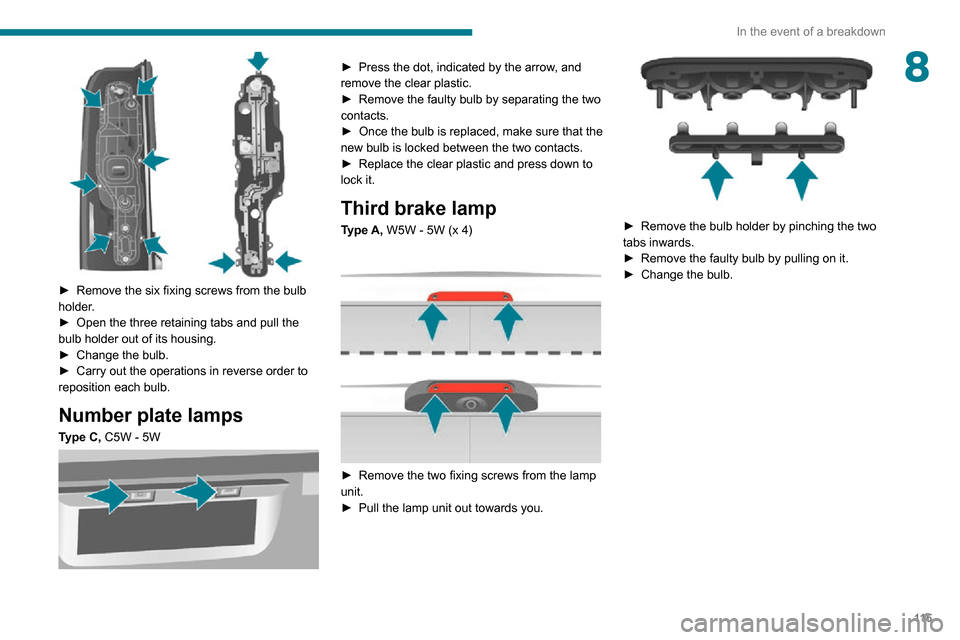
► Remove the six fixing screws from the bulb holder.► Open the three retaining tabs and pull the bulb holder out of its housing.► Change the bulb.► Carry out the operations in reverse order to reposition each bulb.
Number plate lamps
Type C, C5W - 5W
► Press the dot, indicated by the arrow, and remove the clear plastic.► Remove the faulty bulb by separating the two contacts.► Once the bulb is replaced, make sure that the new bulb is locked between the two contacts.► Replace the clear plastic and press down to lock it.
Third brake lamp
Type A, W5W - 5W (x 4)
► Remove the two fixing screws from the lamp unit.► Pull the lamp unit out towards you.
► Remove the bulb holder by pinching the two tabs inwards.► Remove the faulty bulb by pulling on it.► Change the bulb.
Page 139 of 196
137
Special features
10Rear lamps
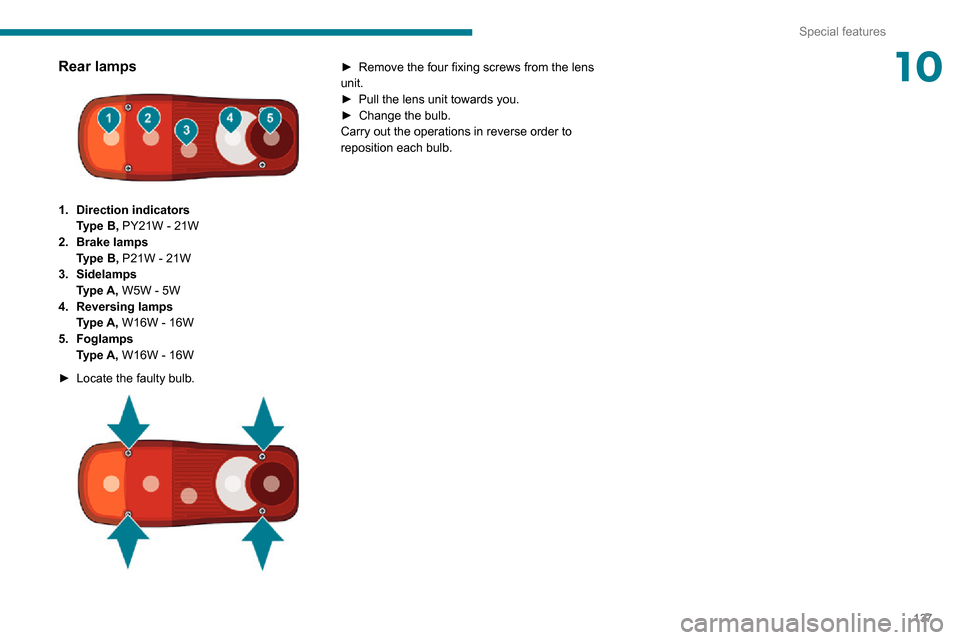
1.Direction indicators
Type B, PY21W - 21W
2. Brake lamps
Type B, P21W - 21W
3. Sidelamps
Type A, W5W - 5W
4. Reversing lamps
Type A, W16W - 16W
5. Foglamps
Type A, W16W - 16W
► Locate the faulty bulb.
► Remove the four fixing screws from the lens unit.► Pull the lens unit towards you.► Change the bulb.Carry out the operations in reverse order to
reposition each bulb.
Page 170 of 196
168
Touch screen audio and telematics system
Enter the telephone number using the keypad,
then press the “Call” button to make the call.
Calling a contact
Press "PHONE".
Press the "Contacts" button or the
"Recent calls" button.
Select the desired contact from the list offered to
start the call.
Vehicle information
Press "MORE" to display the vehicle
information menus:
Exterior temp.
Display the exterior temperature.
Clock
Display the clock.CompassDisplay the direction that you are travelling in.Trip– Current info., Trip A, Trip B.
Display the trip computer.
Press and hold the "Trip A" or "Trip B" button to
reset the trip concerned.
Settings
Press this button to display the settings
menus:
Display
– Brightness.
– Set the brightness of the screen.– Display mode.– Set the display mode.– Language.– Choose the desired language.– Unit of measurement.– Set the display units for consumption, distance and temperature.– Touch screen beep.– Activate or deactivate the audible signal when touching a button on the screen.– Display Trip B.– Display Trip B on the driver's screen.Voice commands– Voice response time.– Set the length of the voice system response.– Display list of commands.– Display suggestions with the different options during a voice session.
Clock and Date
– Time setting and format.– Setting the time.– Display time mode.
– Activate or deactivate the display of the digital clock on the status bar.– Synchro time.– Activate or deactivate the automatic time display.– Date setting.– Set the date.Safety/Assistance– Reversing camera.– Display the reversing camera in reverse.
– Camera delay.– Maintain the on-screen display of the reversing camera for a maximum of 10 seconds
or up to 11 mph (18 km/h).
Lighting
– Daytime running lamps.– Activate or deactivate the automatic illumination of the headlamps when starting.
Doors & locking
– Autoclose.– Activate or deactivate the automatic locking of the doors when the vehicle is moving.Audio– Equalizer.– Adjust the bass, medium and treble.– Balance/Fade.– Adjust the balance of the front and rear speakers, left and right.– Press the button in the centre of the arrows to balance the settings.– Volume/Speed.– Select the desired parameter; the option is highlighted.
– Loudness.– Optimise the quality of low volume audio.– Automatic radio.– Set the radio when starting up or recover the active state when the ignition key was last turned
to STOP.
– Radio switch-off delay.– Set the parameter.– AUX vol. setting.– Set the parameters.