bluetooth Peugeot Boxer 2020 User Guide
[x] Cancel search | Manufacturer: PEUGEOT, Model Year: 2020, Model line: Boxer, Model: Peugeot Boxer 2020Pages: 196, PDF Size: 5.1 MB
Page 171 of 196
169
Touch screen audio and telematics system
12Telephone/Bluetooth®
– Connected tels.– Start the Bluetooth® connection of the selected
mobile device.
– Delete the selected mobile device.– Memorise the selected mobile device in the favourites.– Set the parameters.– Add device.– Add a new mobile device.– Connected audio.– Connect the mobile device only for audio.Radio setting– DAB announcements.– Activate or deactivate the announcements.– Activate or deactivate the options: Alarm, Event announc., Stock market newsflash,
Newsflash, Programme info, Special event, Sport
info, Public transp. info. Alarm announcement,
Weather newsflash.
Restore settings
Restore the default settings of the screen, clock,
sound and radio.
Delete personal data
Delete personal data, Bluetooth
® devices and
built-in presets.
Voice commands
Information - Using the
system
Instead of touching the screen, you can
use your voice to control the system.
To ensure that voice commands are always recognised by the system, please
observe the following recommendations:
– speak in a normal tone of voice,– before speaking, always wait for the "beep" (acoustic signal),– the system is able to recognise the voice commands provided, regardless of gender,
tone and inflection of the voice of the speaker,
– if possible, minimise the noise inside the passenger compartment,– before issuing a voice command, ask any other passengers to refrain from speaking.
Since the system recognises commands
regardless of who is speaking, when several
people are speaking simultaneously, it
is possible for the system to recognise
commands that are different or additional to
what has been requested,
– for optimal operation, you are advised to close the windows and any sunroof present
(on versions/markets where fitted) to avoid
any external source of disturbance.
Steering-mounted controls
This button is used to activate the “Telephone” voice recognition mode that
allows you to make calls, view recent/received/
outgoing calls, display the directory, etc.
This button is used to activate the "Radio/ Media" voice recognition mode that allows
you to tune to a specific radio station or a
specific AM/FM radio frequency, play a track or
an album contained on a USB stick/iPod/MP3/
CD.
Quick voice interaction can be used if
these buttons are depressed during a
voice message from the system; it allows you
to directly say a voice command.
For example, if the system is in the middle
of saying a voice help message and if we
know the command to give the system, by
pressing these buttons, the voice message
is interrupted and it is possible to directly
say the desired voice command (so avoiding
having to listen to the complete voice help
message).
When the system is waiting for a voice
command from the user, pressing these
buttons closes the voice session.
Each time a button is pressed, a "beep"
(acoustic signal) is emitted and the
screen displays a screen page of suggestions
asking the user to say a command.
Page 175 of 196
173
ALPINE® X902D system
13ALPINE® X902D system
Multimedia audio system -
Bluetooth
® telephone- GPS
navigation
For safety reasons, the driver must only
carry out operations that require close
attention with the vehicle stationary.
When the engine is switched off and to
prevent discharging of the battery, the
system switches off after activation of energy
economy mode.
For further information, refer to the
ALPINE user guide at:
https://www.alpine-europe.com
First steps
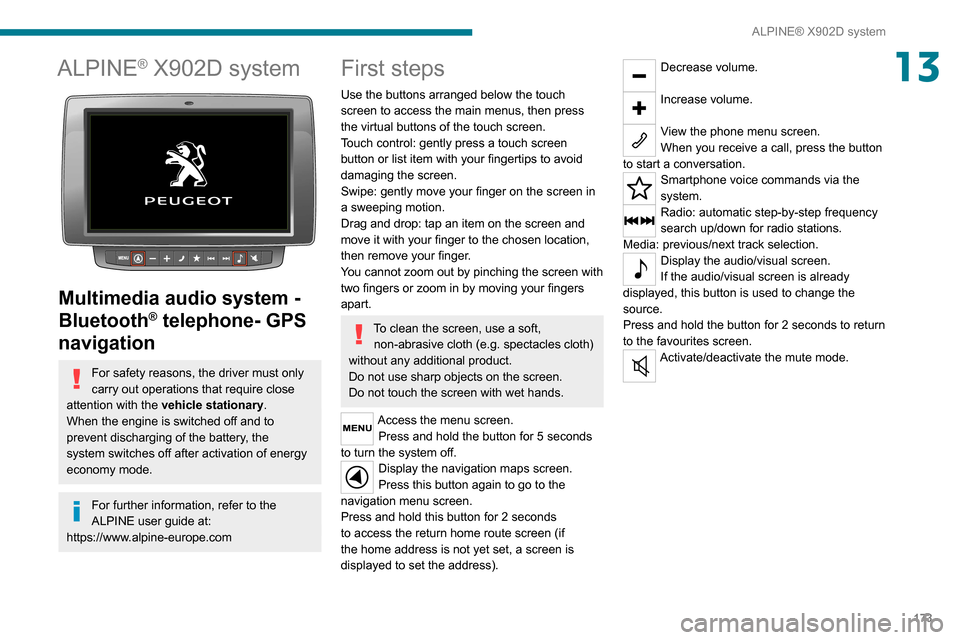
Use the buttons arranged below the touch
screen to access the main menus, then press
the virtual buttons of the touch screen.
Touch control: gently press a touch screen
button or list item with your fingertips to avoid
damaging the screen.
Swipe: gently move your finger on the screen in
a sweeping motion.
Drag and drop: tap an item on the screen and
move it with your finger to the chosen location,
then remove your finger.
You cannot zoom out by pinching the screen with
two fingers or zoom in by moving your fingers
apart.
To clean the screen, use a soft, non-abrasive cloth (e.g. spectacles cloth)
without any additional product.
Do not use sharp objects on the screen.
Do not touch the screen with wet hands.
Access the menu screen. Press and hold the button for 5 seconds
to turn the system off. Display the navigation maps screen.
Press this button again to go to the
navigation menu screen.
Press and hold this button for 2 seconds
to access the return home route screen (if
the home address is not yet set, a screen is
displayed to set the address).
Decrease volume.
Increase volume.
View the phone menu screen.
When you receive a call, press the button
to start a conversation.
Smartphone voice commands via the
system.
Radio: automatic step-by-step frequency
search up/down for radio stations.
Media: previous/next track selection.
Display the audio/visual screen.
If the audio/visual screen is already
displayed, this button is used to change the
source.
Press and hold the button for 2 seconds to return
to the favourites screen.
Activate/deactivate the mute mode.
Page 178 of 196
176
Alphabetical index
A
ABS 52Accessories 51Active Safety Brake 84, 86AdBlue® 101AdBlue® tank 102Adjusting the date 18Adjusting the seat angle 27
Adjusting the seat belt height 55Adjusting the time 18Advice on driving 5, 64–65Airbags 57–59Airbags, curtain 58Airbags, front 57–58Airbags, lateral 58Air conditioning 31, 35–36Air conditioning, additional 35–36Air conditioning, automatic 33Air conditioning, manual 32–33Air vents 31Alarm 24–25Anti-lock braking system (ABS) 52Armrest, front 28ASR 52Assistance, emergency braking 52, 86Audible warning 51Audio streaming (Bluetooth) 162–163Audio system 151
B
Battery 67, 120Battery, 12 V 98, 120Blind spot sensors 83BlueHDi 12, 98Bluetooth (hands-free) 154, 166–167Bluetooth (telephone) 154, 166–167Bonnet 94
Brake discs 99–100Brakes 99–100Braking, automatic emergency 84, 86Brightness 6Bulbs (changing) 111Bulbs (changing, type) 111
C
Cable, audio 153, 162Cable, Jack 153, 162Capacity, fuel tank 90CD 162CD, MP3 162Centre console 4Changing a bulb 111Checking the levels 96–98Checks 98–100Checks, routine 98–100Children 56Child seats 56, 58–59Cigar lighter 43
Collision Risk Alert 84–85Configuration, vehicle 13, 18Container, AdBlue® 101–102Control, heated seats 28Control stalk, lighting 46Control stalk, wipers 49Courtesy lamp, front 38–40, 42Courtesy lamp, rear 43Courtesy lamps 43
Cruise control 78–80
D
DAB (Digital Audio Broadcasting) - Digital radio 161Dashboard 4Daytime running lamps 46Daytime running lamps, LED 46Deactivating the passenger airbag 57, 59Dimensions 129Dipstick 96Direction indicators 46Display screen, instrument panel 6, 69Driving 64–65Driving abroad 46Driving aids camera (warnings) 74Driving aids (recommendations) 73Driving economically 5DSC 52Dynamic stability control (DSC) 52–53