air conditioning PEUGEOT EXPERT 2022 Owner's Manual
[x] Cancel search | Manufacturer: PEUGEOT, Model Year: 2022, Model line: EXPERT, Model: PEUGEOT EXPERT 2022Pages: 324, PDF Size: 10.39 MB
Page 262 of 324
260
3D Connected Navigation
3D Connected Navigation
GPS navigation -
Applications - Multimedia
audio system - Bluetooth
®
telephone
The functions and settings described
vary according to the vehicle version and
configuration, as well as the country of sale.
For safety reasons and because they
require sustained attention by the driver,
the following operations must be carried out
with the vehicle stationary and the ignition
on:
–
Pairing the smartphone with the system via
Bluetooth.
–
Using the smartphone.
–
Connecting to the CarPlay® or Android
Auto applications (certain applications stop
displaying when the vehicle is moving).
–
W
atching a video (the video stops when the
vehicle starts to move again).
–
Changing the system settings and
configuration.
AM and DAB radio are not available on Hybrid vehicles.
The system is protected so that it only operates in the vehicle.
The message Energy economy mode is
displayed when the system is about to go into
standby.
System and map updates can be
downloaded from the Brand's website.
The update procedure is also available there.
The system’s Open Source Software (OSS) source codes are available at the
following addresses:
https://www.groupe-psa.com/fr/oss/
https://www.groupe-psa.com/en/oss/
First steps
With the engine running, a press mutes
the sound.
With the ignition off, a press turns the system on.
Increase or decrease the volume using
the wheel or the "plus" or "minus" buttons
(depending on the equipment).
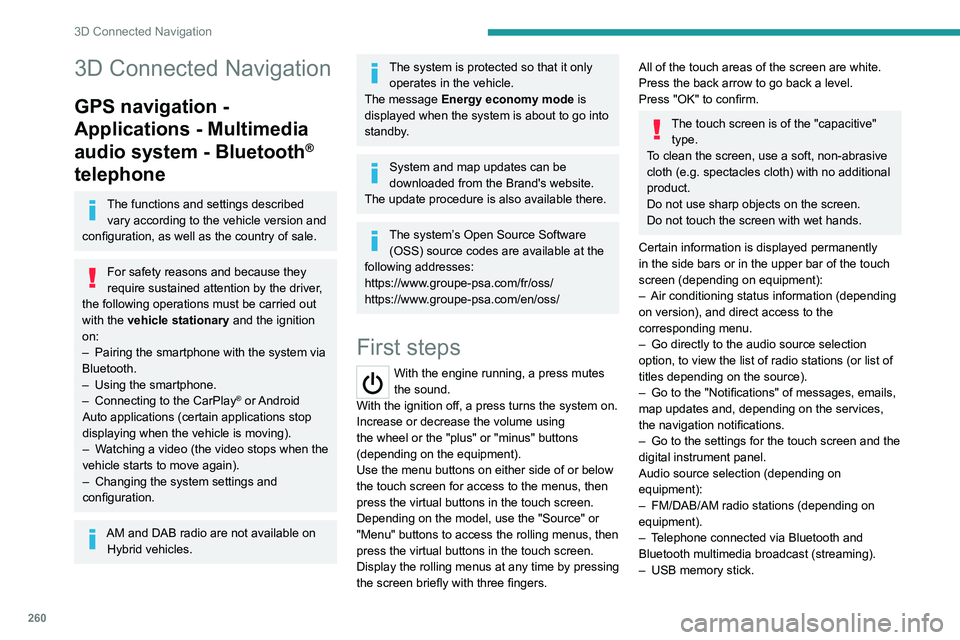
Use the menu buttons on either side of or below
the touch screen for access to the menus, then
press the virtual buttons in the touch screen.
Depending on the model, use the "Source" or
"Menu" buttons to access the rolling menus, then
press the virtual buttons in the touch screen.
Display the rolling menus at any time by pressing
the screen briefly with three fingers.
All of the touch areas of the screen are white.
Press the back arrow to go back a level.
Press "OK" to confirm.
The touch screen is of the "capacitive" type.
To clean the screen, use a soft, non-abrasive
cloth (e.g. spectacles cloth) with no additional
product.
Do not use sharp objects on the screen.
Do not touch the screen with wet hands.
Certain information is displayed permanently
in the side bars or in the upper bar of the touch
screen (depending on equipment):
–
Air conditioning status information (depending
on version), and direct access to the
corresponding menu.
–
Go directly to the audio source selection
option, to view the list of radio stations (or list of
titles depending on the source).
–
Go to the "Notifications" of messages, emails,
map updates and, depending on the services,
the navigation notifications.
–
Go to the settings for the touch screen and the
digital instrument panel.
Audio source selection (depending on
equipment):
–
FM/DAB/AM radio stations (depending on
equipment).
–
T
elephone connected via Bluetooth and
Bluetooth multimedia broadcast (streaming).
–
USB memory stick.
Page 264 of 324
262
3D Connected Navigation
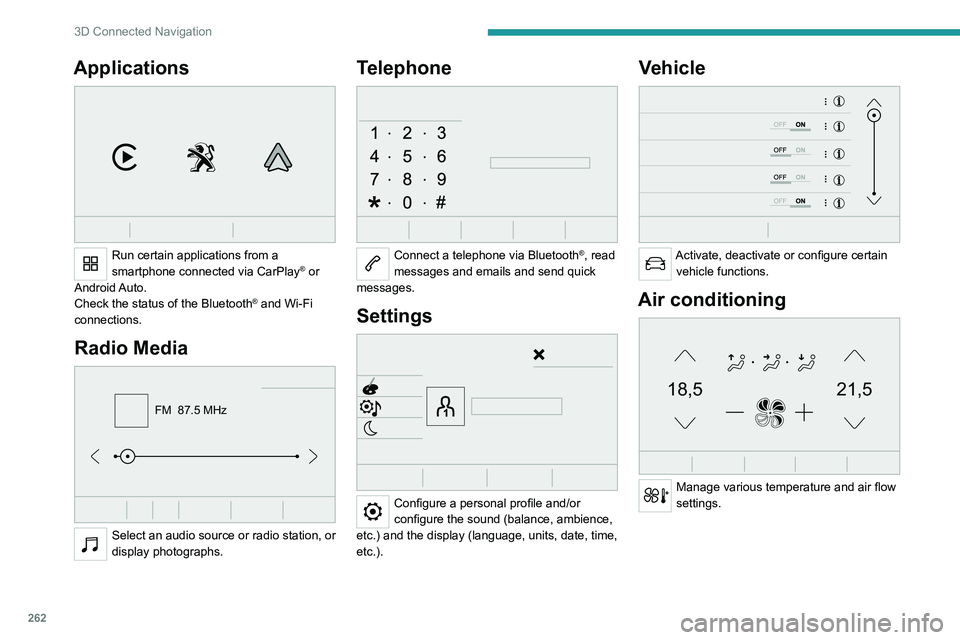
Applications
Run certain applications from a
smartphone connected via CarPlay® or
Android Auto.
Check the status of the
Bluetooth
® and Wi-Fi
connections.
Radio Media
FM 87.5 MHz
Select an audio source or radio station, or
display photographs.
Telephone
Connect a telephone via Bluetooth®, read
messages and emails and send quick
messages.
Settings
Configure a personal profile and/or
configure the sound (balance, ambience,
etc.) and the display (language, units, date, time,
etc.).
Vehicle
Activate, deactivate or configure certain vehicle functions.
Air conditioning
21,518,5
Manage various temperature and air flow
settings.
Page 288 of 324
286
Event data recorders
Depending on the vehicle's equipment level, this
may include:
–
Seat and steering wheel position settings.
–
Chassis and air conditioning settings.
–
Personalised settings such as the interior
lighting.
Y
ou can enter your own data into the functions
of your vehicle's audio and telematic system, as
part of the selected functionalities.
Depending on the vehicle's equipment level,
this
may
include:
–
Multimedia data such as music, videos or
photos to be read by an integrated multimedia
system.
–
Address book data to be used with an
integrated hands-free system or with an
integrated navigation system.
–
Entered destinations.
–
Data regarding the use of online services.
This data for the comfort and infotainment
functions may be stored locally in the vehicle
or saved to a device that you have connected
to the vehicle (e.g.
smartphone, USB memory
stick or MP3 player). Data that you have entered
yourself may be deleted at any time.
This data may also be transmitted outside the
vehicle at your request, particularly when using
online services in line with the settings that you
have selected. Smartphone integration
(e.g.
Android
Auto
® or
Apple
®CarPlay®)
If your vehicle is equipped accordingly, you can
connect your smartphone or another mobile
device to the vehicle in order to operate it using
the vehicle's integrated controls. Images and
sounds from the smartphone can be transmitted
through the audio and telematics system.
Specific information is simultaneously sent
to your smartphone. Depending on the type
of
integration, this includes data such as location,
day/night mode and other general information
about the vehicle. For more information, please
refer to the user instructions for the vehicle or the
audio and telematics system.
Integrating a smartphone allows you to use
its applications, such as a navigation app or
music player. No other
integration between
the smartphone and the vehicle is possible, in
particular active access to vehicle data. How the
data is processed subsequently is determined
by the supplier of the application being used.
The ability the change settings depends on the
application in question and on the operating
system installed on your smartphone.
Online services
If your vehicle is connected to a wireless
network, data can be exchanged between
your vehicle and other systems. Connection
to a wireless network is made possible
via a transmitter located in your vehicle or a mobile
device that you have provided (e.g.
smartphone).
The online services can be used via this wireless
connection.
These include online services and
applications (apps) provided to you by the
Manufacturer or other suppliers.
Exclusive services
As regards the Manufacturer's online services,
the corresponding functions are described by
the Manufacturer in an appropriate medium
(e.g.
handbook, Manufacturer's website) and the
information about data protection is provided.
Personal data may be used for online services.
The exchange of data for this purpose takes
place over a secure connection, using for
example the Manufacturer's dedicated computer
systems. The collection, processing and use of
personal data for the development of services
are carried out solely on the basis of a legal
authorisation, for example in the case of a
legal emergency call system or a contractual
agreement or else under a consent agreement.
You can activate or deactivate the services and
functions (some may be chargeable) and, in
some cases, the vehicle's entire connection to
the wireless network. This does not include the
statutory functions and services such as the
emergency or assistance call system.
Third-party services
If you use online services provided by other
(third-party) suppliers, these services are subject
Page 290 of 324
288
Alphabetical index
180° rear vision 173
A
ABS 99
Accelerated charging unit (Wallbox)
46
Accessories
96
Access to the 3rd row
58, 60
Access to the spare wheel
208–209
Active Safety Brake
163, 165
AdBlue®
18, 62
AdBlue® tank
64
Additive, Diesel
194–195
Adjusting head restraints
50
Adjusting seat
48–49
Adjusting the air distribution
79–80
Adjusting the air flow
79–80
Adjusting the date
26, 258, 280
Adjusting the height and reach
of the steering wheel
52
Adjusting the lumbar support
48
Adjusting the seat angle
48–49
Adjusting the seat belt height
104
Adjusting the temperature
79–80
Adjusting the time
26, 257, 281
Advanced Grip Control
101–102
Advice on care and maintenance
44, 66
Advice on driving
7, 132–133
Airbags
106–108, 110
Airbags, curtain
107–108
Airbags, front
106, 108, 111
Airbags, lateral 107–108
Air conditioning
78–79, 80–83, 81
Air conditioning, digital
82
Air conditioning, dual-zone automatic
79–80
Air conditioning, manual
79, 81
Air intake
79–81
Air vents
78
Alarm
45–46
Android Auto connection
254, 272
Anti-lock braking system (ABS)
99
Anti-pinch
74
Antitheft / Immobiliser
29
Apple CarPlay connection
254, 271
Applications
272
Area, loading
30, 37–38, 72
Armrest, front
50
Assistance call
97
Assistance, emergency braking
99, 165
Audible warning
99
Audio streaming (Bluetooth)
241, 253, 276
B
Battery, 12 V 54, 194–195, 216–219
Battery, ancillaries
216
Battery, charging
218–219
Battery, remote control
36, 85
Bench seat, one-piece, fixed
58–59
Blind, panoramic roof
74
Blind spot monitoring system
169
Blind spot sensors
168
Blinds, side 74
BlueHDi
18, 60, 202
Bluetooth (hands-free)
241–242, 255, 277
Bluetooth (telephone)
255–256, 277–278
Bodywork
66
Bonnet
57
Boot
44
Boot lid
33–34, 35, 44
Brake discs
62
Brake lamps
214, 216
Brakes
62
Braking
146
Braking assistance system
99
Braking, automatic emergency
163, 165
Braking, dynamic emergency
139–140
Brightness
257
Bulbs
212
Bulbs (changing)
211, 214
C
Cable, audio 275
Cable, Jack
275
Capacity, fuel tank
175–176
Cap, fuel filler
175–176
Care of the bodywork
66
CD
240
CD, MP3
240
Central locking
28, 33, 37
Changing a bulb
211, 214, 216
Changing a bulb (side-hinged doors)
214
Page 294 of 324
292
Alphabetical index
Minimum traction battery charge level
(Electric)
20
Mirror, rear view
53
Mirrors, door
52–53, 82, 168–169
Misfuel prevention
42
Mobile application
26, 86, 53
Moduwork
53–55
Motor, electric
136, 58, 229
Mountings,
ISOFIX
116, 124, 126, 127, 127–128
MP3 CD
240
N
Navigation 266–268
Navigation, connected
269–271
Net, cargo
53–55
Net, high load retaining
73
Number plate lamps
215
O
Obstacle detection 169
Oil change
59
Oil consumption
59
OIl, engine
59
On-board tools
203
Opening the bonnet
57
Opening the boot
28–29, 44
Opening the doors
28–29, 38–39
Opening to 180° 43–44
P
Pads, brake 62
Paint
66, 233
Paint colour code
233
Paint, matt
66
Panoramic glass sunroof
74
Parcel shelf, rear
69
Parking brake
138, 61
Parking brake, electric
138–140, 61
Parking sensors, audible and visual
169
Parking sensors, front
170
Parking sensors, rear
170
Passenger compartment temperature
pre-conditioning (Electric)
26, 86
Pedestrian horn (Electric)
99, 133
Plates, identification
233
Player, Apple®
241, 253, 276
Player, MP3 CD
240
Player, USB
239, 252, 275
Port, USB
70, 239, 252, 254, 271, 275
Power
20
Power indicator (Electric)
8, 20
Power mode
147
Pressures, tyres
62, 204, 207, 234
Pre-tensioning seat belts
105
Priming pump
202
Priming the fuel system
202
Profiles
257, 280
Protecting children 106, 108–112,
118–120, 126, 127, 127–128, 128
Public fast charging station
46, 52
Puncture
204–205, 207
R
Radar (warnings) 150
Radio
237–238, 250–251, 274
Radio, digital (Digital Audio
Broadcasting - DAB)
238, 252, 275
Range, AdBlue®
18, 60
RDS
251, 274
Rear screen, demisting
82
Recharging the battery
218–219
Recharging the traction battery
47
Recharging the traction battery
(Electric)
43, 50, 186–187
Recirculation, air
79–81
Recovery
220–222
Recovery of the vehicle
220–221
Reduction of electrical load
54
Regeneration of the particle filter
61
Regenerative braking
(deceleration by engine braking)
145–146
Reinitialisation of the under-inflation
detection system
149
Reinitialising the remote control
36
Reminder, key in ignition
136
Reminder, lighting on
89
Remote control
28–34, 134