manual radio set Peugeot Expert VU 2016 Owner's Manual - RHD (UK, Australia)
[x] Cancel search | Manufacturer: PEUGEOT, Model Year: 2016, Model line: Expert VU, Model: Peugeot Expert VU 2016Pages: 520, PDF Size: 11.2 MB
Page 8 of 520
6
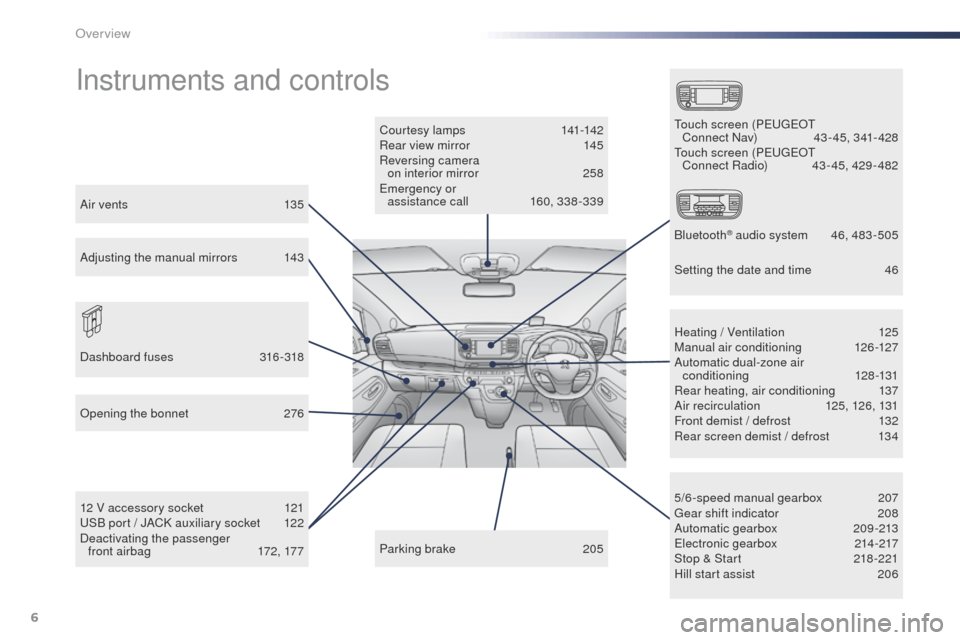
Instruments and controls
Courtesy lamps 141-142
Rear view mirror 1 45
Reversing camera on interior mirror
2
58
em
ergency or
assistance call
1
60, 338 -339
12 V accessory socket
1
21
uS
B port / JACK auxiliary socket
1
22
Deactivating the passenger front airbag
1
72, 177 5/6-speed manual gearbox
2
07
ge
ar shift indicator
2
08
Automatic gearbox
20
9-213
ele
ctronic gearbox
2
14-217
Stop & Start
2
18 -221
Hill start assist
2
06
Heating / Ventilation
1
25
Manual air conditioning
1
26-127
Automatic dual-zone air conditioning
128-131
Rear heating, air conditioning
1
37
Air recirculation
1
25, 126, 131
Front demist / defrost
1
32
Rear screen demist / defrost
1
34
Parking brake
2
05
op
ening the bonnet
2
76
Dashboard fuses
3
16-318to uch screen (Pe ugeot
Connect Nav) 4 3 - 45, 341- 428
to
uch screen (P
e
ugeot
Connect Radio)
4
3 - 45, 429 - 482
Bluetooth
® audio system 4 6, 483 -505
Air vents
1
35
Adjusting the manual mirrors
1
43 Setting the date and time
4
6
over view
Page 391 of 520
389
3
2
4
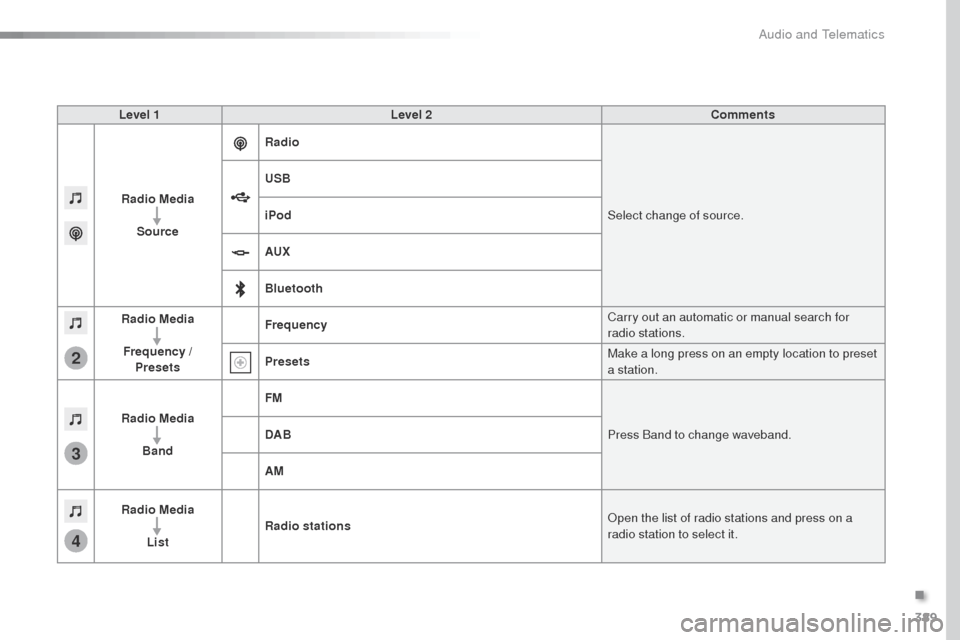
Level 1Level 2 Comments
Radio Media Source Radio
Select change of source.
USB
iPod
AUX
Bluetooth
Radio Media
Frequency / Presets Frequency
Carry out an automatic or manual search for
radio stations.
Presets Make a long press on an empty location to preset
a station.
Radio Media Band FM
Press Band to change waveband.
DAB
AM
Radio Media List Radio stations
op
en the list of radio stations and press on a
radio station to select it.
.
Audio and Telematics
Page 393 of 520
391
5
12
8
6
13
14
15
9
7
10
11
1
1
1
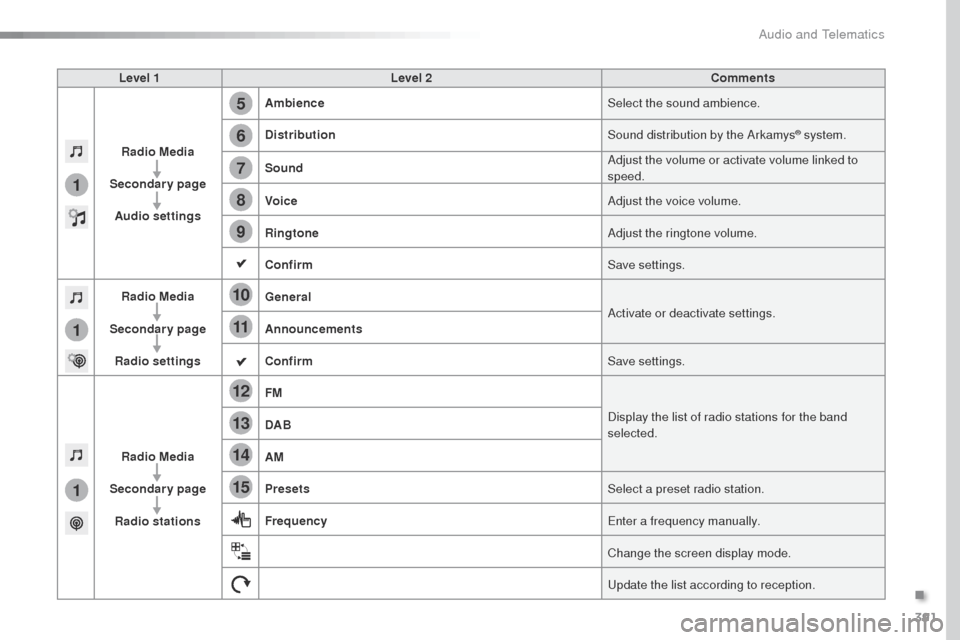
Level 1Level 2 Comments
Radio Media
Secondary page Audio settings Ambience
Select the sound ambience.
Distribution Sound distribution by the Arkamys
® system.
Sound Adjust the volume or activate volume linked to
speed.
Voice Adjust the voice volume.
Ringtone Adjust the ringtone volume.
Confirm Save settings.
Radio Media
Secondary page Radio settings General
Activate or deactivate settings.
Announcements
Confirm Save settings.
Radio Media
Secondary page Radio stations FM
Display the list of radio stations for the band
selected.
DAB
AM
Presets
Select a preset radio station.
Frequency
en
ter a frequency manually.
Change the screen display mode.
up
date the list according to reception.
.
Audio and Telematics
Page 396 of 520
394
1
2
2
2
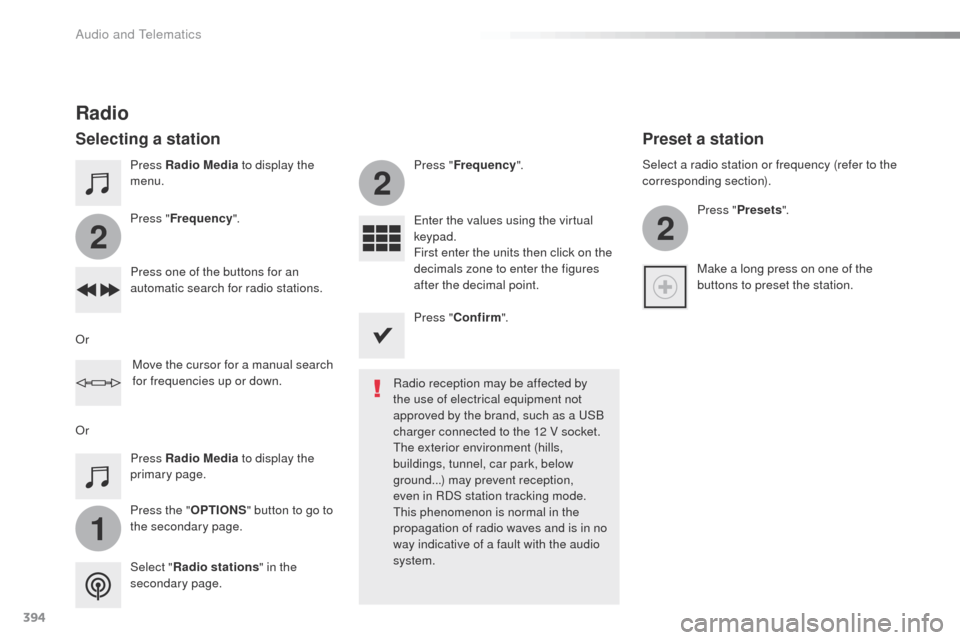
Press Radio Media to display the
menu.
Press the " OPTIONS" button to go to
the secondary page. Press " Frequency ". Press "
Frequency ".
en
ter the values using the virtual
keypad.
First enter the units then click on the
decimals zone to enter the figures
after the decimal point.
Press one of the buttons for an
automatic search for radio stations.
Press Radio Media
to display the
primary page.
Radio
Selecting a station
Radio reception may be affected by
the use of electrical equipment not
approved by the brand, such as a
u
S
B
charger connected to the 12 V socket.
th
e exterior environment (hills,
buildings, tunnel, car park, below
ground...) may prevent reception,
even in RDS station tracking mode.
th
is phenomenon is normal in the
propagation of radio waves and is in no
way indicative of a fault with the audio
system.
Select " Radio stations " in the
secondary page.
o
r
o
r Move the cursor for a manual search
for frequencies up or down. Select a radio station or frequency (refer to the
corresponding section).
Press "Presets ".
Make a long press on one of the
buttons to preset the station.
Preset a station
Press " Confirm ".
Audio and Telematics
Page 447 of 520
445
3
2
4
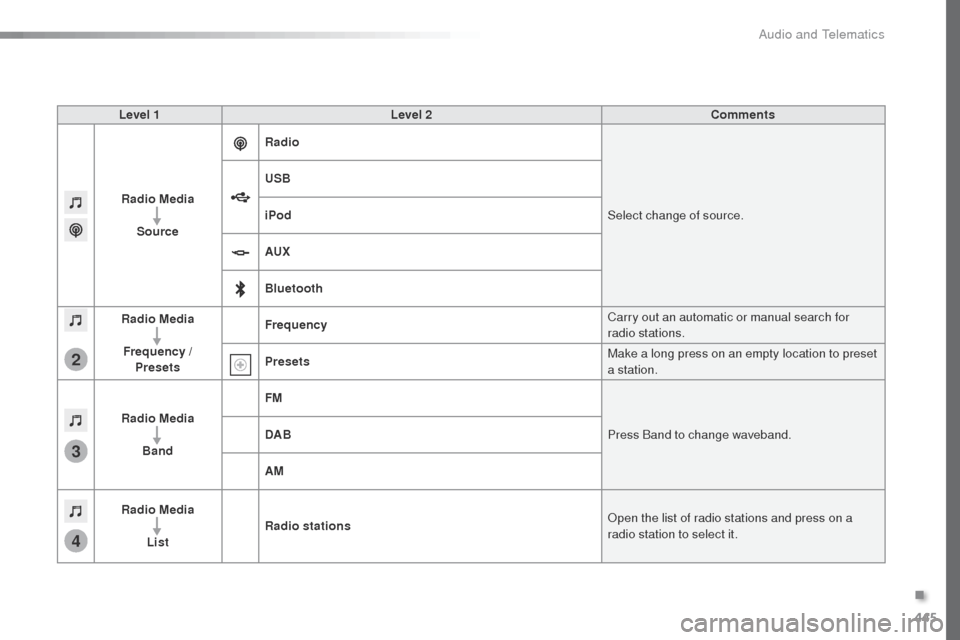
Level 1Level 2 Comments
Radio Media Source Radio
Select change of source.
USB
iPod
AUX
Bluetooth
Radio Media
Frequency / Presets Frequency
Carry out an automatic or manual search for
radio stations.
Presets Make a long press on an empty location to preset
a station.
Radio Media Band FM
Press Band to change waveband.
DAB
AM
Radio Media List Radio stations
op
en the list of radio stations and press on a
radio station to select it.
.
Audio and Telematics
Page 449 of 520
447
1
1
1
5
12
8
6
13
14
15
9
7
10
11
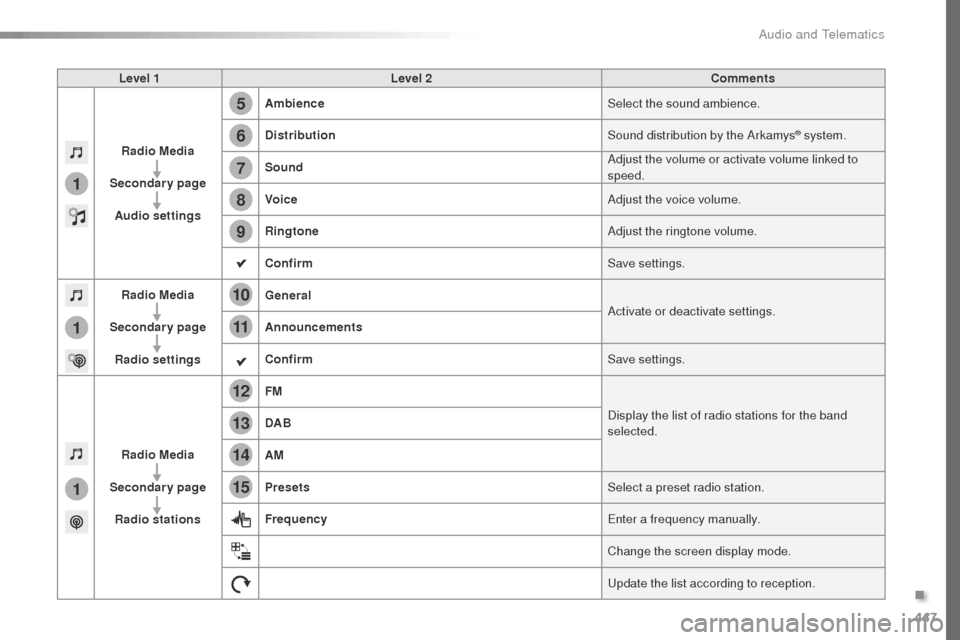
Level 1Level 2 Comments
Radio Media
Secondary page Audio settings Ambience
Select the sound ambience.
Distribution Sound distribution by the Arkamys
® system.
Sound Adjust the volume or activate volume linked to
speed.
Voice Adjust the voice volume.
Ringtone Adjust the ringtone volume.
Confirm Save settings.
Radio Media
Secondary page Radio settings General
Activate or deactivate settings.
Announcements
Confirm Save settings.
Radio Media
Secondary page Radio stations FM
Display the list of radio stations for the band
selected.
DAB
AM
Presets
Select a preset radio station.
Frequency
en
ter a frequency manually.
Change the screen display mode.
up
date the list according to reception.
.
Audio and Telematics
Page 452 of 520
450
1
2
2
2
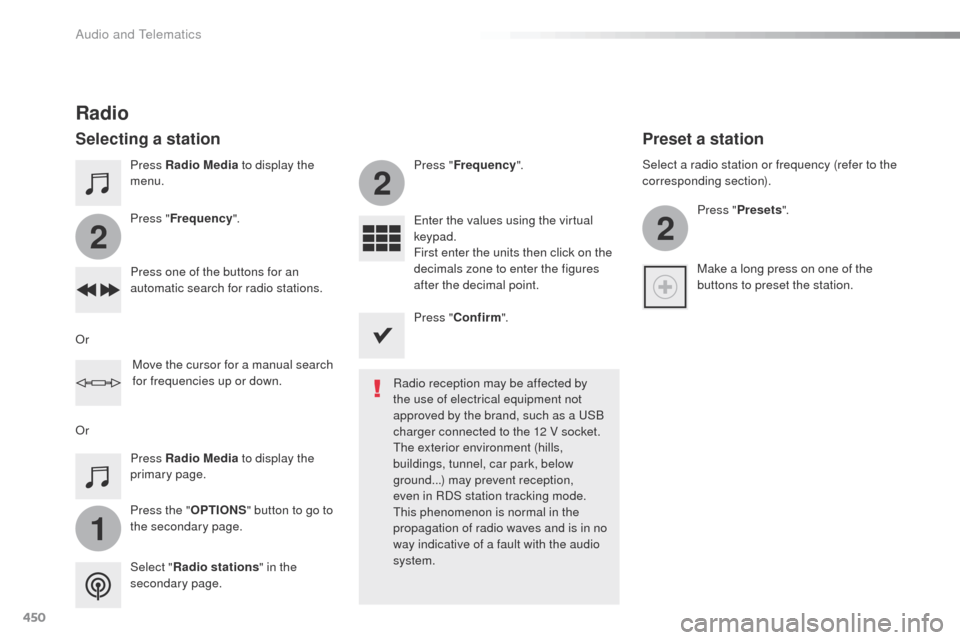
Press Radio Media to display the
menu.
Press the " OPTIONS" button to go to
the secondary page. Press " Frequency ". Press "
Frequency ".
en
ter the values using the virtual
keypad.
First enter the units then click on the
decimals zone to enter the figures
after the decimal point.
Press one of the buttons for an
automatic search for radio stations.
Press Radio Media
to display the
primary page.
Radio
Selecting a station
Radio reception may be affected by
the use of electrical equipment not
approved by the brand, such as a
u
S
B
charger connected to the 12 V socket.
th
e exterior environment (hills,
buildings, tunnel, car park, below
ground...) may prevent reception,
even in RDS station tracking mode.
th
is phenomenon is normal in the
propagation of radio waves and is in no
way indicative of a fault with the audio
system.
Select " Radio stations " in the
secondary page.
o
r
o
r Move the cursor for a manual search
for frequencies up or down. Select a radio station or frequency (refer to the
corresponding section).
Press "Presets ".
Make a long press on one of the
buttons to preset the station.
Preset a station
Press " Confirm ".
Audio and Telematics
Page 486 of 520
484
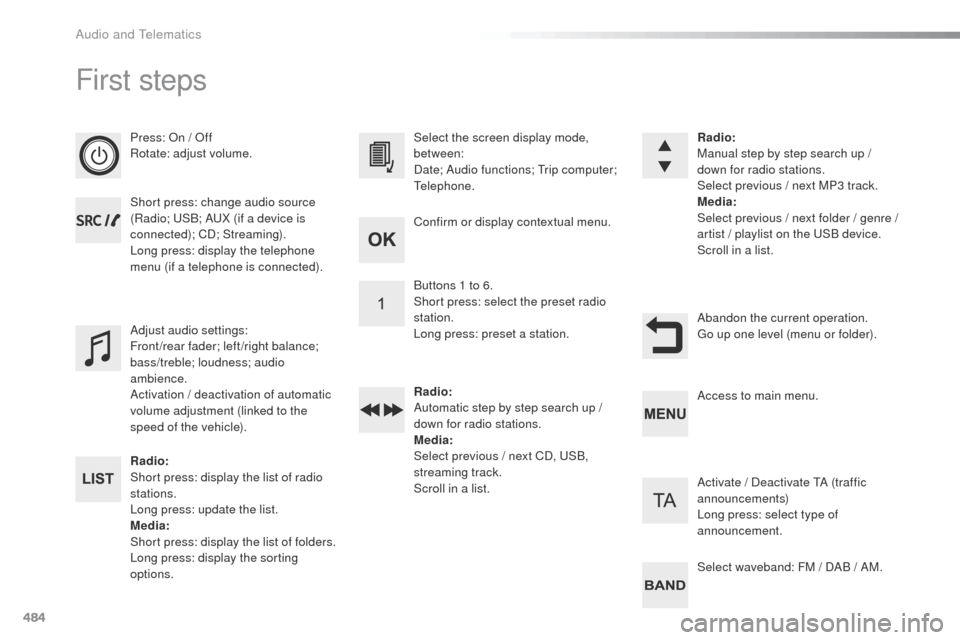
First steps
Press: on / of f
Rotate: adjust volume.
Short press: change audio source
(Radio;
u
S
B; A
uX (
if a device is
connected); CD; Streaming).
Long press: display the telephone
menu (if a telephone is connected).
Radio:
Short press: display the list of radio
stations.
Long press: update the list.
Media:
Short press: display the list of folders.
Long press: display the sorting
options. Select the screen display mode,
between:
Date; Audio functions;
t
r
ip computer;
te
lephone.
Adjust audio settings:
Front/rear fader; left/right balance;
bass/treble; loudness; audio
ambience.
Activation / deactivation of automatic
volume adjustment (linked to the
speed of the vehicle). Radio:
Manual step by step search up /
down for radio stations.
Select previous / next MP3 track.
Media
:
Select previous / next folder / genre /
artist
/ playlist on the u
S
B device.
Scroll in a list.
Abandon the current operation.
go u
p one level (menu or folder).
Confirm or display contextual menu.
Buttons 1 to 6.
Short press: select the preset radio
station.
Long press: preset a station.
Radio
:
Automatic step by step search up /
down for radio stations.
Media :
Select previous / next CD,
u
S
B,
streaming track.
Scroll in a list. Access to main menu.
Activate / Deactivate
t
A (
traffic
announcements)
Long press: select type of
announcement.
Select waveband: FM / DAB / AM.
Audio and telematics
Page 512 of 520
510
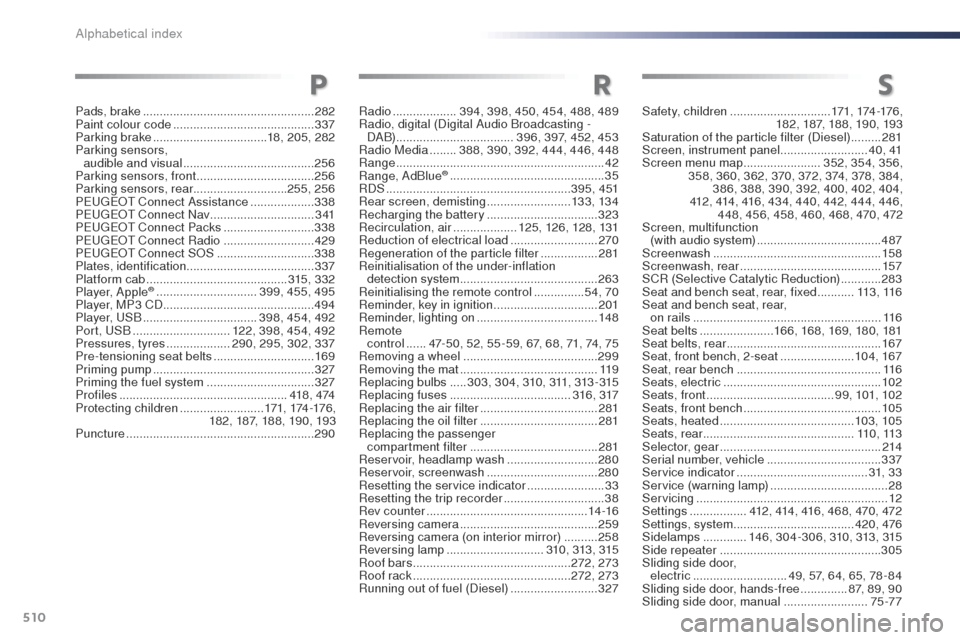
Radio ................... 394, 398, 450, 454, 488, 489
Radio, digital (Digital Audio Broadcasting - DA B) ................................... 396, 397, 452, 453
Radio Media
........388, 390, 392, 444, 446, 448
Range
.............................................................. 42
Range, AdBlue
® ............................... ...............35
RDS
....................................................... 3 9 5 , 4 51
Rear screen, demisting
......................... 13 3, 13 4
Recharging the battery
................................. 32
3
Recirculation, air
................... 125, 126, 128, 131
Reduction of electrical load
.......................... 270
Regeneration of the particle filter
.................2
81
Reinitialisation of the under-inflation detection system
......................................... 263
Reinitialising the remote control
............... 5
4, 70
Reminder, key in ignition
............................... 201
Reminder, lighting on
.................................... 148
Remote control
...... 4
7-50, 52, 55 -59, 67, 68, 71, 74, 75
Removing a wheel
........................................ 299
Removing the mat
......................................... 11 9
Replacing bulbs
..... 3 03, 3 0 4, 310, 311, 313 - 315
Replacing fuses
..............................
......316, 317
Replacing the air filter
................................... 281
Replacing the oil filter
................................... 2
81
Replacing the passenger compartment filter
...................................... 281
Reservoir, headlamp wash
........................... 280
Reservoir, screenwash
................................. 28
0
Resetting the service indicator
.......................33
Resetting the trip recorder
.............................. 38
Rev counter
................................................ 14 -16
Reversing camera
......................................... 259
Reversing camera (on interior mirror)
..........258
Reversing lamp
............................. 31
0, 313, 315
Roof bars
............................................... 2
72, 273
Roof rack
............................................... 2
72, 273
Running out of fuel (Diesel)
.......................... 3
27
RS
Safety, children ..............................17 1, 174 -176 ,
182, 187, 188, 190, 193
Saturation of the particle filter (Diesel)
.........2
81
Screen, instrument panel
..........................4 0 , 41
Screen menu map
.......................352, 354, 356,
358, 360, 362, 370, 372, 374, 378, 384, 386, 388, 390, 392, 400, 402, 404,
412, 414, 416, 434, 440, 442, 444, 446, 448, 456, 458, 460, 468, 470, 472
Screen, multifunction (with audio system)
..................................... 487
Screenwash
.................................................. 15 8
Screenwash, rear
.......................................... 157
SCR (Selective Catalytic Reduction)
............283
Seat and bench seat, rear, fixed
........... 11
3 , 11 6
Seat and bench seat, rear,
on rails
........................................................ 11 6
Seat belts
...................... 1
66, 168, 169, 180, 181
Seat belts, rear
.............................................. 167
Seat, front bench, 2-seat
......................104, 167
Seat, rear bench
........................................... 11 6
Seats, electric
............................................... 102
Seats, front
...............................
.......99, 101, 102
Seats, front bench
......................................... 105
Seats, heated
........................................ 103, 105
Seats, rear
............................................. 11 0 , 113
Selector, gear
................................................ 214
Serial number, vehicle
.................................. 3
37
Service indicator
....................................... 31, 3 3
Service (warning lamp)
................................... 28
S
ervicing
...............................
..........................12
Settings
...............
..412, 414, 416, 468, 470, 472
Settings, system
.................................... 420, 476
Sidelamps
.............146, 304-306, 310, 313, 315
Side repeater
..............................
..................305
Sliding side door, electric
............................ 49, 57, 64, 65, 78 - 84
Sliding side door, hands-free
..............87
, 89, 90
Sliding side door, manual
.........................75 -77
Pads, brake
................................................... 282
Paint colour code
.......................................... 337
Parking brake
.................................. 18, 205, 282
Parking sensors, audible and visual
....................................... 256
Parking sensors, front
................................... 256
Parking sensors, rear ............................255, 256
P
e
ugeot
Connect Assistance
................... 338
P
e
ugeot
Connect Nav
............................... 3
41
P
e
ugeot
Connect Packs
........................... 338
P
e
ugeot
Connect Radio
........................... 429
P
e
ugeot
Connect S
oS
............................. 33
8
Plates, identification ...................................... 337
Platform cab
.......................................... 3
15, 332
Player, Apple
® .............................. 3 99, 455, 495
Player, MP3 CD ............................................. 494
Player,
u
S
B
.................................. 398, 454, 492
Port,
u
S
B
............................. 1
22, 398, 454, 492
Pressures, tyres
................... 290, 295, 302, 337
Pre-tensioning seat belts
.............................. 169
Priming pump
................................................ 327
Priming the fuel system
................................ 327
Profiles
.................................................. 418 , 474
Protecting children
......................... 171, 174 -176 ,
182, 187, 188, 190, 193
Puncture
........................................................ 290
P
Alphabetical index