lock Peugeot Partner 2011 - RHD (UK, Australia) Owner's Guide
[x] Cancel search | Manufacturer: PEUGEOT, Model Year: 2011, Model line: Partner, Model: Peugeot Partner 2011Pages: 200, PDF Size: 7.41 MB
Page 109 of 200
107
CHECK
S
6
Checks
CHECKS
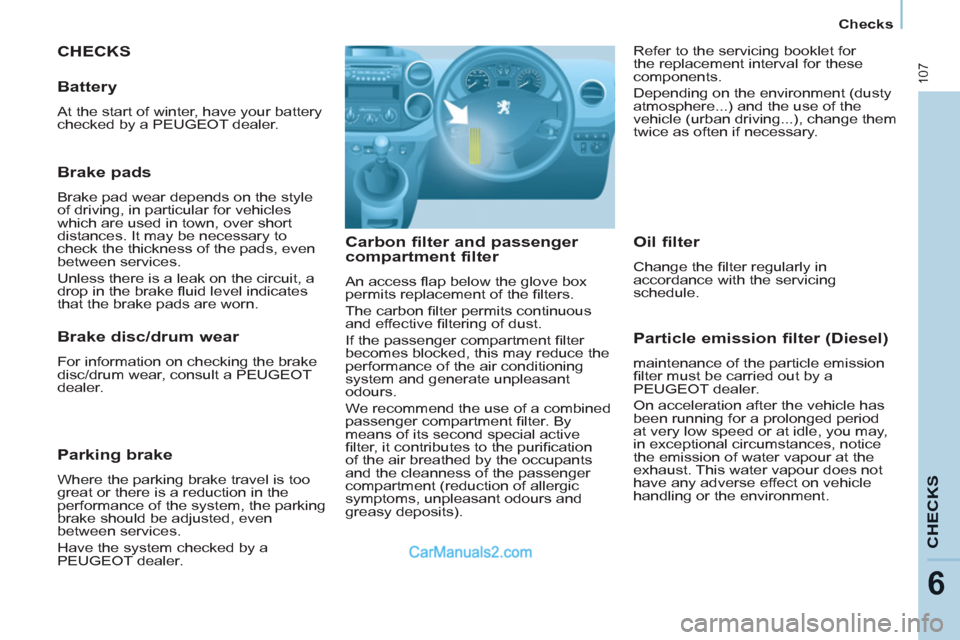
Carbon filter and passenger
compartment filter
An access fl ap below the glove box
permits replacement of the fi lters.
The carbon fi lter permits continuous
and effective fi ltering of dust.
If the passenger compartment fi lter
becomes blocked, this may reduce the
performance of the air conditioning
system and generate unpleasant
odours.
We recommend the use of a combined
passenger compartment fi lter. By
means of its second special active
fi lter, it contributes to the purifi cation
of the air breathed by the occupants
and the cleanness of the passenger
compartment (reduction of allergic
symptoms, unpleasant odours and
greasy deposits).
Particle emission filter (Diesel)
maintenance of the particle emission
fi lter must be carried out by a
PEUGEOT dealer.
On acceleration after the vehicle has
been running for a prolonged period
at very low speed or at idle, you may,
in exceptional circumstances, notice
the emission of water vapour at the
exhaust. This water vapour does not
have any adverse effect on vehicle
handling or the environment.
Battery
At the start of winter, have your battery
checked by a PEUGEOT dealer.
Brake pads
Brake pad wear depends on the style
of driving, in particular for vehicles
which are used in town, over short
distances. It may be necessary to
check the thickness of the pads, even
between services.
Unless there is a leak on the circuit, a
drop in the brake fl uid level indicates
that the brake pads are worn.
Brake disc/drum wear
For information on checking the brake
disc/drum wear, consult a PEUGEOT
dealer.
Parking brake
Where the parking brake travel is too
great or there is a reduction in the
performance of the system, the parking
brake should be adjusted, even
between services.
Have the system checked by a
PEUGEOT dealer.
Oil filter
Change the fi lter regularly in
accordance with the servicing
schedule. Refer to the servicing booklet for
the replacement interval for these
components.
Depending on the environment (dusty
atmosphere...) and the use of the
vehicle (urban driving...), change them
twice as often if necessary.
Page 111 of 200
109
6
Fuel
FILLING WITH FUEL
Low fuel level
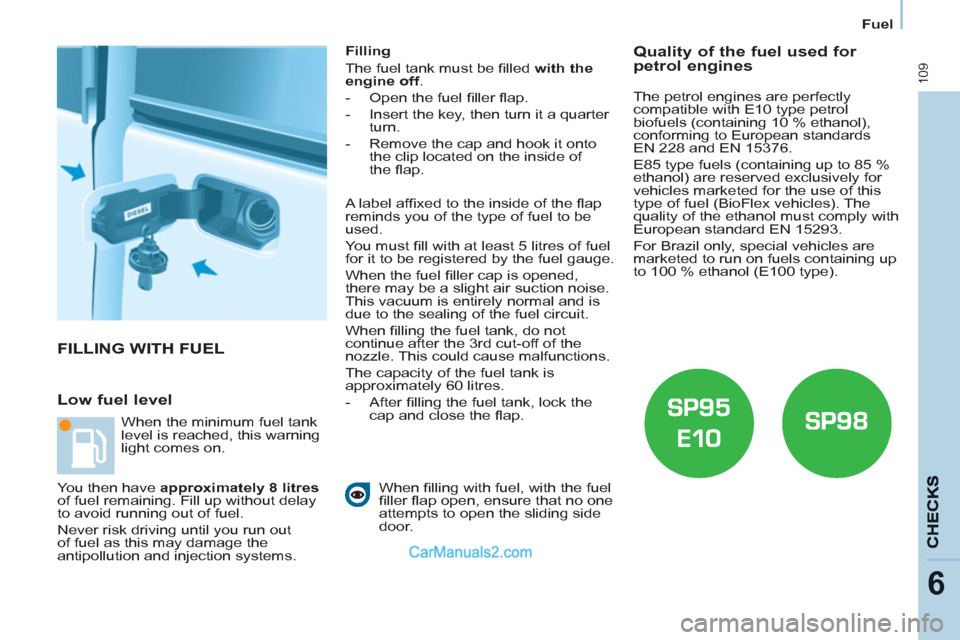
Filling
The fuel tank must be fi lled with the
engine off
.
- Open the fuel fi ller fl ap.
- Insert the key, then turn it a quarter
turn.
- Remove the cap and hook it onto
the clip located on the inside of
the fl ap.
When fi lling with fuel, with the fuel
fi ller fl ap open, ensure that no one
attempts to open the sliding side
door. When the minimum fuel tank
level is reached, this warning
light comes on.
You then have approximately 8 litres
of fuel remaining. Fill up without delay
to avoid running out of fuel.
Never risk driving until you run out
of fuel as this may damage the
antipollution and injection systems.
Quality of the fuel used for
petrol engines
A label affi xed to the inside of the fl ap
reminds you of the type of fuel to be
used.
You must fi ll with at least 5 litres of fuel
for it to be registered by the fuel gauge.
When the fuel fi ller cap is opened,
there may be a slight air suction noise.
This vacuum is entirely normal and is
due to the sealing of the fuel circuit.
When fi lling the fuel tank, do not
continue after the 3 rd cut-off of the
nozzle. This could cause malfunctions.
The capacity of the fuel tank is
approximately 60 litres.
- After fi lling the fuel tank, lock the
cap and close the fl ap.
The petrol engines are perfectly
compatible with E10 type petrol
biofuels (containing 10 % ethanol),
conforming to European standards
EN 228 and EN 15376.
E85 type fuels (containing up to 85 %
ethanol) are reserved exclusively for
vehicles marketed for the use of this
type of fuel (BioFlex vehicles). The
quality of the ethanol must comply with
European standard EN 15293.
For Brazil only, special vehicles are
marketed to run on fuels containing up
to 100 % ethanol (E100 type).
Page 119 of 200
11 7
QUICK HEL
P
7
Changing a bulb
CHANGING A BULB
Type B
Bayonet bulb: press
on the bulb then turn it
anticlockwise.
Type A
All glass bulb: pull gently
as it is fi tted by pressure.
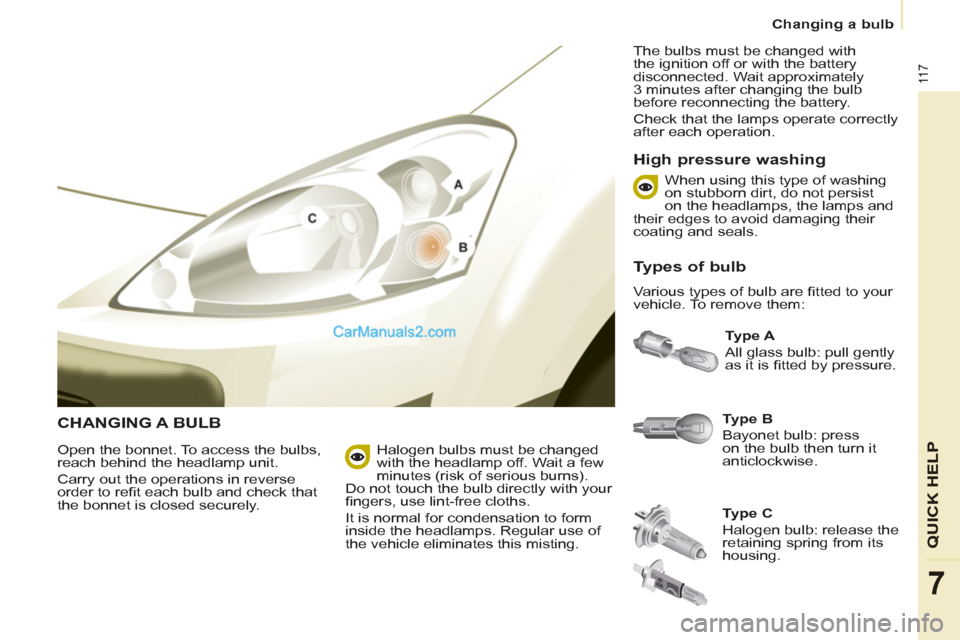
Open the bonnet. To access the bulbs,
reach behind the headlamp unit.
Carry out the operations in reverse
order to refi t each bulb and check that
the bonnet is closed securely.
Type C
Halogen bulb: release the
retaining spring from its
housing.
Halogen bulbs must be changed
with the headlamp off. Wait a few
minutes (risk of serious burns).
Do not touch the bulb directly with your
fi ngers, use lint-free cloths.
It is normal for condensation to form
inside the headlamps. Regular use of
the vehicle eliminates this misting. The bulbs must be changed with
the ignition off or with the battery
disconnected. Wait approximately
3 minutes after changing the bulb
before reconnecting the battery.
Check that the lamps operate correctly
after each operation.
High pressure washing
Types of bulb
Various types of bulb are fi tted to your
vehicle. To remove them: When using this type of washing
on stubborn dirt, do not persist
on the headlamps, the lamps and
their edges to avoid damaging their
coating and seals.
Page 120 of 200
11 8
Changing a bulb
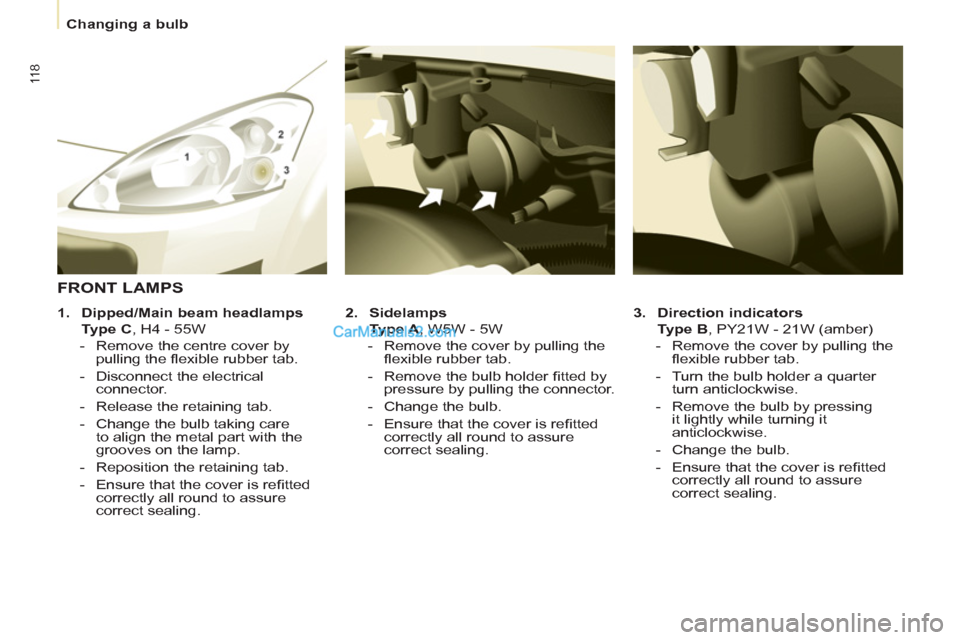
3.
Direction indicators
Type B
, PY21W - 21W (amber)
- Remove the cover by pulling the
fl exible rubber tab.
- Turn the bulb holder a quarter
turn anticlockwise.
- Remove the bulb by pressing
it lightly while turning it
anticlockwise.
- Change the bulb.
- Ensure that the cover is refi tted
correctly all round to assure
correct sealing.
2.
Sidelamps
Ty p e A
, W5W - 5W
- Remove the cover by pulling the
fl exible rubber tab.
- Remove the bulb holder fi tted by
pressure by pulling the connector.
- Change the bulb.
- Ensure that the cover is refi tted
correctly all round to assure
correct sealing.
FRONT LAMPS
1.
Dipped/Main beam headlamps
Type C
, H4 - 55W
- Remove the centre cover by
pulling the fl exible rubber tab.
- Disconnect the electrical
connector.
- Release the retaining tab.
- Change the bulb taking care
to align the metal part with the
grooves on the lamp.
- Reposition the retaining tab.
- Ensure that the cover is refi tted
correctly all round to assure
correct sealing.
Page 122 of 200
120
Changing a bulb
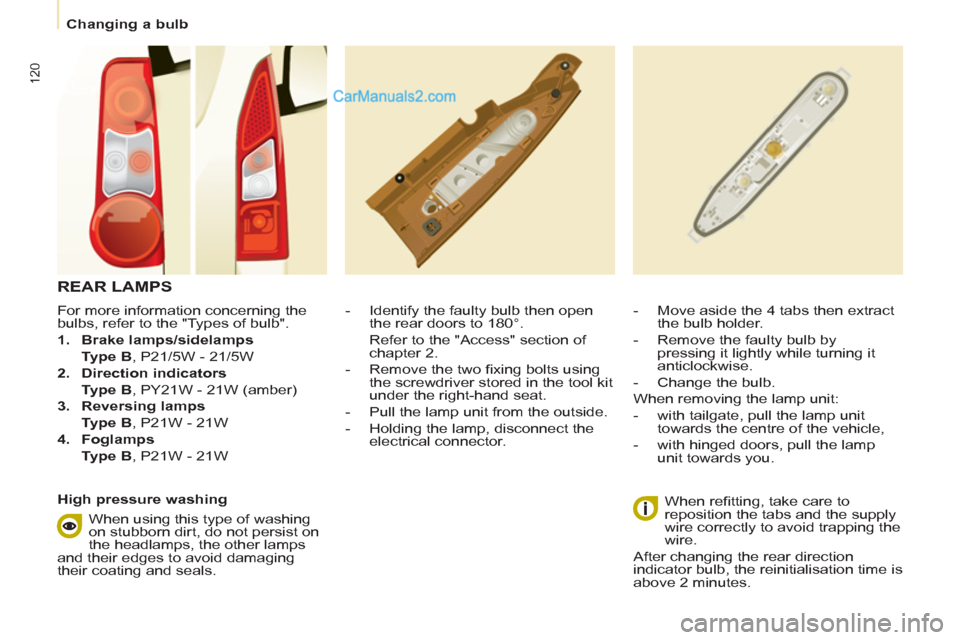
For more information concerning the
bulbs, refer to the "Types of bulb".
1.
Brake lamps/sidelamps
Type B
, P21/5W - 21/5W
2.
Direction indicators
Type B
, PY21W - 21W (amber)
3.
Reversing lamps
Type B
, P21W - 21W
4.
Foglamps
Type B
, P21W - 21W
- Identify the faulty bulb then open
the rear doors to 180°.
Refer to the "Access" section of
chapter 2.
- Remove the two fi xing bolts using
the screwdriver stored in the tool kit
under the right-hand seat.
- Pull the lamp unit from the outside.
- Holding the lamp, disconnect the
electrical connector.
- Move aside the 4 tabs then extract
the bulb holder.
- Remove the faulty bulb by
pressing it lightly while turning it
anticlockwise.
- Change the bulb.
When removing the lamp unit:
- with tailgate, pull the lamp unit
towards the centre of the vehicle,
- with hinged doors, pull the lamp
unit towards you.
When refi tting, take care to
reposition the tabs and the supply
wire correctly to avoid trapping the
wire.
After changing the rear direction
indicator bulb, the reinitialisation time is
above 2 minutes.
REAR LAMPS
High pressure washing
When using this type of washing
on stubborn dirt, do not persist on
the headlamps, the other lamps
and their edges to avoid damaging
their coating and seals.
Page 123 of 200
121
QUICK HELP
7
Changing a bulb
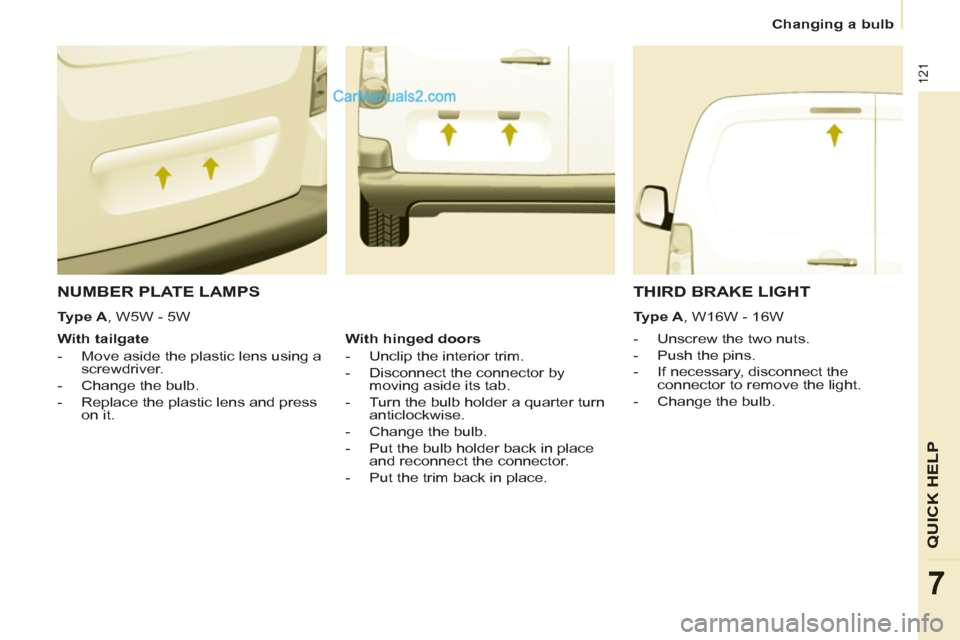
NUMBER PLATE LAMPS
- Unscrew the two nuts.
- Push the pins.
- If necessary, disconnect the
connector to remove the light.
- Change the bulb.
With tailgate
- Move aside the plastic lens using a
screwdriver.
- Change the bulb.
- Replace the plastic lens and press
on it.
THIRD BRAKE LIGHT
Ty p e A
, W16W - 16W
With hinged doors
- Unclip the interior trim.
- Disconnect the connector by
moving aside its tab.
- Turn the bulb holder a quarter turn
anticlockwise.
- Change the bulb.
- Put the bulb holder back in place
and reconnect the connector.
- Put the trim back in place.
Type A
, W5W - 5W
Page 125 of 200
123
QUICK HEL
P
7
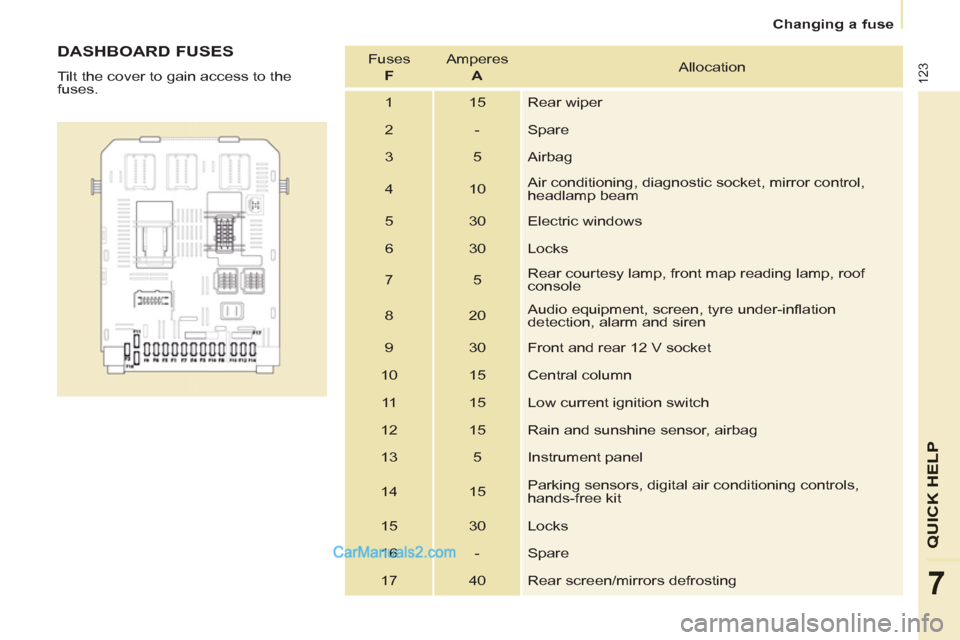
DASHBOARD FUSES
Tilt the cover to gain access to the
fuses. Fuses
F
Amperes
A
Allocation
1 15 Rear wiper
2 - Spare
3 5 Airbag
4 10 Air conditioning, diagnostic socket, mirror control,
headlamp beam
5 30 Electric windows
6 30 Locks
7 5 Rear courtesy lamp, front map reading lamp, roof
console
8 20 Audio equipment, screen, tyre under-infl ation
detection, alarm and siren
9 30 Front and rear 12 V socket
10 15 Central column
11 15 Low current ignition switch
12 15 Rain and sunshine sensor, airbag
13 5 Instrument panel
14 15 Parking sensors, digital air conditioning controls,
hands-free kit
15 30 Locks
16 - Spare
17 40 Rear screen/mirrors defrosting
Changing a fuse
Page 129 of 200
127
QUICK HELP
7
Having your vehicle towed
Without lifting
(4 wheels on the road)
You should always use a towbar.
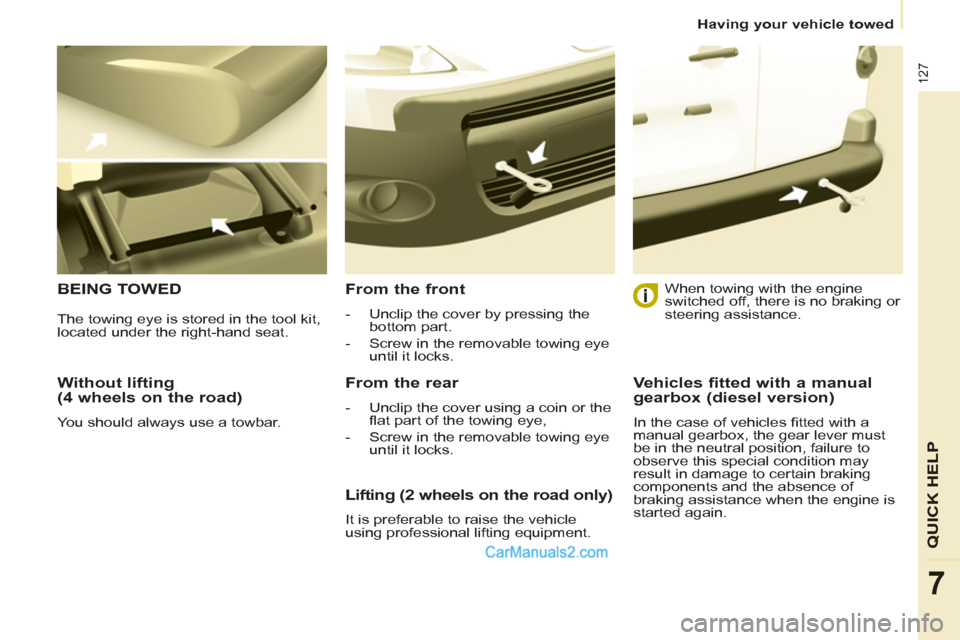
BEING TOWED
From the front
- Unclip the cover by pressing the
bottom part.
- Screw in the removable towing eye
until it locks.
From the rear
- Unclip the cover using a coin or the
fl at part of the towing eye,
- Screw in the removable towing eye
until it locks.
When towing with the engine
switched off, there is no braking or
steering assistance.
Lifting (2 wheels on the road only)
It is preferable to raise the vehicle
using professional lifting equipment. The towing eye is stored in the tool kit,
located under the right-hand seat.
Vehicles fitted with a manual
gearbox (diesel version)
In the case of vehicles fi tted with a
manual gearbox, the gear lever must
be in the neutral position, failure to
observe this special condition may
result in damage to certain braking
components and the absence of
braking assistance when the engine is
started again.
Page 143 of 200
03
9.7
GENERAL OPERATION
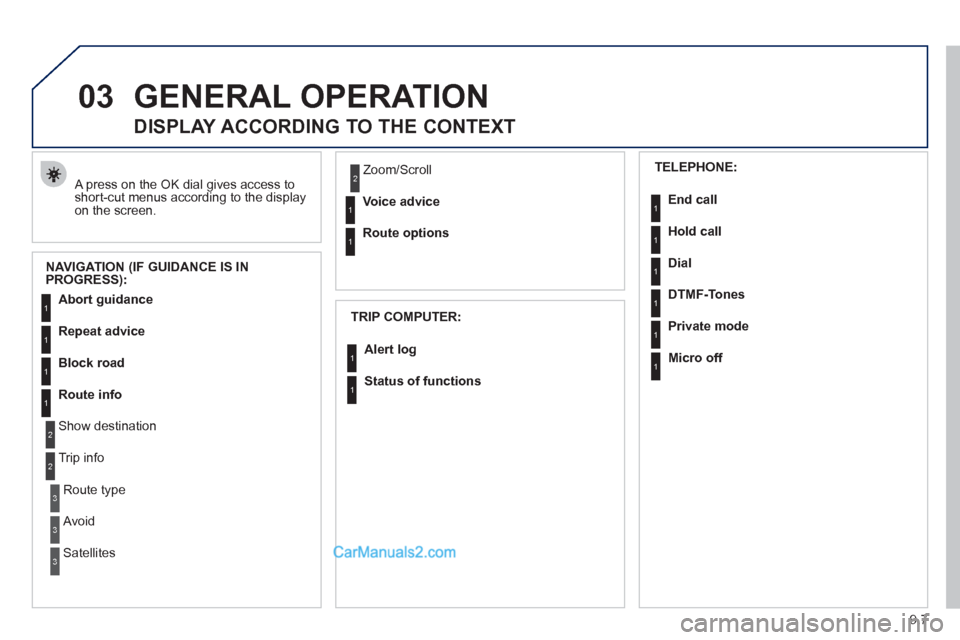
A press on the OK dial gives access to short-cut menus according to the displayon the screen.
DISPLAY ACCORDING TO THE CONTEXT
NAVIGATION (IF GUIDANCE IS IN
PROGRESS):
TRIP COMPUTER:
Abort guidance
Repeat advice
Block road
Route info
Show destination
Trip info
Route t
ype
Avoid
SatellitesZ
oom/Scroll
Voice advice
Route options
Alert log
Status of functions
1
2
3
3
2
1
1
1
3
1
1
1
1
2
TELEPHONE:
End call
Hold call
Dial
DTMF-Tones
Private mod
e
Micro off
1
1
1
1
1
1
Page 168 of 200
9.32
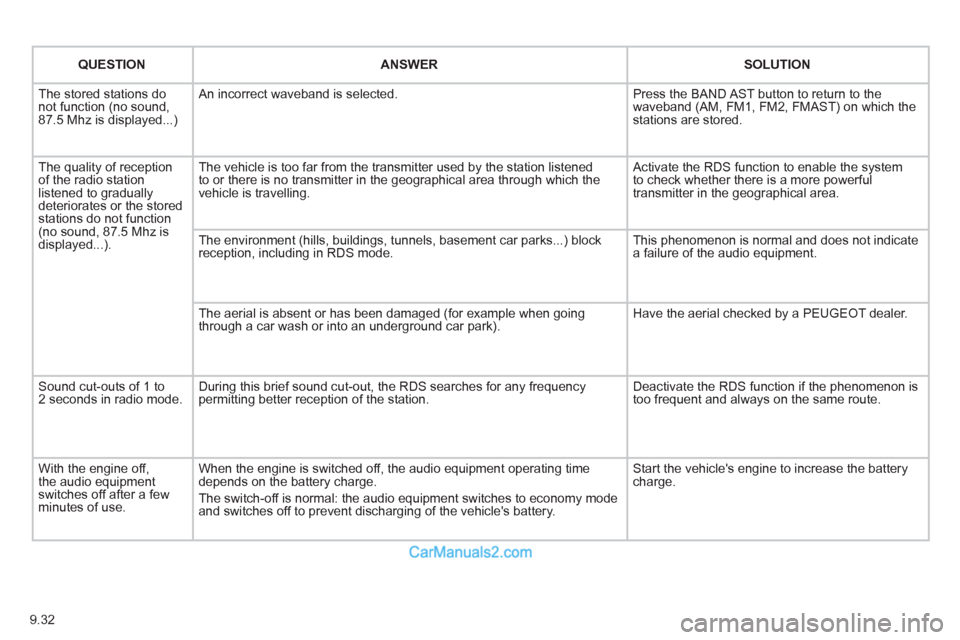
QUESTIONANSWERSOLUTION
The stored stations donot function (no sound, 87.5 Mhz is displayed...)
An incorrect waveband is selected.
Press the BAND AST button to return to the waveband (AM, FM1, FM2, FMAST) on which thestations are stored.
The quality of receptionof the radio station listened to graduallydeteriorates or the stored stations do not function(no sound, 87.5 Mhz is displayed...).
The vehicle is too far from the transmitter used by the station listenedto or there is no transmitter in the geographical area through which the vehicle is travelling.
Activate the RDS function to enable the system to check whether there is a more powerful transmitter in the geographical area.
The environment (hills, buildings, tunnels, basement car parks...) block reception, including in RDS mode.
This phenomenon is normal and does not indicate a failure of the audio equipment.
The aerial is absent or has been damaged (for example when goingthrough a car wash or into an underground car park).
Have the aerial checked by a PEUGEOT dealer.
Sound cut-outs of 1 to2 seconds in radio mode.During this brief sound cut-out, the RDS searches for any frequency permitting better reception of the station.
Deactivate the RDS function if the phenomenon is too frequent and always on the same route.
With the engine off, the audio equipment switches off after a few minutes of use.
When the engine is switched off, the audio equipment operating timedepends on the battery charge.
The switch-off is normal: the audio equipment switches to economy mode and switches off to prevent discharging of the vehicle's battery.
Start the vehicle's engine to increase the batterycharge.