Side lamp Peugeot Partner 2019 Owner's Manual
[x] Cancel search | Manufacturer: PEUGEOT, Model Year: 2019, Model line: Partner, Model: Peugeot Partner 2019Pages: 312, PDF Size: 9.56 MB
Page 4 of 312
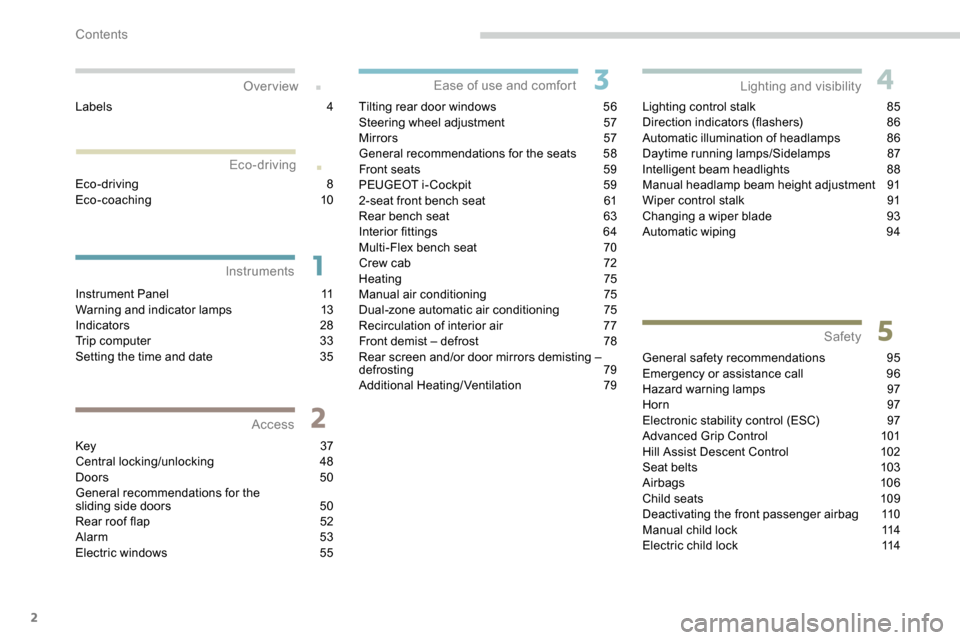
2
.
.
Instrument Panel 11
Warning and indicator lamps 1 3
Indicators
28
Trip computer
3
3
Setting the time and date
3
5
Key
37
Central locking/unlocking
4
8
Doors
5
0
General recommendations for the
sliding side doors
5
0
Rear roof flap
5
2
Alarm
5
3
Electric windows
5
5Tilting rear door windows
5
6
Steering wheel adjustment
5
7
Mirrors
5
7
General recommendations for the seats
5
8
Front seats
5
9
PEUGEOT i- Cockpit
5
9
2-seat front bench seat
6
1
Rear bench seat
6
3
Interior fittings
6
4
Multi-Flex bench seat
7
0
Crew cab
7
2
Heating 75
Manual air conditioning 7 5
Dual-zone automatic air conditioning 7
5
Recirculation of interior air
7
7
Front demist – defrost
7
8
Rear screen and/or door mirrors demisting –
defrosting
79
Additional Heating/Ventilation
7
9Lighting control stalk
8
5
Direction indicators (flashers)
8
6
Automatic illumination of headlamps
8
6
Daytime running lamps/Sidelamps
8
7
Intelligent beam headlights
8
8
Manual headlamp beam height adjustment
9
1
Wiper control stalk
9
1
Changing a wiper blade
9
3
Automatic wiping
9
4
General safety recommendations
9
5
Emergency or assistance call
9
6
Hazard warning lamps
9
7
Horn
97
Electronic stability control (ESC)
9
7
Advanced Grip Control
1
01
Hill Assist Descent Control
1
02
Seat belts
1
03
Airbags
106
Child seats
1
09
Deactivating the front passenger airbag
1
10
Manual child lock
1
14
Electric child lock
1
14
Over view
Instruments Access Ease of use and comfort
Safety
Lighting and visibility
Eco-driving
Eco-driving 8
Eco-coaching 10
Labels
4
Contents
Page 7 of 312
5
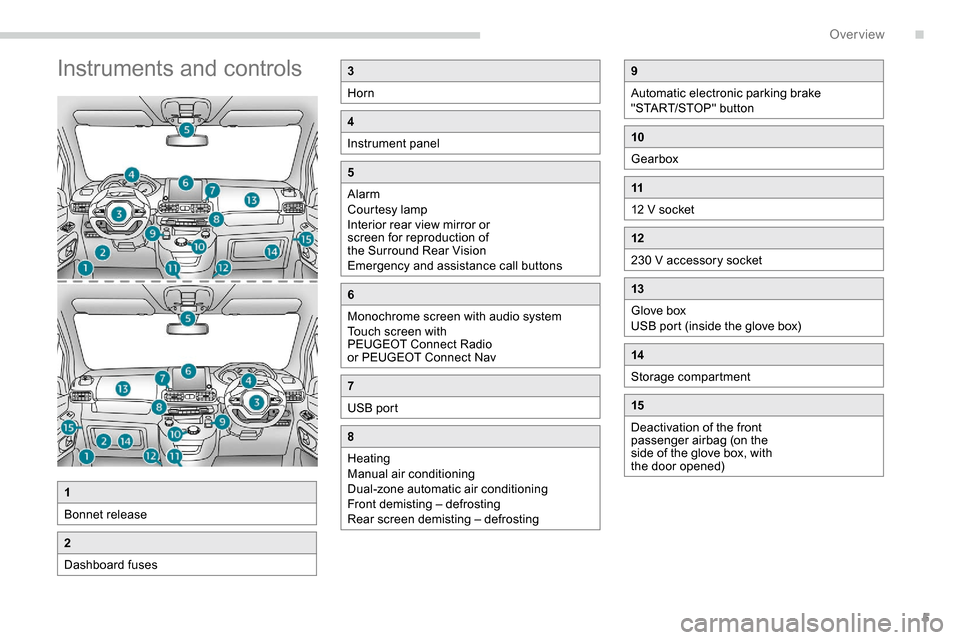
Instruments and controls3
Horn
4
Instrument panel
5
Alarm
Courtesy lamp
Interior rear view mirror or
screen for reproduction of
the Surround Rear Vision
Emergency and assistance call buttons
6
Monochrome screen with audio system
Touch screen with
PEUGEOT Connect Radio
or PEUGEOT Connect Nav
7
USB port
8
Heating
Manual air conditioning
Dual-zone automatic air conditioning
Front demisting – defrosting
Rear screen demisting – defrosting
1
Bonnet release
2
Dashboard fuses
9
Automatic electronic parking brake
"START/STOP" button
10
Gearbox
11
12 V socket
12
230 V accessory socket
13
Glove box
USB port (inside the glove box)
14
Storage compartment
15
Deactivation of the front
passenger airbag (on the
side of the glove box, with
the door opened)
.
Over view
Page 8 of 312
6
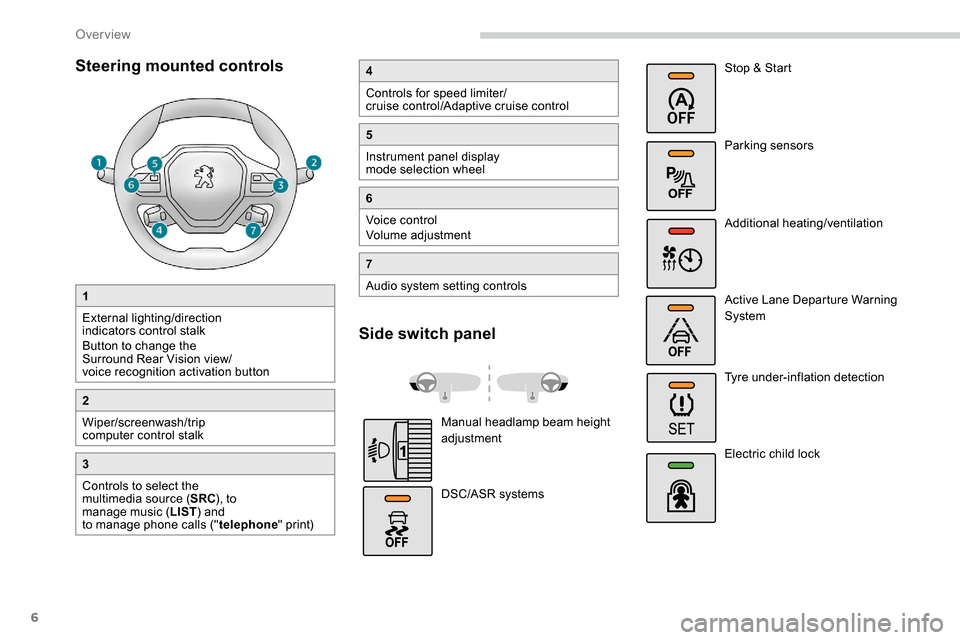
Steering mounted controls
1
External lighting/direction
indicators control stalk
Button to change the
Surround Rear Vision view/
voice recognition activation button
2
Wiper/screenwash/trip
computer control stalk
3
Controls to select the
multimedia source (SRC), to
manage music ( LIST) and
to manage phone calls (" telephone" print)
4
Controls for speed limiter/
cruise control/Adaptive cruise control
5
Instrument panel display
mode selection wheel
6
Voice control
Volume adjustment
7
Audio system setting controls
Side switch panel
Manual headlamp beam height
adjustment
DSC/ASR systems Stop & Start
Parking sensors
Additional heating/ventilation
Active Lane Departure Warning
System
Tyre under-inflation detection
Electric child lock
Over view
Page 9 of 312
7
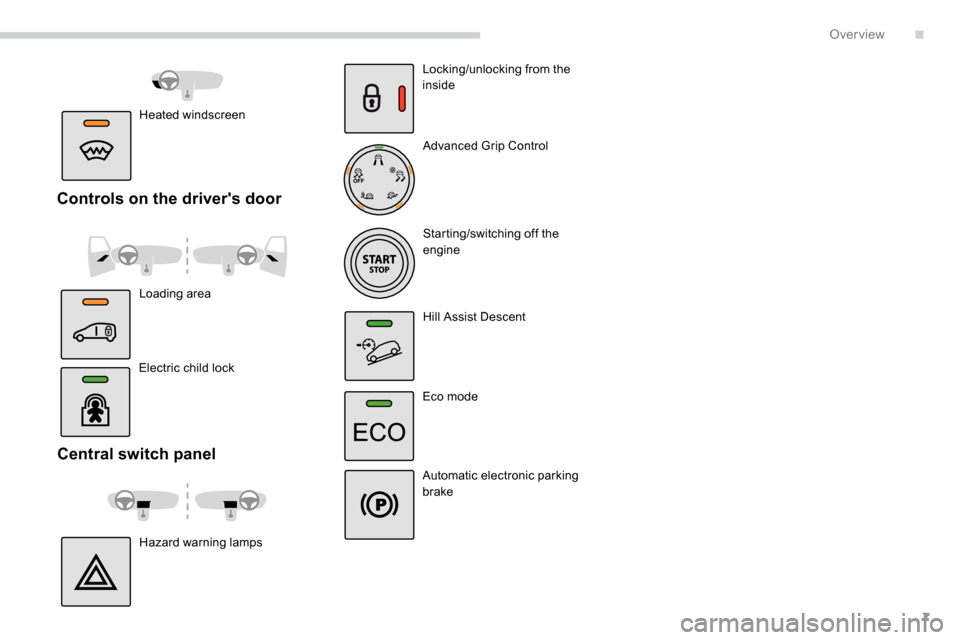
Central switch panel
Hazard warning lampsLocking/unlocking from the
inside
Advanced Grip Control
Starting/switching off the
engine
Hill Assist Descent
Eco mode
Automatic electronic parking
brake
Electric child lock
Controls on the driver's door
Loading area Heated windscreen
.
Over view
Page 10 of 312
8
As a passenger, if you avoid connecting your
multimedia devices (film, music, video game
etc.), you will contribute towards limiting the
consumption of electrical energy, and so of
fuel.
Disconnect your portable devices before
leaving the vehicle.
Eco- driving
Eco-driving is a range of everyday practices that allow the motorist to optimise their fuel consumption and CO2 emissions.
Optimise the use of your
gearbox
With a manual gearbox, move off gently and
change up without waiting. While accelerating,
change up early.
With an automatic gearbox, give preference
to automatic mode and avoid pressing the
accelerator pedal heavily or suddenly.
The gear shift indicator invites you to engage
the most suitable gear: as soon as the
indication is displayed in the instrument panel,
follow it straight away.
For vehicles fitted with an automatic gearbox,
this indicator appears only in manual mode.
Drive smoothly
Maintain a safe distance between vehicles,
use engine braking rather than the
brake pedal, and press the accelerator
progressively. These practices contribute
towards a reduction in fuel consumption and
CO
2 emissions and also help reduce the
background traffic noise.
If your vehicle has cruise control, make use of
the system at speeds above 18
mph (40 km/h)
when the traffic is flowing well.
Control the use of your electrical
equipment
Before moving off, if the passenger
compartment is too warm, ventilate it by opening
the windows and air vents before using the air
conditioning.
Above 31
mph (50 km/h), close the windows and
leave the air vents open.
Consider using equipment that can help keep
the temperature in the passenger compartment
down (sunroof blind and window blinds...).
Switch off the headlamps and front foglamps
when the ambient light level does not require
their use.
Avoid running the engine before moving off,
particularly in winter; your vehicle will warm up
much faster while driving.
Unless it has automatic regulation, switch off
the air conditioning as soon as the desired
temperature has been reached.
Switch off the demisting and defrosting controls,
if these are not automatically managed.
Switch off the heated seat as soon as possible.
Eco-driving
Page 22 of 312
20
Warning/indicator lampStateCause Actions/Observations
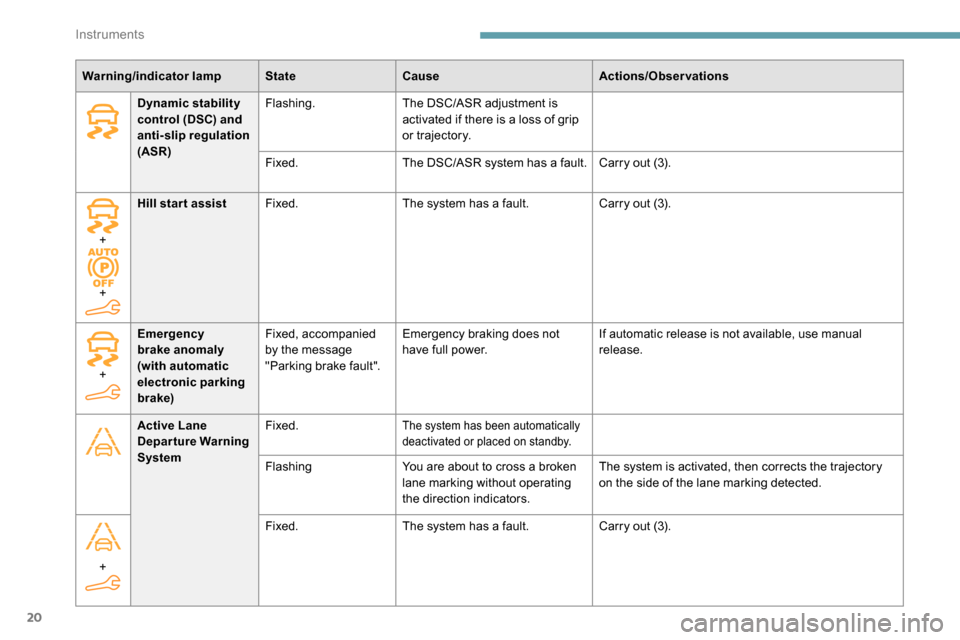
Dynamic stability
control (DSC) and
anti-slip regulation
(ASR) Flashing.
The DSC/ASR adjustment is
activated if there is a loss of grip
or trajectory.
Fixed. The DSC/ASR system has a fault. Carry out (3).
+
+ Hill start assist
Fixed. The system has a fault. Carry out (3).
Active Lane
Departure Warning
System Fixed.
The system has been automatically
deactivated or placed on standby.
Flashing
You are about to cross a broken
lane marking without operating
the direction indicators. The system is activated, then corrects the trajectory
on the side of the lane marking detected.
+
Emergency
brake anomaly
(with automatic
electronic parking
brake) Fixed, accompanied
by the message
"Parking brake fault".
Emergency braking does not
have full power.
If automatic release is not available, use manual
release.
+ Fixed.
The system has a fault. Carry out (3).
Instruments
Page 28 of 312
26
Warning/indicator lampStateCause Actions/Observations
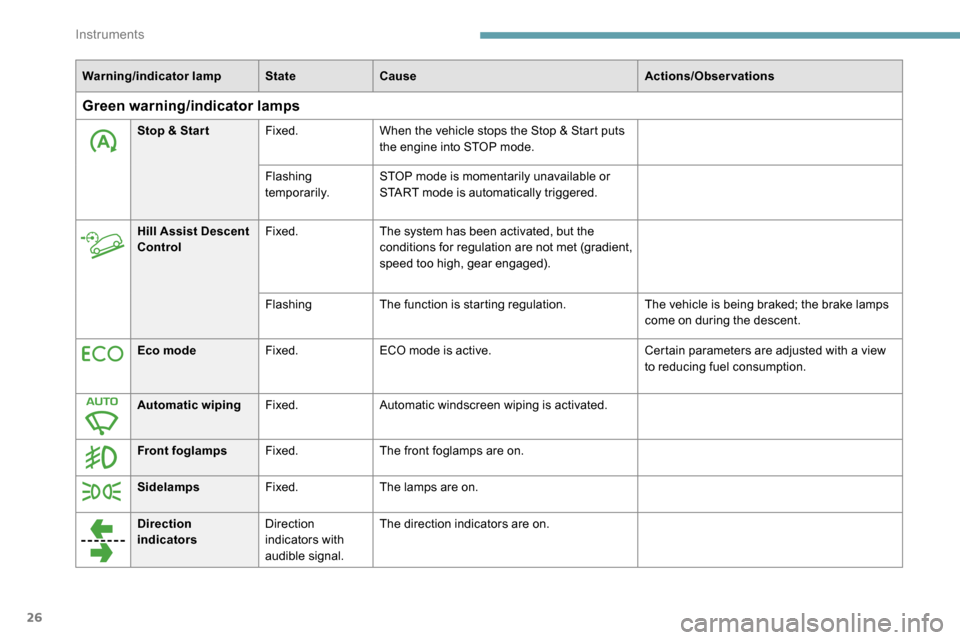
Green warning/indicator lamps
Stop & Star tFixed.When the vehicle stops the Stop & Start puts
the engine into STOP mode.
Flashing
temporarily. STOP mode is momentarily unavailable or
START mode is automatically triggered.
Hill Assist Descent
Control Fixed.
The system has been activated, but the
conditions for regulation are not met (gradient,
speed too high, gear engaged).
Flashing The function is starting regulation. The vehicle is being braked; the brake lamps
come on during the descent.
Eco mode Fixed.ECO mode is active. Certain parameters are adjusted with a view
to reducing fuel consumption.
Automatic wiping Fixed.Automatic windscreen wiping is activated.
Front foglamps Fixed.The front foglamps are on.
Sidelamps Fixed.The lamps are on.
Direction
indicators Direction
indicators with
audible signal.The direction indicators are on.
Instruments
Page 45 of 312
43
If a door is not properly closed (except
the right-hand door with side-hinged
rear doors):
-
v
ehicle stationary and engine
running, this warning lamp comes
on, accompanied by an alert
message for a few seconds,
-
v
ehicle moving (speed above
6
mph (10 km/h)), this warning
lamp comes on, accompanied
by an audible signal and an alert
message for a few seconds.
Deadlocking
With the key
F To deadlock the vehicle, insert the key in the lock then turn it towards the rear.
F
Then within five seconds , turn the key
towards the rear again.
Deadlocking renders the exterior and
interior door controls inoperative.
It also deactivates the manual central
control button.
Therefore, never leave anyone inside the
vehicle when it is deadlocked.
With the remote control
F To deadlock the vehicle, press this button.
F
Then within five seconds after
locking , press this button again.
Depending on the version you have, the
electric door mirrors fold at the same time.
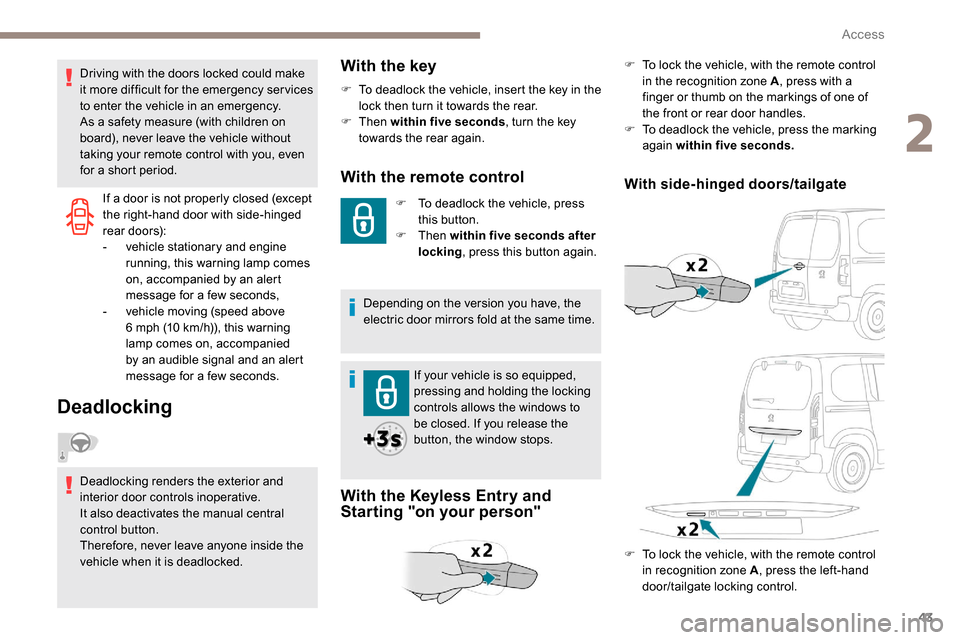
With the Keyless Entry and
Starting "on your person"
With side-hinged doors/tailgate
F To lock the vehicle, with the remote control in the recognition zone A , press with a
finger or thumb on the markings of one of
the front or rear door handles.
F
T
o deadlock the vehicle, press the marking
again within five seconds.
If your vehicle is so equipped,
pressing and holding the locking
controls allows the windows to
be closed. If you release the
button, the window stops.
Driving with the doors locked could make
it more difficult for the emergency ser vices
to enter the vehicle in an emergency.
As a safety measure (with children on
board), never leave the vehicle without
taking your remote control with you, even
for a short period.
F
T
o lock the vehicle, with the remote control
in recognition zone A , press the left-hand
door/tailgate locking control.
2
Access
Page 46 of 312
44
Locating your vehicle
This function allows you to identify your vehicle
from a distance, particularly in poor light. Your
vehicle must have been locked for more than
five seconds.
Remote operation of lighting
A short press of the button allows
you to switch on the lighting from a
distance (lighting the sidelamps, the
dipped beam headlamps and number
plate lamps).
A second press on this button before
the end of the timed period cancels
the remote lighting. F
P
ress this button.
This will switch on the courtesy lamps and the
direction indicators will flash for around ten
seconds.
Anti-theft protection
Electronic immobiliser
The remote control contains an electronic chip
which has a special code. When the ignition is
switched on, this code must be recognised in
order for starting to be possible. F
T
o deadlock the vehicle, press the control
again within five seconds .
In the event of a fault, you are
informed by illumination of this
warning lamp, an audible signal and
a message in the screen.
The vehicle will not start; contact a PEUGEOT
dealer as soon as possible. A few seconds after switching off the ignition,
this system locks the engine control system,
therefore preventing the engine from being
started in the event of a break-in.
Back-up control(s)
If the battery is flat, attempt to lock /unlock the
vehicle as usual. If this does not work, use the
mechanical systems described below.
Also use these systems to mechanically lock /
unlock the doors in the event of:
-
c
entral locking system failure,
-
r
emote control battery discharged,
-
r
emote control fault,
-
v
ehicle in an area subject to strong
electromagnetic interference.
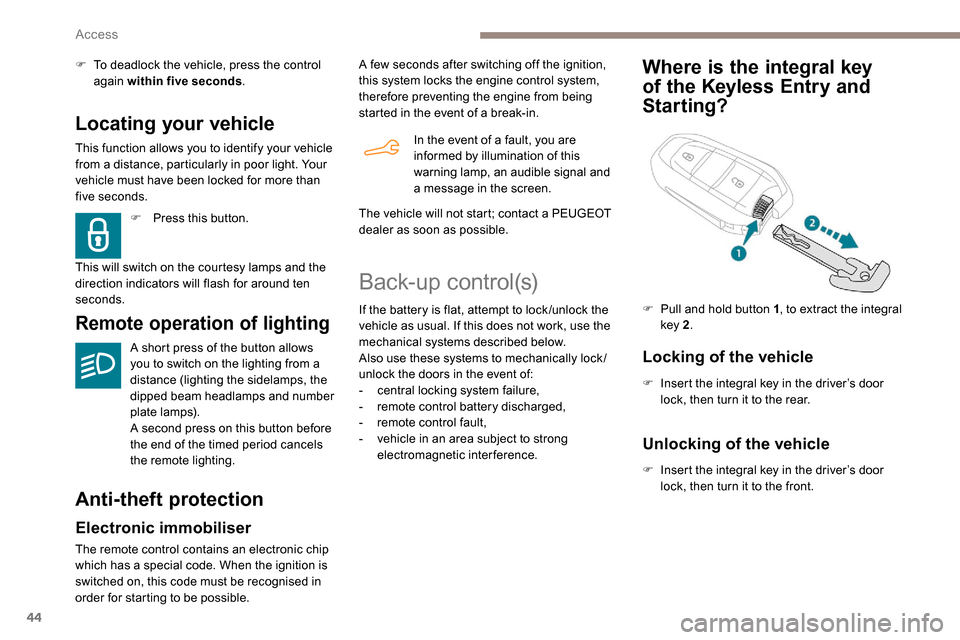
Where is the integral key
of the
K
eyless Entry and
Starting?
Locking of the vehicle
F Insert the integral key in the driver’s door
lock, then turn it to the rear.
F
P
ull and hold button 1
, to extract the integral
key 2 .
Unlocking of the vehicle
F Insert the integral key in the driver’s door
lock, then turn it to the front.
Access
Page 47 of 312
45
If your vehicle has an alarm, it will not be
deactivated/activated on unlocking/locking
the vehicle.
Opening a door will trigger the alarm,
which can be stopped by switching the
ignition on.
To deadlock the vehicle, turn the key again
within five seconds of locking.
Locking of one part of the vehicle
(front passenger door/sliding
side door/side-hinged doors)
Changing the battery
If the battery is flat, you will be
informed by lighting of this warning
lamp in the instrument panel, an
audible signal and a message in the
screen.
F
W
ith a sliding side door
or side-hinged
doors , if fitted to your vehicle, check that
the electric child lock is not activated.
F
O
pen the door.
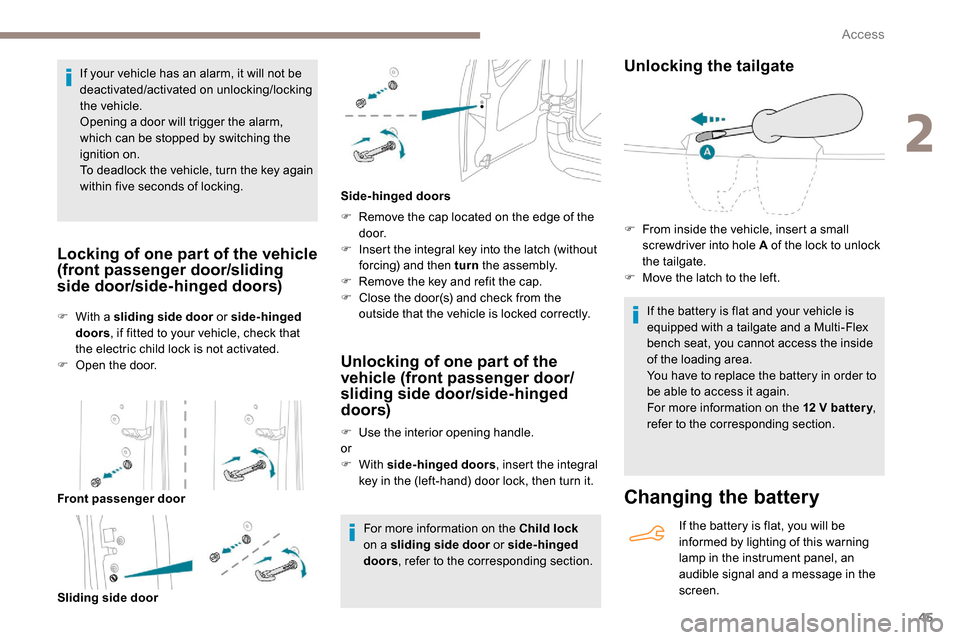
Front passenger door Sliding side door F
R
emove the cap located on the edge of the
d o o r.
F
I
nsert the integral key into the latch (without
forcing) and then turn the assembly.
F
R
emove the key and refit the cap.
F
C
lose the door(s) and check from the
outside that the vehicle is locked correctly.
Side-hinged doors
Unlocking of one part of the
vehicle (front passenger door/
sliding side door/side-hinged
doors)
F Use the interior opening handle.
or
F
With side-hinged doors , insert the integral
key in the (left-hand) door lock, then turn it.
For more information on the Child lock
on a sliding side door or side-hinged
doors , refer to the corresponding section.
Unlocking the tailgate
If the battery is flat and your vehicle is
equipped with a tailgate and a Multi-Flex
bench seat, you cannot access the inside
of the loading area.
You have to replace the battery in order to
be able to access it again.
For more information on the 12
V batter y,
refer to the corresponding section.
F
F
rom inside the vehicle, insert a small
screwdriver into hole A of the lock to unlock
the tailgate.
F
M
ove the latch to the left.
2
Access